HarmonyOS 6(API 23)实战:基于HMAF的「智行中枢」——PC端AI智能体智慧城市交通大脑与车路协同决策平台
文章目录

每日一句正能量
“所谓顺其自然,应该是全力以赴后的接受,而非两手一摊的不作为。”
很多人把“顺其自然”当作逃避努力的借口。但真正的顺其自然,是你已经拼尽全力、尝试过所有可能之后,坦然接纳任何结果。两手一摊是不战而降,全力以赴后的接受才是真正的豁达。
一、前言:当鸿蒙PC赋能城市交通治理
截至2026年,中国城镇化率已突破68%,城市交通拥堵造成的经济损失年均超过1.5万亿元。传统交通信号控制系统依赖固定配时方案,无法应对动态变化的交通流;各路口信号灯"各自为政",缺乏协同优化;突发事件(事故、恶劣天气)响应滞后,往往导致拥堵级联扩散。
HarmonyOS 6(API 23)的分布式能力与AI智能体框架,为城市交通治理提供了全新的技术范式。其分布式软总线让路侧单元(RSU)、摄像头、信号灯、车载终端实现毫秒级互联;悬浮导航让交通调度员在宏观路网与微观路口间自由切换;沉浸光感则通过环境光自适应,让指挥中心的长时间监控不再疲劳。
本文将带你从零构建一个名为**「智行中枢」**的PC端智慧城市交通大脑平台,核心亮点包括:
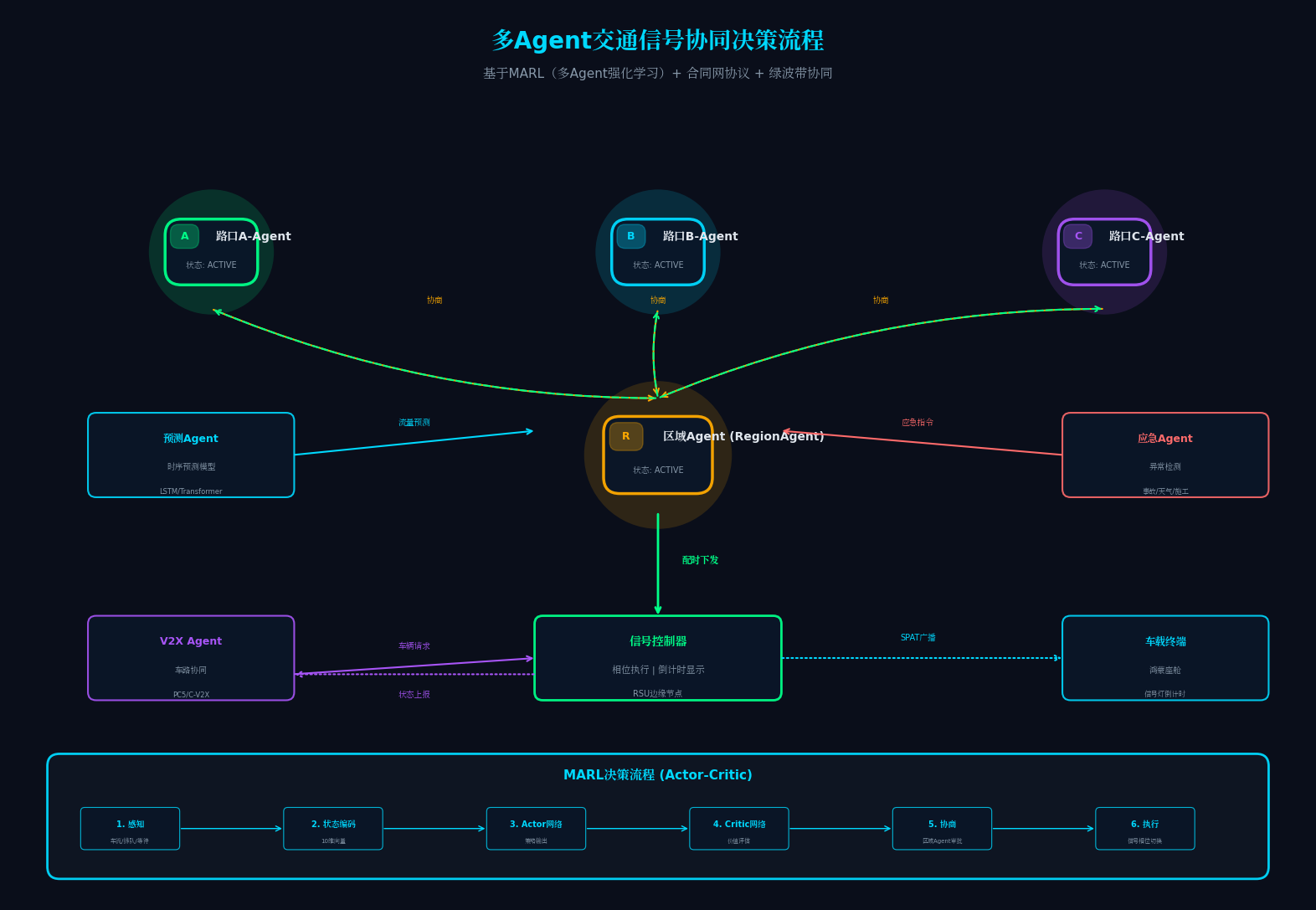
- 多Agent智能体协同架构:路口Agent、区域Agent、预测Agent、应急Agent四大智能体通过HMAF实现分布式协同决策
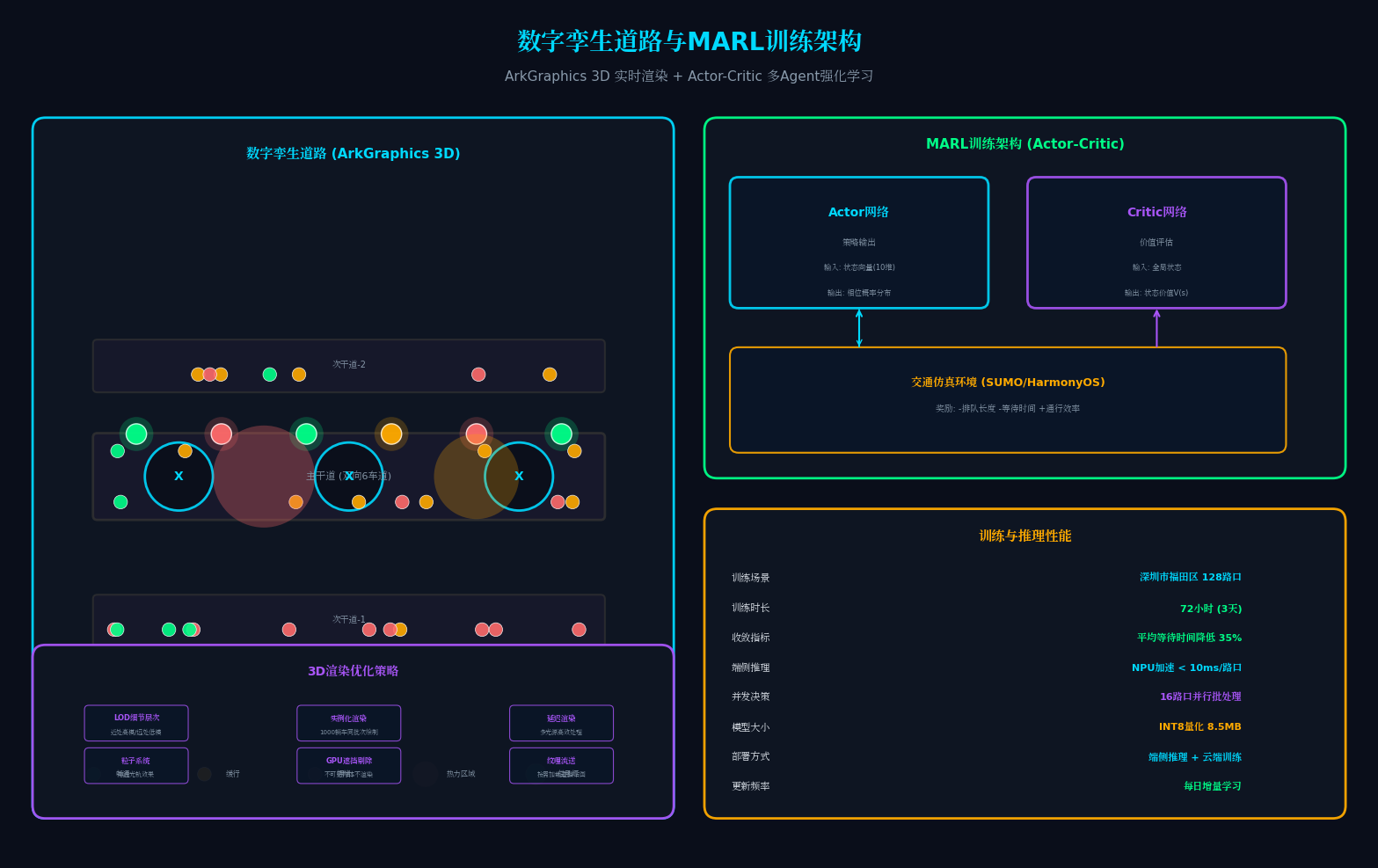
- 数字孪生道路:基于ArkGraphics 3D的实时道路仿真,支持车流热力图与信号配时可视化
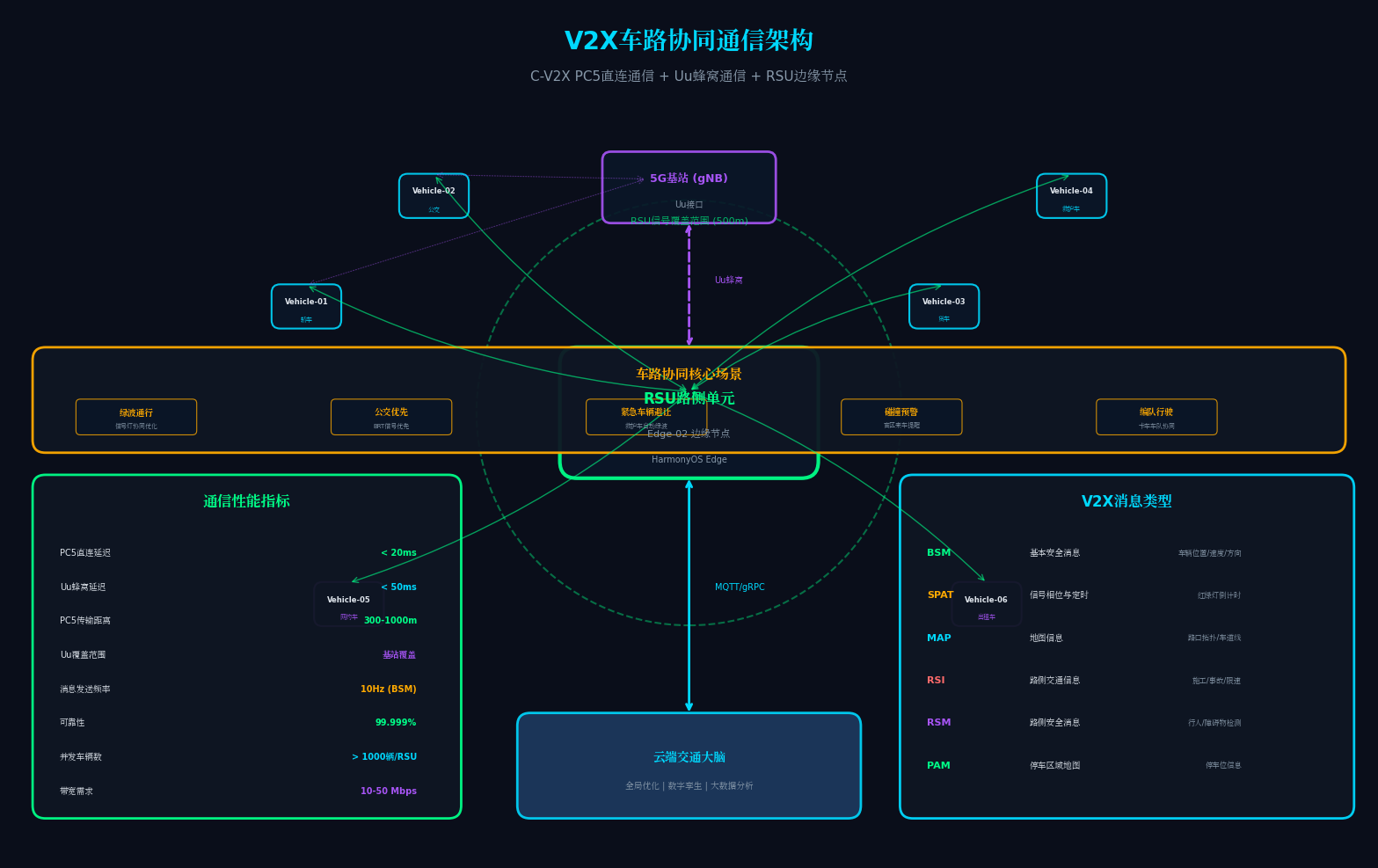
- V2X车路协同:通过C-V2X协议实现"聪明的车"与"智慧的路"实时信息交互
- 悬浮导航+沉浸光感:利用HarmonyOS 6全新API实现指挥中心沉浸式交互体验
二、系统架构设计:云-边-端-Agent四层协同
2.1 整体架构图
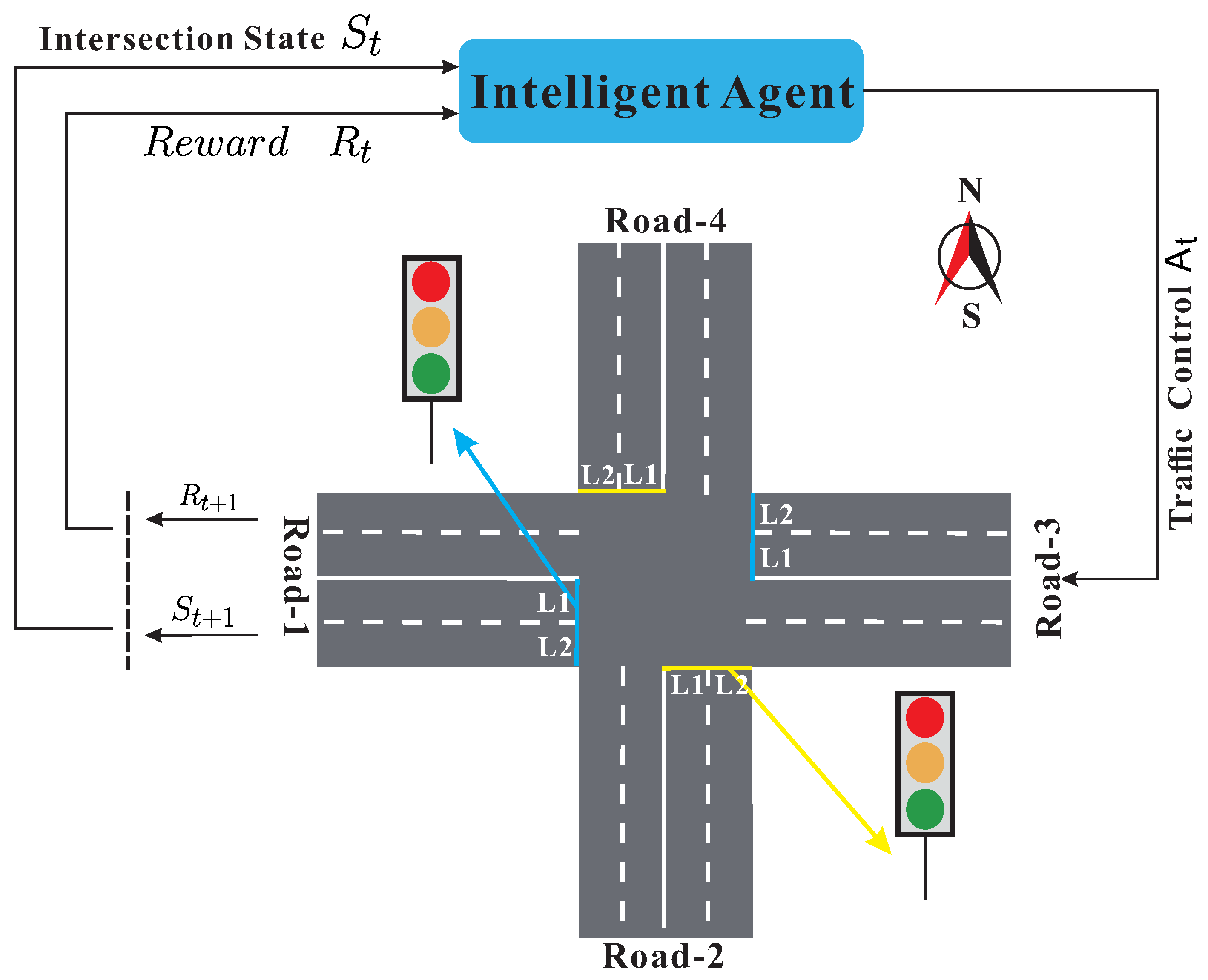
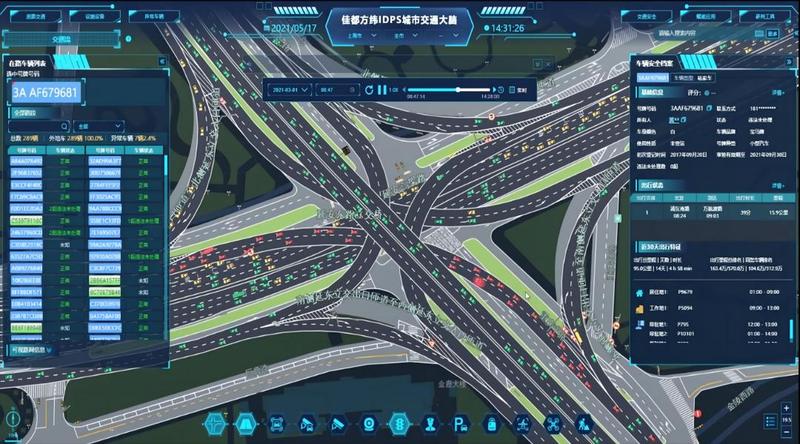
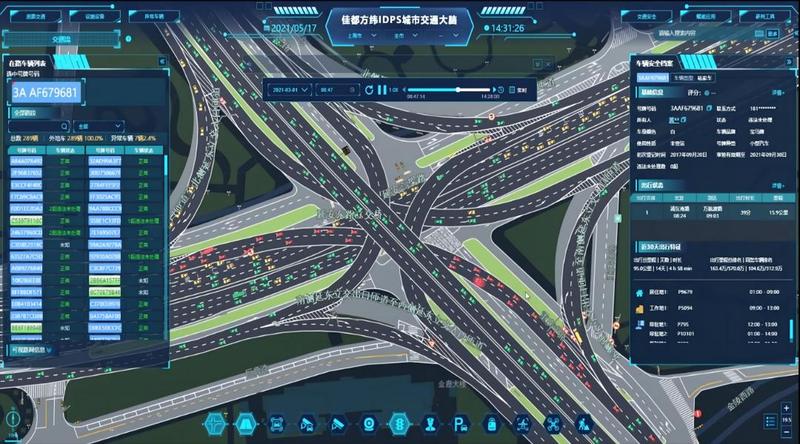
上图左侧展示了基于多智能体的交通信号控制架构,右侧则是IDPS城市交通大脑的实际界面。我们的「智行中枢」平台在此基础上进行了鸿蒙化改造:
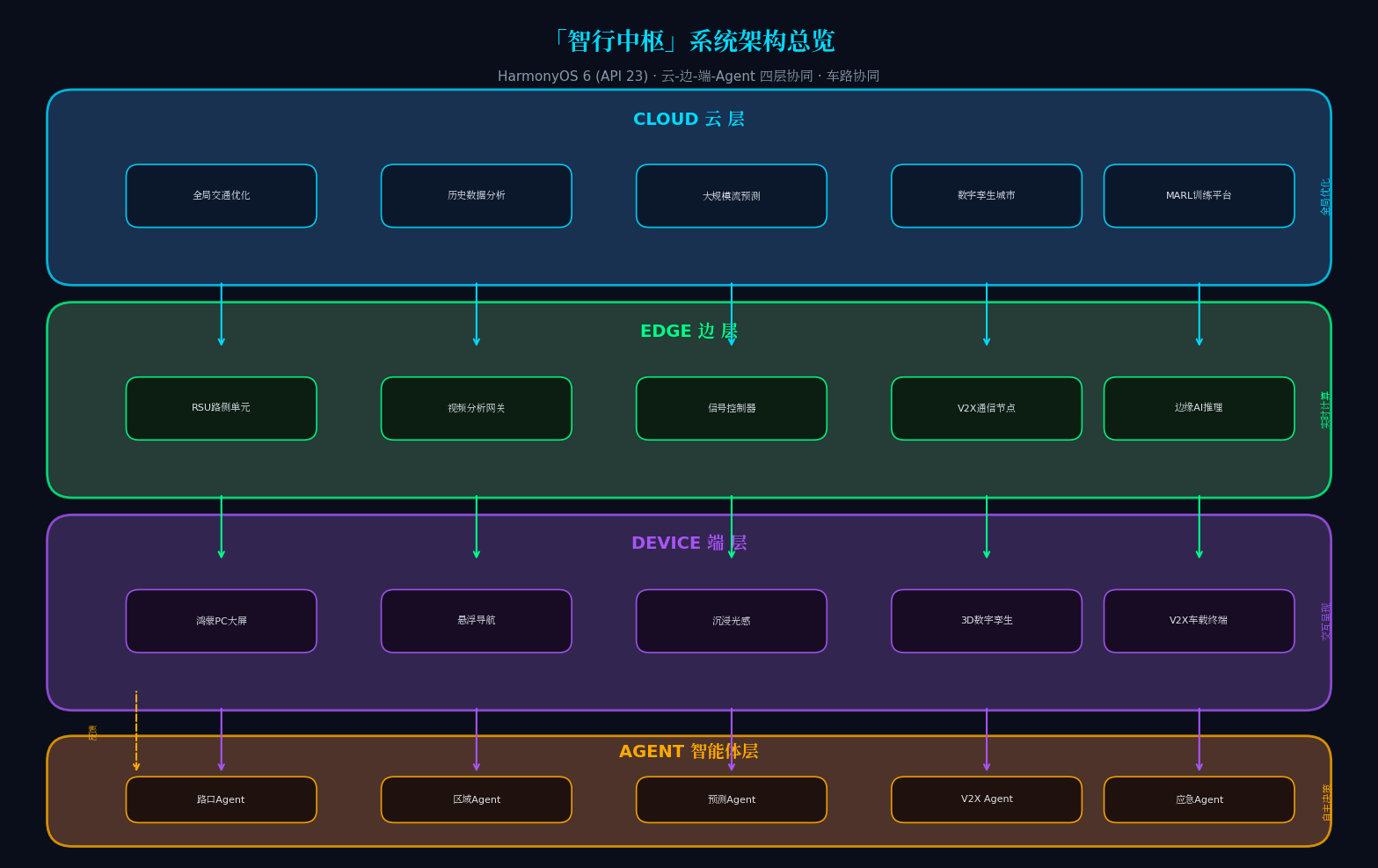
四层架构说明:
| 层级 | 核心组件 | 职责 |
|---|---|---|
| 云 | 全局交通优化引擎、历史数据分析、大规模交通流预测 | 城市级路网优化、宏观策略制定 |
| 边 | 边缘计算节点(RSU)、视频分析网关、信号控制器 | 实时车流检测、信号灯控制、V2X通信 |
| 端 | 鸿蒙PC(API 23)、悬浮导航大屏、沉浸光感界面 | 交通指挥、可视化监控、策略下发 |
| Agent | 路口Agent、区域Agent、预测Agent、应急Agent | 分布式感知、协同决策、自主执行 |
 |
2.2 多Agent智能体设计
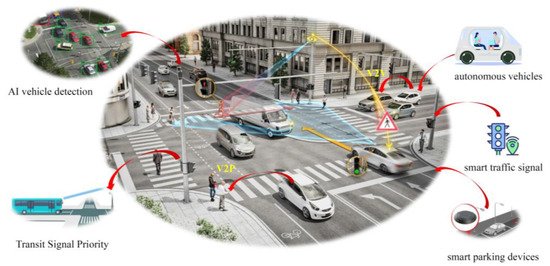
上图展示了车路协同的协同感知场景与V2X通信架构。我们的四大智能体设计如下:
- 路口Agent(IntersectionAgent):控制单个路口的信号灯配时,感知车流量、排队长度、行人需求
- 区域Agent(RegionAgent):协调多个路口Agent,实现区域绿波带优化,避免拥堵迁移
- 预测Agent(ForecastAgent):基于时序模型预测未来15-60分钟交通流量,提前调整配时方案
- 应急Agent(EmergencyAgent):检测事故、施工、恶劣天气等异常,自动触发应急预案
三、核心代码实战:从悬浮导航到多Agent协同
3.1 悬浮导航(Float Navigation)组件实现
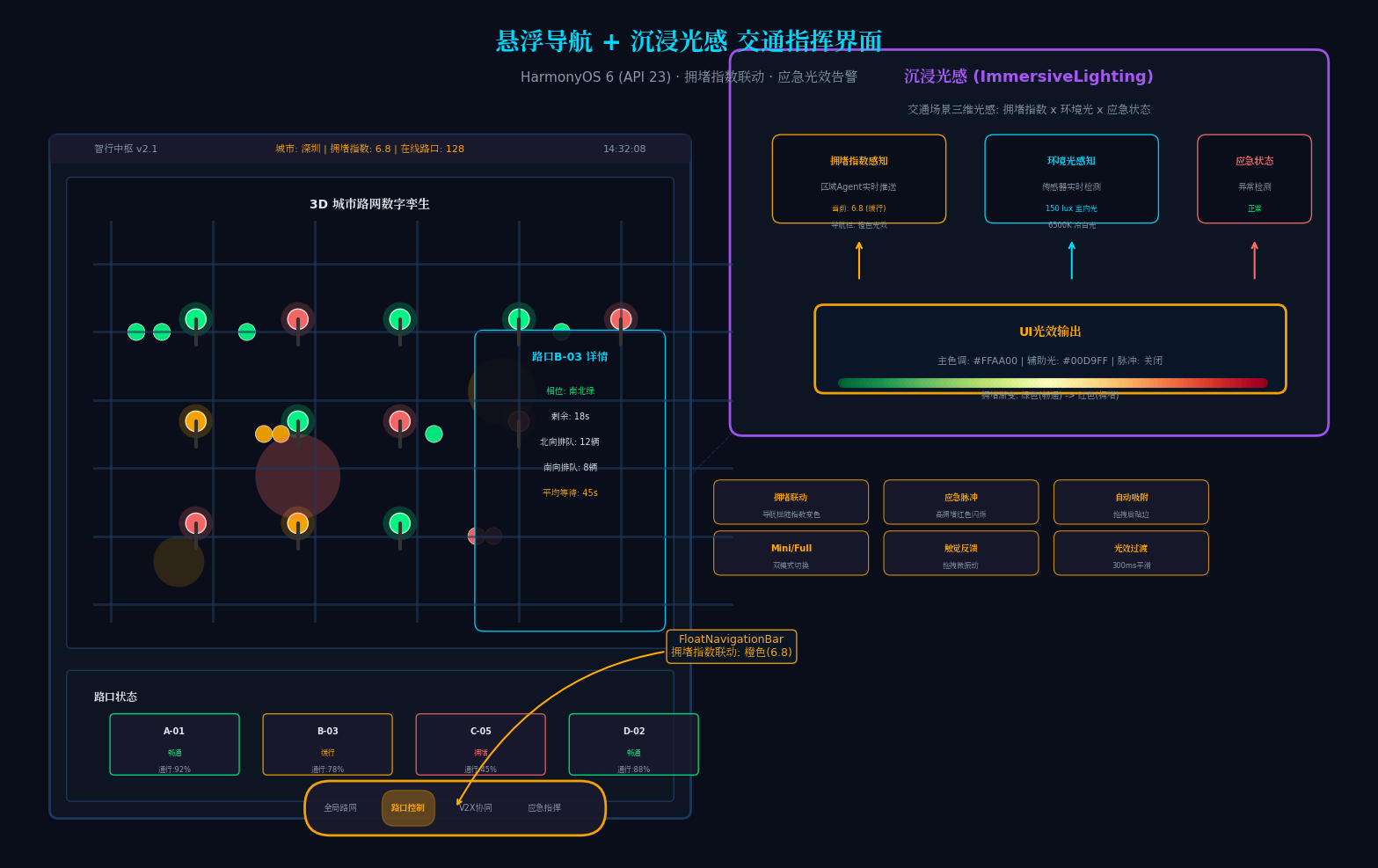
HarmonyOS 6(API 23)引入了全新的FloatNavigationBar组件,支持悬浮跟随、Mini栏展开、动态光效。这是「智行中枢」指挥界面的核心交互组件。
// TrafficFloatNav.ets - 交通指挥悬浮导航栏
// 亮点:支持手势拖拽、自动吸附、Mini模式与Full模式无缝切换
// 特色:根据交通拥堵指数动态改变导航栏颜色

import { FloatNavigationBar, NavigationItem, FloatMode } from '@ohos.arkui.navigation';
import { ImmersiveLighting } from '@ohos.arkui.immersive';
import { sensor } from '@kit.SensorServiceKit';

@Component
export struct TrafficFloatNav {
  @State currentIndex: number = 0;
  @State floatMode: FloatMode = FloatMode.MINI;
  @State isDragging: boolean = false;
  @State navPosition: Position = { x: 120, y: 680 };
  @State ambientLightColor: ResourceColor = '#0A0E1A';
  @State congestionIndex: number = 0; // 交通拥堵指数 0-10

  // 导航项配置:对应四大核心模块
  private navItems: NavigationItem[] = [
    {
      icon: $r('app.media.icon_city'),
      activeIcon: $r('app.media.icon_city_active'),
      label: '全局路网',
      badge: 0,
      module: 'CityMapModule'
    },
    {
      icon: $r('app.media.icon_intersection'),
      activeIcon: $r('app.media.icon_intersection_active'),
      label: '路口控制',
      badge: 3, // 异常路口数
      module: 'IntersectionModule'
    },
    {
      icon: $r('app.media.icon_v2x'),
      activeIcon: $r('app.media.icon_v2x_active'),
      label: 'V2X协同',
      badge: 0,
      module: 'V2XModule'
    },
    {
      icon: $r('app.media.icon_emergency'),
      activeIcon: $r('app.media.icon_emergency_active'),
      label: '应急指挥',
      badge: 1, // 活跃应急事件
      module: 'EmergencyModule'
    }
  ];

  // 环境光感知 + 交通拥堵指数联动
  aboutToAppear() {
    // 注册环境光传感器监听
    sensor.on(sensor.SensorType.SENSOR_TYPE_AMBIENT_LIGHT, (data: sensor.AmbientLightResponse) => {
      this.updateImmersiveLighting(data.intensity);
    });

    // 订阅区域Agent的拥堵指数
    HMAF.subscribeAgentEvent('RegionAgent', (event: AgentEvent) => {
      if (event.type === 'CONGESTION_UPDATE') {
        this.congestionIndex = event.congestionIndex;
        this.updateNavColorByCongestion();
      }
    });
  }

  // 根据交通拥堵指数动态调整导航栏颜色
  private updateNavColorByCongestion(): void {
    let glowColor: ResourceColor;
    if (this.congestionIndex < 3) {
      glowColor = '#00FF88'; // 畅通-绿色
    } else if (this.congestionIndex < 6) {
      glowColor = '#FFAA00'; // 缓行-橙色
    } else {
      glowColor = '#FF6B6B'; // 拥堵-红色
    }

    ImmersiveLighting.setPrimaryGlow({
      color: glowColor,
      intensity: 0.5 + this.congestionIndex * 0.05,
      spread: 100,
      blur: 30
    });

    // 高拥堵时触发脉冲告警
    if (this.congestionIndex > 7) {
      ImmersiveLighting.triggerPulse({
        color: '#FF6B6B',
        interval: 800,
        duration: 3000
      });
    }
  }

  // 根据环境光强度动态调整UI色调
  private updateImmersiveLighting(intensity: number): void {
    if (intensity < 50) {
      this.ambientLightColor = '#0A0E1A';
      ImmersiveLighting.setGlowIntensity(0.4);
    } else if (intensity < 200) {
      this.ambientLightColor = '#0F1623';
      ImmersiveLighting.setGlowIntensity(0.7);
    } else {
      this.ambientLightColor = '#1A1F2E';
      ImmersiveLighting.setGlowIntensity(0.9);
    }
  }

  build() {
    Stack({ alignContent: Alignment.BottomStart }) {
      // 主内容区域
      this.ContentBuilder()

      // 悬浮导航栏
      FloatNavigationBar({
        items: this.navItems,
        selectedIndex: this.currentIndex,
        mode: this.floatMode,
        position: this.navPosition,
        draggable: true,
        autoSnap: true,
        snapEdges: [SnapEdge.LEFT, SnapEdge.RIGHT, SnapEdge.BOTTOM],
        onDragStart: () => {
          this.isDragging = true;
          ImmersiveLighting.triggerHaptic(HapticType.LIGHT);
        },
        onDragEnd: (pos: Position) => {
          this.isDragging = false;
          this.navPosition = pos;
        },
        onItemSelected: (index: number, item: NavigationItem) => {
          this.currentIndex = index;
          // 切换模块时触发光效过渡
          ImmersiveLighting.animateTransition({
            duration: 300,
            curve: Curve.EaseInOut,
            glowColor: this.getModuleColor(item.module)
          });
          // 通知对应Agent激活
          this.notifyAgentActivation(item.module);
        }
      })
      .backgroundColor(this.ambientLightColor)
      .opacity(this.isDragging ? 0.85 : 1.0)
      .shadow({
        radius: this.isDragging ? 20 : 12,
        color: this.getCongestionShadowColor(),
        offsetX: 0,
        offsetY: 4
      })

      // Mini栏展开时的快捷操作面板
      if (this.floatMode === FloatMode.FULL) {
        QuickActionPanel({
          activeModule: this.navItems[this.currentIndex].module,
          congestionIndex: this.congestionIndex,
          onQuickAction: (action: QuickAction) => {
            this.handleQuickAction(action);
          }
        })
        .position({ x: this.navPosition.x + 80, y: this.navPosition.y - 200 })
        .animation({
          duration: 250,
          curve: Curve.Spring,
          iterations: 1
        })
      }
    }
    .width('100%')
    .height('100%')
    .backgroundColor(this.ambientLightColor)
  }

  // 根据拥堵指数获取阴影颜色
  private getCongestionShadowColor(): ResourceColor {
    if (this.congestionIndex < 3) return 'rgba(0, 255, 136, 0.3)';
    if (this.congestionIndex < 6) return 'rgba(255, 170, 0, 0.3)';
    return 'rgba(255, 107, 107, 0.3)';
  }

  // 根据模块获取对应光效颜色
  private getModuleColor(module: string): ResourceColor {
    const colorMap: Map<string, ResourceColor> = new Map([
      ['CityMapModule', '#00D9FF'],      // 全局路网-青色
      ['IntersectionModule', '#00FF88'],  // 路口控制-绿色
      ['V2XModule', '#A855F7'],         // V2X协同-紫色
      ['EmergencyModule', '#FF6B6B']     // 应急指挥-红色
    ]);
    return colorMap.get(module) || '#FFFFFF';
  }

  // 通知Agent激活
  private notifyAgentActivation(module: string): void {
    const agentMap: Map<string, string> = new Map([
      ['CityMapModule', 'RegionAgent'],
      ['IntersectionModule', 'IntersectionAgent'],
      ['V2XModule', 'V2XAgent'],
      ['EmergencyModule', 'EmergencyAgent']
    ]);
    const agentName = agentMap.get(module);
    if (agentName) {
      HMAF.publishAgentEvent(agentName, {
        type: 'AGENT_ACTIVATE',
        timestamp: Date.now(),
        source: 'FloatNavigation'
      });
    }
  }

  @Builder
  ContentBuilder() {
    if (this.currentIndex === 0) {
      CityMapDashboard()      // 全局路网大屏
    } else if (this.currentIndex === 1) {
      IntersectionControlPanel() // 路口控制面板
    } else if (this.currentIndex === 2) {
      V2XMonitorPanel()        // V2X协同监控
    } else {
      EmergencyCommandCenter() // 应急指挥中心
    }
  }
}
代码亮点解析:
- 拥堵指数联动:导航栏颜色随交通拥堵指数实时变化(绿->橙->红),调度员"用余光"即可感知全局路况
- 自动吸附与拖拽:
FloatNavigationBar支持自由拖拽,松手后自动吸附到最近边缘 - 环境光自适应:通过传感器实时感知环境亮度,动态调整UI色调
- Agent联动:导航切换通过HMAF发布事件通知对应Agent,实现"交互即调度"
3.2 沉浸光感(Immersive Lighting)交通场景配置
// TrafficLightingEngine.ets - 交通场景沉浸光感引擎
// 亮点:基于交通拥堵指数、环境光、应急状态的三维光感模型

import { ImmersiveLighting, LightMode, GlowEffect } from '@ohos.arkui.immersive';

export class TrafficLightingEngine {
  private static instance: TrafficLightingEngine;
  private currentMode: LightMode = LightMode.ADAPTIVE;
  private congestionLevel: number = 0;
  private emergencyLevel: number = 0; // 0-无 1-警告 2-紧急 3-严重

  static getInstance(): TrafficLightingEngine {
    if (!TrafficLightingEngine.instance) {
      TrafficLightingEngine.instance = new TrafficLightingEngine();
    }
    return TrafficLightingEngine.instance;
  }

  initialize(): void {
    ImmersiveLighting.setGlobalConfig({
      primaryGlow: {
        color: '#00D9FF',
        intensity: 0.6,
        spread: 120,
        blur: 40
      },
      secondaryGlow: {
        color: '#00FF88',
        intensity: 0.4,
        spread: 80,
        blur: 30
      },
      ambientReflection: {
        enabled: true,
        source: 'top',
        falloff: 0.7
      },
      dynamicShadow: {
        enabled: true,
        angle: 135,
        distance: 8,
        softness: 0.5
      }
    });

    this.registerTrafficStateListener();
  }

  private registerTrafficStateListener(): void {
    // 监听区域Agent的拥堵指数
    HMAF.subscribeAgentEvent('RegionAgent', (event: AgentEvent) => {
      if (event.type === 'CONGESTION_UPDATE') {
        this.congestionLevel = event.congestionIndex;
        this.applyCongestionLighting(this.congestionLevel);
      }
    });

    // 监听应急Agent的告警事件
    HMAF.subscribeAgentEvent('EmergencyAgent', (event: AgentEvent) => {
      if (event.type === 'EMERGENCY_ALERT') {
        this.emergencyLevel = event.severity || 1;
        this.applyEmergencyLighting(this.emergencyLevel);
      } else if (event.type === 'EMERGENCY_RESOLVED') {
        this.emergencyLevel = 0;
        this.applyNormalLighting();
      }
    });
  }

  // 拥堵光效:从绿到红渐变
  private applyCongestionLighting(level: number): void {
    const normalizedLevel = Math.min(level / 10, 1.0);
    const r = Math.floor(255 * normalizedLevel);
    const g = Math.floor(255 * (1 - normalizedLevel));
    const color = `#${r.toString(16).padStart(2,'0')}${g.toString(16).padStart(2,'0')}00`;

    ImmersiveLighting.animateGlow({
      targetColor: color,
      duration: 1000,
      curve: Curve.EaseInOut,
      pulse: normalizedLevel > 0.7
    });
  }

  // 应急光效:红色闪烁
  private applyEmergencyLighting(level: number): void {
    const emergencyColors = ['#FF6B6B', '#FF0000', '#8B0000'];
    const color = emergencyColors[level - 1] || emergencyColors[0];

    ImmersiveLighting.animateGlow({
      targetColor: color,
      duration: 500,
      curve: Curve.EaseInOut,
      pulse: true,
      pulseInterval: 600
    });

    ImmersiveLighting.setAmbientOverlay({
      color: color,
      opacity: 0.2,
      blendMode: BlendMode.MULTIPLY
    });
  }

  private applyNormalLighting(): void {
    ImmersiveLighting.animateGlow({
      targetColor: '#00D9FF',
      duration: 1000,
      curve: Curve.EaseOut,
      pulse: false
    });
    ImmersiveLighting.clearAmbientOverlay();
  }
}
3.3 HMAF多Agent协同框架:交通信号优化
// TrafficHMAF.ets - 交通多Agent协同框架
// 亮点:基于MARL(多Agent强化学习)的信号灯协同控制

import { distributedDeviceManager } from '@kit.DistributedServiceKit';
import { rlInference } from '@kit.AIKit';

// Agent基类
export abstract class TrafficAgent {
  protected agentId: string;
  protected agentType: string;
  protected state: AgentState = AgentState.IDLE;
  protected memory: AgentMemory;

  constructor(id: string, type: string) {
    this.agentId = id;
    this.agentType = type;
    this.memory = new AgentMemory(200);
  }

  async perceive(input: TrafficPerception): Promise<void> {
    this.memory.add({
      timestamp: Date.now(),
      type: 'perception',
      data: input
    });
    await this.reason(input);
  }

  abstract reason(input: TrafficPerception): Promise<void>;
  abstract decide(decision: TrafficDecision): Promise<void>;
  abstract execute(action: TrafficAction): Promise<ActionResult>;
}

// 路口Agent:控制单个路口信号灯
export class IntersectionAgent extends TrafficAgent {
  private intersectionId: string;
  private signalController: SignalController;
  private vehicleQueue: Map<string, number>; // 方向 -> 排队长度
  private currentPhase: number = 0; // 当前信号相位

  constructor(intersectionId: string) {
    super(`intersection-${intersectionId}`, 'IntersectionAgent');
    this.intersectionId = intersectionId;
    this.signalController = new SignalController(intersectionId);
    this.vehicleQueue = new Map();
  }

  async reason(input: TrafficPerception): Promise<void> {
    // 构建状态向量:各方向排队长度、平均等待时间、预测到达率
    const state = this.buildStateVector(input);

    // 使用端侧RL模型进行决策
    const model = await rlInference.loadModel('traffic_signal_marl_v2', {
      backend: 'NPU',
      quantization: 'INT8'
    });

    const action = await model.predict({
      state: state,
      intersectionId: this.intersectionId,
      neighborStates: await this.getNeighborStates()
    });

    await this.decide({
      action: 'SET_PHASE',
      phase: action.phase,
      duration: action.duration,
      confidence: action.confidence
    });
  }

  async decide(decision: TrafficDecision): Promise<void> {
    if (decision.action === 'SET_PHASE') {
      // 与区域Agent协商,确保不破坏绿波带
      const regionApproval = await this.negotiateWithRegionAgent(decision);
      if (regionApproval.accepted) {
        await this.execute({
          type: 'SIGNAL_CHANGE',
          phase: decision.phase,
          duration: decision.duration
        });
      } else {
        // 采用区域Agent建议的配时方案
        await this.execute({
          type: 'SIGNAL_CHANGE',
          phase: regionApproval.suggestedPhase,
          duration: regionApproval.suggestedDuration
        });
      }
    }
  }

  async execute(action: TrafficAction): Promise<ActionResult> {
    // 通过分布式软总线下发指令到信号控制器
    const device = distributedDeviceManager.getDeviceByName(`signal-${this.intersectionId}`);
    if (device) {
      const result = await device.sendCommand({
        type: 'SET_SIGNAL_PHASE',
        phase: action.phase,
        duration: action.duration,
        timestamp: Date.now()
      });

      // 更新当前相位
      this.currentPhase = action.phase;

      return { success: result.code === 0, data: result.data };
    }
    return { success: false, error: 'Signal controller not found' };
  }

  // 与区域Agent协商
  private async negotiateWithRegionAgent(decision: TrafficDecision): Promise<NegotiationResult> {
    const channel = await HMAF.getAgentChannel('RegionAgent');

    const proposal = {
      protocol: 'TRAFFIC_NEGOTIATION',
      sender: this.agentId,
      intersectionId: this.intersectionId,
      proposedPhase: decision.phase,
      proposedDuration: decision.duration,
      currentQueue: Array.from(this.vehicleQueue.entries()),
      deadline: Date.now() + 2000 // 2秒超时
    };

    return new Promise((resolve) => {
      channel.send(proposal);
      channel.onReply((reply: ACLMessage) => {
        resolve({
          accepted: reply.performative === 'ACCEPT',
          suggestedPhase: reply.content?.phase,
          suggestedDuration: reply.content?.duration
        });
      });
    });
  }

  private buildStateVector(input: TrafficPerception): number[] {
    // 状态向量:[北排队, 南排队, 东排队, 西排队, 北等待, 南等待, 东等待, 西等待, 当前相位, 时间]
    return [
      input.queueLengths.north || 0,
      input.queueLengths.south || 0,
      input.queueLengths.east || 0,
      input.queueLengths.west || 0,
      input.waitTimes.north || 0,
      input.waitTimes.south || 0,
      input.waitTimes.east || 0,
      input.waitTimes.west || 0,
      this.currentPhase,
      new Date().getHours() + new Date().getMinutes() / 60
    ];
  }

  private async getNeighborStates(): Promise<number[][]> {
    // 获取相邻路口的状态(用于MARL协同)
    const neighbors = await HMAF.queryNeighborAgents(this.agentId);
    return neighbors.map(n => n.stateVector);
  }
}

// 区域Agent:协调多个路口实现绿波带
export class RegionAgent extends TrafficAgent {
  private intersectionAgents: string[];
  private greenWaveConfig: Map<string, number>; // 路口ID -> 相位偏移

  constructor(regionId: string, intersections: string[]) {
    super(`region-${regionId}`, 'RegionAgent');
    this.intersectionAgents = intersections;
    this.greenWaveConfig = new Map();
  }

  async reason(input: TrafficPerception): Promise<void> {
    // 分析区域整体交通流
    const flowPattern = this.analyzeRegionalFlow(input);

    // 优化绿波带配置
    const optimizedConfig = this.optimizeGreenWave(flowPattern);

    // 下发给各路口Agent
    for (const [intersectionId, offset] of optimizedConfig) {
      await HMAF.publishAgentEvent(`intersection-${intersectionId}`, {
        type: 'GREEN_WAVE_UPDATE',
        phaseOffset: offset,
        timestamp: Date.now()
      });
    }
  }

  private optimizeGreenWave(flowPattern: FlowPattern): Map<string, number> {
    // 使用动态规划优化绿波带
    const offsets = new Map<string, number>();
    const baseCycle = 90; // 基础周期90秒

    // 根据主干道车流方向计算相位偏移
    let cumulativeOffset = 0;
    for (const intersectionId of this.intersectionAgents) {
      offsets.set(intersectionId, cumulativeOffset);
      // 假设平均车速40km/h,路口间距500m
      const travelTime = 500 / (40 / 3.6); // 约45秒
      cumulativeOffset += travelTime;
      cumulativeOffset %= baseCycle;
    }

    return offsets;
  }

  // 处理路口Agent的协商请求
  async handleNegotiation(request: NegotiationRequest): Promise<NegotiationResponse> {
    const intersectionId = request.intersectionId;
    const proposedPhase = request.proposedPhase;

    // 检查是否破坏绿波带
    const greenWaveOffset = this.greenWaveConfig.get(intersectionId) || 0;
    const currentTime = Date.now() % 90000; // 当前周期内时间
    const expectedPhase = this.calculateExpectedPhase(greenWaveOffset, currentTime);

    if (Math.abs(proposedPhase - expectedPhase) < 15) { // 偏差小于15秒可接受
      return { accepted: true };
    } else {
      return {
        accepted: false,
        suggestedPhase: expectedPhase,
        suggestedDuration: 90
      };
    }
  }
}

// V2X Agent:车路协同通信
export class V2XAgent extends TrafficAgent {
  private rsuDevices: Map<string, RSUDevice>;
  private connectedVehicles: Map<string, VehicleStatus>;

  constructor() {
    super('v2x-001', 'V2XAgent');
    this.rsuDevices = new Map();
    this.connectedVehicles = new Map();
  }

  async perceive(input: V2XMessage): Promise<void> {
    switch (input.messageType) {
      case 'BSM': // 基本安全消息
        this.updateVehicleStatus(input.vehicleId, input);
        break;
      case 'SPAT': // 信号相位与定时
        this.broadcastSignalStatus(input.intersectionId, input);
        break;
      case 'MAP': // 地图信息
        this.updateRoadTopology(input);
        break;
    }
  }

  // 向车辆推送信号灯倒计时
  async broadcastSignalStatus(intersectionId: string, spat: SPATMessage): Promise<void> {
    const vehicles = this.getVehiclesNearIntersection(intersectionId);
    for (const vehicle of vehicles) {
      await this.sendV2XMessage(vehicle.vehicleId, {
        type: 'SIGNAL_TIMING',
        intersectionId: intersectionId,
        currentPhase: spat.currentPhase,
        timeRemaining: spat.timeRemaining,
        nextPhase: spat.nextPhase,
        nextTime: spat.nextTime
      });
    }
  }

  // 接收车辆请求,优化信号配时
  async handleVehiclePriorityRequest(request: PriorityRequest): Promise<void> {
    const { vehicleId, intersectionId, priorityType, eta } = request;

    // 与路口Agent协商
    const intersectionAgent = `intersection-${intersectionId}`;
    await HMAF.publishAgentEvent(intersectionAgent, {
      type: 'PRIORITY_REQUEST',
      vehicleId: vehicleId,
      priorityType: priorityType, // 'EMERGENCY', 'TRANSIT', 'FREIGHT'
      eta: eta,
      requestedPhase: this.calculatePriorityPhase(request)
    });
  }

  private async sendV2XMessage(vehicleId: string, message: V2XPayload): Promise<void> {
    // 通过RSU设备发送PC5接口消息
    const rsu = this.findNearestRSU(vehicleId);
    if (rsu) {
      await rsu.sendPC5Message(vehicleId, message);
    }
  }
}

// 应急Agent:突发事件处理
export class EmergencyAgent extends TrafficAgent {
  private activeEmergencies: Map<string, EmergencyEvent>;
  private emergencyRoutes: Map<string, number[][]>; // 应急路线

  constructor() {
    super('emergency-001', 'EmergencyAgent');
    this.activeEmergencies = new Map();
    this.emergencyRoutes = new Map();
  }

  async perceive(input: EmergencyDetection): Promise<void> {
    if (input.type === 'ACCIDENT' || input.type === 'CONSTRUCTION' || input.type === 'WEATHER') {
      const eventId = `emergency-${Date.now()}`;
      this.activeEmergencies.set(eventId, {
        id: eventId,
        type: input.type,
        location: input.location,
        severity: input.severity,
        timestamp: Date.now()
      });

      // 触发应急光效
      ImmersiveLighting.triggerEmergencyGlow(input.severity);

      // 启动应急处理流程
      await this.handleEmergency(eventId);
    }
  }

  private async handleEmergency(eventId: string): Promise<void> {
    const event = this.activeEmergencies.get(eventId);
    if (!event) return;

    // 1. 计算受影响区域
    const affectedRegion = this.calculateAffectedRegion(event.location, event.severity);

    // 2. 生成绕行路线
    const detourRoutes = this.generateDetourRoutes(event.location, affectedRegion);

    // 3. 通知区域Agent调整信号配时
    for (const intersectionId of affectedRegion.intersections) {
      await HMAF.publishAgentEvent(`region-${intersectionId}`, {
        type: 'EMERGENCY_MODE',
        eventId: eventId,
        severity: event.severity,
        detourRoutes: detourRoutes
      });
    }

    // 4. 通过V2X向车辆广播
    await HMAF.publishAgentEvent('V2XAgent', {
      type: 'TRAFFIC_ALERT',
      eventId: eventId,
      location: event.location,
      detourRoutes: detourRoutes,
      estimatedClearTime: this.estimateClearTime(event)
    });
  }
}
3.4 数字孪生道路可视化
// DigitalTwinRoad.ets - 数字孪生道路可视化
// 亮点:基于ArkGraphics 3D的实时道路仿真、车流粒子效果、信号灯光效

import { Scene, Camera, Mesh, Material, Light, ParticleSystem } from '@ohos.arkgraphics.3d';

@Component
export struct DigitalTwinRoad {
  @State roadScene: Scene | null = null;
  @State trafficParticles: ParticleSystem | null = null;
  @State signalMeshes: Map<string, Mesh> = new Map();
  @State congestionHeatmap: Map<string, number> = new Map();

  aboutToAppear() {
    this.initialize3DScene();
    this.subscribeTrafficData();
  }

  private initialize3DScene(): void {
    this.roadScene = new Scene({
      background: '#0A0E1A',
      fog: { enabled: true, color: '#0A0E1A', near: 100, far: 500 }
    });

    // 加载城市路网模型
    this.roadScene.loadModel('city_road_network.glb', {
      position: { x: 0, y: 0, z: 0 },
      scale: { x: 1, y: 1, z: 1 }
    });

    // 添加环境光
    this.roadScene.addLight(new Light({
      type: 'ambient',
      color: '#1A1A2E',
      intensity: 0.4
    }));

    // 添加路灯
    for (let i = 0; i < 20; i++) {
      this.roadScene.addLight(new Light({
        type: 'point',
        position: { x: i * 50, y: 15, z: 25 },
        color: '#FFE4B5',
        intensity: 0.6,
        range: 40
      }));
    }

    // 初始化车流粒子系统
    this.trafficParticles = new ParticleSystem({
      maxParticles: 5000,
      emissionRate: 100,
      particleSize: { min: 0.5, max: 1.5 },
      particleColor: { min: '#00D9FF', max: '#00FF88' },
      lifetime: { min: 2, max: 5 },
      velocity: { min: 10, max: 30 }
    });
    this.roadScene.addParticleSystem(this.trafficParticles);

    // 初始化信号灯模型
    this.initializeSignalLights();
  }

  private initializeSignalLights(): void {
    const intersections = ['A1', 'A2', 'A3', 'B1', 'B2', 'B3'];
    for (const id of intersections) {
      const signalMesh = this.roadScene?.createMesh({
        geometry: 'cylinder',
        position: this.getSignalPosition(id),
        scale: { x: 0.5, y: 8, z: 0.5 }
      });
      if (signalMesh) {
        signalMesh.setMaterial(new Material({
          color: '#333333',
          emissive: '#000000'
        }));
        this.signalMeshes.set(id, signalMesh);
      }
    }
  }

  private subscribeTrafficData(): void {
    // 订阅实时交通数据
    const edgeClient = new EdgeMQTTClient({
      broker: 'edge-node-traffic.local',
      port: 1883,
      topic: 'traffic/+/realtime'
    });

    edgeClient.onMessage((topic: string, payload: TrafficData) => {
      // 更新车流粒子
      this.updateTrafficParticles(payload);

      // 更新信号灯状态
      this.updateSignalLights(payload.signals);

      // 更新拥堵热力图
      this.updateCongestionHeatmap(payload.congestion);
    });
  }

  private updateTrafficParticles(data: TrafficData): void {
    if (!this.trafficParticles) return;

    // 根据车流量调整粒子发射率
    const totalFlow = data.flowRates.reduce((sum, f) => sum + f, 0);
    this.trafficParticles.setEmissionRate(Math.min(totalFlow / 10, 200));

    // 根据拥堵程度调整粒子颜色
    const avgCongestion = data.congestion.reduce((sum, c) => sum + c, 0) / data.congestion.length;
    if (avgCongestion > 0.7) {
      this.trafficParticles.setParticleColor({ min: '#FFAA00', max: '#FF6B6B' });
    } else if (avgCongestion > 0.4) {
      this.trafficParticles.setParticleColor({ min: '#FFAA00', max: '#FFAA00' });
    } else {
      this.trafficParticles.setParticleColor({ min: '#00FF88', max: '#00D9FF' });
    }
  }

  private updateSignalLights(signals: SignalStatus[]): void {
    for (const signal of signals) {
      const mesh = this.signalMeshes.get(signal.intersectionId);
      if (mesh) {
        const color = signal.currentPhase === 'GREEN' ? '#00FF88' :
                     signal.currentPhase === 'YELLOW' ? '#FFAA00' : '#FF6B6B';

        mesh.setMaterial(new Material({
          color: '#333333',
          emissive: color,
          emissiveIntensity: signal.timeRemaining < 5 ? 1.0 : 0.5 // 即将切换时增强发光
        }));

        // 添加倒计时数字
        this.updateSignalCountdown(signal.intersectionId, signal.timeRemaining);
      }
    }
  }

  private updateCongestionHeatmap(congestion: CongestionPoint[]): void {
    for (const point of congestion) {
      // 在3D场景中绘制拥堵热力
      const heatSpot = this.roadScene?.createMesh({
        geometry: 'sphere',
        position: { x: point.x, y: 0.5, z: point.y },
        scale: { x: point.radius, y: 0.1, z: point.radius }
      });

      if (heatSpot) {
        const intensity = point.level / 10;
        const color = intensity > 0.7 ? '#FF6B6B' : intensity > 0.4 ? '#FFAA00' : '#00FF88';
        heatSpot.setMaterial(new Material({
          color: color,
          transparent: true,
          opacity: 0.3 * intensity
        }));
      }
    }
  }

  build() {
    Column() {
      // 顶部状态栏
      TrafficStatusBar({
        totalVehicles: this.getTotalVehicles(),
        avgSpeed: this.getAvgSpeed(),
        congestionIndex: this.getCongestionIndex(),
        activeSignals: this.signalMeshes.size
      })

      // 3D道路视图
      SceneView({
        scene: this.roadScene,
        cameraMode: 'orbit',
        onObjectClick: (obj: Mesh) => {
          if (obj.name.startsWith('intersection_')) {
            const intersectionId = obj.name.replace('intersection_', '');
            this.showIntersectionDetail(intersectionId);
          }
        }
      })
      .width('100%')
      .layoutWeight(1)
      .gesture(
        GestureGroup(GestureMode.Sequence)
          .onPinch((event: GestureEvent) => {
            // 捏合缩放
            this.roadScene?.getCamera().zoom(event.scale);
          })
          .onPan((event: GestureEvent) => {
            // 平移视角
            this.roadScene?.getCamera().pan(event.offsetX, event.offsetY);
          })
      )

      // 底部信息面板
      RoadInfoPanel({
        selectedIntersection: this.selectedIntersection,
        onSignalOverride: (intersectionId: string, phase: number) => {
          this.manualSignalOverride(intersectionId, phase);
        }
      })
    }
    .width('100%')
    .height('100%')
    .backgroundColor('#0A0E1A')
  }

  private manualSignalOverride(intersectionId: string, phase: number): void {
    // 人工干预信号配时
    HMAF.publishAgentEvent(`intersection-${intersectionId}`, {
      type: 'MANUAL_OVERRIDE',
      phase: phase,
      duration: 30,
      operator: 'human',
      timestamp: Date.now()
    });

    // 触发人工干预光效
    ImmersiveLighting.triggerManualOverrideGlow();
  }
}
四、系统运行效果展示
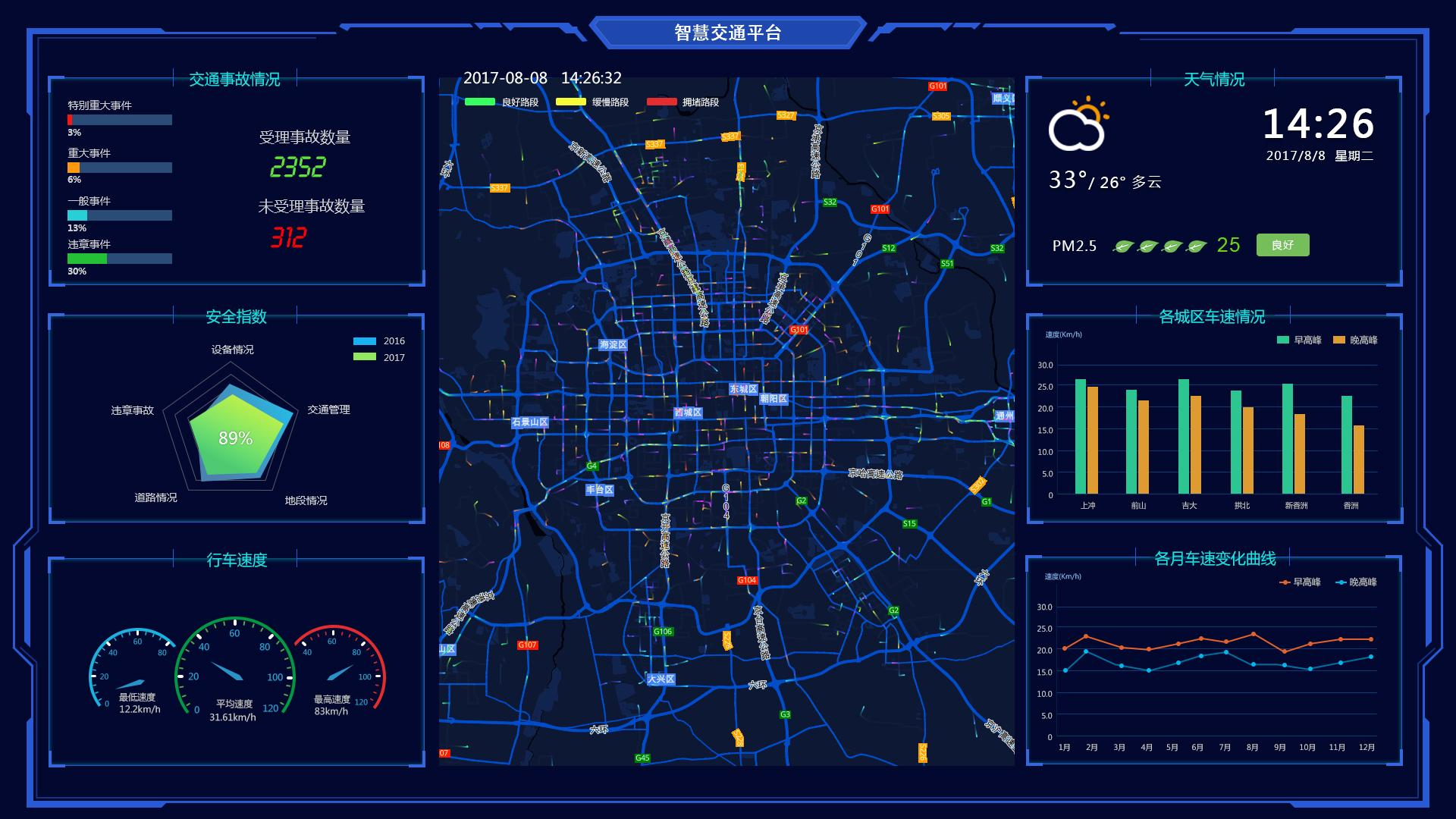
4.1 智慧城市交通大脑可视化
上图展示了智慧城市交通平台的实际界面:
- 左侧:腾讯云的DeepSeek智慧交通平台,展示交通事故、安全指数、行车速度等核心指标
- 右侧:IDPS城市交通大脑,实时展示立交桥区域的车辆运行状态
4.2 车路协同与V2X通信
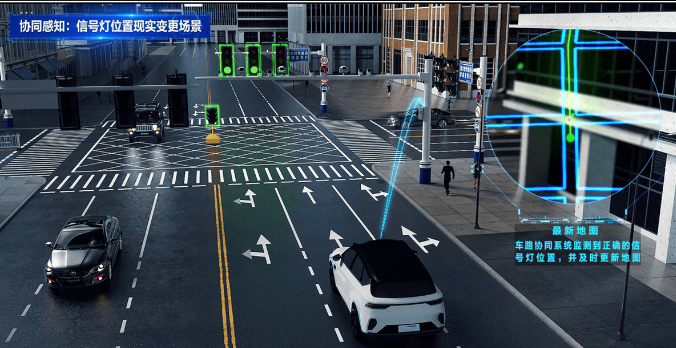
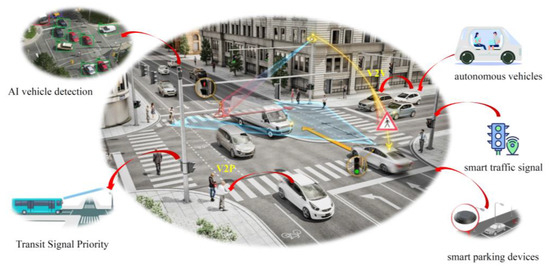
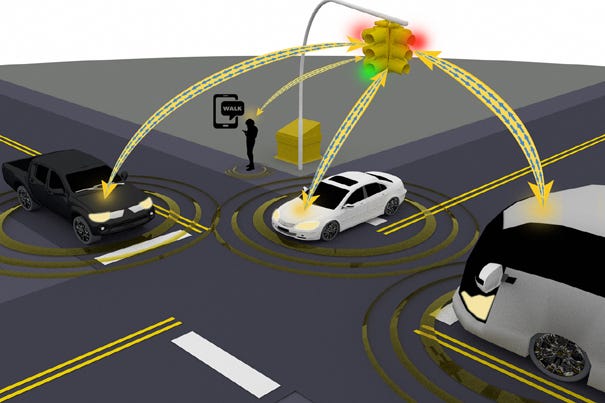
上图展示了车路协同的核心场景:
- 左上:智能交叉路口的协同感知,包括AI车辆检测、公交信号优先、智能停车
- 右上:V2X通信架构,车辆与信号灯、RSU、其他车辆实时通信
- 下方:数字孪生道路可视化,3D展示路口车辆与信号灯状态
4.3 多Agent交通信号优化
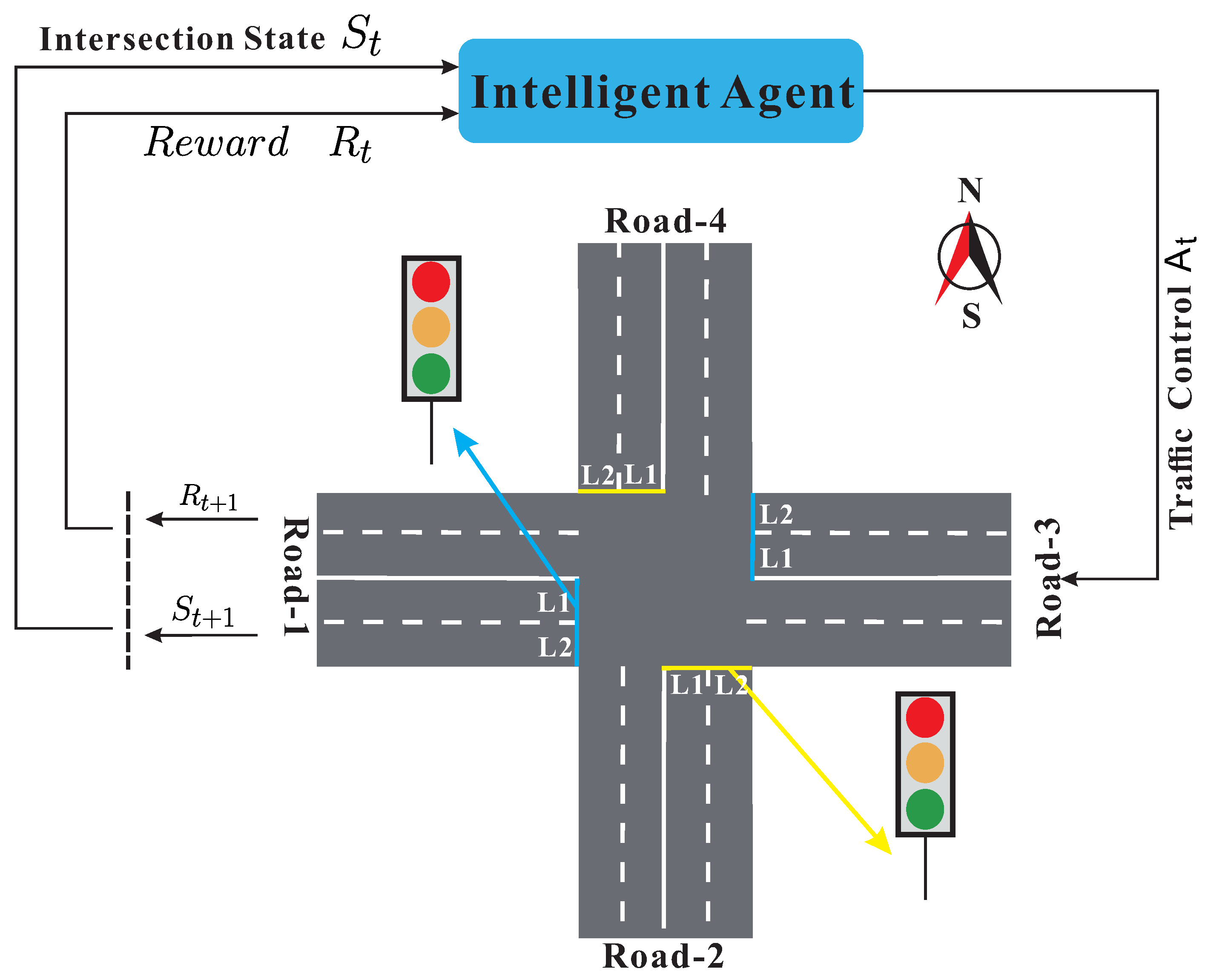
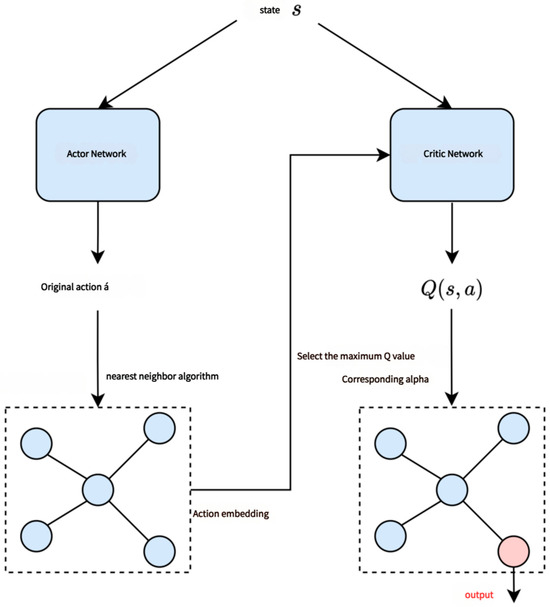
上图展示了多Agent交通控制的架构:
- 左侧:基于边缘计算的多Agent自动通信方法,包含雾计算节点、仿真环境、流量预测
- 右侧:Actor-Critic网络架构,用于深度强化学习信号控制
五、性能优化与最佳实践
5.1 端侧NPU加速
// 使用HarmonyOS 6的NPU进行RL推理
import { npuInference } from '@kit.AIKit';

const trafficModel = await npuInference.loadModel('traffic_marl_v3', {
  backend: 'NPU',
  quantization: 'INT8',
  cacheEnabled: true,
  batchSize: 16 // 批量处理多个路口
});

// 单次推理延迟 < 10ms,支持16个路口并行决策
const decisions = await trafficModel.batchPredict(states);
5.2 V2X低延迟通信
// PC5直连通信配置
const v2xConfig = {
  mode: 'PC5', // 直连模式,不经过基站
  priority: 1, // 最高优先级
  repetition: 2, // 重复发送2次确保可靠
  txPower: 23 // 发射功率23dBm
};

// 信号灯倒计时广播延迟 < 50ms
await rsu.broadcastPC5(message, v2xConfig);
5.3 数字孪生渲染优化
// LOD(细节层次)优化
roadScene.setLODConfig({
  nearDistance: 0,
  nearDetail: 'high', // 近处高细节
  midDistance: 200,
  midDetail: 'medium',
  farDistance: 500,
  farDetail: 'low' // 远处低细节
});

// 实例化渲染:相同车辆模型只上传一次GPU
const vehicleGeometry = await loadGeometry('vehicle.glb');
const instancedVehicles = new InstancedMesh(vehicleGeometry, maxCount: 1000);
六、总结与展望
本文详细阐述了如何基于**HarmonyOS 6(API 23)**构建「智行中枢」——一款PC端AI智能体智慧城市交通大脑与车路协同决策平台。核心创新点包括:
| 创新点 | 技术实现 | 业务价值 |
|---|---|---|
| 悬浮导航 | FloatNavigationBar + 拥堵指数联动 | 调度员单手操作,全局状态一目了然 |
| 沉浸光感 | 环境光感知 + 拥堵/应急状态联动 | 用"光"说话,余光感知交通态势 |
| 多Agent协同 | HMAF + MARL + 合同网协议 | 路口自主决策,区域协同优化 |
| V2X车路协同 | C-V2X PC5 + RSU边缘计算 | 毫秒级通信,车路信息实时互通 |
| 数字孪生 | ArkGraphics 3D + 粒子系统 | 1:1映射物理世界,支持预测推演 |
未来,随着鸿蒙生态在车联网领域的持续拓展,我们可以进一步探索:
- 自动驾驶协同:将「智行中枢」与鸿蒙座舱系统打通,实现车-路-云一体化
- 碳排放优化:在信号优化目标中引入碳排放约束,助力绿色交通
- 数字孪生预测:结合气象、活动日历等数据,实现"预测性"交通治理
转载自:https://blog.csdn.net/u014727709/article/details/162427113
欢迎 👍点赞✍评论⭐收藏,欢迎指正

讨论HarmonyOS开发技术,专注于API与组件、DevEco Studio、测试、元服务和应用上架分发等。
更多推荐



 89
89 0
0- 0


 已为社区贡献861条内容

所有评论(0)