HarmonyOS 6.1 全场景实战|《灵犀厨房一键推荐》元服务【卡片篇】日期动态化:从硬编码默认值到 LocalStorage 数据绑定的全链路修复
HarmonyOS 6.1 全场景实战|《灵犀厨房一键推荐》元服务【卡片篇】日期动态化:从硬编码默认值到 LocalStorage 数据绑定的全链路修复
摘要:你的服务卡片改完需求、编译通过、部署上线——一切看起来完美。但有一天你突然发现:右下角的日期怎么永远是"1月1日 周一"?明明代码里写了
EntryFormAbility.buildCardData()每次都用new Date()动态生成,为什么卡片上显示的还是硬编码兜底值?你可能觉得"不就是改个日期嘛,new Date().getDate()两行搞定"。但当你面对的是 Form Kit 的沉默绑定机制、readonly属性的初始化陷阱、LocalStorage 的数据注入时机 三重深渊时,你就知道这不是一个日期的问题——这是整个卡片数据管道根本没通。本篇将基于 HarmonyOS 6.1.0(API 23),以《灵犀厨房》饭点推荐服务卡片的日期硬编码 Bug 为切入点,完整拆解 Form Kit 动态卡片的数据绑定机制、LocalStorage 在卡片生命周期中的角色、以及如何通过提取 DateUtils 工具类实现时间逻辑的全域统一管理。读完本篇,你将彻底理解 Form Kit 的"数据不流动"之谜。
一、引言:一个"日期永不变"的幽灵 Bug
《灵犀厨房》的饭点推荐服务卡片需求很明确:桌面上放一张 2×2 / 2×4 卡片,显示当前饭点(早餐🌅/午餐☀️/晚餐🌙/夜宵🌃)、日期、一句贴心文案,点击即可跳转元服务首页获取推荐菜谱。
代码写得很"标准"——在 EntryFormAbility.ets 中:
private buildCardData(): CardData {
  const now = new Date();
  const dateStr = `${now.getMonth()+1}月${now.getDate()}日 ${weekDay}`;  // 动态日期
  // ... 饭点判断逻辑
  return { title: '灵犀厨房', dateStr, mealTime, mealEmoji, mealHint, ... };
}
在 WidgetCard.ets 中:
readonly title: string = '灵犀厨房';
readonly dateStr: string = '1月1日 周一';   // ← 硬编码默认值
readonly mealTime: string = '午餐';
编译通过、部署成功、卡片添加到桌面——一切正常。
直到你注意到:右下角的日期永远是"1月1日 周一",换设备、重启、重新添加卡片都一样。
| 检查项 | 预期 | 实际 | 结论 |
|---|---|---|---|
buildCardData() 是否执行 |
✅ 执行 | ✅ onAddForm 日志有输出 | 数据源正常 |
是否调用 createFormBindingData |
✅ 调用 | ✅ 代码无误 | 绑定包装正常 |
是否调用 formProvider.updateForm |
✅ 调用 | ✅ 返回 Promise resolved | 推送指令正常 |
| 卡片 UI 是否刷新 | ✅ 刷新 | ❌ 永远显示默认值 | 数据管道在此断裂 |
就像点了外卖,骑手明明取了餐也在 App 上点了"已送达",但你的门把手上什么都没有。数据确实被"打包送出"了,只是卡片这端根本没有接到。
二、根因分析:readonly 在 Form Kit 中的沉默陷阱
2.1 两套数据通道的"并行宇宙"
HarmonyOS 服务卡片的数据流涉及两套看起来平行、实则不相交的"宇宙":
根因揭秘:
readonly 声明的属性在 ArkTS 卡片组件中,其值在组件实例化时确定,之后不再改变。这个特性在普通 ArkUI 页面中保护了不可变性,但在 Form Kit 卡片中却成了致命缺陷:
// WidgetCard.ets
struct WidgetCard {
  readonly dateStr: string = '1月1日 周一';  // ← 实例化时赋值,永不改变
  // 尽管 EntryFormAbility 推送了新数据,但 readonly 属性不接收任何外部写入
  // FormBindingData 的数据被"送达"了系统 Framework,但 Framework 不知道要写入 dateStr
}
Form Kit 的数据绑定机制依赖一个关键的设计约定:卡片组件必须使用 @LocalStorageProp 声明需要接收动态数据的属性。readonly 属性在框架层面被视为"常数",FormBindingData 即使包含了同名字段,系统也不会将其映射过去。
2.2 为什么编译和部署都"看起来"没问题?
| 阶段 | 发生了什么 | 为什么没报错 |
|---|---|---|
| 编译 | ArkTS 编译器检查语法 ← 语法完全正确 | readonly 初始值是合法表达式 |
onAddForm |
buildCardData() 动态生成 dateStr: '7月1日 周二' |
数据生成了,没问题 |
createFormBindingData |
将 CardData 对象包装成 FormBindingData | 包装正确,没问题 |
formProvider.updateForm |
通过 Binder 将数据发送到卡片的 LocalStorage | 数据发送成功,没问题 |
| 卡片 build() | 从 this.dateStr 读取 → 永远读到 '1月1日 周一' |
← 这里悄无声息地用了默认值 |
没有任何异常日志、没有 crash、没有编译警告。就是一个"安静的 Bug"——它不会让你有灾难感,但它让你的动态卡片变成了静态展板。
三、解决方案:LocalStorage 三件套打通数据管道
3.1 修复后的数据流:这才是正确的管道
3.2 核心修复:三行代码的改变
// ━━━━━━━━━━━━━━━━━━━━━━━━━━━━━━━━━━━━━
// ❌ 修复前:readonly 硬编码,FormBindingData 徒劳
// ━━━━━━━━━━━━━━━━━━━━━━━━━━━━━━━━━━━━━
@Entry
@Component
struct WidgetCard {
  readonly dateStr: string = '1月1日 周一';   // 永久固定
  readonly mealTime: string = '午餐';          // 永久固定
  // ...
}

// ━━━━━━━━━━━━━━━━━━━━━━━━━━━━━━━━━━━━━
// ✅ 修复后:LocalStorage + @LocalStorageProp 动态绑定
// ━━━━━━━━━━━━━━━━━━━━━━━━━━━━━━━━━━━━━
import { DateUtils } from '../../utils/DateUtils';

// ① 创建 LocalStorage 容器,用 DateUtils 填入实时兜底值
const storageLocal = new LocalStorage();
storageLocal.setOrCreate('dateStr', DateUtils.getCardDate());         // 兜底:'7月1日 周二'
storageLocal.setOrCreate('mealTime', DateUtils.getMealInfo().mealTime);  // 兜底:'午餐'
storageLocal.setOrCreate('mealEmoji', DateUtils.getMealInfo().mealEmoji);
storageLocal.setOrCreate('mealHint', DateUtils.getMealInfo().mealHint);

// ② 将 LocalStorage 绑定到 @Entry
@Entry(storageLocal)
@Component
struct WidgetCard {
  // ③ 使用 @LocalStorageProp 接收 FormBindingData 的动态推送
  @LocalStorageProp('title') title: string = '灵犀厨房';
  @LocalStorageProp('dateStr') dateStr: string = DateUtils.getCardDate();
  @LocalStorageProp('mealTime') mealTime: string = DateUtils.getMealInfo().mealTime;
  @LocalStorageProp('mealEmoji') mealEmoji: string = DateUtils.getMealInfo().mealEmoji;
  @LocalStorageProp('mealHint') mealHint: string = DateUtils.getMealInfo().mealHint;
  // 静态配置仍用 readonly
  readonly actionType: string = 'router';
  readonly bundleName: string = 'com.atomicservice.6917606143148706130';
}
3.3 三层设计解析
| 层级 | 作用 | 时机 |
|---|---|---|
| 兜底层 | 防止卡片在数据到达前显示过期硬编码值 | 组件实例化时立即生效 |
| 推送层 | 将服务端的动态数据推入 LocalStorage | onAddForm、onUpdateForm、onFormEvent |
| 绑定层 | 建立 @LocalStorageProp → LocalStorage 的响应式管道 |
整个组件生命周期持续生效 |
四、提效工程:DateUtils 工具类 — 从副本粘贴到全域统一
4.1 问题:"复制自己"的代码扩散
在提取 DateUtils 之前,时间格式化逻辑散落在三个文件中:
| 文件 | 时间相关代码 | 格式 |
|---|---|---|
Index.ets |
getDateString()、getSeason()、getSeasonEmoji()、getSeasonHint() |
X月X日 · 周X |
EntryFormAbility.ets |
内联的 new Date() 逻辑、饭点判断 switch |
X月X日 周X |
WidgetCard.ets |
硬编码默认值 '1月1日 周一' |
无格式化逻辑 |
这导致三个问题:
- 副本分化:Index 用
·连接,Card 用空格连接——同一个日期两个格式 - 逻辑重复:季节判断的
[3,4,5]黑名单在两个地方孤岛式存在 - 饭点判断耦合:EntryFormAbility 中 20 行 if-else 和 WidgetCard 的默认值本质逻辑相同
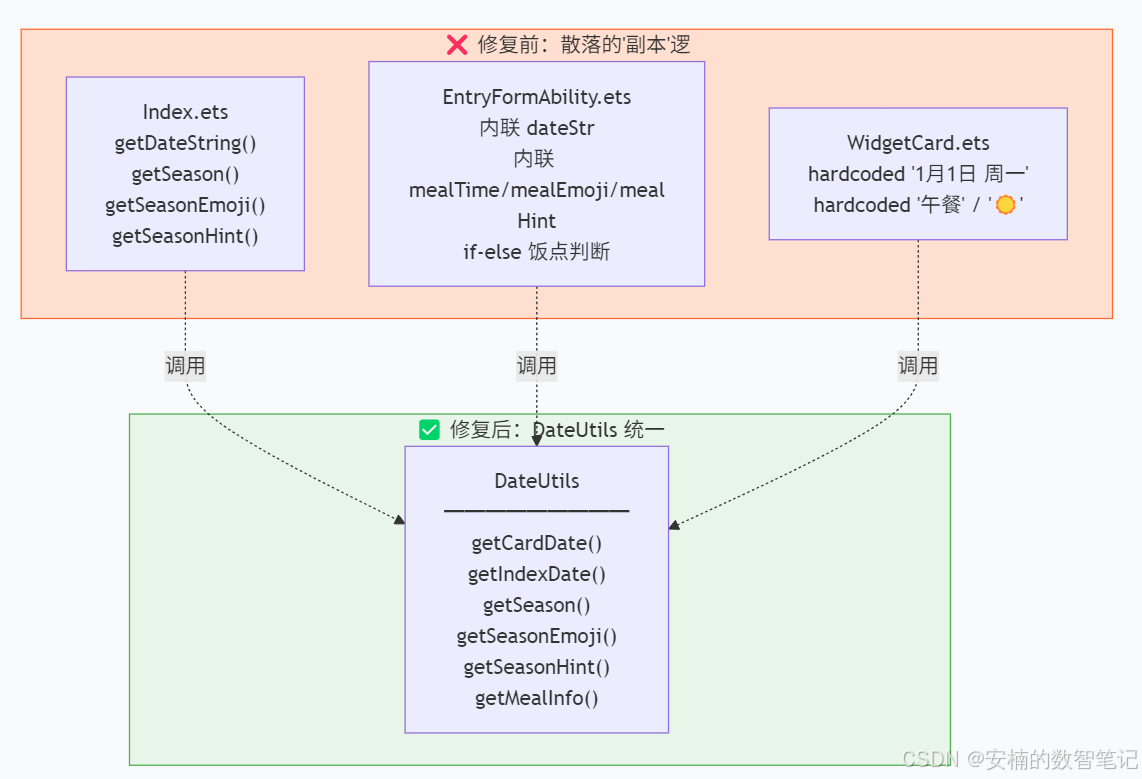
4.2 DateUtils 完整实现
/**
 * 日期/时间工具类
 * 统一管理日期格式化、季节判断、饭点信息等时间相关逻辑
 */
import { SeasonHints } from '../constants/AppConstants';

const WEEK_DAYS = ['周日', '周一', '周二', '周三', '周四', '周五', '周六'];

interface MealInfo {
  mealTime: string;
  mealEmoji: string;
  mealHint: string;
}

export class DateUtils {

  /** 卡片日期格式:X月X日 周X(用于 WidgetCard / EntryFormAbility) */
  static getCardDate(): string {
    const n = new Date();
    return `${n.getMonth() + 1}月${n.getDate()}日 ${WEEK_DAYS[n.getDay()]}`;
  }

  /** 首页日期格式:X月X日 · 周X(用于 Index.ets) */
  static getIndexDate(): string {
    const n = new Date();
    return `${n.getMonth() + 1}月${n.getDate()}日 · ${WEEK_DAYS[n.getDay()]}`;
  }

  /** 获取当前季节 */
  static getSeason(): string {
    const m = new Date().getMonth() + 1;
    if ([3, 4, 5].includes(m)) return '春季';
    if ([6, 7, 8].includes(m)) return '夏季';
    if ([9, 10, 11].includes(m)) return '秋季';
    return '冬季';
  }

  /** 获取季节 Emoji */
  static getSeasonEmoji(): string {
    const s = DateUtils.getSeason();
    if (s === '春季') return SeasonHints.SpringEmoji;
    if (s === '夏季') return SeasonHints.SummerEmoji;
    if (s === '秋季') return SeasonHints.AutumnEmoji;
    return SeasonHints.WinterEmoji;
  }

  /** 获取季节提示文案 */
  static getSeasonHint(): string {
    const s = DateUtils.getSeason();
    if (s === '春季') return SeasonHints.Spring;
    if (s === '夏季') return SeasonHints.Summer;
    if (s === '秋季') return SeasonHints.Autumn;
    return SeasonHints.Winter;
  }

  /**
   * 🔑 核心方法:根据小时获取饭点信息
   * @param hour 可选,不传则使用当前小时
   */
  static getMealInfo(hour?: number): MealInfo {
    const h = hour !== undefined ? hour : new Date().getHours();
    if (h >= 6 && h < 9) {
      return { mealTime: '早餐', mealEmoji: '🌅', mealHint: '美好的一天从早餐开始' };
    } else if (h >= 11 && h < 14) {
      return { mealTime: '午餐', mealEmoji: '☀️', mealHint: '午餐时间到,吃点好的' };
    } else if (h >= 17 && h < 20) {
      return { mealTime: '晚餐', mealEmoji: '🌙', mealHint: '晚餐时刻,犒劳自己' };
    } else if (h >= 20 || h < 6) {
      return { mealTime: '夜宵', mealEmoji: '🌃', mealHint: '夜深了,来点轻食' };
    } else {
      return { mealTime: '加餐', mealEmoji: '🍴', mealHint: '补充能量,继续加油' };
    }
  }
}
4.3 各调用方的精简
EntryFormAbility.ets — 原来 40 行 → 现在 3 行:
// ❌ 修复前:40 行内联时间逻辑
private buildCardData(): CardData {
  const now = new Date();
  const month = now.getMonth() + 1; const day = now.getDate();
  const weekDays = ['周日', '周一', '周二', '周三', '周四', '周五', '周六'];
  const weekDay = weekDays[now.getDay()];
  const dateStr = `${month}月${day}日 ${weekDay}`;
  const hour = now.getHours();
  let mealTime = '', mealEmoji = '', mealHint = '';
  if (hour >= 6 && hour < 9) { mealTime = '早餐'; mealEmoji = '🌅'; mealHint = '...'; }
  else if (hour >= 11 && hour < 14) { mealTime = '午餐'; mealEmoji = '☀️'; mealHint = '...'; }
  else if (hour >= 17 && hour < 20) { mealTime = '晚餐'; mealEmoji = '🌙'; mealHint = '...'; }
  else if (hour >= 20 || hour < 6) { mealTime = '夜宵'; mealEmoji = '🌃'; mealHint = '...'; }
  else { mealTime = '加餐'; mealEmoji = '🍴'; mealHint = '...'; }
  return { title: '灵犀厨房', dateStr, mealTime, mealEmoji, mealHint, ... };
}

// ✅ 修复后:3 行委托给 DateUtils
private buildCardData(): CardData {
  const dateStr = DateUtils.getCardDate();
  const mealInfo = DateUtils.getMealInfo();
  return { title: '灵犀厨房', dateStr, mealTime: mealInfo.mealTime, mealEmoji: mealInfo.mealEmoji, mealHint: mealInfo.mealHint, ... };
}
Index.ets — 4 个 private 方法 → 4 行委托:
// ❌ 修复前:四个方法共计 30+ 行
private getSeason(): string { const m = new Date().getMonth() + 1; if ([3,4,5].includes(m)) return '春季'; ... }
private getSeasonEmoji(): string { const s = this.getSeason(); if (s==='春季') return SeasonHints.SpringEmoji; ... }
private getSeasonHint(): string { const s = this.getSeason(); if (s==='春季') return SeasonHints.Spring; ... }
private getDateString(): string { const n = new Date(); return `${n.getMonth()+1}月${n.getDate()}日 · ${[...][n.getDay()]}`; }

// ✅ 修复后:4 行委托
private getSeason(): string { return DateUtils.getSeason(); }
private getSeasonEmoji(): string { return DateUtils.getSeasonEmoji(); }
private getSeasonHint(): string { return DateUtils.getSeasonHint(); }
private getDateString(): string { return DateUtils.getIndexDate(); }
重构收益一览:
| 指标 | 修复前 | 修复后 | 改善 |
|---|---|---|---|
| 时间逻辑分布文件数 | 3 个 | 1 个(DateUtils) | ⬇️ 67% |
| 重复代码行数 | ~70 行 | 0 行 | ✅ 消除全部 |
| 日期格式一致性 | 2 种格式(· vs ) |
统一管理 | ✅ 两种格式语义分离 |
| 饭点判断维护点 | 2 处(EntryFormAbility + WidgetCard) | 1 处(DateUtils.getMealInfo) | ✅ 单一真相来源 |
五、完整数据流:从定时器到屏幕的全链路
让我将整个卡片数据管道的完整生命周期串起来:
六、踩坑实录:Form Kit 卡片开发的四个致命陷阱
| # | 陷阱 | 现象 | 根因 | 解法 |
|---|---|---|---|---|
| ① | readonly 属性不接收数据 |
卡片永远显示默认值 | 框架不绑定 FormBindingData 到 readonly 属性 |
改用 @LocalStorageProp |
| ② | @ComponentV2 不可用于卡片 |
编译报错 “Invalid EntryComponent” | 卡片仅支持 @Entry @Component |
保持使用 @Entry @Component |
| ③ | LocalStorage 未初始化兜底值 | 卡片首次渲染闪烁出 undefined |
storageLocal 中的 key 不存在于初始化时 |
用 storageLocal.setOrCreate() 预先写入 |
| ④ | 卡片中不能调用 new Date() 作为响应式值 |
日期永远停在首次实例化时刻 | 卡片 build() 中的 new Date() 不是响应式,不会自动刷新 |
依赖 EntryFormAbility 的 onUpdateForm 推送更新 |
七、测试验证:怎样确认修复生效
验证清单:
| 验证项 | 操作 | 通过标准 |
|---|---|---|
| 日期实时显示 | 添加卡片后立即观察日期 | 日期 = 当前日期(如 7月1日 周二) |
| 每日自动更新 | 等待至 scheduledUpdateTime(默认 10:30) |
日期自动变为次日 |
| 饭点动态切换 | 修改系统时间至 6:00/12:00/18:00/22:00 | 饭点 Emotion 切换为 🌅/☀️/🌙/🌃 |
| 不破坏 Index 页面 | 打开元服务首页 | 原有 UI 正常、Loading/推荐/候选列表正常 |
| 编译零错误 | Build → Make Module |
控制台无 error |
八、总结:从"数据管道"到"设计系统"的升维思考
这次修复的本质不是"改了几个关键字",而是一次数据范式的切换:
三条核心经验:
readonly在卡片中不是"只读属性"的语义——它是"完全不参与数据绑定"的语义。只要你的卡片需要接收动态数据,就必须用@LocalStorageProp。DateUtils 工具类的价值不在于"省了几行代码",而在于建立了"单一真相来源"(Single Source of Truth)。世界上只能有一个地方定义"怎么判断现在是午餐时间"。
兜底值 ≠ 默认值。
DateUtils.getCardDate()作为@LocalStorageProp的兜底值,不是用来"凑合显示"的——它保证了即使在 LocalStorage 数据到达之前,卡片也不会露出硬编码的"1月1日"这种令人困惑的幽灵日期。
代码对比 —— 最终效果:
| 文件 | 修改前 | 修改后 |
|---|---|---|
utils/DateUtils.ets |
❌ 不存在 | ✅ 新建,80 行,6 个静态方法 |
widget/pages/WidgetCard.ets |
readonly dateStr = '1月1日 周一' |
@LocalStorageProp('dateStr') dateStr = DateUtils.getCardDate() |
entryformability/EntryFormAbility.ets |
40 行内联时间逻辑 | 4 行委托调用 |
pages/Index.ets |
4 个 private 方法 × 30 行 | 4 个 private 方法 × 1 行委托 |
下篇预告:在《灵犀厨房》服务卡片中,我们达成了"日期动态化"。但另一个幽灵正在暗处潜伏——当卡片第一次渲染、
formBindingData尚未到达 LocalStorage 时,@LocalStorageProp会触发一次"闪烁渲染"。下一篇,我们将深入 Form Kit 的渲染时序,用@Watch+@Provide的组合拳消灭这最后的 UI 闪烁。
🔗 专栏入口:《HarmonyOS 6.1 全场景实战》合集
📦 获取基线版本源码包:包括本系列所有代码 + 架构文档 + Flask 后端
如果你觉得这篇文章对你有帮助,请不要吝啬你的点赞 👍、收藏 ⭐ 和评论 💬。你的支持,是我继续输出高质量技术内容的全部动力。
轻 · 透 · 跨 · 智,用心造厨。我们下一篇见!

讨论HarmonyOS开发技术,专注于API与组件、DevEco Studio、测试、元服务和应用上架分发等。
更多推荐


 10
10 0
0- 0


 已为社区贡献52条内容

所有评论(0)