HarmonyOS 儿童故事汇应用开发实践——完整TTS功能
开源仓库地址:https://atomgit.com/feng8403000/ertonggushihui


一、项目概述
在移动应用开发领域,儿童教育类应用一直是热门方向。本文将详细介绍基于 HarmonyOS 操作系统开发的「儿童故事汇」应用,该应用旨在为儿童提供一个集故事阅读、TTS 朗读、分类浏览于一体的互动式故事平台。
1.1 应用功能概览
「儿童故事汇」应用包含以下核心功能模块:
| 功能模块 | 功能描述 | 技术要点 |
|---|---|---|
| 故事分类 | 8大分类,涵盖童话寓言、动物故事、睡前故事等 | @State 状态管理、列表渲染 |
| 故事列表 | 根据分类筛选显示对应故事 | 分类联动刷新机制 |
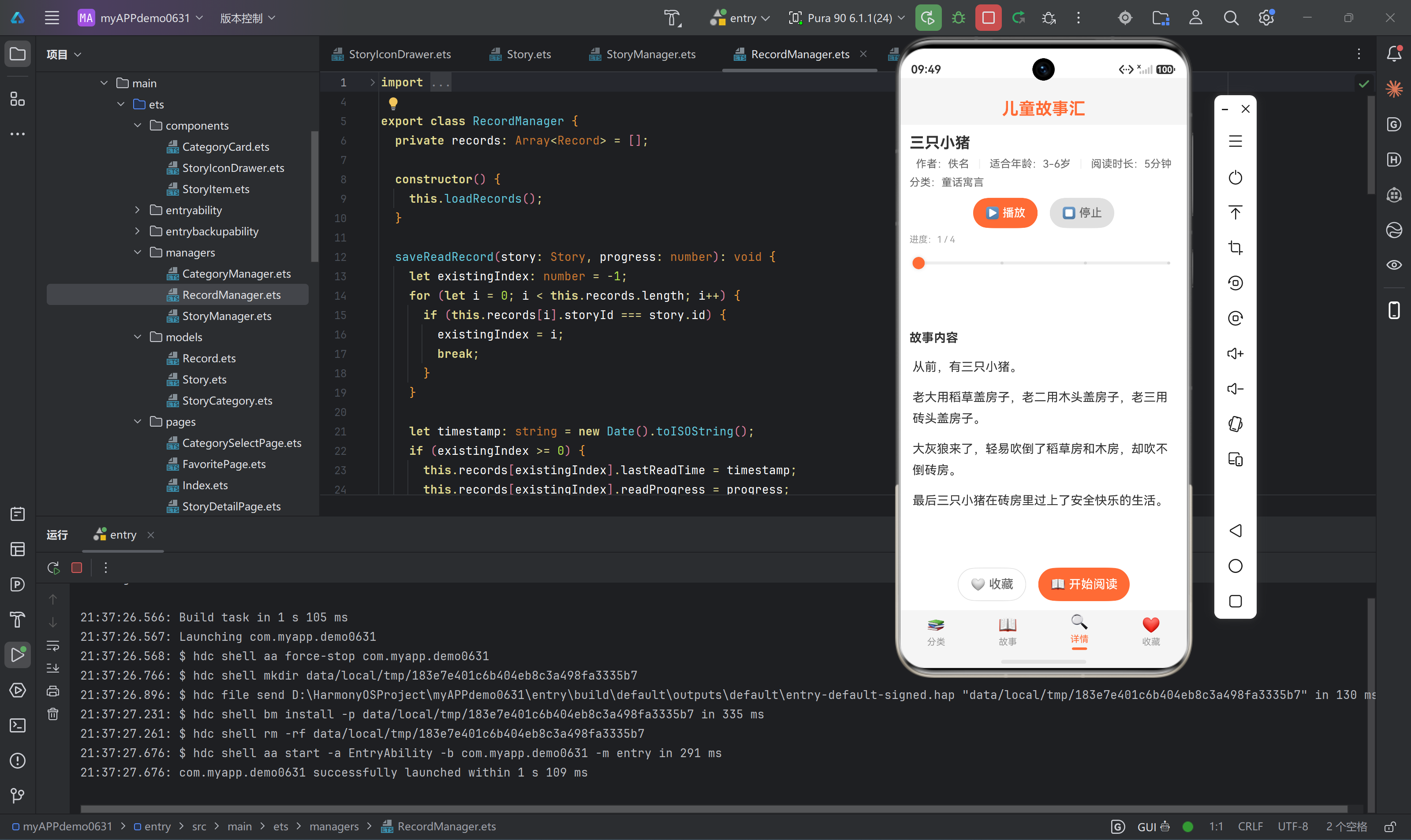
| 故事详情 | 展示故事完整内容,支持 TTS 朗读 | CoreSpeechKit 集成 |
| 收藏功能 | 用户可收藏喜欢的故事 | Preferences 数据持久化 |
1.2 应用架构设计
应用采用分层架构设计,主要分为以下几个层次:
┌──────────────────────────────────────────────┐
│                    UI 层                      │
│  (Index, CategorySelectPage, StoryListPage)  │
├──────────────────────────────────────────────┤
│                  组件层                        │
│  (CategoryCard, StoryItem, StoryIconDrawer)   │
├──────────────────────────────────────────────┤
│                  业务逻辑层                    │
│  (CategoryManager, StoryManager, Record)      │
├──────────────────────────────────────────────┤
│                  数据模型层                    │
│        (StoryCategory, Story, Record)         │
├──────────────────────────────────────────────┤
│                  数据持久化层                  │
│            (StorageService)                   │
└──────────────────────────────────────────────┘
1.3 技术栈
- 开发语言: ArkTS
- UI 框架: ArkUI
- 语音服务: @kit.CoreSpeechKit
- 数据存储: Preferences
- 构建工具: DevEco Studio
二、核心功能实现
2.1 故事分类模块
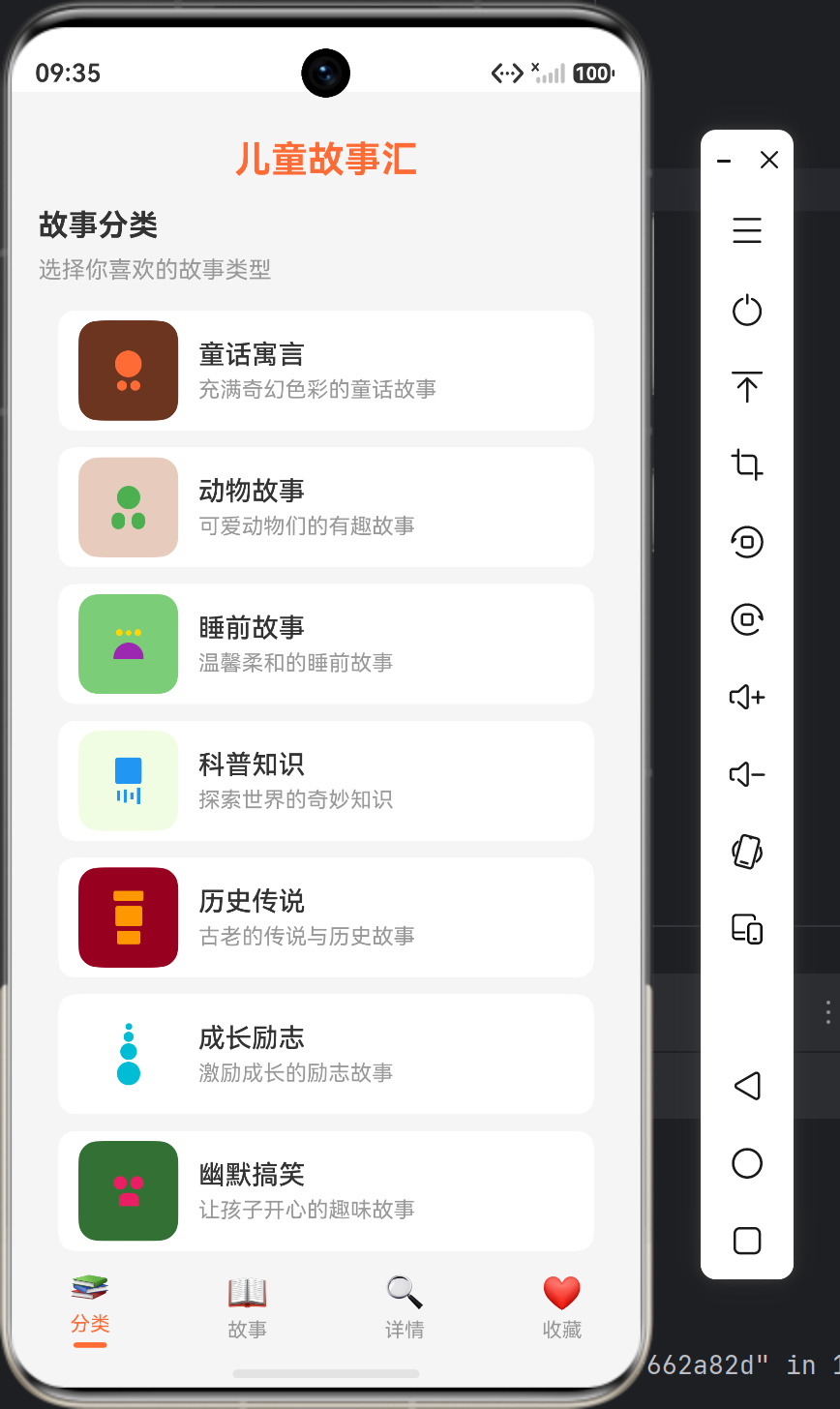
故事分类是应用的入口模块,采用列表布局展示8大分类,用户点击分类后自动跳转到故事列表页面。
2.1.1 数据模型设计
export class StoryCategory {
  id: string = '';
  name: string = '';
  iconType: string = '';
  description: string = '';
  color: string = '#FF6B35';

  constructor(id: string, name: string, iconType: string, description: string, color: string) {
    this.id = id;
    this.name = name;
    this.iconType = iconType;
    this.description = description;
    this.color = color;
  }
}
设计说明:
id字段用于唯一标识分类,便于后续筛选故事iconType字段用于动态渲染不同类型的图标color字段用于区分不同分类的视觉风格
2.1.2 分类管理单例
export class CategoryManager {
  private categories: Array<StoryCategory> = [];
  private selectedCategory: StoryCategory | null = null;

  constructor() {
    this.initCategories();
  }

  private initCategories(): void {
    this.categories = [
      new StoryCategory('c1', '童话寓言', 'fairy', '充满奇幻色彩的童话故事', '#FF6B35'),
      new StoryCategory('c2', '动物故事', 'animal', '可爱动物们的有趣故事', '#4CAF50'),
      new StoryCategory('c3', '睡前故事', 'sleep', '温馨柔和的睡前故事', '#9C27B0'),
      new StoryCategory('c4', '科普知识', 'science', '探索世界的奇妙知识', '#2196F3'),
      new StoryCategory('c5', '历史传说', 'history', '古老的传说与历史故事', '#FF9800'),
      new StoryCategory('c6', '成长励志', 'growth', '激励成长的励志故事', '#00BCD4'),
      new StoryCategory('c7', '幽默搞笑', 'funny', '让孩子开心的趣味故事', '#E91E63'),
      new StoryCategory('c8', '节日故事', 'festival', '各种节日的由来故事', '#795548'),
    ];
  }

  getAllCategories(): Array<StoryCategory> {
    return this.categories;
  }

  selectCategory(category: StoryCategory): void {
    this.selectedCategory = category;
  }

  getSelectedCategory(): StoryCategory | null {
    return this.selectedCategory;
  }
}

export const categoryManager: CategoryManager = new CategoryManager();
设计说明:
- 使用单例模式确保全局只有一个分类管理器实例
selectCategory和getSelectedCategory方法用于跨页面共享选中状态
2.1.3 分类选择页面
@Component
export struct CategorySelectPage {
  @State categories: Array<StoryCategory> = [];
  @State selectedCategory: StoryCategory | null = null;
  onCategorySelect: (category: StoryCategory) => void = () => {};

  build() {
    Column({ space: 16 }) {
      Column({ space: 8 }) {
        Text('故事分类')
          .fontSize(18)
          .fontWeight(FontWeight.Bold)
          .fontColor('#333333')
          .width('100%')

        Text('选择你喜欢的故事类型')
          .fontSize(14)
          .fontColor('#999999')
          .width('100%')
      }

      Scroll() {
        Column({ space: 10 }) {
          ForEach(this.categories, (category: StoryCategory) => {
            CategoryCard({
              category: category,
              isSelected: this.selectedCategory !== null && this.selectedCategory.id === category.id,
              onClickFunc: (c: StoryCategory) => {
                this.selectedCategory = c;
                this.onCategorySelect(c);
              }
            })
          })
        }
        .padding({ left: 12, right: 12, bottom: 60 })
      }
      .flexGrow(1)
    }
    .width('100%')
    .height('100%')
    .padding({ left: 16, right: 16, top: 8 })
    .backgroundColor('#F5F5F5')
    .justifyContent(FlexAlign.Start)
    .onAppear(() => {
      this.categories = categoryManager.getAllCategories();
      this.selectedCategory = categoryManager.getSelectedCategory();
    })
  }
}
设计说明:
- 使用
@State装饰器管理分类列表和选中状态 - 通过
onCategorySelect回调函数实现父子组件通信 padding({ bottom: 60 })确保列表底部内容不会被 TabBar 遮挡
2.2 故事列表模块
故事列表模块负责展示选中分类下的所有故事,支持点击进入详情页和收藏操作。
2.2.1 故事数据模型
export class Story {
  id: string = '';
  title: string = '';
  categoryId: string = '';
  categoryName: string = '';
  author: string = '';
  content: string = '';
  duration: number = 0;
  ageGroup: string = '';
  isFavorite: boolean = false;
  readCount: number = 0;

  constructor(id: string, title: string, categoryId: string, categoryName: string,
              author: string, content: string, duration: number, ageGroup: string) {
    this.id = id;
    this.title = title;
    this.categoryId = categoryId;
    this.categoryName = categoryName;
    this.author = author;
    this.content = content;
    this.duration = duration;
    this.ageGroup = ageGroup;
  }
}
设计说明:
categoryId字段用于关联故事所属分类isFavorite字段标识故事是否被收藏readCount字段记录故事阅读次数
2.2.2 故事管理单例
export class StoryManager {
  private stories: Array<Story> = [];

  constructor() {
    this.initStories();
  }

  private initStories(): void {
    this.stories = [
      new Story('s1', '三只小猪', 'c1', '童话寓言', '佚名',
        '从前,有三只小猪。老大用稻草盖房子,老二用木头盖房子,老三用砖头盖房子。大灰狼来了,轻易吹倒了稻草房和木房,却吹不倒砖房。最后三只小猪在砖房里过上了安全快乐的生活。',
        5, '3-6岁'),
      // ... 更多故事数据
    ];
  }

  getAllStories(): Array<Story> {
    return this.stories;
  }

  getStoriesByCategory(categoryId: string): Array<Story> {
    let result: Array<Story> = [];
    for (let i = 0; i < this.stories.length; i++) {
      if (this.stories[i].categoryId === categoryId) {
        result.push(this.stories[i]);
      }
    }
    return result;
  }

  getStoryById(id: string): Story | null {
    for (let i = 0; i < this.stories.length; i++) {
      if (this.stories[i].id === id) {
        return this.stories[i];
      }
    }
    return null;
  }

  toggleFavorite(id: string): void {
    for (let i = 0; i < this.stories.length; i++) {
      if (this.stories[i].id === id) {
        this.stories[i].isFavorite = !this.stories[i].isFavorite;
        break;
      }
    }
  }

  incrementReadCount(id: string): void {
    for (let i = 0; i < this.stories.length; i++) {
      if (this.stories[i].id === id) {
        this.stories[i].readCount++;
        break;
      }
    }
  }
}

export const storyManager: StoryManager = new StoryManager();
设计说明:
getStoriesByCategory方法根据分类 ID 筛选故事toggleFavorite方法切换故事收藏状态incrementReadCount方法增加故事阅读次数
2.2.3 故事列表页面
@Component
export struct StoryListPage {
  @State stories: Array<Story> = [];
  @State currentCategory: StoryCategory | null = null;
  @State internalRefresh: number = 0;
  refreshKey: number = 0;
  onStorySelect: (story: Story) => void = () => {};

  build() {
    Column({ space: 12 }) {
      Column({ space: 8 }) {
        Text('故事列表')
          .fontSize(18)
          .fontWeight(FontWeight.Bold)
          .fontColor('#333333')
          .width('100%')

        if (this.currentCategory !== null) {
          Text(`当前分类:${this.currentCategory.name}`)
            .fontSize(14)
            .fontColor('#666666')
            .width('100%')
        } else {
          Text('请先选择故事分类')
            .fontSize(14)
            .fontColor('#999999')
            .width('100%')
        }
      }

      Scroll() {
        Column({ space: 8 }) {
          ForEach(this.stories, (story: Story) => {
            StoryItem({
              story: story,
              onClickFunc: (s: Story) => {
                this.onStorySelect(s);
              },
              onFavoriteFunc: (id: string) => {
                storyManager.toggleFavorite(id);
                this.loadStories();
              }
            })
          })
        }
        .padding({ bottom: 60 })
      }
      .flexGrow(1)
    }
    .width('100%')
    .height('100%')
    .padding({ left: 16, right: 16, top: 8 })
    .backgroundColor('#F5F5F5')
    .justifyContent(FlexAlign.Start)
    .onAppear(() => {
      this.loadStories();
    })
  }

  aboutToAppear(): void {
    this.loadStories();
  }

  aboutToReappear(): void {
    this.internalRefresh++;
    this.loadStories();
  }

  private loadStories(): void {
    let category = categoryManager.getSelectedCategory();
    this.currentCategory = category;
    if (category !== null) {
      this.stories = storyManager.getStoriesByCategory(category.id);
    } else {
      this.stories = storyManager.getAllStories();
    }
  }
}
设计说明:
aboutToReappear生命周期方法确保 Tab 切换时重新加载数据internalRefresh状态变量强制触发 UI 重新渲染loadStories方法从categoryManager获取选中分类并筛选故事
2.3 故事详情模块(TTS 朗读核心)
故事详情模块是应用的核心功能模块,集成了 TTS 文本转语音功能,支持播放、暂停、停止控制和进度跟踪。
2.3.1 TTS 引擎初始化
private initTtsEngine(): void {
  let extraParam: Record<string, Object> = {'style': 'interaction-broadcast', 'locate': 'CN', 'name': 'EngineName'};
  let initParamsInfo: textToSpeech.CreateEngineParams = {
    language: 'zh-CN',
    person: 0,
    online: 1,
    extraParams: extraParam
  };

  textToSpeech.createEngine(initParamsInfo, (err: BusinessError, engine: textToSpeech.TextToSpeechEngine) => {
    if (!err) {
      this.ttsEngine = engine;
      this.setupTtsListener();
      console.info('TTS engine created successfully');
    } else {
      console.error(`TTS engine creation failed. Code: ${err.code}, message: ${err.message}`);
    }
  });
}
设计说明:
- 使用
@kit.CoreSpeechKit提供的textToSpeech.createEngineAPI 创建语音引擎 language: 'zh-CN'设置中文语音person: 0设置女声(0 为女声,1 为男声)online: 1设置在线语音合成模式
2.3.2 TTS 监听器设置
private setupTtsListener(): void {
  if (this.ttsEngine !== null) {
    let speakListener: textToSpeech.SpeakListener = {
      onStart: (requestId: string, response: textToSpeech.StartResponse) => {
        console.info(`TTS onStart, requestId: ${requestId}`);
      },
      onComplete: (requestId: string, response: textToSpeech.CompleteResponse) => {
        console.info(`TTS onComplete, requestId: ${requestId}`);
        if (this.isPlaying && this.currentLineIndex < this.contentLines.length - 1) {
          this.currentLineIndex++;
          this.playNextLine();
        } else {
          this.isPlaying = false;
          this.currentLineIndex = 0;
        }
      },
      onStop: (requestId: string, response: textToSpeech.StopResponse) => {
        console.info(`TTS onStop, requestId: ${requestId}`);
        this.isPlaying = false;
      },
      onError: (requestId: string, errorCode: number, errorMessage: string) => {
        console.error(`TTS onError, requestId: ${requestId} errorCode: ${errorCode} errorMessage: ${errorMessage}`);
        this.isPlaying = false;
      }
    };
    this.ttsEngine.setListener(speakListener);
  }
}
设计说明:
onComplete回调在一句朗读完成后触发,自动继续朗读下一句onError回调处理朗读过程中的错误情况- 朗读完成后自动重置进度到第一句
2.3.3 朗读控制方法
private startPlayback(): void {
  if (this.ttsEngine !== null && this.contentLines.length > 0) {
    this.isPlaying = true;
    this.playNextLine();
  }
}

private playNextLine(): void {
  if (this.ttsEngine !== null && this.isPlaying && this.currentLineIndex < this.contentLines.length) {
    let text = this.contentLines[this.currentLineIndex];
    this.requestId++;
    let speakExtraParam: Record<string, Object> = {
      'queueMode': 0,
      'speed': 1,
      'volume': 2,
      'pitch': 1,
      'languageContext': 'zh-CN',
      'audioType': 'pcm',
      'soundChannel': 3,
      'playType': 1
    };
    let speakParams: textToSpeech.SpeakParams = {
      requestId: 'req_' + this.requestId,
      extraParams: speakExtraParam
    };
    this.ttsEngine.speak(text, speakParams);
  }
}

private pausePlayback(): void {
  if (this.ttsEngine !== null) {
    this.ttsEngine.stop();
    this.isPlaying = false;
  }
}

private stopPlayback(): void {
  if (this.ttsEngine !== null) {
    this.ttsEngine.stop();
  }
  this.isPlaying = false;
  this.currentLineIndex = 0;
}
设计说明:
playNextLine方法负责朗读当前行,并配置语音参数(语速、音量、音调)pausePlayback方法暂停朗读但保持当前进度stopPlayback方法停止朗读并重置进度到第一句
2.3.4 故事内容分割
private splitContent(content: string): Array<string> {
  let lines: Array<string> = [];
  let sentences = content.split('。');
  for (let i = 0; i < sentences.length; i++) {
    if (sentences[i].trim() !== '') {
      lines.push(sentences[i].trim() + '。');
    }
  }
  return lines;
}
设计说明:
- 将故事内容按句号分割成句子数组
- 便于逐句朗读和高亮显示当前朗读句子
2.3.5 详情页 UI 构建
build() {
  Column({ space: 12 }) {
    if (this.currentStory !== null) {
      // 故事标题和元信息
      Column({ space: 8 }) {
        Text(this.currentStory.title)
          .fontSize(20)
          .fontWeight(FontWeight.Bold)
          .fontColor('#333333')
          .width('100%')

        Row({ space: 12 }) {
          Text(`作者:${this.currentStory.author}`)
            .fontSize(14)
            .fontColor('#666666')
          Text(`|`)
            .fontSize(14)
            .fontColor('#EEEEEE')
          Text(`适合年龄:${this.currentStory.ageGroup}`)
            .fontSize(14)
            .fontColor('#666666')
          Text(`|`)
            .fontSize(14)
            .fontColor('#EEEEEE')
          Text(`阅读时长:${this.currentStory.duration}分钟`)
            .fontSize(14)
            .fontColor('#666666')
        }
      }
      .padding({ left: 12, right: 12, top: 12 })

      // TTS 控制按钮
      Column({ space: 8 }) {
        Row({ space: 16 }) {
          Button(this.isPlaying ? '⏸️ 暂停' : '▶️ 播放')
            .flexGrow(1)
            .height(40)
            .fontSize(15)
            .backgroundColor(this.isPlaying ? '#FFA500' : '#FF6B35')
            .fontColor('#FFFFFF')
            .borderRadius(20)
            .onClick(() => {
              if (this.isPlaying) {
                this.pausePlayback();
              } else {
                this.startPlayback();
              }
            })

          Button('⏹️ 停止')
            .flexGrow(1)
            .height(40)
            .fontSize(15)
            .backgroundColor('#E0E0E0')
            .fontColor('#666666')
            .borderRadius(20)
            .onClick(() => {
              this.stopPlayback();
            })
        }

        // 进度条
        Column({ space: 4 }) {
          Row() {
            Text(`进度:${this.currentLineIndex + 1} / ${this.contentLines.length}`)
              .fontSize(12)
              .fontColor('#999999')
          }
          .width('100%')

          Slider({
            value: this.currentLineIndex,
            min: 0,
            max: this.contentLines.length - 1,
            style: SliderStyle.OutSet
          })
          .blockColor('#FF6B35')
          .trackColor('#EEEEEE')
          .selectedColor('#FF6B35')
          .showSteps(true)
          .onChange((value: number) => {
            this.currentLineIndex = value;
          })
          .width('100%')
        }
      }
      .padding({ left: 12, right: 12 })

      // 故事内容(高亮当前朗读句子)
      Scroll() {
        Column({ space: 12 }) {
          Text('故事内容')
            .fontSize(16)
            .fontWeight(FontWeight.Bold)
            .fontColor('#333333')
            .width('100%')

          ForEach(this.contentLines, (line: string, index: number) => {
            Text(line)
              .fontSize(16)
              .fontColor(index === this.currentLineIndex && this.isPlaying ? '#FF6B35' : '#333333')
              .fontWeight(index === this.currentLineIndex && this.isPlaying ? FontWeight.Bold : FontWeight.Normal)
              .lineHeight(28)
              .width('100%')
              .backgroundColor(index === this.currentLineIndex && this.isPlaying ? '#FFF8F5' : '#FFFFFF')
              .padding({ left: 4, right: 4 })
              .borderRadius(4)
          })
        }
        .padding({ left: 12, right: 12, bottom: 60 })
      }
      .flexGrow(1)

      // 收藏和阅读按钮
      Row({ space: 16 }) {
        Button(this.currentStory.isFavorite ? '❤️ 已收藏' : '🤍 收藏')
          .flexGrow(1)
          .height(44)
          .fontSize(16)
          .backgroundColor(this.currentStory.isFavorite ? '#FFE4E1' : '#FFFFFF')
          .fontColor(this.currentStory.isFavorite ? '#E53935' : '#666666')
          .borderRadius(22)
          .borderWidth(1)
          .borderColor('#E0E0E0')
          .onClick(() => {
            this.toggleFavorite();
          })

        Button('📖 开始阅读')
          .flexGrow(1)
          .height(44)
          .fontSize(16)
          .backgroundColor('#FF6B35')
          .fontColor('#FFFFFF')
          .borderRadius(22)
          .onClick(() => {
            this.startReading();
          })
      }
      .padding({ left: 12, right: 12, bottom: 12 })
    } else {
      // 空状态显示
      Column({ space: 12 }) {
        Text('暂无故事详情')
          .fontSize(16)
          .fontColor('#999999')
        Text('请先选择一个故事')
          .fontSize(14)
          .fontColor('#CCCCCC')
      }
      .flexGrow(1)
      .width('100%')
      .alignItems(HorizontalAlign.Center)
      .justifyContent(FlexAlign.Center)
    }
  }
  .height('100%')
  .backgroundColor('#FFFFFF')
}
设计说明:
- 朗读时当前句子高亮显示(橙色背景、加粗字体)
- 进度条显示当前朗读句数/总句数,支持拖动跳转
- 收藏按钮根据收藏状态显示不同样式
2.4 导航框架设计
应用采用 Tabs 组件实现底部导航,包含4个 Tab 页面。
@Entry
@Component
struct Index {
  @State currentIndex: number = 0;
  @State tabTitles: Array<string> = ['分类', '故事', '详情', '收藏'];
  @State tabIcons: Array<string> = ['📚', '📖', '🔍', '❤️'];
  @State selectedStory: Story | null = null;
  @State refreshKey: number = 0;

  build() {
    Column() {
      Text('儿童故事汇')
        .fontSize(22)
        .fontWeight(FontWeight.Bold)
        .fontColor('#FF6B35')
        .padding({ top: 28, bottom: 8 })
        .width('100%')
        .textAlign(TextAlign.Center)

      Tabs({ barPosition: BarPosition.End }) {
        TabContent() {
          CategorySelectPage({
            onCategorySelect: (category: StoryCategory) => {
              categoryManager.selectCategory(category);
              this.refreshKey++;
              this.currentIndex = 1;
            }
          })
        }
        .tabBar(this.buildTabBar(0))

        TabContent() {
          StoryListPage({
            refreshKey: this.refreshKey,
            onStorySelect: (story: Story) => {
              this.selectedStory = story;
              storyManager.incrementReadCount(story.id);
              this.currentIndex = 2;
            }
          })
        }
        .tabBar(this.buildTabBar(1))

        TabContent() {
          StoryDetailPage({
            initialStory: this.selectedStory
          })
        }
        .tabBar(this.buildTabBar(2))

        TabContent() {
          FavoritePage()
        }
        .tabBar(this.buildTabBar(3))
      }
      .flexGrow(1)
      .backgroundColor('#F5F5F5')
      .onChange((index: number) => {
        this.currentIndex = index;
        if (index === 1) {
          this.refreshKey++;
        }
        if (index === 2 && this.selectedStory === null) {
          let allStories = storyManager.getAllStories();
          if (allStories.length > 0) {
            this.selectedStory = allStories[0];
          }
        }
      })
    }
    .height('100%')
    .backgroundColor('#F5F5F5')
    .padding({ bottom: 54 })
  }

  @Builder
  buildTabBar(index: number) {
    Column({ space: 4 }) {
      Text(this.tabIcons[index])
        .fontSize(20)
        .fontColor(this.currentIndex === index ? '#FF6B35' : '#999999')

      Text(this.tabTitles[index])
        .fontSize(12)
        .fontColor(this.currentIndex === index ? '#FF6B35' : '#999999')

      if (this.currentIndex === index) {
        Column() {}
          .width(20)
          .height(3)
          .backgroundColor('#FF6B35')
          .borderRadius(2)
      }
    }
    .width('100%')
    .height('100%')
    .alignItems(HorizontalAlign.Center)
    .justifyContent(FlexAlign.Center)
  }
}
设计说明:
refreshKey状态变量用于强制刷新故事列表onCategorySelect回调实现分类选择后自动切换到故事 TabonStorySelect回调实现故事选择后自动切换到详情 TabbuildTabBar方法使用@Builder装饰器复用 TabBar 构建逻辑
三、开发过程中的关键问题与解决方案
3.1 Tab 切换缓存导致列表不刷新问题
问题描述:
点击分类后切换到故事列表页面,但列表没有显示对应分类的故事。
问题分析:
HarmonyOS 的 Tabs 组件会缓存已加载的页面,切换 Tab 时不会重新创建组件,aboutToAppear() 生命周期方法可能不会被调用。即使调用了 loadStories(),由于组件缓存,@State 状态的更新可能没有触发 UI 重新渲染。
解决方案:
- 添加
aboutToReappear()生命周期方法,每次页面重新显示时自动刷新数据:
aboutToReappear(): void {
  this.internalRefresh++;
  this.loadStories();
}
- 在父组件
Index中添加refreshKey状态变量,点击分类或切换到故事 Tab 时增加refreshKey:
onCategorySelect: (category: StoryCategory) => {
  categoryManager.selectCategory(category);
  this.refreshKey++;
  this.currentIndex = 1;
}

.onChange((index: number) => {
  this.currentIndex = index;
  if (index === 1) {
    this.refreshKey++;
  }
})
- 在
StoryListPage的loadStories()方法中直接从categoryManager.getSelectedCategory()获取最新分类状态:
private loadStories(): void {
  let category = categoryManager.getSelectedCategory();
  this.currentCategory = category;
  if (category !== null) {
    this.stories = storyManager.getStoriesByCategory(category.id);
  } else {
    this.stories = storyManager.getAllStories();
  }
}
3.2 @State 响应式更新问题
问题描述:
在开发过程中发现,直接修改数组元素的属性不会触发 UI 重新渲染。
问题分析:
在 ArkTS 中,@State 装饰器的响应式更新只对直接赋值操作生效。如果只是修改数组内部元素的属性,而没有重新赋值数组,UI 不会自动更新。
解决方案:
确保对 @State 装饰的数组进行整体赋值,而不是原地修改:
// 正确做法:重新赋值数组
this.stories = storyManager.getStoriesByCategory(category.id);

// 错误做法:原地修改数组元素
// this.stories[0].isFavorite = true; // 不会触发 UI 更新
3.3 组件间通信策略
问题描述:
在多 Tab 场景下,如何实现跨页面的状态共享和事件传递。
解决方案:
采用以下三种方式实现组件间通信:
- 单例模式:使用
categoryManager和storyManager单例管理全局状态
export const categoryManager: CategoryManager = new CategoryManager();
export const storyManager: StoryManager = new StoryManager();
- 回调函数:通过父组件传递回调函数实现子组件事件通知
CategorySelectPage({
  onCategorySelect: (category: StoryCategory) => {
    categoryManager.selectCategory(category);
    this.currentIndex = 1;
  }
})
- 参数传递:通过组件构造参数传递初始数据
StoryDetailPage({
  initialStory: this.selectedStory
})
3.4 滚动区域底部被 TabBar 遮挡问题
问题描述:
列表滚动到底部时,最后几项内容被底部 TabBar 遮挡。
解决方案:
在所有页面的 Scroll 组件内部的 Column 添加底部 padding:
Scroll() {
  Column({ space: 8 }) {
    // 列表内容
  }
  .padding({ bottom: 60 })
}
四、数据持久化方案
4.1 阅读记录存储
应用使用 HarmonyOS 的 Preferences API 存储阅读记录。
export class StorageService {
  private static RECORDS_KEY: string = 'story_records';

  async saveRecords(records: Array<Record>): Promise<void> {
    let recordsJson: string = JSON.stringify(records);
    let context = getContext(this) as Context;
    try {
      let pref = await preferences.getPreferences(context, 'story_storage');
      await pref.put(StorageService.RECORDS_KEY, recordsJson);
      await pref.flush();
    } catch (err) {
      console.error('saveRecords error:', err);
    }
  }

  async loadRecords(): Promise<Array<Record>> {
    let context = getContext(this) as Context;
    try {
      let pref = await preferences.getPreferences(context, 'story_storage');
      let recordsJson = await pref.get(StorageService.RECORDS_KEY, '[]');
      return JSON.parse(recordsJson);
    } catch (err) {
      console.error('loadRecords error:', err);
      return [];
    }
  }
}
设计说明:
- 使用
preferences.getPreferences获取 Preferences 实例 - 将记录数组序列化为 JSON 字符串存储
flush()方法确保数据持久化到磁盘
五、应用功能完整列表
5.1 故事分类(8大分类)
| 分类 ID | 分类名称 | 故事数量 | 适合年龄 |
|---|---|---|---|
| c1 | 童话寓言 | 8个 | 3-12岁 |
| c2 | 动物故事 | 7个 | 0-6岁 |
| c3 | 睡前故事 | 5个 | 0-3岁 |
| c4 | 科普知识 | 5个 | 6-12岁 |
| c5 | 历史传说 | 5个 | 6-12岁 |
| c6 | 成长励志 | 5个 | 3-12岁 |
| c7 | 幽默搞笑 | 5个 | 3-12岁 |
| c8 | 节日故事 | 5个 | 6-12岁 |
5.2 核心功能
- 分类浏览:点击分类卡片自动跳转到对应故事列表
- 故事列表:显示分类下的故事,支持收藏和点击进入详情
- 故事详情:展示故事完整内容,支持 TTS 朗读
- TTS 朗读:播放、暂停、停止控制,进度跟踪,高亮显示
- 收藏功能:收藏喜欢的故事,在收藏 Tab 查看
- 阅读记录:记录阅读进度和阅读次数
六、开发心得与总结
6.1 ArkTS 响应式编程要点
- @State 装饰器:用于管理组件内部状态,状态变化自动触发 UI 更新
- 避免原地修改:对数组和对象的修改必须通过重新赋值触发响应
- 生命周期方法:合理使用
aboutToAppear和aboutToReappear管理页面生命周期
6.2 HarmonyOS 组件使用技巧
- Tabs 组件:注意 Tab 切换时的组件缓存机制
- Scroll 组件:设置合适的 padding 避免内容被遮挡
- ForEach 组件:确保数据源的唯一性和可追踪性
6.3 跨组件通信策略
- 单例模式:适合全局状态管理
- 回调函数:适合父子组件事件传递
- 参数传递:适合初始化数据传递
6.4 TTS 集成注意事项
- 权限配置:确保在
module.json5中配置语音相关权限 - 引擎释放:在页面销毁时调用
shutdown()释放资源 - 网络依赖:在线语音合成需要网络连接
七、未来优化方向
- 离线语音包:集成离线 TTS 语音包,支持无网络环境下的朗读功能
- 故事搜索:添加搜索功能,支持按标题、作者搜索故事
- 阅读进度保存:保存故事阅读进度,下次打开继续阅读
- 家长控制:添加家长控制功能,限制阅读时长和内容
- 社交分享:支持将喜欢的故事分享给朋友
通过本次开发实践,我们深入了解了 HarmonyOS 应用开发的核心技术点,包括 ArkTS 状态管理、组件通信、TTS 集成等。希望本文能为其他开发者提供参考和借鉴。

讨论HarmonyOS开发技术,专注于API与组件、DevEco Studio、测试、元服务和应用上架分发等。
更多推荐


 0
0 0
0- 0


 已为社区贡献399条内容

所有评论(0)