鸿蒙原生 ArkTS 布局方式之手势组合:GestureGroup 的并行/串行/互斥实战
一、引言
在实际应用开发中,一个组件往往需要同时响应多种手势——例如列表项既要支持点击进入详情,又要支持水平滑动删除,还要支持长按弹出菜单。这时就产生了手势冲突问题:手指按下时,系统应该识别为点击、长按还是拖拽?
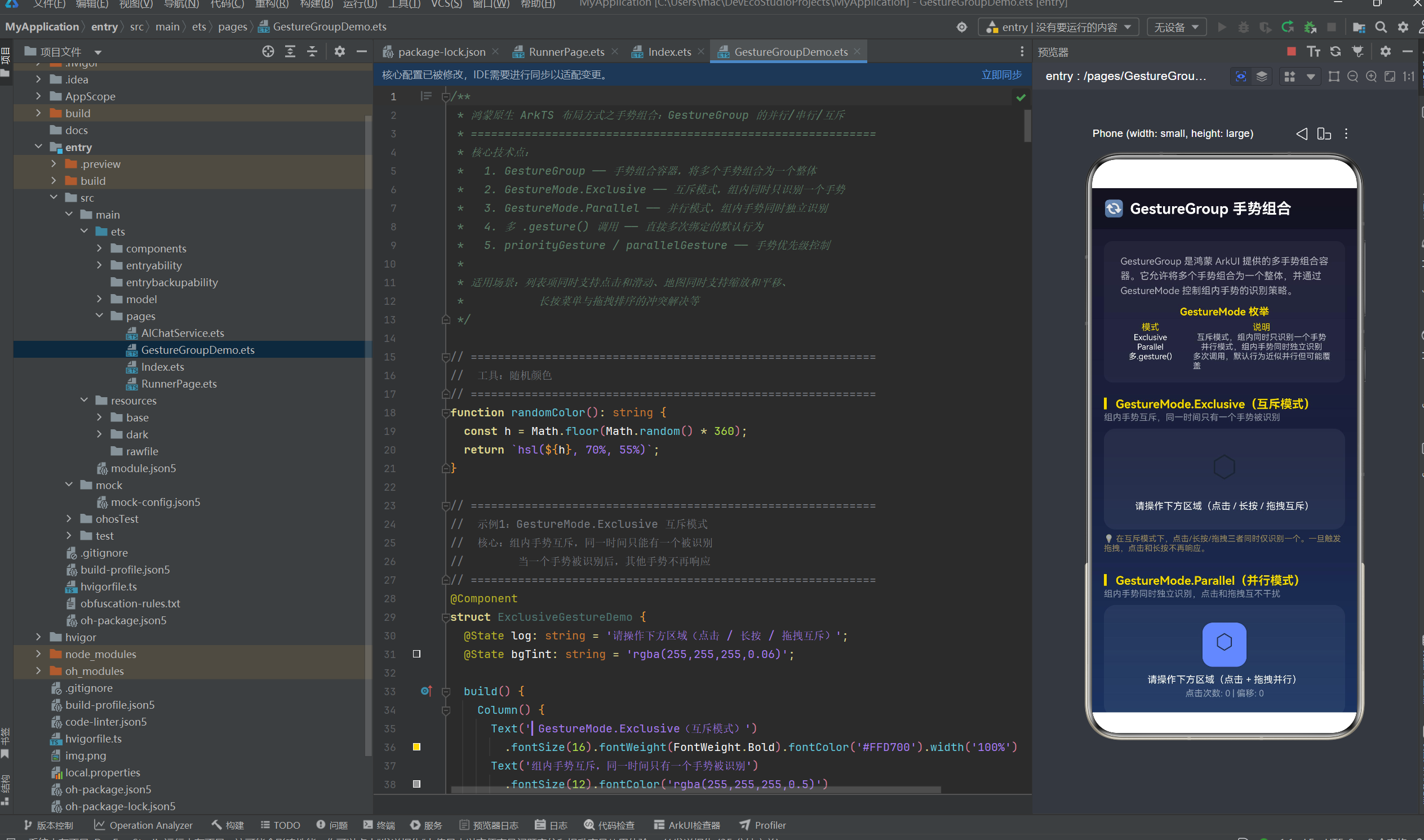
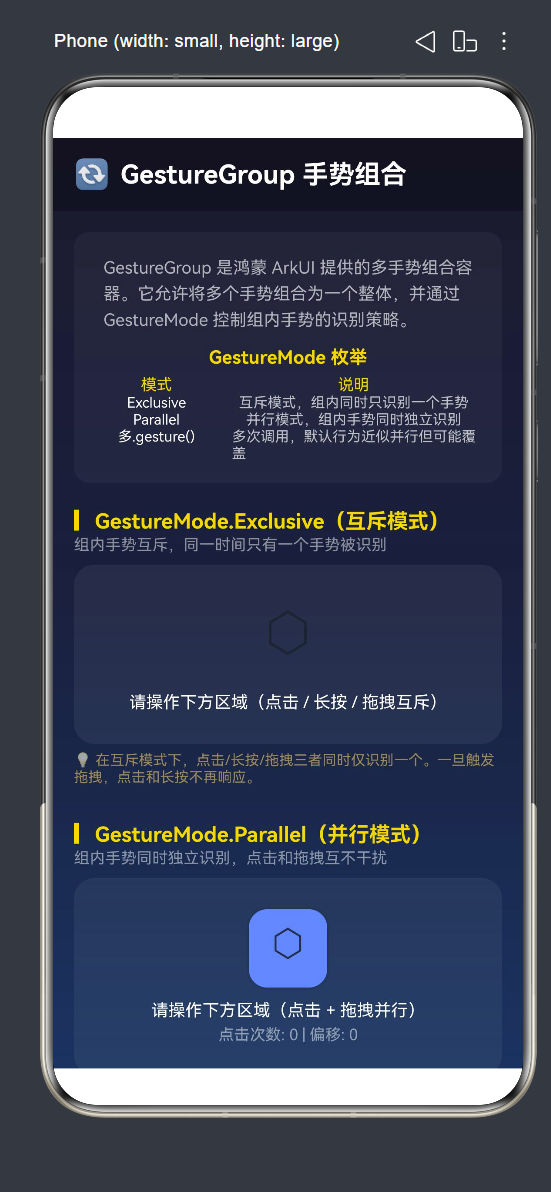
HarmonyOS NEXT 的 ArkUI 框架提供了 GestureGroup 这一手势组合容器,它允许将多个手势组合为一个整体,并通过 GestureMode 枚举控制组内手势的识别策略:
| 模式 | 枚举值 | 行为 |
|---|---|---|
| 互斥模式 | GestureMode.Exclusive | 组内同时只识别一个手势,一个手势被识别后其他不再响应 |
| 并行模式 | GestureMode.Parallel | 组内手势同时独立识别,互不干扰 |
| 多次 .gesture() | 不经过 GestureGroup | 默认行为,后绑定的手势覆盖先绑定的同名手势 |
本文通过 6 个实战场景 系统讲解 GestureGroup 的使用方法、三种模式的行为差异以及实际应用中的冲突解决方案。
二、核心原理
2.1 GestureGroup 的 API 签名
GestureGroup(mode: GestureMode, ...gestures: GestureType[])
第一个参数是 GestureMode 枚举值,后续参数是可变长的手势列表。
2.2 三种手势组合方式对比
| 方式 | 代码形式 | 识别策略 | 适用场景 |
|---|---|---|---|
| 多次 .gesture() | .gesture(A).gesture(B) | 默认可并行,后绑定覆盖同名 | 简单多手势 |
| GestureGroup Exclusive | GestureGroup(Exclusive, A, B) | 互斥,同时只识别一个 | 列表项点击 vs 滑动 |
| GestureGroup Parallel | GestureGroup(Parallel, A, B) | 并行,同时独立识别 | 拖拽+点击 |
2.3 手势优先级控制
当手势涉及父子组件时,额外的三个绑定方式控制优先级:
| 方式 | 方法 | 效果 |
|---|---|---|
| 默认手势 | .gesture() | 子组件优先,父组件被阻断 |
| 优先手势 | .priorityGesture() | 父组件优先,阻断子组件 |
| 并行手势 | .parallelGesture() | 父子并行,各自独立触发 |
三、环境
MyApplication/
└── entry/src/main/
    ├── ets/pages/GestureGroupDemo.ets
    └── resources/base/profile/main_pages.json
四、6 个实战场景
4.1 Exclusive 互斥模式
点击、长按、拖拽三者互斥,同一时间只有一个手势被识别。一旦手指滑动触发拖拽,点击和长按不再响应。
@Component
struct ExclusiveGestureDemo {
  @State log: string = '请操作(点击 / 长按 / 拖拽互斥)';
  @State bgTint: string = 'rgba(255,255,255,0.06)';

  build() {
    Column() {
      Column() {
        Text('⬡').fontSize(40)
        Text(this.log).fontSize(13).fontColor(Color.White)
      }
      .width('100%').padding(24)
      .backgroundColor(this.bgTint).borderRadius(16)
      .alignItems(HorizontalAlign.Center)
      .gesture(
        GestureGroup(GestureMode.Exclusive,
          TapGesture({ count: 1 })
            .onAction(() => {
              this.log = '👆 单击触发';
              this.bgTint = 'rgba(33,150,243,0.25)';
            }),
          LongPressGesture({ fingers: 1, duration: 400 })
            .onAction(() => {
              this.log = '🟢 长按触发 (400ms)';
              this.bgTint = 'rgba(76,175,80,0.25)';
            })
            .onActionEnd(() => { this.bgTint = 'rgba(255,255,255,0.06)'; }),
          PanGesture({ direction: PanDirection.Horizontal, distance: 10 })
            .onActionStart(() => { this.log = '➡️ 拖拽开始'; })
            .onActionUpdate((e) => { this.log = '➡️ 拖拽 offsetX=' + Math.round(e.offsetX); })
            .onActionEnd(() => { this.log = '✅ 拖拽结束'; })
        )
      )
    }
  }
}
关键行为:
- 轻触 → 触发 TapGesture,背景变为蓝色
- 长按 400ms → 触发 LongPressGesture,背景变为绿色
- 水平滑动超过 10vp → 触发 PanGesture,背景变为橙色,此时点击和长按不再触发
- 手指抬起 → 背景恢复
4.2 Parallel 并行模式
点击和拖拽同时独立识别。在拖拽过程中仍然可以触发点击。
@Component
struct ParallelGestureDemo {
  @State log: string = '点击 + 拖拽并行';
  @State offsetX: number = 0;
  @State tapCount: number = 0;
  @State boxColor: string = '#5C8AFF';

  build() {
    Column() {
      Column() {
        Column() { Text('⬡').fontSize(28) }
          .width(60).height(60)
          .backgroundColor(this.boxColor).borderRadius(14)
          .translate({ x: this.offsetX })

        Text(this.log).fontSize(13)
        Text('点击: ' + this.tapCount + ' | 偏移: ' + Math.round(this.offsetX))
      }
      .padding(24).borderRadius(16)
      .backgroundColor('rgba(255,255,255,0.06)')
      .alignItems(HorizontalAlign.Center)
      .gesture(
        GestureGroup(GestureMode.Parallel,
          TapGesture({ count: 1 })
            .onAction(() => {
              this.tapCount++;
              this.log = '👆 点击 (第' + this.tapCount + '次)';
              this.boxColor = randomColor();
            }),
          PanGesture({ direction: PanDirection.Horizontal, distance: 5 })
            .onActionUpdate((e) => {
              this.offsetX += e.offsetX;
              this.log = '➡️ 拖拽 ' + Math.round(this.offsetX);
            })
        )
      )
    }
  }
}
function randomColor(): string { return `hsl(${Math.floor(Math.random()*360)}, 70%, 55%)`; }
与 Exclusive 的核心差异:
| 行为 | Exclusive | Parallel |
|---|---|---|
| 轻触触发点击 | ✅ | ✅ |
| 滑动触发拖拽 | ✅ | ✅ |
| 拖拽中点击 | ❌ 不响应 | ✅ 同时响应 |
| 点击后立刻滑动 | ❌ 点击已触发,拖拽不再识别 | ✅ 点击和拖拽各自独立 |
4.3 对比实验:多次 .gesture() vs GestureGroup.Exclusive
并排展示两种手势绑定方式的行为差异。
// 左侧:多次 .gesture()
.gesture(TapGesture().onAction(() => { /* 点击 */ }))
.gesture(LongPressGesture().onAction(() => { /* 长按 */ }))
// → 默认行为:点击和长按可先后触发

// 右侧:GestureGroup.Exclusive
.gesture(GestureGroup(GestureMode.Exclusive,
  TapGesture().onAction(() => { /* 点击 */ }),
  LongPressGesture().onAction(() => { /* 长按 */ })
))
// → 互斥行为:点击触发后长按不再检测
行为差异总结:
| 操作 | 多次 .gesture() | GestureGroup.Exclusive |
|---|---|---|
| 轻触后快速松手 | 触发单击 | 触发单击 |
| 按住 500ms | 触发长按 | 触发长按(单击不再触发) |
| 先点击后长按 | 两者先后独立触发 | 单击触发后,长按不再检测 |
| 手指按下后改变主意(轻触→按住) | 最终触发长按 | 轻触触发后即锁定,长按不再响应 |
4.4 三模式横向对比
A/B/C 三列并排,同一手指在三个区域上分别体验三种模式的行为差异。
┌──────────┬──────────┬──────────┐
│ A:多次  │ B:Excl  │ C:Par   │
│ .gesture │  -usive  │  -allel  │
│          │          │          │
│   ⬡      │    ⬡    │    ⬡    │
│ 可拖拽   │  互斥    │  并行    │
│ 可点击   │  选一    │  都响应  │
└──────────┴──────────┴──────────┘
每个卡片都绑定了 TapGesture + PanGesture,但组合方式不同:
| 卡片 | 手势绑定 | 点击+拖拽关系 |
|---|---|---|
| A | 两次 .gesture() | 默认可并行 |
| B | GestureGroup(Exclusive, ...) | 互斥,选一 |
| C | GestureGroup(Parallel, ...) | 并行,都响应 |
4.5 priorityGesture vs parallelGesture
当手势涉及父子组件时,手势的优先级和传递关系由三种绑定方式控制。
@Component
struct PriorityVsParallelDemo {
  @State parentCount: number = 0;
  @State childCount: number = 0;
  @State mode: string = 'default';

  build() {
    Column() {
      // 模式选择器
      Row({ space: 8 }) {
        this.buildModeBtn('默认', 'default')
        this.buildModeBtn('priorityGesture', 'priority')
        this.buildModeBtn('parallelGesture', 'parallel')
      }

      // 父容器
      Column() {
        Text('父容器点击次数: ' + this.parentCount)

        // 子容器(嵌套在父容器内)
        Column() {
          Text('子容器点击次数: ' + this.childCount)
        }
        .gesture(TapGesture().onAction(() => { this.childCount++; }))
      }
      .gesture(TapGesture().onAction(() => { this.parentCount++; }))
    }
  }
}
三种模式的行为:
| 模式 | 点击子区域时 | 点击父区域(非子区域)时 |
|---|---|---|
| 默认 | 仅子组件触发 | 仅父组件触发 |
| priorityGesture | 仅父组件触发(子被阻断) | 仅父组件触发 |
| parallelGesture | 父子都触发 | 仅父组件触发 |
4.6 实际场景:列表项点击 + 滑动删除
这是 Exclusive 模式最经典的应用场景:列表项需要同时支持点击进入详情和水平滑动显示删除按钮。
@Component
struct ListItemGestureDemo {
  @State items: string[] = ['第一项', '第二项', '第三项', '第四项', '第五项'];
  @State selectedIndex: number = -1;
  @State slideOffset: number = 0;
  @State slideIndex: number = -1;

  build() {
    Column() {
      ForEach(this.items, (item: string, index: number) => {
        Stack() {
          // 底层:滑动删除指示
          Row() { Text('🗑️ 滑动删除').fontColor(Color.White) }
            .width('100%').height('100%')
            .backgroundColor('rgba(244,67,54,0.6)').borderRadius(10)
            .justifyContent(FlexAlign.End).padding({ right: 20 })

          // 表层:列表项
          Row() {
            Text(item).fontSize(14).fontColor(Color.White)
            Blank()
            Text('>').fontSize(18).fontColor('rgba(255,255,255,0.3)')
          }
          .width('100%').padding(16)
          .backgroundColor('rgba(255,255,255,0.08)').borderRadius(10)
          .translate({ x: this.slideIndex === index ? this.slideOffset : 0 })
          .gesture(
            GestureGroup(GestureMode.Exclusive,
              TapGesture({ count: 1 })
                .onAction(() => { this.selectedIndex = index; }),
              PanGesture({ direction: PanDirection.Horizontal, distance: 10 })
                .onActionUpdate((e) => {
                  this.slideIndex = index;
                  if (this.slideOffset + e.offsetX >= 0) {
                    this.slideOffset += e.offsetX;
                  }
                })
                .onActionEnd(() => {
                  animateTo({ duration: 200, curve: Curve.Friction }, () => {
                    this.slideOffset = 0;
                    this.slideIndex = -1;
                  });
                })
            )
          )
        }
        .clip(true)
        .margin({ bottom: 8 })
      })
    }
  }
}
设计要点:
GestureGroup(Exclusive, TapGesture, PanGesture)确保点击和滑动互斥- 用户轻触时触发 TapGesture → 选中该项
- 用户水平滑动时触发 PanGesture → 显示删除按钮
- 滑动超过 80vp 触发删除,不足则
animateTo弹性回弹 PanDirection.Horizontal限制仅水平方向,避免垂直滚动干扰
五、主页面整合
@Entry
@Component
struct GestureGroupDemo {
  build() {
    Column() {
      Row() { Text('🔄 GestureGroup 手势组合').fontSize(20) }
        .width('100%').height(56).backgroundColor('rgba(0,0,0,0.3)')

      Scroll() {
        Column() {
          ExclusiveGestureDemo()
          ParallelGestureDemo()
          CompareDemo()
          ThreeModeCompareDemo()
          PriorityVsParallelDemo()
          ListItemGestureDemo()

          Column() {
            Text('📖 要点总结').fontSize(16).fontColor('#FFD700')

            Text('1. GestureGroup 三种模式:'
              + 'Exclusive(互斥)/ Parallel(并行)/ 多次 .gesture()(默认)。')

            Text('2. Exclusive 适合需要确保手势互不干扰的场景,'
              + '如列表项点击 vs 滑动删除。')

            Text('3. Parallel 适合需要手势同时响应的场景,'
              + '如拖拽过程中仍可触发点击。')

            Text('4. 父子组件手势优先级:'
              + '默认子优先 → priorityGesture 父优先 → parallelGesture 父子并行。')
          }
          .width('100%').padding(20)
          .backgroundColor('rgba(0,0,0,0.25)').borderRadius(16)
        }.width('100%').padding(16)
      }.layoutWeight(1)
    }.width('100%').height('100%')
    .linearGradient({
      direction: GradientDirection.Bottom,
      colors: [['#1a1a2e', 0], ['#16213e', 0.5], ['#0f3460', 1]]
    })
  }
}
六、进阶技巧
6.1 手势冲突解决流程
当应用中遇到手势冲突时,按以下流程决策:
手势冲突?
├── 同一组件内多个手势
│   ├── 需要互斥 → GestureGroup(Exclusive, ...)
│   ├── 需要并行 → GestureGroup(Parallel, ...)
│   └── 无需控制 → 多次 .gesture()
└── 父子组件手势冲突
    ├── 子优先(默认)→ 不处理
    ├── 父优先 → .priorityGesture()
    └── 父子并行 → .parallelGesture()
6.2 GestureMode 选择速查
| 应用场景 | 推荐模式 | 原因 |
|---|---|---|
| 列表项:点击 + 滑动删除 | Exclusive | 点击和滑动互斥,避免误触 |
| 卡片:点击 + 长按菜单 | 多次 .gesture() | 两者天然互斥,无需特殊处理 |
| 地图:双指缩放 + 单指平移 | Parallel | 需要同时响应 |
| 拖拽排序 + 点击选中 | Exclusive | 拖拽时不应触发选中 |
| 图片查看器:双击缩放 + 拖拽平移 | Exclusive | 双击放大后拖拽平移 |
6.3 animateTo 回弹动画
在 PanGesture 的 onActionEnd 中使用 animateTo 实现松手回弹:
.onActionEnd(() => {
  if (this.slideOffset > 80) {
    // 超过阈值,执行删除(实际应用)
  } else {
    // 不足阈值,弹性回弹
    animateTo({ duration: 200, curve: Curve.Friction }, () => {
      this.slideOffset = 0;
    });
  }
})
Curve.Friction 摩擦力曲线让回弹过程逐渐减速,模拟真实物理效果。duration: 200 确保动画流畅不拖沓。
七、常见问题
Q1:GestureGroup 和多个 .gesture() 有什么区别?
A:多个 .gesture() 绑定的手势在 ArkUI 中默认可并行识别。GestureGroup 可以将手势组合并指定明确的识别策略(Exclusive/Parallel)。当需要精细控制手势互斥关系时使用 GestureGroup。
Q2:Exclusive 模式下,为什么先拖拽后点击不触发?
A:Exclusive 模式下,一旦某个手势被识别(如 PanGesture),其他手势(如 TapGesture)在整个手势过程中不再响应。手指抬起后重置,下一次触摸可以重新触发。
Q3:priorityGesture 和 parallelGesture 可以同时用吗?
A:不可以。一个组件只能选择一种绑定方式:.gesture()、.priorityGesture() 或 .parallelGesture()。
Q4:如何让列表同时支持垂直滚动和水平滑动删除?
A:使用 PanDirection.Horizontal 限制水平滑动手册的方向,使垂直方向的滑动传递给父容器的 Scroll 组件处理。两者方向不同,天然互不冲突。
Q5:手势被取消(onActionCancel)是什么情况?
A:当手势被更高优先级的其他手势打断时触发。例如在 Exclusive 模式下,先触发了 PanGesture,然后手指又做了一个大幅度的动作,系统可能取消当前手势。
八、总结
| 场景 | 技术 | 交互 |
|---|---|---|
| 1 | GestureGroup Exclusive 互斥 | ✅ |
| 2 | GestureGroup Parallel 并行 | ✅ |
| 3 | 多次 .gesture() vs Exclusive 对比 | ✅ |
| 4 | 三模式横向对比(A/B/C 并排) | ✅ |
| 5 | priorityGesture vs parallelGesture | ✅ |
| 6 | 列表项点击+滑动删除(实际场景) | ✅ |
核心要点:
GestureGroup(Exclusive, ...)  → 互斥,同时只识别一个手势
GestureGroup(Parallel, ...)   → 并行,手势独立响应
多次 .gesture()              → 默认行为,后绑定覆盖先绑定的
.priorityGesture()           → 父优先,阻断子手势
.parallelGesture()           → 父子并行,各自独立触发
掌握 GestureGroup 的手势组合与冲突解决策略,是构建复杂交互体验的关键能力。

讨论HarmonyOS开发技术,专注于API与组件、DevEco Studio、测试、元服务和应用上架分发等。
更多推荐

 22
22 0
0- 0


 已为社区贡献57条内容

所有评论(0)