【观止·诗史汇 HarmonyOS 实战系列 12】学习统计与设置闭环:从 DailyStat 到能力图谱和无障碍体验
【观止·诗史汇 HarmonyOS 实战系列 12】学习统计与设置闭环:从 DailyStat 到能力图谱和无障碍体验
到了第十二篇,《观止·诗史汇》的实战系列也来到最后一层:把用户行为沉淀成学习画像,并让用户偏好反过来影响应用体验。
前面的文章已经拆过诗文内容包、详情页、时间轴、地理、文脉、练习、收藏、笔记和错题本。它们解决的是“内容从哪里来、如何被阅读、如何被练习、如何被个人化保存”。第十二篇要解决的是另一个问题:应用怎样知道用户真的在学习,并把这些行为组织成可反馈、可调整、可持续的闭环。
这一篇围绕两条线展开:
| 线索 | 入口 | 核心 Store | 作用 |
|---|---|---|---|
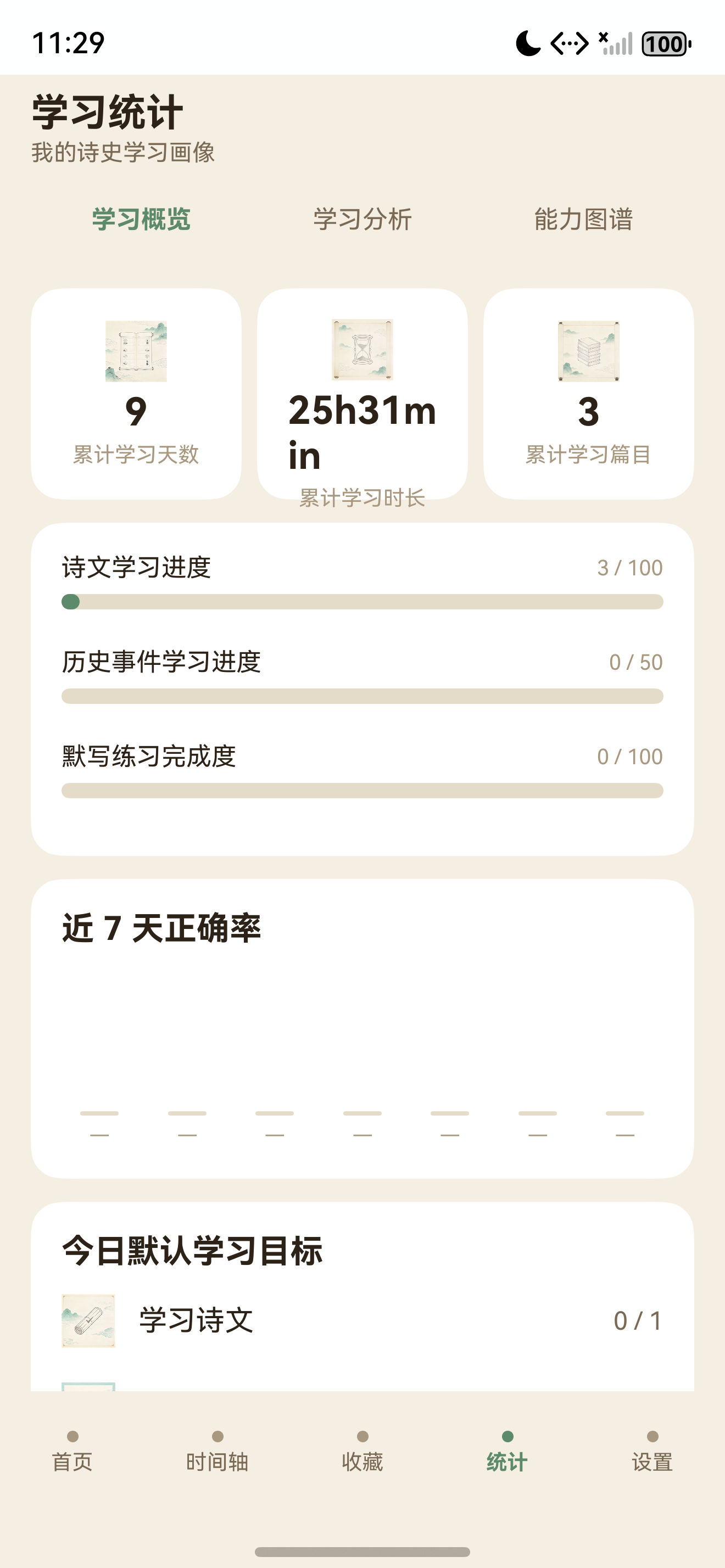
| 学习统计 | `StatsPage.ets` | `StatsStore` | 汇总学习天数、时长、篇目、练习、能力图谱 |
| 设置闭环 | `SettingPage.ets` | `SettingsStore` | 持久化主题、字号、对比度、减少动画等偏好 |
统计让用户看到“我学到了哪里”,设置让用户决定“我希望怎样学习”。这两条线合起来,才像一个完整的学习 App。
本篇要解决什么问题
统计与设置很容易被做成两个普通页面:统计页放几个数字,设置页放几个按钮。这样的页面能看,但不一定有工程价值。当前项目的处理方式更像一个闭环:
| 问题 | 当前实现 |
|---|---|
| 统计记录从哪里来 | 诗文阅读、史事阅读、练习作答、活跃时长写入 `StatsStore` |
| 每日数据怎么建模 | `DailyStat` 按日期保存当日行为 |
| 页面如何展示统计 | `StatsPage` 只展示 `StatsStore.summary()` 的聚合结果 |
| 能力图谱如何计算 | `computeAbilities()` 根据阅读量、练习量、准确率、时长综合估算 |
| 设置如何持久化 | `SettingsStore` 写入 Preferences 的 `settings` 分区 |
| 设置如何生效 | 主题调用 `setColorMode()`,字号和无障碍偏好通过 Store 订阅刷新 |
这说明第十二篇不是“做两个页面”,而是把学习行为和用户偏好都纳入本地状态体系。
DailyStat:以日期为核心的学习记录
学习统计的最小单位是 DailyStat:
export interface DailyStat {
  date: string;
  durationSec: number;
  poemIds: string[];
  eventIds: string[];
  practiceTotal: number;
  practiceRight: number;
  practiceWrong: number;
  practiceNext?: number;
  practiceBlank?: number;
  practiceFamous?: number;
  practiceEvent?: number;
}
这个模型的设计很克制。它没有记录每一次点击,而是按天聚合几个对学习有意义的指标:
| 字段 | 统计含义 |
|---|---|
| `date` | 日期 key,格式为 `YYYY-MM-DD` |
| `durationSec` | 当日学习时长 |
| `poemIds` | 当日阅读过的诗文,按 ID 去重 |
| `eventIds` | 当日阅读过的历史事件,按 ID 去重 |
| `practiceTotal` | 当日练习总数 |
| `practiceRight/practiceWrong` | 当日答对/答错数量 |
| `practiceNext/Blank/Famous/Event` | 不同题型的练习次数 |
为什么按天存,而不是存一条条行为日志?因为当前产品要展示的是学习画像,不是审计日志。按天聚合有几个好处:
- 数据量小,适合 Preferences。
- 查询简单,页面可以直接计算近 7 天、累计天数、连续天数。
- 隐私更友好,不记录过细行为。
- 未来迁移到数据库时也能作为日汇总表。
StatsStore:统计口径集中在 Store
StatsPage 的注释写得很直白:
/**
 * 学习统计 S15:3 标签 —— 学习概览 / 学习分析 / 能力图谱。
 * 页面只展示 StatsStore.summary() 的聚合结果,所有统计口径统一在 Store 中维护。
 */
这句话是第十二篇的核心。统计页不要自己算一套口径,否则很容易出现页面 A 和页面 B 数字不一致。项目把统计口径集中到 StatsStore,页面只消费一个 StatsSummary。
StatsSummary 包含:
| 聚合字段 | 说明 |
|---|---|
| `activeDays` | 有学习行为的天数 |
| `streakDays` | 连续学习天数 |
| `durationSec` | 累计学习时长 |
| `uniquePoems` | 去重后的学习诗文数 |
| `uniqueEvents` | 去重后的学习史事数 |
| `practice` | 练习总量、正确率和题型分布 |
| `progress` | 长期目标进度 |
| `today` | 今日目标进度 |
| `recent7` | 近 7 天正确率趋势 |
| `abilities` | 能力图谱 |
| `medals` | 成就徽章 |
这意味着 UI 页面不会散落各种 for 循环去重复计算。只要 Store 的 summary 口径稳定,统计页、个人页、未来的成就页都可以复用。
ensureToday:记录前先拿到当天桶
所有行为记录都会先进入当天记录:
private ensureToday(): DailyStat {
  const k: string = this.todayKey();
  let cur: DailyStat | undefined = this.records.find((it: DailyStat) => it.date === k);
  if (!cur) {
    cur = {
      date: k, durationSec: 0,
      poemIds: [], eventIds: [],
      practiceTotal: 0, practiceRight: 0, practiceWrong: 0,
      practiceNext: 0, practiceBlank: 0, practiceFamous: 0, practiceEvent: 0
    };
    this.records.push(cur);
    this.records.sort((a: DailyStat, b: DailyStat) => a.date.localeCompare(b.date));
  }
  return cur;
}
这个函数让上层记录函数都很简单。比如记录诗文阅读:
recordPoem(poemId: string): void {
  if (!poemId || poemId.length === 0) return;
  const t: DailyStat = this.ensureToday();
  if (t.poemIds.indexOf(poemId) < 0) {
    t.poemIds.push(poemId);
    this.notifyChanged();
  }
}
它会去重。一天内反复打开同一首诗,不会把“学习篇目”刷高。这一点非常重要:统计如果很容易被重复打开刷出来,用户看到的数据就没有学习意义。
史事记录也是同样逻辑:
recordEvent(eventId: string): void {
  if (!eventId || eventId.length === 0) return;
  const t: DailyStat = this.ensureToday();
  if (t.eventIds.indexOf(eventId) < 0) {
    t.eventIds.push(eventId);
    this.notifyChanged();
  }
}
recordPractice:练习结果既记录正确率,也记录题型
练习记录函数是:
recordPractice(right: boolean, type?: PracticeType): void {
  const t: DailyStat = this.ensureToday();
  t.practiceTotal += 1;
  if (right) t.practiceRight += 1; else t.practiceWrong += 1;
  if (type === 'blank') {
    t.practiceBlank = (t.practiceBlank || 0) + 1;
  } else if (type === 'famous') {
    t.practiceFamous = (t.practiceFamous || 0) + 1;
  } else if (type === 'event') {
    t.practiceEvent = (t.practiceEvent || 0) + 1;
  } else {
    t.practiceNext = (t.practiceNext || 0) + 1;
  }
  this.notifyChanged();
}
这段逻辑同时满足两类展示:
| 展示目标 | 对应数据 |
|---|---|
| 正确率 | `practiceRight / practiceTotal` |
| 题型分布 | `practiceNext/Blank/Famous/Event` |
第十篇的文试默写模块负责判题,第十二篇的统计模块负责吸收结果。这样练习模块不会知道统计页怎么展示,统计模块也不关心题目如何生成。
活跃时长:应用生命周期也能进入统计
EntryAbility 在生命周期中调用:
onCreate(...) {
  RawJsonLoader.bind(this.context);
  AppBootstrap.startActiveSession(this.context);
}

onForeground(): void {
  AppBootstrap.startActiveSession(this.context);
}

onBackground(): void {
  AppBootstrap.flushAll();
}

onDestroy(): void {
  AppBootstrap.flushAll();
}
StatsStore 内部维护一个活跃会话:
beginActiveSession(): void {
  if (this.activeStartMs > 0) return;
  this.activeStartMs = Date.now();
  this.startActivePersistTimer();
  this.bus.emit();
  this.publishDataVersion();
}
每 30 秒提交一次:
this.activePersistTimer = setInterval(() => {
  this.commitActiveSession();
}, 30000);
进入后台或销毁时再 flush。这样统计页的“学习时长”不需要用户点开始/结束按钮,而是基于应用活跃状态自动记录。对一个阅读学习 App 来说,这个交互更自然。
hydrate 前写入:处理启动竞态
统计 Store 有一个比收藏和笔记更复杂的点:
private pendingPersist: Promise<void> = Promise.resolve();
private dirtyBeforeHydrate: boolean = false;
如果在 hydrate() 完成前已经发生了写入,Store 不会直接丢掉本地内存状态,而是标记 dirtyBeforeHydrate。恢复完成后会合并:
if (this.dirtyBeforeHydrate && localRecords.length > 0) {
  this.records = this.mergeRecords(loaded, localRecords);
  this.dirtyBeforeHydrate = false;
  this.persist();
} else {
  this.records = this.normalizeRecords(loaded);
}
这个设计解决的是启动阶段的竞态。比如应用一启动就开始记录活跃时长,但 Preferences 还没有读完。如果简单用加载结果覆盖内存,就可能丢掉这段行为。mergeRecords() 把已加载数据和启动时产生的数据合并,保证统计连续。
normalizeRecord:兼容旧数据和异常数据
统计数据会被规范化:
private normalizeRecord(r: DailyStat): DailyStat {
  const total: number = Math.max(0, r.practiceTotal || 0);
  const right: number = Math.max(0, r.practiceRight || 0);
  const wrong: number = Math.max(0, r.practiceWrong || 0);
  let nextCount: number = Math.max(0, r.practiceNext || 0);
  ...
  if (nextCount + blankCount + famousCount + eventCount === 0 && total > 0) {
    nextCount = total;
  }
  return {
    date: r.date,
    durationSec: Math.max(0, r.durationSec || 0),
    poemIds: this.uniqueStrings(r.poemIds || []),
    eventIds: this.uniqueStrings(r.eventIds || []),
    practiceTotal: total,
    practiceRight: Math.min(right, total),
    practiceWrong: Math.min(wrong, total),
    practiceNext: nextCount,
    ...
  };
}
这里有几个保护:
| 保护 | 作用 |
|---|---|
| 数字不小于 0 | 避免异常负值 |
| `right` 不超过 `total` | 避免错误率超过边界 |
| ID 去重 | 避免重复阅读刷数据 |
| 旧数据兜底到 `practiceNext` | 兼容题型字段未出现前的历史记录 |
这类代码不像 UI 那样显眼,但它决定统计页能不能长期稳定运行。只要数据会持久化,就必须考虑旧版本数据和异常数据。
summary:统计页面的单一数据出口
统计汇总函数大致结构是:
summary(external?: Partial<StatsExternalCounts>): StatsSummary {
  const ext: StatsExternalCounts = {
    favoriteCount: external?.favoriteCount ?? 0,
    folderCount: external?.folderCount ?? 0,
    noteCount: external?.noteCount ?? 0,
    wrongCount: external?.wrongCount ?? 0
  };
  const records: DailyStat[] = this.list();
  const practice: PracticeAggResult = this.practiceStats();
  const uniquePoems: number = this.totalPoems();
  const uniqueEvents: number = this.totalEvents();
  const activeDays: number = this.totalDays();
  const durationSec: number = this.totalDurationSec() + this.liveDurationSec();
  const streakDays: number = this.computeStreakDays(records);
  ...
}
注意 external 参数。统计不只依赖 StatsStore 自己的数据,还要纳入收藏、文件夹、笔记、错题数:
this.statsStore.summary({
  favoriteCount: this.favStore.list().length,
  folderCount: this.favStore.listFolders().length,
  noteCount: this.noteStore.list().length,
  wrongCount: this.wrongStore.count()
});
这就是第十一篇和第十二篇的连接点。收藏、笔记、错题不是统计模块的一部分,但它们能影响学习画像和徽章。
能力图谱:不是精确测评,而是行为反馈
能力图谱由 computeAbilities() 计算:
private computeAbilities(uniquePoems: number, uniqueEvents: number, durationSec: number,
  practice: PracticeAggResult): StatsAbilityScore[] {
  const poemProgress: number = this.progressScore(uniquePoems, this.poemTarget);
  const eventProgress: number = this.progressScore(uniqueEvents, this.eventTarget);
  const practiceProgress: number = this.progressScore(practice.total, this.practiceTarget);
  const durationProgress: number = this.progressScore(Math.floor(durationSec / 60), 300);
  const acc: number = practice.accuracy;
  return [
    { label: '诗文理解', score: Math.round(poemProgress * 0.7 + durationProgress * 0.3) },
    { label: '字词注释', score: Math.round(poemProgress * 0.6 + acc * 0.4) },
    { label: '名句记忆', score: this.typeScore(practice.famous, practice.total, acc) },
    { label: '朝代脉络', score: Math.round(eventProgress * 0.7 + poemProgress * 0.3) },
    { label: '历史事件', score: this.typeScore(practice.event, practice.total, eventProgress) },
    { label: '地理关联', score: Math.min(100, uniqueEvents * 5 + uniquePoems * 2) },
    { label: '默写准确率', score: practiceProgress === 0 ? 0 : acc }
  ];
}
这里要注意定位:它不是严肃考试的能力测评,而是一个产品内反馈模型。它的价值是让用户知道自己最近更偏向哪类学习:
| 能力项 | 数据来源 |
|---|---|
| 诗文理解 | 阅读诗文数 + 学习时长 |
| 字词注释 | 阅读诗文数 + 练习准确率 |
| 名句记忆 | 名句题练习量 + 准确率 |
| 朝代脉络 | 史事阅读 + 诗文阅读 |
| 历史事件 | 史事题练习量 + 事件学习进度 |
| 地理关联 | 事件和诗文学习覆盖 |
| 默写准确率 | 练习正确率 |
这种能力图谱的目标不是给用户贴标签,而是帮助用户发现下一步可以补哪里。
StatsPage:三标签展示统计结果
统计页分三个标签:
| 标签 | 内容 |
|---|---|
| 学习概览 | 累计学习天数、时长、篇目、长期进度、近 7 天正确率、今日目标 |
| 学习分析 | 总题数、答对、答错、正确率、题型分布、近 7 天走势 |
| 能力图谱 | 多个能力项的进度条 |
页面内部最重要的函数是 summarize():
private summarize(): void {
  const summary: StatsSummary = this.statsStore.summary({
    favoriteCount: this.favStore.list().length,
    folderCount: this.favStore.listFolders().length,
    noteCount: this.noteStore.list().length,
    wrongCount: this.wrongStore.count()
  });
  this.summary = summary;
  this.metrics = this.buildMetrics(summary);
  this.progressRows = [...];
  this.trendRows = summary.recent7;
  this.goalRows = [...];
  this.practiceRows = [...];
  this.abilityRows = summary.abilities.map(...);
}
这是一种比较干净的 UI 写法:页面只把 summary 转成可渲染数组。它不把统计口径写在 Builder 里,也不在每个卡片里重复计算。
实时刷新也延续了第十一篇的模式:
private statsStore: StatsStore = StatsStore.instance();
private favStore: FavoriteStore = FavoriteStore.instance();
private noteStore: NoteStore = NoteStore.instance();
private wrongStore: WrongStore = WrongStore.instance();

this.statsStore.subscribe(this.listener);
this.favStore.subscribe(this.listener);
this.noteStore.subscribe(this.listener);
this.wrongStore.subscribe(this.listener);
统计页订阅多个 Store,是因为学习画像本身就是跨模块聚合结果。
SettingsStore:设置也是本地状态
设置模型定义为:
export interface AppSettings {
  theme: 'light' | 'dark' | 'system';
  fontScale: number;
  poemFontScale: number;
  highContrast: boolean;
  reduceMotion: boolean;
}
当前支持五类偏好:
| 设置 | 作用 |
|---|---|
| `theme` | 浅色、深色、跟随系统 |
| `fontScale` | 全局正文字号缩放 |
| `poemFontScale` | 诗文阅读字号缩放 |
| `highContrast` | 更高对比度 |
| `reduceMotion` | 减少动画 |
这些设置都写入 Preferences 的 settings 分区:
this.prefs = await PrefsStore.open(ctx, 'settings');恢复时逐项读取,并做安全值处理:
const t: string = await this.prefs.getString('theme', 'light');
const fs: number = await this.prefs.getNumber('fontScale', 1.0);
const pfs: number = await this.prefs.getNumber('poemFontScale', 1.0);
const hc: boolean = await this.prefs.getBool('highContrast', false);
const rm: boolean = await this.prefs.getBool('reduceMotion', false);
let safe: 'light' | 'dark' | 'system' = 'light';
if (t === 'dark') safe = 'dark';
else if (t === 'system') safe = 'system';
这里同样没有直接信任本地字符串。只有 dark/system 能覆盖默认,否则回到 light。
主题设置:从业务偏好同步到系统色彩模式
设置主题时,Store 会调用:
private applyColorMode(safe: 'light' | 'dark' | 'system'): void {
  if (!this.appCtx) return;
  let mode: ConfigurationConstant.ColorMode
    = ConfigurationConstant.ColorMode.COLOR_MODE_NOT_SET;
  if (safe === 'dark') mode = ConfigurationConstant.ColorMode.COLOR_MODE_DARK;
  else if (safe === 'light') mode = ConfigurationConstant.ColorMode.COLOR_MODE_LIGHT;
  this.appCtx.setColorMode(mode);
}这意味着“外观设置”不只是保存一个字符串,而是真的同步到了应用上下文色彩模式。system 对应 COLOR_MODE_NOT_SET,交给系统决定。
设置函数也很克制:
setTheme(t: string): void {
  let safe: 'light' | 'dark' | 'system' = 'light';
  if (t === 'dark') safe = 'dark';
  else if (t === 'system') safe = 'system';
  this.settings = { ... };
  this.applyColorMode(safe);
  this.bus.emit();
  if (this.prefs) this.prefs.putString('theme', safe);
}
先更新内存和 UI,再持久化。用户点击后能立刻看到选中状态。
字体与无障碍:学习类 App 必须认真做
字体设置页面有两个滑块:
| 设置 | 范围 | 作用 |
|---|---|---|
| 正文字号 | `0.85 ~ 1.4` | 影响普通页面文本 |
| 诗文字号 | `0.85 ~ 1.6` | 影响诗文阅读正文 |
代码示例:
Slider({
  value: this.poemFontScale,
  min: 0.85, max: 1.6, step: 0.05
})
.onChange((v: number) => {
  this.poemFontScale = v;
  this.store.setPoemFontScale(v);
})
诗文阅读和普通设置项的字号上限不同,这是一个很合理的产品细节。诗文正文是长时间阅读场景,应该给更大的可调空间。
无障碍页面则提供:
this.SwitchRow(
  '更高对比度',
  '加强文字与背景对比,便于弱视用户阅读',
  this.highContrast,
  (v: boolean) => { this.highContrast = v; this.store.setHighContrast(v); }
)

this.SwitchRow(
  '减少动画',
  '降低过渡动画,减少眩晕与干扰',
  this.reduceMotion,
  (v: boolean) => { this.reduceMotion = v; this.store.setReduceMotion(v); }
)
学习类 App 的使用时长通常比普通工具更长,所以可读性不是附加项。字号、对比度、减少动画这些设置,直接影响用户是否愿意长期使用。
SettingPage:入口保持克制
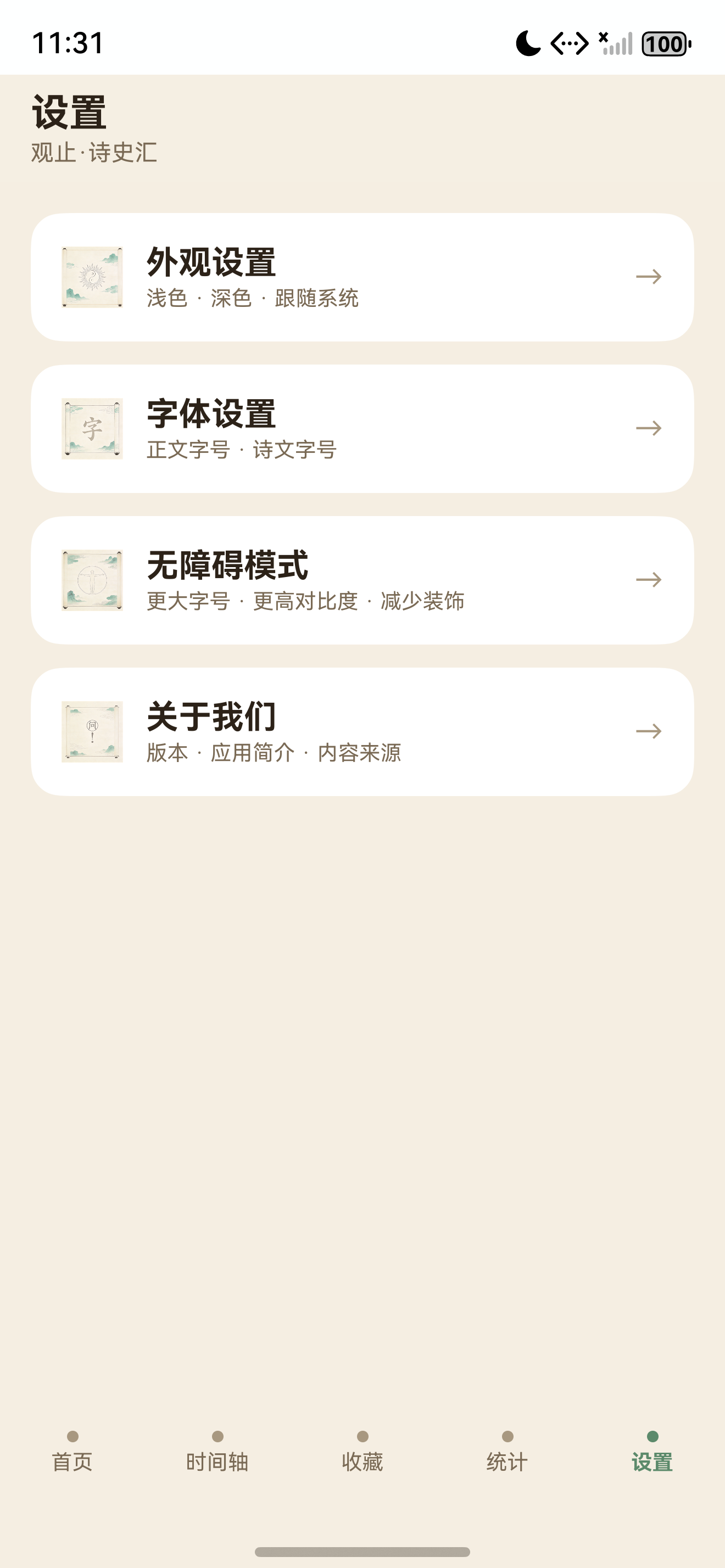
设置主页只有四项:
| 入口 | 页面 |
|---|---|
| 外观设置 | `SettingAppearancePage` |
| 字体设置 | `SettingFontPage` |
| 无障碍模式 | `SettingA11yPage` |
| 关于我们 | `SettingAboutPage` |
入口数据由数组驱动:
private entries: SettingEntry[] = [
  { url: AppRoutes.SETTING_APPEARANCE, label: '外观设置', hint: '浅色 · 深色 · 跟随系统' },
  { url: AppRoutes.SETTING_FONT, label: '字体设置', hint: '正文字号 · 诗文字号' },
  { url: AppRoutes.SETTING_A11Y, label: '无障碍模式', hint: '更大字号 · 更高对比度 · 减少装饰' },
  { url: AppRoutes.SETTING_ABOUT, label: '关于我们', hint: '版本 · 应用简介 · 内容来源' }
];
这种列表式入口很适合设置页:不需要复杂营销式页面,只要让用户快速找到要调整的项。
统计和设置如何共同构成闭环
第十二篇的闭环可以用一条链表示:
用户阅读/练习/停留
  -> StatsStore 写入 DailyStat
  -> StatsStore.summary() 聚合学习画像
  -> StatsPage 展示目标、趋势、能力图谱
  -> 用户根据反馈调整学习策略

用户调整主题/字号/无障碍
  -> SettingsStore 写入 Preferences
  -> 页面订阅刷新或系统色彩模式变化
  -> 阅读和练习体验变得更适合当前用户
统计回答“学得怎么样”,设置回答“怎样学更舒服”。它们最终都服务于持续学习。
当前实现的质量点
| 质量点 | 代码体现 |
|---|---|
| 统计口径集中 | `StatsStore.summary()` 统一输出 |
| 每日聚合 | `DailyStat` 按日期保存学习行为 |
| 去重统计 | `poemIds/eventIds` 用数组去重 |
| 启动竞态保护 | `dirtyBeforeHydrate` + `mergeRecords()` |
| 持久化有序 | `pendingPersist` 串行写入 |
| 兼容旧数据 | `normalizeRecord()` 兜底题型字段 |
| 跨模块画像 | 统计页聚合收藏、笔记、错题数量 |
| 设置持久化 | `SettingsStore` 写入 `settings` 分区 |
| 系统主题联动 | `setColorMode()` 同步色彩模式 |
| 可访问性考虑 | 字号、对比度、减少动画都有入口 |
可以继续优化的地方
系列文章到第十二篇不是项目的终点。统计与设置后续还能继续深化:
| 方向 | 优化方式 |
|---|---|
| 数据迁移 | 为 `DailyStat` 增加版本号,支持更复杂的行为结构 |
| 图表能力 | 未来可用自绘 Canvas 或图表组件展示趋势 |
| 设置全局化 | 把 `fontScale/highContrast/reduceMotion` 接入更多页面 token |
| 隐私与清除 | 增加一键清空统计、导出统计 |
| 学习目标 | 允许用户自定义每日目标和长期目标 |
| 间隔复习 | 根据错题 `wrongCount/lastAt` 生成复习建议 |
| 能力模型 | 把能力图谱从规则估算升级为更细的题目标签统计 |
这些优化都可以沿着当前架构扩展,不需要推翻已有 Store 设计。
验收清单
第十二篇对应功能可以这样验收:
- 打开 App 后停留一段时间,统计页学习时长会增长。
- 阅读诗文后,学习篇目数只增加一次;重复打开同一篇不重复计数。
- 阅读史事后,历史事件进度能更新。
- 完成练习后,总题数、答对、答错、正确率、题型分布能更新。
- 错题、收藏、笔记变化后,统计页的外部画像能同步刷新。
- 切换浅色/深色/跟随系统后,偏好能保存,重启后仍存在。
- 调整正文字号和诗文字号后,设置页示例文本能即时变化。
- 打开高对比度或减少动画后,对应偏好能写入 Store。
- 应用进入后台或关闭后,统计会 flush,不丢失最后一段活跃时长。
系列收束
从第一篇到第十二篇,《观止·诗史汇》的工程链路已经形成一个完整闭环:
内容包
  -> 首页/详情/时间轴/地理/文脉
  -> 练习题生成与作答
  -> 收藏、笔记、错题
  -> 学习统计与个性化设置
第十二篇的价值,是把前面所有行为收束成“可见的学习反馈”和“可调的学习体验”。对一个 HarmonyOS 本地学习应用来说,这比单纯堆页面更重要。用户不只是打开 App 看内容,而是在自己的设备上沉淀一套学习轨迹,并逐步把应用调成适合自己的阅读和练习环境。
到这里,观止·诗史汇的实战系列完成了从工程结构、内容建模、页面组织、练习闭环到本地状态与体验设置的全链路拆解。后续如果继续迭代,可以从 RDB、搜索、图表、同步和复习策略几个方向继续深化,但当前版本已经具备一个单机学习 App 的完整骨架。

讨论HarmonyOS开发技术,专注于API与组件、DevEco Studio、测试、元服务和应用上架分发等。
更多推荐

 9
9 0
0- 0


 已为社区贡献26条内容

所有评论(0)