【私房菜集 HarmonyOS ArkTS 实战系列 04】首页推荐流:今日热榜、最近浏览、热门精选与随机厨房
【私房菜集 HarmonyOS ArkTS 实战系列 04】首页推荐流:今日热榜、最近浏览、热门精选与随机厨房
第三篇已经把 514 道本地菜谱资产接入RecipeDataSource,探索页可以消费分类与菜品列表。本篇继续看首页推荐流:RecipeService.getHomeData()如何把内置菜谱、用户最近浏览状态和热门排序组合成首页数据,让首页承担“今天看什么、接着看什么、随便做什么”的入口职责。
一、首页不是静态展示页
菜谱应用的首页如果只放几张固定卡片,很快会变成装饰页。用户真正需要的是三个入口:
- 打开应用时,先看到一道足够醒目的推荐菜。
- 看过详情后,回到首页能继续找到最近浏览的菜。
- 不知道吃什么时,可以从热门精选或随机厨房继续探索。
“私房菜集”的首页数据不是写死在 Index.ets 里,而是由 RecipeService.getHomeData() 统一生成。首页只负责渲染 HomeData,具体哪道菜作为 hero、最近浏览来自哪里、热门精选怎么排序,都交给服务层处理。
二、源码对象总览
| 源码对象 | 作用 |
|---|---|
entry/src/main/ets/services/RecipeService.ets |
组合首页数据,提供 getHomeData()、排序、随机菜谱和浏览记录写入。 |
entry/src/main/ets/models/RecipeModels.ets |
定义 HomeData、RecipeSummary 等首页展示模型。 |
entry/src/main/ets/pages/Index.ets |
首页 HomeTab() 消费 homeData,渲染 hero、最近浏览和热门精选。 |
entry/src/main/ets/components/recipe/RecipeHeroCard.ets |
顶部大图推荐卡片。 |
entry/src/main/ets/components/recipe/RecipeGridCard.ets |
最近浏览和热门精选的宫格卡片。 |
这条链路的边界比较清楚:服务层决定数据,页面决定布局,组件决定单个卡片的视觉表达。
三、首页数据模型:一张 hero,两组列表
首页使用的模型是 HomeData:
export interface HomeData {
  hero: RecipeSummary;
  recent: RecipeSummary[];
  popular: RecipeSummary[];
}
它没有暴露完整 Recipe,而是使用 RecipeSummary:
export interface RecipeSummary {
  id: string;
  title: string;
  description: string;
  categoryId: string;
  categoryName: string;
  coverImage: string;
  durationMinutes: number;
  difficultyText: string;
  viewCount: number;
  tags: string[];
}
首页展示不需要完整用料、步骤和技巧。使用摘要模型可以让首页保持轻量,也避免大列表重复携带详情数据。
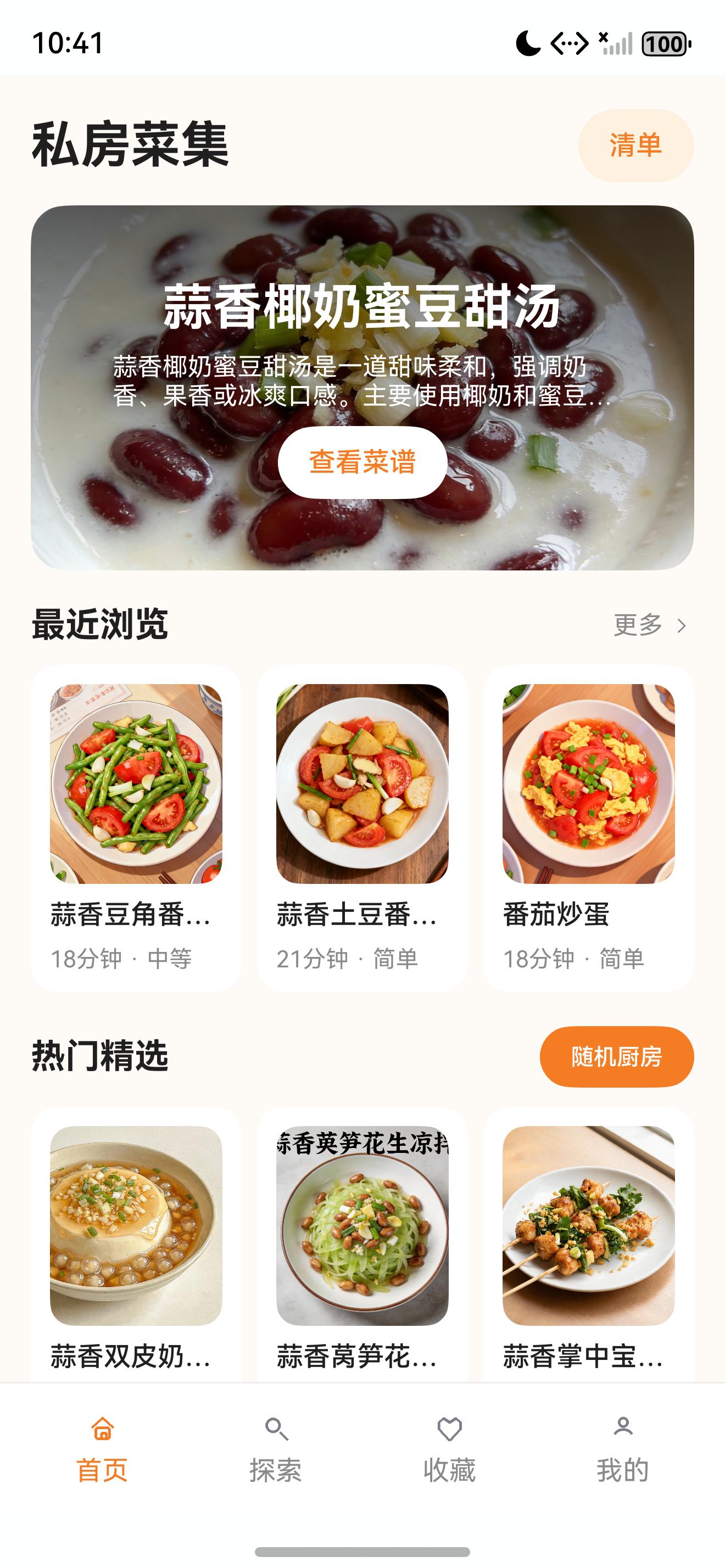
截图中能看到三段内容:
- 顶部大图:
homeData.hero - 最近浏览:
homeData.recent.slice(0, 3) - 热门精选:
homeData.popular
四、getHomeData:推荐流的组合入口
首页推荐流的核心代码如下:
async getHomeData(): Promise<HomeData> {
  const recipes = this.getAllRecipes();
  const sorted = this.sortSummaries(recipes.map((item: Recipe): RecipeSummary => recipeDataSource.toSummary(item)), 'popular');
  const sortedWithImages = sorted.filter((item: RecipeSummary) => this.hasCoverImage(item));
  const states = userStateRepository.listStates().filter(item => item.lastViewedAt > 0)
    .sort((a, b) => b.lastViewedAt - a.lastViewedAt);
  const recent: RecipeSummary[] = [];
  states.forEach(item => {
    const recipe = this.getAllRecipes().find(candidate => candidate.id === item.recipeId);
    if (recipe && recent.length < 6) {
      recent.push(recipeDataSource.toSummary(recipe));
    }
  });
  return {
    hero: sortedWithImages[0] ?? this.emptySummary(),
    recent: recent.length > 0 ? recent : sorted.slice(1, 4),
    popular: sorted.slice(4, 16)
  };
}
这段代码把首页拆成三层:
第一层是热门排序。所有菜谱先降维成 RecipeSummary,再按 viewCount 排序。
第二层是封面过滤。顶部 hero 必须有图,所以从 sortedWithImages 里取第一道菜。
第三层是最近浏览。用户已经看过详情时,优先用本地状态里的 lastViewedAt 生成最近浏览;没有浏览记录时,用热门排序里的第 2 到第 4 道菜兜底。
这个兜底很重要。新用户第一次打开应用时还没有最近浏览,如果首页直接空出一块,体验会显得不完整。当前实现让首页在无状态时也能展示内容,而一旦产生浏览记录,就自然切换成个性化列表。
五、热门排序:先把数据变成 Summary
排序入口是 sortSummaries():
private sortSummaries(recipes: RecipeSummary[], sortKey: RecipeSortKey): RecipeSummary[] {
  const next = recipes.concat([]);
  if (sortKey === 'shortTime') {
    return next.sort((a, b) => a.durationMinutes - b.durationMinutes);
  }
  if (sortKey === 'latest') {
    return next.sort((a, b) => b.id.localeCompare(a.id));
  }
  return next.sort((a, b) => b.viewCount - a.viewCount);
}
首页传入的是 'popular',因此使用浏览热度降序。这里没有直接修改原数组,而是先 concat([]) 拷贝一份,避免排序影响外部调用者。
第 03 篇里提到,内置菜谱的 viewCount 在 RecipeDataSource.mapDish() 里按稳定算法生成:
viewCount: 1200 + ((index * 137) % 16000)
这不是用户真实浏览统计,而是内置内容的展示热度字段。它的作用是让首页、探索页在没有后端统计服务时仍然具备稳定排序依据。
六、最近浏览:本地状态参与首页推荐
首页的“最近浏览”来自 UserStateRepository:
const states = userStateRepository.listStates().filter(item => item.lastViewedAt > 0)
  .sort((a, b) => b.lastViewedAt - a.lastViewedAt);
const recent: RecipeSummary[] = [];
states.forEach(item => {
  const recipe = this.getAllRecipes().find(candidate => candidate.id === item.recipeId);
  if (recipe && recent.length < 6) {
    recent.push(recipeDataSource.toSummary(recipe));
  }
});
这段逻辑说明首页不是纯内容页,它已经开始接入用户行为闭环。详情页记录浏览后,首页再次刷新就可以显示最近浏览。
浏览记录的写入在 recordView():
async recordView(recipeId: string): Promise<void> {
  const state = userStateRepository.getState(recipeId);
  userStateRepository.saveState({
    recipeId: state.recipeId,
    isFavorite: state.isFavorite,
    isInTodoList: state.isInTodoList,
    todoOrder: state.todoOrder,
    lastViewedAt: Date.now(),
    note: state.note,
    updatedAt: state.updatedAt
  });
}
这里复用了同一份用户状态实体,浏览记录、收藏、想做清单、笔记都围绕 recipeId 维护。第 07 篇会专门拆这套 Preferences 本地状态仓。
七、首页生命周期:首次进入全量刷新,返回时按 Tab 刷新
Index.ets 首次进入时会初始化服务并刷新全部主入口数据:
async aboutToAppear() {
  recipeService.init(getContext(this) as common.UIAbilityContext);
  await this.refreshData();
}

private async refreshData() {
  await this.refreshHomeData();
  await this.refreshExploreData();
  await this.refreshFavoriteData();
  await this.refreshMineData();
}

private async refreshHomeData(): Promise<void> {
  this.homeData = await recipeService.getHomeData();
}
从详情页返回主页面时,onPageShow() 只刷新当前 Tab:
async onPageShow() {
  await this.refreshCurrentTab();
}

private async refreshCurrentTab(): Promise<void> {
  if (this.selectedTab === 'home') {
    await this.refreshHomeData();
  } else if (this.selectedTab === 'explore') {
    await this.refreshExploreData();
  } else if (this.selectedTab === 'favorite') {
    await this.refreshFavoriteData();
  } else {
    await this.refreshMineData();
  }
}
这正好支撑最近浏览场景:在首页点进详情,详情页记录浏览,返回首页后 refreshHomeData() 重新读取 lastViewedAt,最近浏览区就能更新。
八、HomeTab:页面只消费 HomeData
首页 Builder 并不自己查 rawfile,也不自己读 Preferences。它只根据 homeData 渲染三个区域。
顶部标题和清单入口:
Row() {
  Text('私房菜集')
    .fontSize(26)
    .fontWeight(FontWeight.Bold)
    .fontColor($r('app.color.text_primary'))
  Blank()
  Button('清单')
    .height(38)
    .fontSize(14)
    .fontColor($r('app.color.primary_orange'))
    .backgroundColor($r('app.color.primary_orange_light'))
    .onClick(() => {
      this.switchTab('favorite');
      this.selectedFavoriteTab = 'todo';
    })
}
清单按钮没有进入新路由,而是切换主 Tab 和收藏子 Tab。它体现了首页作为主入口宿主的一部分:轻量入口留在主页面内部,二级功能才走路由。
顶部 hero 区:
if (this.homeData.hero.id.length > 0) {
  Column() {
    RecipeHeroCard({ recipe: this.homeData.hero, onRecipeClick: (id: string) => this.openDetail(id) })
  }
  .padding({ left: 16, right: 16 })
}
最近浏览区:
SectionHeader({ title: '最近浏览', actionText: '更多', onAction: () => { this.switchTab('explore'); } })
if (this.homeData.recent.length === 0) {
  EmptyStateView({ text: '最近看过的菜会出现在这里', actionText: '去探索', onAction: () => { this.switchTab('explore'); } })
} else {
  Grid() {
    ForEach(this.homeData.recent.slice(0, 3), (recipe: RecipeSummary) => {
      GridItem() {
        RecipeGridCard({ recipe, onRecipeClick: (id: string) => this.openDetail(id) })
      }
    }, (recipe: RecipeSummary) => recipe.id)
  }
  .columnsTemplate('1fr 1fr 1fr')
  .columnsGap(8)
  .height(170)
}
热门精选区:
Row() {
  Text('热门精选')
    .fontSize(18)
    .fontWeight(FontWeight.Bold)
    .fontColor($r('app.color.text_primary'))
  Blank()
  Button('随机厨房')
    .height(32)
    .fontSize(12)
    .fontWeight(FontWeight.Medium)
    .fontColor(Color.White)
    .backgroundColor($r('app.color.primary_orange'))
    .borderRadius(16)
    .onClick(() => this.openRandom())
}
这三段页面代码都只消费摘要模型。首页不需要知道菜谱完整步骤,不需要知道 rawfile 的 JSON 结构,也不需要自己维护最近浏览排序。
九、RecipeHeroCard:大图推荐卡片
顶部大图卡片由 RecipeHeroCard 承担:
Stack({ alignContent: Alignment.BottomStart }) {
  RecipeImage({ src: this.recipe.coverImage, title: this.recipe.title, heightValue: 190, radius: 18 })
  Column({ space: 8 }) {
    Text(this.recipe.title)
      .fontSize(26)
      .fontWeight(FontWeight.Bold)
      .fontColor(Color.White)
      .maxLines(1)
      .textOverflow({ overflow: TextOverflow.Ellipsis })
    Text(this.recipe.description)
      .fontSize(13)
      .fontColor(Color.White)
      .maxLines(2)
      .textOverflow({ overflow: TextOverflow.Ellipsis })
    Button('查看菜谱')
      .height(38)
      .fontSize(14)
      .fontColor($r('app.color.primary_orange'))
      .backgroundColor(Color.White)
      .onClick(() => this.onRecipeClick(this.recipe.id))
  }
  .width('100%')
  .padding(38)
  .linearGradient({
    angle: 0,
    colors: [['#00000000', 0.0], ['#99000000', 1.0]]
  })
}
.width('100%')
.height(190)
.borderRadius(18)
.clip(true)
.onClick(() => this.onRecipeClick(this.recipe.id))
这个组件负责三件事:
- 用
RecipeImage显示封面图。 - 用渐变遮罩保证标题和描述在图片上可读。
- 点击卡片或按钮都进入详情页。
大图卡片不直接读 RecipeService,因此后续首页推荐算法变化时,组件不用改。
十、RecipeGridCard:最近浏览与热门精选复用
最近浏览和热门精选使用同一个 RecipeGridCard:
Column({ space: 8 }) {
  RecipeImage({ src: this.recipe.coverImage, title: this.recipe.title, heightValue: 104, radius: 12 })
  Text(this.recipe.title)
    .fontSize(14)
    .fontWeight(FontWeight.Medium)
    .fontColor($r('app.color.text_primary'))
    .maxLines(1)
    .textOverflow({ overflow: TextOverflow.Ellipsis })
    .constraintSize({ minWidth: 0 })
    .width('100%')
  Text(`${this.recipe.durationMinutes}分钟 · ${this.recipe.difficultyText}`)
    .fontSize(12)
    .fontColor($r('app.color.text_secondary'))
    .maxLines(1)
    .textOverflow({ overflow: TextOverflow.Ellipsis })
    .width('100%')
    .constraintSize({ minWidth: 0 })
}
.width('100%')
.constraintSize({ minWidth: 0 })
.padding(10)
.backgroundColor(this.selected ? $r('app.color.primary_orange_light') : $r('app.color.card_bg'))
.borderRadius(14)
.onClick(() => this.onRecipeClick(this.recipe.id))
它只展示首页列表所需的字段:封面、标题、时长和难度。描述在小卡片上被省略,避免三列布局过挤。
这里也能看到 ArkUI 列表卡片的一个细节:标题和副标题都设置了 maxLines(1)、TextOverflow.Ellipsis 和 constraintSize({ minWidth: 0 })。菜名长度不固定,如果不做约束,三列卡片很容易出现文本挤压或溢出。
十一、随机厨房:从首页进入不确定探索
首页右侧的“随机厨房”按钮调用 openRandom():
private async openRandom(): Promise<void> {
  const recipe = await recipeService.getRandomRecipe();
  this.openDetail(recipe.id);
}
服务层实现如下:
async getRandomRecipe(): Promise<RecipeSummary> {
  const recipes = this.getAllRecipes();
  if (recipes.length === 0) {
    return this.emptySummary();
  }
  const index = Math.floor(Math.random() * recipes.length);
  return recipeDataSource.toSummary(recipes[index]);
}
这不是复杂推荐算法,但它很好地补足了菜谱应用的一个常见场景:没有明确搜索目标,只想随便看看做什么。随机厨房仍然走 RecipeSummary -> openDetail(recipe.id) 这条链路,和普通卡片点击保持一致。
十二、运行与验收
本篇截图来自本机 HarmonyOS 模拟器真实运行页面,操作路径如下:
hdc shell aa start -a EntryAbility -b com.lesson.myapplicationsfcj
hdc shell uitest uiInput click 186 2635
hdc shell snapshot_display -f /data/local/tmp/sfcj_04_home_recommend.jpeg
hdc file recv /data/local/tmp/sfcj_04_home_recommend.jpeg .\SFCJ\screenshots\04_home_recommend_raw.jpeg
验收重点可以按下面清单检查:
- 首页顶部显示应用标题和清单入口。
- hero 区展示真实菜品图片、标题、描述和“查看菜谱”按钮。
- 最近浏览区有内容时展示三列卡片,没有记录时显示空状态。
- 热门精选区展示多张
RecipeGridCard,每张卡片包含图片、菜名、时长和难度。 - 点击 hero、最近浏览或热门精选卡片能进入详情页。
- 点击“随机厨房”能进入某一道随机菜谱详情。
- 从详情页返回首页后,最近浏览区能根据
lastViewedAt刷新。
十三、问题复盘:推荐流先保守,边界要清楚
首页推荐很容易过早复杂化,例如一开始就设计多维打分、口味偏好、时间段推荐和营养标签。但当前项目的首页更适合先保守落地:用稳定热度作为热门排序,用本地浏览状态作为个性化入口,用随机厨房补充探索行为。
这种设计的好处是边界清晰:
- 内置内容来自
RecipeDataSource。 - 推荐组合在
RecipeService.getHomeData()。 - 最近浏览由
UserStateRepository提供。 - 首页只消费
HomeData。 - 卡片组件只负责展示
RecipeSummary。
后续如果要增强推荐能力,可以在 getHomeData() 内继续演进,不需要推翻首页布局和卡片组件。例如可以按用餐时间调整 hero,可以把饮食偏好接入热门精选过滤,也可以把最近浏览从 6 条扩展成带权重的推荐队列。
十四、质量补强:推荐流要能被复核
首页推荐流看起来是视觉页面,但高质量实现不能只停留在“页面能展示”。它需要满足三类可复核条件。
第一类是数据来源可复核。hero、recent、popular 都来自 RecipeService.getHomeData(),页面没有在 UI 层临时拼接推荐列表。这样排查问题时可以先看服务层返回值,再看页面渲染,而不是在多个 Builder 里追数据来源。
第二类是空状态可复核。新用户没有最近浏览记录时,recent 会回退到热门排序中的第 2 到第 4 条;菜谱没有封面时,hero 会优先从 sortedWithImages 里选有图菜谱。首页不会因为本地状态为空而出现大面积空白。
第三类是交互链路可复核。首页卡片、hero 按钮和随机厨房都走 openDetail(recipe.id),进入详情页后由 recordView() 写入 lastViewedAt,返回首页再触发 refreshHomeData()。这条链路把“点击菜谱 -> 记录浏览 -> 首页最近浏览更新”串成闭环,而不是只展示静态列表。
把这三类条件落到文章和代码里,审核时也更容易判断当前实现不是界面截图堆叠,而是有真实工程链路支撑的功能拆解。
十五、下一篇衔接
首页解决的是“今天看什么”。但当用户有明确目标时,更需要探索和搜索能力。下一篇进入本地检索方案:分类、热词、搜索历史和关键词匹配如何在没有后端服务的单机应用里组成可维护的搜索链路。

讨论HarmonyOS开发技术,专注于API与组件、DevEco Studio、测试、元服务和应用上架分发等。
更多推荐
 6
6 0
0- 0


 已为社区贡献26条内容

所有评论(0)