【私房菜集 HarmonyOS ArkTS 实战系列 05】探索与搜索:分类、热词、关键词匹配的本地检索方案
【私房菜集 HarmonyOS ArkTS 实战系列 05】探索与搜索:分类、热词、关键词匹配的本地检索方案
第 04 篇拆解了首页推荐流:首页负责回答“今天看什么”。当用户已经有明确目标时,入口就要从推荐切到检索。本篇进入探索与搜索链路,重点看 SearchService 如何在没有后端搜索服务的单机应用里完成关键词匹配、搜索历史、热词入口、分类列表和搜索结果展示。
一、搜索解决的是确定性找菜
首页推荐适合“随便看看”,搜索适合“明确要找”。菜谱应用常见的确定性需求有几类:
- 按菜名找,比如输入“鸡”找到番茄炒蛋、鸡蛋小炒、鸡腿肉小炒。
- 按食材找,比如输入“番茄”“鸡蛋”“青椒”。
- 按分类找,比如家常菜、小吃夜宵、汤羹炖品。
- 按做法或描述找,比如“蒜香”“凉拌”“下饭”。
“私房菜集”是单机应用,当前没有后端搜索服务,也没有全文索引引擎。它的搜索方案并不追求复杂算法,而是先把检索边界做清楚:输入归一化、空关键词保护、搜索历史持久化、字段匹配、结果降维、列表渲染和详情跳转。
二、源码对象总览
| 源码对象 | 作用 |
|---|---|
entry/src/main/ets/services/SearchService.ets |
本地搜索入口,负责关键词归一化、热词、历史记录和字段匹配。 |
entry/src/main/ets/pages/Index.ets |
探索 Tab,承载搜索框、搜索记录、分类宫格和搜索结果列表。 |
entry/src/main/ets/pages/SearchResultPage.ets |
独立搜索结果页,接收路由关键词并展示列表结果。 |
entry/src/main/ets/pages/CategoryRecipeListPage.ets |
分类菜谱页,按 categoryId 展示某一类菜谱。 |
entry/src/main/ets/components/recipe/RecipeListItem.ets |
搜索结果和分类列表复用的菜谱列表项组件。 |
这条链路的核心思路是:服务层只返回 RecipeSummary[],页面负责搜索状态和结果展示,列表组件只负责单条菜谱的视觉表达。
三、结果模型:搜索页不拿完整 Recipe
搜索结果使用的模型定义在 RecipeModels.ets:
export type SearchResultType = 'dish' | 'ingredient' | 'recipe';

export interface SearchResultData {
  keyword: string;
  type: SearchResultType;
  results: RecipeSummary[];
}
SearchResultType 给搜索留出了三种入口:
dish:综合搜索,匹配菜名、描述、分类、标签和食材。ingredient:偏食材搜索,只看用料名称。recipe:偏做法搜索,看描述和步骤。
当前探索页默认使用 dish,独立搜索结果页也使用 dish。虽然页面暂时没有把三种类型做成 Tab,但模型已经把边界留好。后续如果要扩展成“菜品 / 食材 / 做法”三类结果,不需要改搜索服务的核心结构。
四、SearchService.search:先归一化,再查本地菜谱
搜索入口如下:
async search(keyword: string, type: SearchResultType): Promise<SearchResultData> {
  const normalized = keyword.trim();
  if (!normalized) {
    return {
      keyword,
      type,
      results: []
    };
  }
  const results = recipeService.getAllRecipes()
    .filter((item: Recipe) => this.matchRecipe(item, normalized, type))
    .map((item: Recipe): RecipeSummary => recipeService.toSummary(item))
    .slice(0, 100);
  return {
    keyword: normalized,
    type,
    results
  };
}
这段代码有几个值得注意的点。
第一,关键词先 trim()。用户输入前后空格时,不应该触发无效搜索,也不应该把带空格的内容写进搜索历史。
第二,空关键词直接返回空结果。搜索页可以根据空结果展示“输入关键词开始搜索”或清空状态,而不是用空字符串扫完整个菜谱库。
第三,搜索结果先从完整 Recipe 映射成 RecipeSummary。列表展示只需要封面、标题、描述、分类、时长、难度和热度,不需要携带完整用料、步骤、技巧。
第四,结果最多取 100 条。当前内置菜谱规模是 514 道,直接遍历没有性能压力,但列表展示仍然需要上限,避免一个过宽泛关键词让页面一次性渲染太多节点。
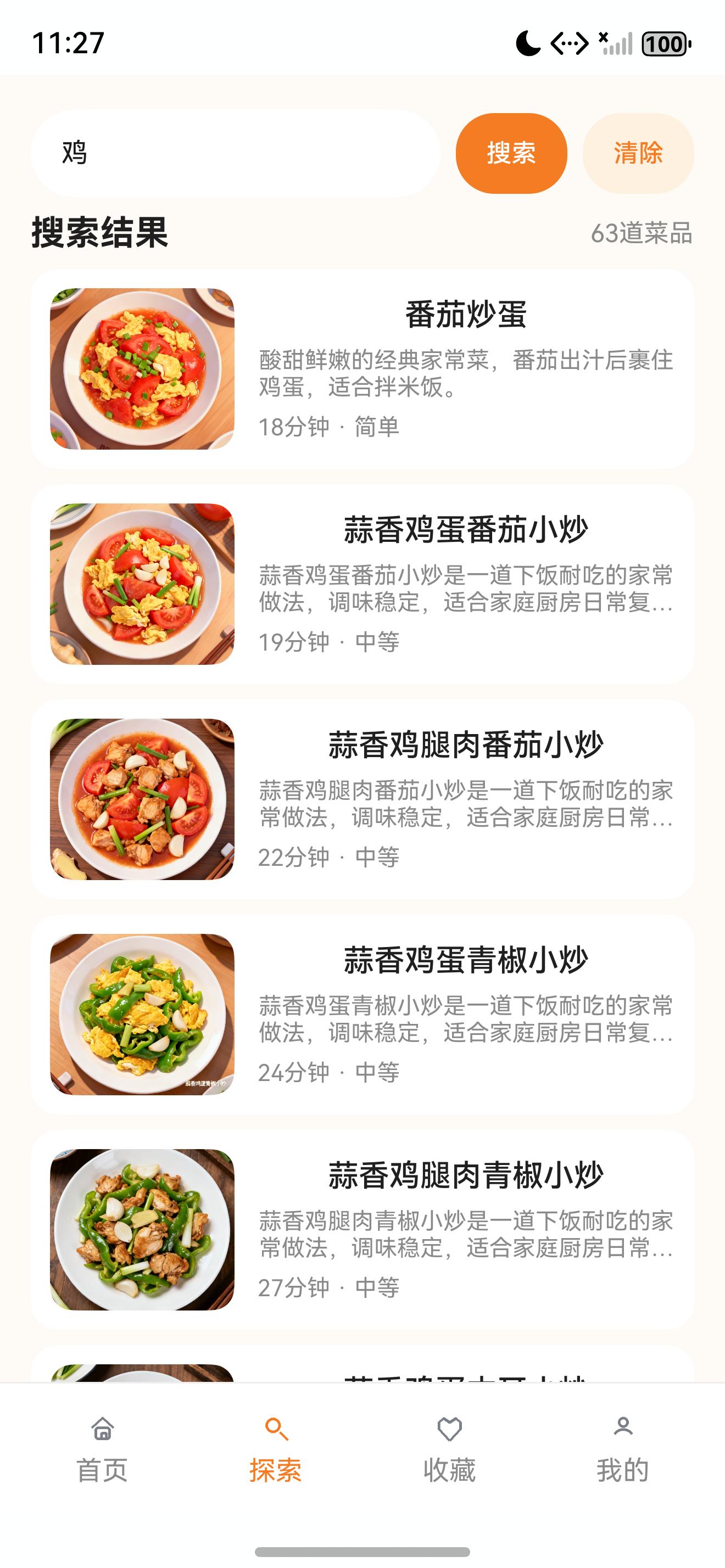
截图中使用关键词“鸡”,页面返回 63 道菜品,能看到番茄炒蛋、蒜香鸡蛋番茄小炒、蒜香鸡腿肉番茄小炒等结果。这说明搜索不是只匹配标题,也能命中食材字段。
五、matchRecipe:字段匹配要有明确边界
真正的匹配逻辑集中在 matchRecipe():
private matchRecipe(recipe: Recipe, keyword: string, type: SearchResultType): boolean {
  if (type === 'ingredient') {
    return recipe.ingredients.some(item => item.name.includes(keyword));
  }
  if (type === 'recipe') {
    return recipe.description.includes(keyword) || recipe.steps.some(item => item.content.includes(keyword));
  }
  return recipe.title.includes(keyword) ||
    recipe.description.includes(keyword) ||
    recipe.categoryName.includes(keyword) ||
    recipe.tags.some(item => item.includes(keyword)) ||
    recipe.ingredients.some(item => item.name.includes(keyword));
}
这段代码把不同搜索意图分开了。
ingredient 只查用料名称,适合“家里有某种食材,想找能做什么”的场景。
recipe 查描述和步骤,适合找做法特征,比如“凉拌”“蒜香”“炖”“煎”。
dish 是综合搜索,覆盖菜名、描述、分类、标签和食材。探索页用它作为默认搜索类型,因为用户在主搜索框里输入关键词时,通常不希望先选择搜索类型。
当前实现使用 String.includes(),优点是简单、可解释、调试成本低。它的边界也很明确:不做拼音、不做同义词、不做分词权重。后续如果要增强搜索,可以在 matchRecipe() 这一层替换策略,而不用重写页面。
六、热词和历史:让搜索不只靠输入框
搜索服务提供固定热词:
getHotKeywords(): string[] {
  return ['红烧肉', '番茄炒蛋', '麻婆豆腐', '鸡翅', '土豆丝', '排骨汤'];
}
探索页实际展示的热词来自 RecipeService.getExploreData():
async getExploreData(sortKey: RecipeSortKey = 'popular'): Promise<ExploreData> {
  const recipes = this.getAllRecipes().map((item: Recipe): RecipeSummary => recipeDataSource.toSummary(item));
  return {
    categories: recipeDataSource.loadCategories().slice(0, 9),
    hotKeywords: ['红烧肉', '番茄炒蛋', '鸡翅', '汤羹', '夜宵', '低脂'],
    recipes: sortKey === 'popular' ? this.pickRandomSummaries(recipes, 16) : this.sortSummaries(recipes, sortKey).slice(0, 16)
  };
}
这两处可以继续统一,但当前职责已经清楚:搜索服务知道通用搜索能力,探索数据知道探索页要展示哪些入口。
搜索历史写在本地 Preferences 中:
const SEARCH_HISTORY_KEY: string = 'search_history';

getSearchHistory(): string[] {
  const raw = localStoreAdapter.loadString(SEARCH_HISTORY_KEY);
  if (!raw) {
    return [];
  }
  try {
    return JSON.parse(raw) as string[];
  } catch (_) {
    return [];
  }
}
解析失败时返回空数组,这是本地状态常见的防御策略。Preferences 里存的是字符串,一旦 JSON 被异常内容污染,页面不应该因此崩溃。
新增历史时会去重并限制长度:
addSearchHistory(keyword: string): string[] {
  const normalized = keyword.trim();
  if (!normalized) {
    return this.getSearchHistory();
  }
  const next = [normalized].concat(this.getSearchHistory().filter(item => item !== normalized)).slice(0, 12);
  localStoreAdapter.saveString(SEARCH_HISTORY_KEY, JSON.stringify(next));
  return next;
}
新的关键词放在最前面,旧的同名关键词会被移除,最多保留 12 条。这样搜索记录既能保留最近行为,又不会无限增长。
七、探索页状态:搜索结果和默认探索分开
Index.ets 中探索页的状态如下:
@State exploreData: ExploreData = {
  categories: [],
  hotKeywords: [],
  recipes: []
};
@State exploreKeyword: string = '';
@State exploreSearchResults: RecipeSummary[] = [];
@State searchRecords: string[] = [];
@State hasExploreSearch: boolean = false;
这里把默认探索数据和搜索结果分开维护。
exploreData:默认探索页,包含分类、热词和推荐菜品。exploreKeyword:当前输入框内容。exploreSearchResults:搜索后的结果列表。searchRecords:本地搜索历史。hasExploreSearch:是否处于搜索结果模式。
刷新探索数据时,会同时读取搜索历史并执行一次搜索状态刷新:
private async refreshExploreData(): Promise<void> {
  this.exploreData = await recipeService.getExploreData('popular');
  this.searchRecords = searchService.getSearchHistory();
  await this.runExploreSearch();
}
这个设计避免了一个常见问题:返回探索页后,分类和推荐列表刷新了,但搜索历史还是旧的。探索页作为主 Tab,必须把默认探索和搜索状态一起管理。
八、提交搜索:空关键词保护和历史写入
探索页的搜索输入由 TextInput 和按钮组成:
TextInput({ text: this.exploreKeyword, placeholder: '搜索菜品' })
  .layoutWeight(1)
  .height(46)
  .fontSize(14)
  .backgroundColor($r('app.color.card_bg'))
  .borderRadius(23)
  .onChange((value: string) => {
    this.exploreKeyword = value;
    if (value.trim().length === 0) {
      this.clearExploreSearch();
    } else {
      this.exploreKeyword = value;
    }
  })
Button('搜索')
  .width(58)
  .height(42)
  .fontSize(13)
  .backgroundColor($r('app.color.primary_orange'))
  .onClick(() => this.submitExploreSearch())
Button('清除')
  .width(58)
  .height(42)
  .fontSize(13)
  .fontColor($r('app.color.primary_orange'))
  .backgroundColor($r('app.color.primary_orange_light'))
  .onClick(() => this.clearExploreSearch())
提交逻辑如下:
private async submitExploreSearch(): Promise<void> {
  const keyword = this.exploreKeyword.trim();
  if (keyword.length === 0) {
    this.clearExploreSearch();
    return;
  }
  this.searchRecords = searchService.addSearchHistory(keyword);
  this.hasExploreSearch = true;
  await this.runExploreSearch();
}
空关键词不会进入搜索历史,也不会触发无意义结果。有效关键词会先写历史,再切换到搜索结果模式,最后执行搜索。
搜索执行函数也有空关键词保护:
private async runExploreSearch(): Promise<void> {
  if (this.exploreKeyword.trim().length === 0) {
    this.exploreSearchResults = [];
    this.hasExploreSearch = false;
    return;
  }
  const data = await searchService.search(this.exploreKeyword, 'dish');
  this.exploreSearchResults = data.results;
  this.hasExploreSearch = true;
}
这让输入框清空、点击清除、页面刷新三种路径都能回到默认探索状态。
九、搜索结果渲染:复用 RecipeListItem
当 hasExploreSearch 为 true 时,探索页渲染搜索结果:
if (this.hasExploreSearch) {
  Row() {
    Text('搜索结果')
      .fontSize(18)
      .fontWeight(FontWeight.Bold)
      .fontColor($r('app.color.text_primary'))
    Blank()
    Text(`${this.exploreSearchResults.length}道菜品`)
      .fontSize(13)
      .fontColor($r('app.color.text_secondary'))
  }
  .width('100%')
  if (this.exploreSearchResults.length === 0) {
    EmptyStateView({ text: '没找到相关菜品', actionText: '清除搜索', onAction: () => { this.clearExploreSearch(); } })
  } else {
    ForEach(this.exploreSearchResults, (recipe: RecipeSummary) => {
      RecipeListItem({ recipe, onRecipeClick: (id: string) => this.openDetail(id) })
    }, (recipe: RecipeSummary) => recipe.id)
  }
}
截图中的“鸡 / 搜索结果 / 63 道菜品”就来自这段逻辑。每条结果使用 RecipeListItem,因此搜索结果、分类列表和其他列表入口的视觉结构保持一致。
RecipeListItem 展示的字段非常克制:
Row({ space: 12 }) {
  Column() {
    RecipeImage({ src: this.recipe.coverImage, title: this.recipe.title, heightValue: 84, radius: 12 })
  }
  .width(96)
  Column({ space: 7 }) {
    Text(this.recipe.title)
      .fontSize(16)
      .fontWeight(FontWeight.Medium)
      .fontColor($r('app.color.text_primary'))
      .maxLines(1)
      .textOverflow({ overflow: TextOverflow.Ellipsis })
      .constraintSize({ minWidth: 0 })
    Text(this.recipe.description)
      .fontSize(12)
      .fontColor($r('app.color.text_secondary'))
      .maxLines(2)
      .textOverflow({ overflow: TextOverflow.Ellipsis })
      .constraintSize({ minWidth: 0 })
    Row() {
      Text(`${this.recipe.durationMinutes}分钟 · ${this.recipe.difficultyText}`)
        .fontSize(12)
        .fontColor($r('app.color.text_secondary'))
        .layoutWeight(1)
    }
    .width('100%')
  }
  .layoutWeight(1)
  .constraintSize({ minWidth: 0 })
}
列表项不展示过多信息,是为了保证搜索页能快速扫描:图、菜名、描述、时间、难度就够了。完整用料和步骤留给详情页。
十、分类页:另一条确定性检索入口
探索页不只有搜索框,还有分类宫格。分类点击后进入 CategoryRecipeListPage:
private openCategory(categoryId: string): void {
  router.pushUrl({
    url: AppRoutes.CATEGORY,
    params: { categoryId }
  });
}
全部分类入口会进入侧边栏模式:
private openAllCategories(): void {
  router.pushUrl({
    url: AppRoutes.CATEGORY,
    params: {
      mode: 'all',
      categoryId: this.exploreData.categories[0]?.id ?? ''
    }
  });
}
分类页初始化时读取路由参数:
async aboutToAppear() {
  recipeService.init(getContext(this) as common.UIAbilityContext);
  const params = router.getParams() as CategoryParams;
  this.isAllMode = params.mode === 'all';
  this.categories = await recipeService.getCategories();
  const firstCategoryId = this.categories[0]?.id ?? '';
  this.selectedCategoryId = params.categoryId ?? firstCategoryId;
  if (this.selectedCategoryId.length === 0) {
    this.selectedCategoryId = firstCategoryId;
  }
  await this.loadCategory(this.selectedCategoryId);
  if (this.isAllMode) {
    this.title = '全部分类';
  }
}
分类列表本质上也是本地检索,只是关键词变成了稳定的 categoryId。它不需要匹配多个字段,直接调用 recipeService.getCategoryRecipes(categoryId) 即可。
十一、独立搜索结果页:路由参数驱动
除了探索 Tab 内联搜索,项目还保留了独立搜索结果页 SearchResultPage.ets:
interface SearchParams {
  keyword?: string;
}

async aboutToAppear() {
  recipeService.init(getContext(this) as common.UIAbilityContext);
  const params = router.getParams() as SearchParams;
  this.keyword = params.keyword ?? '';
  await this.runSearch();
}
搜索执行同样复用 SearchService:
private async runSearch() {
  const data = await searchService.search(this.keyword, 'dish');
  this.results = data.results;
}
页面内输入框变更后立即搜索:
TextInput({ text: this.keyword, placeholder: '搜索菜品' })
  .layoutWeight(1)
  .height(42)
  .backgroundColor($r('app.color.card_bg'))
  .borderRadius(21)
  .onChange((value: string) => {
    this.keyword = value;
    this.runSearch();
  })
这和探索页的“点击搜索按钮后切换结果模式”略有不同。独立搜索结果页更像一个持续编辑页面,输入变化直接刷新列表;探索页则更强调默认探索内容和搜索结果之间的模式切换。
十二、运行与验收
本篇截图来自本机 HarmonyOS 模拟器真实运行页面,操作路径如下:
hdc shell aa start -a EntryAbility -b com.lesson.myapplicationsfcj
hdc shell uitest uiInput click 502 2635
hdc shell uitest uiInput click 200 280
hdc shell uitest uiInput text 鸡
hdc shell uitest uiInput click 930 280
hdc shell uitest uiInput keyEvent Back
hdc shell snapshot_display -f /data/local/tmp/sfcj_05_search_result.jpeg
hdc file recv /data/local/tmp/sfcj_05_search_result.jpeg .\SFCJ\screenshots\05_search_result_raw.jpeg
验收重点可以按下面清单检查:
- 探索页默认展示搜索记录、分类宫格和全部菜品列表。
- 输入空关键词不会写入搜索历史,也不会触发无效搜索。
- 输入“鸡”后能进入搜索结果模式,并显示结果数量。
- 搜索结果每项包含封面、标题、描述、时长和难度。
- 点击搜索结果能进入菜谱详情页。
- 点击分类宫格能进入对应分类列表页。
- 点击“全部”能进入全部分类侧边栏模式。
- 搜索历史最多保留 12 条,并且重复关键词会提到最前面。
十三、问题复盘:先可解释,再复杂化
本地搜索最容易走向两个极端:要么只做菜名匹配,导致食材和做法都搜不到;要么一开始就设计复杂分词、权重、拼音和同义词,结果页面还没稳定,搜索服务先变成黑盒。
当前方案选择了中间路线:
- 搜索字段覆盖菜名、描述、分类、标签和食材。
- 搜索类型保留
dish / ingredient / recipe三类边界。 - 结果统一降维为
RecipeSummary。 - 页面只处理搜索状态、空状态和列表展示。
- 历史记录用 Preferences 持久化,解析失败时安全回退。
这种方案的优点是可解释、可调试、可逐步增强。后续如果需要更强体验,可以继续在 SearchService 内增加拼音首字母、同义词表、分词权重或高亮字段,而不用推翻探索页、分类页和列表组件。
十四、下一篇衔接
探索和搜索解决了“要找哪道菜”。找到菜之后,用户真正进入的是详情页:大图、用料、步骤、收藏、想做、计时器和分享入口都要在同一个页面里组织清楚。下一篇继续拆 RecipeDetailPage,看详情页如何把内容展示和用户操作承接起来。

讨论HarmonyOS开发技术,专注于API与组件、DevEco Studio、测试、元服务和应用上架分发等。
更多推荐
 5
5 0
0- 0


 已为社区贡献26条内容

所有评论(0)