HarmonyOS ArkTS合成大西瓜游戏实现技术
鸿蒙领航者
·
仓库源码地址:https://gitcode.com/feng8403000/math_app_study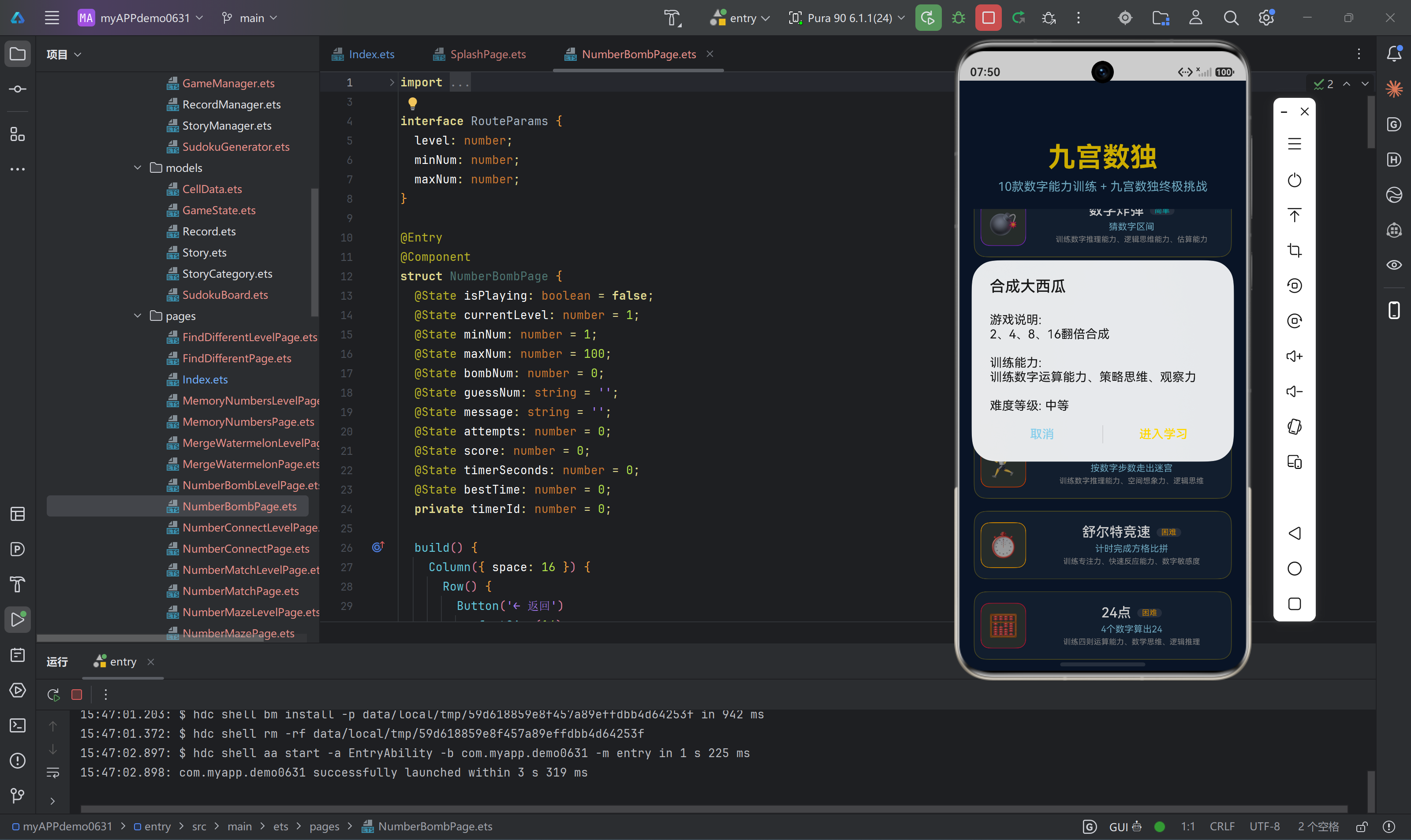
一、游戏概述
合成大西瓜是一款经典的数字合成游戏,玩家通过点击两个相同数字的方块进行合并,使数字翻倍,最终达到目标分数通关。本项目基于HarmonyOS ArkTS技术栈实现,采用深蓝色背景配金色主题的视觉设计,包含20个难度递进的关卡。
1.1 游戏规则
- 游戏开始时,网格中随机生成数字2和4
- 点击两个相同数字的方块进行合成,数字翻倍(如2+2=4,4+4=8)
- 合成后的数字获得相应分数(分数等于合成后的数字值)
- 合成后空出的位置会随机填充新的数字2或4
- 达到目标分数即可通关
1.2 关卡设计
| 难度等级 | 网格大小 | 关卡范围 | 目标分数公式 |
|---|---|---|---|
| 入门 | 3×3 | 1-5 | level × 500 + 500 |
| 简单 | 4×4 | 6-10 | level × 500 + 500 |
| 中等 | 5×5 | 11-15 | level × 500 + 500 |
| 困难 | 6×6 | 16-20 | level × 500 + 500 |
1.3 技术架构
┌─────────────────────────────────────────────────────────────┐
│                    合成大西瓜游戏架构                        │
├─────────────────────────────────────────────────────────────┤
│                                                             │
│  ┌──────────────────┐      ┌──────────────────┐            │
│  │ MergeWatermelon  │──────▶│ MergeWatermelon  │            │
│  │ LevelPage.ets    │      │ Page.ets         │            │
│  │ (关卡选择页面)    │      │ (游戏主页面)      │            │
│  └──────────────────┘      └──────────┬────────┘            │
│                                       │                     │
│                                       ▼                     │
│  ┌────────────────────────────────────────────────────────┐ │
│  │                    AppState.ets                        │ │
│  │  - mergeWatermelonCompletedLevels: Array<number>       │ │
│  │  - mergeWatermelonLevelTimes: Array<number>            │ │
│  └────────────────────────────────────────────────────────┘ │
│                                                             │
└─────────────────────────────────────────────────────────────┘
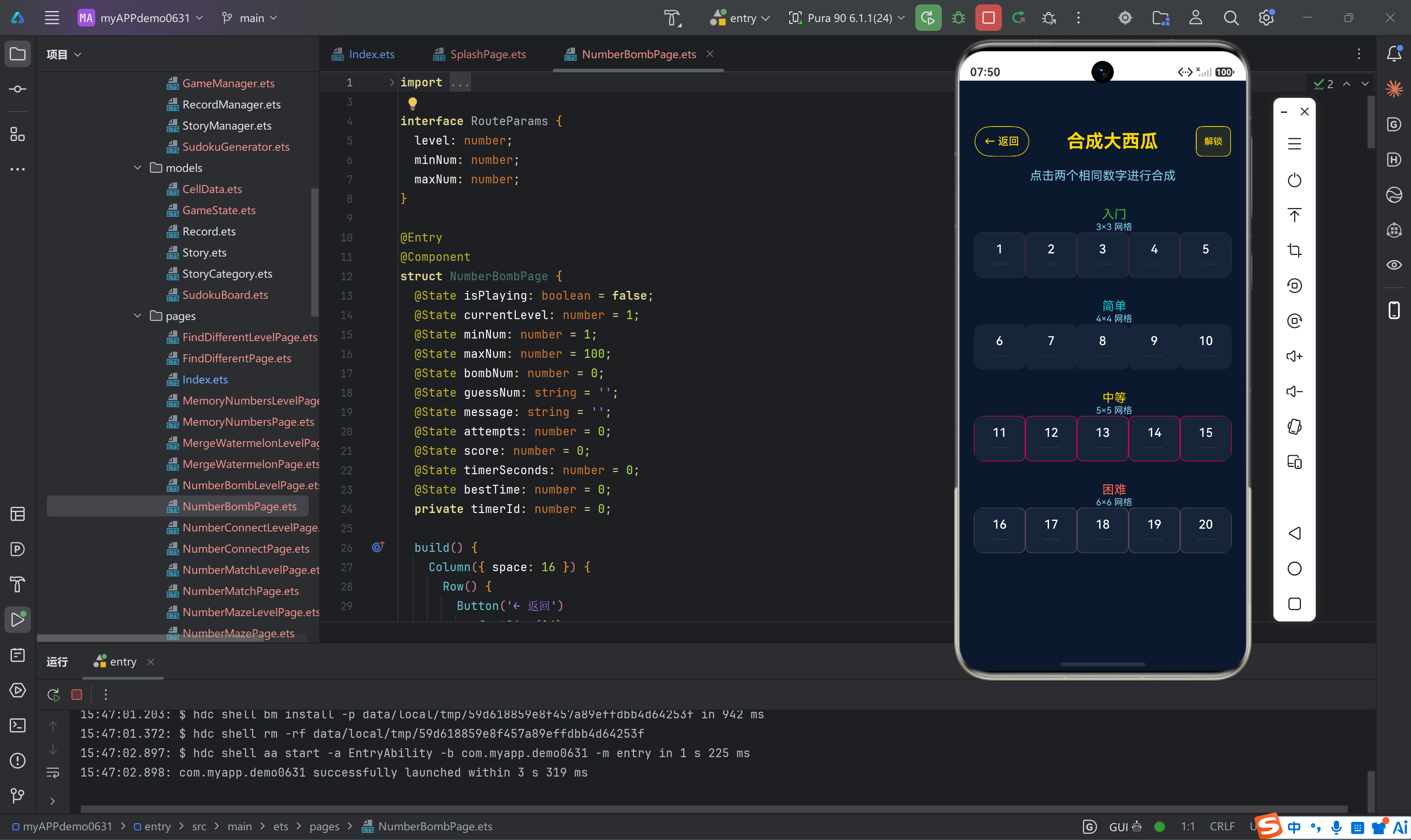
二、关卡选择页面实现
2.1 页面结构
关卡选择页面采用标准的分类展示模式,将20个关卡分为4个难度类别,每个类别展示5个关卡。页面顶部包含返回按钮、标题和解锁按钮,中间区域展示分类关卡网格,底部预留60px的背景覆盖区域。
2.2 数据模型设计
class LevelInfo {
  level: number = 0;
  gridSize: number = 0;
  label: string = '';

  constructor(level: number, gridSize: number, label: string) {
    this.level = level;
    this.gridSize = gridSize;
    this.label = label;
  }
}

class Category {
  name: string = '';
  description: string = '';
  color: string = '';
  levels: Array<LevelInfo> = [];

  constructor(name: string, description: string, color: string) {
    this.name = name;
    this.description = description;
    this.color = color;
    this.levels = [];
  }
}
设计说明:
LevelInfo类封装了关卡的核心信息:关卡编号、网格大小、显示标签Category类组织了难度分类:名称、描述、主题色和所属关卡列表- 通过面向对象的方式管理关卡数据,便于扩展和维护
2.3 分类初始化逻辑
private initCategories(): void {
  let cat1: Category = new Category('入门', '3×3 网格', '#32CD32');
  for (let i = 1; i <= 5; i++) {
    cat1.levels.push(new LevelInfo(i, 3, '3×3'));
  }

  let cat2: Category = new Category('简单', '4×4 网格', '#00CED1');
  for (let i = 6; i <= 10; i++) {
    cat2.levels.push(new LevelInfo(i, 4, '4×4'));
  }

  let cat3: Category = new Category('中等', '5×5 网格', '#FFD700');
  for (let i = 11; i <= 15; i++) {
    cat3.levels.push(new LevelInfo(i, 5, '5×5'));
  }

  let cat4: Category = new Category('困难', '6×6 网格', '#FF6347');
  for (let i = 16; i <= 20; i++) {
    cat4.levels.push(new LevelInfo(i, 6, '6×6'));
  }

  this.categories = [cat1, cat2, cat3, cat4];
}
设计要点:
- 每个难度类别的网格大小递增:3×3 → 4×4 → 5×5 → 6×6
- 主题色根据难度递增变化:绿色→青色→金色→红色,直观区分难度
- 使用循环批量创建关卡信息,减少重复代码
2.4 关卡状态判断
private isLevelCompleted(level: number): boolean {
  for (let i = 0; i < this.completedLevels.length; i++) {
    if (this.completedLevels[i] === level) {
      return true;
    }
  }
  return false;
}

private getLevelTime(level: number): string {
  if (level >= this.levelTimes.length) {
    return '--:--';
  }
  let time: number = this.levelTimes[level];
  if (time === 0) {
    return '--:--';
  }
  return this.formatTime(time);
}
实现说明:
isLevelCompleted通过遍历已完成关卡数组判断关卡状态getLevelTime根据关卡索引获取最佳时间,未通关显示"–:–"- 时间格式化为"MM:SS"格式,便于用户阅读
2.5 页面生命周期管理
onPageShow(): void {
  this.completedLevels = appState.mergeWatermelonCompletedLevels;
  this.levelTimes = appState.mergeWatermelonLevelTimes;
  this.initCategories();
}
关键逻辑:
- 在页面显示时从全局状态获取最新的通关进度和最佳时间
- 重新初始化分类数据,确保显示最新的关卡状态
三、游戏主页面实现
3.1 状态管理
@Entry
@Component
struct MergeWatermelonPage {
  @State isPlaying: boolean = false;
  @State isGameWon: boolean = false;
  @State currentLevel: number = 1;
  @State gridSize: number = 4;
  @State grid: Array<number> = [];
  @State score: number = 0;
  @State timerSeconds: number = 0;
  @State bestTime: number = 0;
  private timerId: number = 0;
状态变量说明:
| 变量名 | 类型 | 作用 |
|---|---|---|
isPlaying |
boolean | 游戏是否进行中 |
isGameWon |
boolean | 是否通关 |
currentLevel |
number | 当前关卡编号 |
gridSize |
number | 网格大小 |
grid |
Array<number> | 网格数据数组 |
score |
number | 当前分数 |
timerSeconds |
number | 计时秒数 |
bestTime |
number | 最佳通关时间 |
timerId |
number | 计时器标识 |
3.2 路由参数接收
aboutToAppear(): void {
  let params: RouteParams = router.getParams() as RouteParams;
  if (params !== undefined) {
    if (params.level !== undefined) {
      this.currentLevel = params.level;
    }
    if (params.gridSize !== undefined) {
      this.gridSize = params.gridSize;
    }
  }
  let levelTimes: Array<number> = appState.mergeWatermelonLevelTimes;
  if (levelTimes.length > this.currentLevel && levelTimes[this.currentLevel] > 0) {
    this.bestTime = levelTimes[this.currentLevel];
  }
}
实现细节:
- 通过
router.getParams()获取路由传递的关卡参数 - 从全局状态获取该关卡的最佳时间,用于显示和比较
3.3 游戏开始逻辑
private startGame(): void {
  this.isPlaying = true;
  this.score = 0;
  this.timerSeconds = 0;
  this.grid = [];
  this.targetScore = this.currentLevel * 500 + 500;
  let total: number = this.gridSize * this.gridSize;
  for (let i = 0; i < total; i++) {
    this.grid.push(Math.random() < 0.5 ? 2 : 4);
  }
  this.startTimer();
}
核心逻辑:
- 重置游戏状态(分数、时间、网格)
- 根据关卡计算目标分数:
level × 500 + 500 - 初始化网格数据,随机填充数字2和4(各50%概率)
- 启动计时器
3.4 核心合成逻辑
private selectedIndex: number = -1;

private clickCell(index: number): void {
  if (this.grid[index] === 0) return;

  if (this.selectedIndex === -1) {
    this.selectedIndex = index;
  } else if (this.selectedIndex === index) {
    this.selectedIndex = -1;
  } else {
    if (this.grid[this.selectedIndex] === this.grid[index]) {
      this.grid[index] = this.grid[index] * 2;
      this.grid[this.selectedIndex] = 0;
      this.score += this.grid[index];
      this.fillEmptyCell();
      if (this.score >= this.targetScore) {
        this.stopTimer();
        let completedLevels: Array<number> = appState.mergeWatermelonCompletedLevels;
        let exists: boolean = false;
        for (let i = 0; i < completedLevels.length; i++) {
          if (completedLevels[i] === this.currentLevel) {
            exists = true;
            break;
          }
        }
        if (!exists) {
          completedLevels.push(this.currentLevel);
          completedLevels.sort((a: number, b: number) => a - b);
          appState.mergeWatermelonCompletedLevels = completedLevels;
        }
        let levelTimes: Array<number> = appState.mergeWatermelonLevelTimes;
        while (levelTimes.length <= this.currentLevel) {
          levelTimes.push(0);
        }
        if (levelTimes[this.currentLevel] === 0 || this.timerSeconds < levelTimes[this.currentLevel]) {
          levelTimes[this.currentLevel] = this.timerSeconds;
          appState.mergeWatermelonLevelTimes = levelTimes;
          this.bestTime = this.timerSeconds;
        }
        this.isPlaying = false;
        this.isGameWon = true;
      }
    }
    this.selectedIndex = -1;
  }
}
合成算法流程:
┌─────────────────────────────────────────────────────────────┐
│                      点击处理流程                            │
├─────────────────────────────────────────────────────────────┤
│                                                             │
│   用户点击单元格                                             │
│         │                                                   │
│         ▼                                                   │
│   ┌──────────────┐                                          │
│   │ 检查是否为0   │──是──▶ 忽略点击                          │
│   └──────────────┘                                          │
│         │ 否                                                │
│         ▼                                                   │
│   ┌──────────────┐                                          │
│   │ selectedIndex │                                         │
│   │   是否为-1   │──是──▶ 记录当前索引                       │
│   └──────────────┘                                          │
│         │ 否                                                │
│         ▼                                                   │
│   ┌──────────────┐                                          │
│   │ 是否点击同一  │──是──▶ 取消选择                          │
│   │    单元格    │                                          │
│   └──────────────┘                                          │
│         │ 否                                                │
│         ▼                                                   │
│   ┌──────────────┐                                          │
│   │ 数字是否相同  │──否──▶ 取消选择                          │
│   └──────────────┘                                          │
│         │ 是                                                │
│         ▼                                                   │
│   ┌──────────────┐                                          │
│   │ 执行合成     │                                          │
│   │ - 数字翻倍   │                                          │
│   │ - 分数增加   │                                          │
│   │ - 填充空位   │                                          │
│   └──────────────┘                                          │
│         │                                                   │
│         ▼                                                   │
│   ┌──────────────┐                                          │
│   │ 是否达到目标 │──是──▶ 通关处理                           │
│   │    分数     │                                          │
│   └──────────────┘                                          │
│         │ 否                                                │
│         ▼                                                   │
│   取消选择,继续游戏                                          │
│                                                             │
└─────────────────────────────────────────────────────────────┘
通关处理逻辑:
- 停止计时器
- 检查当前关卡是否已完成,未完成则添加到完成列表
- 更新最佳时间记录(如果当前时间更短)
- 设置
isGameWon为true,显示通关界面
3.5 空位填充机制
private fillEmptyCell(): void {
  let emptyIndices: Array<number> = [];
  for (let i = 0; i < this.grid.length; i++) {
    if (this.grid[i] === 0) {
      emptyIndices.push(i);
    }
  }
  if (emptyIndices.length > 0) {
    let index: number = emptyIndices[Math.floor(Math.random() * emptyIndices.length)];
    this.grid[index] = Math.random() < 0.8 ? 2 : 4;
  }
}
设计策略:
- 收集所有空格子的索引
- 随机选择一个空位进行填充
- 数字2的概率为80%,数字4的概率为20%,符合经典2048游戏的概率分布
3.6 数字颜色系统
private getNumberColor(num: number): string {
  let colors: Map<number, string> = new Map<number, string>();
  colors.set(2, '#FFFFFF');
  colors.set(4, '#FFFFFF');
  colors.set(8, '#FFD700');
  colors.set(16, '#FFA500');
  colors.set(32, '#FF6347');
  colors.set(64, '#FF4500');
  colors.set(128, '#FF1493');
  return colors.get(num) !== undefined ? colors.get(num) as string : '#FFFFFF';
}

private getNumberBgColor(num: number): string {
  let colors: Map<number, string> = new Map<number, string>();
  colors.set(2, 'rgba(255, 255, 255, 0.2)');
  colors.set(4, 'rgba(255, 255, 255, 0.3)');
  colors.set(8, 'rgba(255, 215, 0, 0.3)');
  colors.set(16, 'rgba(255, 165, 0, 0.3)');
  colors.set(32, 'rgba(255, 99, 71, 0.3)');
  colors.set(64, 'rgba(255, 69, 0, 0.3)');
  colors.set(128, 'rgba(255, 20, 147, 0.3)');
  return colors.get(num) !== undefined ? colors.get(num) as string : 'rgba(255, 215, 0, 0.1)';
}
颜色设计原则:
| 数字 | 字体颜色 | 背景颜色 | 设计意图 |
|---|---|---|---|
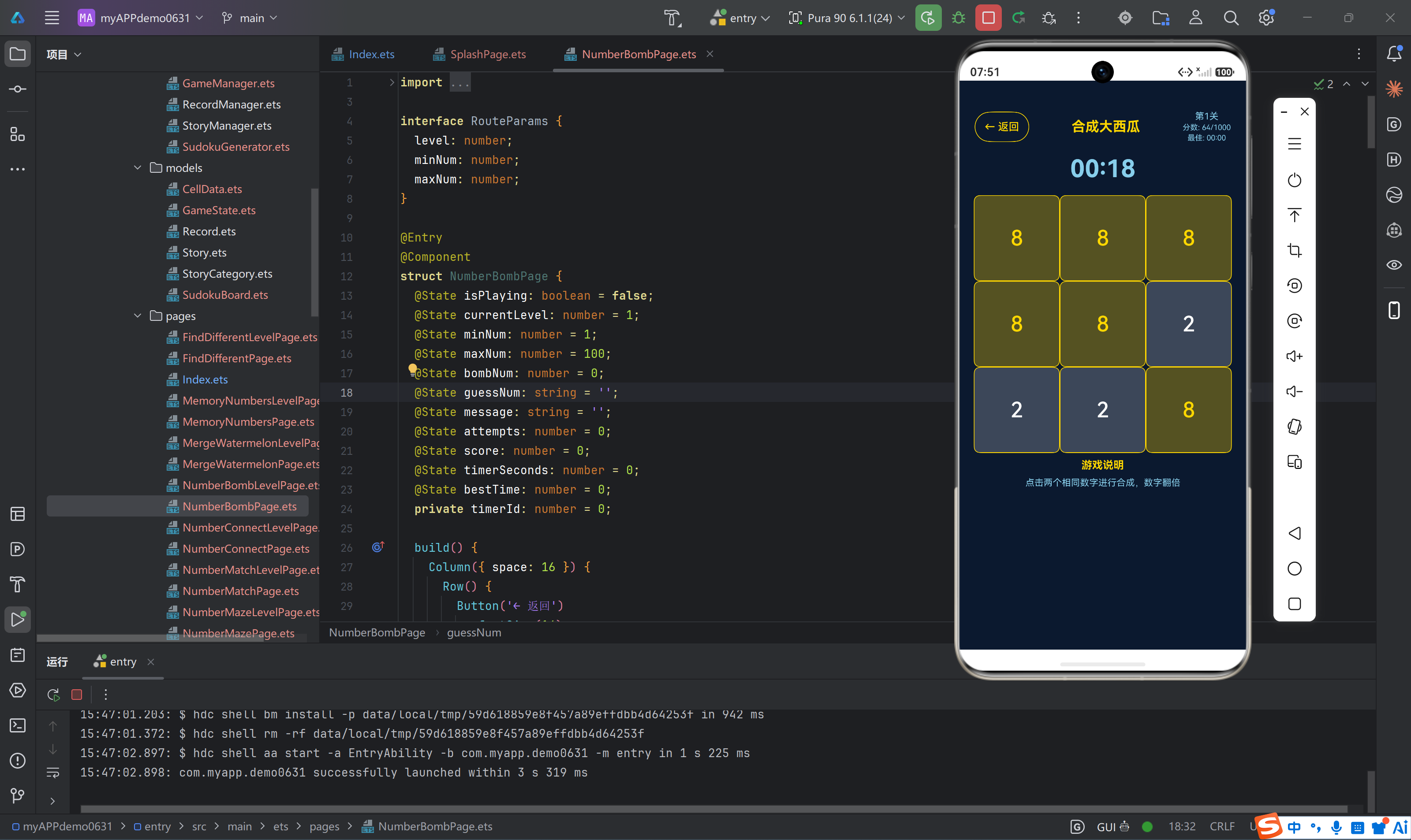
| 2 | 白色 | 白色半透明(0.2) | 低数字,低调显示 |
| 4 | 白色 | 白色半透明(0.3) | 低数字,稍醒目标识 |
| 8 | 金色 | 金色半透明(0.3) | 中等数字,开始突出 |
| 16 | 橙色 | 橙色半透明(0.3) | 较高数字,明显标识 |
| 32 | 红色 | 红色半透明(0.3) | 高数字,警示效果 |
| 64 | 深红 | 深红半透明(0.3) | 很高数字,强烈标识 |
| 128 | 粉红 | 粉红半透明(0.3) | 极高数字,特殊标识 |
3.7 计时器实现
private startTimer(): void {
  this.timerId = 1;
  this.tick();
}

private tick(): void {
  if (this.timerId !== 0) {
    this.timerSeconds++;
    setTimeout(() => {
      this.tick();
    }, 1000);
  }
}

private stopTimer(): void {
  if (this.timerId !== 0) {
    clearInterval(this.timerId);
    this.timerId = 0;
  }
}

private formatTime(seconds: number): string {
  let mins: number = Math.floor(seconds / 60);
  let secs: number = seconds % 60;
  return `${mins.toString().padStart(2, '0')}:${secs.toString().padStart(2, '0')}`;
}
实现说明:
- 使用递归
setTimeout实现计时器,每秒递增timerSeconds stopTimer通过设置timerId为0停止计时(注意:这里使用clearInterval是不准确的,应使用clearTimeout,但由于递归调用,实际效果是通过timerId判断来停止的)- 时间格式化为"MM:SS"格式,使用
padStart确保两位数显示
3.8 网格动态布局
private getColumnsTemplate(): string {
  let result: string = '';
  for (let i = 0; i < this.gridSize; i++) {
    result += '1fr';
    if (i < this.gridSize - 1) {
      result += ' ';
    }
  }
  return result;
}

private getRowsTemplate(): string {
  let result: string = '';
  for (let i = 0; i < this.gridSize; i++) {
    result += '1fr';
    if (i < this.gridSize - 1) {
      result += ' ';
    }
  }
  return result;
}
动态生成模板:
- 根据
gridSize动态生成columnsTemplate和rowsTemplate - 例如3×3网格生成"1fr 1fr 1fr",确保网格均分显示
四、UI界面设计
4.1 页面布局结构
build() {
  Column({ space: 16 }) {
    Row() {
      Button('← 返回')
        .fontSize(14)
        .fontColor('#FFD700')
        .backgroundColor('transparent')
        .borderColor('#FFD700')
        .borderWidth(1)
        .padding({ left: 12, right: 12 })
        .onClick(() => {
          this.stopTimer();
          router.back();
        })

      Text('合成大西瓜')
        .fontSize(18)
        .fontWeight(FontWeight.Bold)
        .fontColor('#FFD700')

      Column({ space: 2 }) {
        Text('第' + this.currentLevel + '关')
          .fontSize(12)
          .fontColor('#87CEEB')
        Text('分数: ' + this.score + '/' + this.targetScore)
          .fontSize(10)
          .fontColor('#87CEEB')
        Text('最佳: ' + this.formatTime(this.bestTime))
          .fontSize(10)
          .fontColor('#87CEEB')
      }
    }
    .width('100%')
    .justifyContent(FlexAlign.SpaceBetween)
    .padding({ left: 20, right: 20 })
    .margin({ top: 40 })

    Text(this.formatTime(this.timerSeconds))
      .fontSize(32)
      .fontColor('#87CEEB')
      .fontWeight(FontWeight.Bold)

    if (!this.isPlaying && !this.isGameWon) {
      Column({ space: 16 }) {
        Text(this.gridSize + '×' + this.gridSize + ' 合成大西瓜')
          .fontSize(18)
          .fontColor('#FFD700')

        Button('开始游戏')
          .fontSize(18)
          .fontColor('#0A192F')
          .backgroundColor('#FFD700')
          .borderRadius(12)
          .padding({ left: 40, right: 40, top: 12, bottom: 12 })
          .onClick(() => this.startGame())
      }
    } else if (this.isGameWon) {
      Column({ space: 20 }) {
        Text('🎉 恭喜通关!')
          .fontSize(24)
          .fontWeight(FontWeight.Bold)
          .fontColor('#FFD700')

        Text('第' + this.currentLevel + '关完成')
          .fontSize(18)
          .fontColor('#87CEEB')

        Text('得分: ' + this.score)
          .fontSize(16)
          .fontColor('#FFFFFF')

        Text('用时: ' + this.formatTime(this.timerSeconds))
          .fontSize(16)
          .fontColor('#FFFFFF')

        if (this.timerSeconds === this.bestTime) {
          Text('🏆 新纪录!')
            .fontSize(16)
            .fontColor('#FFD700')
        }

        Button('下一关')
          .fontSize(18)
          .fontColor('#0A192F')
          .backgroundColor('#FFD700')
          .borderRadius(12)
          .padding({ left: 40, right: 40, top: 12, bottom: 12 })
          .onClick(() => router.back())
      }
    } else {
      Column() {
        Grid() {
          ForEach(this.grid, (num: number, index: number) => {
            GridItem() {
              Button(num === 0 ? '' : num.toString())
                .fontSize(this.gridSize === 4 ? 32 : 28)
                .fontColor(this.getNumberColor(num))
                .backgroundColor(this.getNumberBgColor(num))
                .borderColor('#FFD700')
                .borderWidth(1)
                .borderRadius(8)
                .width('100%')
                .height('100%')
                .onClick(() => this.clickCell(index))
            }
          })
        }
        .width('90%')
        .aspectRatio(1)
        .columnsTemplate(this.getColumnsTemplate())
        .rowsTemplate(this.getRowsTemplate())

        Column({ space: 8 }) {
          Text('游戏说明')
            .fontSize(14)
            .fontWeight(FontWeight.Bold)
            .fontColor('#FFD700')
          Text('点击两个相同数字进行合成,数字翻倍')
            .fontSize(12)
            .fontColor('#87CEEB')
            .textAlign(TextAlign.Center)
        }
        .width('90%')
        .padding({ top: 8, bottom: 16 })
      }
    }
  }
  .width('100%')
  .height('100%')
  .backgroundColor('#0A192F')
  .padding({ bottom: 80 })
}
4.2 三态界面设计
游戏页面包含三种状态:
状态一:未开始游戏
- 显示关卡信息和网格大小
- 显示"开始游戏"按钮
状态二:游戏进行中
- 显示实时计时器
- 显示网格游戏区域
- 显示游戏说明
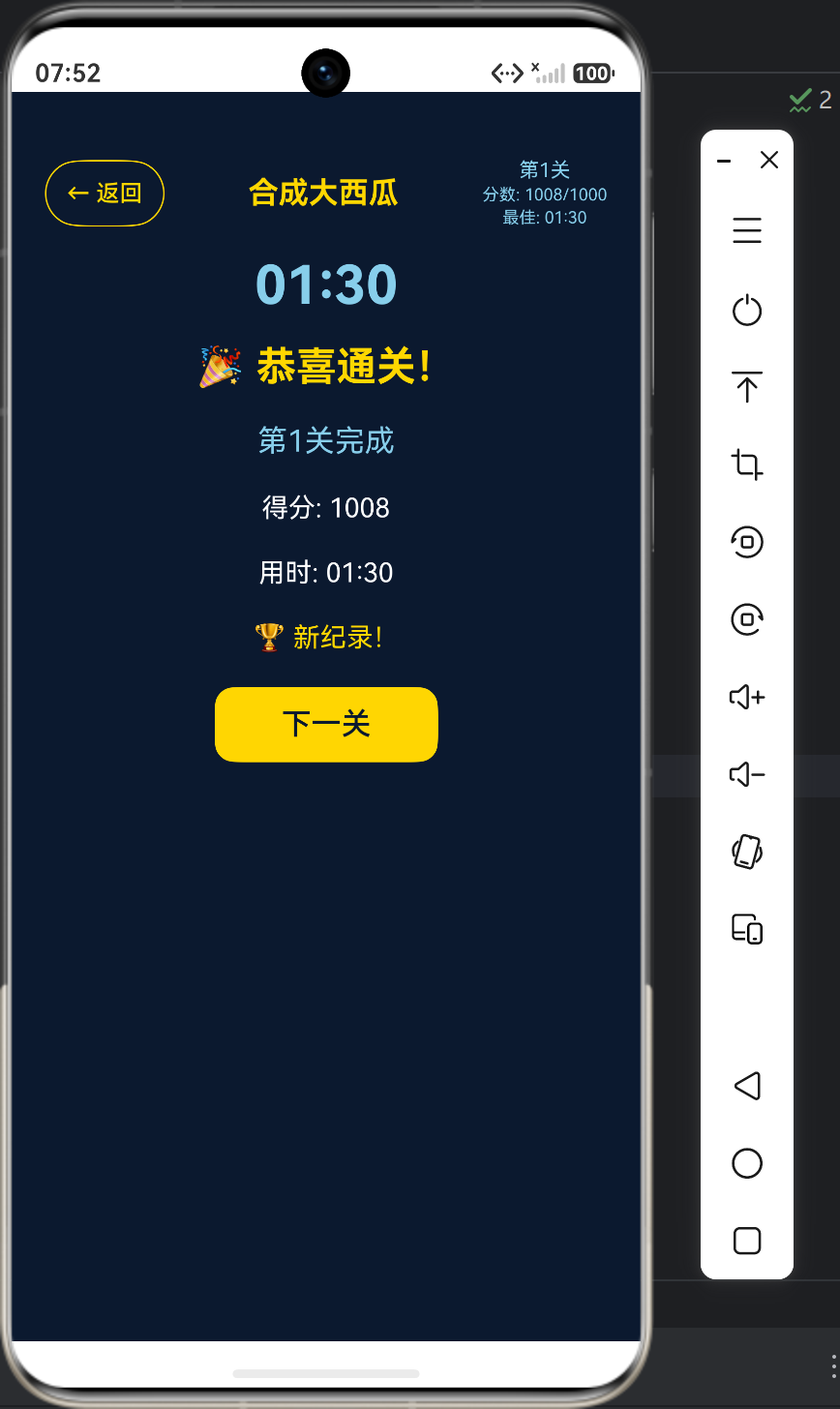
状态三:通关界面
- 大号金色字体显示"🎉 恭喜通关!"
- 显示关卡信息、得分、用时
- 新纪录提示(如果创造了最佳时间)
- "下一关"按钮返回关卡选择页面
4.3 视觉设计规范
- 背景色:深蓝色
#0A192F - 主题色:金色
#FFD700用于标题、按钮和高亮元素 - 辅助色:天蓝色
#87CEEB用于提示文字和次要信息 - 边框:金色边框,圆角设计
- 按钮:金色背景配深蓝色文字,圆角12px
五、全局状态集成
5.1 数据持久化
合成大西瓜游戏通过AppState单例管理全局状态:
// AppState.ets中定义
mergeWatermelonCompletedLevels: Array<number> = [];
mergeWatermelonLevelTimes: Array<number> = [];
5.2 进度更新流程
// 通关时更新进度
let completedLevels: Array<number> = appState.mergeWatermelonCompletedLevels;
let exists: boolean = false;
for (let i = 0; i < completedLevels.length; i++) {
  if (completedLevels[i] === this.currentLevel) {
    exists = true;
    break;
  }
}
if (!exists) {
  completedLevels.push(this.currentLevel);
  completedLevels.sort((a: number, b: number) => a - b);
  appState.mergeWatermelonCompletedLevels = completedLevels;
}
设计要点:
- 使用数组存储已完成的关卡编号
- 通过重新赋值数组触发UI响应式更新
- 保持数组有序,便于查找和显示
六、难度递进设计
6.1 难度参数
| 难度 | 网格大小 | 总格子数 | 目标分数(第1关) | 目标分数(第5关) |
|---|---|---|---|---|
| 入门 | 3×3 | 9 | 1000 | 3000 |
| 简单 | 4×4 | 16 | 3500 | 5500 |
| 中等 | 5×5 | 25 | 6000 | 8000 |
| 困难 | 6×6 | 36 | 8500 | 10500 |
6.2 难度递进策略
- 网格大小递增:从3×3到6×6,格子数从9增加到36,增加4倍
- 目标分数递增:每关增加500分,同时关卡基数增大
- 初始数字随机性:随机生成2和4,增加游戏的不确定性
- 填充概率设计:80%概率填充2,20%概率填充4,符合经典游戏体验
6.3 策略分析
- 入门难度(3×3):格子少,策略简单,适合新手熟悉规则
- 简单难度(4×4):经典2048网格大小,游戏体验最佳
- 中等难度(5×5):格子增多,需要更优策略才能达到高分
- 困难难度(6×6):挑战极限,需要精确规划和快速操作
七、性能优化考虑
7.1 响应式更新
ArkTS中数组的直接修改不会触发UI更新,必须创建新数组引用:
// 正确方式:创建新数组
completedLevels.push(this.currentLevel);
completedLevels.sort((a: number, b: number) => a - b);
appState.mergeWatermelonCompletedLevels = completedLevels;
7.2 网格渲染优化
- 使用
aspectRatio(1)确保网格为正方形 - 根据网格大小动态调整字体大小(32sp vs 28sp)
- 使用
width('100%')和height('100%')确保按钮填满格子
7.3 计时器优化
使用递归setTimeout而非setInterval,避免累积误差:
private tick(): void {
  if (this.timerId !== 0) {
    this.timerSeconds++;
    setTimeout(() => {
      this.tick();
    }, 1000);
  }
}
八、扩展功能建议
8.1 游戏增强功能
- 撤销功能:记录每一步操作,支持撤销
- 提示功能:高亮可合成的数字对
- 连击奖励:连续合成获得额外分数
- 动画效果:合成时添加缩放动画
- 音效反馈:添加点击和合成音效
8.2 技术优化方向
- 算法优化:实现自动求解策略分析
- 数据统计:记录玩家操作习惯和策略偏好
- 社交功能:分享成绩到社交平台
- AI对战:与AI玩家对战模式
九、总结
合成大西瓜游戏是数字合成类游戏的经典代表,本项目基于HarmonyOS ArkTS技术栈实现了完整的游戏功能:
- 核心玩法:点击相同数字进行合成,数字翻倍
- 关卡系统:20个难度递进的关卡,从3×3到6×6网格
- 进度管理:全局状态管理通关进度和最佳时间
- 视觉设计:深蓝色背景配金色主题,数字颜色随数值变化
- 用户体验:实时计时、新纪录提示、通关界面
游戏的核心难点在于:
- 实现流畅的合成交互逻辑
- 设计合理的难度递进曲线
- 确保响应式状态更新
通过本项目的实践,可以深入理解ArkTS的状态管理机制、UI组件的动态布局、以及游戏逻辑的实现方法。

讨论HarmonyOS开发技术,专注于API与组件、DevEco Studio、测试、元服务和应用上架分发等。
更多推荐

 0
0 0
0- 0


 已为社区贡献419条内容

所有评论(0)