HarmonyOS宠物邻里实战第12篇:账号注销集成测试、关联数据清理与隐私闭环
HarmonyOS宠物邻里实战第12篇:账号注销集成测试、关联数据清理与隐私闭环
摘要
账号注销不是删除一条用户记录。对宠物邻里这种包含宠物档案、社区帖子、评论互动、寄养需求、寄养申请、寄养记录、评价、通知和关注关系的项目来说,注销账号如果清理不完整,其他页面就会留下“幽灵数据”:帖子还在但作者不存在、通知指向已删除用户、寄养记录找不到宠物、关注数不准确。
本文基于宠物邻里 HarmonyOS + Express + MongoDB 项目,复盘账号注销的完整工程闭环:
- 后端
/auth/delete-account为什么必须要求密码二次确认; deleteAccountData()如何按集合清理关联数据;- 宠物、帖子、评论、互动、寄养、通知、关注、Session 分别怎么处理;
- MongoDB 删除顺序为什么会影响数据一致性;
- HarmonyOS 端
AuthService.deleteAccount()如何清理本地登录态; - 如何设计账号注销集成测试,证明注销后没有残留;
- 最后给出后端、前端和数据库三层验收清单。
这篇文章重点是隐私和数据一致性:用户选择注销后,系统必须给出可信的清理结果。
工程背景与源码定位
| 文件 | 作用 |
|---|---|
houduan/test/routes/api.js |
账号注销接口和关联数据清理 |
houduan/test/test/integration.js |
后端集成测试入口 |
houduan/test/db.js |
MongoDB 连接 |
MyApp/entry/src/main/ets/services/AuthService.ets |
HarmonyOS 账号注销和本地态清理 |
MyApp/entry/src/main/ets/services/BackendService.ets |
调用 /auth/delete-account |
MyApp/entry/src/main/ets/pages/user/AccountDeletionPage.ets |
注销账号页面 |
MyApp/entry/src/main/ets/common/MockStore.ets |
当前用户和本地快照 |
验证命令:
cd D:\APP\chong_wu_guan_li\houduan\test
npm run check
npm run test:integration
npm run check 保证后端脚本没有语法错误,npm run test:integration 负责跑完整业务链路。账号注销测试可以作为集成测试的一部分,也可以独立写一个 test/delete-account.js。
一、账号注销的风险点
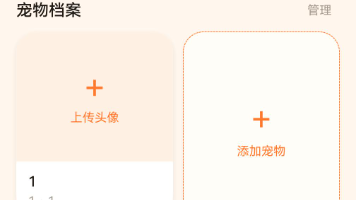
宠物邻里项目里,用户数据不只在 accounts 集合里。一个活跃用户可能关联很多业务对象:
| 数据类型 | 示例 |
|---|---|
| 账号资料 | accounts、profiles、sessions |
| 宠物档案 | pets |
| 社区内容 | posts、comments |
| 社区互动 | postInteractions、commentInteractions |
| 社交关系 | follows |
| 寄养业务 | fosterRequests、fosterApplications、fosterRecords、fosterMessages、fosterReviews |
| 消息通知 | notices |
| 反馈记录 | feedback |
如果只删除 accounts,其余集合还会引用这个用户 ID。前端通过 /bootstrap 拉快照时,就可能遇到作者为空、头像取不到、记录无法打开等问题。
二、后端注销接口要求密码确认
后端接口会再次校验密码:
router.post('/auth/delete-account', requireAuth, async function(req, res, next) {
  try {
    const password = String(req.body.password || '');
    const confirmation = String(req.body.confirmation || '');
    if (confirmation !== '注销账号') {
      return fail(res, 400, '请输入正确的确认文本');
    }
    const db = getDatabase();
    const account = await db.collection('accounts').findOne({ username: req.auth.username });
    if (!account || !passwordMatches(password, account)) {
      return fail(res, 401, '密码错误');
    }
    await deleteAccountData(db, req.auth.username, req.auth.profileId);
    ok(res, true);
  } catch (error) {
    next(error);
  }
});
这类高风险操作不能只依赖当前登录态。即使用户已经登录,也需要密码二次确认和明确文本确认,避免误触。
三、前端 BackendService 调用
ArkTS 端通过 BackendService 调用注销接口:
class DeleteAccountPayload {
  password: string = '';
  confirmation: string = '';
}

static async deleteAccount(password: string): Promise<BackendAuthResult> {
  try {
    const payload: DeleteAccountPayload = new DeleteAccountPayload();
    payload.password = password;
    payload.confirmation = '注销账号';
    const response: ApiEnvelope = await ApiClient.post('/auth/delete-account', payload);
    if (response.code === 0) return BackendAuthResult.Ok;
    if (response.code === 401) return BackendAuthResult.WrongPassword;
    return BackendAuthResult.Error;
  } catch (e) {
    console.error('[BackendService] delete account failed: ' + JSON.stringify(e));
    return BackendAuthResult.Error;
  }
}
页面不直接拼接口,也不直接写 confirmation 字段。确认文本由服务层统一发送,页面只负责收集密码和用户确认。
四、AuthService 清理本地登录态
后端注销成功后,AuthService.deleteAccount() 清理本地状态:
static async deleteAccount(password: string): Promise<AuthResult> {
  const result: BackendAuthResult = await BackendService.deleteAccount(password);
  if (result === BackendAuthResult.WrongPassword) {
    return AuthResult.WrongPassword;
  }
  if (result !== BackendAuthResult.Ok) {
    return AuthResult.Error;
  }
  const username: string = AuthService.activeUser;
  AuthService.users = AuthService.users.filter((item: AuthUserCredential) => item.username !== username);
  await AuthService.persistUsers();
  AuthService.activeUser = '';
  ApiClient.setAuthToken('');
  MockStore.setCurrentUserId('');
  AppStorage.setOrCreate<string>(AppKeys.CURRENT_USER, '');
  AppStorage.setOrCreate<string>(AppKeys.CURRENT_PROFILE, '');
  await AuthService.persistActive('');
  return AuthResult.Ok;
}
这里做了六件事:
- 从本地 users 列表移除账号;
- 持久化本地账号列表;
- 清空 activeUser;
- 清空
ApiClientToken; - 清空
MockStore当前用户; - 清空
AppStorage当前用户和 profile。
这一步不能省。后端数据删了,如果前端还拿旧 Token 请求,就会不断遇到 401。
五、deleteAccountData 的清理范围
后端核心是 deleteAccountData()。它先找到和当前用户相关的 ID:
const pets = await db.collection('pets').find({ ownerId: profileId }).project({ id: 1 }).toArray();
const petIds = pets.map((item) => item.id);
const requests = await db.collection('fosterRequests')
  .find({ authorId: profileId }).project({ id: 1 }).toArray();
const requestIds = requests.map((item) => item.id);
const records = await db.collection('fosterRecords')
  .find({ $or: [{ hostId: profileId }, { petId: { $in: petIds } }] })
  .project({ id: 1 }).toArray();
const recordIds = records.map((item) => item.id);
const posts = await db.collection('posts').find({ authorId: profileId }).project({ id: 1 }).toArray();
const postIds = posts.map((item) => item.id);
先收集 ID 的原因是:删除主数据之前,要知道哪些评论、互动、记录和评价需要一起删。
六、通知和反馈清理
通知和反馈是最直接的用户关联数据:
await Promise.all([
  db.collection('feedback').deleteMany({ userId: profileId }),
  db.collection('notices').deleteMany({
    $or: [{ targetUserId: profileId }, { fromUserId: profileId }]
  })
]);
通知要按两个方向删:
targetUserId是当前用户:这是发给他的通知;fromUserId是当前用户:这是由他触发的通知。
否则别人通知列表里可能还残留一个已注销用户触发的点赞、评论或关注消息。
七、社区内容和互动清理
社区相关集合包括帖子、评论、点赞收藏、评论点赞:
await Promise.all([
  db.collection('postInteractions').deleteMany({
    $or: [{ userId: profileId }, { postId: { $in: postIds } }]
  }),
  db.collection('commentInteractions').deleteMany({
    $or: [{ userId: profileId }, { commentId: { $in: deletedCommentIds } }]
  }),
  db.collection('comments').deleteMany({
    $or: [{ authorId: profileId }, { postId: { $in: postIds } }]
  }),
  db.collection('posts').deleteMany({ authorId: profileId })
]);
这里要注意两类清理:
| 清理类型 | 示例 |
|---|---|
| 用户主动产生的互动 | 用户给别人帖子点赞 |
| 别人作用在用户内容上的互动 | 别人给该用户帖子点赞 |
如果删除用户帖子,却不删 postInteractions,互动集合里会留下指向不存在帖子的记录。
八、寄养业务清理
寄养业务链路更复杂:
await Promise.all([
  db.collection('fosterMessages').deleteMany({
    $or: [
      { authorId: profileId },
      { 'reply.authorId': profileId },
      { requestId: { $in: requestIds } }
    ]
  }),
  db.collection('fosterReviews').deleteMany({
    $or: [{ authorId: profileId }, { hostId: profileId }, { recordId: { $in: recordIds } }]
  }),
  db.collection('fosterRecords').deleteMany({ id: { $in: recordIds } }),
  db.collection('fosterApplications').deleteMany({
    $or: [
      { applicantId: profileId },
      { ownerId: profileId },
      { requestId: { $in: requestIds } }
    ]
  }),
  db.collection('fosterRequests').deleteMany({ authorId: profileId })
]);
寄养数据要考虑三种身份:
- 用户是需求发布者;
- 用户是申请人或寄养人;
- 用户是评价作者或被评价寄养人。
只按 authorId 删除是不够的。
九、关注关系和计数修正
关注关系会影响两个用户的数字:
const follows = await db.collection('follows').find({
  $or: [{ followerId: profileId }, { followingId: profileId }]
}).toArray();
const affectedProfiles = [...new Set(follows.flatMap((item) => [item.followerId, item.followingId]))]
  .filter((id) => id !== profileId);
删除关注关系后,需要修正其他用户的关注数和粉丝数:
for (const id of affectedProfiles) {
  const followCount = await db.collection('follows').countDocuments({ followerId: id });
  const fanCount = await db.collection('follows').countDocuments({ followingId: id });
  await db.collection('profiles').updateOne({ id }, { $set: { followCount, fanCount } });
}
这一步很容易被忽略。账号注销后,如果不修正计数,其他用户主页会显示错误的粉丝数。
十、最后清理账号基础数据
业务数据清理后,才删除账号基础数据:
await db.collection('sessions').deleteMany({ profileId });
await db.collection('profiles').deleteOne({ id: profileId });
await db.collection('accounts').deleteOne({ username });
await db.collection('pets').deleteMany({ ownerId: profileId });
顺序上建议先收集关联 ID,再删业务集合,最后删账号和资料。否则先删 profile,后面某些清理逻辑就很难根据 profile 找到关联数据。
十一、集成测试如何设计
账号注销测试可以分成五步:
- 注册 owner、follower、host 三个账号;
- owner 创建宠物、帖子、寄养需求;
- follower 点赞、评论、关注 owner;
- host 申请寄养并生成记录;
- owner 注销账号,检查所有关联数据。
伪代码如下:
async function assertAccountDeleted(db, profileId, petIds, postIds, requestIds, recordIds) {
  assert.strictEqual(await db.collection('accounts').countDocuments({ profileId }), 0);
  assert.strictEqual(await db.collection('profiles').countDocuments({ id: profileId }), 0);
  assert.strictEqual(await db.collection('sessions').countDocuments({ profileId }), 0);
  assert.strictEqual(await db.collection('pets').countDocuments({ ownerId: profileId }), 0);
  assert.strictEqual(await db.collection('posts').countDocuments({ authorId: profileId }), 0);
  assert.strictEqual(await db.collection('comments').countDocuments({
    $or: [{ authorId: profileId }, { postId: { $in: postIds } }]
  }), 0);
  assert.strictEqual(await db.collection('fosterRequests').countDocuments({ authorId: profileId }), 0);
  assert.strictEqual(await db.collection('fosterRecords').countDocuments({ id: { $in: recordIds } }), 0);
  assert.strictEqual(await db.collection('notices').countDocuments({
    $or: [{ targetUserId: profileId }, { fromUserId: profileId }]
  }), 0);
}
测试重点不是接口返回 200,而是数据库真的没有残留。
十二、错误密码不能注销
集成测试还要覆盖错误密码:
let response = await api('/auth/delete-account', 'POST', owner.token, {
  password: 'WrongPass123',
  confirmation: '注销账号'
});
assert.strictEqual(response.status, 401);

const stillExists = await db.collection('accounts').findOne({ username: owner.username });
assert.ok(stillExists);
这条断言证明:错误密码不会误删账号。
十三、确认文本也要测试
确认文本错误时也应该失败:
response = await api('/auth/delete-account', 'POST', owner.token, {
  password,
  confirmation: '删除账号'
});
assert.strictEqual(response.status, 400);
前端页面可以要求用户输入“注销账号”,后端也必须校验。不要把确认文本只作为 UI 装饰。
十四、注销后 Token 应失效
账号注销成功后,旧 Token 不能再访问接口:
response = await api('/bootstrap', 'GET', owner.token);
assert.strictEqual(response.status, 401);
这是因为 sessions 已经被删除。这个断言很重要,它能证明后端没有留下可继续访问的会话。
十五、HarmonyOS 前端验收
前端注销成功后要验证:
| 验收点 | 期望 |
|---|---|
| 当前用户 | AuthService.currentUser() 返回空 |
| 登录态 | AuthService.isLoggedIn() 为 false |
| Token | ApiClient 不再携带旧 Token |
| AppStorage | CURRENT_USER 和 CURRENT_PROFILE 被清空 |
| MockStore | 当前用户 ID 被清空 |
| 页面跳转 | 返回登录页或未登录首页 |
| 再进通知/宠物页 | 不显示已注销账号的数据 |
前端不要等下一次启动再清理。注销成功后,当前运行时状态就要清干净。
十六、常见问题排查
| 问题 | 可能原因 | 排查方式 |
|---|---|---|
| 注销后还能访问接口 | Session 没删 | 检查 sessions.deleteMany({ profileId }) |
| 其他人仍看到用户帖子 | posts 或评论未删 |
查 posts.authorId 和 comments.postId |
| 通知列表残留已注销用户 | notices.fromUserId 未清理 |
检查通知删除条件 |
| 粉丝数不对 | 关注关系删除后未重算 | 检查 affectedProfiles |
| 寄养记录打不开 | 记录引用的宠物已删但记录未删 | 检查 recordIds |
| 前端还显示已登录 | 本地 activeUser 未清空 | 检查 AuthService.deleteAccount() |
| 错误密码也删了账号 | 后端未校验 password | 检查 passwordMatches() |
十七、发布前验收清单
- 删除前先收集
petIds、postIds、requestIds、recordIds; - 错误密码返回 401;
- 确认文本错误返回 400;
- 删除账号后
accounts、profiles、sessions都为空; - 用户宠物、帖子、评论、互动全部清理;
- 寄养需求、申请、记录、留言、评价全部清理;
- 通知按 target 和 from 两个方向清理;
- 关注关系删除后,其他用户计数重算;
- 旧 Token 访问
/bootstrap返回 401; - HarmonyOS 本地 Token、当前用户、AppStorage 全部清空;
- 集成测试结束后不留下测试账号。
总结
账号注销是一个容易被低估的功能。它不是“删账号”这么简单,而是一次全链路隐私清理:后端要清账号、资料、会话、宠物、社区、寄养、通知、关注和互动;前端要清 Token、当前用户、本地账号列表和页面状态。
宠物邻里项目用 deleteAccountData() 集中处理 MongoDB 关联集合,用 BackendService.deleteAccount() 封装接口语义,用 AuthService.deleteAccount() 清理 HarmonyOS 本地登录态。再配合集成测试验证错误密码、确认文本、旧 Token 失效和数据库残留,才能让账号注销真正可信。
这类功能平时不显眼,但一旦出错就是严重隐私问题。越早把注销链路做成可测试闭环,后续业务扩展越安心。

讨论HarmonyOS开发技术,专注于API与组件、DevEco Studio、测试、元服务和应用上架分发等。
更多推荐
 8
8 0
0- 0


 已为社区贡献58条内容

所有评论(0)