鸿蒙布局>stack
·
@Preview
@Component
struct Stacks {
  build() {

    Stack() {
      // 2. 左上角 View
      Text('左上')
        .width(60)
        .height(60)
        .backgroundColor('#4ECDC4') // 颜色
        .textAlign(TextAlign.Center)
        .fontColor(Color.White)
        // 关键定位代码:左上角
        .position({ x: 10, y: 10 })

      // 3. 右上角 View
      Text('右上')
        .width(60)
        .height(60)
        .backgroundColor('#45B7D1')
        .textAlign(TextAlign.Center)
        .fontColor(Color.White)
        // 关键定位代码:右上角 (距离右边10,上边10)
        .position({ x: '100%', y: 10 })
        .translate({ x: '-100%' }) // 平移自身宽度,确保完全在容器内

      // 4. 左下角 View
      Text('左下')
        .width(60)
        .height(60)
        .backgroundColor('#FFD700')
        .textAlign(TextAlign.Center)
        .fontColor(Color.White)
        // 关键定位代码:左下角 (距离左边10,下边10)
        .position({ x: 10, y: '100%' })
        .translate({ y: '-100%' }) // 平移自身高度,确保完全在容器内

      // 5. 右下角 View
      Text('右下')
        .width(60)
        .height(60)
        .backgroundColor('#9B59B6')
        .textAlign(TextAlign.Center)
        .fontColor(Color.White)
        // 关键定位代码:右下角 (距离右边10,下边10)
        .position({ x: '100%', y: '100%' })
        .translate({ x: '-100%', y: '-100%' }) // 平移自身宽高,确保完全在容器内
    }
    .width('100%')
    .height('100%')
    .backgroundColor('#E0E0E0') // 背景色,方便观察


  }
}
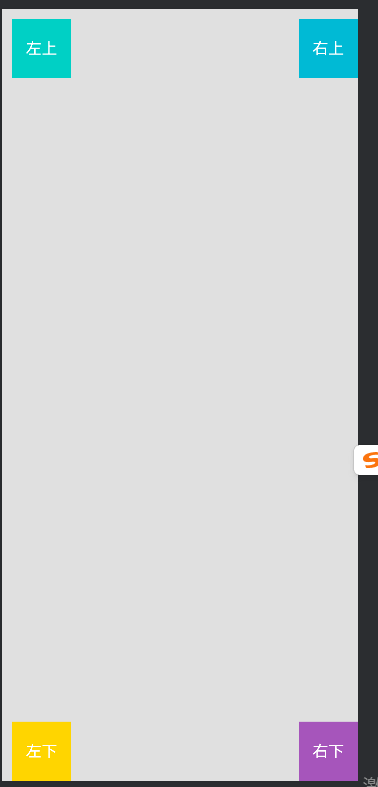 换成Row/column标签也可以的

讨论HarmonyOS开发技术,专注于API与组件、DevEco Studio、测试、元服务和应用上架分发等。
更多推荐

 0
0 0
0- 0


 已为社区贡献6条内容

所有评论(0)