HarmonyOS7 ArkUI 待办事项高级版 - 分优先级、截止日期与进度统计实战:把案例真正写懂
文章目录
前言
待办类页面看着很常见,但真写起来,特别容易写成“功能都有,越用越乱”。原因很简单:它不是单纯的列表,也不是单纯的表单,而是把录入、筛选、完成状态、统计反馈全揉在了一起。你只要有一层状态放错位置,页面马上就会显得别扭。
所以我一直觉得,待办应用是很适合拿来练 ArkUI 的。它没有地图、图表那种重视觉压力,却能很直接地暴露你对状态组织、列表更新和局部反馈到底熟不熟。
这不是一个任务列表,它更像个人效率面板
AdvancedTodoPage 真正有意思的地方,不在于能新增几条任务,而在于它已经开始往“效率工具”靠了:有优先级,有分类,有截止时间,还有完成率统计。也就是说,这个页面不仅要展示任务,还要帮用户判断“我现在该先做什么”。
这种页面一旦进入真实项目,最关键的就不再是卡片圆角漂不漂亮,而是信息有没有层次。用户打开页面第一眼通常会看三件事:今天还有多少没做、当前筛选后还剩哪些任务、我新增一条任务要不要立刻出现在顶部。代码结构如果能直接服务这三个动作,页面就会很顺。
| 观察点 | 在这个案例里的落点 |
|---|---|
| 页面主题 | 待办事项高级版 |
| 用户最在意的动作 | 看剩余任务、按优先级筛、快速标记完成、补录新任务 |
| 常用组件 | Button, Column, ForEach, Progress, Row, Scroll, Stack, Text, TextInput |
| 真正适合学习的地方 | 列表筛选、完成统计、录入弹层、进度反馈联动 |
跑这个页面时,别只顾着点勾选
如果你想真正把它看明白,我建议先做一次完整操作:切几次优先级和分类、把一条任务标记完成、删掉一条已有任务、再新增一条高优先级任务。这个顺序走下来之后,你会一下子看出这个案例的重点其实不在 UI,而在“同一份任务数据要同时服务多少块区域”。
因为同一份 tasks,至少会被四处消费:任务列表要用,顶部统计要用,完成率要用,筛选结果也要用。如果这些逻辑都直接写在布局里,页面一大就会很难维护。反过来,如果主数据源稳定,派生逻辑又被收拢到 getter 里,这类页面后面扩展标签、提醒、排序都不会太痛苦。
如果你准备把它改成自己的版本,我会建议先改数据结构,再改筛选规则,最后再改视觉。待办工具最怕的就是外观先做得很完整,结果新增字段时发现整个状态结构接不住。
这份代码最值钱的,不是按钮,而是状态边界
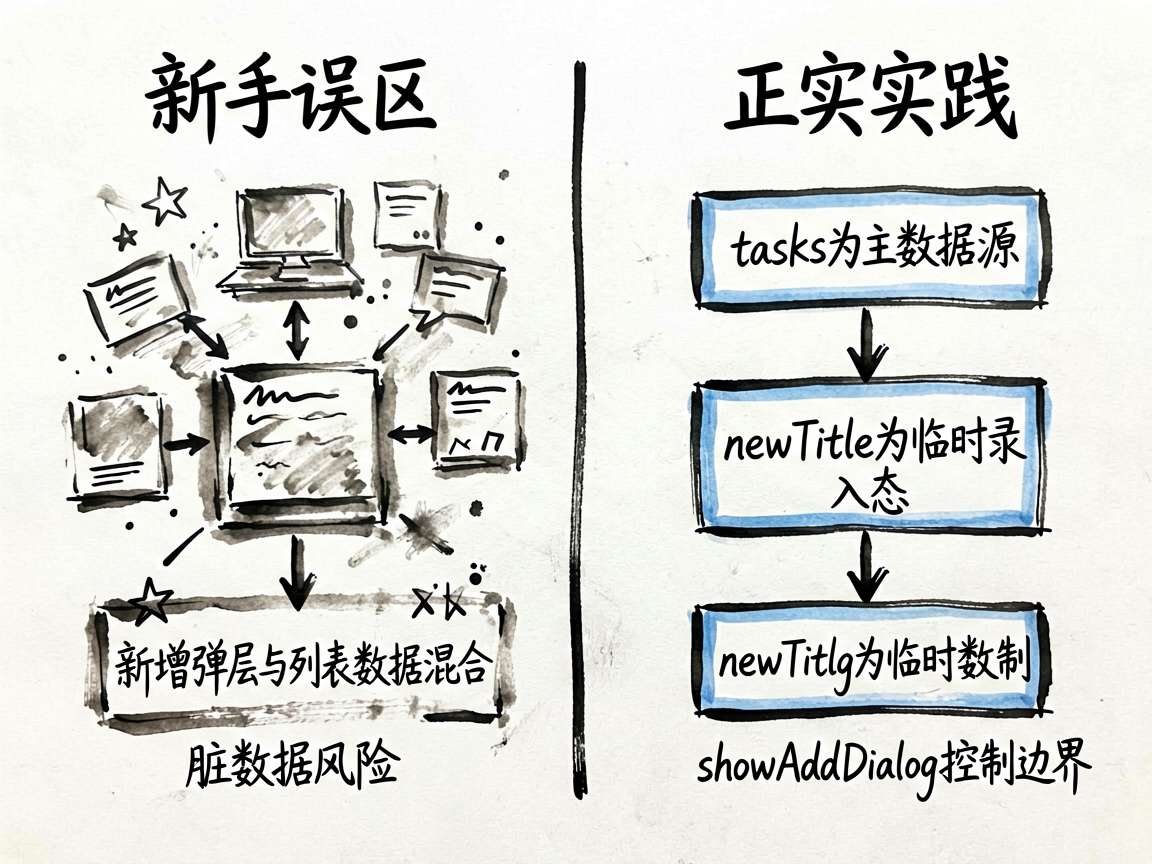
这个案例里有两类状态特别值得分开看:一类是“已有任务数据”,另一类是“当前正在操作的录入数据”。很多人第一次写待办页时,容易把新增弹层里的输入值和任务列表混着处理,短期能跑,后期就会很难受。
| 状态字段 | 类型 | 在这里我会把它理解成什么 |
|---|---|---|
tasks |
TodoTask[] |
页面唯一的任务主数据源,列表、统计和完成率都围着它转 |
filterPriority |
string |
当前筛选条件的一部分,影响用户此刻看到的任务范围 |
filterCategory |
string |
另一层筛选入口,让任务能按生活场景快速收拢 |
showAddDialog |
boolean |
控制录入面板是否出现,把“浏览任务”和“新增任务”两个动作切开 |
newTitle |
string |
用户当前正在输入的任务标题,属于临时录入态 |
newPriority |
string |
新任务的优先级选择,用来影响新增后的任务权重 |
newCategory |
string |
新任务所属分类,避免所有任务堆成一个池子 |
newDeadline |
string |
新任务截止时间,决定页面是否具备最基本的时间感 |
我会特别强调 tasks 和 newTitle 这两类状态别混。前者是“已经存在的数据”,后者是“用户还没提交的输入”。这两个层次一旦混在一起,新增弹层就很容易出现脏数据、取消不干净或者回填异常。
两段 getter,直接决定这页像不像成熟工具
片段 1:get filteredTasks(): TodoTask[] {
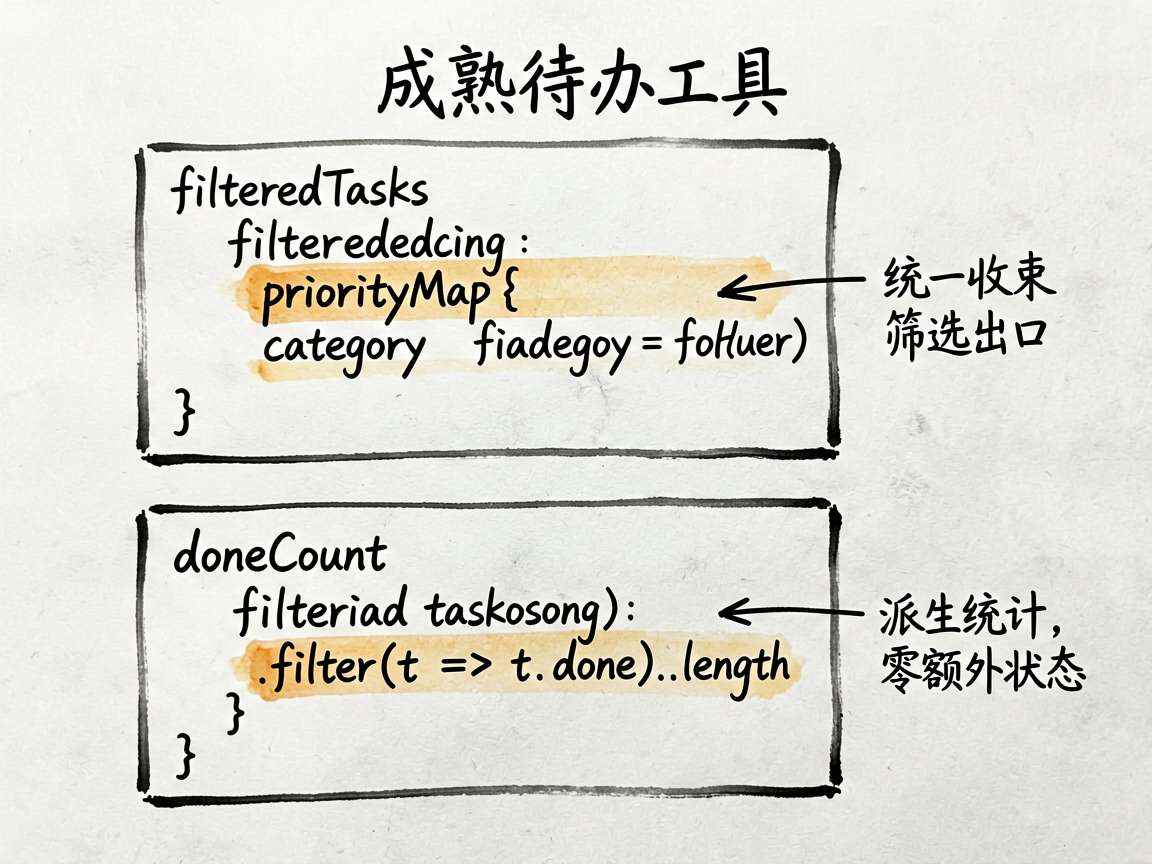
这个 getter 很关键,因为它把“优先级筛选”和“分类筛选”统一收束到了一个出口。页面布局只管渲染 filteredTasks,不需要在 ForEach 里到处写判断。这个拆法非常像真实项目里的列表页做法,简洁,而且后续可扩展。
  get filteredTasks(): TodoTask[] {
    return this.tasks.filter((t: TodoTask) => {
      const matchP = this.filterPriority === '全部' || this.priorityMap[t.priority] === this.filterPriority
      const matchC = this.filterCategory === '全部' || t.category === this.filterCategory
      return matchP && matchC
    })
  }
![手绘墨迹流程图:展示ArkUI待办事项的数据流向。中心节点为'TodoTask[] tasks'(主](https://i-blog.csdnimg.cn/img_convert/bd673d2972f15285c5e0d3561c5ba4fa.jpeg)
后面你如果想继续加“只看未完成”“只看今天到期”“按创建时间排序”,最自然的扩展位置就是这里,而不是跑到任务卡片里临时补条件。
片段 2:get doneCount(): number {
这段代码短得几乎容易被忽略,但它特别能说明一个成熟页面的思路:统计结果不单独维护,而是从主数据里实时派生。这样做最大的好处就是少一份状态、少一类同步问题。
  get doneCount(): number {
    return this.tasks.filter((t: TodoTask) => t.done).length
  }
我自己很喜欢这种写法。因为完成数、总数、完成率这些信息,本来就应该是列表状态的“读后感”,不该再手动存一份。你只要保证 tasks 是真的,统计就不会偏。
这篇代码我会怎么继续往下看
待办工具真正的难点,不是把任务列出来,而是保证同一条任务在“列表、统计、筛选、录入”四个场景下始终一致。
如果主数据源稳定,筛选和统计都通过派生逻辑拿结果,页面就会越写越顺。
如果新增、筛选、完成数都各自维护一份状态,后面功能一多就会开始打架。
- 新增任务后,列表、统计和完成率是否会同步变化
- 筛选条件是否只影响展示结果,而不会误改原始任务数据
- 完成状态切换后,任务卡片和顶部统计有没有同时刷新
- 录入弹层的临时输入值,是否和正式任务数据彻底分开
- 以后如果要加提醒时间、标签或排序,现有结构能不能自然接上
完整实现
// AdvancedTodoPage - 待办事项高级版 - 分优先级、截止日期与进度统计

interface TodoTask {
  id: number
  title: string
  desc: string
  priority: string
  deadline: string
  done: boolean
  category: string
}

@Entry
@Component
struct AdvancedTodoPage {
  @State tasks: TodoTask[] = [
    { id: 1, title: '完成项目需求文档', desc: '整理用户调研结果,编写PRD', priority: 'high', deadline: '今天', done: false, category: '工作' },
    { id: 2, title: '代码审查', desc: 'Review新功能PR', priority: 'high', deadline: '今天', done: true, category: '工作' },
    { id: 3, title: '购买生日礼物', desc: '给妈妈准备生日礼物', priority: 'medium', deadline: '明天', done: false, category: '生活' },
    { id: 4, title: '学习ArkUI动画', desc: '掌握animateTo和animation属性', priority: 'medium', deadline: '本周', done: false, category: '学习' },
    { id: 5, title: '健身房训练', desc: '腿部+有氧 60分钟', priority: 'low', deadline: '今天', done: true, category: '生活' },
    { id: 6, title: '阅读《深入理解计算机系统》', desc: '第三章:程序的机器级表示', priority: 'low', deadline: '本周', done: false, category: '学习' },
    { id: 7, title: '提交周报', desc: '总结本周工作进展', priority: 'high', deadline: '周五', done: false, category: '工作' },
  ]
  @State filterPriority: string = '全部'
  @State filterCategory: string = '全部'
  @State showAddDialog: boolean = false
  @State newTitle: string = ''
  @State newPriority: string = 'medium'
  @State newCategory: string = '工作'
  @State newDeadline: string = '今天'

  private priorityList: string[] = ['全部', '高', '中', '低']
  private categoryList: string[] = ['全部', '工作', '生活', '学习']

  private priorityMap: Record<string, string> = {
    'high': '高',
    'medium': '中',
    'low': '低',
  }
  private priorityColor: Record<string, string> = {
    'high': '#ff4d4f',
    'medium': '#fa8c16',
    'low': '#52c41a',
  }

  get filteredTasks(): TodoTask[] {
    return this.tasks.filter((t: TodoTask) => {
      const matchP = this.filterPriority === '全部' || this.priorityMap[t.priority] === this.filterPriority
      const matchC = this.filterCategory === '全部' || t.category === this.filterCategory
      return matchP && matchC
    })
  }

  get doneCount(): number {
    return this.tasks.filter((t: TodoTask) => t.done).length
  }

  get totalCount(): number {
    return this.tasks.length
  }

  get progressRate(): number {
    return this.totalCount === 0 ? 0 : this.doneCount / this.totalCount
  }

  toggleDone(id: number) {
    this.tasks = this.tasks.map((t) => { if (t.id === id) { t.done = !t.done } return t })
  }

  deleteTask(id: number) {
    this.tasks = this.tasks.filter((t: TodoTask) => t.id !== id)
  }

  addTask() {
    if (!this.newTitle.trim()) return
    const task: TodoTask = {
      id: Date.now(),
      title: this.newTitle,
      desc: '',
      priority: this.newPriority,
      deadline: this.newDeadline,
      done: false,
      category: this.newCategory,
    }
    this.tasks = [task].concat(this.tasks)
    this.newTitle = ''
    this.showAddDialog = false
  }

  @Builder
  StatsHeader() {
    Column({ space: 16 }) {
      Row() {
        Column({ space: 4 }) {
          Text('今日任务').fontSize(13).fontColor('#999999')
          Row({ space: 4 }) {
            Text(`${this.doneCount}`).fontSize(28).fontWeight(FontWeight.Bold).fontColor('#1890ff')
            Text(`/ ${this.totalCount}`).fontSize(16).fontColor('#aaaaaa').alignSelf(ItemAlign.End).margin({ bottom: 3 })
          }
        }
        .layoutWeight(1)
        .alignItems(HorizontalAlign.Start)

        Column({ space: 4 }) {
          Text(`${Math.round(this.progressRate * 100)}%`)
            .fontSize(28)
            .fontWeight(FontWeight.Bold)
            .fontColor(this.progressRate === 1 ? '#52c41a' : '#1890ff')
          Text('完成率').fontSize(13).fontColor('#999999')
        }
        .alignItems(HorizontalAlign.End)
      }
      .width('100%')

      Progress({ value: this.progressRate * 100, total: 100, type: ProgressType.Linear })
        .width('100%')
        .height(8)
        .color(this.progressRate === 1 ? '#52c41a' : '#1890ff')
        .backgroundColor('#f0f0f0')
        .borderRadius(4)

      // 分类快速统计
      Row({ space: 8 }) {
        ForEach(['工作', '生活', '学习'], (cat: string) => {
          Column({ space: 4 }) {
            Text(`${this.tasks.filter((t: TodoTask) => t.category === cat && !t.done).length}`)
              .fontSize(18)
              .fontWeight(FontWeight.Bold)
              .fontColor('#1a1a1a')
            Text(`${cat}待办`).fontSize(11).fontColor('#999999')
          }
          .layoutWeight(1)
          .alignItems(HorizontalAlign.Center)
          .padding(8)
          .backgroundColor('#f8f8f8')
          .borderRadius(8)
        })
      }
      .width('100%')
      .justifyContent(FlexAlign.SpaceBetween)

    }
    .padding(20)
    .backgroundColor('#ffffff')
    .borderRadius(16)
  }

  build() {
    Stack({ alignContent: Alignment.BottomEnd }) {
      Column({ space: 0 }) {
        // 标题
        Row() {
          Column({ space: 2 }) {
            Text('我的待办').fontSize(22).fontWeight(FontWeight.Bold).fontColor('#1a1a1a')
            Text('保持专注,完成每一项').fontSize(13).fontColor('#aaaaaa')
          }
          .alignItems(HorizontalAlign.Start)
          Blank()
        }
        .width('100%')
        .padding({ left: 16, right: 16, top: 16, bottom: 12 })
        .backgroundColor('#ffffff')

        Scroll() {
          Column({ space: 16 }) {
            this.StatsHeader()

            // 筛选器
            Column({ space: 10 }) {
              Row({ space: 8 }) {
                Text('优先级:').fontSize(13).fontColor('#666666')
                ForEach(this.priorityList, (p: string) => {
                  Text(p)
                    .fontSize(12)
                    .fontColor(this.filterPriority === p ? '#ffffff' : '#666666')
                    .backgroundColor(this.filterPriority === p ? '#1890ff' : '#f0f0f0')
                    .padding({ left: 12, right: 12, top: 4, bottom: 4 })
                    .borderRadius(12)
                    .onClick(() => { this.filterPriority = p })
                })
              }
              Row({ space: 8 }) {
                Text('分类:').fontSize(13).fontColor('#666666')
                ForEach(this.categoryList, (c: string) => {
                  Text(c)
                    .fontSize(12)
                    .fontColor(this.filterCategory === c ? '#ffffff' : '#666666')
                    .backgroundColor(this.filterCategory === c ? '#722ed1' : '#f0f0f0')
                    .padding({ left: 12, right: 12, top: 4, bottom: 4 })
                    .borderRadius(12)
                    .onClick(() => { this.filterCategory = c })
                })
              }
            }
            .padding({ left: 4, right: 4 })

            // 任务列表
            Column({ space: 8 }) {
              ForEach(this.filteredTasks, (task: TodoTask) => {
                Row({ space: 12 }) {
                  // 完成勾选
                  Stack() {
                    Circle()
                      .width(24)
                      .height(24)
                      .fill(task.done ? '#1890ff' : 'transparent')
                      .stroke(task.done ? '#1890ff' : '#cccccc')
                      .strokeWidth(2)
                    if (task.done) {
                      Text('✓').fontSize(12).fontColor('#ffffff').fontWeight(FontWeight.Bold)
                    }
                  }
                  .onClick(() => this.toggleDone(task.id))

                  Column({ space: 4 }) {
                    Row({ space: 8 }) {
                      Text(task.title)
                        .fontSize(15)
                        .fontColor(task.done ? '#bbbbbb' : '#1a1a1a')
                        .fontWeight(FontWeight.Medium)
                        .decoration({ type: task.done ? TextDecorationType.LineThrough : TextDecorationType.None })
                        .layoutWeight(1)
                        .maxLines(1)
                        .textOverflow({ overflow: TextOverflow.Ellipsis })
                    }
                    if (task.desc && !task.done) {
                      Text(task.desc)
                        .fontSize(12)
                        .fontColor('#aaaaaa')
                        .maxLines(1)
                        .textOverflow({ overflow: TextOverflow.Ellipsis })
                    }
                    Row({ space: 6 }) {
                      Text(this.priorityMap[task.priority])
                        .fontSize(10)
                        .fontColor('#ffffff')
                        .backgroundColor(this.priorityColor[task.priority])
                        .padding({ left: 6, right: 6, top: 2, bottom: 2 })
                        .borderRadius(8)
                      Text(task.category)
                        .fontSize(10)
                        .fontColor('#666666')
                        .backgroundColor('#f0f0f0')
                        .padding({ left: 6, right: 6, top: 2, bottom: 2 })
                        .borderRadius(8)
                      Text(`📅 ${task.deadline}`)
                        .fontSize(10)
                        .fontColor('#888888')
                    }
                  }
                  .layoutWeight(1)
                  .alignItems(HorizontalAlign.Start)

                  Text('×')
                    .fontSize(18)
                    .fontColor('#cccccc')
                    .onClick(() => this.deleteTask(task.id))
                }
                .padding(16)
                .backgroundColor('#ffffff')
                .borderRadius(12)
                .opacity(task.done ? 0.6 : 1)
              })
            }

            Column().height(80)
          }
          .padding({ left: 16, right: 16, top: 8, bottom: 16 })
        }
        .layoutWeight(1)
        .backgroundColor('#f5f7fa')
      }
      .width('100%')
      .height('100%')

      // 新增弹窗
      if (this.showAddDialog) {
        Column({ space: 16 }) {
          Row() {
            Text('新增任务').fontSize(16).fontWeight(FontWeight.Bold).fontColor('#1a1a1a')
            Blank()
            Text('✕').fontSize(18).fontColor('#999999').onClick(() => { this.showAddDialog = false })
          }
          .width('100%')

          TextInput({ placeholder: '任务名称', text: this.newTitle })
            .height(44).fontSize(15).onChange((v: string) => { this.newTitle = v })

          Row({ space: 8 }) {
            Text('优先级:').fontSize(13).fontColor('#666666')
            ForEach(['high', 'medium', 'low'], (p: string) => {
              Text(this.priorityMap[p])
                .fontSize(13)
                .fontColor(this.newPriority === p ? '#ffffff' : '#666666')
                .backgroundColor(this.newPriority === p ? this.priorityColor[p] : '#f0f0f0')
                .padding({ left: 12, right: 12, top: 5, bottom: 5 })
                .borderRadius(12)
                .onClick(() => { this.newPriority = p })
            })
          }
          .width('100%')

          Row({ space: 8 }) {
            Text('分类:').fontSize(13).fontColor('#666666')
            ForEach(['工作', '生活', '学习'], (c: string) => {
              Text(c)
                .fontSize(13)
                .fontColor(this.newCategory === c ? '#ffffff' : '#666666')
                .backgroundColor(this.newCategory === c ? '#722ed1' : '#f0f0f0')
                .padding({ left: 12, right: 12, top: 5, bottom: 5 })
                .borderRadius(12)
                .onClick(() => { this.newCategory = c })
            })
          }
          .width('100%')

          Button('添加任务').width('100%').height(44).fontSize(15).backgroundColor('#1890ff')
            .onClick(() => this.addTask())
        }
        .width('100%')
        .padding(20)
        .backgroundColor('#ffffff')
        .borderRadius({ topLeft: 20, topRight: 20 })
        .shadow({ radius: 20, color: '#00000020', offsetX: 0, offsetY: -4 })
        .position({ x: 0, y: '100%' })
        .translate({ y: '-100%' })
      }

      // FAB 按钮
      if (!this.showAddDialog) {
        Button('+')
          .width(56).height(56).fontSize(28)
          .backgroundColor('#1890ff')
          .borderRadius(28)
          .shadow({ radius: 8, color: '#1890ff50', offsetX: 0, offsetY: 4 })
          .margin({ bottom: 32, right: 20 })
          .onClick(() => { this.showAddDialog = true })
      }
    }
    .width('100%')
    .height('100%')
  }
}
再补一句
这类案例最值得学的,其实不是某一个控件怎么写,而是页面组织方式。把状态放对、把交互函数收好、把布局压简单,后面你接正式项目时会轻松很多。

讨论HarmonyOS开发技术,专注于API与组件、DevEco Studio、测试、元服务和应用上架分发等。
更多推荐
 4
4 0
0- 0


 已为社区贡献2条内容

所有评论(0)