HarmonyOS ArkTS 实战:实现一个校园社团物资库存与领用记录应用
项目效果
本文实现一个基于 HarmonyOS 和 ArkTS 的校园社团物资库存与领用记录应用。应用可以记录社团物资名称、所属社团、库存数量和物资类型,并支持物资领用、库存补充、低库存筛选、库存总量统计和单条物资删除。
最终运行效果如下:
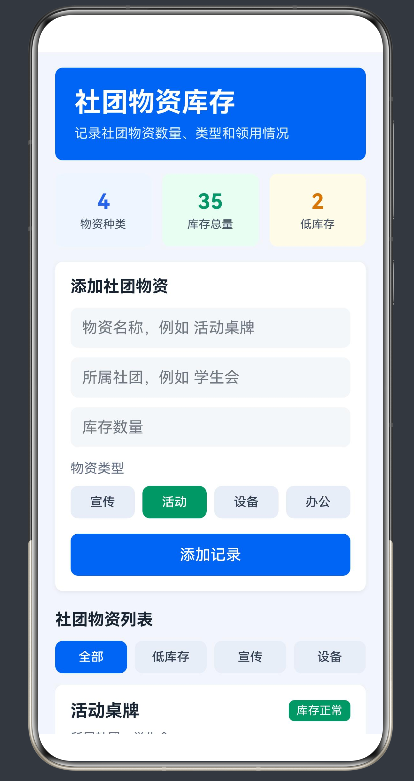
页面功能包括:
- 记录社团物资名称;
- 记录所属社团;
- 记录库存数量;
- 选择宣传、活动、设备、办公物资类型;
- 支持物资领用;
- 支持库存补充;
- 按全部、低库存、宣传、设备筛选;
- 统计物资种类、库存总量、低库存数量;
- 删除单条物资记录。
前言
校园社团经常会管理一些公共物资,比如宣传海报、横幅、话筒、插排、桌牌、文件夹、胶带、剪刀和活动道具等。如果物资数量只靠人工记忆,很容易出现活动前才发现库存不足、设备被借走却没有记录、社团物资管理混乱等问题。
本文实现的校园社团物资库存与领用记录应用,就是围绕这个场景设计的。用户可以添加社团物资,填写物资名称、所属社团和库存数量,并选择物资类型。每次领用或补充物资时,可以点击按钮调整库存,页面会自动统计库存总量和低库存物资数量。
这个项目不依赖后端接口,也不需要数据库,但包含表单输入、数组新增、库存更新、条件筛选、列表渲染和动态统计等典型 ArkTS 练习内容。
一、核心数据结构
每一条社团物资记录使用 MaterialRecord 表示:
interface MaterialRecord {
  id: number;
  itemName: string;
  clubName: string;
  stockCount: number;
  itemType: string;
}
其中:
itemName表示物资名称;clubName表示所属社团;stockCount表示当前库存数量;itemType表示宣传、活动、设备或办公物资类型。
二、页面状态设计
页面使用 @State 保存输入内容、筛选条件和物资列表:
@State private itemText: string = '';
@State private clubText: string = '';
@State private stockText: string = '';
@State private itemType: string = '活动';
@State private filterType: string = '全部';
@State private nextId: number = 5;

@State private records: MaterialRecord[] = [
  { id: 1, itemName: '活动桌牌', clubName: '学生会', stockCount: 12, itemType: '活动' },
  { id: 2, itemName: '宣传海报', clubName: '摄影社', stockCount: 3, itemType: '宣传' },
  { id: 3, itemName: '无线话筒', clubName: '音乐社', stockCount: 2, itemType: '设备' },
  { id: 4, itemName: '文件夹', clubName: '辩论社', stockCount: 18, itemType: '办公' }
];
这些状态变化后,ArkUI 会自动刷新页面。
三、添加物资记录
添加记录时,需要读取物资名称、所属社团和库存数量,并把库存数量从字符串转换成数字:
private addRecord(): void {
  const itemName: string = this.itemText.trim();
  const clubName: string = this.clubText.trim();
  const stockCount: number = Number(this.stockText);

  if (itemName.length === 0 || clubName.length === 0 || Number.isNaN(stockCount) || stockCount < 0) {
    return;
  }

  const record: MaterialRecord = {
    id: this.nextId,
    itemName,
    clubName,
    stockCount,
    itemType: this.itemType
  };

  this.records = [record, ...this.records];
  this.nextId += 1;
  this.itemText = '';
  this.clubText = '';
  this.stockText = '';
}
这里把新记录放在数组最前面,方便用户优先看到最新添加的社团物资。
四、库存调整和删除
物资领用时,库存数量减少 1。为了避免库存变成负数,需要先判断当前库存是否大于 0:
private useItem(id: number): void {
  this.records = this.records.map((item: MaterialRecord) => {
    if (item.id === id && item.stockCount > 0) {
      return {
        id: item.id,
        itemName: item.itemName,
        clubName: item.clubName,
        stockCount: item.stockCount - 1,
        itemType: item.itemType
      };
    }
    return item;
  });
}
库存补充时,库存数量增加 1:
private addStock(id: number): void {
  this.records = this.records.map((item: MaterialRecord) => {
    if (item.id === id) {
      return {
        id: item.id,
        itemName: item.itemName,
        clubName: item.clubName,
        stockCount: item.stockCount + 1,
        itemType: item.itemType
      };
    }
    return item;
  });
}
删除记录使用 filter():
private deleteRecord(id: number): void {
  this.records = this.records.filter((item: MaterialRecord) => item.id !== id);
}
五、筛选和统计
筛选逻辑如下:
private getFilteredRecords(): MaterialRecord[] {
  if (this.filterType === '低库存') {
    return this.records.filter((item: MaterialRecord) => item.stockCount <= 3);
  }

  if (this.filterType === '宣传') {
    return this.records.filter((item: MaterialRecord) => item.itemType === '宣传');
  }

  if (this.filterType === '设备') {
    return this.records.filter((item: MaterialRecord) => item.itemType === '设备');
  }

  return this.records;
}
库存总量和低库存数量也直接从数组计算:
private getTotalStock(): number {
  let total: number = 0;
  this.records.forEach((item: MaterialRecord) => {
    total += item.stockCount;
  });
  return total;
}

private getLowStockCount(): number {
  return this.records.filter((item: MaterialRecord) => item.stockCount <= 3).length;
}
六、页面布局说明
页面主要由四部分组成:
- 顶部标题卡片:展示应用名称和说明;
- 统计卡片:展示物资种类、库存总量、低库存;
- 添加表单:输入物资名称、所属社团和库存数量;
- 物资列表:展示每条物资记录,并支持领用、补充和删除。
列表使用 List 和 ForEach 渲染:
List() {
  ForEach(this.getFilteredRecords(), (item: MaterialRecord) => {
    ListItem() {
      this.MaterialCard(item);
    }
  }, (item: MaterialRecord) => item.id.toString());
}
当筛选结果为空时,页面显示空状态提示,避免列表区域空白。
七、Index.ets 完整代码
打开文件:
entry/src/main/ets/pages/Index.ets
将其中内容替换为下面代码:
interface MaterialRecord {
  id: number;
  itemName: string;
  clubName: string;
  stockCount: number;
  itemType: string;
}

@Entry
@Component
struct Index {
  @State private itemText: string = '';
  @State private clubText: string = '';
  @State private stockText: string = '';
  @State private itemType: string = '活动';
  @State private filterType: string = '全部';
  @State private nextId: number = 5;

  @State private records: MaterialRecord[] = [
    { id: 1, itemName: '活动桌牌', clubName: '学生会', stockCount: 12, itemType: '活动' },
    { id: 2, itemName: '宣传海报', clubName: '摄影社', stockCount: 3, itemType: '宣传' },
    { id: 3, itemName: '无线话筒', clubName: '音乐社', stockCount: 2, itemType: '设备' },
    { id: 4, itemName: '文件夹', clubName: '辩论社', stockCount: 18, itemType: '办公' }
  ];

  private addRecord(): void {
    const itemName: string = this.itemText.trim();
    const clubName: string = this.clubText.trim();
    const stockCount: number = Number(this.stockText);

    if (itemName.length === 0 || clubName.length === 0 || Number.isNaN(stockCount) || stockCount < 0) {
      return;
    }

    const record: MaterialRecord = {
      id: this.nextId,
      itemName,
      clubName,
      stockCount,
      itemType: this.itemType
    };

    this.records = [record, ...this.records];
    this.nextId += 1;
    this.itemText = '';
    this.clubText = '';
    this.stockText = '';
  }

  private useItem(id: number): void {
    this.records = this.records.map((item: MaterialRecord) => {
      if (item.id === id && item.stockCount > 0) {
        return {
          id: item.id,
          itemName: item.itemName,
          clubName: item.clubName,
          stockCount: item.stockCount - 1,
          itemType: item.itemType
        };
      }
      return item;
    });
  }

  private addStock(id: number): void {
    this.records = this.records.map((item: MaterialRecord) => {
      if (item.id === id) {
        return {
          id: item.id,
          itemName: item.itemName,
          clubName: item.clubName,
          stockCount: item.stockCount + 1,
          itemType: item.itemType
        };
      }
      return item;
    });
  }

  private deleteRecord(id: number): void {
    this.records = this.records.filter((item: MaterialRecord) => item.id !== id);
  }

  private getFilteredRecords(): MaterialRecord[] {
    if (this.filterType === '低库存') {
      return this.records.filter((item: MaterialRecord) => item.stockCount <= 3);
    }

    if (this.filterType === '宣传') {
      return this.records.filter((item: MaterialRecord) => item.itemType === '宣传');
    }

    if (this.filterType === '设备') {
      return this.records.filter((item: MaterialRecord) => item.itemType === '设备');
    }

    return this.records;
  }

  private getTotalStock(): number {
    let total: number = 0;
    this.records.forEach((item: MaterialRecord) => {
      total += item.stockCount;
    });
    return total;
  }

  private getLowStockCount(): number {
    return this.records.filter((item: MaterialRecord) => item.stockCount <= 3).length;
  }

  private getTypeColor(type: string): ResourceColor {
    if (type === '宣传') {
      return '#2563EB';
    }

    if (type === '活动') {
      return '#059669';
    }

    if (type === '设备') {
      return '#D97706';
    }

    return '#7C3AED';
  }

  @Builder
  HeaderCard() {
    Column({ space: 8 }) {
      Text('社团物资库存')
        .fontSize(28)
        .fontWeight(FontWeight.Bold)
        .fontColor(Color.White)
        .width('100%');

      Text('记录社团物资数量、类型和领用情况')
        .fontSize(14)
        .fontColor('#E0F2FE')
        .width('100%');
    }
    .width('100%')
    .padding(20)
    .backgroundColor('#2563EB')
    .borderRadius(8);
  }

  @Builder
  StatCard(title: string, value: string, color: ResourceColor, bgColor: ResourceColor) {
    Column({ space: 4 }) {
      Text(value)
        .fontSize(22)
        .fontWeight(FontWeight.Bold)
        .fontColor(color);

      Text(title)
        .fontSize(12)
        .fontColor('#475467');
    }
    .width('31%')
    .height(76)
    .justifyContent(FlexAlign.Center)
    .backgroundColor(bgColor)
    .borderRadius(8);
  }

  @Builder
  TypeButton(text: string) {
    Button(text)
      .height(34)
      .layoutWeight(1)
      .fontSize(13)
      .fontColor(this.itemType === text ? Color.White : '#344054')
      .backgroundColor(this.itemType === text ? this.getTypeColor(text) : '#E8EEF7')
      .borderRadius(8)
      .onClick(() => {
        this.itemType = text;
      });
  }

  @Builder
  FilterButton(text: string) {
    Button(text)
      .height(34)
      .layoutWeight(1)
      .fontSize(13)
      .fontColor(this.filterType === text ? Color.White : '#344054')
      .backgroundColor(this.filterType === text ? '#2563EB' : '#E8EEF7')
      .borderRadius(8)
      .onClick(() => {
        this.filterType = text;
      });
  }

  @Builder
  MaterialCard(item: MaterialRecord) {
    Column({ space: 10 }) {
      Row() {
        Text(item.itemName)
          .fontSize(18)
          .fontWeight(FontWeight.Bold)
          .fontColor('#182431')
          .layoutWeight(1)
          .maxLines(1)
          .textOverflow({ overflow: TextOverflow.Ellipsis });

        Text(item.stockCount <= 3 ? '低库存' : '库存正常')
          .fontSize(12)
          .fontColor(Color.White)
          .backgroundColor(item.stockCount <= 3 ? '#D92D20' : '#059669')
          .borderRadius(6)
          .padding({ left: 8, right: 8, top: 4, bottom: 4 });
      }
      .width('100%');

      Text(`所属社团:${item.clubName}`)
        .fontSize(13)
        .fontColor('#667085')
        .width('100%');

      Row({ space: 8 }) {
        Text(item.itemType)
          .fontSize(12)
          .fontColor(Color.White)
          .backgroundColor(this.getTypeColor(item.itemType))
          .borderRadius(6)
          .padding({ left: 8, right: 8, top: 4, bottom: 4 });

        Text(`库存 ${item.stockCount}`)
          .fontSize(12)
          .fontColor(item.stockCount <= 3 ? '#D92D20' : '#2563EB')
          .backgroundColor(item.stockCount <= 3 ? '#FEE4E2' : '#EFF6FF')
          .borderRadius(6)
          .padding({ left: 8, right: 8, top: 4, bottom: 4 });
      }
      .width('100%');

      Row({ space: 10 }) {
        Button('领用')
          .height(34)
          .fontSize(13)
          .fontColor('#2563EB')
          .backgroundColor('#EFF6FF')
          .borderRadius(8)
          .padding({ left: 12, right: 12 })
          .onClick(() => {
            this.useItem(item.id);
          });

        Button('补充')
          .height(34)
          .fontSize(13)
          .fontColor('#059669')
          .backgroundColor('#ECFDF3')
          .borderRadius(8)
          .padding({ left: 12, right: 12 })
          .onClick(() => {
            this.addStock(item.id);
          });

        Blank();

        Button('删除')
          .height(34)
          .fontSize(13)
          .fontColor('#D92D20')
          .backgroundColor('#FEE4E2')
          .borderRadius(8)
          .padding({ left: 12, right: 12 })
          .onClick(() => {
            this.deleteRecord(item.id);
          });
      }
      .width('100%');
    }
    .width('100%')
    .padding(16)
    .margin({ bottom: 12 })
    .backgroundColor(Color.White)
    .borderRadius(8)
    .shadow({ radius: 10, color: '#10000000', offsetX: 0, offsetY: 4 });
  }

  @Builder
  EmptyState() {
    Column({ space: 8 }) {
      Text('暂无物资记录')
        .fontSize(17)
        .fontWeight(FontWeight.Bold)
        .fontColor('#344054');

      Text('添加社团物资后,这里会显示库存列表。')
        .fontSize(13)
        .fontColor('#667085')
        .textAlign(TextAlign.Center);
    }
    .width('100%')
    .padding(26)
    .backgroundColor(Color.White)
    .borderRadius(8);
  }

  build() {
    Column() {
      this.HeaderCard();

      Row() {
        this.StatCard('物资种类', `${this.records.length}`, '#2563EB', '#EFF6FF');
        this.StatCard('库存总量', `${this.getTotalStock()}`, '#059669', '#ECFDF3');
        this.StatCard('低库存', `${this.getLowStockCount()}`, '#D97706', '#FFFBEB');
      }
      .width('100%')
      .justifyContent(FlexAlign.SpaceBetween)
      .margin({ top: 14 });

      Column() {
        Text('添加社团物资')
          .fontSize(17)
          .fontWeight(FontWeight.Bold)
          .fontColor('#182431')
          .width('100%')
          .margin({ bottom: 12 });

        TextInput({ placeholder: '物资名称,例如 活动桌牌', text: this.itemText })
          .height(42)
          .fontSize(14)
          .backgroundColor('#F5F7FA')
          .borderRadius(8)
          .padding({ left: 12, right: 12 })
          .onChange((value: string) => {
            this.itemText = value;
          });

        TextInput({ placeholder: '所属社团,例如 学生会', text: this.clubText })
          .height(42)
          .fontSize(14)
          .backgroundColor('#F5F7FA')
          .borderRadius(8)
          .padding({ left: 12, right: 12 })
          .margin({ top: 10 })
          .onChange((value: string) => {
            this.clubText = value;
          });

        TextInput({ placeholder: '库存数量', text: this.stockText })
          .height(42)
          .fontSize(14)
          .backgroundColor('#F5F7FA')
          .borderRadius(8)
          .type(InputType.Number)
          .padding({ left: 12, right: 12 })
          .margin({ top: 10 })
          .onChange((value: string) => {
            this.stockText = value;
          });

        Text('物资类型')
          .fontSize(14)
          .fontColor('#667085')
          .width('100%')
          .margin({ top: 14, bottom: 10 });

        Row({ space: 8 }) {
          this.TypeButton('宣传');
          this.TypeButton('活动');
          this.TypeButton('设备');
          this.TypeButton('办公');
        }
        .width('100%');

        Button('添加记录')
          .height(44)
          .fontSize(16)
          .fontColor(Color.White)
          .backgroundColor('#2563EB')
          .borderRadius(8)
          .width('100%')
          .margin({ top: 16 })
          .onClick(() => {
            this.addRecord();
          });
      }
      .width('100%')
      .padding(16)
      .backgroundColor(Color.White)
      .borderRadius(8)
      .margin({ top: 16 })
      .shadow({ radius: 10, color: '#10000000', offsetX: 0, offsetY: 4 });

      Text('社团物资列表')
        .fontSize(17)
        .fontWeight(FontWeight.Bold)
        .fontColor('#182431')
        .width('100%')
        .margin({ top: 20, bottom: 12 });

      Row({ space: 8 }) {
        this.FilterButton('全部');
        this.FilterButton('低库存');
        this.FilterButton('宣传');
        this.FilterButton('设备');
      }
      .width('100%')
      .margin({ bottom: 12 });

      if (this.getFilteredRecords().length === 0) {
        this.EmptyState();
      } else {
        List() {
          ForEach(this.getFilteredRecords(), (item: MaterialRecord) => {
            ListItem() {
              this.MaterialCard(item);
            }
          }, (item: MaterialRecord) => item.id.toString());
        }
        .width('100%')
        .layoutWeight(1)
        .scrollBar(BarState.Off);
      }
    }
    .width('100%')
    .height('100%')
    .padding({ left: 18, right: 18, top: 16 })
    .backgroundColor('#F3F6FB');
  }
}
八、运行测试
在 DevEco Studio 中打开项目,进入:
entry/src/main/ets/pages/Index.ets
使用 Preview、模拟器或真机运行页面。测试步骤如下:
- 输入物资名称;
- 输入所属社团;
- 输入库存数量;
- 选择宣传、活动、设备或办公类型;
- 点击“添加记录”;
- 点击“领用”减少库存;
- 点击“补充”增加库存;
- 使用筛选按钮查看不同记录;
- 删除单条记录;
- 检查统计卡片是否同步变化。
经过测试,添加记录、库存领用、库存补充、筛选、删除和统计功能均可正常运行。
九、总结
本文基于 HarmonyOS 和 ArkTS 实现了一个校园社团物资库存与领用记录应用。项目通过 @State 管理页面数据,使用 ArkUI 完成页面布局,并实现了物资记录添加、库存领用、库存补充、物资类型选择、筛选展示和动态统计等功能。
这个项目虽然是单页面应用,但业务场景具体,交互逻辑完整,适合用来练习 ArkTS 中的表单输入、数组操作、条件渲染和列表渲染。后续可以继续扩展本地存储、物资借用人记录、低库存提醒、物资搜索和社团分类统计等功能。

讨论HarmonyOS开发技术,专注于API与组件、DevEco Studio、测试、元服务和应用上架分发等。
更多推荐
 5
5 0
0- 0


 已为社区贡献14条内容

所有评论(0)