基于HarmonyOS的情侣美食管理应用开发实战(七)- 菜谱详情页面开发
·
基于HarmonyOS的情侣美食管理应用开发实战(七)- 菜谱详情页面开发
📖 系列文章目录
- (一)项目设计与角色管理
- (二)菜谱管理与订单系统
- (三)美食相册与设置功能
- (四)数据库优化与问题解决
- (五)数据持久化问题修复
- (六)图片显示问题修复
- (七)菜谱详情页面开发(本文)
- (八)收藏功能实现
一、功能概述
1.1 需求分析
在之前的开发中,我们已经实现了菜谱列表展示功能,但用户点击菜谱后只能看到一个简单的详情页面。为了提升用户体验,我们需要开发一个完整的菜谱详情页面,包含:
- 完整的菜谱信息展示:图片、基本信息、食材列表、制作步骤
- 收藏功能:用户可以收藏喜欢的菜谱,方便后续查看
- 统一的详情入口:从任何菜谱列表点击都可跳转到详情页
1.2 功能特点
✅ 信息完整性:展示菜谱的所有相关信息
✅ 交互友好:收藏状态实时反馈,操作流畅
✅ 视觉美观:卡片式布局,渐变色导航栏
✅ 数据准确:从数据库实时查询最新数据
二、页面结构设计
2.1 页面布局
菜谱详情页面采用垂直滚动布局,从上到下依次为:
┌─────────────────────────────┐
│   导航栏(返回 + 收藏)      │
├─────────────────────────────┤
│   菜谱图片                   │
├─────────────────────────────┤
│   基本信息(名称、类型等)   │
├─────────────────────────────┤
│   食材列表                   │
├─────────────────────────────┤
│   制作步骤                   │
└─────────────────────────────┘
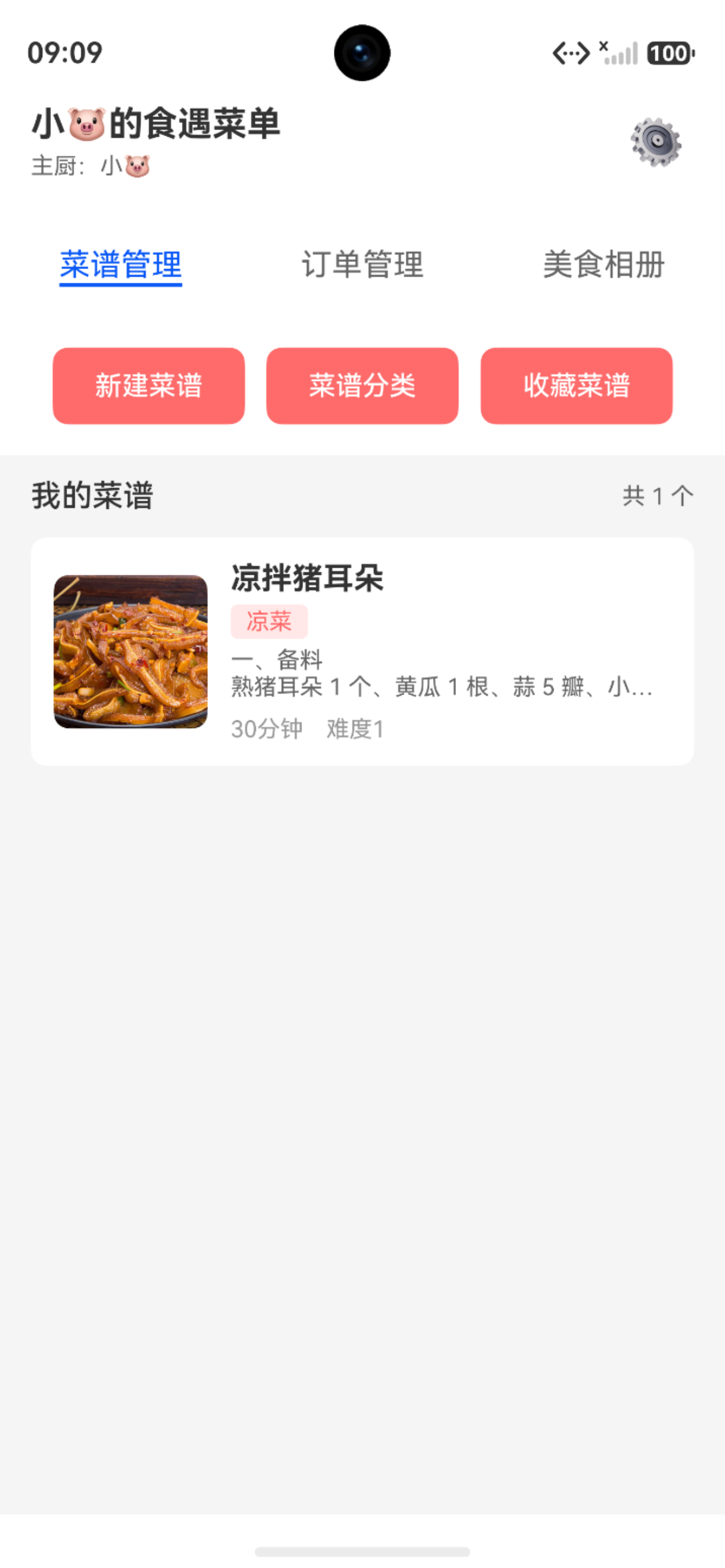
2.2 页面状态管理
@Entry
@Component
struct RecipeDetailPage {
  @State recipe: Recipe | null = null      // 菜谱数据
  @State isLoading: boolean = true          // 加载状态
  @State isFavorite: boolean = false        // 收藏状态

  // 页面加载时获取菜谱ID
  aboutToAppear() {
    const params = router.getParams() as Record<string, Object>
    const recipeId = params['recipeId'] as number
    this.loadRecipeDetail(recipeId)
  }
}
三、导航栏设计
3.1 渐变色背景实现
导航栏采用渐变色背景,包含返回按钮和收藏按钮:
@Builder
NavBar() {
  Row() {
    // 返回按钮
    Row() {
      Image($r('app.media.ic_back'))
        .width(24)
        .height(24)

      Text('菜谱详情')
        .fontSize(18)
        .fontColor(Color.White)
        .margin({ left: 8 })
    }
    .onClick(() => router.back())

    Blank()

    // 收藏按钮
    Image(this.isFavorite ? $r('app.media.ic_favorite_filled') : $r('app.media.ic_favorite'))
      .width(24)
      .height(24)
      .onClick(() => this.toggleFavorite())
  }
  .width('100%')
  .height(56)
  .padding({ left: 16, right: 16 })
  .linearGradient({
    angle: 135,
    colors: [['#FF6B6B', 0.0], ['#FF8E53', 1.0]]
  })
}
设计要点:
- 使用
linearGradient实现渐变背景 - 收藏图标根据状态动态切换(空心/实心)
- 返回按钮使用自定义SVG图标
3.2 图标资源准备
创建以下SVG图标:
返回图标 (ic_back.svg):
<svg xmlns="http://www.w3.org/2000/svg" width="24" height="24" viewBox="0 0 24 24"
     fill="none" stroke="white" stroke-width="2">
  <path d="M19 12H5M12 19l-7-7 7-7"/>
</svg>
收藏图标(空心) (ic_favorite.svg):
<svg xmlns="http://www.w3.org/2000/svg" width="24" height="24" viewBox="0 0 24 24"
     fill="none" stroke="white" stroke-width="2">
  <path d="M20.84 4.61a5.5 5.5 0 0 0-7.78 0L12 5.67l-1.06-1.06a5.5 5.5 0 0 0-7.78 7.78l1.06 1.06L12 21.23l7.78-7.78 1.06-1.06a5.5 5.5 0 0 0 0-7.78z"/>
</svg>
收藏图标(实心) (ic_favorite_filled.svg):
<svg xmlns="http://www.w3.org/2000/svg" width="24" height="24" viewBox="0 0 24 24"
     fill="white" stroke="white" stroke-width="2">
  <path d="M20.84 4.61a5.5 5.5 0 0 0-7.78 0L12 5.67l-1.06-1.06a5.5 5.5 0 0 0-7.78 7.78l1.06 1.06L12 21.23l7.78-7.78 1.06-1.06a5.5 5.5 0 0 0 0-7.78z"/>
</svg>
四、基本信息展示
4.1 信息卡片设计
@Builder
RecipeInfo() {
  Column() {
    // 菜谱名称
    Text(this.recipe.name)
      .fontSize(24)
      .fontWeight(FontWeight.Bold)
      .margin({ bottom: 12 })

    // 标签信息
    Row() {
      // 类型标签
      Text(RecipeTypeMap.get(this.recipe.type) || '其他')
        .fontSize(12)
        .fontColor(Color.White)
        .backgroundColor('#FF6B6B')
        .borderRadius(12)
        .padding({ left: 12, right: 12, top: 4, bottom: 4 })

      // 难度标签
      Text(DifficultyMap.get(this.recipe.difficulty) || '普通')
        .fontSize(12)
        .fontColor(Color.White)
        .backgroundColor('#4ECDC4')
        .borderRadius(12)
        .padding({ left: 12, right: 12, top: 4, bottom: 4 })
        .margin({ left: 8 })

      // 时长标签
      Text(`${this.recipe.cookingTime}分钟`)
        .fontSize(12)
        .fontColor(Color.White)
        .backgroundColor('#95E1D3')
        .borderRadius(12)
        .padding({ left: 12, right: 12, top: 4, bottom: 4 })
        .margin({ left: 8 })
    }
    .margin({ bottom: 12 })

    // 描述
    if (this.recipe.description) {
      Text(this.recipe.description)
        .fontSize(14)
        .fontColor('#666666')
        .lineHeight(22)
    }
  }
  .width('100%')
  .padding(16)
  .backgroundColor(Color.White)
  .borderRadius(8)
}
设计要点:
- 使用彩色标签区分不同信息类型
- 标签采用圆角胶囊样式
- 描述文本支持多行显示
4.2 难度映射配置
在 CommonConstant.ets 中添加难度映射:
/**
 * 难度等级映射
 */
export const DifficultyMap = new Map<number, string>([
  [1, '简单'],
  [2, '普通'],
  [3, '中等'],
  [4, '困难'],
  [5, '大师']
])
五、食材列表展示
5.1 列表布局
@Builder
MaterialList() {
  Column() {
    Text('食材清单')
      .fontSize(18)
      .fontWeight(FontWeight.Bold)
      .margin({ bottom: 12 })

    ForEach(this.recipe.materials, (material: RecipeMaterial) => {
      Row() {
        Text(material.name)
          .fontSize(14)
          .layoutWeight(1)

        Text(material.amount)
          .fontSize(14)
          .fontColor('#666666')
      }
      .width('100%')
      .padding({ top: 8, bottom: 8 })
      .border({ width: { bottom: 1 }, color: '#F0F0F0' })
    })
  }
  .width('100%')
  .padding(16)
  .backgroundColor(Color.White)
  .borderRadius(8)
  .margin({ top: 12 })
}
设计要点:
- 食材名称和用量左右布局
- 使用分割线区分不同食材
- 卡片式设计,圆角边框
六、制作步骤展示
6.1 步骤卡片设计
@Builder
StepList() {
  Column() {
    Text('制作步骤')
      .fontSize(18)
      .fontWeight(FontWeight.Bold)
      .margin({ bottom: 12 })

    ForEach(this.recipe.steps, (step: RecipeStep, index: number) => {
      Row() {
        // 步骤序号
        Column() {
          Text(`${index + 1}`)
            .fontSize(16)
            .fontColor(Color.White)
            .fontWeight(FontWeight.Bold)
        }
        .width(32)
        .height(32)
        .borderRadius(16)
        .backgroundColor('#FF6B6B')
        .justifyContent(FlexAlign.Center)

        // 步骤内容
        Column() {
          Text(step.description)
            .fontSize(14)
            .lineHeight(22)

          // 步骤图片(如果有)
          if (step.imagePath) {
            Image(ImageUtil.getDisplayPath(step.imagePath))
              .width('100%')
              .height(150)
              .borderRadius(8)
              .margin({ top: 8 })
              .objectFit(ImageFit.Cover)
          }
        }
        .layoutWeight(1)
        .margin({ left: 12 })
        .alignItems(HorizontalAlign.Start)
      }
      .width('100%')
      .margin({ top: 16 })
    })
  }
  .width('100%')
  .padding(16)
  .backgroundColor(Color.White)
  .borderRadius(8)
  .margin({ top: 12 })
}
设计要点:
- 步骤序号使用圆形背景
- 支持步骤图片展示
- 图文结合,更直观易懂
七、数据库功能扩展
7.1 查询菜谱详情
在 RdbUtil.ets 中添加查询方法:
static async queryRecipeById(id: number): Promise<Recipe | null> {
  const predicates = new relationalStore.RdbPredicates('recipe')
  predicates.equalTo('id', id)

  const resultSet = await this.rdbStore.query(predicates)

  if (resultSet.goToFirstRow()) {
    const recipe: Recipe = {
      id: resultSet.getLong(resultSet.getColumnIndex('id')),
      name: resultSet.getString(resultSet.getColumnIndex('name')),
      type: resultSet.getLong(resultSet.getColumnIndex('type')),
      difficulty: resultSet.getLong(resultSet.getColumnIndex('difficulty')),
      cookingTime: resultSet.getLong(resultSet.getColumnIndex('cooking_time')),
      description: resultSet.getString(resultSet.getColumnIndex('description')),
      imagePath: resultSet.getString(resultSet.getColumnIndex('image_path')),
      isFavorite: resultSet.getLong(resultSet.getColumnIndex('is_favorite')),
      materials: [],
      steps: []
    }

    resultSet.close()

    // 查询食材和步骤
    recipe.materials = await this.queryMaterialsByRecipeId(id)
    recipe.steps = await this.queryStepsByRecipeId(id)

    return recipe
  }

  resultSet.close()
  return null
}
7.2 查询食材列表
static async queryMaterialsByRecipeId(recipeId: number): Promise<RecipeMaterial[]> {
  const predicates = new relationalStore.RdbPredicates('recipe_material')
  predicates.equalTo('recipe_id', recipeId)

  const resultSet = await this.rdbStore.query(predicates)
  const materials: RecipeMaterial[] = []

  while (resultSet.goToNextRow()) {
    materials.push({
      id: resultSet.getLong(resultSet.getColumnIndex('id')),
      recipeId: resultSet.getLong(resultSet.getColumnIndex('recipe_id')),
      name: resultSet.getString(resultSet.getColumnIndex('name')),
      amount: resultSet.getString(resultSet.getColumnIndex('amount'))
    })
  }

  resultSet.close()
  return materials
}
7.3 查询制作步骤
static async queryStepsByRecipeId(recipeId: number): Promise<RecipeStep[]> {
  const predicates = new relationalStore.RdbPredicates('recipe_step')
  predicates.equalTo('recipe_id', recipeId)
  predicates.orderByAsc('step_number')

  const resultSet = await this.rdbStore.query(predicates)
  const steps: RecipeStep[] = []

  while (resultSet.goToNextRow()) {
    steps.push({
      id: resultSet.getLong(resultSet.getColumnIndex('id')),
      recipeId: resultSet.getLong(resultSet.getColumnIndex('recipe_id')),
      stepNumber: resultSet.getLong(resultSet.getColumnIndex('step_number')),
      description: resultSet.getString(resultSet.getColumnIndex('description')),
      imagePath: resultSet.getString(resultSet.getColumnIndex('image_path'))
    })
  }

  resultSet.close()
  return steps
}
八、页面跳转逻辑
8.1 统一跳转入口
修改所有菜谱列表页面,统一跳转到详情页:
主厨首页 (ChefHomePage.ets):
.onClick(() => {
  router.pushUrl({
    url: 'pages/RecipeDetailPage',
    params: { recipeId: recipe.id }
  })
})
分类页面 (RecipeCategoryPage.ets):
.onClick(() => {
  router.pushUrl({
    url: 'pages/RecipeDetailPage',
    params: { recipeId: recipe.id }
  })
})
收藏页面 (FavoriteRecipePage.ets):
.onClick(() => {
  router.pushUrl({
    url: 'pages/RecipeDetailPage',
    params: { recipeId: recipe.id }
  })
})
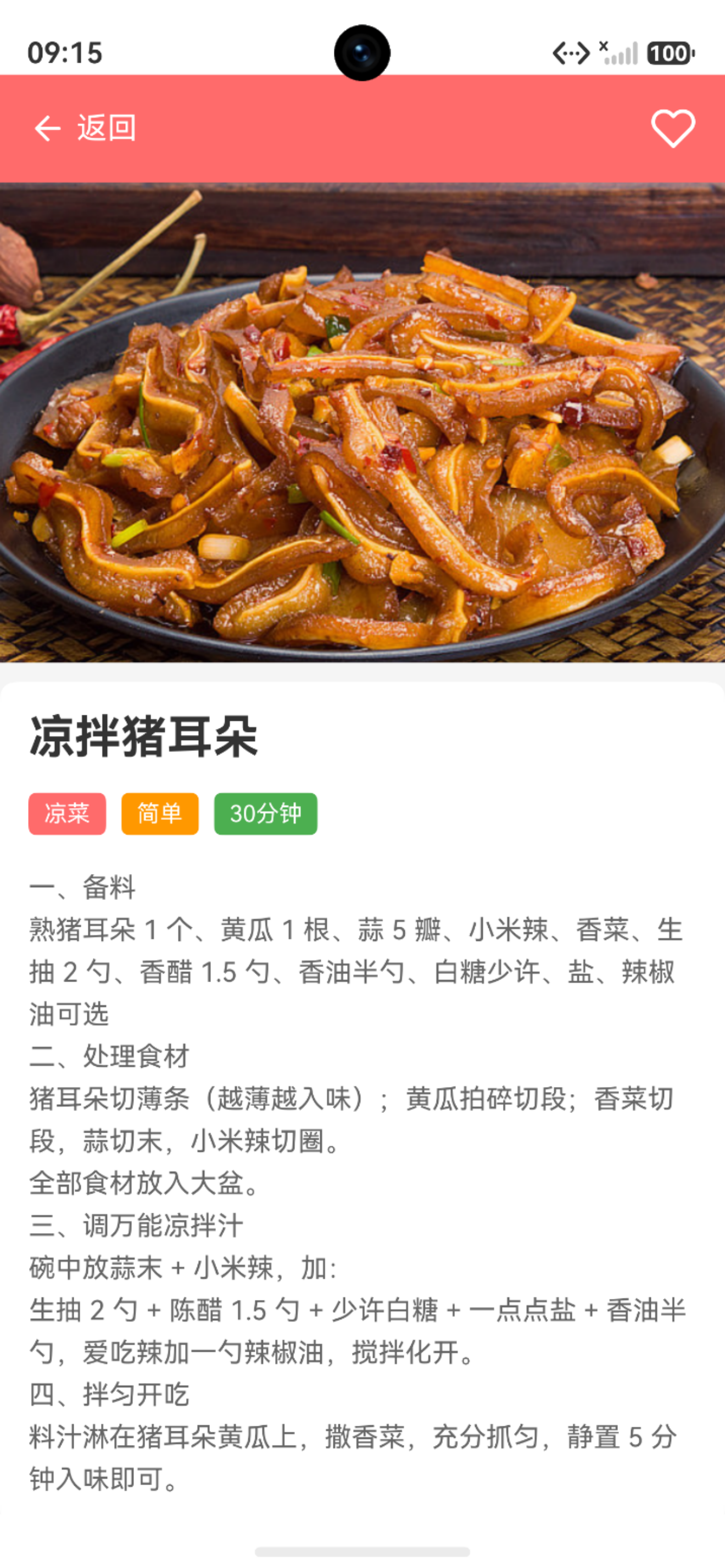
- 详情页如下:
8.2 页面注册
在 main_pages.json 中注册新页面:
{
  "src": [
    "pages/Index",
    "pages/SplashPage",
    "pages/RoleSelectPage",
    "pages/ChefHomePage",
    "pages/DinerHomePage",
    "pages/RecipeDetailPage",
    // ... 其他页面
  ]
}
九、技术要点总结
9.1 状态管理
@State recipe: Recipe | null = null      // 菜谱数据
@State isLoading: boolean = true          // 加载状态
@State isFavorite: boolean = false        // 收藏状态
要点:
- 使用
@State装饰器实现响应式更新 - 数据变更自动触发UI刷新
- 状态分离,逻辑清晰
9.2 路由传参
传递参数:
router.pushUrl({
  url: 'pages/RecipeDetailPage',
  params: { recipeId: recipe.id }
})
接收参数:
const params = router.getParams() as Record<string, Object>
const recipeId = params['recipeId'] as number
9.3 渐变色实现
.linearGradient({
  angle: 135,
  colors: [['#FF6B6B', 0.0], ['#FF8E53', 1.0]]
})
参数说明:
angle: 渐变角度(135度)colors: 颜色数组,每个元素包含颜色值和位置
十、总结
通过本篇文章,我们完成了菜谱详情页面的开发:
✅ 页面结构清晰:导航栏、图片、信息、食材、步骤层次分明
✅ 视觉设计美观:渐变色导航栏、彩色标签、卡片式布局
✅ 数据查询完整:支持查询菜谱详情、食材列表、制作步骤
✅ 页面跳转统一:所有列表页面统一跳转到详情页
下一篇文章将介绍收藏功能的实现,包括收藏状态切换、数据库更新等内容。

讨论HarmonyOS开发技术,专注于API与组件、DevEco Studio、测试、元服务和应用上架分发等。
更多推荐

 11
11 0
0- 0


 已为社区贡献76条内容

所有评论(0)