基于HarmonyOS的情侣美食管理应用开发实战(八)- 收藏功能实现
·
基于HarmonyOS的情侣美食管理应用开发实战(八)- 收藏功能实现
📖 系列文章目录
- (一)项目设计与角色管理
- (二)菜谱管理与订单系统
- (三)美食相册与设置功能
- (四)数据库优化与问题解决
- (五)数据持久化问题修复
- (六)图片显示问题修复
- (七)菜谱详情页面开发
- (八)收藏功能实现(本文)
一、功能概述
1.1 需求分析
在菜谱详情页面中,用户需要能够:
- 收藏喜欢的菜谱
- 取消已收藏的菜谱
- 查看收藏状态
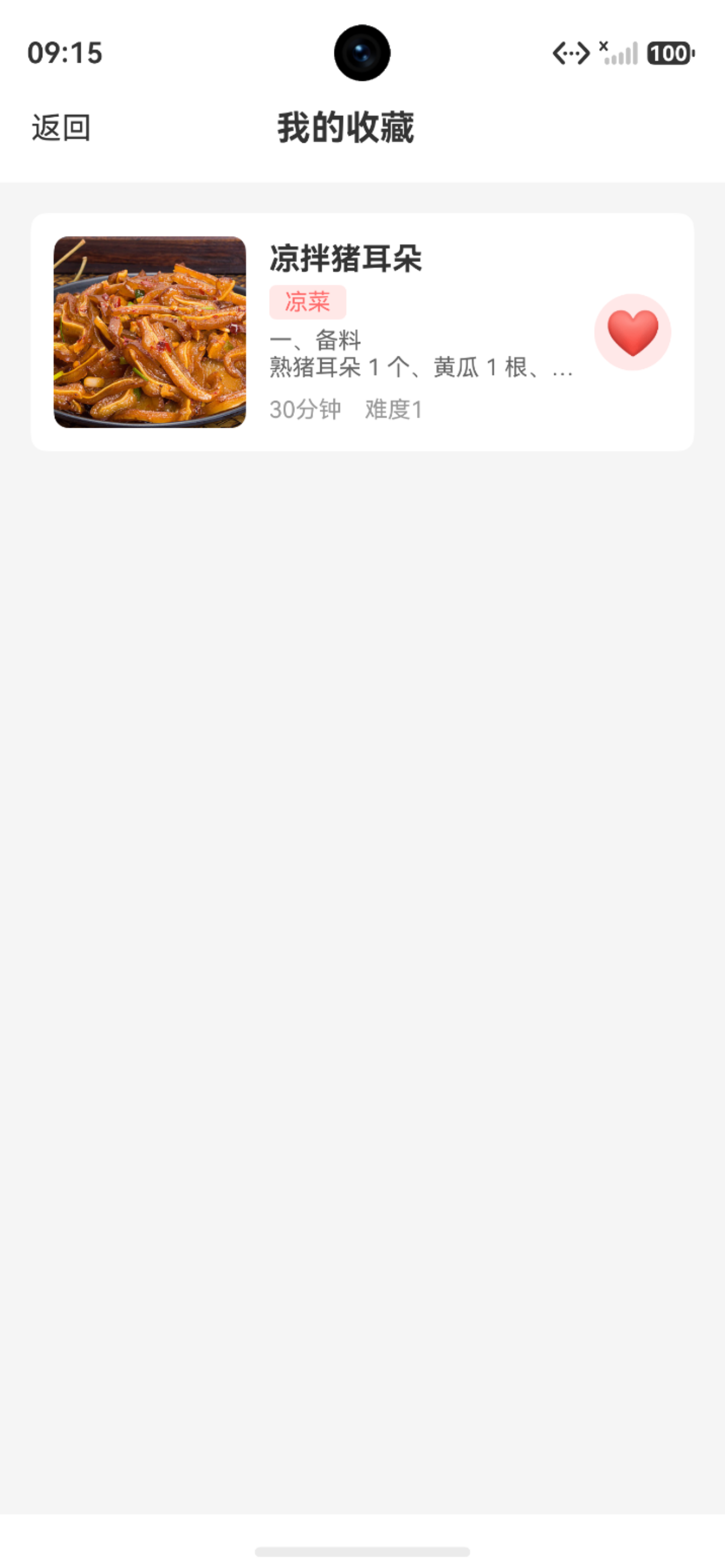
- 在收藏页面查看所有收藏的菜谱
1.2 功能特点
✅ 一键收藏:点击爱心图标即可收藏/取消收藏
✅ 状态反馈:图标实时切换,Toast提示操作结果
✅ 数据持久化:收藏状态保存到数据库
✅ 列表展示:专门的收藏页面展示所有收藏菜谱
二、收藏功能实现
2.1 收藏按钮设计
在详情页导航栏添加收藏按钮:
@Builder
NavBar() {
  Row() {
    // 返回按钮
    Row() {
      Image($r('app.media.ic_back'))
        .width(24)
        .height(24)

      Text('菜谱详情')
        .fontSize(18)
        .fontColor(Color.White)
        .margin({ left: 8 })
    }
    .onClick(() => router.back())

    Blank()

    // 收藏按钮(根据状态显示不同图标)
    Image(this.isFavorite ? $r('app.media.ic_favorite_filled') : $r('app.media.ic_favorite'))
      .width(24)
      .height(24)
      .onClick(() => this.toggleFavorite())
  }
  .width('100%')
  .height(56)
  .padding({ left: 16, right: 16 })
  .linearGradient({
    angle: 135,
    colors: [['#FF6B6B', 0.0], ['#FF8E53', 1.0]]
  })
}
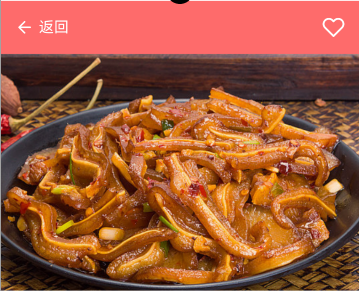
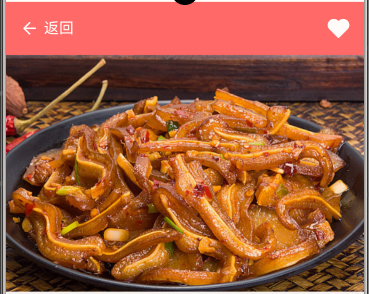
设计要点:
-
使用三元运算符动态切换图标
-
空心爱心表示未收藏
-
实心爱心表示已收藏
-
未收藏页面显示如下:
-
收藏页面显示如下:
2.2 收藏状态切换
async toggleFavorite() {
  if (!this.recipe) return

  // 切换收藏状态
  this.recipe.isFavorite = this.isFavorite ? 0 : 1

  try {
    // 更新数据库
    await RdbUtil.updateRecipe(this.recipe)

    // 更新UI状态
    this.isFavorite = !this.isFavorite

    // 提示用户
    promptAction.showToast({
      message: this.isFavorite ? '已添加到收藏' : '已取消收藏',
      duration: 2000
    })
  } catch (err) {
    LogUtil.error('RecipeDetailPage', `收藏操作失败: ${JSON.stringify(err)}`)
    promptAction.showToast({ message: '操作失败,请重试' })
  }
}
实现要点:
- 先更新数据模型
- 再更新数据库
- 最后更新UI状态
- 使用Toast提示用户
三、数据库更新方法
3.1 更新菜谱方法
在 RdbUtil.ets 中添加更新菜谱的方法:
static async updateRecipe(recipe: Recipe): Promise<void> {
  const values: relationalStore.ValuesBucket = {
    name: recipe.name,
    type: recipe.type,
    difficulty: recipe.difficulty,
    cooking_time: recipe.cookingTime,
    description: recipe.description,
    image_path: recipe.imagePath,
    is_favorite: recipe.isFavorite,
    update_time: Date.now()
  }

  const predicates = new relationalStore.RdbPredicates('recipe')
  predicates.equalTo('id', recipe.id)

  await this.rdbStore.update(values, predicates)
}
要点:
- 使用
ValuesBucket封装更新数据 - 使用
RdbPredicates指定更新条件 - 更新时间戳记录修改时间
3.2 查询收藏菜谱
static async queryFavoriteRecipes(): Promise<Recipe[]> {
  const predicates = new relationalStore.RdbPredicates('recipe')
  predicates.equalTo('is_favorite', 1)
  predicates.orderByDesc('update_time')

  const resultSet = await this.rdbStore.query(predicates)
  const recipes: Recipe[] = []

  while (resultSet.goToNextRow()) {
    recipes.push({
      id: resultSet.getLong(resultSet.getColumnIndex('id')),
      name: resultSet.getString(resultSet.getColumnIndex('name')),
      type: resultSet.getLong(resultSet.getColumnIndex('type')),
      difficulty: resultSet.getLong(resultSet.getColumnIndex('difficulty')),
      cookingTime: resultSet.getLong(resultSet.getColumnIndex('cooking_time')),
      description: resultSet.getString(resultSet.getColumnIndex('description')),
      imagePath: resultSet.getString(resultSet.getColumnIndex('image_path')),
      isFavorite: resultSet.getLong(resultSet.getColumnIndex('is_favorite')),
      materials: [],
      steps: []
    })
  }

  resultSet.close()
  return recipes
}
要点:
- 查询条件:
is_favorite = 1 - 按更新时间倒序排列
- 返回收藏的菜谱列表
四、收藏页面实现
4.1 页面结构
@Entry
@Component
struct FavoriteRecipePage {
  @State recipes: Recipe[] = []
  @State isLoading: boolean = true

  aboutToAppear() {
    this.loadFavoriteRecipes()
  }

  async loadFavoriteRecipes() {
    this.isLoading = true
    try {
      this.recipes = await RdbUtil.queryFavoriteRecipes()
    } catch (err) {
      LogUtil.error('FavoriteRecipePage', `加载收藏菜谱失败: ${JSON.stringify(err)}`)
    } finally {
      this.isLoading = false
    }
  }

  build() {
    Column() {
      // 导航栏
      this.NavBar()

      // 内容区域
      if (this.isLoading) {
        this.LoadingView()
      } else if (this.recipes.length === 0) {
        this.EmptyView()
      } else {
        this.RecipeList()
      }
    }
    .width('100%')
    .height('100%')
    .backgroundColor('#F5F5F5')
  }
}
4.2 空状态展示
@Builder
EmptyView() {
  Column() {
    Image($r('app.media.ic_empty'))
      .width(120)
      .height(120)
      .margin({ bottom: 16 })

    Text('暂无收藏菜谱')
      .fontSize(16)
      .fontColor('#999999')
      .margin({ bottom: 8 })

    Text('快去收藏喜欢的菜谱吧')
      .fontSize(14)
      .fontColor('#CCCCCC')
  }
  .width('100%')
  .height('100%')
  .justifyContent(FlexAlign.Center)
}
4.3 菜谱列表展示
@Builder
RecipeList() {
  List() {
    ForEach(this.recipes, (recipe: Recipe) => {
      ListItem() {
        this.RecipeItem(recipe)
      }
      .margin({ top: 12 })
    })
  }
  .width('100%')
  .layoutWeight(1)
  .padding({ left: 16, right: 16, top: 12, bottom: 12 })
}
4.4 菜谱卡片设计
@Builder
RecipeItem(recipe: Recipe) {
  Row() {
    // 菜谱图片
    if (recipe.imagePath) {
      Image(ImageUtil.getDisplayPath(recipe.imagePath))
        .width(80)
        .height(80)
        .borderRadius(8)
        .objectFit(ImageFit.Cover)
    } else {
      Column() {
        Text('暂无图片')
          .fontSize(12)
          .fontColor('#999999')
      }
      .width(80)
      .height(80)
      .borderRadius(8)
      .backgroundColor('#F5F5F5')
      .justifyContent(FlexAlign.Center)
    }

    // 菜谱信息
    Column() {
      Text(recipe.name)
        .fontSize(16)
        .fontWeight(FontWeight.Bold)
        .margin({ bottom: 8 })

      Row() {
        Text(RecipeTypeMap.get(recipe.type) || '其他')
          .fontSize(12)
          .fontColor('#666666')

        Text(`|`)
          .fontSize(12)
          .fontColor('#CCCCCC')
          .margin({ left: 8, right: 8 })

        Text(`${recipe.cookingTime}分钟`)
          .fontSize(12)
          .fontColor('#666666')
      }
    }
    .layoutWeight(1)
    .alignItems(HorizontalAlign.Start)
    .padding({ left: 12 })
  }
  .width('100%')
  .padding(12)
  .backgroundColor(Color.White)
  .borderRadius(8)
  .onClick(() => {
    router.pushUrl({
      url: 'pages/RecipeDetailPage',
      params: { recipeId: recipe.id }
    })
  })
}
五、数据流程分析
5.1 收藏流程
用户点击收藏按钮
    ↓
调用 toggleFavorite()
    ↓
更新 recipe.isFavorite
    ↓
调用 RdbUtil.updateRecipe()
    ↓
数据库更新 is_favorite 字段
    ↓
更新 UI 状态 (this.isFavorite)
    ↓
图标切换(空心 ↔ 实心)
    ↓
Toast 提示用户
5.2 查询流程
进入收藏页面
    ↓
调用 loadFavoriteRecipes()
    ↓
调用 RdbUtil.queryFavoriteRecipes()
    ↓
数据库查询 is_favorite = 1
    ↓
返回收藏菜谱列表
    ↓
渲染列表页面
六、状态管理
6.1 详情页状态
@State recipe: Recipe | null = null      // 菜谱数据
@State isLoading: boolean = true          // 加载状态
@State isFavorite: boolean = false        // 收藏状态
状态初始化:
async loadRecipeDetail(id: number) {
  this.isLoading = true
  try {
    this.recipe = await RdbUtil.queryRecipeById(id)
    this.isFavorite = this.recipe?.isFavorite === 1
  } catch (err) {
    LogUtil.error('RecipeDetailPage', `加载菜谱详情失败: ${JSON.stringify(err)}`)
  } finally {
    this.isLoading = false
  }
}
6.2 收藏页状态
@State recipes: Recipe[] = []        // 收藏菜谱列表
@State isLoading: boolean = true      // 加载状态
七、错误处理
7.1 数据库操作错误
try {
  await RdbUtil.updateRecipe(this.recipe)
  this.isFavorite = !this.isFavorite
  promptAction.showToast({
    message: this.isFavorite ? '已添加到收藏' : '已取消收藏'
  })
} catch (err) {
  LogUtil.error('RecipeDetailPage', `收藏操作失败: ${JSON.stringify(err)}`)
  promptAction.showToast({ message: '操作失败,请重试' })
}
7.2 查询错误处理
async loadFavoriteRecipes() {
  this.isLoading = true
  try {
    this.recipes = await RdbUtil.queryFavoriteRecipes()
  } catch (err) {
    LogUtil.error('FavoriteRecipePage', `加载收藏菜谱失败: ${JSON.stringify(err)}`)
    promptAction.showToast({ message: '加载失败,请重试' })
  } finally {
    this.isLoading = false
  }
}
八、性能优化
8.1 懒加载
使用 ForEach 实现列表懒加载:
List() {
  ForEach(this.recipes, (recipe: Recipe) => {
    ListItem() {
      this.RecipeItem(recipe)
    }
  })
}
.lazyForEach(this.recipes, (recipe: Recipe) => {
  // 懒加载实现
})
8.2 图片缓存
使用 ImageUtil 处理图片路径:
Image(ImageUtil.getDisplayPath(recipe.imagePath))
  .width(80)
  .height(80)
  .objectFit(ImageFit.Cover)
九、用户体验优化
9.1 操作反馈
Toast提示:
promptAction.showToast({
  message: this.isFavorite ? '已添加到收藏' : '已取消收藏',
  duration: 2000
})
图标动画:
Image(this.isFavorite ? $r('app.media.ic_favorite_filled') : $r('app.media.ic_favorite'))
  .width(24)
  .height(24)
  .animation({
    duration: 300,
    curve: Curve.EaseInOut
  })
9.2 空状态设计
@Builder
EmptyView() {
  Column() {
    Image($r('app.media.ic_empty'))
      .width(120)
      .height(120)
      .margin({ bottom: 16 })

    Text('暂无收藏菜谱')
      .fontSize(16)
      .fontColor('#999999')
      .margin({ bottom: 8 })

    Text('快去收藏喜欢的菜谱吧')
      .fontSize(14)
      .fontColor('#CCCCCC')
  }
  .width('100%')
  .height('100%')
  .justifyContent(FlexAlign.Center)
}
十、技术要点总结
10.1 数据库操作
✅ 更新操作:使用 ValuesBucket 封装数据
✅ 查询操作:使用 RdbPredicates 设置条件
✅ 排序操作:使用 orderByDesc 排序
10.2 状态管理
✅ 响应式更新:使用 @State 装饰器
✅ 状态同步:UI状态与数据库状态同步
✅ 错误处理:try-catch捕获异常
10.3 用户交互
✅ 即时反馈:Toast提示操作结果
✅ 视觉反馈:图标状态切换
✅ 空状态:友好的空状态提示
十一、总结
通过本篇文章,我们完成了收藏功能的实现:
✅ 收藏功能完整:支持收藏/取消收藏操作
✅ 状态同步准确:UI状态与数据库状态实时同步
✅ 用户体验友好:操作反馈及时,空状态提示友好
✅ 代码结构清晰:状态管理、数据库操作、UI渲染分离
至此,菜谱详情与收藏功能全部完成,用户可以:
- 查看完整的菜谱信息
- 收藏喜欢的菜谱
- 在收藏页面查看所有收藏的菜谱
相关文章:

讨论HarmonyOS开发技术,专注于API与组件、DevEco Studio、测试、元服务和应用上架分发等。
更多推荐



 7
7 0
0- 0


 已为社区贡献76条内容

所有评论(0)