基于HarmonyOS的情侣美食管理应用开发实战(九)- 食客菜谱浏览功能
·
基于HarmonyOS的情侣美食管理应用开发实战(九)- 食客菜谱浏览功能
📖 系列文章目录
- (一)项目设计与角色管理
- (二)菜谱管理与订单系统
- (三)美食相册与设置功能
- (四)数据库优化与问题解决
- (五)数据持久化问题修复
- (六)图片显示问题修复
- (七)菜谱详情页面开发
- (八)收藏功能实现
- (九)食客菜谱浏览功能(本文)
- (十)点餐清单与提交订单
- (十一)主厨订单处理功能
- (十二)双向订单记录查询
一、功能概述
1.1 需求分析
在情侣美食管理应用中,食客角色需要能够浏览主厨创建的菜谱,并从中选择心仪的菜品进行点餐。本章节将实现食客的核心浏览功能,包括:
- 菜谱列表展示:以卡片形式展示所有菜谱
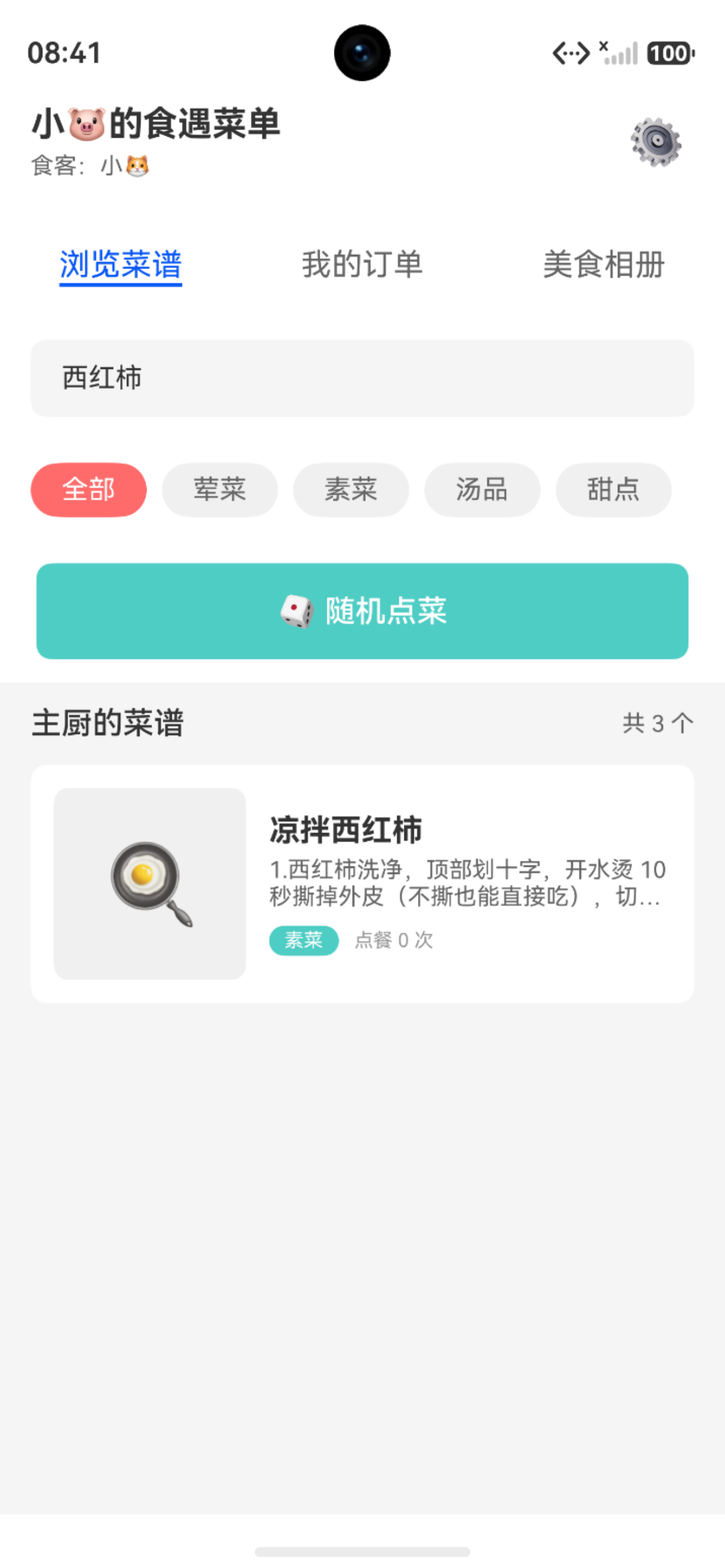
- 搜索功能:支持按菜名和描述关键词搜索
- 分类筛选:按菜谱类型(荤菜、素菜、汤品、甜点)筛选
- 随机点菜:一键随机选择菜谱,增加趣味性
1.2 功能特点
✅ 实时数据加载:从数据库查询最新菜谱数据
✅ 智能搜索:支持模糊搜索,实时过滤结果
✅ 分类筛选:快速定位目标类型菜谱
✅ 趣味交互:随机点菜功能增加使用乐趣
二、数据模型扩展
2.1 Recipe模型增强
为了支持浏览功能,需要在Recipe模型中添加新属性:
export class Recipe {
  id: number = 0
  name: string = ''             // 菜名
  type: number = 1              // 菜谱类型
  description: string = ''      // 描述
  imagePath: string = ''        // 图片路径
  image: string = ''            // 图片(兼容属性)
  cookingTime: number = 0       // 烹饪时长(分钟)
  difficulty: number = 1        // 难度等级 1-5
  isFavorite: number = 0        // 是否收藏
  orderCount: number = 0        // 点餐次数(新增)
  createTime: number = 0        // 创建时间
  updateTime: number = 0        // 更新时间

  // 关联数据
  materials: RecipeMaterial[] = []    // 食材列表
  steps: RecipeStep[] = []            // 步骤列表
}
2.2 数据解析方法
在fromJson方法中添加新属性解析:
static fromJson(json: Record<string, Object>): Recipe {
  const recipe = new Recipe()
  recipe.id = (json['id'] as number) || 0
  recipe.name = (json['name'] as string) || ''
  recipe.type = (json['type'] as number) || 1
  recipe.description = (json['description'] as string) || ''
  recipe.imagePath = (json['image_path'] as string) || ''
  recipe.image = recipe.imagePath  // 兼容属性
  recipe.cookingTime = (json['cooking_time'] as number) || 0
  recipe.difficulty = (json['difficulty'] as number) || 1
  recipe.isFavorite = (json['is_favorite'] as number) || 0
  recipe.orderCount = (json['order_count'] as number) || 0
  recipe.createTime = (json['create_time'] as number) || 0
  recipe.updateTime = (json['update_time'] as number) || 0
  return recipe
}
三、页面状态管理
3.1 状态变量定义
在DinerHomePage中定义浏览功能所需的状态变量:
@Component
struct DinerHomePage {
  @State currentTab: number = 0
  @State coupleConfig: CoupleConfig | null = null
  @State recipeCount: number = 0
  @State myOrderCount: number = 0
  @State selectedCategory: number = 0  // 0-全部 1-荤菜 2-素菜 3-汤品 4-甜点
  @State recipes: Recipe[] = []        // 菜谱列表
  @State filteredRecipes: Recipe[] = []  // 筛选后的菜谱列表
  @State searchKeyword: string = ''    // 搜索关键词
  private context: common.UIAbilityContext | null = null
}
状态说明:
recipes:从数据库加载的完整菜谱列表filteredRecipes:经过搜索和筛选后的结果列表selectedCategory:当前选中的分类(0表示全部)searchKeyword:搜索框输入的关键词- 搜索结果导览图
3.2 数据加载流程
页面初始化
    ↓
加载情侣配置
    ↓
加载菜谱列表 → recipes
    ↓
执行筛选逻辑 → filteredRecipes
    ↓
渲染UI列表
四、菜谱列表加载
4.1 数据库查询方法
在RdbUtil中添加查询所有菜谱的方法:
static async queryAllRecipes(): Promise<Recipe[]> {
  try {
    const predicates = new relationalStore.RdbPredicates('recipe')
    predicates.orderByDesc('create_time')  // 按创建时间倒序

    const resultSet = await this.rdbStore.query(predicates)
    const recipes: Recipe[] = []

    while (resultSet.goToNextRow()) {
      const recipe = Recipe.fromJson({
        id: resultSet.getLong(resultSet.getColumnIndex('id')),
        name: resultSet.getString(resultSet.getColumnIndex('name')),
        type: resultSet.getLong(resultSet.getColumnIndex('type')),
        description: resultSet.getString(resultSet.getColumnIndex('description')),
        image_path: resultSet.getString(resultSet.getColumnIndex('image_path')),
        cooking_time: resultSet.getLong(resultSet.getColumnIndex('cooking_time')),
        difficulty: resultSet.getLong(resultSet.getColumnIndex('difficulty')),
        is_favorite: resultSet.getLong(resultSet.getColumnIndex('is_favorite')),
        create_time: resultSet.getLong(resultSet.getColumnIndex('create_time')),
        update_time: resultSet.getLong(resultSet.getColumnIndex('update_time'))
      })
      recipes.push(recipe)
    }

    resultSet.close()
    return recipes
  } catch (err) {
    LogUtil.error('RdbUtil', `查询所有菜谱失败: ${err}`)
    return []
  }
}
4.2 页面加载实现
async loadRecipes() {
  try {
    this.recipes = await RdbUtil.queryAllRecipes()
    this.filterRecipes()  // 加载后立即执行筛选
    LogUtil.info('DinerHomePage', `加载菜谱列表成功,共 ${this.recipes.length} 条`)
  } catch (err) {
    LogUtil.error('DinerHomePage', `加载菜谱列表失败: ${err}`)
  }
}
五、搜索功能实现
5.1 搜索框UI设计

@Builder
SearchBar() {
  Row() {
    Image($r('app.media.ic_search'))
      .width(20)
      .height(20)
      .margin({ left: 12 })

    TextInput({ placeholder: '搜索菜谱...', text: this.searchKeyword })
      .layoutWeight(1)
      .height(40)
      .backgroundColor(Color.Transparent)
      .placeholderColor(CommonStyle.TEXT_COLOR_HINT)
      .fontColor(CommonStyle.TEXT_COLOR_PRIMARY)
      .onChange((value: string) => {
        this.searchKeyword = value
        this.filterRecipes()
      })

    if (this.searchKeyword.length > 0) {
      Image($r('app.media.ic_clear'))
        .width(20)
        .height(20)
        .margin({ right: 12 })
        .onClick(() => {
          this.searchKeyword = ''
          this.filterRecipes()
        })
    }
  }
  .width('100%')
  .height(48)
  .backgroundColor(CommonStyle.BG_COLOR_WHITE)
  .borderRadius(CommonStyle.BORDER_RADIUS_MD)
}
设计要点:
- 左侧搜索图标,右侧清除按钮(有内容时显示)
- 输入时实时触发筛选
- 圆角卡片样式,视觉友好
5.2 搜索逻辑实现
filterRecipes() {
  let result = [...this.recipes]

  // 按分类筛选
  if (this.selectedCategory > 0) {
    result = result.filter(recipe => recipe.type === this.selectedCategory)
  }

  // 按关键词搜索
  if (this.searchKeyword.trim().length > 0) {
    const keyword = this.searchKeyword.trim().toLowerCase()
    result = result.filter(recipe =>
      recipe.name.toLowerCase().includes(keyword) ||
      recipe.description.toLowerCase().includes(keyword)
    )
  }

  this.filteredRecipes = result
}
搜索规则:
- 支持按菜名搜索(模糊匹配)
- 支持按描述搜索(模糊匹配)
- 不区分大小写
- 实时响应输入变化
六、分类筛选功能
6.1 分类标签UI
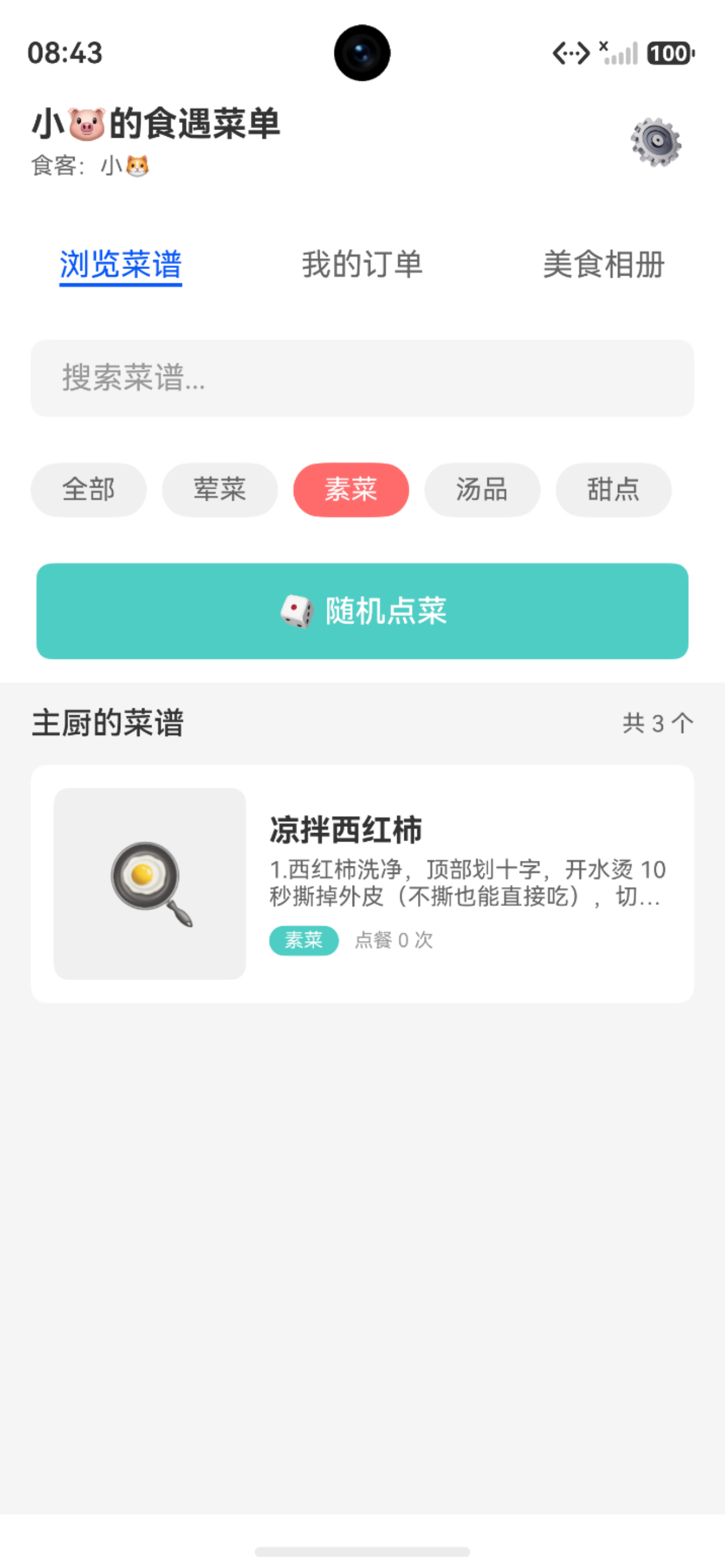
- 分类选择素菜
@Builder
CategoryTabs() {
  Row() {
    ForEach([
      { id: 0, name: '全部' },
      { id: 1, name: '荤菜' },
      { id: 2, name: '素菜' },
      { id: 3, name: '汤品' },
      { id: 4, name: '甜点' }
    ], (item: CategoryItem) => {
      Text(item.name)
        .fontSize(14)
        .fontColor(this.selectedCategory === item.id ?
          CommonStyle.TEXT_COLOR_WHITE : CommonStyle.TEXT_COLOR_PRIMARY)
        .backgroundColor(this.selectedCategory === item.id ?
          RoleStyle.DINER_COLOR : CommonStyle.BG_COLOR_GRAY)
        .borderRadius(CommonStyle.BORDER_RADIUS_ROUND)
        .padding({ left: 16, right: 16, top: 8, bottom: 8 })
        .onClick(() => {
          this.selectedCategory = item.id
          this.filterRecipes()
        })
    })
  }
  .width('100%')
  .justifyContent(FlexAlign.SpaceEvenly)
}
设计要点:
- 横向排列的标签组
- 选中状态使用主题色高亮
- 点击切换分类并触发筛选
6.2 分类映射配置
在CommonConstant中定义菜谱类型映射:
/**
 * 菜谱类型映射
 */
export const RecipeTypeMap = new Map<number, string>([
  [1, '荤菜'],
  [2, '素菜'],
  [3, '汤品'],
  [4, '甜点']
])
七、随机点菜功能
7.1 随机点菜按钮

@Builder
RandomOrderButton() {
  Column() {
    Row() {
      Image($r('app.media.ic_random'))
        .width(24)
        .height(24)

      Text('随机点菜')
        .fontSize(16)
        .fontColor(CommonStyle.TEXT_COLOR_WHITE)
        .fontWeight(FontWeight.Medium)
        .margin({ left: 8 })
    }
    .width('100%')
    .height(50)
    .justifyContent(FlexAlign.Center)
    .linearGradient({
      angle: 135,
      colors: [[RoleStyle.DINER_COLOR, 0.0], ['#FF8E53', 1.0]]
    })
    .borderRadius(CommonStyle.BORDER_RADIUS_MD)
    .onClick(() => {
      this.onRandomOrder()
    })
  }
  .width('100%')
  .padding({ left: 16, right: 16, top: 16 })
}
7.2 随机选择逻辑
onRandomOrder() {
  if (this.recipes.length === 0) {
    promptAction.showToast({
      message: '暂无可点菜谱',
      duration: 2000
    })
    return
  }

  // 随机选择一个菜谱
  const randomIndex = Math.floor(Math.random() * this.recipes.length)
  const randomRecipe = this.recipes[randomIndex]

  // 跳转到点餐页面
  router.pushUrl({
    url: 'pages/DinerOrderPage',
    params: { recipeId: randomRecipe.id }
  })
}
逻辑说明:
- 检查菜谱列表是否为空
- 使用Math.random()生成随机索引
- 跳转到点餐页面并传递菜谱ID
八、菜谱卡片展示
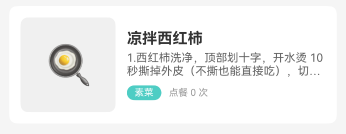
8.1 卡片UI设计
@Builder
RecipeCard(recipe: Recipe) {
  Column() {
    // 菜谱图片
    if (recipe.image) {
      Image(recipe.image)
        .width('100%')
        .height(120)
        .objectFit(ImageFit.Cover)
        .borderRadius({ topLeft: 8, topRight: 8 })
    } else {
      Column() {
        Text('🍳')
          .fontSize(40)
      }
      .width('100%')
      .height(120)
      .backgroundColor(CommonStyle.BG_COLOR_GRAY)
      .justifyContent(FlexAlign.Center)
      .borderRadius({ topLeft: 8, topRight: 8 })
    }

    // 菜谱信息
    Column() {
      Text(recipe.name)
        .fontSize(16)
        .fontWeight(FontWeight.Bold)
        .fontColor(CommonStyle.TEXT_COLOR_PRIMARY)
        .maxLines(1)
        .textOverflow({ overflow: TextOverflow.Ellipsis })

      // 分类标签
      Text(RecipeTypeMap.get(recipe.type) || '其他')
        .fontSize(12)
        .fontColor(RoleStyle.DINER_COLOR)
        .backgroundColor('#FFE8E8')
        .padding({ left: 8, right: 8, top: 2, bottom: 2 })
        .borderRadius(4)
        .margin({ top: 4 })

      if (recipe.description) {
        Text(recipe.description)
          .fontSize(12)
          .fontColor(CommonStyle.TEXT_COLOR_SECONDARY)
          .margin({ top: 4 })
          .maxLines(2)
          .textOverflow({ overflow: TextOverflow.Ellipsis })
      }

      // 点餐次数
      Row() {
        Text(`已点${recipe.orderCount}次`)
          .fontSize(12)
          .fontColor(CommonStyle.TEXT_COLOR_HINT)
      }
      .width('100%')
      .margin({ top: 8 })
    }
    .width('100%')
    .padding(12)
    .alignItems(HorizontalAlign.Start)
  }
  .width('100%')
  .backgroundColor(Color.White)
  .borderRadius(8)
  .onClick(() => {
    router.pushUrl({
      url: 'pages/DinerOrderPage',
      params: { recipeId: recipe.id }
    })
  })
}
设计要点:
- 卡片式布局,圆角边框
- 图片占位处理(无图片时显示emoji)
- 分类标签使用浅色背景
- 显示点餐次数,增加社交感
- 点击跳转到点餐页面
九、技术要点总结
9.1 状态管理
@State recipes: Recipe[] = []           // 原始数据
@State filteredRecipes: Recipe[] = []   // 筛选后数据
@State searchKeyword: string = ''       // 搜索关键词
@State selectedCategory: number = 0     // 分类选择
要点:
- 原始数据与筛选数据分离
- 状态变更自动触发UI更新
- 筛选逻辑统一管理
9.2 实时搜索
.onChange((value: string) => {
  this.searchKeyword = value
  this.filterRecipes()  // 实时触发筛选
})
优点:
- 无需点击搜索按钮
- 输入即搜索,体验流畅
- 减少用户操作步骤
9.3 链式筛选
filterRecipes() {
  let result = [...this.recipes]

  // 分类筛选
  if (this.selectedCategory > 0) {
    result = result.filter(...)
  }

  // 关键词搜索
  if (this.searchKeyword.trim().length > 0) {
    result = result.filter(...)
  }

  this.filteredRecipes = result
}
特点:
- 先分类后搜索,顺序执行
- 支持组合筛选
- 易于扩展新的筛选条件
十、总结
通过本篇文章,我们完成了食客菜谱浏览功能的开发:
✅ 数据加载完整:从数据库查询所有菜谱并展示
✅ 搜索功能强大:支持按菜名和描述实时搜索
✅ 分类筛选灵活:支持按类型快速筛选
✅ 随机点菜趣味:一键随机选择增加互动乐趣
下一篇文章将介绍点餐清单与提交订单功能的实现,敬请期待!
相关文章

讨论HarmonyOS开发技术,专注于API与组件、DevEco Studio、测试、元服务和应用上架分发等。
更多推荐

 14
14 0
0- 0


 已为社区贡献76条内容

所有评论(0)