基于HarmonyOS的情侣美食管理应用开发实战(十三)- 修复主页菜谱列表不显示问题
·
基于HarmonyOS的情侣美食管理应用开发实战(一)- 修复主页菜谱列表不显示问题
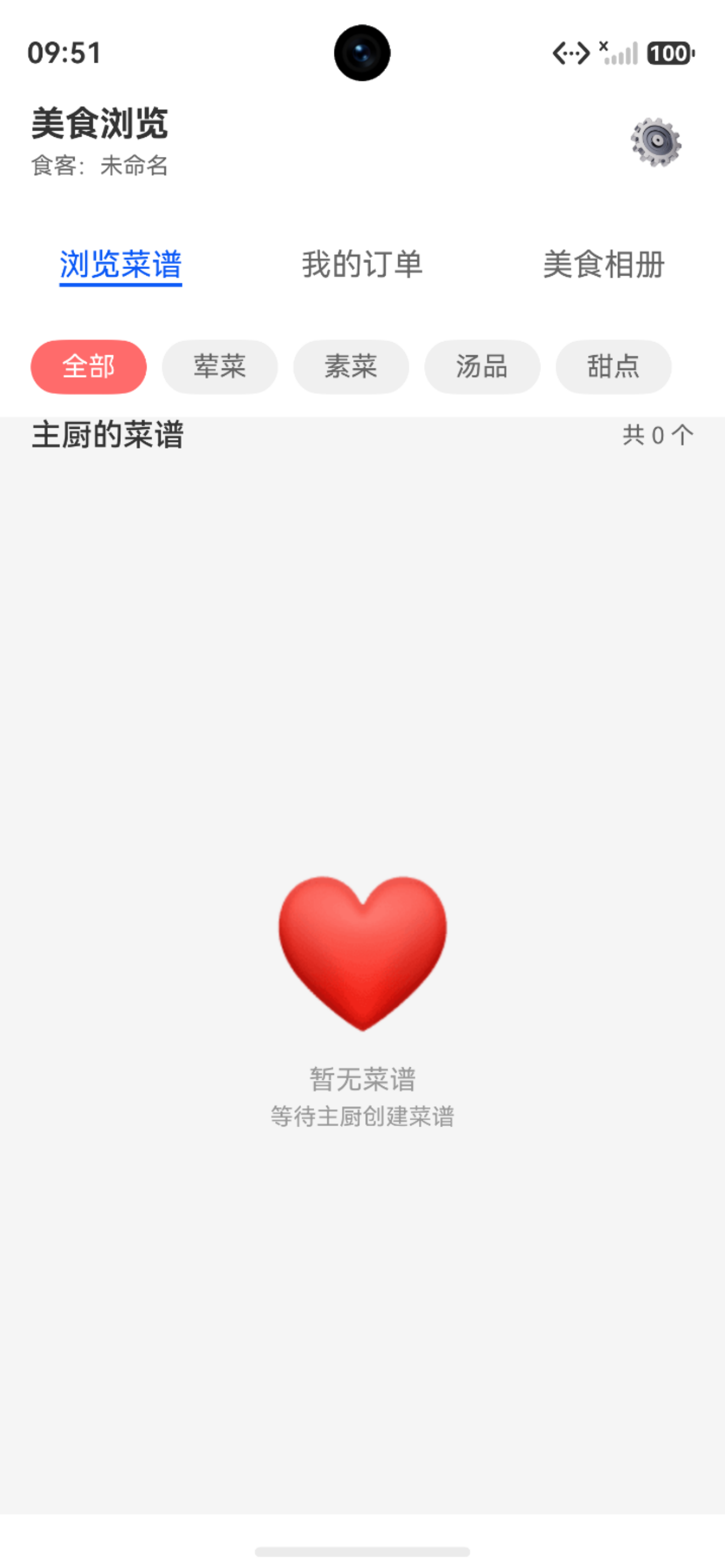
问题现象
在 HarmonyOS 应用开发过程中,遇到了一个奇怪的问题:
- 主页"我的菜谱"模块:显示"共4个",但列表区域完全空白
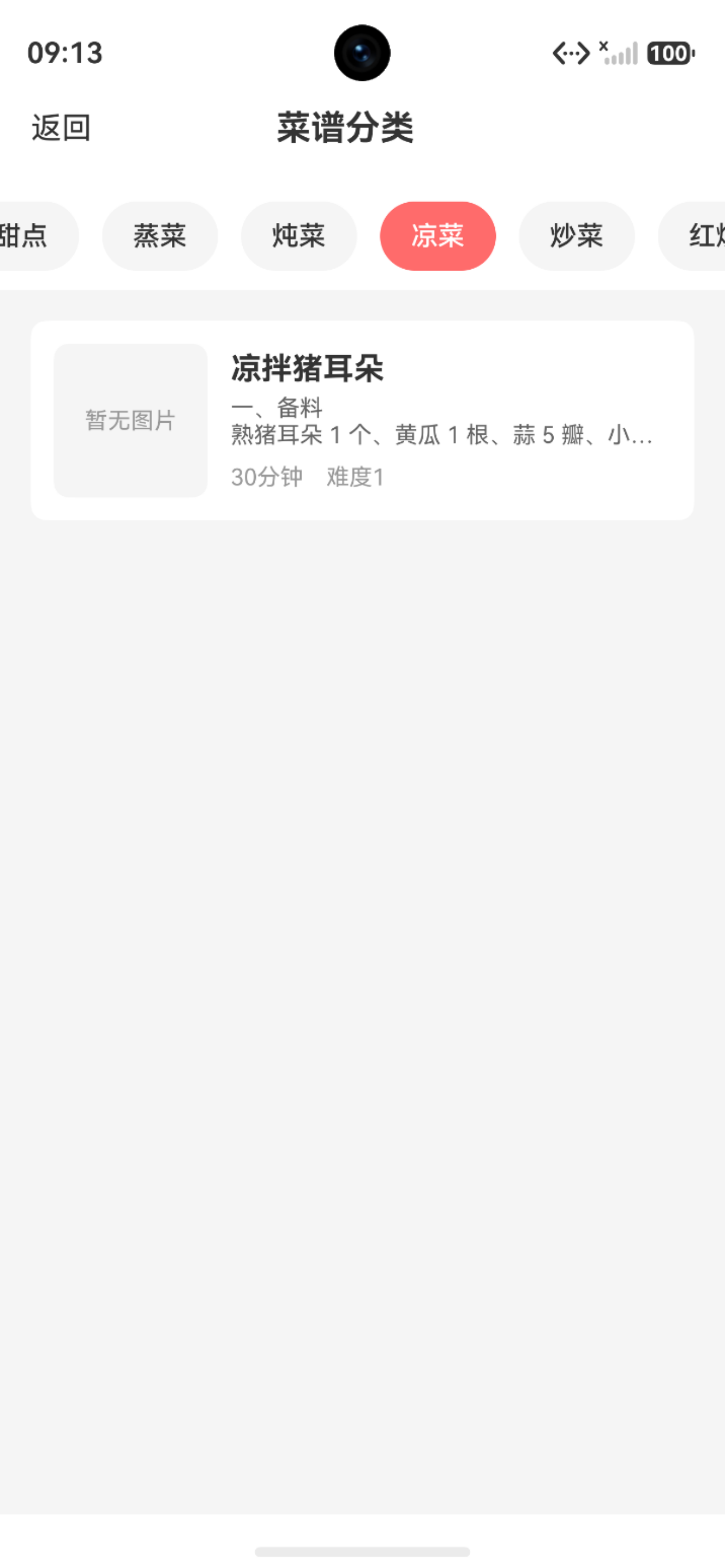
- 菜谱分类页面:点进分类后可以正常显示菜谱列表
- 数据库:确认有菜谱数据存在
这个问题看起来很矛盾:为什么分类页面能显示,主页却不能?
问题分析
1. 数据加载流程对比
首先对比主页和分类页面的数据加载流程:
主页加载流程:
// ChefHomePage.ets
async loadRecipes() {
  this.isLoading = true
  try {
    this.recipes = await RdbUtil.queryAllRecipes()  // 查询所有菜谱
    LogUtil.info('ChefHomePage', `加载完成,共 ${this.recipes.length} 个菜谱`)
  } catch (err) {
    LogUtil.error('ChefHomePage', `加载菜谱失败: ${JSON.stringify(err)}`)
  } finally {
    this.isLoading = false
  }
}
分类页面加载流程:
// RecipeTypePage.ets
async loadRecipes() {
  this.isLoading = true
  try {
    this.recipes = await RdbUtil.queryRecipesByType(this.type)  // 按类型查询
    LogUtil.info('RecipeTypePage', `加载完成,共 ${this.recipes.length} 个菜谱`)
  } catch (err) {
    LogUtil.error('RecipeTypePage', `加载菜谱失败: ${JSON.stringify(err)}`)
  } finally {
    this.isLoading = false
  }
}
2. 数据库查询方法对比
检查两个数据库查询方法的实现:
查询所有菜谱:
static async queryAllRecipes(): Promise<Recipe[]> {
  const predicates = new relationalStore.RdbPredicates('recipe')
  predicates.orderByDesc('create_time')
  const resultSet = await RdbUtil.rdbStore.query(predicates)

  const recipes: Recipe[] = []
  while (resultSet.goToNextRow()) {
    const recipe = new Recipe()
    recipe.id = resultSet.getLong(resultSet.getColumnIndex('id'))
    recipe.name = resultSet.getString(resultSet.getColumnIndex('name'))
    // ... 其他字段
    recipes.push(recipe)
  }

  resultSet.close()
  return recipes
}
按类型查询菜谱:
static async queryRecipesByType(type: number): Promise<Recipe[]> {
  const predicates = new relationalStore.RdbPredicates('recipe')
  predicates.equalTo('type', type)
  predicates.orderByDesc('create_time')
  const resultSet = await RdbUtil.rdbStore.query(predicates)

  const recipes: Recipe[] = []
  while (resultSet.goToNextRow()) {
    const recipe = new Recipe()
    recipe.id = resultSet.getLong(resultSet.getColumnIndex('id'))
    recipe.name = resultSet.getString(resultSet.getColumnIndex('name'))
    // ... 其他字段
    recipes.push(recipe)
  }

  resultSet.close()
  return recipes
}
3. 发现问题
经过仔细对比,发现了关键问题:
queryRecipesByType() 方法缺少 orderCount 字段的读取!
// queryAllRecipes() 中有这行
recipe.orderCount = resultSet.getLong(resultSet.getColumnIndex('order_count'))

// queryRecipesByType() 中缺少这行
// recipe.orderCount = resultSet.getLong(resultSet.getColumnIndex('order_count'))
虽然这个字段缺失不应该直接导致列表不显示,但它反映了代码的不一致性,可能影响后续的数据处理。
解决方案
方案一:统一数据库查询遍历方式
首先统一了两个查询方法的遍历方式,使用 while (resultSet.goToNextRow()):
// 修改前(使用 do-while)
if (resultSet.rowCount > 0) {
  if (resultSet.goToFirstRow()) {
    do {
      // 读取数据
    } while (resultSet.goToNextRow())
  }
}

// 修改后(使用 while)
while (resultSet.goToNextRow()) {
  // 读取数据
}
方案二:补全缺失字段
在 queryRecipesByType() 方法中补全 orderCount 字段:
static async queryRecipesByType(type: number): Promise<Recipe[]> {
  // ...
  while (resultSet.goToNextRow()) {
    const recipe = new Recipe()
    recipe.id = resultSet.getLong(resultSet.getColumnIndex('id'))
    recipe.name = resultSet.getString(resultSet.getColumnIndex('name'))
    recipe.type = resultSet.getLong(resultSet.getColumnIndex('type'))
    recipe.description = resultSet.getString(resultSet.getColumnIndex('description'))
    recipe.imagePath = resultSet.getString(resultSet.getColumnIndex('image_path'))
    recipe.image = recipe.imagePath
    recipe.cookingTime = resultSet.getLong(resultSet.getColumnIndex('cooking_time'))
    recipe.difficulty = resultSet.getLong(resultSet.getColumnIndex('difficulty'))
    recipe.isFavorite = resultSet.getLong(resultSet.getColumnIndex('is_favorite'))
    recipe.orderCount = resultSet.getLong(resultSet.getColumnIndex('order_count'))  // ✅ 补全
    recipe.createTime = resultSet.getLong(resultSet.getColumnIndex('create_time'))
    recipe.updateTime = resultSet.getLong(resultSet.getColumnIndex('update_time'))
    recipes.push(recipe)
  }
  // ...
}
技术要点
1. HarmonyOS ResultSet 遍历方式
HarmonyOS 的 ResultSet 提供了两种遍历方式:
方式一:使用 goToNextRow()
while (resultSet.goToNextRow()) {
  // 读取当前行数据
}
方式二:使用 goToFirstRow() + goToNextRow()
if (resultSet.goToFirstRow()) {
  do {
    // 读取当前行数据
  } while (resultSet.goToNextRow())
}
两种方式都是正确的,但推荐使用第一种方式,代码更简洁。
2. 数据模型字段完整性
在从数据库读取数据时,必须确保:
- 所有字段都要读取:避免数据不完整
- 字段类型要匹配:数据库字段类型要与模型字段类型一致
- 字段名称要对应:数据库列名要与
getColumnName()参数一致
3. 日志调试技巧
在数据加载方法中添加详细日志,有助于快速定位问题:
async loadRecipes() {
  LogUtil.info('ChefHomePage', '开始加载菜谱列表')
  this.isLoading = true
  try {
    this.recipes = await RdbUtil.queryAllRecipes()
    LogUtil.info('ChefHomePage', `加载完成,共 ${this.recipes.length} 个菜谱`)
  } catch (err) {
    LogUtil.error('ChefHomePage', `加载菜谱失败: ${JSON.stringify(err)}`)
  } finally {
    this.isLoading = false
  }
}
经验总结
1. 代码一致性的重要性
- 相同功能的方法应该保持一致:
queryAllRecipes()和queryRecipesByType()应该使用相同的实现模式 - 避免遗漏字段:所有查询方法都应该读取完整的字段列表
- 定期代码审查:及时发现和修复不一致的地方
2. 调试思路
遇到类似问题时,可以按照以下步骤调试:
- 对比正常和异常场景:分类页面能显示,主页不能显示
- 检查数据加载流程:对比两个页面的数据加载方法
- 检查数据库查询:对比两个查询方法的实现
- 检查字段完整性:确保所有字段都被正确读取
- 添加日志输出:在关键位置添加日志,跟踪数据流
3. HarmonyOS 开发注意事项
- ResultSet 必须关闭:使用完毕后要调用
resultSet.close() - 异步操作要 await:数据库查询是异步操作,要正确使用
await - 错误处理要完善:使用 try-catch 捕获异常,避免应用崩溃
最终代码
修复后的 queryRecipesByType() 方法:
static async queryRecipesByType(type: number): Promise<Recipe[]> {
  if (!RdbUtil.rdbStore) {
    LogUtil.error(RdbUtil.TAG, '数据库未初始化')
    return []
  }

  try {
    const predicates = new relationalStore.RdbPredicates('recipe')
    predicates.equalTo('type', type)
    predicates.orderByDesc('create_time')
    const resultSet = await RdbUtil.rdbStore.query(predicates)

    const recipes: Recipe[] = []
    while (resultSet.goToNextRow()) {
      const recipe = new Recipe()
      recipe.id = resultSet.getLong(resultSet.getColumnIndex('id'))
      recipe.name = resultSet.getString(resultSet.getColumnIndex('name'))
      recipe.type = resultSet.getLong(resultSet.getColumnIndex('type'))
      recipe.description = resultSet.getString(resultSet.getColumnIndex('description'))
      recipe.imagePath = resultSet.getString(resultSet.getColumnIndex('image_path'))
      recipe.image = recipe.imagePath
      recipe.cookingTime = resultSet.getLong(resultSet.getColumnIndex('cooking_time'))
      recipe.difficulty = resultSet.getLong(resultSet.getColumnIndex('difficulty'))
      recipe.isFavorite = resultSet.getLong(resultSet.getColumnIndex('is_favorite'))
      recipe.orderCount = resultSet.getLong(resultSet.getColumnIndex('order_count'))
      recipe.createTime = resultSet.getLong(resultSet.getColumnIndex('create_time'))
      recipe.updateTime = resultSet.getLong(resultSet.getColumnIndex('update_time'))
      recipes.push(recipe)
    }

    resultSet.close()
    return recipes
  } catch (err) {
    LogUtil.error(RdbUtil.TAG, `按类型查询菜谱失败: ${err}`)
    return []
  }
}
测试验证
修复后,需要验证以下功能:
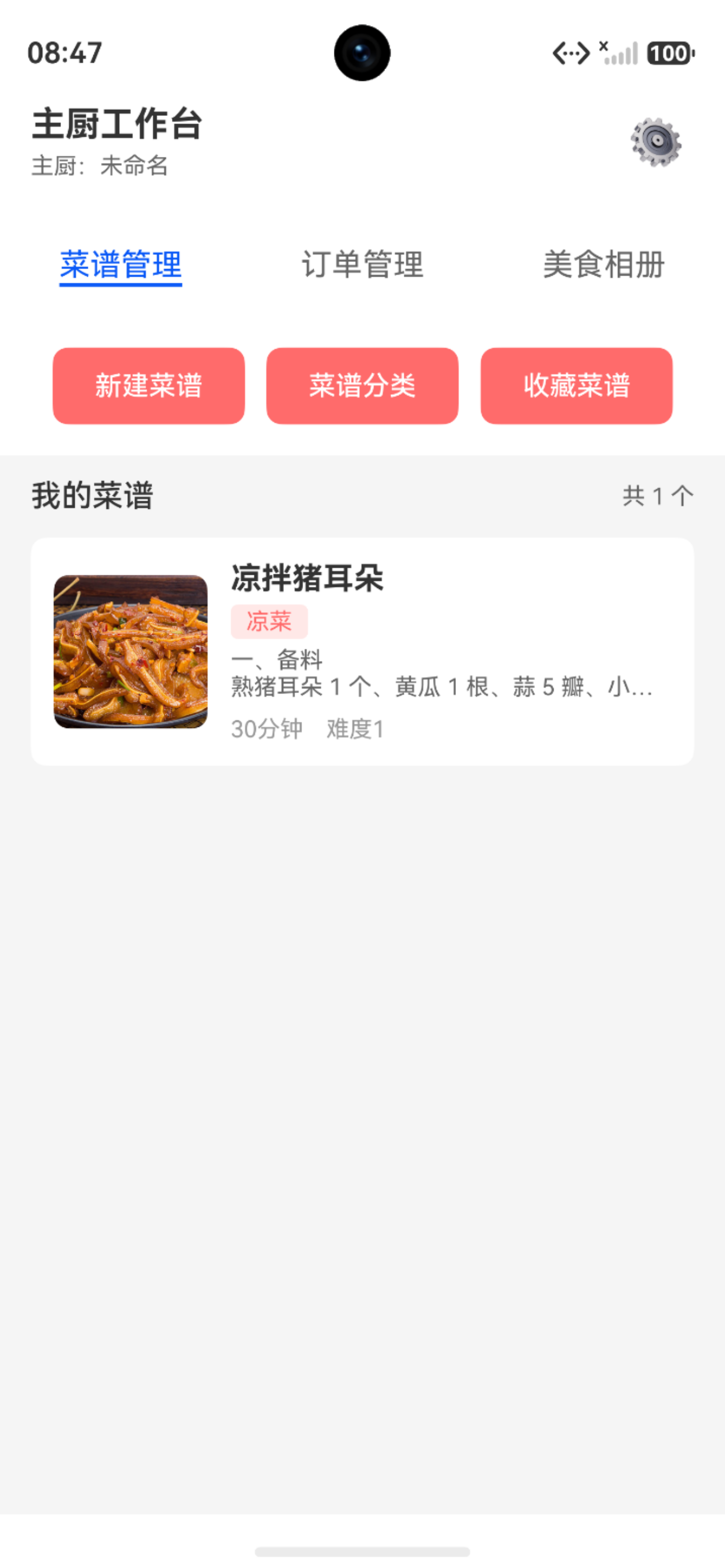
- ✅ 主页"我的菜谱":能正常显示所有菜谱
- ✅ 菜谱分类页面:能正常显示各分类的菜谱
- ✅ 菜谱数量:显示数量与实际数量一致
- ✅ 菜谱详情:能正常查看菜谱详细信息
结语
这个问题看似简单,但暴露了代码一致性的重要性。在开发过程中,我们应该:
- 保持代码风格一致:相同功能的方法使用相同的实现模式
- 定期代码审查:及时发现和修复不一致的地方
- 完善测试覆盖:确保所有功能都经过充分测试
- 重视日志输出:在关键位置添加日志,方便问题定位
希望这篇博客能帮助遇到类似问题的开发者快速定位和解决问题!

讨论HarmonyOS开发技术,专注于API与组件、DevEco Studio、测试、元服务和应用上架分发等。
更多推荐


 7
7 0
0- 0


 已为社区贡献76条内容

所有评论(0)