鸿蒙笔记:读取打包发布的文本文件内容
·
由于开发的应用需要读写静态文件内容,这里测试一下将文本文件放入安装包,编译发布到模拟器,点击按钮读取并显示文件内容。
1、新建项目,类型是 Empty Ability
2、文本文件位置:
entry\src\main\resources\rawfile\data\test.txt
3、文本文件内容:
hello data!!!您好啊。
4、修改 entry\src\main\ets\pages\Index.ets 内容为:
import { resourceManager } from '@kit.LocalizationKit';
import { hilog } from '@kit.PerformanceAnalysisKit';
import { util } from '@kit.ArkTS';

@Entry
@Component
struct Index {
  @State message: string = 'Hello World';
  @State fileContent: string = '点击按钮读取文件内容';
  private resMgr: resourceManager.ResourceManager | undefined;

  aboutToAppear() {
    // ✅ 正确获取 resourceManager(在组件生命周期中获取)
    this.resMgr = this.getUIContext().getHostContext()?.resourceManager;
    hilog.info(0x0000, 'Index', 'ResourceManager initialized: %{public}s',
      this.resMgr ? 'success' : 'failed');
  }

  /**
   * 方式1:同步读取(简单,但可能阻塞UI,适合小文件)
   */
  readRawFileSync() {
    if (!this.resMgr) {
      this.fileContent = 'ResourceManager not available';
      return;
    }

    try {
      // 读取 rawfile/data/test.txt
      let rawfileArray: Uint8Array = this.resMgr.getRawFileContentSync('data/test.txt');
      let textDecoder = new util.TextDecoder();
      let content: string = textDecoder.decodeToString(rawfileArray);

      this.fileContent = content;
      hilog.info(0x0000, 'RawfileTest', '同步读取成功,内容长度: %{public}d', content.length);
    } catch (error) {
      let errMsg = JSON.stringify(error);
      this.fileContent = '读取失败: ' + errMsg;
      hilog.error(0x0000, 'RawfileTest', '同步读取失败: %{public}s', errMsg);
    }
  }

  /**
   * 方式2:异步读取(推荐,不阻塞UI)
   */
  async readRawFileAsync() {
    if (!this.resMgr) {
      this.fileContent = 'ResourceManager not available';
      return;
    }

    try {
      // 异步读取 rawfile/data/test.txt
      let rawfileArray: Uint8Array = await this.resMgr.getRawFileContent('data/test.txt');
      let textDecoder = new util.TextDecoder();
      let content: string = textDecoder.decodeToString(rawfileArray);

      this.fileContent = content;
      hilog.info(0x0000, 'RawfileTest', '异步读取成功,内容长度: %{public}d', content.length);
    } catch (error) {
      let errMsg = JSON.stringify(error);
      this.fileContent = '读取失败: ' + errMsg;
      hilog.error(0x0000, 'RawfileTest', '异步读取失败: %{public}s', errMsg);
    }
  }

  build() {
    RelativeContainer() {
      // 原 Hello World 文本
      Text(this.message)
        .id('HelloWorld')
        .fontSize($r('app.float.page_text_font_size'))
        .fontWeight(FontWeight.Bold)
        .alignRules({
          center: { anchor: '__container__', align: VerticalAlign.Center },
          middle: { anchor: '__container__', align: HorizontalAlign.Center }
        })
        .onClick(() => {
          this.message = 'Welcome';
        })

      // 显示文件内容的文本
      Text(this.fileContent)
        .id('FileContent')
        .fontSize(16)
        .fontColor('#333333')
        .maxLines(10)
        .textOverflow({ overflow: TextOverflow.Ellipsis })
        .alignRules({
          top: { anchor: 'HelloWorld', align: VerticalAlign.Bottom },
          middle: { anchor: '__container__', align: HorizontalAlign.Center }
        })
        .margin({ top: 20 })

      // 同步读取按钮
      Button('同步读取 test.txt')
        .id('BtnSync')
        .backgroundColor('#007DFF')
        .fontColor(Color.White)
        .alignRules({
          top: { anchor: 'FileContent', align: VerticalAlign.Bottom },
          middle: { anchor: '__container__', align: HorizontalAlign.Center }
        })
        .margin({ top: 20 })
        .onClick(() => {
          this.readRawFileSync();
        })

      // 异步读取按钮
      Button('异步读取 test.txt')
        .id('BtnAsync')
        .backgroundColor('#FF7D00')
        .fontColor(Color.White)
        .alignRules({
          top: { anchor: 'BtnSync', align: VerticalAlign.Bottom },
          middle: { anchor: '__container__', align: HorizontalAlign.Center }
        })
        .margin({ top: 10 })
        .onClick(() => {
          this.readRawFileAsync();
        })
    }
    .height('100%')
    .width('100%')
    .padding(20)
  }
}
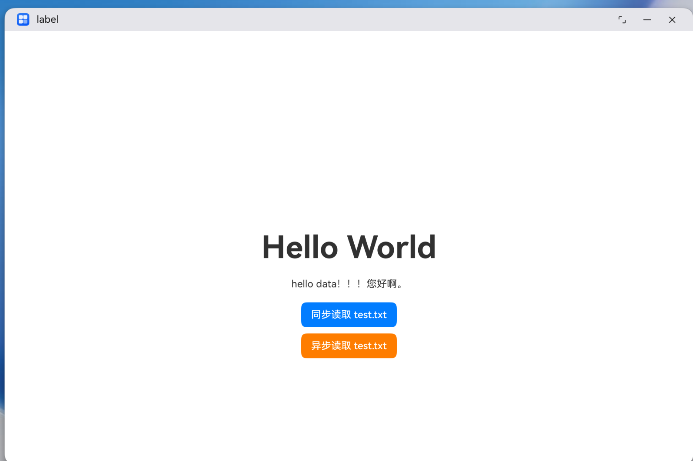
5、编译,运行:

讨论HarmonyOS开发技术,专注于API与组件、DevEco Studio、测试、元服务和应用上架分发等。
更多推荐
 8
8 0
0- 0


 已为社区贡献3条内容

所有评论(0)