HarmonyOS7 ArkUI 地图标记列表 - 附近地点、分类筛选、路线导航卡片实战:从状态到页面反馈
·
文章目录
前言
我看这份代码时,最先关注的不是配色,而是状态怎么推动页面变化。只要这条线顺了,后面的 UI 调整都不难。
它的主线是 地图标记列表,细节落在 附近地点、分类筛选、路线导航卡片。这些细节刚好能把页面状态、用户操作和组件刷新串起来。
这个案例练的是什么
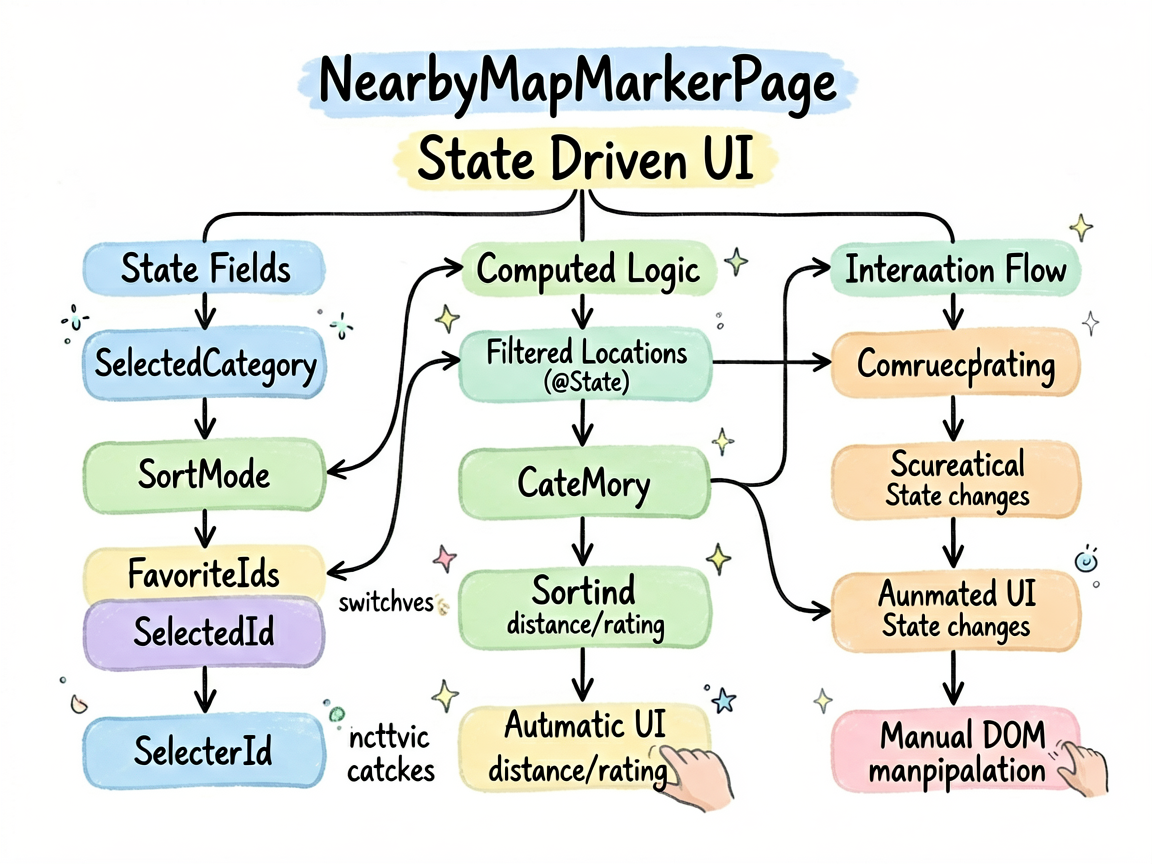
NearbyMapMarkerPage 不是一个只展示静态内容的页面。它会根据用户点击、输入、切换或计时来改变界面,所以阅读代码时可以先抓三条线:
| 观察点 | 在这个案例里的表现 |
|---|---|
| 页面主题 | 地图标记列表 |
| 主要文案 | 全部, 餐饮, 购物, 医疗, 交通, 教育 |
| 常用组件 | Column, ForEach, List, ListItem, Row, Scroll, Stack, Text |
| 适合练习 | 状态驱动 UI、条件样式、列表渲染、事件回调 |
数据流别写散
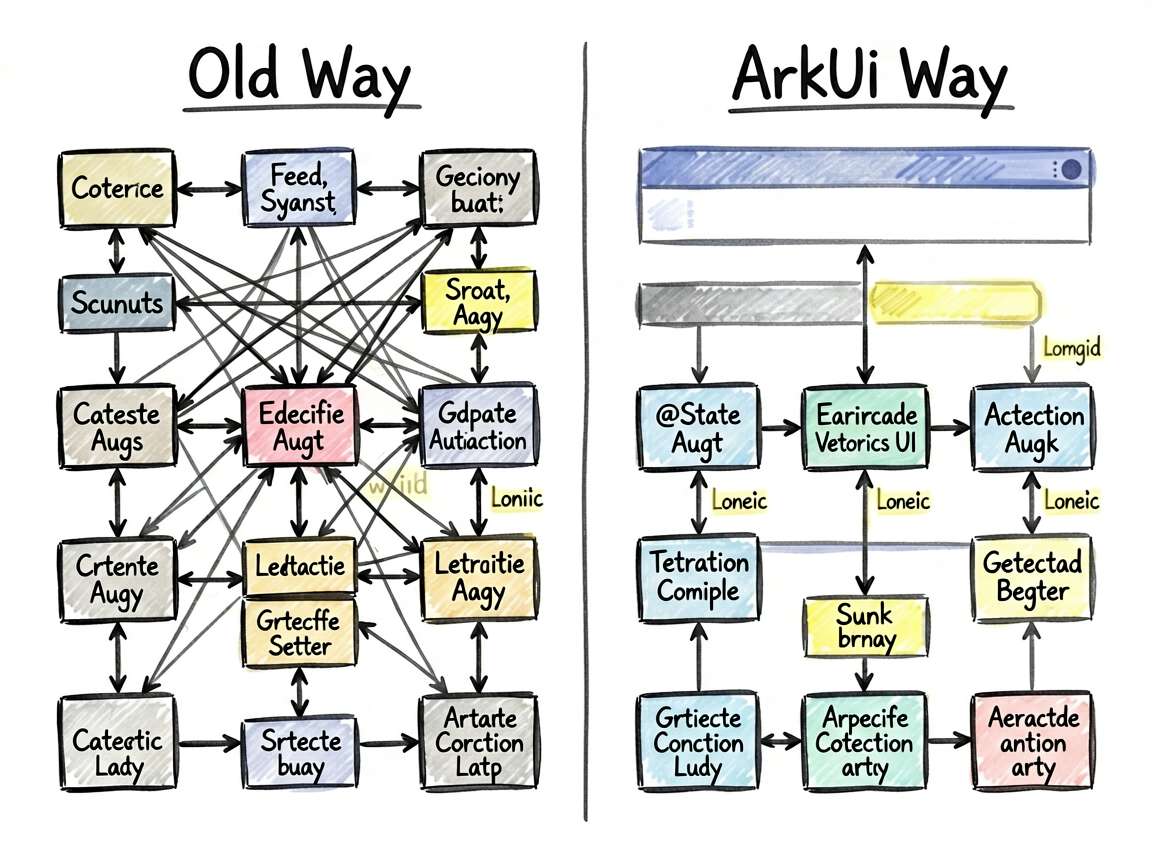
ArkUI 的页面刷新依赖状态变化。下面这些 @State 字段就是页面的“开关”和“数据源”,不用手动找 DOM,也不用自己通知某个控件刷新。
| 状态字段 | 类型 | 我会怎么理解它 |
|---|---|---|
selectedCategory |
string |
当前选中项,决定高亮和内容切换 |
sortMode |
string |
记录页面当前选择、输入或展示状态 |
favoriteIds |
number[] |
记录页面当前选择、输入或展示状态 |
selectedId |
number |
当前选中项,决定高亮和内容切换 |
一个经验:先把
@State看完,再看build(),页面逻辑会清楚很多。否则很容易被一长串布局代码带偏。
单独看这几段
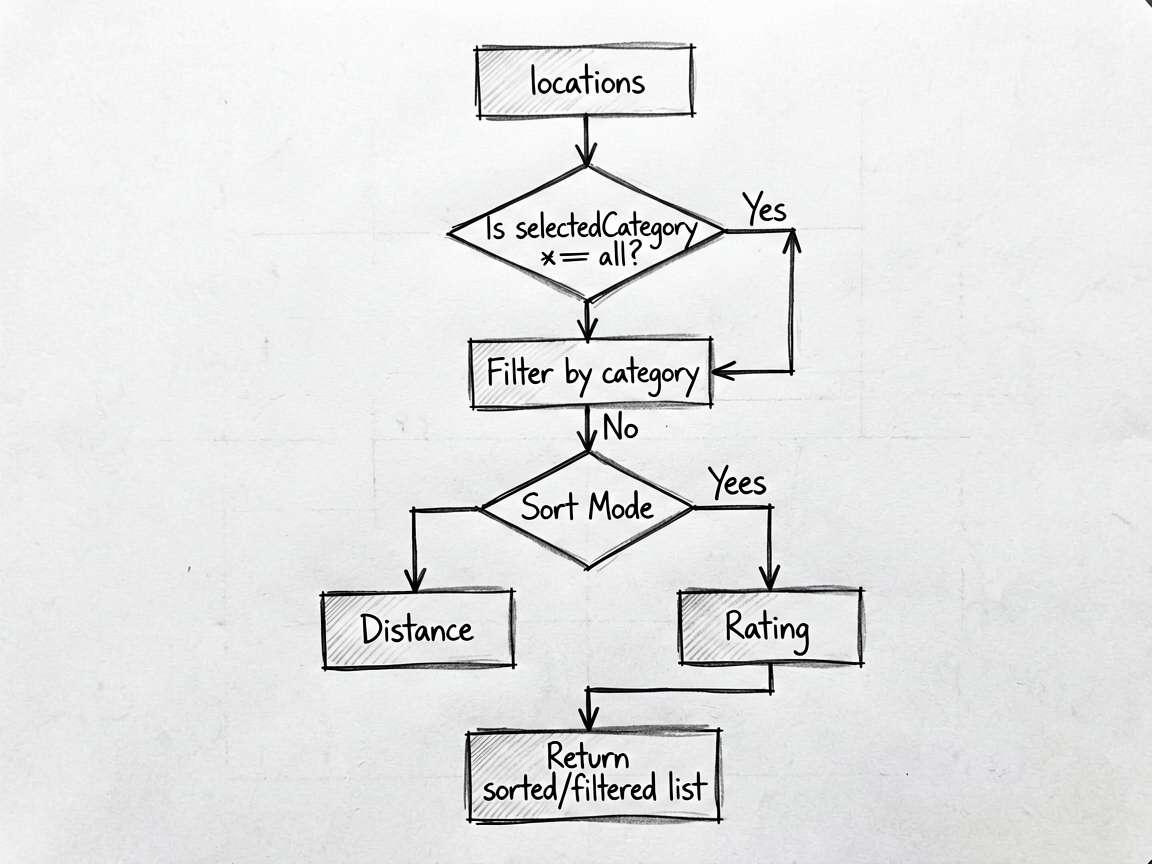
片段 1:get filteredLocations(): LocationItem[] {
这段代码承担的是页面里的“判断”或“动作”,把它从布局里抽出来后,build() 会清爽很多。后面要加新条件,也不会到处翻 UI 代码。
  get filteredLocations(): LocationItem[] {
    let data = this.locations
    if (this.selectedCategory !== '全部') {
      data = data.filter(l => l.category === this.selectedCategory)
    }
    if (this.sortMode === 'distance') {
      return data.slice().sort((a, b) => a.distanceNum - b.distanceNum)
    } else if (this.sortMode === 'rating') {
      return data.slice().sort((a, b) => b.rating - a.rating)
    }
    return data
  }
片段 2:toggleFavorite(id: number) {
这段代码承担的是页面里的“判断”或“动作”,把它从布局里抽出来后,build() 会清爽很多。后面要加新条件,也不会到处翻 UI 代码。
  toggleFavorite(id: number) {
    const idx = this.favoriteIds.indexOf(id)
    if (idx >= 0) {
      this.favoriteIds = this.favoriteIds.filter(i => i !== id)
    } else {
      this.favoriteIds = this.favoriteIds.concat([id])
    }
  }
使用方式
把下面代码放进 ArkTS 页面文件中即可运行。用于正式项目时,我会继续把数据模型、卡片 Builder 和页面事件拆出去,页面文件只负责组合。
建议练习顺序:先改状态字段 -> 再改交互事件 -> 最后调整 UI 样式
检查重点:点击是否刷新、列表 key 是否稳定、条件样式是否集中管理
- 把模拟数据替换成接口数据
- 抽出复用卡片组件
- 增加空状态和异常状态
- 补充深色模式或主题色适配
- 对输入类场景增加校验提示
完整实现
// NearbyMapMarkerPage - 地图标记列表 - 附近地点、分类筛选、路线导航卡片

interface LocationItem {
  id: number
  name: string
  category: string
  categoryIcon: string
  distance: string
  distanceNum: number
  address: string
  rating: number
  reviewCount: number
  isOpen: boolean
  tags: string[]
  phone: string
  color: ResourceColor
  bgColor: ResourceColor
}

interface CategoryFilter_y0kf {
  key: string
  label: string
  icon: string
}

@Entry
@Component
struct NearbyMapMarkerPage {
  @State selectedCategory: string = '全部'
  @State sortMode: string = 'distance'
  @State favoriteIds: number[] = [2, 5]
  @State selectedId: number = -1

  private categories: CategoryFilter_y0kf[] = [
    { key: '全部', label: '全部', icon: '🗺️' },
    { key: '餐饮', label: '餐饮', icon: '🍜' },
    { key: '购物', label: '购物', icon: '🛍️' },
    { key: '医疗', label: '医疗', icon: '🏥' },
    { key: '交通', label: '交通', icon: '🚇' },
    { key: '教育', label: '教育', icon: '📚' },
  ]

  private locations: LocationItem[] = [
    { id: 1, name: '老北京炸酱面馆', category: '餐饮', categoryIcon: '🍜', distance: '150m', distanceNum: 150, address: '朝阳区建国路88号', rating: 4.8, reviewCount: 2341, isOpen: true, tags: ['老字号', '人气爆款', '必吃'], phone: '010-12345678', color: '#EF4444', bgColor: '#FEF2F2' },
    { id: 2, name: '朝阳医院', category: '医疗', categoryIcon: '🏥', distance: '320m', distanceNum: 320, address: '朝阳区工体南路8号', rating: 4.5, reviewCount: 8921, isOpen: true, tags: ['三甲医院', '24h急诊'], phone: '010-87654321', color: '#22C55E', bgColor: '#F0FDF4' },
    { id: 3, name: '万达广场', category: '购物', categoryIcon: '🛍️', distance: '480m', distanceNum: 480, address: '朝阳区建国路93号', rating: 4.6, reviewCount: 15632, isOpen: true, tags: ['大型商场', '停车方便'], phone: '010-11112222', color: '#F59E0B', bgColor: '#FFFBEB' },
    { id: 4, name: '朝阳区图书馆', category: '教育', categoryIcon: '📚', distance: '650m', distanceNum: 650, address: '朝阳区文化路12号', rating: 4.7, reviewCount: 3421, isOpen: false, tags: ['免费', '安静', '学习圣地'], phone: '010-33334444', color: '#8B5CF6', bgColor: '#F5F3FF' },
    { id: 5, name: '国贸地铁站', category: '交通', categoryIcon: '🚇', distance: '200m', distanceNum: 200, address: '朝阳区建国门外大街', rating: 4.2, reviewCount: 62100, isOpen: true, tags: ['1号线', '10号线换乘'], phone: '', color: '#3B82F6', bgColor: '#EFF6FF' },
    { id: 6, name: '星巴克(国贸店)', category: '餐饮', categoryIcon: '☕', distance: '100m', distanceNum: 100, address: '朝阳区建国路甲6号', rating: 4.3, reviewCount: 4521, isOpen: true, tags: ['咖啡', '商务', 'WiFi'], phone: '010-55556666', color: '#22C55E', bgColor: '#F0FDF4' },
    { id: 7, name: '眼镜城', category: '购物', categoryIcon: '👓', distance: '780m', distanceNum: 780, address: '朝阳区劲松路34号', rating: 4.4, reviewCount: 1823, isOpen: true, tags: ['品牌全', '验光免费'], phone: '010-77778888', color: '#F59E0B', bgColor: '#FFFBEB' },
  ]

  get filteredLocations(): LocationItem[] {
    let data = this.locations
    if (this.selectedCategory !== '全部') {
      data = data.filter(l => l.category === this.selectedCategory)
    }
    if (this.sortMode === 'distance') {
      return data.slice().sort((a, b) => a.distanceNum - b.distanceNum)
    } else if (this.sortMode === 'rating') {
      return data.slice().sort((a, b) => b.rating - a.rating)
    }
    return data
  }

  toggleFavorite(id: number) {
    const idx = this.favoriteIds.indexOf(id)
    if (idx >= 0) {
      this.favoriteIds = this.favoriteIds.filter(i => i !== id)
    } else {
      this.favoriteIds = this.favoriteIds.concat([id])
    }
  }

  @Builder
  mapArea() {
    Stack({ alignContent: Alignment.Center }) {
      Row()
        .width('100%')
        .height('100%')
        .backgroundColor('#D1E8FF')
        .linearGradient({
          angle: 135,
          colors: [['#B8D4F0', 0], ['#D4E8FF', 0.5], ['#C8DFF5', 1]]
        })

      // 模拟地图元素
      Row()
        .width(120)
        .height(8)
        .backgroundColor('#FFFFFF')
        .borderRadius(4)
        .opacity(0.6)
        .position({ x: 30, y: 50 })

      Row()
        .width(80)
        .height(8)
        .backgroundColor('#FFFFFF')
        .borderRadius(4)
        .opacity(0.6)
        .position({ x: 180, y: 80 })

      Row()
        .width(100)
        .height(8)
        .backgroundColor('#FFFFFF')
        .borderRadius(4)
        .opacity(0.6)
        .position({ x: 80, y: 110 })

      // 当前位置
      Stack({ alignContent: Alignment.Center }) {
        Circle({ width: 50, height: 50 }).fill('#3B82F620')
        Circle({ width: 20, height: 20 }).fill('#3B82F6')
        Circle({ width: 8, height: 8 }).fill('#FFFFFF')
      }

      Text('附近地点')
        .fontSize(12)
        .fontColor('#6B7280')
        .backgroundColor('#FFFFFF')
        .padding({ left: 12, right: 12, top: 6, bottom: 6 })
        .borderRadius(16)
        .position({ x: 0, y: 8 })
        .shadow({ radius: 4, color: '#1A000000' })
    }
    .width('100%')
    .height(160)
  }

  @Builder
  locationCard(loc: LocationItem) {
    Column({ space: 10 }) {
      Row({ space: 12 }) {
        // 图标
        Stack({ alignContent: Alignment.Center }) {
          Text(loc.categoryIcon).fontSize(24)
        }
        .width(52)
        .height(52)
        .backgroundColor(loc.bgColor)
        .borderRadius(14)

        // 信息
        Column({ space: 4 }) {
          Row({ space: 6 }) {
            Text(loc.name)
              .fontSize(15)
              .fontWeight(FontWeight.Bold)
              .fontColor('#1F2937')
              .maxLines(1)
              .textOverflow({ overflow: TextOverflow.Ellipsis })
              .layoutWeight(1)
            if (!loc.isOpen) {
              Text('已关闭')
                .fontSize(11)
                .fontColor('#9CA3AF')
                .backgroundColor('#F3F4F6')
                .padding({ left: 6, right: 6, top: 2, bottom: 2 })
                .borderRadius(8)
            }
          }
          Row({ space: 6 }) {
            Text('★').fontSize(13).fontColor('#F59E0B')
            Text(`${loc.rating}`).fontSize(13).fontColor('#374151').fontWeight(FontWeight.Medium)
            Text(`(${loc.reviewCount > 1000 ? (loc.reviewCount / 1000).toFixed(1) + 'k' : loc.reviewCount}条)`)
              .fontSize(12)
              .fontColor('#9CA3AF')
            Text('·').fontColor('#D1D5DB')
            Text(loc.distance)
              .fontSize(12)
              .fontColor('#3B82F6')
              .fontWeight(FontWeight.Medium)
          }
          Text(loc.address)
            .fontSize(12)
            .fontColor('#6B7280')
            .maxLines(1)
            .textOverflow({ overflow: TextOverflow.Ellipsis })
        }
        .layoutWeight(1)
        .alignItems(HorizontalAlign.Start)

        // 收藏
        Text(this.favoriteIds.includes(loc.id) ? '❤️' : '🤍')
          .fontSize(22)
          .onClick(() => this.toggleFavorite(loc.id))
      }

      // 标签
      Row({ space: 6 }) {
        ForEach(loc.tags, (tag: string) => {
          Text(tag)
            .fontSize(11)
            .fontColor(loc.color)
            .backgroundColor(loc.bgColor)
            .padding({ left: 7, right: 7, top: 2, bottom: 2 })
            .borderRadius(8)
        })
      }

      // 操作按钮
      Row({ space: 10 }) {
        Row({ space: 6 }) {
          Text('🧭').fontSize(14)
          Text('导航')
            .fontSize(13)
            .fontColor('#3B82F6')
        }
        .layoutWeight(1)
        .padding(10)
        .backgroundColor('#EFF6FF')
        .borderRadius(10)
        .justifyContent(FlexAlign.Center)

        if (loc.phone) {
          Row({ space: 6 }) {
            Text('📞').fontSize(14)
            Text('电话')
              .fontSize(13)
              .fontColor('#22C55E')
          }
          .layoutWeight(1)
          .padding(10)
          .backgroundColor('#F0FDF4')
          .borderRadius(10)
          .justifyContent(FlexAlign.Center)
        }

        Row({ space: 6 }) {
          Text('📌').fontSize(14)
          Text('收藏')
            .fontSize(13)
            .fontColor('#F59E0B')
        }
        .layoutWeight(1)
        .padding(10)
        .backgroundColor('#FFFBEB')
        .borderRadius(10)
        .justifyContent(FlexAlign.Center)
        .onClick(() => this.toggleFavorite(loc.id))
      }
    }
    .padding(14)
    .backgroundColor('#FFFFFF')
    .borderRadius(16)
    .margin({ left: 16, right: 16 })
    .shadow({ radius: 3, color: '#0D000000', offsetY: 1 })
    .border({ width: 1.5, color: this.selectedId === loc.id ? '#3B82F6' : 'transparent' })
    .onClick(() => { this.selectedId = this.selectedId === loc.id ? -1 : loc.id })
  }

  build() {
    Column() {
      Row() {
        Text('附近地点').fontSize(20).fontWeight(FontWeight.Bold).fontColor('#1F2937')
        Blank()
        Text('📍 定位中').fontSize(13).fontColor('#3B82F6')
      }
      .width('100%')
      .padding({ left: 16, right: 16, top: 16, bottom: 8 })

      // 地图区域
      this.mapArea()

      // 分类 Tab
      Scroll() {
        Row({ space: 8 }) {
          ForEach(this.categories, (cat: CategoryFilter_y0kf) => {
            Row({ space: 4 }) {
              Text(cat.icon).fontSize(14)
              Text(cat.label).fontSize(13)
            }
            .padding({ left: 12, right: 12, top: 7, bottom: 7 })
            .backgroundColor(this.selectedCategory === cat.key ? '#3B82F6' : '#FFFFFF')
            .borderRadius(20)
            .border({ width: 1, color: this.selectedCategory === cat.key ? '#3B82F6' : '#E5E7EB' })
            .onClick(() => { this.selectedCategory = cat.key })
          })
        }
        .padding({ left: 16, right: 16, top: 8, bottom: 8 })
      }
      .scrollable(ScrollDirection.Horizontal)
      .scrollBar(BarState.Off)

      // 排序
      Row({ space: 12 }) {
        Text(`共 ${this.filteredLocations.length} 个结果`)
          .fontSize(13)
          .fontColor('#6B7280')
        Blank()
        Text('按距离')
          .fontSize(13)
          .fontColor(this.sortMode === 'distance' ? '#3B82F6' : '#9CA3AF')
          .fontWeight(this.sortMode === 'distance' ? FontWeight.Bold : FontWeight.Normal)
          .onClick(() => { this.sortMode = 'distance' })
        Text('|').fontColor('#E5E7EB')
        Text('按评分')
          .fontSize(13)
          .fontColor(this.sortMode === 'rating' ? '#3B82F6' : '#9CA3AF')
          .fontWeight(this.sortMode === 'rating' ? FontWeight.Bold : FontWeight.Normal)
          .onClick(() => { this.sortMode = 'rating' })
      }
      .padding({ left: 16, right: 16, bottom: 6 })

      List({ space: 10 }) {
        ForEach(this.filteredLocations, (loc: LocationItem) => {
          ListItem() {
            this.locationCard(loc)
          }
        })
        ListItem() { Row().height(16) }
      }
      .layoutWeight(1)
      .scrollBar(BarState.Off)
    }
    .width('100%')
    .height('100%')
    .backgroundColor('#F9FAFB')
  }
}
写到项目里要注意
这个案例可以当成一个小模板:先把页面会变的东西放进状态,再用函数或 Builder 处理重复逻辑,最后让布局只关心展示。写 HarmonyOS7 页面时,这个顺序通常比一上来堆 UI 更稳。

讨论HarmonyOS开发技术,专注于API与组件、DevEco Studio、测试、元服务和应用上架分发等。
更多推荐
 2
2 0
0- 0


 已为社区贡献49条内容

所有评论(0)