HarmonyOS7 ArkUI 博客文章列表 - 文章卡片、分类标签、作者信息、阅读量实战:从状态到页面反馈
文章目录
前言
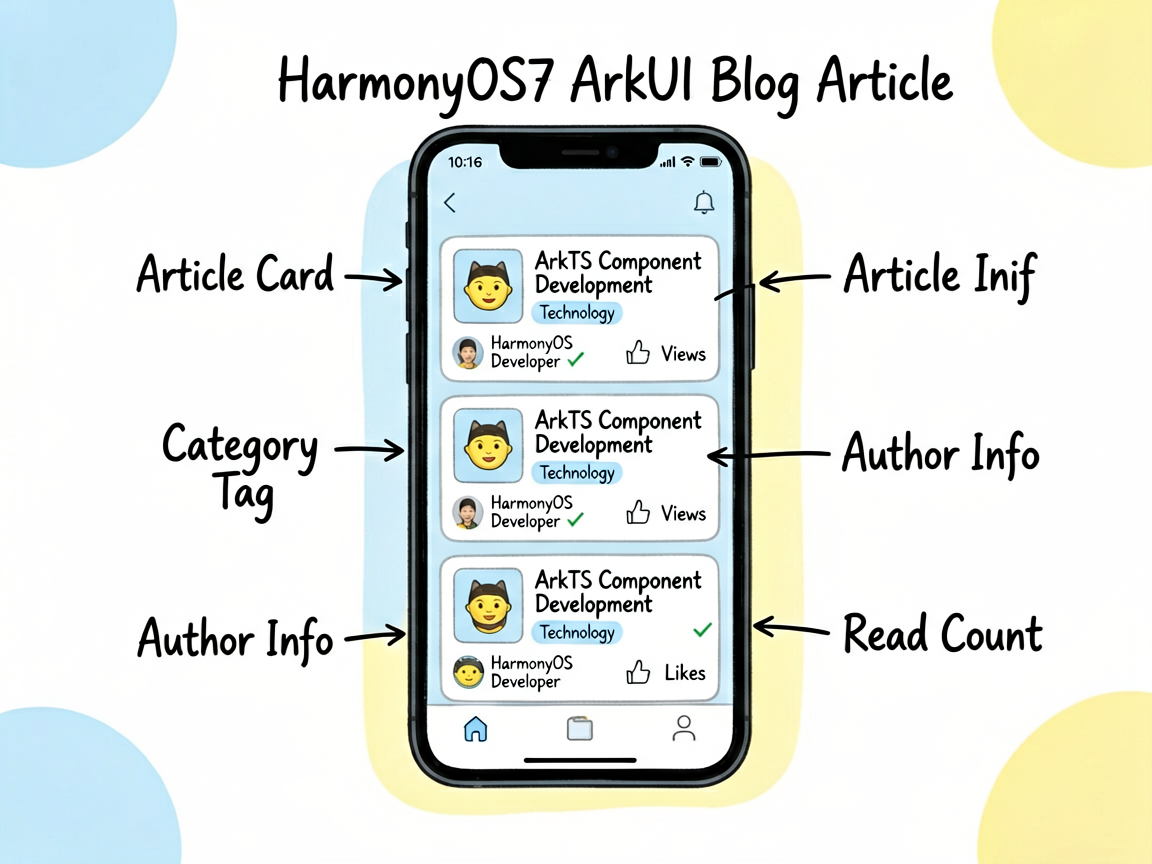
这个案例看着是一个小页面,里面其实塞了不少常见业务写法:列表、筛选、按钮事件、条件样式,基本都能练到。
它的主线是 博客文章列表,细节落在 文章卡片、分类标签、作者信息、阅读量。这些细节刚好能把页面状态、用户操作和组件刷新串起来。
先把业务看明白
BlogArticleListPage 不是一个只展示静态内容的页面。它会根据用户点击、输入、切换或计时来改变界面,所以阅读代码时可以先抓三条线:
| 观察点 | 在这个案例里的表现 |
|---|---|
| 页面主题 | 博客文章列表 |
| 主要文案 | ArkTS 组件化开发最佳实践:从基础到进阶, 技术, 鸿蒙开发者, 组件化, 趋势, 科技观察 |
| 常用组件 | Column, Divider, ForEach, List, ListItem, Row, Stack, Text |
| 适合练习 | 状态驱动 UI、条件样式、列表渲染、事件回调 |
状态和 UI 的关系
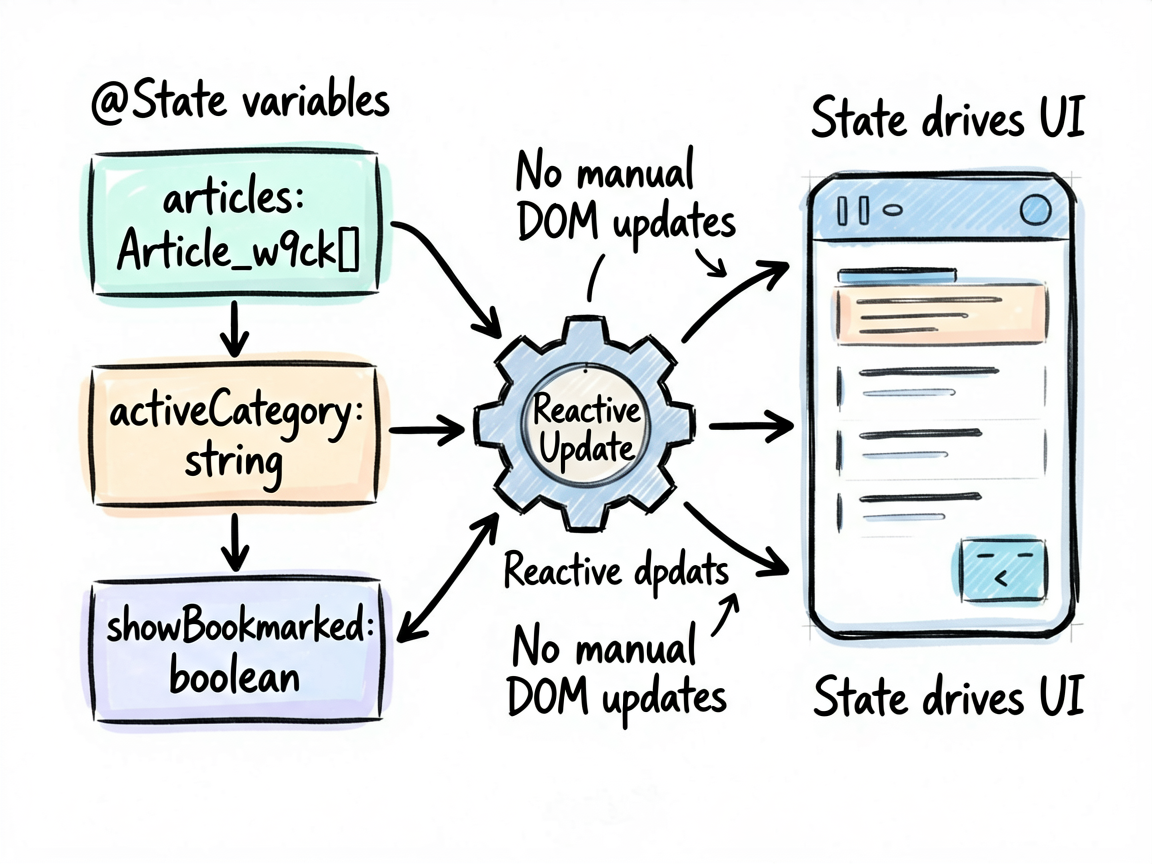
ArkUI 的页面刷新依赖状态变化。下面这些 @State 字段就是页面的“开关”和“数据源”,不用手动找 DOM,也不用自己通知某个控件刷新。
| 状态字段 | 类型 | 我会怎么理解它 |
| — | — | — |
| articles | Article_w9ck[] | 记录页面当前选择、输入或展示状态 |
| activeCategory | string | 当前选中项,决定高亮和内容切换 |
| showBookmarked | boolean | 布尔开关,控制显示隐藏或模式切换 |
一个经验:先把
@State看完,再看build(),页面逻辑会清楚很多。否则很容易被一长串布局代码带偏。
核心逻辑拆读
片段 1:get displayArticles(): Article_w9ck[] {
这段代码承担的是页面里的“判断”或“动作”,把它从布局里抽出来后,build() 会清爽很多。后面要加新条件,也不会到处翻 UI 代码。
  get displayArticles(): Article_w9ck[] {
    let data = this.articles
    if (this.activeCategory !== '全部') {
      data = data.filter(a => a.category === this.activeCategory)
    }
    if (this.showBookmarked) {
      data = data.filter(a => a.isBookmarked)
    }
    return data
  }
片段 2:toggleLike(id: number) {
这段代码承担的是页面里的“判断”或“动作”,把它从布局里抽出来后,build() 会清爽很多。后面要加新条件,也不会到处翻 UI 代码。
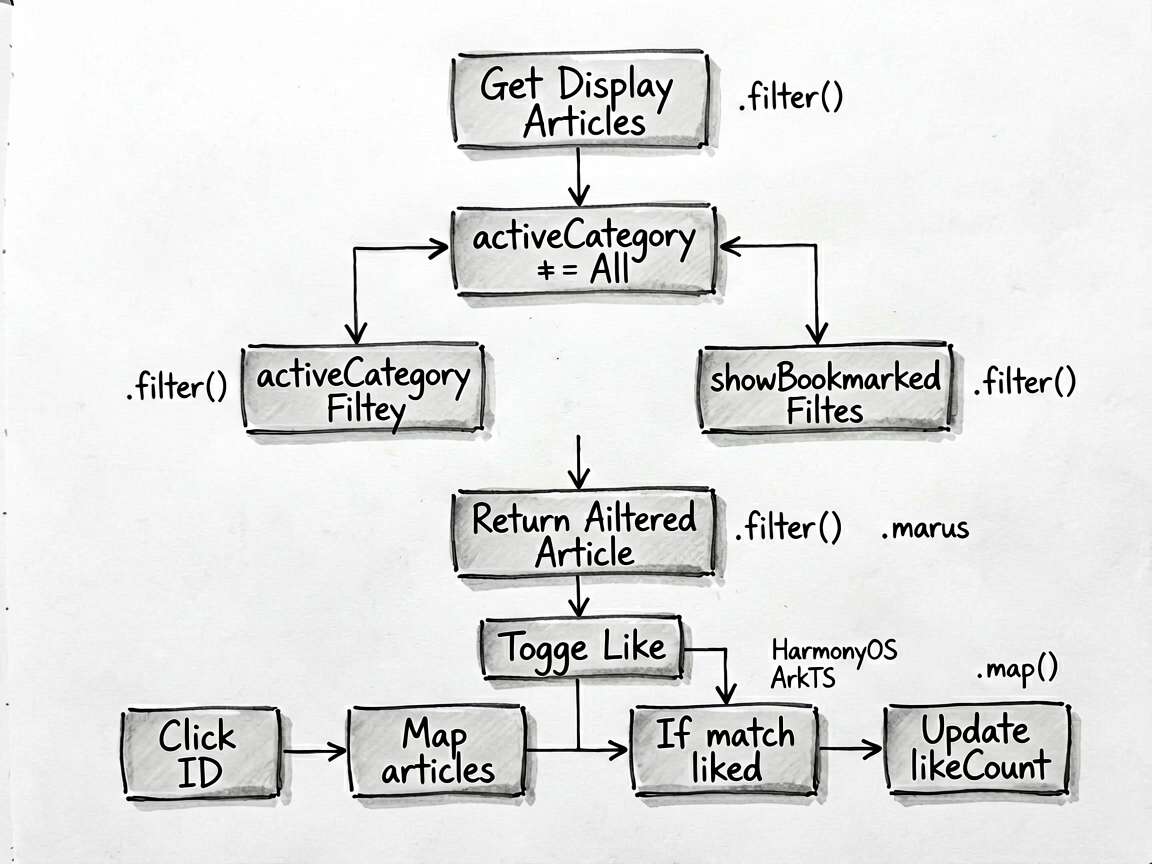
  toggleLike(id: number) {
    this.articles = this.articles.map((a: Article_w9ck) => {
      if (a.id === id) {
        a.likeCount = a.liked ? a.likeCount - 1 : a.likeCount + 1
        a.liked = !a.liked
        return a
      }
      return a
    })
  }
使用方式
把下面代码放进 ArkTS 页面文件中即可运行。用于正式项目时,我会继续把数据模型、卡片 Builder 和页面事件拆出去,页面文件只负责组合。
建议练习顺序:先改状态字段 -> 再改交互事件 -> 最后调整 UI 样式
检查重点:点击是否刷新、列表 key 是否稳定、条件样式是否集中管理
- 把模拟数据替换成接口数据
- 抽出复用卡片组件
- 增加空状态和异常状态
- 补充深色模式或主题色适配
- 对输入类场景增加校验提示
完整代码
// BlogArticleListPage - 博客文章列表 - 文章卡片、分类标签、作者信息、阅读量
interface Author {
name: string
avatar: string
verified: boolean
}
interface Article_w9ck {
id: number
title: string
summary: string
category: string
categoryColor: ResourceColor
categoryBg: ResourceColor
coverEmoji: string
coverBg: ResourceColor
author: Author
readTime: number
likeCount: number
commentCount: number
viewCount: number
date: string
tags: string[]
isFeatured: boolean
isBookmarked: boolean
liked: boolean
}
@Entry
@Component
struct BlogArticleListPage {
@State articles: Article_w9ck[] = [
{
id: 1,
title: 'ArkTS 组件化开发最佳实践:从基础到进阶',
summary: '深入探讨 HarmonyOS ArkTS 的组件化开发模式,从 @Component 的基础使用到复杂组件树的状态管理,帮助你构建高可维护性的应用。',
category: '技术',
categoryColor: '#3B82F6',
categoryBg: '#EFF6FF',
coverEmoji: '⚡',
coverBg: '#EFF6FF',
author: { name: '鸿蒙开发者', avatar: '👨💻', verified: true },
readTime: 12,
likeCount: 348,
commentCount: 56,
viewCount: 12800,
date: '06-05',
tags: ['HarmonyOS', 'ArkTS', '组件化'],
isFeatured: true,
isBookmarked: true,
liked: false,
},
{
id: 2,
title: '2026 年前端趋势:AI 辅助开发正在重塑行业',
summary: 'AI 代码生成、智能 UI 设计工具、自动化测试……本文梳理 2026 年最值得关注的前端技术趋势,以及开发者应如何应对。',
category: '趋势',
categoryColor: '#8B5CF6',
categoryBg: '#F5F3FF',
coverEmoji: '🤖',
coverBg: '#F5F3FF',
author: { name: '科技观察', avatar: '🔭', verified: false },
readTime: 8,
likeCount: 521,
commentCount: 93,
viewCount: 28600,
date: '06-04',
tags: ['AI', '前端', '趋势'],
isFeatured: true,
isBookmarked: false,
liked: true,
},
{
id: 3,
title: '如何设计一个优雅的深色模式主题系统',
summary: '颜色系统设计、动态主题切换实现、以及在 ArkUI 中如何优雅地管理主题变量,本文提供完整的解决方案。',
category: '设计',
categoryColor: '#EC4899',
categoryBg: '#FDF2F8',
coverEmoji: '🎨',
coverBg: '#FDF2F8',
author: { name: 'UI 设计师小明', avatar: '🎭', verified: true },
readTime: 6,
likeCount: 289,
commentCount: 34,
viewCount: 9200,
date: '06-03',
tags: ['深色模式', 'UI设计', '主题'],
isFeatured: false,
isBookmarked: false,
liked: false,
},
{
id: 4,
title: '性能优化实战:List 组件的 LazyForEach 使用指南',
summary: 'ForEach 和 LazyForEach 的区别在哪里?在长列表场景下如何利用 LazyForEach 避免内存溢出?本文配合完整代码示例讲解。',
category: '技术',
categoryColor: '#3B82F6',
categoryBg: '#EFF6FF',
coverEmoji: '🚀',
coverBg: '#F0FDF4',
author: { name: '性能优化专家', avatar: '⚡', verified: true },
readTime: 15,
likeCount: 412,
commentCount: 67,
viewCount: 18400,
date: '06-02',
tags: ['性能优化', 'LazyForEach', 'List'],
isFeatured: false,
isBookmarked: true,
liked: false,
},
{
id: 5,
title: '从零搭建鸿蒙应用:项目结构与工程化配置',
summary: '初学者必看!从创建第一个 HarmonyOS 项目开始,讲解工程目录结构、模块化配置、资源管理规范,帮你避开常见坑。',
category: '教程',
categoryColor: '#22C55E',
categoryBg: '#F0FDF4',
coverEmoji: '📖',
coverBg: '#FFFBEB',
author: { name: '鸿蒙入门指南', avatar: '📚', verified: false },
readTime: 20,
likeCount: 678,
commentCount: 124,
viewCount: 45000,
date: '06-01',
tags: ['入门', '项目结构', '配置'],
isFeatured: false,
isBookmarked: false,
liked: true,
},
]
@State activeCategory: string = '全部'
@State showBookmarked: boolean = false
private tabCategories: string[] = ['全部', '技术', '趋势', '设计', '教程']
get displayArticles(): Article_w9ck[] {
let data = this.articles
if (this.activeCategory !== '全部') {
data = data.filter(a => a.category === this.activeCategory)
}
if (this.showBookmarked) {
data = data.filter(a => a.isBookmarked)
}
return data
}
toggleLike(id: number) {
this.articles = this.articles.map((a: Article_w9ck) => {
if (a.id === id) {
a.likeCount = a.liked ? a.likeCount - 1 : a.likeCount + 1
a.liked = !a.liked
return a
}
return a
})
}
toggleBookmark(id: number) {
this.articles = this.articles.map(a => { if (a.id === id) { a.isBookmarked = !a.isBookmarked } return a })
}
formatCount(n: number): string {
if (n >= 10000) return `${(n / 10000).toFixed(1)}w`
if (n >= 1000) return `${(n / 1000).toFixed(1)}k`
return `${n}`
}
@Builder
featuredCard(article: Article_w9ck) {
Column({ space: 10 }) {
// 封面
Stack({ alignContent: Alignment.BottomStart }) {
Row()
.width('100%')
.height(140)
.backgroundColor(article.coverBg)
.borderRadius({ topLeft: 16, topRight: 16 })
Text(article.coverEmoji)
.fontSize(64)
.position({ x: '50%', y: '50%' })
.translate({ x: -32, y: -32 })
Row() {
Text('推荐')
.fontSize(11)
.fontColor('#FFFFFF')
.backgroundColor('#F59E0B')
.padding({ left: 8, right: 8, top: 3, bottom: 3 })
.borderRadius(8)
}
.padding(12)
}
.width('100%')
.height(140)
Column({ space: 8 }) {
Row({ space: 6 }) {
Text(article.category)
.fontSize(11)
.fontColor(article.categoryColor)
.backgroundColor(article.categoryBg)
.padding({ left: 8, right: 8, top: 2, bottom: 2 })
.borderRadius(8)
Text(`${article.readTime}分钟阅读`)
.fontSize(11)
.fontColor('#9CA3AF')
}
Text(article.title)
.fontSize(16)
.fontWeight(FontWeight.Bold)
.fontColor('#1F2937')
.maxLines(2)
.textOverflow({ overflow: TextOverflow.Ellipsis })
.lineHeight(24)
Row({ space: 8 }) {
Text(article.author.avatar).fontSize(18)
Text(article.author.name)
.fontSize(13)
.fontColor('#374151')
if (article.author.verified) {
Text('✓').fontSize(11).fontColor('#3B82F6')
}
Blank()
Text(article.date).fontSize(12).fontColor('#9CA3AF')
}
Row({ space: 16 }) {
Row({ space: 4 }) {
Text(article.liked ? '❤️' : '🤍').fontSize(14)
Text(`${this.formatCount(article.likeCount)}`)
.fontSize(12)
.fontColor(article.liked ? '#EF4444' : '#9CA3AF')
}.onClick(() => this.toggleLike(article.id))
Row({ space: 4 }) {
Text('💬').fontSize(14)
Text(`${article.commentCount}`).fontSize(12).fontColor('#9CA3AF')
}
Row({ space: 4 }) {
Text('👁').fontSize(14)
Text(`${this.formatCount(article.viewCount)}`).fontSize(12).fontColor('#9CA3AF')
}
Blank()
Text(article.isBookmarked ? '🔖' : '📌')
.fontSize(18)
.onClick(() => this.toggleBookmark(article.id))
}
}
.padding({ left: 14, right: 14, bottom: 14 })
}
.backgroundColor('#FFFFFF')
.borderRadius(16)
.margin({ left: 16, right: 16 })
.shadow({ radius: 6, color: '#0D000000', offsetY: 2 })
}
@Builder
normalCard(article: Article_w9ck) {
Row({ space: 12 }) {
// 左侧封面
Stack({ alignContent: Alignment.Center }) {
Text(article.coverEmoji).fontSize(32)
}
.width(80)
.height(80)
.backgroundColor(article.coverBg)
.borderRadius(12)
// 右侧信息
Column({ space: 6 }) {
Row({ space: 6 }) {
Text(article.category)
.fontSize(11)
.fontColor(article.categoryColor)
.backgroundColor(article.categoryBg)
.padding({ left: 6, right: 6, top: 2, bottom: 2 })
.borderRadius(6)
Text(`${article.readTime}min`)
.fontSize(11)
.fontColor('#9CA3AF')
}
Text(article.title)
.fontSize(14)
.fontWeight(FontWeight.Bold)
.fontColor('#1F2937')
.maxLines(2)
.textOverflow({ overflow: TextOverflow.Ellipsis })
.lineHeight(20)
Row({ space: 12 }) {
Row({ space: 3 }) {
Text(article.author.avatar).fontSize(14)
Text(article.author.name)
.fontSize(11)
.fontColor('#6B7280')
.maxLines(1)
.textOverflow({ overflow: TextOverflow.Ellipsis })
}.layoutWeight(1)
Row({ space: 10 }) {
Row({ space: 3 }) {
Text(article.liked ? '❤️' : '🤍').fontSize(12)
Text(`${this.formatCount(article.likeCount)}`).fontSize(11).fontColor('#9CA3AF')
}.onClick(() => this.toggleLike(article.id))
Text(article.isBookmarked ? '🔖' : '📌')
.fontSize(14)
.onClick(() => this.toggleBookmark(article.id))
}
}
}
.layoutWeight(1)
.alignItems(HorizontalAlign.Start)
}
.padding(14)
.backgroundColor('#FFFFFF')
.borderRadius(14)
.margin({ left: 16, right: 16 })
.shadow({ radius: 3, color: '#0D000000', offsetY: 1 })
}
build() {
Column() {
// 顶部
Row() {
Text('发现').fontSize(22).fontWeight(FontWeight.Bold).fontColor('#1F2937')
Blank()
Text(this.showBookmarked ? '🔖' : '📌')
.fontSize(22)
.fontColor(this.showBookmarked ? '#3B82F6' : '#9CA3AF')
.onClick(() => { this.showBookmarked = !this.showBookmarked })
Text('🔍').fontSize(20).margin({ left: 12 }).fontColor('#9CA3AF')
}
.width('100%')
.padding({ left: 16, right: 16, top: 16, bottom: 8 })
// 分类 Tab
Row({ space: 0 }) {
ForEach(this.tabCategories, (cat: string) => {
Column() {
Text(cat)
.fontSize(14)
.fontColor(this.activeCategory === cat ? '#3B82F6' : '#6B7280')
.fontWeight(this.activeCategory === cat ? FontWeight.Bold : FontWeight.Normal)
.padding({ top: 8, bottom: 8 })
Divider()
.strokeWidth(2)
.color(this.activeCategory === cat ? '#3B82F6' : 'transparent')
.width(40)
}
.layoutWeight(1)
.alignItems(HorizontalAlign.Center)
.onClick(() => { this.activeCategory = cat })
})
}
.width('100%')
.border({ width: { bottom: 1 }, color: '#F3F4F6' })
.padding({ left: 16, right: 16 })
List({ space: 12 }) {
ForEach(this.displayArticles, (article: Article_w9ck, idx: number) => {
ListItem() {
if (article.isFeatured && idx === 0) {
this.featuredCard(article)
} else {
this.normalCard(article)
}
}
})
ListItem() { Row().height(20) }
}
.layoutWeight(1)
.scrollBar(BarState.Off)
.padding({ top: 12 })
}
.width('100%')
.height('100%')
.backgroundColor('#F9FAFB')
}
}
一个小复盘
这个案例可以当成一个小模板:先把页面会变的东西放进状态,再用函数或 Builder 处理重复逻辑,最后让布局只关心展示。写 HarmonyOS7 页面时,这个顺序通常比一上来堆 UI 更稳。

讨论HarmonyOS开发技术,专注于API与组件、DevEco Studio、测试、元服务和应用上架分发等。
更多推荐
 3
3 0
0- 0


 已为社区贡献49条内容

所有评论(0)