《卡片添加至桌面》二、@ohos.deviceInfo使用指南
HarmonyOS @ohos.deviceInfo(设备信息)使用指南
摘要:本文全面介绍 HarmonyOS
@ohos.deviceInfo模块的 API 属性与使用方法,通过完整代码示例演示如何获取设备名称、品牌、型号、系统版本等信息,并结合应用卡片场景展示实战应用。
效果
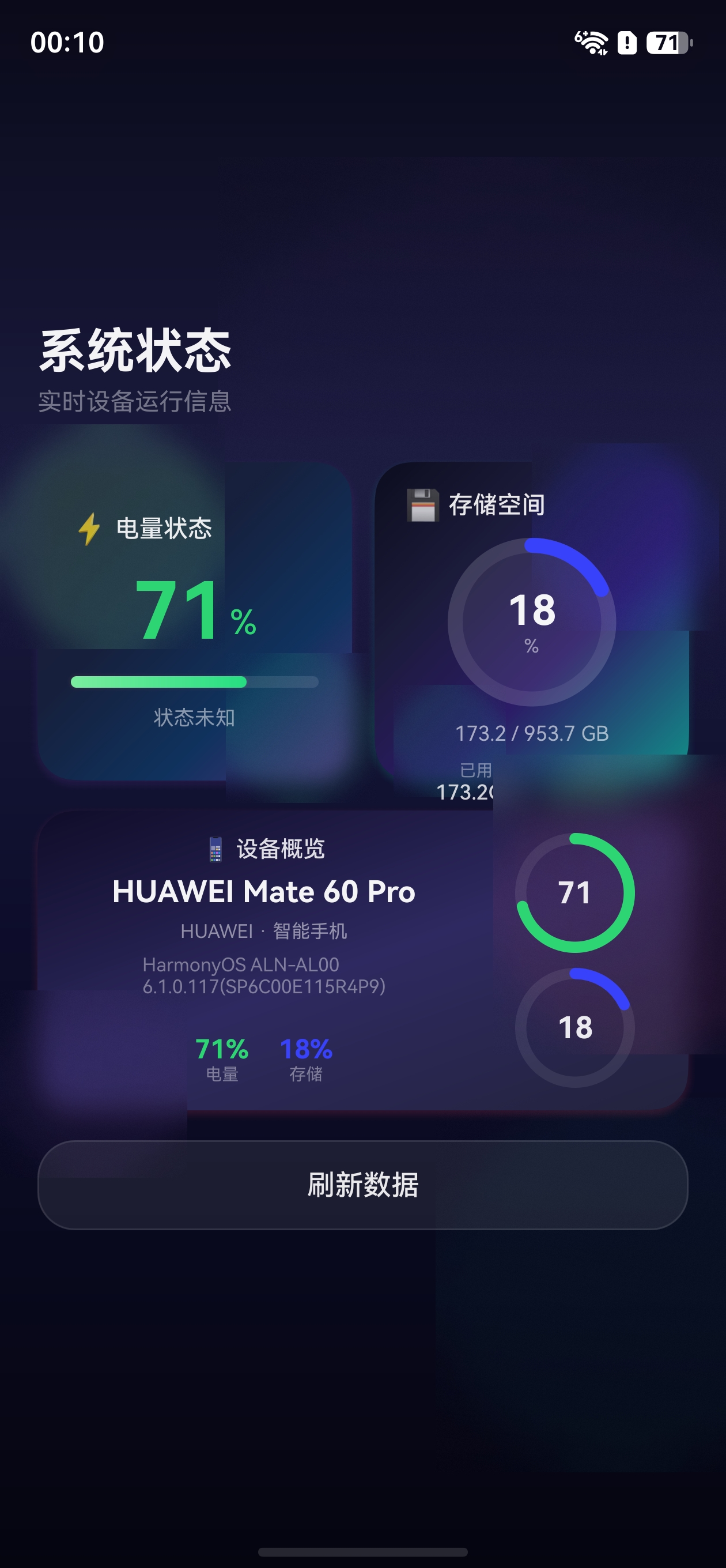
一、模块概述
@ohos.deviceInfo 是 HarmonyOS 基础服务模块,属于 @kit.BasicServicesKit,用于获取当前设备的硬件与系统信息。所有属性均为同步只读,无需申请权限,开发者可以直接在页面或卡片中读取设备信息。
1.1 适用场景
- 设备信息展示应用
- 根据设备类型适配 UI 布局
- 桌面卡片显示设备名称与品牌
- 日志采集与数据分析
1.2 模块归属
| 属性 | 值 |
|---|---|
| 模块名 | @ohos.deviceInfo |
| Kit | @kit.BasicServicesKit |
| 引入方式 | import { deviceInfo } from '@kit.BasicServicesKit' |
二、核心 API 详解
2.1 常用属性列表
| 属性名 | 类型 | 说明 | 示例值 |
|---|---|---|---|
brand |
string |
设备品牌 | HUAWEI |
marketName |
string |
产品市场名称 | Mate 60 Pro |
productModel |
string |
设备型号 | ALN-AL80 |
deviceType |
string |
设备类型 | phone / tablet / 2in1 |
osFullName |
string |
操作系统全称 | HarmonyOS |
osReleaseType |
string |
系统版本类型 | Release / Beta |
displayVersion |
string |
显示版本号 | 5.0.0 |
osBrand |
string |
操作系统品牌 | HarmonyOS |
hardwareProfile |
string |
硬件配置信息 | - |
serial |
string |
设备序列号 | - |
bootloaderVersion |
string |
Bootloader版本号 | - |
abiList |
string[] |
支持的ABI列表 | ['arm64-v8a'] |
2.2 设备类型枚举
deviceType 属性返回字符串类型,常见值如下:
| 值 | 含义 |
|---|---|
phone |
手机 |
tablet |
平板 |
2in1 |
二合一设备 |
tv |
电视 |
wearable |
可穿戴设备 |
car |
车载设备 |
三、权限说明
deviceInfo 模块的所有属性均为系统级只读信息,无需额外申请权限即可使用。
注意:部分敏感属性(如
serial)在低权限应用中可能返回空字符串。
四、基础示例:设备信息展示卡片
4.1 创建项目
使用 DevEco Studio 新建 ArkTS 项目,选择 Empty Ability 模板。
4.2 编写页面代码
在 entry/src/main/ets/pages/Index.ets 中编写如下代码:
import { deviceInfo } from '@kit.BasicServicesKit';

@Entry
@Component
struct DeviceInfoDemo {
  @State deviceBrand: string = '';
  @State deviceMarketName: string = '';
  @State deviceModel: string = '';
  @State deviceType: string = '';
  @State osName: string = '';
  @State osVersion: string = '';

  aboutToAppear(): void {
    this.loadDeviceInfo();
  }

  loadDeviceInfo(): void {
    // 直接读取设备信息属性
    this.deviceBrand = deviceInfo.brand;
    this.deviceMarketName = deviceInfo.marketName;
    this.deviceModel = deviceInfo.productModel;
    this.deviceType = this.getDeviceTypeName(deviceInfo.deviceType);
    this.osName = deviceInfo.osFullName;
    this.osVersion = deviceInfo.displayVersion;
  }

  // 设备类型映射为中文名称
  getDeviceTypeName(type: string): string {
    const typeMap: Record<string, string> = {
      'phone': '手机',
      'tablet': '平板',
      '2in1': '二合一设备',
      'tv': '电视',
      'wearable': '可穿戴设备',
      'car': '车载设备'
    };
    return typeMap[type] ?? type;
  }

  build() {
    Column({ space: 20 }) {
      Text('设备信息展示')
        .fontSize(24)
        .fontWeight(FontWeight.Bold)

      // 信息卡片
      Column({ space: 16 }) {
        this.InfoRow('品牌', this.deviceBrand)
        this.InfoRow('产品名称', this.deviceMarketName)
        this.InfoRow('设备型号', this.deviceModel)
        this.InfoRow('设备类型', this.deviceType)
        this.InfoRow('操作系统', this.osName)
        this.InfoRow('系统版本', this.osVersion)
      }
      .width('90%')
      .padding(24)
      .backgroundColor(Color.White)
      .borderRadius(16)
      .shadow({ radius: 8, color: '#1A000000', offsetY: 4 })

      Button('刷新信息')
        .fontSize(16)
        .width('60%')
        .onClick(() => {
          this.loadDeviceInfo();
        })
    }
    .width('100%')
    .height('100%')
    .justifyContent(FlexAlign.Center)
    .backgroundColor('#F5F5F5')
  }

  @Builder
  InfoRow(label: string, value: string) {
    Row() {
      Text(label)
        .fontSize(14)
        .fontColor('#999999')
        .width(80)
      Text(value)
        .fontSize(16)
        .fontWeight(FontWeight.Medium)
        .fontColor('#333333')
        .layoutWeight(1)
    }
    .width('100%')
    .height(40)
  }
}
4.3 运行效果
页面将展示一个设备信息卡片,包含品牌、产品名称、设备型号、设备类型、操作系统和系统版本。
五、进阶:根据设备类型动态适配布局
利用 deviceInfo.deviceType 可以实现针对不同设备类型的 UI 适配:
import { deviceInfo } from '@kit.BasicServicesKit';

@Entry
@Component
struct AdaptiveLayoutDemo {
  @State isPhone: boolean = true;
  @State isTablet: boolean = false;

  aboutToAppear(): void {
    const type = deviceInfo.deviceType;
    this.isPhone = type === 'phone';
    this.isTablet = type === 'tablet' || type === '2in1';
  }

  build() {
    if (this.isPhone) {
      // 手机布局 - 垂直排列
      Column({ space: 16 }) {
        Text('手机端布局')
          .fontSize(20)
        // 垂直堆叠的卡片
        this.CardItem('卡片 A', '#4FC3F7')
        this.CardItem('卡片 B', '#81C784')
        this.CardItem('卡片 C', '#FFB74D')
      }
      .width('100%')
      .height('100%')
      .padding(16)
    } else {
      // 平板/二合一布局 - 水平排列
      Row({ space: 16 }) {
        this.CardItem('卡片 A', '#4FC3F7')
        this.CardItem('卡片 B', '#81C784')
        this.CardItem('卡片 C', '#FFB74D')
      }
      .width('100%')
      .height('100%')
      .padding(16)
    }
  }

  @Builder
  CardItem(title: string, color: string) {
    Column() {
      Text(title)
        .fontSize(18)
        .fontWeight(FontWeight.Medium)
        .fontColor(Color.White)
    }
    .width(this.isPhone ? '100%' : '33%')
    .height(120)
    .backgroundColor(color)
    .borderRadius(12)
    .justifyContent(FlexAlign.Center)
  }
}
六、在应用卡片中使用设备信息
在桌面卡片场景中,deviceInfo 数据通常由主应用获取后,通过 Preferences 传递给 FormExtensionAbility。
6.1 主应用端获取并保存
import { deviceInfo } from '@kit.BasicServicesKit';
import { preferences } from '@kit.ArkData';

// 获取设备信息
let marketName: string = deviceInfo.marketName;
let brand: string = deviceInfo.brand;

// 保存到 Preferences 供卡片读取
let prefs = preferences.getPreferencesSync(context, { name: 'myStore' });
prefs.putSync('marketName', marketName);
prefs.putSync('brand', brand);
prefs.flush();
6.2 FormExtensionAbility 端读取
import { formBindingData, FormExtensionAbility } from '@kit.FormKit';
import { Want } from '@kit.AbilityKit';
import { preferences } from '@kit.ArkData';

export default class MyFormAbility extends FormExtensionAbility {
  onAddForm(want: Want): formBindingData.FormBindingData {
    let formId = want.parameters?.['ohos.extra.param.key.form_identity'] as string;
    let prefs = preferences.getPreferencesSync(this.context, { name: 'myStore' });

    let formData = {
      formId: formId,
      marketName: prefs.getSync('marketName', '未知设备') as string,
      brand: prefs.getSync('brand', '未知品牌') as string
    };

    return formBindingData.createFormBindingData(formData);
  }
}
6.3 卡片 UI 展示
@Component
struct DeviceInfoWidgetCard {
  @LocalStorageProp('marketName') marketName: string = '';
  @LocalStorageProp('brand') brand: string = '';

  build() {
    Column({ space: 8 }) {
      Text(`设备:${this.marketName}`)
        .fontSize(14)
        .fontColor('rgba(0,0,0,0.9)')

      Text(`品牌:${this.brand}`)
        .fontSize(12)
        .fontColor('rgba(0,0,0,0.6)')
    }
    .width('100%')
    .height('100%')
    .padding(16)
    .justifyContent(FlexAlign.Center)
  }
}
七、常见问题与注意事项
7.1 marketName 和 productModel 的区别?
| 属性 | 说明 | 示例 |
|---|---|---|
marketName |
产品市场名称,面向消费者 | Mate 60 Pro |
productModel |
设备内部型号编码 | ALN-AL80 |
在展示给用户时优先使用 marketName,在技术分析时可使用 productModel。
7.2 模拟器返回默认值?
模拟器上 brand、marketName 等属性可能返回默认值(如 Huawei、rk3568),建议在真机上调试以获取真实数据。
7.3 设备类型字符串可能扩展
deviceType 的返回值可能随 HarmonyOS 版本更新而扩展,建议在代码中使用 default 分支处理未知类型。
八、总结
| 知识点 | 内容 |
|---|---|
| 模块导入 | import { deviceInfo } from '@kit.BasicServicesKit' |
| 获取品牌 | deviceInfo.brand |
| 获取产品名 | deviceInfo.marketName |
| 获取设备类型 | deviceInfo.deviceType |
| 获取系统版本 | deviceInfo.displayVersion |
| 权限要求 | 无需额外权限 |
| 数据传递 | 通过 Preferences + FormExtensionAbility 传递到卡片 |
@ohos.deviceInfo 是开发设备信息类应用的基础模块,结合同步读取和 Preferences 持久化存储,可以方便地在应用和桌面卡片中展示设备信息。

讨论HarmonyOS开发技术,专注于API与组件、DevEco Studio、测试、元服务和应用上架分发等。
更多推荐
 5
5 0
0- 0



 已为社区贡献27条内容

所有评论(0)