HarmonyOS7 ArkUI 天气穿搭建议 - 根据天气数据推荐穿搭实战:把案例真正写懂
文章目录
前言
很多 ArkUI 示例看着不大,真正难的是把状态、列表和交互放在合适的位置。这个案例就很典型。
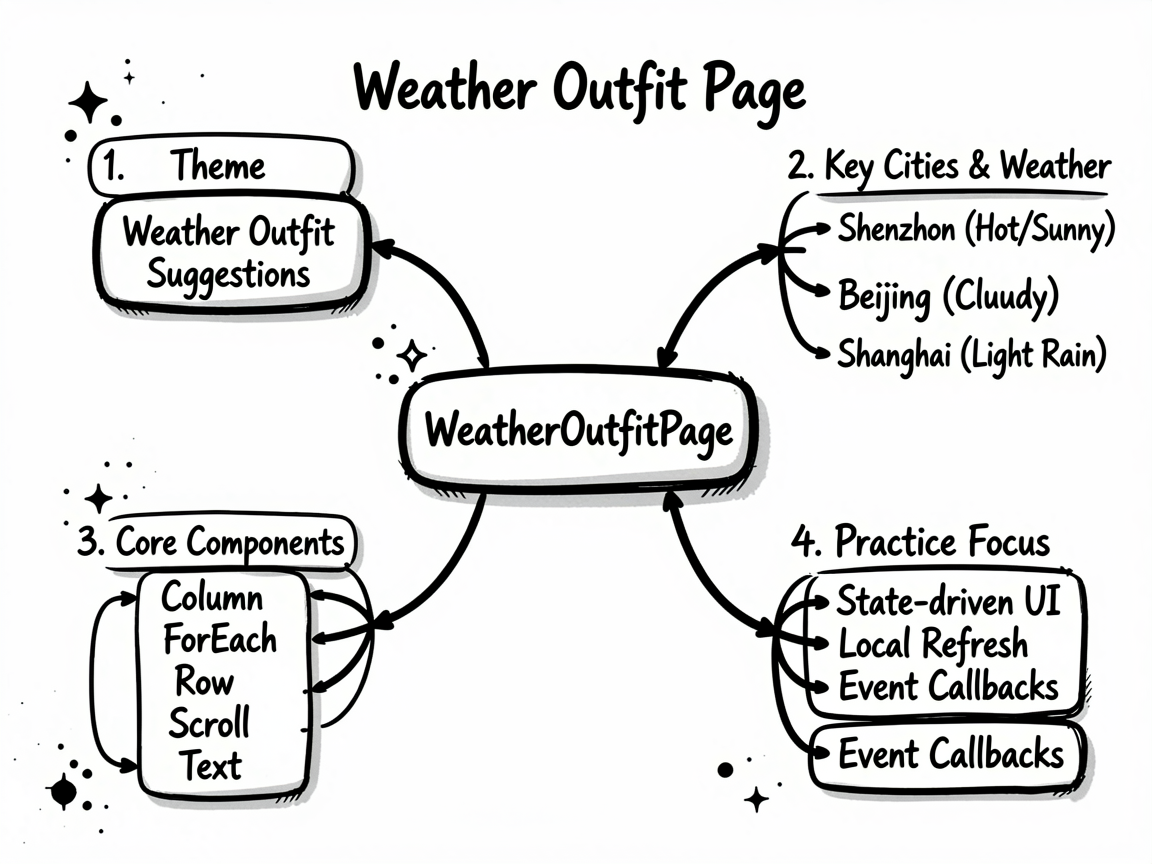
这个案例的主线是 天气穿搭建议,后面的 根据天气数据推荐穿搭 则把页面做得更像真实业务页。读代码时,建议把交互、状态和列表这三条线一起看。
先看页面目标
WeatherOutfitPage 对应的是 天气穿搭建议 - 根据天气数据推荐穿搭 这个业务场景。别把它只当成一个 UI 练习页,它真正有价值的地方在于:同一个页面里同时出现了状态切换、列表渲染、条件展示和用户反馈。
| 观察点 | 在这个案例里的表现 |
|---|---|
| 页面主题 | 天气穿搭建议 |
| 主要文案 | 深圳, 晴热, 北京, 多云, 上海, 小雨 |
| 常用组件 | Column, ForEach, Row, Scroll, Text |
| 适合练习 | 状态驱动 UI、局部刷新、事件回调、页面结构拆分 |
使用方法
把完整代码放进 ArkTS 页面文件后,就可以直接在预览器里运行。实际使用时,建议先手动点一遍页面里的主要交互,看状态有没有跟着变化;然后再去对照代码,理解每个 @State 字段到底控制了哪一块区域。
如果你想把这个案例改成自己的版本,我建议先做三件事:换掉模拟数据、调整筛选规则、再把重复结构抽成 Builder 或子组件。顺序别反,先改结构往往最容易把自己绕进去。
数据怎么驱动 UI
ArkUI 页面写顺手之后,你会发现很多问题其实都不是样式问题,而是状态没放对位置。这个案例里能直接看到哪些数据是输入、哪些是选择、哪些是列表源,读起来会比较顺。
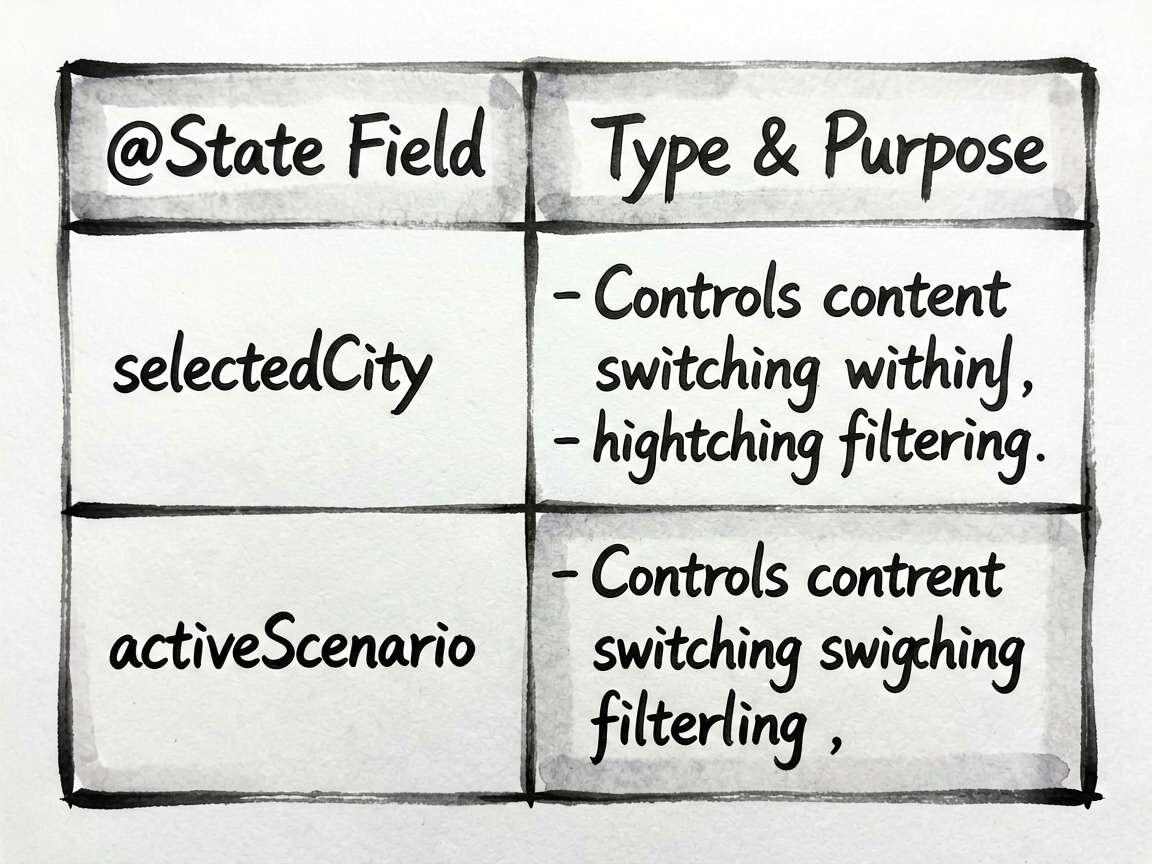
| 状态字段 | 类型 | 说明 |
|---|---|---|
selectedCity |
number |
当前选中项,决定内容切换、高亮或过滤结果 |
activeScenario |
number |
当前选中项,决定内容切换、高亮或过滤结果 |
我自己看这类示例时,会先把
@State和事件函数圈出来,再去看布局。这样不会被大段Column、Row搞乱节奏。
值得抄的片段
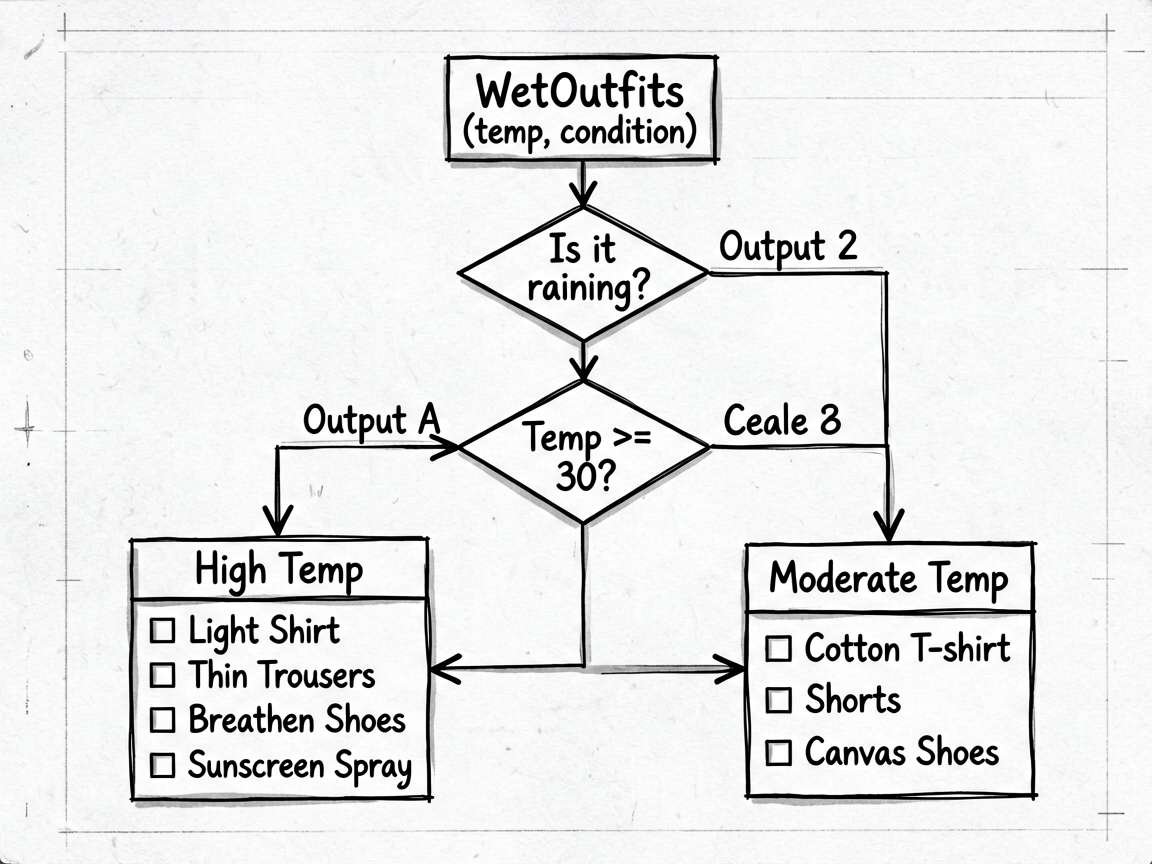
片段 1:private getOutfits(weather: WeatherInfo_axn6): OutfitSuggestion[] {
这段代码我建议单独看。它通常负责派生数据、交互动作或者局部渲染逻辑,把这部分抽出去之后,页面主结构会干净很多,后续要改规则也更省事。
  private getOutfits(weather: WeatherInfo_axn6): OutfitSuggestion[] {
    const temp = weather.temp
    const isRain = weather.condition.includes('雨')

    if (temp >= 30) {
      return [
        {
          scenario: '通勤上班',
          icon: '💼',
          items: [
            { type: '上衣', name: '轻薄透气衬衫', emoji: '👔', color: '#e3f2fd' },
            { type: '下装', name: '薄款西裤', emoji: '👖', color: '#ede7f6' },
            { type: '鞋子', name: '透气皮鞋', emoji: '👞', color: '#fff3e0' },
            { type: '配件', name: '防晒喷雾', emoji: '🧴', color: '#fce4ec' },
          ],
          tip: '高温天气注意防晒,建议携带遮阳伞,室内外温差大记得多备一件薄外套。',
        },
        {
          scenario: '休闲外出',
          icon: '🛍️',
          items: [
            { type: '上衣', name: '棉质T恤', emoji: '👕', color: '#e8f5e9' },
            { type: '下装', name: '休闲短裤', emoji: '🩳', color: '#fff9c4' },
            { type: '鞋子', name: '帆布鞋', emoji: '👟', color: '#e3f2fd' },
            { type: '配件', name: '太阳镜+帽子', emoji: '🕶️', color: '#ede7f6' },
          ],
          tip: '短裤帆布鞋轻松应对高温,出行避开中午12-15点高峰紫外线时段。',
        },
      ]
    } else if (temp >= 20) {
      return [
        {
          scenario: '通勤上班',
          icon: '💼',
片段 2:get currentWeather(): WeatherInfo_axn6 {
这段代码我建议单独看。它通常负责派生数据、交互动作或者局部渲染逻辑,把这部分抽出去之后,页面主结构会干净很多,后续要改规则也更省事。
  get currentWeather(): WeatherInfo_axn6 {
    return this.cities[this.selectedCity]
  }
必读小结
适合拿来练手的能力:页面拆分、状态联动、条件渲染、交互反馈。
推荐阅读顺序:先看前言 -> 再跑页面 -> 再看状态表 -> 最后啃完整代码
如果只想快速上手,优先改模拟数据和交互函数,收益最高
- 点击或输入之后,界面有没有立即更新
- 列表渲染是否依赖了稳定的数据结构
- 筛选、统计、派生数据是不是单独放进函数里
- 是否还有重复布局可以继续抽出去
- 文案、颜色、间距是不是同一套风格
完整实现
// WeatherOutfitPage - 天气穿搭建议 - 根据天气数据推荐穿搭

interface WeatherInfo_axn6 {
  city: string
  temp: number
  feelsLike: number
  humidity: number
  windSpeed: number
  condition: string
  icon: string
  uv: number
}

interface OutfitItem {
  type: string
  name: string
  emoji: string
  color: string
}

interface OutfitSuggestion {
  scenario: string
  icon: string
  items: OutfitItem[]
  tip: string
}

@Entry
@Component
struct WeatherOutfitPage {
  @State selectedCity: number = 0
  @State activeScenario: number = 0

  private cities: WeatherInfo_axn6[] = [
    { city: '深圳', temp: 32, feelsLike: 36, humidity: 85, windSpeed: 12, condition: '晴热', icon: '☀️', uv: 9 },
    { city: '北京', temp: 28, feelsLike: 30, humidity: 55, windSpeed: 18, condition: '多云', icon: '⛅', uv: 5 },
    { city: '上海', temp: 25, feelsLike: 26, humidity: 70, windSpeed: 22, condition: '小雨', icon: '🌧️', uv: 2 },
    { city: '哈尔滨', temp: 5, feelsLike: 2, humidity: 45, windSpeed: 25, condition: '大风', icon: '💨', uv: 1 },
  ]

  private getOutfits(weather: WeatherInfo_axn6): OutfitSuggestion[] {
    const temp = weather.temp
    const isRain = weather.condition.includes('雨')

    if (temp >= 30) {
      return [
        {
          scenario: '通勤上班',
          icon: '💼',
          items: [
            { type: '上衣', name: '轻薄透气衬衫', emoji: '👔', color: '#e3f2fd' },
            { type: '下装', name: '薄款西裤', emoji: '👖', color: '#ede7f6' },
            { type: '鞋子', name: '透气皮鞋', emoji: '👞', color: '#fff3e0' },
            { type: '配件', name: '防晒喷雾', emoji: '🧴', color: '#fce4ec' },
          ],
          tip: '高温天气注意防晒,建议携带遮阳伞,室内外温差大记得多备一件薄外套。',
        },
        {
          scenario: '休闲外出',
          icon: '🛍️',
          items: [
            { type: '上衣', name: '棉质T恤', emoji: '👕', color: '#e8f5e9' },
            { type: '下装', name: '休闲短裤', emoji: '🩳', color: '#fff9c4' },
            { type: '鞋子', name: '帆布鞋', emoji: '👟', color: '#e3f2fd' },
            { type: '配件', name: '太阳镜+帽子', emoji: '🕶️', color: '#ede7f6' },
          ],
          tip: '短裤帆布鞋轻松应对高温,出行避开中午12-15点高峰紫外线时段。',
        },
      ]
    } else if (temp >= 20) {
      return [
        {
          scenario: '通勤上班',
          icon: '💼',
          items: [
            { type: '上衣', name: '长袖衬衫', emoji: '👔', color: '#e3f2fd' },
            { type: '外搭', name: '薄款夹克', emoji: '🧥', color: '#ede7f6' },
            { type: '下装', name: '休闲长裤', emoji: '👖', color: '#fff3e0' },
            { type: '鞋子', name: '小白鞋', emoji: '👟', color: '#e8f5e9' },
          ],
          tip: '春秋舒适温度,薄款夹克可应对早晚温差,建议随身携带。',
        },
        {
          scenario: '休闲约会',
          icon: '🌸',
          items: [
            { type: '上衣', name: '针织开衫', emoji: '🧶', color: '#fce4ec' },
            { type: '下装', name: '牛仔裤', emoji: '🧢', color: '#e3f2fd' },
            { type: '鞋子', name: '小皮鞋', emoji: '👞', color: '#fff9c4' },
            { type: '配件', name: '帆布包', emoji: '👜', color: '#e8f5e9' },
          ],
          tip: '舒适宜人的温度是约会最佳天气,层叠穿搭既时尚又实用。',
        },
      ]
    } else {
      return [
        {
          scenario: '通勤上班',
          icon: '💼',
          items: [
            { type: '内衬', name: '厚款打底衫', emoji: '👕', color: '#e3f2fd' },
            { type: '外套', name: '羽绒服/大衣', emoji: '🧥', color: '#ede7f6' },
            { type: '下装', name: '加绒长裤', emoji: '👖', color: '#fff3e0' },
            { type: '配件', name: '围巾+手套', emoji: '🧤', color: '#fce4ec' },
          ],
          tip: '气温较低,注意保暖,加绒衣物是不错的选择,外出戴好围巾帽子。',
        },
      ]
    }
  }

  get currentWeather(): WeatherInfo_axn6 {
    return this.cities[this.selectedCity]
  }

  get uvLevel(): string {
    const uv = this.currentWeather.uv
    if (uv <= 2) return '低'
    if (uv <= 5) return '中等'
    if (uv <= 7) return '高'
    return '极高'
  }

  get uvColor(): string {
    const uv = this.currentWeather.uv
    if (uv <= 2) return '#52c41a'
    if (uv <= 5) return '#fadb14'
    if (uv <= 7) return '#fa8c16'
    return '#ff4d4f'
  }

  @Builder
  WeatherCard() {
    Column({ space: 16 }) {
      // 城市切换
      Scroll() {
        Row({ space: 10 }) {
          ForEach(this.cities, (w: WeatherInfo_axn6, idx: number) => {
            Text(w.city)
              .fontSize(14)
              .fontColor(this.selectedCity === idx ? '#ffffff' : '#666666')
              .backgroundColor(this.selectedCity === idx ? '#1890ff' : '#f0f0f0')
              .padding({ left: 16, right: 16, top: 6, bottom: 6 })
              .borderRadius(16)
              .onClick(() => { this.selectedCity = idx; this.activeScenario = 0 })
          })
        }
        .padding({ left: 4, right: 4 })
      }
      .scrollable(ScrollDirection.Horizontal)
      .scrollBar(BarState.Off)

      // 天气主显示
      Row({ space: 20 }) {
        Column({ space: 6 }) {
          Text(this.currentWeather.icon).fontSize(52)
          Text(this.currentWeather.condition)
            .fontSize(14).fontColor('#666666')
        }
        .alignItems(HorizontalAlign.Center)

        Column({ space: 4 }) {
          Text(`${this.currentWeather.temp}°C`)
            .fontSize(48).fontWeight(FontWeight.Bold).fontColor('#1a1a1a')
          Text(`体感 ${this.currentWeather.feelsLike}°C`)
            .fontSize(13).fontColor('#888888')
        }
        .alignItems(HorizontalAlign.Start)

        Column({ space: 8 }) {
          Row({ space: 6 }) {
            Text('💧').fontSize(14)
            Text(`${this.currentWeather.humidity}%`).fontSize(13).fontColor('#666666')
          }
          Row({ space: 6 }) {
            Text('💨').fontSize(14)
            Text(`${this.currentWeather.windSpeed}km/h`).fontSize(13).fontColor('#666666')
          }
          Row({ space: 6 }) {
            Text('☀️').fontSize(14)
            Text(`UV ${this.uvLevel}`)
              .fontSize(13).fontColor(this.uvColor).fontWeight(FontWeight.Medium)
          }
        }
        .alignItems(HorizontalAlign.Start)
      }
      .width('100%')
      .justifyContent(FlexAlign.SpaceAround)
    }
    .padding(20)
    .backgroundColor('#ffffff')
    .borderRadius(16)
  }

  @Builder
  OutfitPanel() {
    Column({ space: 16 }) {
      Text('🧥 今日穿搭推荐')
        .fontSize(16).fontWeight(FontWeight.Bold).fontColor('#1a1a1a').width('100%')

      // 场景切换
      Row({ space: 10 }) {
        ForEach(this.getOutfits(this.currentWeather), (o: OutfitSuggestion, idx: number) => {
          Row({ space: 6 }) {
            Text(o.icon).fontSize(14)
            Text(o.scenario).fontSize(13)
          }
          .padding({ left: 14, right: 14, top: 8, bottom: 8 })
          .backgroundColor(this.activeScenario === idx ? '#1890ff' : '#f0f0f0')
          .borderRadius(20)
          .onClick(() => { this.activeScenario = idx })
          // text color override via conditional child
        })
      }
      .width('100%')

      // 穿搭项
      if (this.getOutfits(this.currentWeather).length > this.activeScenario) {
        Column({ space: 12 }) {
          Row({ space: 12 }) {
            ForEach(this.getOutfits(this.currentWeather)[this.activeScenario].items, (item: OutfitItem) => {
              Column({ space: 6 }) {
                Column({ space: 2 }) {
                  Text(item.emoji).fontSize(30)
                }
                .width(64).height(64)
                .backgroundColor(item.color)
                .borderRadius(12)
                .justifyContent(FlexAlign.Center)
                .alignItems(HorizontalAlign.Center)

                Text(item.type).fontSize(10).fontColor('#aaaaaa')
                Text(item.name).fontSize(11).fontColor('#444444').maxLines(2).textAlign(TextAlign.Center)
              }
              .layoutWeight(1)
              .alignItems(HorizontalAlign.Center)
            })
          }
          .width('100%')

          // 提示
          Row({ space: 8 }) {
            Text('💡').fontSize(14)
            Text(this.getOutfits(this.currentWeather)[this.activeScenario].tip)
              .fontSize(13).fontColor('#555555').layoutWeight(1).lineHeight(20)
          }
          .width('100%')
          .padding(14)
          .backgroundColor('#fffbe6')
          .borderRadius(10)
          .border({ width: 1, color: '#ffe58f' })
        }
      }
    }
    .padding(16)
    .backgroundColor('#ffffff')
    .borderRadius(16)
  }

  build() {
    Column({ space: 0 }) {
      Row() {
        Text('天气穿搭')
          .fontSize(20).fontWeight(FontWeight.Bold).fontColor('#1a1a1a')
        Blank()
        Text('📍 定位').fontSize(14).fontColor('#1890ff')
      }
      .width('100%')
      .padding({ left: 16, right: 16, top: 16, bottom: 12 })
      .backgroundColor('#ffffff')

      Scroll() {
        Column({ space: 16 }) {
          this.WeatherCard()
          this.OutfitPanel()

          // 生活建议
          Column({ space: 12 }) {
            Text('🌈 今日生活建议').fontSize(14).fontWeight(FontWeight.Bold).fontColor('#1a1a1a').width('100%')
            Row({ space: 12 }) {
              ForEach([
                { icon: '☂️', label: '带伞', value: this.currentWeather.condition.includes('雨') ? '建议' : '不需要' },
                { icon: '🧴', label: '防晒', value: this.currentWeather.uv >= 6 ? '强烈建议' : '一般防护' },
                { icon: '💦', label: '补水', value: this.currentWeather.humidity < 50 ? '多喝水' : '适量即可' },
              ], (item: Record<string, string>) => {
                Column({ space: 4 }) {
                  Text(item['icon']).fontSize(24)
                  Text(item['label']).fontSize(12).fontColor('#888888')
                  Text(item['value']).fontSize(12).fontColor('#1a1a1a').fontWeight(FontWeight.Medium)
                }
                .layoutWeight(1)
                .padding(12)
                .backgroundColor('#ffffff')
                .borderRadius(10)
                .alignItems(HorizontalAlign.Center)
              })
            }
            .width('100%')
          }
          .padding({ left: 4, right: 4 })

          Column().height(32)
        }
        .padding({ left: 16, right: 16, top: 12 })
      }
      .layoutWeight(1)
      .backgroundColor('#f5f7fa')
    }
    .width('100%')
    .height('100%')
    .backgroundColor('#f5f7fa')
  }
}
再补一句
这类案例最值得学的,其实不是某一个控件怎么写,而是页面组织方式。把状态放对、把交互函数收好、把布局压简单,后面你接正式项目时会轻松很多。

讨论HarmonyOS开发技术,专注于API与组件、DevEco Studio、测试、元服务和应用上架分发等。
更多推荐
 8
8 0
0- 0


 已为社区贡献49条内容

所有评论(0)