《卡片添加至桌面》五、postCardAction指南
HarmonyOS postCardAction 指南
摘要:本文详细介绍 HarmonyOS 卡片事件机制
postCardAction的使用方法,涵盖call、router、message三种事件类型的用法与区别,通过完整代码示例演示卡片与应用主进程之间的交互方式。
效果
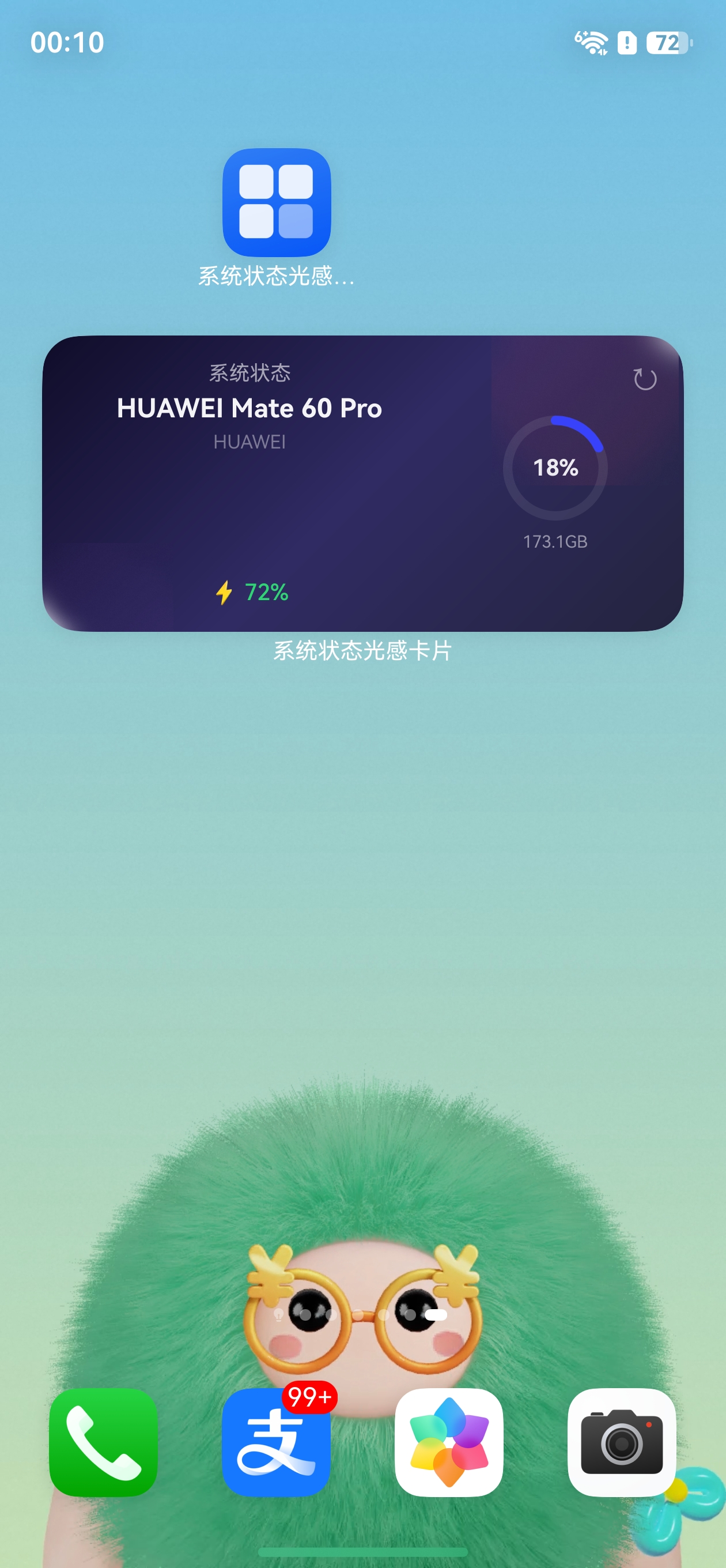
一、概述
postCardAction 是 HarmonyOS 应用卡片中用于触发交互事件的全局函数。由于卡片运行在桌面进程中(非应用进程),无法直接使用普通的导航和事件机制。postCardAction 提供了一套专门的事件通道,让卡片可以与宿主应用进行通信。
1.1 三种事件类型
| 事件类型 | 作用 | 触发方式 |
|---|---|---|
call |
调用 UIAbility 中注册的 callee 方法 | 卡片内触发,主进程 callee 响应 |
router |
跳转打开应用页面 | 点击后直接打开应用 |
message |
发送消息到 FormExtensionAbility | 卡片内触发,onFormEvent 响应 |
1.2 函数签名
postCardAction(
  component: Object,        // 当前组件实例(this)
  actionInfo: {
    action: 'call' | 'router' | 'message',
    abilityName?: string,   // call 事件必填:目标 UIAbility 名称
    params?: Record<string, string>  // 传递的参数
  }
)
二、call 事件:调用主进程方法
call 事件是卡片刷新数据最常用的方式。卡片通过 postCardAction 发送 call 事件,主应用的 UIAbility 通过 callee.on() 注册的回调来接收和处理。
2.1 流程图
卡片 UI (Widget)
    │
    │ postCardAction({ action: 'call', abilityName: 'EntryAbility', params: {...} })
    ▼
EntryAbility.callee.on('methodName', callback)
    │
    │ 获取最新数据,更新 Preferences
    ▼
formProvider.updateForm(formId, formData)
    │
    ▼
卡片 UI 自动刷新
2.2 卡片端代码
let localStorage = new LocalStorage();

@Entry(localStorage)
@Component
struct MyWidgetCard {
  @LocalStorageProp('formId') formId: string = '';
  @LocalStorageProp('batteryLevel') batteryLevel: number = 0;

  build() {
    Column({ space: 12 }) {
      Text(`当前电量:${this.batteryLevel}%`)
        .fontSize(20)
        .fontWeight(FontWeight.Bold)

      Image($r('app.media.refresh_icon'))
        .width(24)
        .height(24)
        .onClick(() => {
          // 发送 call 事件,触发主进程刷新数据
          postCardAction(this, {
            action: 'call',
            abilityName: 'EntryAbility',
            params: {
              formId: this.formId,
              method: 'refreshData'
            }
          });
        })
    }
    .width('100%')
    .height('100%')
    .padding(16)
  }
}
2.3 EntryAbility 端代码
import { UIAbility } from '@kit.AbilityKit';
import { rpc } from '@kit.IPCKit';
import { formBindingData, formProvider } from '@kit.FormKit';
import { JSON } from '@kit.ArkTS';

export default class EntryAbility extends UIAbility {
  // 定义 callee 回调处理函数
  refreshData = (data: rpc.MessageSequence) => {
    // 1. 解析卡片传来的参数
    let params: Record<string, string> = JSON.parse(data.readString()) as Record<string, string>;
    let formId = params.formId;

    if (formId) {
      // 2. 获取最新数据(例如电量信息)
      let batteryLevel = batteryInfo.batterySOC;

      // 3. 构造卡片更新数据
      let formData = {
        formId: formId,
        batteryLevel: batteryLevel
      };

      // 4. 更新卡片
      let formMsg = formBindingData.createFormBindingData(formData);
      formProvider.updateForm(formId, formMsg).then(() => {
        console.info('卡片刷新成功');
      }).catch((error: Error) => {
        console.error(`卡片刷新失败: ${JSON.stringify(error)}`);
      });
    }
    return null;
  };

  onCreate(): void {
    // 注册 callee 回调
    try {
      this.callee.on('refreshData', this.refreshData);
    } catch (err) {
      console.error(`注册 callee 失败: ${JSON.stringify(err)}`);
    }
  }

  onDestroy(): void {
    // 取消 callee 注册
    try {
      this.callee.off('refreshData');
    } catch (err) {
      console.error(`取消 callee 失败: ${JSON.stringify(err)}`);
    }
  }
}
2.4 关键要点
| 要点 | 说明 |
|---|---|
abilityName |
必须与 module.json5 中定义的 UIAbility 名称一致 |
| 参数格式 | params 是 Record<string, string> 类型 |
| callee 注册 | 在 onCreate 中注册,onDestroy 中取消 |
| 数据处理 | 通过 rpc.MessageSequence 读取参数 |
三、router 事件:跳转打开应用
router 事件用于点击卡片后打开应用页面,是最简单的卡片交互方式。
3.1 卡片端代码
@Entry(localStorage)
@Component
struct MyWidgetCard {
  @LocalStorageProp('formId') formId: string = '';
  @LocalStorageProp('title') title: string = '';

  build() {
    Column() {
      Text(this.title)
        .fontSize(16)
        .fontWeight(FontWeight.Bold)

      Text('点击查看详情')
        .fontSize(12)
        .fontColor('#4FC3F7')
        .margin({ top: 8 })
        .onClick(() => {
          postCardAction(this, {
            action: 'router',
            abilityName: 'EntryAbility',
            params: {
              formId: this.formId,
              page: 'DetailPage'
            }
          });
        })
    }
    .width('100%')
    .height('100%')
    .padding(16)
  }
}
3.2 EntryAbility 处理跳转
在 onWindowStageCreate 中根据 Want 参数跳转到不同页面:
onWindowStageCreate(windowStage: window.WindowStage): void {
  // 检查是否从卡片 router 跳转而来
  let page = this.context.want?.parameters?.page as string;
  let targetPage = page ?? 'pages/Index';

  windowStage.loadContent(targetPage, (err) => {
    if (err.code) {
      console.error(`加载页面失败: ${JSON.stringify(err)}`);
      return;
    }
  });
}
3.3 router 事件特点
- 不需要注册 callee
- 会唤醒应用并将应用带到前台
- 适合"查看详情"等跳转场景
四、message 事件:发送消息到 FormExtensionAbility
message 事件将消息发送到 FormExtensionAbility 的 onFormEvent 回调中。
4.1 卡片端代码
Text('发送消息')
  .onClick(() => {
    postCardAction(this, {
      action: 'message',
      params: {
        key: 'refresh',
        formId: this.formId
      }
    });
  })
4.2 FormExtensionAbility 端接收
onFormEvent(formId: string, message: string): void {
  console.info(`收到卡片消息: formId=${formId}, message=${message}`);

  // 解析消息
  let msgObj = JSON.parse(message) as Record<string, string>;
  if (msgObj.key === 'refresh') {
    // 执行数据刷新逻辑
    let formData = { formId: formId, updated: true };
    let formMsg = formBindingData.createFormBindingData(formData);
    formProvider.updateForm(formId, formMsg);
  }
}
五、三种事件类型对比
| 维度 | call | router | message |
|---|---|---|---|
| 接收端 | UIAbility (callee) | UIAbility (Want) | FormExtensionAbility |
| 是否唤醒应用 | 唤醒后台应用 | 打开应用到前台 | 不唤醒应用 |
| 适用场景 | 刷新卡片数据 | 跳转页面 | 简单消息通知 |
| 参数传递 | rpc.MessageSequence | Want parameters | JSON 字符串 |
| 复杂度 | 中等 | 低 | 低 |
六、完整实战示例:刷新按钮触发数据更新
6.1 卡片组件
let localStorage = new LocalStorage();

@Entry(localStorage)
@Component
struct RefreshableWidgetCard {
  @LocalStorageProp('formId') formId: string = '';
  @LocalStorageProp('batteryLevel') batteryLevel: number = 0;
  @LocalStorageProp('storageUsed') storageUsed: string = '';
  @LocalStorageProp('isRefreshing') isRefreshing: boolean = false;

  build() {
    Column({ space: 12 }) {
      Row() {
        Text('设备信息')
          .fontSize(14)
          .fontWeight(FontWeight.Bold)

        Blank()

        Image($r('app.media.refresh_icon'))
          .width(20)
          .height(20)
          .onClick(() => {
            postCardAction(this, {
              action: 'call',
              abilityName: 'EntryAbility',
              params: {
                formId: this.formId,
                method: 'refreshAll'
              }
            });
          })
      }
      .width('100%')

      Text(`电量:${this.batteryLevel}%`)
        .fontSize(12)

      Text(`存储:${this.storageUsed}`)
        .fontSize(12)
    }
    .width('100%')
    .height('100%')
    .padding(16)
    .backgroundColor(Color.White)
    .borderRadius(12)
  }
}
6.2 EntryAbility 处理
refreshAll = (data: rpc.MessageSequence) => {
  let params = JSON.parse(data.readString()) as Record<string, string>;
  let formId = params.formId;

  if (formId) {
    let formData = {
      formId: formId,
      batteryLevel: batteryInfo.batterySOC,
      storageUsed: `${usedGB.toFixed(1)} / ${totalGB.toFixed(1)} GB`
    };

    let formMsg = formBindingData.createFormBindingData(formData);
    formProvider.updateForm(formId, formMsg);
  }
  return null;
};
七、常见问题与注意事项
7.1 postCardAction 不生效?
- 确认
abilityName与module.json5中的名称完全一致 - 确认 callee 已在
onCreate中注册 - 确认卡片是通过
@Entry(localStorage)声明的
7.2 call 事件中参数类型?
params 是 Record<string, string> 类型,所有值都是字符串。如果需要传递数字,需要在接收端进行类型转换。
7.3 callee 回调中如何返回数据?
callee 回调的返回值通过 rpc.MessageSequence 返回给卡片端,但在实际使用中,卡片数据更新通常通过 formProvider.updateForm 直接推送。
八、总结
| 知识点 | 内容 |
|---|---|
| 函数 | postCardAction(this, actionInfo) |
| call 事件 | 调用 UIAbility 中 callee 注册的方法 |
| router 事件 | 跳转打开应用页面 |
| message 事件 | 发送消息到 FormExtensionAbility |
| callee 注册 | this.callee.on('name', callback) |
| callee 取消 | this.callee.off('name') |
| 参数解析 | rpc.MessageSequence.readString() |
postCardAction 是 HarmonyOS 卡片交互的核心机制,掌握 call 事件可以实现卡片的实时数据刷新,是开发动态应用卡片的必备技能。

讨论HarmonyOS开发技术,专注于API与组件、DevEco Studio、测试、元服务和应用上架分发等。
更多推荐

 6
6 0
0- 0



 已为社区贡献42条内容

所有评论(0)