HarmonyOS7 ArkUI 酒店预订系统 - 客房浏览、筛选与预订流程实战:把案例真正写懂
文章目录
前言
酒店预订这种页面,最容易把人带偏的地方,是它看起来像个卡片列表,实际上却是个流程页。用户不是只看看房型就结束了,他会筛房、比价、选日期、确认人数、再一路走到下单,所以代码里一定会同时出现“列表展示”和“流程推进”两套逻辑。
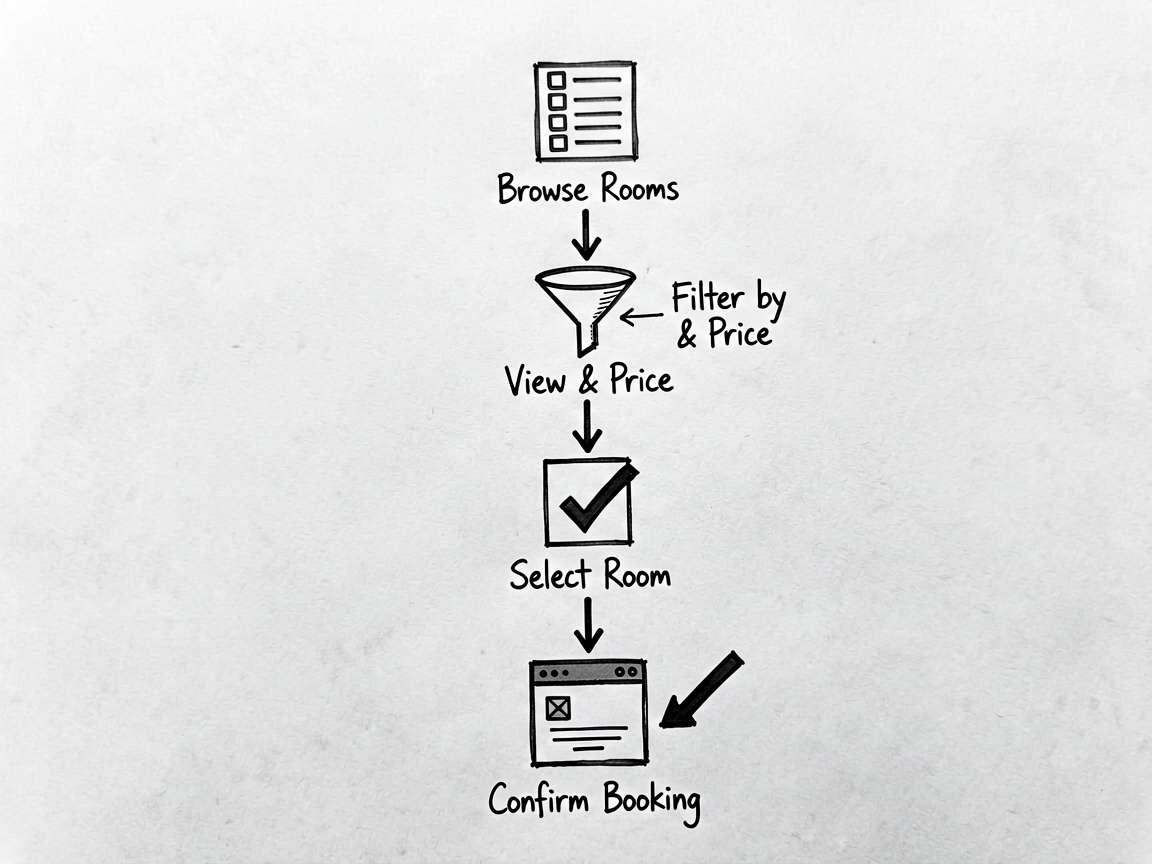
这个案例我觉得特别适合拿来练“页面怎么长成业务页面”。因为你能明显看见:房型卡片只是表层,真正把页面撑起来的是筛选条件、预订信息和底部弹出的预订面板。
先别急着看样式,先看业务线
HotelBookingPage 不是那种靠视觉效果取胜的案例,它更像一个缩小版订房流程。页面至少有三条线在并行:
- 客房列表负责把不同房型展示出来。
- 筛选条件负责缩小选择范围。
- 预订面板负责把“浏览”切到“下单”。
这三条线如果写散了,后面就会很难维护。所以我自己读这份代码时,不会先盯 RoomCard() 里的圆角、渐变和间距,而是先看房型数据怎么筛、当前选中的房间怎么取、预订面板什么时候出现。
| 观察点 | 在这个案例里的落点 |
|---|---|
| 页面主题 | 酒店预订系统 |
| 业务主线 | 浏览房型 → 按景观和价格筛选 → 选择房间 → 确认预订 |
| 常用组件 | Button, Column, Divider, ForEach, Row, Scroll, Stack, Text |
| 真正值得学的地方 | 派生数据、流程状态推进、卡片列表和弹层配合 |
这个案例更适合怎么上手
如果你是第一次跑这个页面,我建议别一上来就改 UI。先做一遍真实操作:切换景观条件、观察列表数量变化、点“立即预订”、再把底部面板一步一步点完。这样你很快就能看明白,页面不是靠单个组件在工作,而是靠一组状态一起配合。
等你跑完一遍,再回来看代码,会发现这几个点最关键:房型数据源有没有统一入口,筛选逻辑是不是集中写在 getter 里,预订过程有没有被 bookStep 明确切开。只要这三件事稳住,页面后面就算继续加早餐选择、优惠券、入住偏好,也不会太乱。
如果想把它改成自己的版本,我更建议按这个顺序下手:先替换房型模拟数据,再扩展筛选条件,最后再考虑拆子组件。因为这个案例真正难的不是“拆”,而是拆之前先把状态边界搞清楚。
这几个状态,决定了页面会不会越写越乱
这个页面最像真实项目的地方,是它没有把所有内容硬塞在一个列表里,而是显式区分了“可选房型”“当前预订信息”“筛选条件”和“流程步骤”。这种区分很重要,不然后面一加逻辑就容易串掉。
| 状态字段 | 类型 | 我更关心它解决什么问题 |
|---|---|---|
rooms |
RoomType[] |
提供完整房型数据源,列表渲染和查找当前房型都从这里出发 |
booking |
BookingInfo |
承接入住日期、晚数、人数和当前选中房间,属于预订流程的核心数据 |
selectedView |
string |
控制当前景观筛选条件,直接影响房型列表结果 |
maxPrice |
number |
负责价格过滤,说明这个页面已经不只是展示,还带有决策辅助 |
showBookPanel |
boolean |
决定用户是否正式进入预订面板,是浏览态和提交流程的分界线 |
bookStep |
number |
把预订面板拆成多个阶段,避免把确认和支付逻辑全挤在一起 |
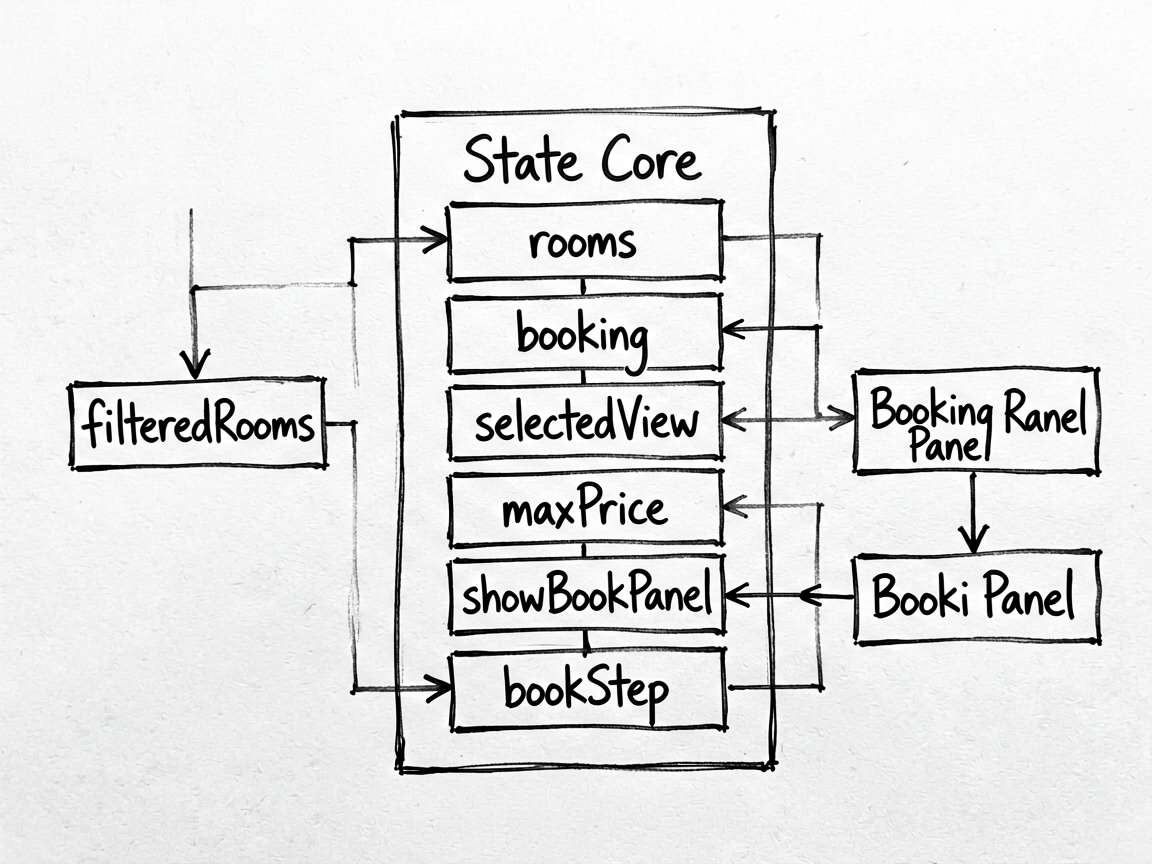
这里我会特别注意 booking 这个对象。很多人写这种页面时,喜欢把入住日期、人数、房间 id 分散成多个状态,看起来灵活,后面其实更难管。像这里这样把同一条业务线上的数据收进一个对象,维护起来会舒服很多。
两段代码,基本把核心思路说透了
片段 1:get filteredRooms(): RoomType[] {
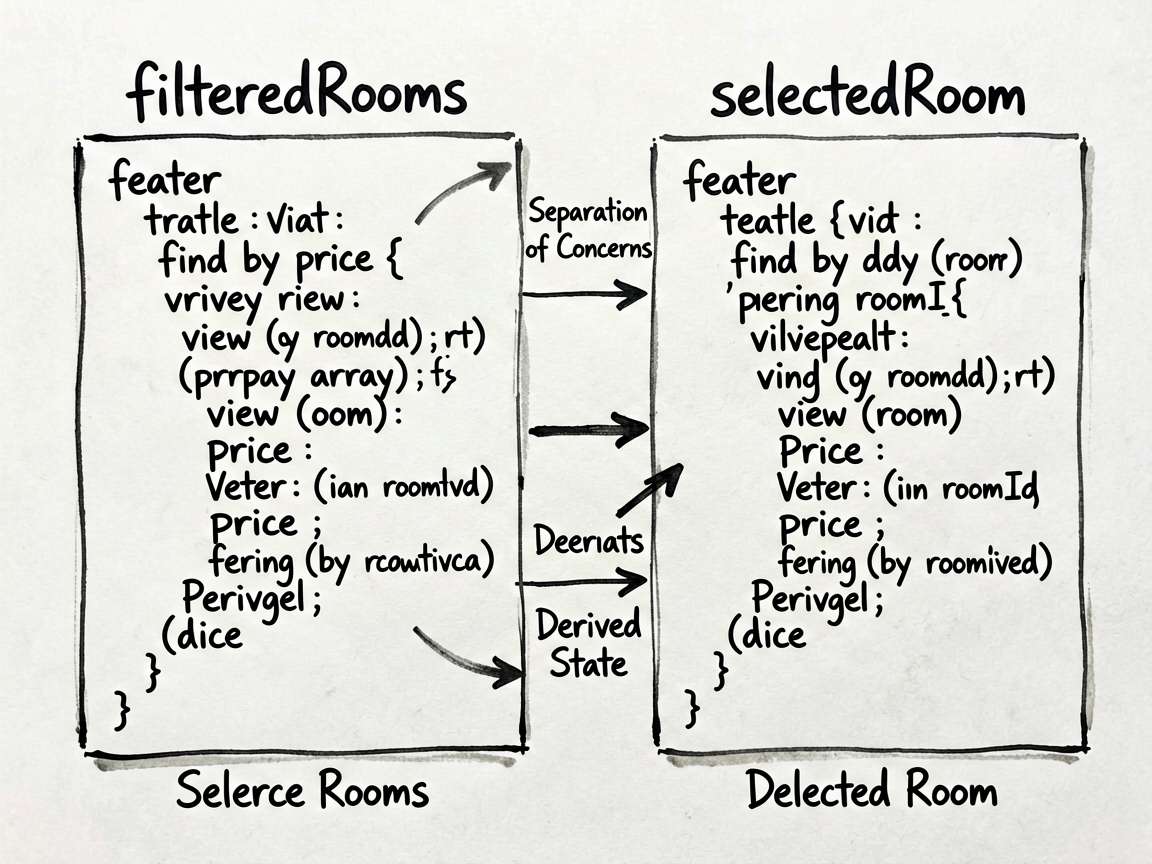
这段 getter 很像业务列表页里的“结果出口”。景观和价格两层条件都在这里汇合,最后产出一份可以直接给 ForEach 使用的房型数组。这样的好处是,布局层完全不用关心筛选规则,展示和判断被自然分开了。
  get filteredRooms(): RoomType[] {
    return this.rooms.filter((r: RoomType) => {
      const matchView = this.selectedView === '全部' || r.view === this.selectedView
      const matchPrice = r.price <= this.maxPrice
      return matchView && matchPrice
    })
  }
这个写法还有个很现实的优点:后面如果你要继续加“可取消”“含早餐”“会员专享”这些标签条件,也还是往这个 getter 里扩,不用回头翻房型卡片布局。
片段 2:get selectedRoom(): RoomType | undefined {
这一段虽然短,但特别像“把当前上下文找出来”的经典写法。页面只保存了 roomId,真正要显示预订面板时,再去完整房型数据里把对象找出来。这样做能避免重复保存一份几乎相同的数据,也能减少状态不一致的问题。
  get selectedRoom(): RoomType | undefined {
    return this.rooms.find((r: RoomType) => r.id === this.booking.roomId)
  }
我自己挺喜欢这种思路:能存 id 就别重复存整对象,能做派生就别把派生结果也当主状态。页面复杂起来之后,这种习惯真的很救命。
读到这里,可以顺手检查什么
这个案例真正难的不是房卡怎么排,而是浏览态和预订态之间有没有清晰边界。
如果列表、筛选和预订流程各有各的状态入口,页面就容易扩展。
如果筛选逻辑、当前选中房型和步骤推进混在布局里,后面一改需求就会很痛苦。
- 房型筛选是不是只在一个出口统一处理
- 当前选中房间是否通过
roomId做派生,而不是重复保存整份数据 - 预订面板的显示和步骤推进有没有明确分工
- 房型卡片里的视觉信息,是否掩盖了真正的业务状态
- 后续如果加优惠券、早餐或发票,现有状态结构能不能接得住
完整代码
// HotelBookingPage - 酒店预订系统 - 客房浏览、筛选与预订流程

interface RoomType {
  id: number
  name: string
  size: number
  bed: string
  floor: string
  view: string
  price: number
  originalPrice: number
  available: number
  amenities: string[]
  color: string
  rating: number
  reviews: number
  isSelected: boolean
}

interface BookingInfo {
  checkIn: string
  checkOut: string
  nights: number
  guests: number
  roomId: number
}

@Entry
@Component
struct HotelBookingPage {
  @State rooms: RoomType[] = [
    { id: 1, name: '豪华大床房', size: 36, bed: '1.8m大床', floor: '高层', view: '城景', price: 588, originalPrice: 880, available: 3, amenities: ['WiFi', '浴缸', '迷你吧', '独立淋浴'], color: '#667eea', rating: 4.8, reviews: 1234, isSelected: false },
    { id: 2, name: '行政套房', size: 65, bed: '1.8m大床', floor: '行政楼层', view: '海景', price: 1288, originalPrice: 1888, available: 1, amenities: ['WiFi', '浴缸', '行政酒廊', '早餐'], color: '#f64f59', rating: 4.9, reviews: 876, isSelected: false },
    { id: 3, name: '标准双床房', size: 28, bed: '两张1.2m床', floor: '中层', view: '花园景', price: 388, originalPrice: 550, available: 8, amenities: ['WiFi', '淋浴', '工作台'], color: '#00b894', rating: 4.5, reviews: 2345, isSelected: false },
    { id: 4, name: '商务单人房', size: 22, bed: '1.5m单床', floor: '低层', view: '内景', price: 288, originalPrice: 420, available: 5, amenities: ['WiFi', '淋浴', '保险箱'], color: '#fdcb6e', rating: 4.3, reviews: 567, isSelected: false },
    { id: 5, name: '家庭亲子套房', size: 80, bed: '大床+子母床', floor: '中层', view: '花园景', price: 1488, originalPrice: 2200, available: 2, amenities: ['WiFi', '浴缸', '儿童设施', '早餐'], color: '#a29bfe', rating: 4.7, reviews: 432, isSelected: false },
  ]
  @State booking: BookingInfo = {
    checkIn: '2026-06-10',
    checkOut: '2026-06-12',
    nights: 2,
    guests: 2,
    roomId: -1,
  }
  @State selectedView: string = '全部'
  @State maxPrice: number = 2000
  @State showBookPanel: boolean = false
  @State bookStep: number = 0

  private viewOptions: string[] = ['全部', '海景', '城景', '花园景', '内景']

  get filteredRooms(): RoomType[] {
    return this.rooms.filter((r: RoomType) => {
      const matchView = this.selectedView === '全部' || r.view === this.selectedView
      const matchPrice = r.price <= this.maxPrice
      return matchView && matchPrice
    })
  }

  get selectedRoom(): RoomType | undefined {
    return this.rooms.find((r: RoomType) => r.id === this.booking.roomId)
  }

  selectRoom(id: number) {
    this.booking.roomId = id
    this.showBookPanel = true
    this.bookStep = 0
  }

  @Builder
  RoomCard(room: RoomType) {
    Column({ space: 0 }) {
      // 封面
      Stack({ alignContent: Alignment.TopEnd }) {
        Column()
          .width('100%').height(180)
          .linearGradient({ angle: 135, colors: [[room.color, 0], ['#00000050', 1]] })

        Column({ space: 4 }) {
          Text(`${room.price}`)
            .fontSize(22).fontWeight(FontWeight.Bold).fontColor('#ffffff')
          Text('元/晚').fontSize(12).fontColor('#ffffffcc')
        }
        .padding(14)
        .alignItems(HorizontalAlign.End)

        if (room.available <= 2) {
          Text(`仅剩${room.available}间`)
            .fontSize(11).fontColor('#ffffff')
            .backgroundColor('#ff4d4f')
            .padding({ left: 8, right: 8, top: 4, bottom: 4 })
            .borderRadius(4)
            .position({ x: 0, y: 0 })
            .margin(10)
        }
      }
      .width('100%')

      // 房间信息
      Column({ space: 10 }) {
        Row({ space: 8 }) {
          Text(room.name)
            .fontSize(16).fontWeight(FontWeight.Bold).fontColor('#1a1a1a').layoutWeight(1)
          Row({ space: 2 }) {
            Text('⭐').fontSize(13)
            Text(`${room.rating}`).fontSize(13).fontColor('#fa8c16').fontWeight(FontWeight.Bold)
            Text(`(${room.reviews})`).fontSize(11).fontColor('#aaaaaa')
          }
        }
        .width('100%')

        Row({ space: 12 }) {
          Text(`📏 ${room.size}㎡`).fontSize(12).fontColor('#666666')
          Text(`🛏 ${room.bed}`).fontSize(12).fontColor('#666666')
          Text(`🏙 ${room.view}`).fontSize(12).fontColor('#666666')
          Text(`🏢 ${room.floor}`).fontSize(12).fontColor('#666666')
        }
        .width('100%')

        // 设施标签
        Row({ space: 6 }) {
          ForEach(room.amenities.slice(0, 4), (a: string) => {
            Text(a)
              .fontSize(11).fontColor('#555555')
              .backgroundColor('#f0f0f0')
              .padding({ left: 8, right: 8, top: 3, bottom: 3 })
              .borderRadius(10)
          })
        }
        .width('100%')

        Row() {
          Column({ space: 2 }) {
            Row({ space: 4 }) {
              Text(`¥${room.price}`)
                .fontSize(18).fontWeight(FontWeight.Bold).fontColor('#ff4d4f')
              Text('/晚').fontSize(12).fontColor('#aaaaaa')
            }
            Text(`原价 ¥${room.originalPrice}`)
              .fontSize(11).fontColor('#cccccc')
              .decoration({ type: TextDecorationType.LineThrough })
          }
          .layoutWeight(1)
          .alignItems(HorizontalAlign.Start)

          Button('立即预订')
            .height(40).fontSize(14)
            .backgroundColor('#ff4d4f')
            .padding({ left: 20, right: 20 })
            .onClick(() => this.selectRoom(room.id))
        }
        .width('100%')
      }
      .padding(14)
    }
    .backgroundColor('#ffffff')
    .borderRadius(12)
    .clip(true)
  }

  @Builder
  BookPanel() {
    if (this.selectedRoom) {
      Column({ space: 16 }) {
        // 步骤指示器
        Row({ space: 0 }) {
          ForEach(['选房间', '确认信息', '支付'], (step: string, idx: number) => {
            Row({ space: 0 }) {
              Column({ space: 4 }) {
                Circle()
                  .width(24).height(24)
                  .fill(this.bookStep >= idx ? '#ff4d4f' : '#e0e0e0')
                Text(step).fontSize(11).fontColor(this.bookStep >= idx ? '#ff4d4f' : '#aaaaaa')
              }
              .alignItems(HorizontalAlign.Center)
              if (idx < 2) {
                Column()
                  .height(2)
                  .layoutWeight(1)
                  .backgroundColor(this.bookStep > idx ? '#ff4d4f' : '#e0e0e0')
                  .margin({ bottom: 16 })
              }
            }
            .layoutWeight(1)
          })
        }
        .width('100%')

        if (this.bookStep === 0) {
          // 预订信息确认
          Column({ space: 10 }) {
            Row() {
              Column()
                .width(70).height(70).borderRadius(8)
                .linearGradient({ angle: 135, colors: [[this.selectedRoom!.color, 0], ['#00000030', 1]] })
              Column({ space: 4 }) {
                Text(this.selectedRoom!.name).fontSize(16).fontWeight(FontWeight.Bold).fontColor('#1a1a1a')
                Text(`${this.selectedRoom!.view} · ${this.selectedRoom!.floor}`).fontSize(13).fontColor('#888888')
                Text(`¥${this.selectedRoom!.price}/晚`).fontSize(15).fontColor('#ff4d4f').fontWeight(FontWeight.Bold)
              }
              .layoutWeight(1).alignItems(HorizontalAlign.Start).padding({ left: 12 })
            }
            .width('100%')

            Divider().strokeWidth(0.5).color('#f0f0f0')

            Row() {
              Column({ space: 2 }) {
                Text('入住').fontSize(12).fontColor('#888888')
                Text(this.booking.checkIn).fontSize(15).fontWeight(FontWeight.Bold).fontColor('#1a1a1a')
              }
              .layoutWeight(1).alignItems(HorizontalAlign.Start)

              Column() {
                Text(`${this.booking.nights}晚`).fontSize(14).fontColor('#888888')
              }
              .alignItems(HorizontalAlign.Center)

              Column({ space: 2 }) {
                Text('离店').fontSize(12).fontColor('#888888')
                Text(this.booking.checkOut).fontSize(15).fontWeight(FontWeight.Bold).fontColor('#1a1a1a')
              }
              .layoutWeight(1).alignItems(HorizontalAlign.End)
            }
            .width('100%')

            Row() {
              Text('合计:')
                .fontSize(14).fontColor('#666666')
              Text(`¥${this.selectedRoom!.price * this.booking.nights}`)
                .fontSize(22).fontWeight(FontWeight.Bold).fontColor('#ff4d4f')
            }
            .width('100%').justifyContent(FlexAlign.End)
          }

          Button('下一步:确认信息')
            .width('100%').height(48).fontSize(15).backgroundColor('#ff4d4f')
            .onClick(() => { this.bookStep = 1 })
        } else if (this.bookStep === 1) {
          Button('下一步:前往支付')
            .width('100%').height(48).fontSize(15).backgroundColor('#ff4d4f')
            .onClick(() => { this.bookStep = 2 })
        } else {
          Column({ space: 12 }) {
            Text('✅ 预订成功!').fontSize(22).fontWeight(FontWeight.Bold).fontColor('#52c41a')
            Text(`预订号:BK${Date.now().toString().slice(-8)}`).fontSize(14).fontColor('#666666')
          }
          .alignItems(HorizontalAlign.Center)
          .width('100%')

          Button('完成')
            .width('100%').height(48).fontSize(15).backgroundColor('#52c41a')
            .onClick(() => { this.showBookPanel = false; this.bookStep = 0 })
        }
      }
      .padding(20)
      .backgroundColor('#ffffff')
      .borderRadius({ topLeft: 20, topRight: 20 })
      .shadow({ radius: 20, color: '#00000020', offsetX: 0, offsetY: -4 })
    }
  }

  build() {
    Stack({ alignContent: Alignment.Bottom }) {
      Column({ space: 0 }) {
        // 酒店信息头
        Column() {
          Row() {
            Column({ space: 2 }) {
              Text('海滨大酒店').fontSize(20).fontWeight(FontWeight.Bold).fontColor('#1a1a1a')
              Row({ space: 6 }) {
                Text('⭐⭐⭐⭐⭐').fontSize(12)
                Text('4.7 · 5,678条评价').fontSize(13).fontColor('#888888')
              }
            }
            .layoutWeight(1).alignItems(HorizontalAlign.Start)
            Text('📍 深圳市南山区').fontSize(12).fontColor('#1890ff')
          }
          .width('100%').padding({ left: 16, right: 16, top: 14, bottom: 10 })

          // 日期/人数
          Row({ space: 12 }) {
            Column({ space: 2 }) {
              Text('入住').fontSize(11).fontColor('#aaaaaa')
              Text(this.booking.checkIn).fontSize(14).fontWeight(FontWeight.Bold).fontColor('#1a1a1a')
            }
            .layoutWeight(1).padding(10).backgroundColor('#f8f8f8').borderRadius(8).alignItems(HorizontalAlign.Center)

            Text(`${this.booking.nights}晚`).fontSize(14).fontColor('#ff4d4f').fontWeight(FontWeight.Bold)

            Column({ space: 2 }) {
              Text('离店').fontSize(11).fontColor('#aaaaaa')
              Text(this.booking.checkOut).fontSize(14).fontWeight(FontWeight.Bold).fontColor('#1a1a1a')
            }
            .layoutWeight(1).padding(10).backgroundColor('#f8f8f8').borderRadius(8).alignItems(HorizontalAlign.Center)

            Column({ space: 2 }) {
              Text('人数').fontSize(11).fontColor('#aaaaaa')
              Text(`${this.booking.guests}人`).fontSize(14).fontWeight(FontWeight.Bold).fontColor('#1a1a1a')
            }
            .width(60).padding(10).backgroundColor('#f8f8f8').borderRadius(8).alignItems(HorizontalAlign.Center)
          }
          .padding({ left: 16, right: 16, bottom: 12 })
        }
        .backgroundColor('#ffffff')

        // 筛选
        Column({ space: 8 }) {
          Scroll() {
            Row({ space: 10 }) {
              ForEach(this.viewOptions, (v: string) => {
                Text(v)
                  .fontSize(13)
                  .fontColor(this.selectedView === v ? '#ffffff' : '#666666')
                  .backgroundColor(this.selectedView === v ? '#ff4d4f' : '#f0f0f0')
                  .padding({ left: 14, right: 14, top: 6, bottom: 6 })
                  .borderRadius(16)
                  .onClick(() => { this.selectedView = v })
              })
            }
            .padding({ left: 16, right: 16, bottom: 12, top: 12 })
          }
          .scrollable(ScrollDirection.Horizontal)
          .scrollBar(BarState.Off)
        }
        .backgroundColor('#ffffff')
        .border({ width: { bottom: 0.5 }, color: '#f0f0f0' })

        // 客房列表
        Scroll() {
          Column({ space: 12 }) {
            Text(`${this.filteredRooms.length} 种房型可选`)
              .fontSize(13).fontColor('#888888').width('100%')
            ForEach(this.filteredRooms, (room: RoomType) => {
              this.RoomCard(room)
            })
            Column().height(80)
          }
          .padding({ left: 16, right: 16, top: 12 })
        }
        .layoutWeight(1)
        .backgroundColor('#f5f7fa')
      }
      .width('100%')
      .height('100%')

      // 预订面板
      if (this.showBookPanel) {
        Column({ space: 0 }) {
          Row() {
            Blank()
            Text('✕').fontSize(20).fontColor('#999999')
              .padding(16)
              .onClick(() => { this.showBookPanel = false })
          }
          .width('100%')
          this.BookPanel()
        }
        .width('100%')
        .backgroundColor('#00000050')
      }
    }
    .width('100%')
    .height('100%')
  }
}
继续扩展
这类案例最值得学的,其实不是某一个控件怎么写,而是页面组织方式。把状态放对、把交互函数收好、把布局压简单,后面你接正式项目时会轻松很多。

讨论HarmonyOS开发技术,专注于API与组件、DevEco Studio、测试、元服务和应用上架分发等。
更多推荐
 19
19 0
0- 0


 已为社区贡献49条内容

所有评论(0)