鸿蒙新特性实战:hiAppEvent 打造事件打点实验室
前言
“这个按钮的点击率是多少?”“用户从注册到付费的转化漏斗在哪一步断了?”“线上 crash 率有没有上升趋势?”——这些问题背后都需要一套可靠的事件打点(埋点)系统。
在传统开发流程中,埋点是产品和运营的需求,由开发手动添加代码实现。Android 上有 Firebase Analytics、友盟、神策等第三方 SDK,iOS 上有 App Analytics、Mixpanel 等。而 HarmonyOS NEXT 直接在内核层面提供了 @ohos.hiviewdfx.hiAppEvent——一套无需引入任何第三方依赖的应用事件打点框架,支持故障(FAULT)、统计(STATISTIC)、安全(SECURITY)、行为(BEHAVIOR)四种事件类型,配合 hiappevent 命令行工具可以实现事件的写入、订阅、导出和离线分析。
本文将 hiAppEvent 的核心能力封装成一个可交互的"事件打点实验室"页面,让你直观理解事件类型、domain/name/params 三要素、参数类型约束、以及事件生命周期管理。
全文含完整可运行代码,适合需要建立应用数据埋点体系的中级开发者。
一、hiAppEvent 概述与定位
1.1 什么是 hiAppEvent
@ohos.hiviewdfx.hiAppEvent 是 HarmonyOS 的应用事件日志框架,属于 @kit.PerformanceAnalysisKit。它的核心功能是:让开发者以结构化的方式记录应用运行期间发生的各类事件,供后续查询、统计和分析。
与 @ohos.hilog(面向开发调试的日志输出)不同,hiAppEvent 面向的是"可统计的事件":
| 维度 | hiAppEvent | hilog |
|---|---|---|
| 用途 | 埋点统计、故障监控、安全审计 | 开发调试、问题排查 |
| 结构化 | 强结构化(domain + name + type + params) | 弱结构化(domain + tag + format) |
| 消费方 | 数据分析平台、命令行导出 | DevEco Studio Log 面板 |
| 事件类型 | 四类(FAULT/STATISTIC/SECURITY/BEHAVIOR) | 五级(DEBUG~FATAL) |
| 持久化 | 写入磁盘,可导出 | 系统缓冲区,满则覆盖 |
简单来说:hilog 回答"代码在做什么",hiAppEvent 回答"用户在做什么"。
1.2 四类事件类型
enum EventType {
  FAULT = 1,     // 故障事件:崩溃、ANR、OOM
  STATISTIC = 2, // 统计事件:留存率、转化率、时长
  SECURITY = 3,  // 安全事件:越权访问、异常登录
  BEHAVIOR = 4   // 行为事件:点击、浏览、购买
}
这四种类型覆盖了应用监控的主要场景:
- FAULT(故障):应用崩溃、主线程卡顿、资源泄漏等。这类事件通常由系统自动采集(如
APP_CRASH、APP_FREEZE、SCROLL_JANK),但你也可以用write()主动上报自定义故障。 - STATISTIC(统计):用户留存、功能使用频率、业务指标等。典型场景如"每日活跃用户数"“付费成功率”。
- SECURITY(安全):异常登录、权限滥用、多次密码错误等安全敏感操作。
- BEHAVIOR(行为):页面浏览、按钮点击、搜索关键词等用户交互轨迹。
1.3 导入方式
import hiAppEvent from '@ohos.hiviewdfx.hiAppEvent';
这是 default import,来自 @kit.PerformanceAnalysisKit。注意路径是 @ohos.hiviewdfx.hiAppEvent(带 hiviewdfx 命名空间),不是简单的 @ohos.hiAppEvent。
二、核心 API 详解
2.1 write —— 写入事件
function write(info: AppEventInfo): Promise<void>;
function write(info: AppEventInfo, callback: AsyncCallback<void>): void;
write() 是最核心的 API——所有事件打点都通过它完成。它接受一个 AppEventInfo 对象,该对象包含四个必填字段:
| 字段 | 类型 | 约束 |
|---|---|---|
domain |
string |
最多 32 字符,字母/数字/下划线,字母开头,不能以下划线结尾 |
name |
string |
最多 48 字符,字母/数字/下划线/,字母或,字母或,字母或开头,数字或字母结尾 |
eventType |
EventType |
FAULT(1) / STATISTIC(2) / SECURITY(3) / BEHAVIOR(4) |
params |
Record<string, ParamType> |
最多 32 个键值对,key 最多 32 字符(字母/数字/_/$),value 为 string/number/boolean/Array |
params 的参数值类型 ParamType 定义为:
type ParamType = number | string | boolean | Array<string>;
注意数组元素只能是 string 类型,不能是 number 或 boolean 数组。另外每个 string 类型的参数值不能超过 8KB,number 类型的值必须在 Number.MIN_SAFE_INTEGER 到 Number.MAX_SAFE_INTEGER 之间。
2.2 domain 和 name 的命名约束
Domain 的规则(来自 SDK 声明文件):
- 长度 ≤ 32 字符
- 只能包含数字(0-9)、字母(a-z)、下划线(_)
- 必须以字母开头
- 不能以下划线结尾
例如:demo_app 合法,_demo 不合法,demo_ 不合法,123app 不合法。
Name 的规则:
- 长度 ≤ 48 字符
- 只能包含数字(0-9)、字母(a-z)、下划线(_)、美元符号($)
- 必须以字母或
$开头 - 必须以数字或字母结尾
例如:page_view 合法,user_login 合法,$custom_event 合法,page-view 不合法(不能有连字符)。
2.3 configure —— 配置日志行为
function configure(config: ConfigOption): void;
ConfigOption 接口允许你设置日志开关和存储配额。主要配置项包括是否启用打点、日志最大存储空间等。在 Demo 中不需要显式调用——hiAppEvent 默认启用,直接 write() 即可。
2.4 预设事件名称
hiAppEvent 预定义了多个系统事件名称常量(位于 hiAppEvent.event 命名空间):
event.USER_LOGIN— 用户登录event.USER_LOGOUT— 用户登出event.APP_CRASH— 应用崩溃(系统自动上报)event.APP_FREEZE— 应用无响应event.APP_LAUNCH— 应用启动耗时event.SCROLL_JANK— 滑动丢帧event.CPU_USAGE_HIGH— CPU 高负载event.BATTERY_USAGE— 电池使用统计
这些常量本质上就是字符串,如 event.USER_LOGIN = "user_login"。你可以在 write() 的 name 字段中使用这些常量,也可以直接写自定义字符串。
三、实战:事件打点实验室页面
3.1 整体设计
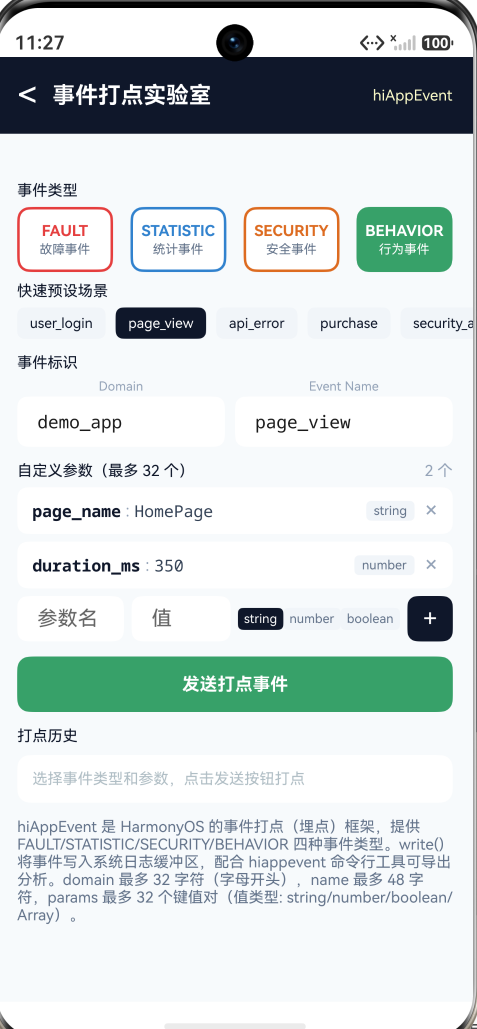
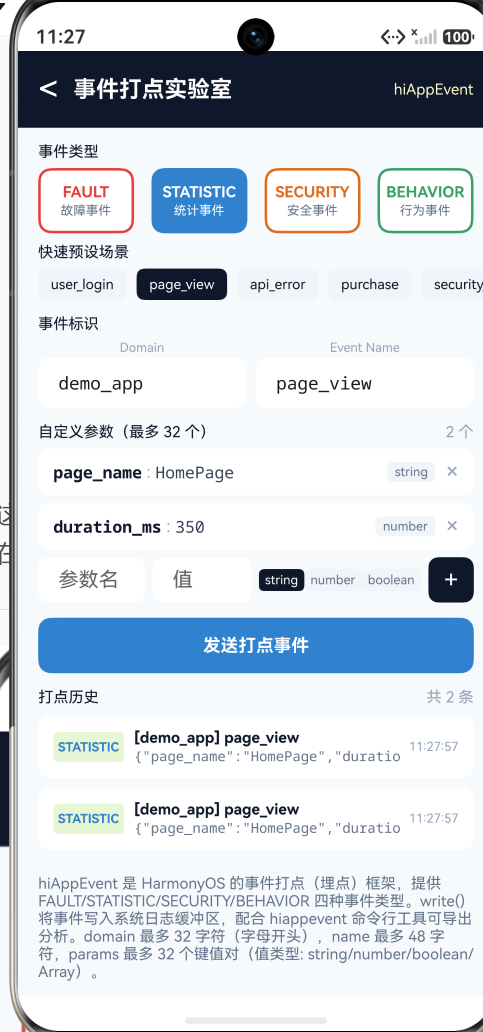
实验室页面的功能布局:
- 事件类型选择器:四个色块按钮(FAULT 红/STATISTIC 蓝/SECURITY 橙/BEHAVIOR 绿),选中高亮
- 预设场景快捷按钮:5 个预定义场景(user_login/page_view/api_error/purchase/security_alert),一键填充 domain/name/type/params
- 事件标识配置:Domain 和 Event Name 双输入框
- 自定义参数编辑器:支持添加/删除参数,每个参数包含 key、value、type(string/number/boolean)
- 发送按钮:调用
hiAppEvent.write()并将记录追加到本地历史 - 打点历史列表:最多 50 条,带颜色标签和时间戳
3.2 完整代码
import { router } from '@kit.ArkUI';
import hiAppEvent from '@ohos.hiviewdfx.hiAppEvent';
import { FontSize, Spacing } from '../common/Constants';

interface ParamItem {
  key: string;
  value: string;
  type: string;
}

interface EventRecord {
  time: string;
  domain: string;
  name: string;
  typeName: string;
  typeColor: string;
  params: string;
}

interface PresetConfig {
  domain: string;
  name: string;
  etype: number;
  params: ParamItem[];
}

@Entry
@Component
struct HiAppEventLabPage {
  @State domain: string = 'demo_app';
  @State eventName: string = 'page_view';
  @State selectedType: number = 3; // BEHAVIOR
  @State params: ParamItem[] = [
    { key: 'page_name', value: 'HomePage', type: 'string' },
    { key: 'duration_ms', value: '350', type: 'number' }
  ];
  @State records: EventRecord[] = [];
  @State newKey: string = '';
  @State newVal: string = '';
  @State newValType: string = 'string';

  private types: string[] = ['FAULT', 'STATISTIC', 'SECURITY', 'BEHAVIOR'];
  private typeValues: number[] = [1, 2, 3, 4];
  private typeColors: string[] = ['#E53E3E', '#3182CE', '#DD6B20', '#38A169'];
  private typeNames: string[] = ['故障事件', '统计事件', '安全事件', '行为事件'];

  // 预设参数数组(ArkTS 严格模式要求显式类型)
  private preset1Params: ParamItem[] = [
    { key: 'login_method', value: 'sms', type: 'string' } as ParamItem,
    { key: 'success', value: 'true', type: 'boolean' } as ParamItem
  ];
  private preset2Params: ParamItem[] = [
    { key: 'page_name', value: 'HomePage', type: 'string' } as ParamItem,
    { key: 'duration_ms', value: '350', type: 'number' } as ParamItem
  ];
  private preset3Params: ParamItem[] = [
    { key: 'api', value: '/v1/user/info', type: 'string' } as ParamItem,
    { key: 'code', value: '500', type: 'number' } as ParamItem
  ];
  private preset4Params: ParamItem[] = [
    { key: 'item', value: 'premium_plan', type: 'string' } as ParamItem,
    { key: 'amount', value: '99', type: 'number' } as ParamItem
  ];
  private preset5Params: ParamItem[] = [
    { key: 'reason', value: 'multiple_fail', type: 'string' } as ParamItem,
    { key: 'ip', value: '10.0.0.1', type: 'string' } as ParamItem
  ];

  private presets: PresetConfig[] = [
    { domain: 'demo_app', name: 'user_login', etype: 4,
      params: this.preset1Params } as PresetConfig,
    { domain: 'demo_app', name: 'page_view', etype: 4,
      params: this.preset2Params } as PresetConfig,
    { domain: 'demo_app', name: 'api_error', etype: 1,
      params: this.preset3Params } as PresetConfig,
    { domain: 'demo_app', name: 'purchase', etype: 2,
      params: this.preset4Params } as PresetConfig,
    { domain: 'demo_app', name: 'security_alert', etype: 3,
      params: this.preset5Params } as PresetConfig
  ];

  private paramTypeOptions: string[] = ['string', 'number', 'boolean'];

  private addParam(): void {
    if (this.newKey.trim() === '') {
      return;
    }
    const exists: boolean = this.params.some((p: ParamItem) =>
      p.key === this.newKey.trim());
    if (exists) {
      return;
    }
    const v: string = this.newVal.trim() === '' ? '' : this.newVal.trim();
    const param: ParamItem = { key: this.newKey.trim(), value: v,
      type: this.newValType };
    this.params = this.params.concat([param]);
    this.newKey = '';
    this.newVal = '';
  }

  private removeParam(index: number): void {
    this.params = this.params.filter((_: ParamItem, i: number) =>
      i !== index);
  }

  private applyPreset(index: number): void {
    const p: PresetConfig = this.presets[index];
    this.domain = p.domain;
    this.eventName = p.name;
    this.selectedType = p.etype - 1;
    this.params = p.params.map((item: ParamItem): ParamItem => {
      return { key: item.key, value: item.value,
        type: item.type } as ParamItem;
    });
  }

  private sendEvent(): void {
    const paramsObj: Record<string, string | number | boolean | string[]> = {};
    for (let i = 0; i < this.params.length; i++) {
      const p: ParamItem = this.params[i];
      if (p.type === 'number') {
        const n: number = parseFloat(p.value);
        if (!isNaN(n)) {
          paramsObj[p.key] = n;
        }
      } else if (p.type === 'boolean') {
        paramsObj[p.key] = p.value === 'true';
      } else {
        paramsObj[p.key] = p.value;
      }
    }

    try {
      hiAppEvent.write({
        domain: this.domain,
        name: this.eventName,
        eventType: this.typeValues[this.selectedType],
        params: paramsObj
      });
    } catch (e) {
      // 系统事件写入,忽略异常
    }

    const now: Date = new Date();
    const ts: string = now.getHours().toString().padStart(2, '0') + ':' +
      now.getMinutes().toString().padStart(2, '0') + ':' +
      now.getSeconds().toString().padStart(2, '0');
    const record: EventRecord = {
      time: ts,
      domain: this.domain,
      name: this.eventName,
      typeName: this.types[this.selectedType],
      typeColor: this.typeColors[this.selectedType],
      params: JSON.stringify(paramsObj)
    };
    this.records = [record].concat(this.records).slice(0, 50);
  }

  build() {
    Column() {
      Row() {
        Text('<')
          .fontSize(28).fontColor('#FFFFFF')
          .onClick(() => { router.back(); })
        Text('事件打点实验室')
          .fontSize(FontSize.TITLE).fontColor('#FFFFFF')
          .fontWeight(FontWeight.Bold).margin({ left: Spacing.MD })
        Blank()
        Text('hiAppEvent')
          .fontSize(FontSize.CAPTION).fontColor('#FFFFFFCC')
      }
      .width('100%')
      .padding({ left: Spacing.LG, right: Spacing.LG, top: 14, bottom: 14 })
      .backgroundColor('#0F172A')

      Scroll() {
        Column() {
          // 事件类型选择
          Text('事件类型')
            .fontSize(FontSize.CAPTION).fontColor('#0F172A')
            .width('100%').margin({ bottom: 6 })

          Row() {
            ForEach(this.types, (t: string, index: number) => {
              Column() {
                Text(t).fontSize(12).fontWeight(FontWeight.Bold)
                  .fontColor(this.selectedType === index ?
                    '#FFFFFF' : this.typeColors[index])
                  .margin({ bottom: 2 })
                Text(this.typeNames[index]).fontSize(10)
                  .fontColor(this.selectedType === index ?
                    '#FFFFFF' : '#64748B')
              }
              .width('22%').padding({ top: 10, bottom: 10 }).borderRadius(10)
              .backgroundColor(this.selectedType === index ?
                this.typeColors[index] : '#FFFFFF')
              .border({ width: 2, color: this.typeColors[index] })
              .margin({ right: index < 3 ? '4%' : 0 })
              .onClick(() => { this.selectedType = index; })
            })
          }
          .width('100%').margin({ bottom: Spacing.SM })

          // 预设场景
          Text('快速预设场景')
            .fontSize(FontSize.CAPTION).fontColor('#0F172A')
            .width('100%').margin({ bottom: 6 })

          Row() {
            ForEach(this.presets, (p: PresetConfig, index: number) => {
              Text(p.name).fontSize(11)
                .fontColor(this.domain === p.domain &&
                  this.eventName === p.name ? '#FFFFFF' : '#0F172A')
                .backgroundColor(this.domain === p.domain &&
                  this.eventName === p.name ? '#0F172A' : '#F1F5F9')
                .borderRadius(6)
                .padding({ left: 10, right: 10, top: 6, bottom: 6 })
                .margin({ right: 8 })
                .onClick(() => { this.applyPreset(index); })
            })
          }
          .width('100%').margin({ bottom: Spacing.MD })

          // Domain + Event Name 双输入框
          Text('事件标识')
            .fontSize(FontSize.CAPTION).fontColor('#0F172A')
            .width('100%').margin({ bottom: 6 })

          Row() {
            Column() {
              Text('Domain').fontSize(10).fontColor('#94A3B8')
                .margin({ bottom: 2 })
              TextInput({ text: this.domain })
                .fontSize(FontSize.BODY).fontFamily('monospace')
                .height(40).backgroundColor('#FFFFFF').borderRadius(8)
                .onChange((v: string) => { this.domain = v; })
            }
            .layoutWeight(1).margin({ right: Spacing.SM })

            Column() {
              Text('Event Name').fontSize(10).fontColor('#94A3B8')
                .margin({ bottom: 2 })
              TextInput({ text: this.eventName })
                .fontSize(FontSize.BODY).fontFamily('monospace')
                .height(40).backgroundColor('#FFFFFF').borderRadius(8)
                .onChange((v: string) => { this.eventName = v; })
            }
            .layoutWeight(1)
          }
          .width('100%').margin({ bottom: Spacing.MD })

          // 自定义参数
          Row() {
            Text('自定义参数(最多 32 个)')
              .fontSize(FontSize.CAPTION).fontColor('#0F172A')
            Blank()
            Text(this.params.length + ' 个')
              .fontSize(FontSize.CAPTION).fontColor('#94A3B8')
          }
          .width('100%').margin({ bottom: 6 })

          // 参数列表
          if (this.params.length > 0) {
            ForEach(this.params, (p: ParamItem, index: number) => {
              Row() {
                Text(p.key).fontSize(13).fontFamily('monospace')
                  .fontWeight(FontWeight.Bold).fontColor('#0F172A')
                Text(' : ').fontSize(13).fontColor('#94A3B8')
                Text(p.value).fontSize(13).fontFamily('monospace')
                  .fontColor('#334155').layoutWeight(1).maxLines(1)
                Text(p.type).fontSize(10).fontColor('#64748B')
                  .backgroundColor('#F1F5F9').borderRadius(4)
                  .padding({ left: 6, right: 6, top: 2, bottom: 2 })
                  .margin({ right: 8 })
                Text('×').fontSize(18).fontColor('#94A3B8')
                  .onClick(() => { this.removeParam(index); })
              }
              .width('100%')
              .padding({ left: Spacing.MD, right: Spacing.MD,
                top: 8, bottom: 8 })
              .backgroundColor('#FFFFFF').borderRadius(8)
              .margin({ bottom: 6 })
            })
          }

          // 添加参数行
          Row() {
            TextInput({ text: this.newKey, placeholder: '参数名' })
              .fontSize(12).fontFamily('monospace').height(36)
              .layoutWeight(2).backgroundColor('#FFFFFF').borderRadius(8)
              .onChange((v: string) => { this.newKey = v; })

            TextInput({ text: this.newVal, placeholder: '值' })
              .fontSize(12).fontFamily('monospace').height(36)
              .layoutWeight(2).backgroundColor('#FFFFFF').borderRadius(8)
              .margin({ left: 6 })
              .onChange((v: string) => { this.newVal = v; })

            Row() {
              ForEach(this.paramTypeOptions, (opt: string) => {
                Text(opt).fontSize(10)
                  .fontColor(this.newValType === opt ?
                    '#FFFFFF' : '#64748B')
                  .backgroundColor(this.newValType === opt ?
                    '#0F172A' : '#F1F5F9')
                  .borderRadius(4)
                  .padding({ left: 5, right: 5, top: 3, bottom: 3 })
                  .onClick(() => { this.newValType = opt; })
              })
            }
            .margin({ left: 6 })

            Text('+').fontSize(20).fontColor('#FFFFFF')
              .width(36).height(36).textAlign(TextAlign.Center)
              .backgroundColor('#0F172A').borderRadius(8)
              .margin({ left: 6 })
              .onClick(() => { this.addParam(); })
          }
          .width('100%').margin({ bottom: Spacing.MD })

          // 发送按钮
          Button('发送打点事件')
            .fontSize(FontSize.BODY).fontWeight(FontWeight.Bold)
            .fontColor('#FFFFFF').width('100%').height(44)
            .borderRadius(10)
            .backgroundColor(this.typeColors[this.selectedType])
            .onClick(() => { this.sendEvent(); })
            .margin({ bottom: Spacing.MD })

          // 打点历史
          Row() {
            Text('打点历史')
              .fontSize(FontSize.CAPTION).fontColor('#0F172A')
            Blank()
            if (this.records.length > 0) {
              Text('共 ' + this.records.length + ' 条')
                .fontSize(FontSize.CAPTION).fontColor('#94A3B8')
            }
          }
          .width('100%').margin({ bottom: 8 })

          if (this.records.length === 0) {
            Text('选择事件类型和参数,点击发送按钮打点')
              .fontSize(FontSize.CAPTION).fontColor('#B0BEC5')
              .width('100%').padding(Spacing.MD)
              .backgroundColor('#FFFFFF').borderRadius(10)
          } else {
            ForEach(this.records, (r: EventRecord) => {
              Row() {
                Column() {
                  Text(r.typeName).fontSize(10)
                    .fontColor(r.typeColor).fontWeight(FontWeight.Bold)
                }
                .width(56).height(24).borderRadius(4)
                .backgroundColor(r.typeColor + '20')
                .justifyContent(FlexAlign.Center)

                Column() {
                  Text('[' + r.domain + '] ' + r.name)
                    .fontSize(12).fontWeight(FontWeight.Bold)
                    .fontColor('#0F172A').maxLines(1)
                  Text(r.params).fontSize(11).fontFamily('monospace')
                    .fontColor('#64748B').maxLines(1)
                }
                .alignItems(HorizontalAlign.Start)
                .margin({ left: Spacing.SM }).layoutWeight(1)

                Text(r.time).fontSize(10).fontColor('#94A3B8')
              }
              .width('100%')
              .padding({ left: Spacing.MD, right: Spacing.MD,
                top: 10, bottom: 10 })
              .backgroundColor('#FFFFFF').borderRadius(8)
              .margin({ bottom: 8 })
            })
          }

          // 说明文字
          Text('hiAppEvent 是 HarmonyOS 的事件打点(埋点)框架...')
            .fontSize(FontSize.CAPTION).fontColor('#64748B')
            .width('100%')
            .margin({ top: Spacing.MD, bottom: Spacing.XXL })
        }
        .width('100%')
        .padding({ left: Spacing.LG, right: Spacing.LG,
          top: Spacing.MD, bottom: Spacing.MD })
      }
      .layoutWeight(1).scrollBar(BarState.Off).backgroundColor('#F8FAFC')
    }
    .width('100%').height('100%').backgroundColor('#F8FAFC')
  }
}
3.3 关键设计决策
参数类型的三态切换
自定义参数支持 string、number、boolean 三种类型。在 UI 层,所有值都以字符串形式存储在 ParamItem.value 中,发送时才根据 type 做类型转换:
if (p.type === 'number') {
  const n: number = parseFloat(p.value);
  if (!isNaN(n)) {
    paramsObj[p.key] = n;
  }
} else if (p.type === 'boolean') {
  paramsObj[p.key] = p.value === 'true';
} else {
  paramsObj[p.key] = p.value;
}
这样做的好处是 TextInput 组件天然处理字符串输入,我们可以用一个统一的输入框组件处理所有类型的值,避免为不同类型维护不同的输入控件。
ArkTS 严格模式下的对象字面量处理
在 ArkTS 严格模式下,presets 数组的每个元素和内部 params 数组的每个元素都必须是显式类型的对象字面量。因此代码中:
- 定义了
PresetConfig接口来声明预设对象的结构 - 每个
ParamItem[]都单独声明为类字段(preset1Params~preset5Params),而非内联在presets数组中 - 每个
ParamItem对象字面量都使用了as ParamItem类型断言
这是 ArkTS arkts-no-obj-literals-as-types 和 arkts-no-noninferrable-arr-literals 两条规则的直接后果——编译器要求所有对象字面量都必须能在创建时推断出类型。
类型安全的事件写入
sendEvent() 在调用 hiAppEvent.write() 前构建 paramsObj,类型声明为 Record<string, string | number | boolean | string[]>,与 SDK 的 ParamType 定义一致。这样做既满足编译器的类型检查,也避免运行时因参数类型不合法而被 hiAppEvent 静默丢弃。
四、实战要点与坑
4.1 domain 和 name 的命名规范不可忽略
如果你写了一个不合法的 domain(如 "123app" 或 "demo_"),write() 不会抛出异常——但事件也不会被正确记录。这种"静默失败"行为在调试时非常令人困惑。建议始终使用字母开头、不含特殊字符的 domain 字符串,如 user_center、payment_flow。
4.2 params 的总容量限制
虽然单个事件最多支持 32 个参数,但所有参数的总体积也有限制。每个 string 类型参数值不能超过 8KB(8 × 1024 字符),超过部分会被截断。number 类型的值需在安全整数范围内。数组类型的元素数不能超过 100,超过部分会被丢弃。
4.3 事件写入了但查不到
这是新手最常遇到的困惑:write() 调用成功(Promise resolved),但用 hiappevent 命令查询却看不到事件。可能的原因:
- domain 命名不合法(见 4.1)
- name 与系统事件冲突:不要使用 hiAppEvent 系统保留的 name(如
APP_CRASH、SCROLL_JANK)作为自定义事件的 name - Release 包的事件记录策略不同:在 Release 模式下,某些低级别事件可能不会被持久化
- 存储配额已满:如果应用产生大量事件,可能达到存储上限,新事件会覆盖旧事件
4.4 不要在 params 中放敏感数据
hiAppEvent 的事件数据可以被系统工具导出和分析。虽然鸿蒙提供了安全事件类型(SECURITY),但这不代表事件内容可以包含用户隐私信息。作为一般原则:
- 可以记录:“登录失败原因:密码错误”
- 不要记录:“用户输入的密码是:123456”
- 可以记录:“异常 IP 访问:10.0.0.1”
- 不要记录:“用户手机号 138xxxx + 验证码 123456”
4.5 write() 的异步特性
write() 返回 Promise<void>,是一个异步操作。事件被放入队列后,实际写入磁盘可能有一定延迟。如果你的应用在 write() 之后立即崩溃或被杀死,该事件可能丢失。对于关键的故障事件,建议同步记录到多种渠道(如同时 write + hilog.error)。
五、与第三方埋点方案的对比
| 维度 | hiAppEvent | 第三方 SDK(友盟/神策等) |
|---|---|---|
| 引入成本 | 零依赖,系统自带 | 需集成 SDK,有包体积开销 |
| 数据归属 | 数据在设备本地,可命令行导出 | 数据上报到第三方服务器 |
| 隐私合规 | 鸿蒙原生隐私标注支持(%{public}/%{private}) | 需自行处理隐私合规 |
| 离线分析 | 需配合 hiappevent 命令导出 | 自带可视化后台 |
| 实时性 | 本地实时,但不自动上传 | 实时上报到云端 |
| 跨平台 | 仅鸿蒙 | 通常支持 Android/iOS/Web |
hiAppEvent 的最大优势是"零成本"和"隐私合规"。你不需要注册第三方账号、不需要接入 SDK、不需要担心数据泄露给外部——事件数据始终在设备本地,由系统统一管理。缺点是没有自带的分析后台,需要自己用 hiappevent 工具导出数据后分析。
六、事件体系设计建议
6.1 Domain 分层
参考 hilog 的 domain 分配思路,hiAppEvent 的 domain 也可以按模块划分:
| Domain | 含义 | 示例事件名 |
|---|---|---|
user_center |
用户中心 | register, login, logout, profile_edit |
social |
社交功能 | like, comment, share, follow |
payment |
支付流程 | checkout, pay_success, pay_fail |
search |
搜索 | keyword, result_click, filter_use |
app_core |
应用基础 | cold_start, hot_start, memory_warning |
6.2 参数标准化
建议在工程中定义一个常量文件,统一管理常用事件名和参数名:
// EventNames.ts
export class EventNames {
  static readonly USER_LOGIN = 'user_login';
  static readonly PAGE_VIEW = 'page_view';
  static readonly BUTTON_CLICK = 'button_click';
  static readonly API_ERROR = 'api_error';
  static readonly PURCHASE = 'purchase';
}

// ParamKeys.ts
export class ParamKeys {
  static readonly PAGE_NAME = 'page_name';
  static readonly DURATION_MS = 'duration_ms';
  static readonly BUTTON_ID = 'button_id';
  static readonly SUCCESS = 'success';
  static readonly ERROR_CODE = 'error_code';
}
这样在整个应用中调用 write() 时,domain/name/key 都由常量提供,避免拼写错误和不一致。
6.3 重要事件的 write 包装
不要在每个业务代码中直接调用 hiAppEvent.write()。建议封装一个 EventTrack 工具类:
export class EventTrack {
  static trackPageView(pageName: string): void {
    hiAppEvent.write({
      domain: 'app_core',
      name: 'page_view',
      eventType: hiAppEvent.EventType.BEHAVIOR,
      params: { page_name: pageName, timestamp: Date.now() }
    });
  }

  static trackApiError(api: string, code: number): void {
    hiAppEvent.write({
      domain: 'network',
      name: 'api_error',
      eventType: hiAppEvent.EventType.FAULT,
      params: { api: api, code: code }
    });
  }
}
这个包装层提供了三个好处:
- 类型安全:每个方法只暴露必要的参数,减少调用方的犯错空间
- 一致性:所有同类事件使用相同的 domain 和 name
- 可测试:可以 mock EventTrack 来验证事件是否正确发送
七、小结
本文以"事件打点实验室"为 Demo,系统讲解了 HarmonyOS NEXT 的 @ohos.hiviewdfx.hiAppEvent:
- 四种事件类型:FAULT(故障)/ STATISTIC(统计)/ SECURITY(安全)/ BEHAVIOR(行为),覆盖应用的各类监控需求
- 三要素:domain(业务域,≤32字符)+ name(事件名,≤48字符)+ params(参数键值对,≤32个),严格命名约束
- write() API:接收 AppEventInfo 对象,异步写入系统日志缓冲区,支持 Promise 和 Callback 两种调用方式
- 参数类型约束:string/number/boolean/Array 四种值类型,number 需在安全整数范围内,string 不超过 8KB
- ArkTS 严格模式适配:接口声明 + 类型断言 + 显式字段声明,确保对象字面量通过编译检查
- 工程化建议:domain 分层、参数标准化、EventTrack 包装类
hiAppEvent 是鸿蒙为开发者准备的"开箱即用"的埋点基础设施。它不需要任何第三方依赖,不产生任何网络请求,不泄露任何用户数据——事件静静地写入系统日志,等你需要时再导出分析。对于重视隐私合规和包体积的应用来说,这是一个非常简洁优雅的选择。

讨论HarmonyOS开发技术,专注于API与组件、DevEco Studio、测试、元服务和应用上架分发等。
更多推荐


 1
1 0
0- 0


 已为社区贡献212条内容

所有评论(0)