鸿蒙应用开发实战【63】— 绑定状态状态机BindingStatus流转规则
·
鸿蒙应用开发实战【63】— 绑定状态状态机BindingStatus流转规则
本文是「号码助手全栈开发系列」第 63 篇,持续更新中…
开源社区:https://openharmonycrossplatform.csdn.net
前言
BindingStatus 是号码助手最核心的业务状态——它定义了一个应用绑定当前处于什么阶段。四种状态之间的流转规则驱动了首页统计、批量操作、StatusListPage 筛选、RebindPage 换绑等一系列功能。
本篇涵盖:四种状态定义与语义、
forStatus颜色映射体系、状态机流转规则(触发条件 / 目标状态)、StatusBadge 组件实现、countByStatus 聚合统计、状态变更的边界情况处理。
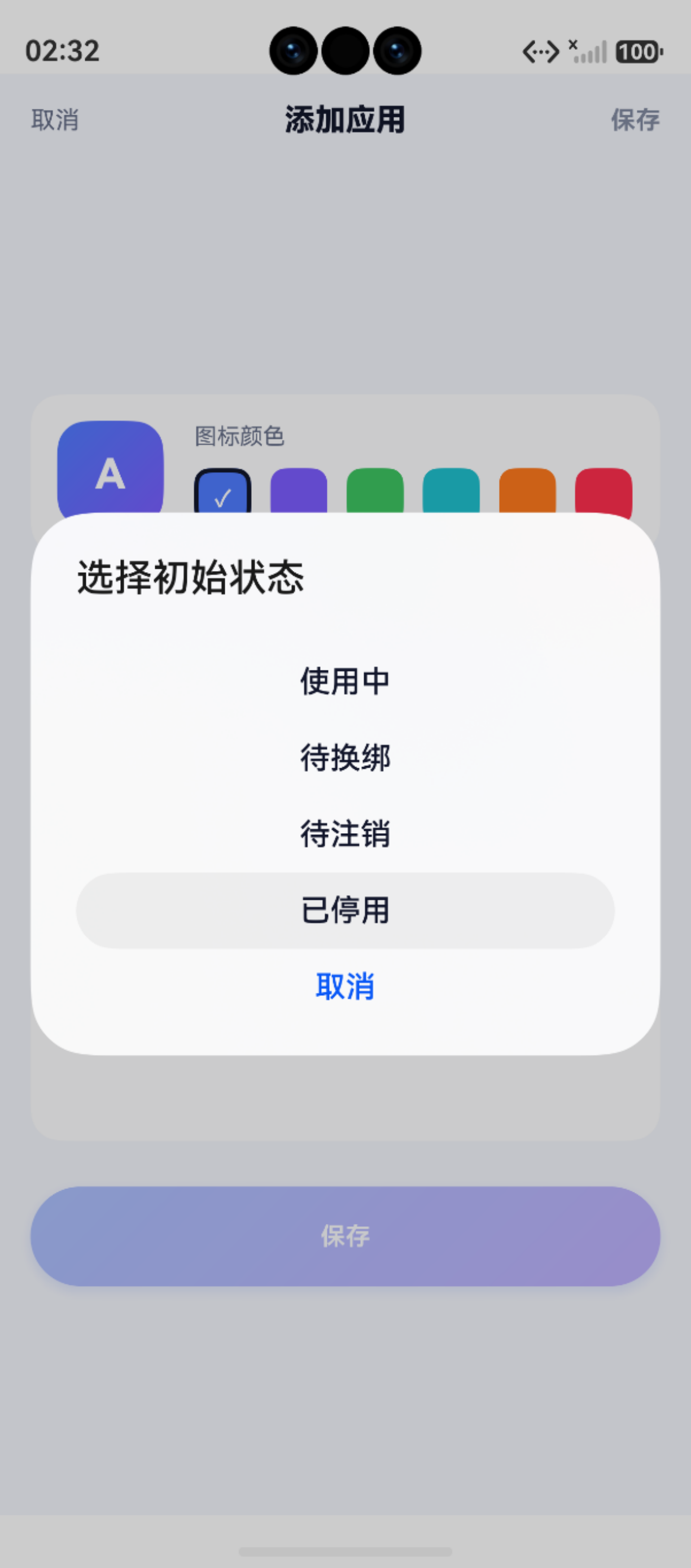
一、状态定义
export type BindingStatus = '使用中' | '待换绑' | '待注销' | '已停用'
| 状态 | 语义 | 颜色 | 图标/徽标 |
|---|---|---|---|
使用中 |
正常绑定,卡号有效 | 蓝色 #4F7CFF |
蓝底 |
待换绑 |
用户计划换绑但尚未执行 | 黄色 #DB8A00 |
黄底提醒 |
待注销 |
用户标记需要注销 | 红色 #E5395B |
红底警告 |
已停用 |
已完成注销或不再使用 | 灰色 #8B93A7 |
灰底静默 |
二、颜色映射体系
2.1 主色、背景色、边框色
// AppColors.ets

// 状态主色(文字/徽标)
static readonly STATUS_ACTIVE: string = '#4F7CFF'
static readonly STATUS_PENDING_SWITCH: string = '#DB8A00'
static readonly STATUS_PENDING_CANCEL: string = '#E5395B'
static readonly STATUS_DISABLED: string = '#8B93A7'

// 状态背景色(半透明)
static readonly PRIMARY_BG: string  = '#1F4F7CFF'  // 蓝底
static readonly WARN_BG: string      = '#21DB8A00'  // 黄底
static readonly DANGER_BG: string    = '#1FE5395B'  // 红底
static readonly MUTED_BG: string     = '#0F141E3C'  // 灰底

// 状态边框色(徽标 border)
static readonly BADGE_BORDER_ACTIVE: string   = '#474F7CFF'
static readonly BADGE_BORDER_PENDING: string  = '#47DB8A00'
static readonly BADGE_BORDER_CANCEL: string   = '#47E5395B'
static readonly BADGE_BORDER_DISABLED: string = '#14141E3C'
2.2 便捷方法
static forStatus(status: string): string {
  switch (status) {
    case '使用中': return AppColors.STATUS_ACTIVE
    case '待换绑': return AppColors.STATUS_PENDING_SWITCH
    case '待注销': return AppColors.STATUS_PENDING_CANCEL
    case '已停用': return AppColors.STATUS_DISABLED
    default: return AppColors.MUTED
  }
}

static forStatusBg(status: string): string {
  switch (status) {
    case '使用中': return AppColors.PRIMARY_BG
    case '待换绑': return AppColors.WARN_BG
    case '待注销': return AppColors.DANGER_BG
    case '已停用': return AppColors.MUTED_BG
    default: return AppColors.MUTED_BG
  }
}

static forStatusBorder(status: string): string {
  switch (status) {
    case '使用中': return AppColors.BADGE_BORDER_ACTIVE
    case '待换绑': return AppColors.BADGE_BORDER_PENDING
    case '待注销': return AppColors.BADGE_BORDER_CANCEL
    case '已停用': return AppColors.BADGE_BORDER_DISABLED
    default: return AppColors.BADGE_BORDER_DISABLED
  }
}
三种颜色(主色/背景色/边框色)构成完整的 Badge 视觉系统,分别控制文字、填充和描边。
三、状态机流转规则
                   ┌─────────────────┐
                   │    使用中       │ ◀────────── 换绑成功自动恢复
                   └────────┬────────┘
                            │
              ┌─────────────┼─────────────┐
              │             │             │
              ▼             ▼             ▼
       ┌──────────┐  ┌──────────┐  ┌──────────┐
       │  待换绑   │  │  待注销   │  │  已停用   │
       └──────────┘  └──────────┘  └──────────┘
              │             │
              │ 换绑成功     │ 执行注销
              ▼             ▼
       ┌──────────┐  ┌──────────┐
       │  使用中   │  │  已停用   │
       └──────────┘  └──────────┘
3.1 流转规则表
| 当前状态 | 操作 | 目标状态 | 触发场景 |
|---|---|---|---|
| 使用中 | 标记换绑 | 待换绑 | 首页批量操作 → 换绑 |
| 使用中 | 标记注销 | 待注销 | 首页批量操作 → 注销 |
| 使用中 | 直接停用 | 已停用 | 手动编辑状态 |
| 待换绑 | 执行换绑 | 使用中 | RebindPage 确认换绑(自动重置) |
| 待换绑 | 取消标记 | 使用中 | 批量操作取消 |
| 待注销 | 执行注销 | 已停用 | 批量操作 → 确认注销 |
| 待注销 | 取消标记 | 使用中 | 批量操作取消 |
3.2 状态流转约束条件
| 操作 | 前置条件 | 后置影响 | 是否允许批量 |
|---|---|---|---|
| 标记换绑 | 当前状态为 使用中 |
进入 待换绑 |
✅ |
| 标记注销 | 当前状态为 使用中 |
进入 待注销 |
✅ |
| 执行换绑 | 当前状态为 待换绑 |
进入 使用中 |
❌ 逐条执行 |
| 执行注销 | 当前状态为 待注销 |
进入 已停用 |
✅ |
| 取消标记 | 当前状态为 待换绑/待注销 |
回到 使用中 |
✅ |
3.3 换绑时的自动状态重置
// AppBindingDao.rebindCard:换绑成功后自动置为 使用中
static async rebindCard(id: number, newCardId: number, updatedAt: number): Promise<void> {
  const predicates = new RdbPredicates('app_bindings')
  predicates.equalTo('id', id)
  const values: relationalStore.ValuesBucket = {
    card_id: newCardId,
    status: '使用中',  // 自动重置
    updated_at: updatedAt
  }
  await store.update(values, predicates)
}
设计理由:换绑操作意味着应用已经迁移到新卡号,应当恢复为正常使用状态,而不是停留在"待换绑"。
四、StatusBadge 组件
// StatusBadge.ets — 可复用的状态徽标
@Component
export struct StatusBadge {
  @Prop status: string = ''

  build() {
    Row() {
      Text(this.status)
        .fontSize(Size.s11)
        .fontColor(AppColors.forStatus(this.status))
        .padding({ left: 10, right: 10, top: 3, bottom: 3 })
        .border({ width: 1, color: AppColors.forStatusBorder(this.status), radius: 99 })
    }
    .padding(1)
    .backgroundColor(AppColors.forStatusBg(this.status))
    .borderRadius(99)
  }
}
使用方式:
StatusBadge({ status: '待换绑' })
全状态映射:状态字符串 → forStatus(文字色) + forStatusBg(背景色) + forStatusBorder(边框色)。
五、批量状态变更
5.1 单条更新
static async updateStatus(id: number, status: BindingStatus, updatedAt: number): Promise<void> {
  const predicates = new RdbPredicates('app_bindings')
  predicates.equalTo('id', id)
  const values = { status, updated_at: updatedAt }
  await store.update(values, predicates)
}
5.2 批量更新
static async batchUpdateStatus(ids: number[], status: BindingStatus, updatedAt: number): Promise<void> {
  if (ids.length === 0) return
  const store = AppBindingDao.getStore()
  const predicates = new RdbPredicates('app_bindings')
  predicates.in('id', ids)
  const values = { status, updated_at: updatedAt }
  await store.update(values, predicates)
}
predicates.in('id', ids) 生成 WHERE id IN (1,2,3) 一条 SQL 完成批量更新。
5.3 首页批量操作调用
// HomePage
// 标记换绑
await AppBindingDao.batchUpdateStatus(this.selectedIds, '待换绑', Date.now())

// 标记注销
await AppBindingDao.batchUpdateStatus(this.selectedIds, '待注销', Date.now())

// 批量删除(非状态变更,直接删除记录)
await AppBindingDao.deleteMany(this.selectedIds)
六、countByStatus 聚合
static async countByStatus(): Promise<StatusCount[]> {
  const rs = await store.querySql(
    'SELECT status, COUNT(*) AS cnt FROM app_bindings GROUP BY status'
  )
  // 解析 → 返回 StatusCount[]
}
零值缺失问题:如果某状态在数据库中没有行,GROUP BY 不会返回该状态。首页统计卡需要手动补零:
const ALL_STATUSES: BindingStatus[] = ['使用中', '待换绑', '待注销', '已停用']
const countMap = new Map<string, number>()
for (const s of result) countMap.set(s.status, s.count)
const withZeros = ALL_STATUSES.map(s => ({
  status: s,
  count: countMap.get(s) ?? 0
}))
小结
| 要点 | 说明 |
|---|---|
| 状态集 | 使用中 待换绑 待注销 已停用 |
| 颜色映射 | forStatus + forStatusBg + forStatusBorder |
| 状态机 | 使用中→待换绑→使用中(换绑循环) |
| 换绑重置 | rebindCard 自动置 status=‘使用中’ |
| StatusBadge | 三色体系(文字/背景/边框)统一渲染 |
| 批量变更 | predicates.in + batchUpdateStatus |
| 聚合补零 | 手动补齐四种状态 count |
如果这篇文章对你有帮助,欢迎点赞👍、收藏⭐、关注🔔,你的支持是我持续创作的动力!
相关资源:
- openHarmony 跨平台社区:https://openharmonycrossplatform.csdn.net
- HarmonyOS 官方文档:https://developer.huawei.com/consumer/cn/doc/
- HarmonyOS 状态管理指南:https://developer.huawei.com/consumer/cn/doc/harmonyos-guides/arkts-state-mgmt
- HarmonyOS 颜色资源开发:https://developer.huawei.com/consumer/cn/doc/harmonyos-guides/resource-categories-and-access

讨论HarmonyOS开发技术,专注于API与组件、DevEco Studio、测试、元服务和应用上架分发等。
更多推荐


 3
3 0
0- 0


 已为社区贡献17条内容

所有评论(0)