鸿蒙应用开发实战【64】— 换绑工作流完整实现
·
鸿蒙应用开发实战【64】— 换绑工作流完整实现
本文是「号码助手全栈开发系列」第 64 篇,持续更新中…
开源社区:https://openharmonycrossplatform.csdn.net
前言
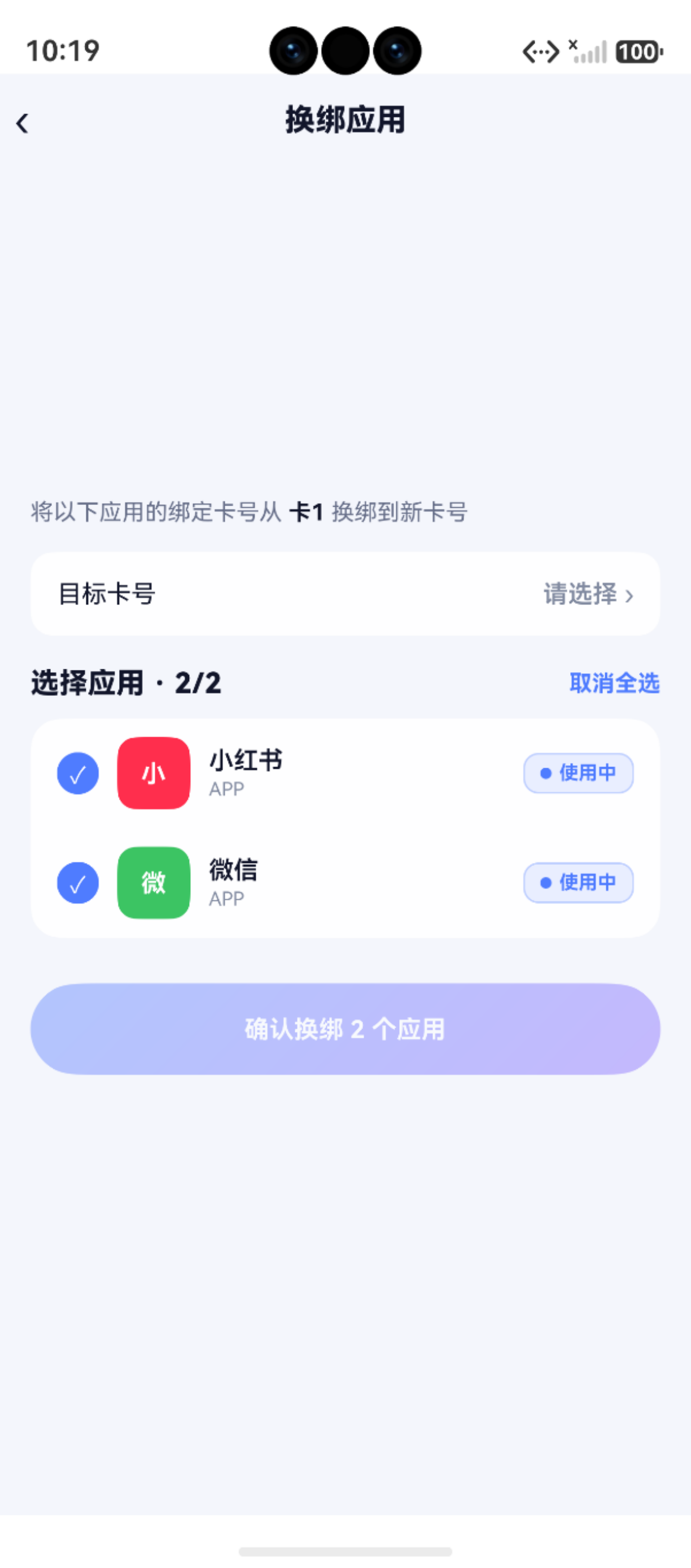
换绑是号码助手最核心的业务流程——用户将某张卡号下绑定的应用转移到另一张卡号。它串联了三个页面(WizardPage / CardDetailPage / RebindPage)和两个 DAO 方法(batchUpdateStatus / rebindCard),覆盖了从"标记"到"执行"的完整链路。
本篇涵盖:换绑的两种触发入口(WizardPage 批量标记 / CardDetailPage 一键换绑)、WizardPage 三步流程、RebindPage 执行换绑、DAO 层 rebindCard 实现、从标记到执行的完整链路追踪。
一、换绑流程全景
┌─────────────────────────────────────────────────────┐
│                   换绑工作流                           │
├─────────────────────────────────────────────────────┤
│                                                      │
│  ┌──────────┐    ┌──────────┐    ┌──────────────┐   │
│  │ Wizard   │───▶│ 首页批量  │───▶│ RebindPage   │   │
│  │ 三步骤    │    │ 标记待换绑 │    │ 执行换绑     │   │
│  └──────────┘    └──────────┘    └──────┬───────┘   │
│         ▲                                │           │
│         │                                ▼           │
│  ┌──────┴───────┐              ┌──────────────────┐ │
│  │ CardDetail   │              │ AppBindingDao.   │ │
│  │ ·一键换绑     │              │ rebindCard()     │ │
│  │ ·级联删除入口  │              │ card_id + status  │ │
│  └──────────────┘              └──────────────────┘ │
│                                                      │
└─────────────────────────────────────────────────────┘
二、触发入口
2.1 WizardPage 批量标记
WizardPage(新手引导/换号向导)三步流程:
Step 1:选择旧卡号
// WizardPage.ets
@State fromCardId: number = -1

Row() {
  ForEach(this.cards, (card: CardEntity) => {
    CardPicker({
      label: card.label,
      phone: card.phone_number,
      selected: this.fromCardId === card.id,
      onClick: () => { this.fromCardId = card.id! }
    })
  })
}
Step 2:展示该卡号下的所有应用,默认全选
private onStep2Enter(): void {
  this.bindings = await AppBindingDao.listByCardId(this.fromCardId)
  // 默认全选
  this.selectedIds = this.bindings.map(b => b.id ?? 0).filter(id => id > 0)
}
Step 3:确认 → 批量标记为「待换绑」
private async onConfirm(): Promise<void> {
  await AppBindingDao.batchUpdateStatus(this.selectedIds, '待换绑', Date.now())
  promptAction.showToast({ message: `已标记 ${this.selectedIds.length} 个应用为待换绑` })
}
WizardPage 只做"标记",真正执行换绑要到 RebindPage。
2.2 CardDetailPage 一键换绑入口
// CardDetailPage.ets
if (this.bindings.length > 0) {
  Button('一键换绑全部应用', { type: ButtonType.Capsule })
    .width('100%').height(Size.s44)
    .fontColor(AppColors.PRIMARY)
    .backgroundColor(AppColors.PRIMARY_BG)
    .onClick(() => {
      this.getUIContext().getRouter().pushUrl({
        url: 'pages/RebindPage',
        params: { fromCardId: this.cardId }
      })
    })
}
fromCardId 路由参数传递给 RebindPage。
三、RebindPage 执行换绑
3.1 数据加载
aboutToAppear(): void {
  const params = this.getUIContext().getRouter().getParams() as Record<string, Object>
  if (params) {
    const rawId = params['fromCardId']
    if (rawId !== undefined && rawId !== null) {
      this.fromCardId = Number(rawId)
    }
  }
  this.loadData()
}

private async loadData(): Promise<void> {
  // 1. 加载源卡信息
  this.fromCard = await CardDao.findById(this.fromCardId)
  // 2. 加载该卡下的所有绑定
  this.bindings = await AppBindingDao.listByCardId(this.fromCardId)
  // 3. 默认全选
  this.selectedIds = this.bindings.map(b => b.id ?? 0).filter(id => id > 0)
  // 4. 加载其他卡号(排除源卡)
  const all = await CardDao.listAll()
  this.cards = all.filter(c => c.id !== this.fromCardId)
}
3.2 目标卡号选择
使用 promptAction.showActionMenu 弹出选项菜单:
private async pickTargetCard(): Promise<void> {
  if (this.cards.length === 0) {
    promptAction.showToast({ message: '没有其他卡号可选,请先添加卡号' })
    return
  }
  const buttons = this.cards.map(c => (
    { text: `${c.label} · ${c.phone_number}`, color: AppColors.TEXT }
  ))
  const result = await promptAction.showActionMenu({
    title: '选择目标卡号',
    buttons: buttons as [CardBtn, CardBtn?, CardBtn?, CardBtn?, CardBtn?, CardBtn?]
  })
  this.targetCardIndex = result.index
}
3.3 确认按钮条件禁用
Button(this.saving ? '换绑中…' : `确认换绑 ${this.selectedIds.length} 个应用`)
  .opacity(this.selectedIds.length > 0 && this.targetCardIndex >= 0 ? 1 : 0.4)
  .enabled(this.selectedIds.length > 0 && this.targetCardIndex >= 0)
  .onClick(() => this.doRebind())
两个条件必须同时满足:至少选了一个应用 + 选了目标卡号。
3.4 执行换绑
private async doRebind(): Promise<void> {
  const targetCard = this.cards[this.targetCardIndex]
  this.saving = true
  try {
    const now = Date.now()
    for (const id of this.selectedIds) {
      await AppBindingDao.rebindCard(id, targetCard.id!, now)
    }
    promptAction.showToast({
      message: `已将 ${this.selectedIds.length} 个应用换绑到"${targetCard.label}"`
    })
    this.getUIContext().getRouter().back()
  } catch (e) {
    promptAction.showToast({ message: '换绑失败,请重试' })
  } finally {
    this.saving = false
  }
}
四、常见异常处理
| 异常场景 | 原因 | 用户提示 | DAO 日志 |
|---|---|---|---|
| 换绑时目标卡不存在 | 卡号在操作过程中被删除 | ‘换绑失败,请重试’ | error + 错误详情 |
| 换绑时源应用不存在 | 应用被其他设备删除 | ‘换绑失败,请重试’ | error + 错误详情 |
| 网络异常 | AppStorage 同步失败 | ‘操作完成,但状态同步失败’ | warn |
| 批量标记时部分失败 | 数据库锁冲突 | ‘已标记 N 个应用’ | info 记录实际数量 |
五、DAO 层核心方法
5.1 rebindCard
static async rebindCard(id: number, newCardId: number, updatedAt: number): Promise<void> {
  const store = AppBindingDao.getStore()
  const predicates = new RdbPredicates('app_bindings')
  predicates.equalTo('id', id)
  const values: relationalStore.ValuesBucket = {
    card_id: newCardId,   // 迁移到新卡号
    status: '使用中',      // 自动重置为正常状态
    updated_at: updatedAt
  }
  await store.update(values, predicates)
}
一次 UPDATE 完成两件事:
card_id = newCardId— 修改外键指向新卡号status = '使用中'— 状态自动恢复为正常(无论之前是待换绑还是使用中)
4.2 batchUpdateStatus
static async batchUpdateStatus(ids: number[], status: BindingStatus, updatedAt: number): Promise<void> {
  if (ids.length === 0) return
  const store = AppBindingDao.getStore()
  const predicates = new RdbPredicates('app_bindings')
  predicates.in('id', ids)
  const values = { status, updated_at: updatedAt }
  await store.update(values, predicates)
}
五、完整链路追踪
场景:张三换号,将卡1的应用全部换到卡2

1. WizardPage 三步流程
   Step1: 选择"卡1"
   Step2: 看到所有应用,默认全选
   Step3: 确认标记
   └──→ batchUpdateStatus(ids, '待换绑', now)
        └──→ status = '待换绑' (标记成功)

2. 首页统计卡「待换绑: 3」
   用户点击进入 StatusListPage

3. 从 StatusListPage 或 CardDetailPage
   点击「一键换绑全部应用」
   └──→ router.pushUrl({ url: 'pages/RebindPage', params: { fromCardId: 1 }})

4. RebindPage
   ├── 源卡: 卡1
   ├── 目标: 选择"卡2"
   └── 确认换绑
       └──→ rebindCard(id, 2, now) × N
            └──→ card_id = 2, status = '使用中'

5. 换绑完成,数据状态:
   卡1: 无绑定
   卡2: 微信(使用中)、淘宝(使用中)、抖音(使用中)
小结
| 要点 | 说明 |
|---|---|
| 触发入口 | WizardPage 批量标记 / CardDetailPage 一键换绑 |
| WizardPage | 选卡→全选→标记待换绑(只标记不执行) |
| RebindPage | 源卡→选目标→执行换绑 |
| rebindCard | UPDATE card_id + status=‘使用中’ |
| 状态重置 | 换绑成功后自动恢复为使用中 |
| 条件按钮 | 选中应用 + 选中目标卡号 缺一不可 |
| 完整链路 | 标记→统计→筛选→执行→完成 |
如果这篇文章对你有帮助,欢迎点赞👍、收藏⭐、关注🔔,你的支持是我持续创作的动力!
相关资源:
- openHarmony 跨平台社区:https://openharmonycrossplatform.csdn.net
- HarmonyOS 官方文档:https://developer.huawei.com/consumer/cn/doc/
- HarmonyOS 路由开发指南:https://developer.huawei.com/consumer/cn/doc/harmonyos-guides/arkts-routing
- HarmonyOS 数据更新 API:https://developer.huawei.com/consumer/cn/doc/harmonyos-references/relationalstore

讨论HarmonyOS开发技术,专注于API与组件、DevEco Studio、测试、元服务和应用上架分发等。
更多推荐


 5
5 0
0- 0


 已为社区贡献17条内容

所有评论(0)