HarmonyOS 应用开发《掌上英语》第19篇:3D 翻转动画实现——ArkTS 动画系统全解析
3D 翻转动画实现——ArkTS 动画系统全解析
引言
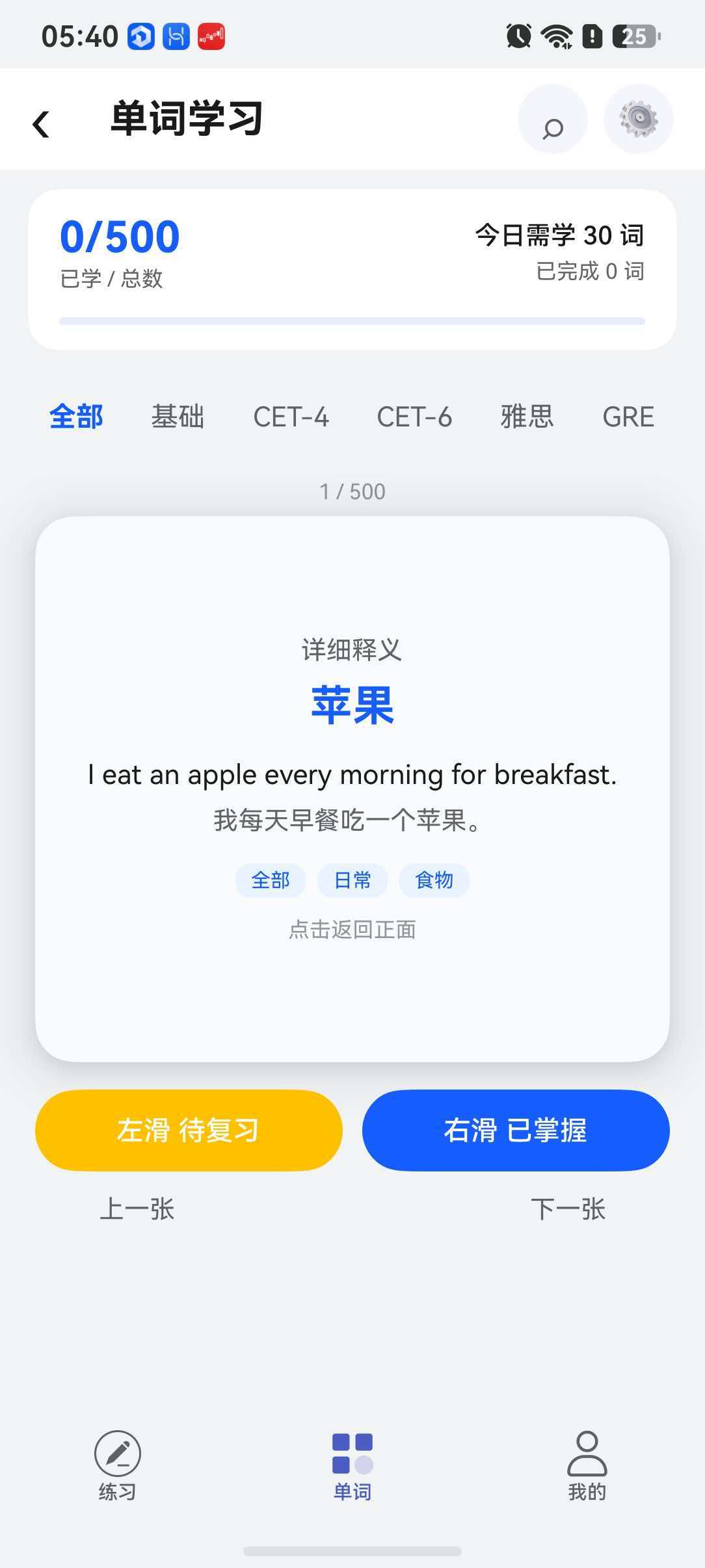
在移动应用中,卡片翻转动画是最受欢迎的交互动效之一,它能给用户带来直观的"物理世界"操作感。在我们的英语学习 App 的单词学习页面(CourseHomePage.ets)中,就实现了一个完整的 3D 卡片翻转效果:用户点击卡片,正面单词翻转显示背面释义,仿佛在翻动一张真实的学习卡片。本文将深入剖析这个动画的实现原理,并系统讲解 ArkTS 的动画 API。
一、动画系统概览
ArkTS 提供了两套动画 API:
| API | 类型 | 使用场景 |
|---|---|---|
animateTo() | 显式动画 | 通过状态变化驱动动画 |
.animation() | 属性动画 | 链式调用,跟随属性变化 |
本项目中的卡片翻转使用的是 animateTo 显式动画,因为它需要对多个属性(rotateY、opacity)进行同步控制。
二、卡片翻转动画源码分析
2.1 状态定义
翻转动画涉及 4 个关键状态变量:
@Local isFlipped: boolean = false;   // 翻转状态标记
@Local rotateY: number = 0;           // Y 轴旋转角度
@Local frontOpacity: number = 1;      // 正面透明度
@Local backOpacity: number = 0;       // 反面透明度
isFlipped:布尔标记,表示当前是否处于翻转状态rotateY:驱动 3D 旋转的核心变量,范围 0°~180°frontOpacity/backOpacity:控制正反面可见性,实现"翻转过程中透明切换"
2.2 翻转方法
private flipCard(): void {
  animateTo({ duration: 400, curve: Curve.EaseInOut }, () => {
    if (this.isFlipped) {
      // 翻回正面
      this.rotateY = 0;
      this.frontOpacity = 1;
      this.backOpacity = 0;
    } else {
      // 翻到反面
      this.rotateY = 180;
      this.frontOpacity = 0;
      this.backOpacity = 1;
    }
    this.isFlipped = !this.isFlipped;
  });
}
动画工作流程:
用户点击卡片
  → flipCard() 被调用
  → animateTo() 启动动画闭包
  → 框架检测到 rotateY/frontOpacity/backOpacity 变化
  → 在 400ms 内使用 EaseInOut 曲线平滑过渡
  → 动画完成后,isFlipped 状态取反
2.3 UI 层实现
正反两面卡片使用 Stack 容器叠放,通过 rotate 和 opacity 控制显示:
Stack() {
  // ========== 正面卡片 ==========
  Column() {
    Row() {
      Text(this.currentWord().partOfSpeech)
        .fontSize(12)
        .fontColor('#165DFF')
        .backgroundColor('#EAF2FF')
        .padding({ left: 10, right: 10, top: 4, bottom: 4 })
        .borderRadius(12);
      Blank();
      Text(this.isFavorite ? '★' : '☆')
        .fontSize(24)
        .fontColor('#FFB020');
    }
    .width('100%')
    .padding({ left: 18, right: 18, top: 14 });

    Column() {
      Text(this.currentWord().word)
        .fontSize(34)
        .fontWeight(FontWeight.Bold)
        .fontColor('#165DFF')
        .margin({ bottom: 8 })
        .onClick(() => this.playPronunciation());

      Row({ space: 8 }) {
        Text(this.currentWord().phonetic)
          .fontSize(15)
          .fontColor($r('sys.color.font_secondary'));
        Text('▶')
          .fontSize(12)
          .fontColor('#FFFFFF')
          .width(26).height(26)
          .textAlign(TextAlign.Center)
          .borderRadius(13)
          .backgroundColor('#165DFF');
      }
      .alignItems(VerticalAlign.Center)
      .margin({ bottom: 16 });

      Text(this.currentWord().translation)
        .fontSize(20)
        .fontWeight(FontWeight.Medium)
        .fontColor($r('sys.color.font_primary'))
        .textAlign(TextAlign.Center)
        .margin({ bottom: 14 });

      Text(this.currentWord().example)
        .fontSize(14)
        .fontColor($r('sys.color.font_secondary'))
        .textAlign(TextAlign.Center)
        .maxLines(2)
        .padding({ left: 18, right: 18 });
    }
    .layoutWeight(1)
    .justifyContent(FlexAlign.Center)
    .alignItems(HorizontalAlign.Center)
    .width('100%');

    Text('点击卡片查看释义')
      .fontSize(11)
      .fontColor($r('sys.color.font_tertiary'))
      .margin({ bottom: 12 });
  }
  .width('100%')
  .height(280)
  .backgroundColor($r('sys.color.background_primary'))
  .borderRadius(20)
  .shadow(ShadowStyle.OUTER_DEFAULT_MD)
  // 3D 旋转设置
  .rotate({ x: 0, y: this.rotateY, z: 0, centerX: '50%', centerY: '50%', perspective: 1200 })
  .opacity(this.frontOpacity)
  .onClick(() => this.flipCard());

  // ========== 反面卡片 ==========
  Column() {
    Text('详细释义')
      .fontSize(13)
      .fontColor($r('sys.color.font_secondary'))
      .margin({ bottom: 8 });

    Text(this.currentWord().translation)
      .fontSize(22)
      .fontWeight(FontWeight.Bold)
      .fontColor('#165DFF')
      .textAlign(TextAlign.Center)
      .margin({ bottom: 14 });

    Text(this.currentWord().example)
      .fontSize(14)
      .fontColor($r('sys.color.font_primary'))
      .textAlign(TextAlign.Center)
      .maxLines(2)
      .margin({ bottom: 8 });

    Text(this.currentWord().exampleTranslation)
      .fontSize(13)
      .fontColor($r('sys.color.font_secondary'))
      .textAlign(TextAlign.Center)
      .maxLines(2)
      .margin({ bottom: 14 });

    Row({ space: 6 }) {
      Text(this.getCategoryLabel())
        .fontSize(10)
        .fontColor('#165DFF')
        .backgroundColor('#EAF2FF')
        .padding({ left: 8, right: 8, top: 3, bottom: 3 })
        .borderRadius(8);
      ForEach(this.currentWord().tags, (tag: string) => {
        Text(tag)
          .fontSize(10)
          .fontColor('#165DFF')
          .backgroundColor('#EAF2FF')
          .padding({ left: 8, right: 8, top: 3, bottom: 3 })
          .borderRadius(8);
      }, (tag: string) => tag);
    }
    .justifyContent(FlexAlign.Center)
    .margin({ bottom: 10 });

    Text('点击返回正面')
      .fontSize(11)
      .fontColor($r('sys.color.font_tertiary'));
  }
  .width('100%')
  .height(280)
  .justifyContent(FlexAlign.Center)
  .alignItems(HorizontalAlign.Center)
  .backgroundColor('#F8FAFC')
  .borderRadius(20)
  .shadow(ShadowStyle.OUTER_DEFAULT_MD)
  // 反面旋转:比正面始终少 180°,实现"背面跟随"
  .rotate({ x: 0, y: this.rotateY - 180, z: 0, centerX: '50%', centerY: '50%', perspective: 1200 })
  .opacity(this.backOpacity)
  .onClick(() => this.flipCard());
}
三、3D 旋转的核心参数
3.1 rotate 属性详解
rotate 属性是 ArkTS 实现 3D 变换的关键,它包含 5 个参数:
| 参数 | 说明 | 本项目中取值 |
|---|---|---|
x | X 轴旋转分量 | 0(不绕 X 轴旋转) |
y | Y 轴旋转分量 | this.rotateY(动态变化 0→180) |
z | Z 轴旋转分量 | 0(不绕 Z 轴旋转) |
centerX | 旋转中心 X | '50%'(卡片中心) |
centerY | 旋转中心 Y | '50%'(卡片中心) |
perspective | 透视距离 | 1200(单位 vp) |
3.2 反面旋转的特殊处理
反面卡片的旋转角度为 this.rotateY - 180:
// 正面
.rotate({ x: 0, y: this.rotateY, ... })

// 反面:比正面始终少 180°
.rotate({ x: 0, y: this.rotateY - 180, ... })
为什么要这样做?
- 当
rotateY = 0(正面朝前):反面 =0 - 180 = -180°,即反面已经转了 180°,处于不可见状态 - 当
rotateY = 180(翻转完成):反面 =180 - 180 = 0°,即反面转回 0°,处于可见状态 - 在动画过程中,正反面同步旋转,始终保持"背对背"的关系
3.3 perspective 透视效果
perspective: 1200 设定了透视距离,值越小,3D 效果越强(但过小会导致变形严重):
perspective = 800  → 3D 效果强烈,近大远小明显
perspective = 1200 → 舒适的自然 3D 效果 ✓
perspective = 2000 → 3D 效果减弱,接近平面旋转
四、opacity 与 visibility 的动画协调
4.1 正反面透明度切换
翻转过程中,正反面透明度的同步变化至关重要:
| 动画阶段 | rotateY | frontOpacity | backOpacity | 视觉效果 |
|---|---|---|---|---|
| 起始(正面) | 0° | 1 | 0 | 正面完全可见 |
| 旋转到 90° | 90° | 渐变中… | 渐变中… | 开始看到反面 |
| 翻转完成 | 180° | 0 | 1 | 反面完全可见 |
4.2 为什么不直接用 visibility
可能有人会问:为什么不直接用 visibility 控制正反面显示?
// ❌ 不推荐:visibility 无法参与动画过渡
.visibility(this.isFlipped ? Visibility.Hidden : Visibility.Visible)
原因在于,visibility 是离散状态(显示/隐藏),不能产生平滑的过渡动画。而 opacity 是连续数值(0→1),可以自然地产生渐隐渐现效果。
4.3 完整的动画时序
时间轴:  0ms ---------- 200ms ---------- 400ms
         ↓               ↓               ↓
rotateY: 0° →→→→→→→→→→  90° →→→→→→→→→→ 180°
front:   1.0 →→→→→→→→→ 0.5 →→→→→→→→→→  0.0
back:    0.0 →→→→→→→→→ 0.5 →→→→→→→→→→  1.0

视觉效果:正面卡片沿 Y 轴旋转,到 90° 时正反面各半,
         继续旋转到 180° 时反面完全显示
五、animateTo API 深入
5.1 参数配置
animateTo({
  duration: 400,          // 动画时长,单位 ms
  curve: Curve.EaseInOut, // 动画曲线
  delay: 0,               // 延迟启动,单位 ms
  iterations: 1,          // 播放次数
  playMode: PlayMode.Normal, // 播放模式
  onFinish: () => {}      // 动画完成回调
}, () => {
  // 闭包内修改变量,框架自动侦测并驱动动画
  this.rotateY = 180;
});
5.2 动画曲线选择
| 曲线 | 效果 | 适用场景 |
|---|---|---|
Curve.EaseInOut | 慢→快→慢 | ✅ 翻转动画 |
Curve.Ease | 快→慢 | 元素弹出 |
Curve.Linear | 匀速 | 进度条 |
Curve.FastOutSlowIn | 快→慢 | Material Design 风格 |
EaseInOut 是翻转动画的理想选择——它让卡片在起始和结束时速度较慢,模拟了真实世界中卡片翻转的物理感受。
六、最佳实践
6.1 动画性能优化
- 只动画化 transform 和 opacity:这两个属性的动画可以由 GPU 硬件加速,避免动画化
width、height等触发布局重排的属性 - 合理设置 perspective:
800-1500是视觉效果和性能的平衡区间 - 控制动画时长:
300-500ms是翻转动画的黄金区间,过短显得生硬,过长则显拖沓
6.2 重置动画状态
在切换单词时,需要重置所有动画状态:
private nextCard(): void {
  if (this.currentIndex < this.totalCount - 1) {
    // 重置翻转状态
    this.isFlipped = false;
    this.rotateY = 0;
    this.frontOpacity = 1;
    this.backOpacity = 0;
    this.isFavorite = false;
    this.currentIndex++;
  }
}
6.3 在 Tab 切换时重置
当用户切换单词分类 Tab 时,也要重置动画状态,避免卡片处于"卡在半路"的状态:
.onTabBarClick((index: number) => {
  // ...
  this.currentIndex = 0;
  this.isFlipped = false;
  this.frontOpacity = 1;
  this.backOpacity = 0;
  this.rotateY = 0;
  this.isFavorite = false;
})
七、扩展:从 Y 轴翻转到 X/Z 轴旋转
如果你想让卡片实现不同的翻转方向,只需调整 rotate 的轴向参数:
// X 轴翻转(上下翻)
.rotate({ x: this.rotateX, y: 0, z: 0, ... })

// Z 轴旋转(平面旋转)
.rotate({ x: 0, y: 0, z: this.rotateZ, ... })

// 组合翻转(3D 空间旋转)
.rotate({ x: this.rotateX, y: this.rotateY, z: 0, ... })
总结
通过 CourseHomePage.ets 中的 3D 翻转动画实现,我们深入学习了 ArkTS 动画系统的核心机制:
animateTo()显式动画:在闭包中修改状态变量,框架自动驱动动画rotate3D 变换:通过 Y 轴旋转 +perspective实现真实 3D 翻转opacity动画协调:正反面透明度同步变化,实现自然过渡EaseInOut曲线:模拟物理世界的缓动效果
这个翻转动画虽然代码量不大,但涉及了 ArkTS 动画系统的多个核心概念,是学习动画开发的绝佳案例。

讨论HarmonyOS开发技术,专注于API与组件、DevEco Studio、测试、元服务和应用上架分发等。
更多推荐

 7
7 0
0- 0


 已为社区贡献250条内容

所有评论(0)