HarmonyOS ArkTS 实战:实现一个校园水电费查询缴费应用
HarmonyOS ArkTS 实战:实现一个校园水电费查询缴费应用
项目效果
本文使用 HarmonyOS 和 ArkTS 实现一个校园水电费查询缴费应用。
应用可以查询每月水电用量和费用,在线缴费,查看缴费记录,并提供用量统计、欠费提醒和账单明细等功能。
项目使用 DevEco Studio 开发,适配 API 23 及以上版本。
运行效果
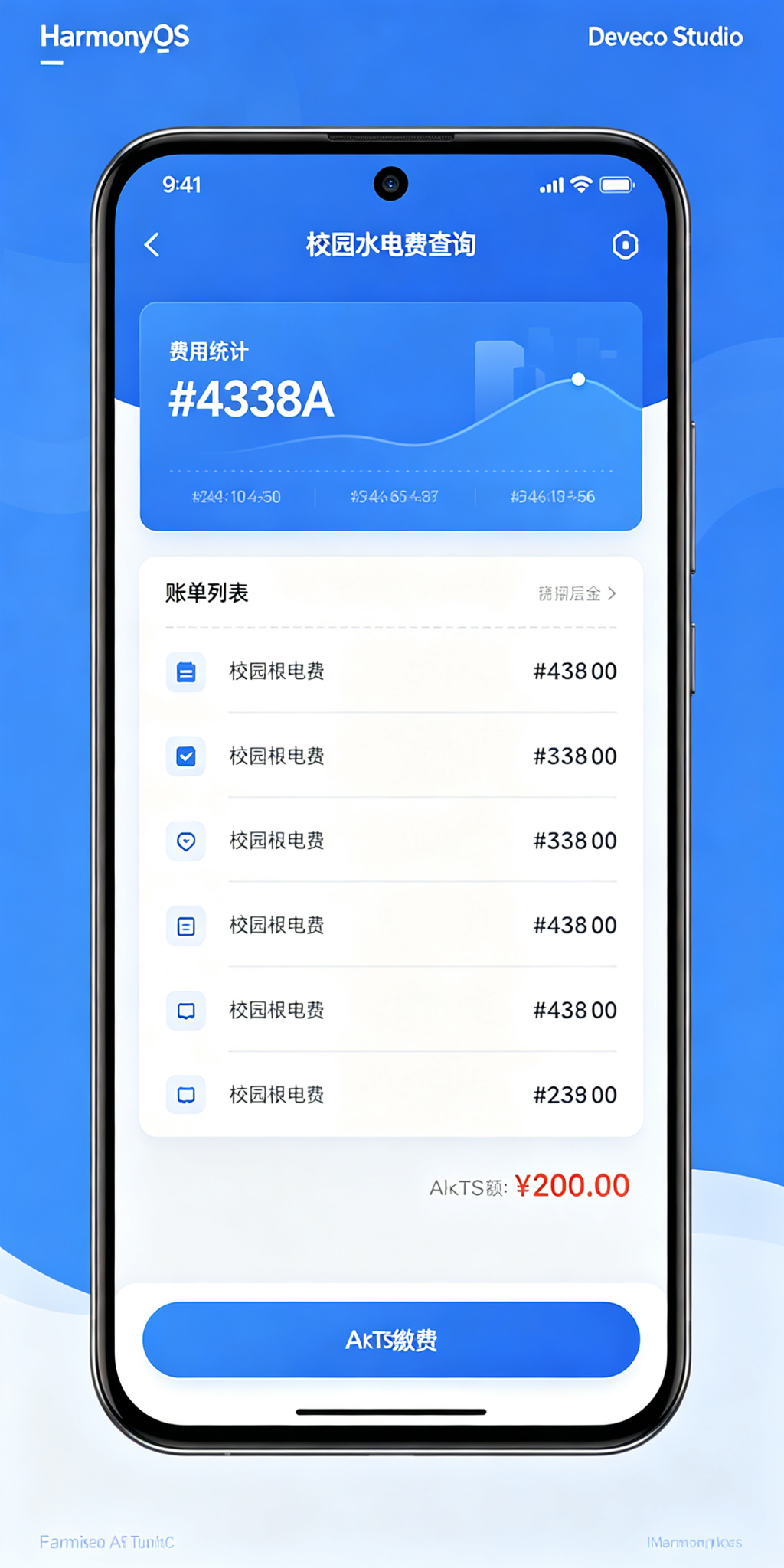
功能介绍
本项目实现了以下功能:
- 查询每月水电费账单
- 查看水电用量明细
- 在线缴费
- 查看缴费记录
- 用量趋势统计
- 欠费提醒
- 按月份查询
- 统计已缴、未缴、欠费金额
- 单价设置
- 账单导出
定义数据结构
首先定义账单记录的数据结构:
interface BillRecord {
  id: number;
  month: string;
  dormNumber: string;
  waterUsage: number;
  electricUsage: number;
  waterFee: number;
  electricFee: number;
  totalFee: number;
  status: string;
  payTime: string;
  payMethod: string;
}
字段说明如下:
BillRecord:账单记录id:账单编号month:账单月份dormNumber:宿舍号waterUsage:用水量(吨)electricUsage:用电量(度)waterFee:水费(元)electricFee:电费(元)totalFee:总费用(元)status:状态(未缴费/已缴费/已逾期)payTime:缴费时间payMethod:支付方式
初始化页面状态
使用 @State 保存宿舍号、单价、筛选月份:
@State private dormNumberText: string = '3号楼 302';
@State private waterPrice: number = 3.5;
@State private electricPrice: number = 0.6;
@State private filterStatus: string = '全部';
@State private currentUserId: string = '2023001';
@State private nextBillId: number = 5;
准备一些初始账单数据:
@State private bills: BillRecord[] = [
  {
    id: 1,
    month: '2026-07',
    dormNumber: '3号楼 302',
    waterUsage: 8,
    electricUsage: 120,
    waterFee: 28,
    electricFee: 72,
    totalFee: 100,
    status: '未缴费',
    payTime: '',
    payMethod: ''
  },
  {
    id: 2,
    month: '2026-06',
    dormNumber: '3号楼 302',
    waterUsage: 6,
    electricUsage: 85,
    waterFee: 21,
    electricFee: 51,
    totalFee: 72,
    status: '已缴费',
    payTime: '2026-06-15 14:30',
    payMethod: '微信支付'
  },
  {
    id: 3,
    month: '2026-05',
    dormNumber: '3号楼 302',
    waterUsage: 7,
    electricUsage: 95,
    waterFee: 24.5,
    electricFee: 57,
    totalFee: 81.5,
    status: '已缴费',
    payTime: '2026-05-18 09:15',
    payMethod: '支付宝'
  },
  {
    id: 4,
    month: '2026-04',
    dormNumber: '3号楼 302',
    waterUsage: 5,
    electricUsage: 60,
    waterFee: 17.5,
    electricFee: 36,
    totalFee: 53.5,
    status: '已逾期',
    payTime: '',
    payMethod: ''
  }
];
生成新账单
每月自动生成新账单:
private generateBill(): void {
  const now = new Date();
  const month = `${now.getFullYear()}-${String(now.getMonth() + 1).padStart(2, '0')}`;

  const exists = this.bills.some(b => b.month === month);
  if (exists) return;

  const waterUsage = Math.floor(Math.random() * 10) + 5;
  const electricUsage = Math.floor(Math.random() * 100) + 50;
  const waterFee = Math.round(waterUsage * this.waterPrice * 10) / 10;
  const electricFee = Math.round(electricUsage * this.electricPrice * 10) / 10;

  const bill: BillRecord = {
    id: this.nextBillId,
    month,
    dormNumber: this.dormNumberText,
    waterUsage,
    electricUsage,
    waterFee,
    electricFee,
    totalFee: Math.round((waterFee + electricFee) * 10) / 10,
    status: '未缴费',
    payTime: '',
    payMethod: ''
  };

  this.bills = [bill, ...this.bills];
  this.nextBillId += 1;
}
缴费功能
用户可以缴纳水电费:
private payBill(billId: number, method: string): void {
  const now = new Date();
  const payTime = `${now.getFullYear()}-${String(now.getMonth() + 1).padStart(2, '0')}-${String(now.getDate()).padStart(2, '0')} ${String(now.getHours()).padStart(2, '0')}:${String(now.getMinutes()).padStart(2, '0')}`;

  this.bills = this.bills.map((bill: BillRecord) => {
    if (bill.id === billId && bill.status !== '已缴费') {
      return {
        id: bill.id,
        month: bill.month,
        dormNumber: bill.dormNumber,
        waterUsage: bill.waterUsage,
        electricUsage: bill.electricUsage,
        waterFee: bill.waterFee,
        electricFee: bill.electricFee,
        totalFee: bill.totalFee,
        status: '已缴费',
        payTime,
        payMethod: method
      };
    }
    return bill;
  });
}
筛选账单
按状态筛选账单:
private getFilteredBills(): BillRecord[] {
  if (this.filterStatus === '全部') {
    return this.bills;
  }
  return this.bills.filter(
    (b: BillRecord) => b.status === this.filterStatus
  );
}
筛选按钮封装:
@Builder
FilterButton(text: string) {
  Button(text)
    .height(32)
    .padding({ left: 14, right: 14 })
    .fontSize(12)
    .fontColor(this.filterStatus === text ? Color.White : '#344054')
    .backgroundColor(
      this.filterStatus === text ? '#4338CA' : '#EEF2FF'
    )
    .borderRadius(16)
    .onClick(() => {
      this.filterStatus = text;
    });
}
统计数据
统计已缴、未缴、欠费金额:
private getUnpaidAmount(): number {
  return this.bills
    .filter(b => b.status === '未缴费' || b.status === '已逾期')
    .reduce((sum, b) => sum + b.totalFee, 0);
}

private getPaidAmount(): number {
  return this.bills
    .filter(b => b.status === '已缴费')
    .reduce((sum, b) => sum + b.totalFee, 0);
}

private getOverdueCount(): number {
  return this.bills.filter(b => b.status === '已逾期').length;
}

private getTotalWaterUsage(): number {
  return this.bills.reduce((sum, b) => sum + b.waterUsage, 0);
}

private getTotalElectricUsage(): number {
  return this.bills.reduce((sum, b) => sum + b.electricUsage, 0);
}
顶部统计区域展示待缴金额、已缴金额、逾期账单、累计用电:
this.StatCard(
  '待缴金额',
  `¥${this.getUnpaidAmount().toFixed(1)}`,
  '#DC2626',
  '#FEF2F2'
);
this.StatCard(
  '已缴金额',
  `¥${this.getPaidAmount().toFixed(1)}`,
  '#059669',
  '#ECFDF5'
);
this.StatCard(
  '逾期账单',
  `${this.getOverdueCount()}个`,
  '#D97706',
  '#FFF7E8'
);
this.StatCard(
  '累计用电',
  `${this.getTotalElectricUsage()}度`,
  '#4338CA',
  '#EEF2FF'
);
设置状态颜色
不同账单状态使用不同颜色:
private getStatusColor(status: string): ResourceColor {
  if (status === '已缴费') {
    return '#059669';
  }
  if (status === '已逾期') {
    return '#DC2626';
  }
  return '#D97706';
}

private getStatusBgColor(status: string): ResourceColor {
  if (status === '已缴费') {
    return '#DCFCE7';
  }
  if (status === '已逾期') {
    return '#FEE2E2';
  }
  return '#FEF3C7';
}
- 绿色:已缴费
- 红色:已逾期
- 橙色:未缴费
- 靛蓝色:页面主题色
使用列表展示账单
使用 List 和 ForEach 渲染账单列表:
List({ space: 12 }) {
  ForEach(
    this.getFilteredBills(),
    (bill: BillRecord) => {
      ListItem() {
        this.BillCard(bill)
      }
    },
    (bill: BillRecord) => bill.id.toString()
  );
}
.width('100%')
.layoutWeight(1)
.scrollBar(BarState.Off);
每个账单卡片包含月份、宿舍号、用水量/用电量、水费/电费、总金额、状态和缴费按钮。
页面设计说明
应用使用靛蓝色作为主题色,体现生活服务、稳重可靠的感觉。
页面主要分为以下区域:
- 顶部宿舍信息
- 费用统计区域
- 用量概览
- 状态筛选
- 账单列表
- 缴费弹窗
页面采用浅灰色背景和白色卡片。待缴金额使用醒目的红色,已缴使用绿色,逾期使用红色警示,用水量使用蓝色水滴图标,用电量使用黄色闪电图标,费用使用大号字体突出显示。
SDK 配置
本项目使用 HarmonyOS API 24,满足 API 23 及以上要求:
{
  "name": "default",
  "compatibleSdkVersion": "6.1.1(24)",
  "runtimeOS": "HarmonyOS",
  "targetSdkVersion": "6.1.1(24)",
  "compileSdkVersion": "6.1.1(24)"
}
运行项目
使用 DevEco Studio 打开项目,然后找到:
entry/src/main/ets/pages/Index.ets
等待项目同步完成,点击右侧的 Preview 按钮即可查看应用效果。
项目总结
本文使用 HarmonyOS 和 ArkTS 实现了一个校园水电费查询缴费应用。
项目实现了账单查询、用量统计、在线缴费、缴费记录、欠费提醒、状态筛选、金额统计等功能。
通过这个项目可以掌握:
- ArkTS 接口定义
@State状态管理- 费用计算逻辑
List和ForEach列表渲染reduce数组统计- 支付流程模拟
- 自定义
@Builder组件 - HarmonyOS 生活服务类应用布局
后续还可以加入用电预警、用量对比图表、自动代扣、电子发票、报修联动、公摊费用、室友AA分摊和历史用量分析等功能。

讨论HarmonyOS开发技术,专注于API与组件、DevEco Studio、测试、元服务和应用上架分发等。
更多推荐

 6
6 0
0- 0


 已为社区贡献8条内容

所有评论(0)