HarmonyOS ArkTS 实战:实现一个校园问答与知识社区应用
·
HarmonyOS ArkTS 实战:实现一个校园问答与知识社区应用
项目效果
本文使用 HarmonyOS 和 ArkTS 实现一个校园问答与知识社区应用。
应用可以提问问题,回答他人问题,点赞收藏,关注话题,并提供问题分类筛选、热门排序和回答统计等功能。
项目使用 DevEco Studio 开发,适配 API 23 及以上版本。
运行效果
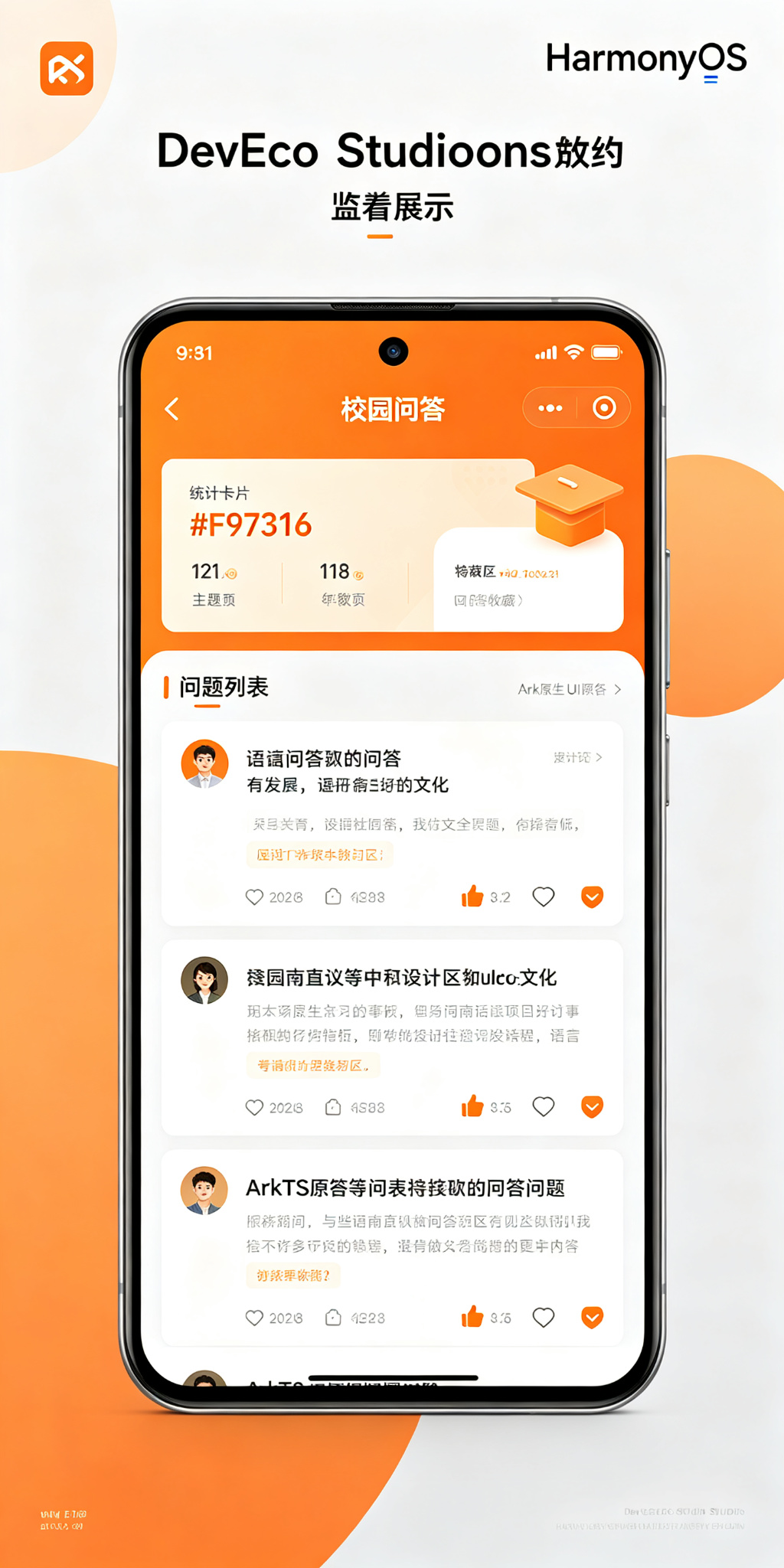
功能介绍
本项目实现了以下功能:
- 发布问题
- 设置问题标题和描述
- 选择问题分类
- 回答问题
- 点赞问题/回答
- 收藏问题
- 采纳最佳答案
- 按分类筛选问题
- 按热度/最新排序
- 统计提问数、回答数、获赞数
- 我的提问/我的回答
定义数据结构
首先定义回答和问题的数据结构:
interface Answer {
  id: number;
  questionId: number;
  author: string;
  content: string;
  likes: number;
  likedBy: string[];
  isAccepted: boolean;
  answerTime: string;
}

interface Question {
  id: number;
  title: string;
  content: string;
  category: string;
  author: string;
  createTime: string;
  views: number;
  likes: number;
  likedBy: string[];
  isCollected: boolean;
  answers: Answer[];
  hasAccepted: boolean;
}
字段说明如下:
Answer:回答id:回答编号questionId:问题编号author:回答者content:回答内容likes:点赞数likedBy:点赞人列表isAccepted:是否被采纳answerTime:回答时间
Question:问题id:问题编号title:问题标题content:问题描述category:分类(学习/生活/情感/就业/其他)author:提问者createTime:提问时间views:浏览量likes:点赞数likedBy:点赞人列表isCollected:是否收藏answers:回答列表hasAccepted:是否已采纳答案
初始化页面状态
使用 @State 保存输入内容、分类选择、排序方式:
@State private titleText: string = '';
@State private contentText: string = '';
@State private answerText: string = '';
@State private selectedCategory: string = '学习';
@State private filterCategory: string = '全部';
@State private sortType: string = '最新';
@State private currentUserId: string = '2023001';
@State private currentUserName: string = '王同学';
@State private nextQuestionId: number = 5;
@State private nextAnswerId: number = 20;
准备一些初始问题数据:
@State private questions: Question[] = [
  {
    id: 1,
    title: 'HarmonyOS开发怎么入门?',
    content: '想学习HarmonyOS应用开发,有什么好的学习路线推荐吗?需要什么基础?',
    category: '学习',
    author: '李同学',
    createTime: '2026-07-15 10:30',
    views: 256,
    likes: 23,
    likedBy: [],
    isCollected: false,
    hasAccepted: true,
    answers: [
      {
        id: 1,
        questionId: 1,
        author: '张学长',
        content: '推荐先学ArkTS基础,然后看官方文档,跟着Codelab做几个小项目,推荐从TodoList、计数器开始练手。',
        likes: 45,
        likedBy: [],
        isAccepted: true,
        answerTime: '2026-07-15 11:20'
      }
    ]
  },
  {
    id: 2,
    title: '学校附近有什么好吃的推荐?',
    content: '刚来学校不久,求推荐学校周边好吃的餐厅,适合聚餐的那种',
    category: '生活',
    author: '赵同学',
    createTime: '2026-07-16 18:00',
    views: 189,
    likes: 15,
    likedBy: ['2023001'],
    isCollected: true,
    hasAccepted: false,
    answers: []
  },
  {
    id: 3,
    title: '秋招什么时候开始准备比较好?',
    content: '大三了,想问问学长学姐秋招一般几月份开始,现在准备来得及吗?',
    category: '就业',
    author: '孙同学',
    createTime: '2026-07-14 09:15',
    views: 512,
    likes: 67,
    likedBy: [],
    isCollected: false,
    hasAccepted: false,
    answers: [
      {
        id: 2,
        questionId: 3,
        author: '已毕业学长',
        content: '建议现在就开始准备,金九银十,8月份就要投简历了,先刷算法题,准备项目经历。',
        likes: 89,
        likedBy: [],
        isAccepted: false,
        answerTime: '2026-07-14 10:00'
      }
    ]
  }
];
发布问题
用户可以发布新问题:
private publishQuestion(): void {
  const title = this.titleText.trim();
  const content = this.contentText.trim();

  if (title.length === 0 || content.length === 0) {
    return;
  }

  const now = new Date();
  const timeStr = `${now.getFullYear()}-${String(now.getMonth() + 1).padStart(2, '0')}-${String(now.getDate()).padStart(2, '0')} ${String(now.getHours()).padStart(2, '0')}:${String(now.getMinutes()).padStart(2, '0')}`;

  const question: Question = {
    id: this.nextQuestionId,
    title,
    content,
    category: this.selectedCategory,
    author: this.currentUserName,
    createTime: timeStr,
    views: 0,
    likes: 0,
    likedBy: [],
    isCollected: false,
    answers: [],
    hasAccepted: false
  };

  this.questions = [question, ...this.questions];
  this.nextQuestionId += 1;
  this.titleText = '';
  this.contentText = '';
}
回答问题
用户可以回答问题:
private submitAnswer(questionId: number): void {
  const content = this.answerText.trim();
  if (content.length === 0) {
    return;
  }

  const now = new Date();
  const timeStr = `${now.getFullYear()}-${String(now.getMonth() + 1).padStart(2, '0')}-${String(now.getDate()).padStart(2, '0')} ${String(now.getHours()).padStart(2, '0')}:${String(now.getMinutes()).padStart(2, '0')}`;

  this.questions = this.questions.map((q: Question) => {
    if (q.id === questionId) {
      const newAnswer: Answer = {
        id: this.nextAnswerId,
        questionId,
        author: this.currentUserName,
        content,
        likes: 0,
        likedBy: [],
        isAccepted: false,
        answerTime: timeStr
      };
      this.nextAnswerId += 1;

      return {
        id: q.id,
        title: q.title,
        content: q.content,
        category: q.category,
        author: q.author,
        createTime: q.createTime,
        views: q.views + 1,
        likes: q.likes,
        likedBy: q.likedBy,
        isCollected: q.isCollected,
        answers: [...q.answers, newAnswer],
        hasAccepted: q.hasAccepted
      };
    }
    return q;
  });

  this.answerText = '';
}
点赞功能
支持点赞问题和回答:
private toggleLikeQuestion(questionId: number): void {
  this.questions = this.questions.map((q: Question) => {
    if (q.id === questionId) {
      const hasLiked = q.likedBy.includes(this.currentUserId);
      return {
        id: q.id,
        title: q.title,
        content: q.content,
        category: q.category,
        author: q.author,
        createTime: q.createTime,
        views: q.views,
        likes: hasLiked ? q.likes - 1 : q.likes + 1,
        likedBy: hasLiked
          ? q.likedBy.filter(id => id !== this.currentUserId)
          : [...q.likedBy, this.currentUserId],
        isCollected: q.isCollected,
        answers: q.answers,
        hasAccepted: q.hasAccepted
      };
    }
    return q;
  });
}

private toggleLikeAnswer(questionId: number, answerId: number): void {
  this.questions = this.questions.map((q: Question) => {
    if (q.id === questionId) {
      const updatedAnswers = q.answers.map((a: Answer) => {
        if (a.id === answerId) {
          const hasLiked = a.likedBy.includes(this.currentUserId);
          return {
            id: a.id,
            questionId: a.questionId,
            author: a.author,
            content: a.content,
            likes: hasLiked ? a.likes - 1 : a.likes + 1,
            likedBy: hasLiked
              ? a.likedBy.filter(id => id !== this.currentUserId)
              : [...a.likedBy, this.currentUserId],
            isAccepted: a.isAccepted,
            answerTime: a.answerTime
          };
        }
        return a;
      });

      return {
        id: q.id,
        title: q.title,
        content: q.content,
        category: q.category,
        author: q.author,
        createTime: q.createTime,
        views: q.views,
        likes: q.likes,
        likedBy: q.likedBy,
        isCollected: q.isCollected,
        answers: updatedAnswers,
        hasAccepted: q.hasAccepted
      };
    }
    return q;
  });
}
收藏和采纳
支持收藏问题和采纳答案:
private toggleCollect(questionId: number): void {
  this.questions = this.questions.map((q: Question) => {
    if (q.id === questionId) {
      return {
        id: q.id,
        title: q.title,
        content: q.content,
        category: q.category,
        author: q.author,
        createTime: q.createTime,
        views: q.views,
        likes: q.likes,
        likedBy: q.likedBy,
        isCollected: !q.isCollected,
        answers: q.answers,
        hasAccepted: q.hasAccepted
      };
    }
    return q;
  });
}

private acceptAnswer(questionId: number, answerId: number): void {
  this.questions = this.questions.map((q: Question) => {
    if (q.id === questionId && q.author === this.currentUserName && !q.hasAccepted) {
      const updatedAnswers = q.answers.map((a: Answer) => ({
        id: a.id,
        questionId: a.questionId,
        author: a.author,
        content: a.content,
        likes: a.likes,
        likedBy: a.likedBy,
        isAccepted: a.id === answerId,
        answerTime: a.answerTime
      }));

      return {
        id: q.id,
        title: q.title,
        content: q.content,
        category: q.category,
        author: q.author,
        createTime: q.createTime,
        views: q.views,
        likes: q.likes,
        likedBy: q.likedBy,
        isCollected: q.isCollected,
        answers: updatedAnswers,
        hasAccepted: true
      };
    }
    return q;
  });
}
只有提问者可以采纳答案,每个问题只能采纳一个。
筛选和排序
支持按分类筛选和按热度/最新排序:
private getFilteredQuestions(): Question[] {
  let result = this.questions;

  if (this.filterCategory === '我的提问') {
    result = result.filter(q => q.author === this.currentUserName);
  } else if (this.filterCategory === '我的收藏') {
    result = result.filter(q => q.isCollected);
  } else if (this.filterCategory !== '全部') {
    result = result.filter(q => q.category === this.filterCategory);
  }

  if (this.sortType === '最热') {
    result = [...result].sort((a, b) => b.likes - a.likes);
  } else {
    result = [...result].sort((a, b) => b.id - a.id);
  }

  return result;
}
分类按钮封装:
@Builder
CategoryButton(text: string) {
  Button(text)
    .height(32)
    .padding({ left: 14, right: 14 })
    .fontSize(12)
    .fontColor(this.filterCategory === text ? Color.White : '#344054')
    .backgroundColor(
      this.filterCategory === text ? '#F97316' : '#FFEDD5'
    )
    .borderRadius(16)
    .onClick(() => {
      this.filterCategory = text;
    });
}
统计数据
统计提问数、回答数、获赞数:
private getMyQuestionCount(): number {
  return this.questions.filter(q => q.author === this.currentUserName).length;
}

private getMyAnswerCount(): number {
  let count = 0;
  this.questions.forEach(q => {
    q.answers.forEach(a => {
      if (a.author === this.currentUserName) count++;
    });
  });
  return count;
}

private getMyLikeCount(): number {
  let count = 0;
  this.questions.forEach(q => {
    if (q.author === this.currentUserName) count += q.likes;
    q.answers.forEach(a => {
      if (a.author === this.currentUserName) count += a.likes;
    });
  });
  return count;
}
顶部统计区域展示问题总数、我的提问、我的回答、获赞数:
this.StatCard(
  '问题总数',
  `${this.questions.length}`,
  '#F97316',
  '#FFF7ED'
);
this.StatCard(
  '我的提问',
  `${this.getMyQuestionCount()}`,
  '#2563EB',
  '#EFF6FF'
);
this.StatCard(
  '我的回答',
  `${this.getMyAnswerCount()}`,
  '#16A34A',
  '#F0FDF4'
);
this.StatCard(
  '获赞',
  `${this.getMyLikeCount()}`,
  '#DC2626',
  '#FEF2F2'
);
页面设计说明
应用使用橙色作为主题色,体现社区温暖、活跃的氛围。
页面主要分为以下区域:
- 顶部标题和搜索
- 个人数据统计
- 发布问题表单
- 分类筛选和排序
- 问题列表
- 回答弹窗
页面采用浅灰色背景和白色卡片。问题使用卡片展示,回答数量、点赞数、浏览量使用图标+数字展示,采纳答案使用绿色对勾标记,分类使用彩色标签。
SDK 配置
本项目使用 HarmonyOS API 24,满足 API 23 及以上要求:
{
  "name": "default",
  "compatibleSdkVersion": "6.1.1(24)",
  "runtimeOS": "HarmonyOS",
  "targetSdkVersion": "6.1.1(24)",
  "compileSdkVersion": "6.1.1(24)"
}
运行项目
使用 DevEco Studio 打开项目,然后找到:
entry/src/main/ets/pages/Index.ets
等待项目同步完成,点击右侧的 Preview 按钮即可查看应用效果。
项目总结
本文使用 HarmonyOS 和 ArkTS 实现了一个校园问答与知识社区应用。
项目实现了发布问题、回答问题、点赞、收藏、采纳答案、分类筛选、热度排序、个人统计等功能。
通过这个项目可以掌握:
- ArkTS 接口定义和嵌套数据结构
@State状态管理- 点赞收藏逻辑
- 多层数组更新
List和ForEach列表渲染- 排序和筛选
- 自定义
@Builder组件 - HarmonyOS 社区类应用布局
后续还可以加入关注用户、私信功能、话题标签、举报功能、积分系统、优质回答认证、图片上传、评论功能和消息通知等功能。

讨论HarmonyOS开发技术,专注于API与组件、DevEco Studio、测试、元服务和应用上架分发等。
更多推荐

 3
3 0
0- 0


 已为社区贡献8条内容

所有评论(0)