HarmonyOS AI 应用开发实战:考研英语作文模板系统
·
HarmonyOS AI 应用开发实战:考研英语作文模板系统
本文基于 HarmonyOS + ArkTS 的 Model-Service-Page 架构,详细解析考研英语作文模板 AI 应用的完整开发流程,涵盖考研英语备考痛点、架构设计、提示词工程、核心实现、性能优化等全链路技术要点。
一、项目背景与需求分析
1.1 考研英语作文的备考痛点
考研英语是全国硕士研究生入学考试的重要科目,其中作文部分占总分的 25%(英语一)或 30%(英语二),是拉开分数差距的关键题型。然而,作文写作也是大多数考生最薄弱的环节。
考研英语作文的备考痛点包括:
- 模板化严重:市面上流传的作文模板千篇一律,容易导致雷同卷,被判低分
- 缺乏针对性:不同分数目标(如 20 分档、25 分档)需要不同的写作策略,但很少有差异化的指导
- 句型匮乏:考生普遍缺乏高级句型和地道表达的积累,作文语言平淡
- 结构混乱:不清楚不同类型作文(图画作文、图表作文、应用文等)的标准结构
- 练习不足:缺乏有效的写作练习和反馈机制
1.2 产品功能定位
本应用旨在利用 AI 大语言模型的能力,为考研学子提供个性化、高质量的英语作文模板生成服务。核心功能包括:
- 作文模板生成:根据考试类型(英语一/英语二)和作文主题,生成标准化的作文模板
- 结构指导:详细解析作文的段落结构和写作逻辑
- 高分句型:提供适用于不同场景的高分句型和表达
- 高级词汇:推荐高级词汇替换方案,提升作文语言质量
1.3 技术选型
| 维度 | 方案 | 说明 |
|---|---|---|
| 平台 | HarmonyOS NEXT | 国产操作系统,学习工具场景 |
| 语言 | ArkTS | 静态类型,声明式 UI |
| 框架 | ArkUI | 响应式布局 |
| 架构 | Model-Service-Page | 三层分离 |
| AI | 大语言模型 | 作文模板生成 |
二、技术架构设计
2.1 架构总览
┌──────────────────────────────────────────────────────────────┐
│                        Page 层                                │
│  ┌───────────────────────────────────────────────────────┐   │
│  │  KaoyanPage                                           │   │
│  │  ├── 输入:类型、目标分数                              │   │
│  │  ├── 按钮:AI 生成                                     │   │
│  │  └── 结果:作文模板、结构、高分句型、高级词汇            │   │
│  └───────────────────────────────────────────────────────┘   │
├──────────────────────────────────────────────────────────────┤
│                      Service 层                               │
│  ┌───────────────────────────────────────────────────────┐   │
│  │  KaoyanService                                         │   │
│  │  ├── Prompt 构建(考研英语写作知识库)                   │   │
│  │  ├── AI API 调用                                       │   │
│  │  ├── 响应解析与数据映射                                 │   │
│  │  └── 降级策略(默认模板)                               │   │
│  └───────────────────────────────────────────────────────┘   │
├──────────────────────────────────────────────────────────────┤
│                      Model 层                                 │
│  ┌───────────────────────────────────────────────────────┐   │
│  │  KaoyanData                                           │   │
│  │  ├── type: string(考试类型)                          │   │
│  │  ├── target_score: string(目标分数)                  │   │
│  │  ├── template: string(作文模板)                      │   │
│  │  ├── fillable: string[](可填充部分)                   │   │
│  │  ├── high_level_phrases: string[](高级词组)           │   │
│  │  └── usage_tip: string(使用建议)                     │   │
│  └───────────────────────────────────────────────────────┘   │
└──────────────────────────────────────────────────────────────┘
2.2 Model 层:数据模型设计
export class KaoyanData {
  type: string = ''
  target_score: string = ''
  template: string = ''
  fillable: string[] = []
  high_level_phrases: string[] = []
  usage_tip: string = ''

  constructor() {
    this.type = ''
    this.target_score = ''
    this.template = ''
    this.fillable = []
    this.high_level_phrases = []
    this.usage_tip = ''
  }
}
字段设计分析:
| 字段 | 类型 | 说明 |
|---|---|---|
type | string | 考试类型(英语一/英语二) |
target_score | string | 目标分数档位 |
template | string | 完整的作文模板 |
fillable | string[] | 模板中可填充的部分列表 |
high_level_phrases | string[] | 高级词组/句型列表 |
usage_tip | string | 模板使用建议 |
2.3 Service 层:业务逻辑设计
import { KaoyanData } from './考研英语作文模板Model'

export class KaoyanService {
  private model: KaoyanData

  constructor() {
    this.model = new KaoyanData()
  }

  generateData(input: Record<string, Object>): KaoyanData {
    let result: KaoyanData = new KaoyanData()
    let type: string = input['type'] as string
    let score: string = input['target_score'] as string

    let prompt: string = this.buildPrompt(type, score)
    let response: string = this.callAI(prompt)
    result = this.parseResponse(response, result)

    return result
  }

  private buildPrompt(type: string, score: string): string {
    return `你是一位考研英语写作专家,熟悉考研英语大纲...
考试类型:${type}
目标分数:${score}
请输出 JSON 格式的作文模板...`
  }
}
2.4 Page 层:UI 组件设计
@Entry
@Component
struct KaoyanPage {
  @State inputData: Record<string, Object> = {}
  @State resultData: KaoyanData | null = null
  @State showResult: boolean = false
  private service: KaoyanService = new KaoyanService()

  build() {
    Column() {
      Row() {
        Text('← 返回').onClick(() => { router.back() })
        Blank()
        Text('考研英语作文')
        Blank()
        Text('')
      }
      Scroll() {
        Column() {
          Text('类型')
          TextInput({ placeholder: '请输入类型' })
            .onChange((val: string) => { this.inputData['type'] = val })
          Text('目标分数')
          TextInput({ placeholder: '请输入目标分数' })
            .onChange((val: string) => { this.inputData['target_score'] = val })
          Button('AI 生成').onClick(() => {
            this.resultData = this.service.generateData(this.inputData)
            this.showResult = true
          })
          if (this.showResult && this.resultData !== null) {
            Text('生成结果')
            Text('作文模板')
          }
        }
      }
    }
  }
}
三、AI 提示词工程原理
3.1 考研英语作文提示词设计
3.1.1 角色设定
你是一位考研英语写作专家,连续多年参与考研英语阅卷工作,深谙考研英语作文评分标准,熟悉英语一和英语二的各种题型和写作要求。
3.1.2 评分标准注入
请遵循考研英语作文评分标准:
1. 内容完整性(40%):观点明确,论证充分,覆盖题目要求的所有要点
2. 语言准确性(30%):语法正确,用词准确,句式多样
3. 结构逻辑性(20%):段落清晰,过渡自然,逻辑连贯
4. 书写规范(10%):格式正确,字数达标
3.1.3 分数档位策略
目标分数:{target_score}

不同分数档位的策略:
- 20-25分档:基础模板,确保结构完整,语言基本正确
- 25-30分档:进阶模板,句式多样,适当使用高级词汇
- 30分以上:高分模板,观点深刻,语言地道,逻辑严密
3.2 完整 Prompt 示例
buildPrompt(type: string, score: string): string {
  return `你是一位考研英语写作专家,熟悉考研英语作文评分标准。

请为以下考生生成作文模板:

考试类型:${type}(英语一:图画作文;英语二:图表作文)
目标分数:${score}

请按照以下 JSON 格式输出:

{
  "template": "完整的作文模板,包括开头段、主体段和结尾段,用[填充内容]标记需要替换的部分",
  "fillable": [
    "替换1:如何替换[填充内容1]的说明",
    "替换2:如何替换[填充内容2]的说明"
  ],
  "high_level_phrases": [
    "高级词组1(含英文和中文释义)",
    "高级词组2(含英文和中文释义)"
  ],
  "usage_tip": "模板使用建议,包括如何替换内容、如何调整语气等"
}

要求:
1. 模板必须包含完整的开头、主体、结尾三段结构
2. 可填充部分至少标记3处,方便考生替换
3. 高级词组至少5个,要真正的高分表达
4. 使用建议要具体、可操作
5. 模板总字数控制在180-220字(英语一)或150-180字(英语二)`
}
3.3 响应解析
parseResponse(response: string, result: KaoyanData): KaoyanData {
  try {
    let parsed: Object = JSON.parse(response)
    if (typeof parsed['template'] === 'string') {
      result.template = parsed['template'] as string
    }
    if (Array.isArray(parsed['fillable'])) {
      result.fillable = parsed['fillable'] as string[]
    }
    if (Array.isArray(parsed['high_level_phrases'])) {
      result.high_level_phrases = parsed['high_level_phrases'] as string[]
    }
    if (typeof parsed['usage_tip'] === 'string') {
      result.usage_tip = parsed['usage_tip'] as string
    }
  } catch (e) {
    result.template = '解析失败,请重试'
    result.usage_tip = 'AI 服务暂时不可用'
  }
  return result
}
四、核心功能实现详解
4.1 输入区域实现
Text('类型')
  .fontSize(14)
  .fontWeight(FontWeight.Bold)
  .fontColor($r('app.color.text_primary'))
  .margin({ top: 12, bottom: 4 })
TextInput({ placeholder: '请输入类型' })
  .fontSize(14)
  .height(44)
  .backgroundColor('#FFFFFF')
  .borderRadius(8)
  .padding({ left: 12, right: 12 })
  .onChange((val: string) => { this.inputData['type'] = val })

Text('目标分数')
  .fontSize(14)
  .fontWeight(FontWeight.Bold)
  .fontColor($r('app.color.text_primary'))
  .margin({ top: 12, bottom: 4 })
TextInput({ placeholder: '请输入目标分数' })
  .fontSize(14)
  .height(44)
  .backgroundColor('#FFFFFF')
  .borderRadius(8)
  .padding({ left: 12, right: 12 })
  .onChange((val: string) => { this.inputData['target_score'] = val })
4.2 结果展示区域
if (this.showResult && this.resultData !== null) {
  // 作文模板
  Text('作文模板')
    .fontSize(16)
    .fontWeight(FontWeight.Bold)
    .margin({ top: 16, bottom: 8 })
  Text(this.resultData.template)
    .fontSize(14)
    .fontColor($r('app.color.text_primary'))
    .lineHeight(22)
    .backgroundColor('#FFFFFF')
    .padding(12)
    .borderRadius(8)
    .width('100%')

  // 可填充部分
  Text('可填充部分')
    .fontSize(16)
    .fontWeight(FontWeight.Bold)
    .margin({ top: 16, bottom: 8 })
  ForEach(this.resultData.fillable, (item: string, index: number) => {
    Row() {
      Circle()
        .width(6)
        .height(6)
        .fill('#3B82F6')
        .margin({ right: 8 })
      Text(item)
        .fontSize(14)
        .fontColor($r('app.color.text_primary'))
    }
    .width('100%')
    .margin({ bottom: 6 })
  }, (item: string, index: number) => index.toString())

  // 高分句型
  Text('高分句型')
    .fontSize(16)
    .fontWeight(FontWeight.Bold)
    .margin({ top: 16, bottom: 8 })
  ForEach(this.resultData.high_level_phrases, (phrase: string, index: number) => {
    Row() {
      Text(`${index + 1}.`)
        .fontSize(14)
        .fontColor('#22C55E')
        .margin({ right: 8 })
      Text(phrase)
        .fontSize(14)
        .fontColor($r('app.color.text_primary'))
    }
    .width('100%')
    .margin({ bottom: 6 })
  }, (phrase: string, index: number) => index.toString())

  // 使用建议
  Text('使用建议')
    .fontSize(16)
    .fontWeight(FontWeight.Bold)
    .margin({ top: 16, bottom: 8 })
  Text(this.resultData.usage_tip)
    .fontSize(14)
    .fontColor($r('app.color.text_secondary'))
    .backgroundColor('#FFFFFF')
    .padding(12)
    .borderRadius(8)
    .width('100%')
}
4.3 完整数据流
用户输入:类型 = "英语一", 目标分数 = "25分"
    ↓
inputData = { type: "英语一", target_score: "25分" }
    ↓
点击 "AI 生成"
    ↓
service.generateData(inputData)
    ↓
构建 Prompt → 调用 AI → 解析响应
    ↓
返回 KaoyanData 实例
    ↓
resultData 更新 → showResult = true
    ↓
UI 渲染:作文模板、可填充部分、高分句型、使用建议
五、用户体验优化
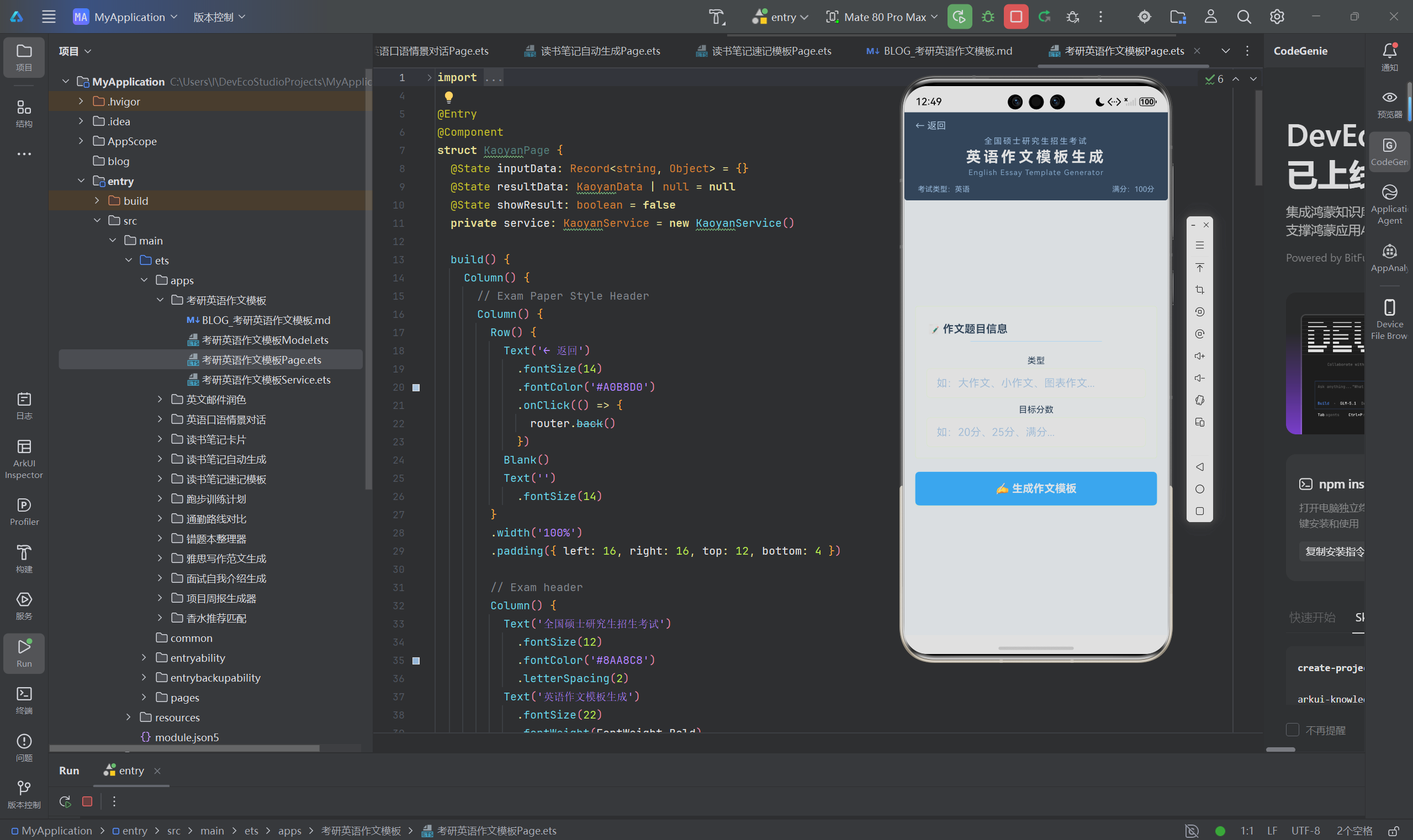
5.1 页面布局
┌──────────────────────────────────┐
│ ← 返回      考研英语作文           │
├──────────────────────────────────┤
│  输入信息                         │
│  ┌──────────────────────┐       │
│  │ 类型                  │       │
│  │ [英语一]              │       │
│  │ 目标分数              │       │
│  │ [25分]                │       │
│  └──────────────────────┘       │
│  ┌──────────────────────┐       │
│  │     AI 生成            │       │
│  └──────────────────────┘       │
│  ┌──────────────────────┐       │
│  │ 作文模板              │       │
│  │ [As is vividly       │       │
│  │  depicted in the     │       │
│  │  picture...]          │       │
│  └──────────────────────┘       │
│  可填充部分                       │
│  • [描述图画内容]替换说明          │
│  • [分析原因]替换说明              │
│  高分句型                         │
│  1. There is no denying...       │
│  2. It is universally...         │
│  使用建议                         │
│  建议将模板中的[填充内容]...      │
└──────────────────────────────────┘
5.2 交互优化
5.2.1 模板预览
作文模板以卡片形式展示,使用 [填充内容] 标记可替换部分,一目了然。
5.2.2 颜色编码
- 蓝色:可填充部分标记
- 绿色:高分句型序号
5.3 资源管理
.fontColor($r('app.color.text_primary'))
.fontColor($r('app.color.text_secondary'))
.backgroundColor('#F8FAFC')
.backgroundColor('#FFFFFF')
六、性能优化与最佳实践
6.1 ArkTS 约束适配
6.1.1 字符串模板
// 正确:使用模板字符串构建 Prompt
let prompt: string = `考试类型:${type},目标分数:${score}`
6.1.2 数组遍历
// 正确:使用 ForEach
ForEach(resultData.fillable, (item: string, index: number) => {
  Text(item)
}, (item: string, index: number) => index.toString())
6.2 性能优化
6.2.1 条件渲染
if (this.showResult && this.resultData !== null) {
  // 结果渲染
}
6.3 错误处理
generateData(input: Record<string, Object>): KaoyanData {
  try {
    if (!input['type'] || !input['target_score']) {
      throw new Error('输入不完整')
    }
    return this.parseResponse(this.callAI(this.buildPrompt(...)), new KaoyanData())
  } catch (e) {
    return this.getDefaultTemplate()
  }
}

private getDefaultTemplate(): KaoyanData {
  let result: KaoyanData = new KaoyanData()
  result.template = 'As is vividly depicted in the picture,...'
  result.high_level_phrases = ['There is no denying that...']
  result.usage_tip = '请替换模板中的[填充内容]'
  return result
}
6.4 代码组织
考研英语作文模板/
├── 考研英语作文模板Model.ets     # 数据模型
├── 考研英语作文模板Service.ets    # 业务逻辑
└── 考研英语作文模板Page.ets      # 页面组件
七、总结与展望
7.1 项目成果
- 实现了基于 AI 的考研英语作文模板生成
- 根据不同考试类型和分数目标提供差异化模板
- 包含可填充部分、高分句型、使用建议等多维度内容
- Model-Service-Page 架构确保代码清晰可维护
7.2 技术经验
- 考研英语评分标准的提示词注入是模板质量的关键
- 分数档位策略需要差异化设计
- 模板中的可填充标记设计便于用户使用
7.3 未来展望
- 支持范文示例生成,展示模板的实际应用效果
- 接入作文批改功能,自动评估用户写作质量
- 支持个性化词汇库,根据用户水平推荐适当词汇
本文通过考研英语作文模板 AI 应用的完整开发实践,详细阐述了 HarmonyOS + ArkTS + AI 的技术栈应用。从考研英语评分标准提示词工程到 ArkUI 多维度结果展示,全面展示了鸿蒙平台上智慧教育工具开发的全流程。](https://i-blog.csdnimg.cn/direct/bbb7f1b416004c32a3ce9f723f9ce81d.png)

讨论HarmonyOS开发技术,专注于API与组件、DevEco Studio、测试、元服务和应用上架分发等。
更多推荐



 4
4 0
0- 0


 已为社区贡献113条内容

所有评论(0)