鸿蒙原生开发手记:徒步迹 - 显式动画与转场动画
·
鸿蒙原生开发手记:徒步迹 - 显式动画与转场动画
使用显式动画和转场动画实现高级 UI 效果
前言
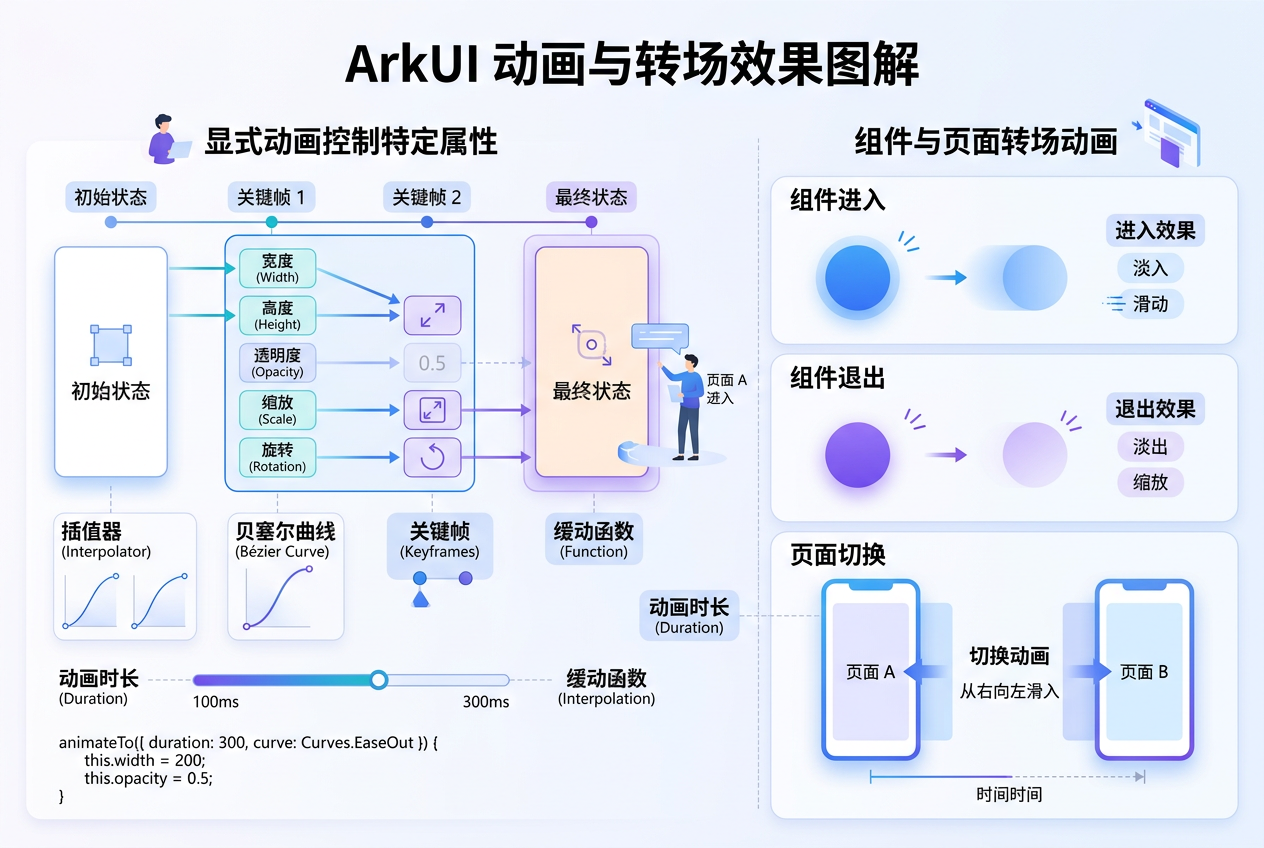
显式动画提供了更精细的动画控制能力,而转场动画则用于组件挂载/卸载时的过渡效果。ArkUI 的显式动画和转场动画让徒步迹的页面切换和交互反馈更加流畅自然。
一、显式动画
@Entry
@Component
struct ExplicitAnimationDemo {
  @State width: number = 100;
  @State height: number = 100;
  @State borderRadius: number = 16;
  @State bgColor: string = '#4CAF50';

  build() {
    Column() {
      Column() {
        Text('点击变化').fontColor(Color.White).fontSize(16);
      }
      .width(this.width).height(this.height)
      .backgroundColor(this.bgColor).borderRadius(this.borderRadius)
      .justifyContent(FlexAlign.Center).margin({ top: 40 })
      .onClick(() => {
        // 显式动画:同时控制多个属性变化
        animateTo({
          duration: 800,
          curve: Curve.SpringMotion,
          onFinish: () => console.log('动画完成'),
        }, () => {
          this.width = this.width === 100 ? 200 : 100;
          this.height = this.height === 100 ? 200 : 100;
          this.borderRadius = this.borderRadius === 16 ? 100 : 16;
          this.bgColor = this.bgColor === '#4CAF50' ? '#FF9800' : '#4CAF50';
        });
      });
    }
    .width('100%').height(300).padding(24);
  }
}
二、转场动画
@Entry
@Component
struct TransitionDemo {
  @State showPanel: boolean = false;

  build() {
    Stack() {
      Column() {
        Button(this.showPanel ? '关闭面板' : '打开面板')
          .onClick(() => { this.showPanel = !this.showPanel; });
      }
      .width('100%').height('100%').padding(24);

      // 转场动画:面板滑入/滑出
      if (this.showPanel) {
        Column() {
          Text('设置面板').fontSize(18).fontWeight(FontWeight.Bold);
          // 设置选项
        }
        .width('100%').height(300).backgroundColor(Color.White)
        .borderRadius({ topLeft: 20, topRight: 20 })
        .padding(24).position({ bottom: 0 })
        .transition({
          type: TransitionType.Insert,
          translate: { y: 300 },
          opacity: 0,
        })
        .transition({
          type: TransitionType.Delete,
          translate: { y: 300 },
          opacity: 0,
        });
      }
    }
    .width('100%').height('100%');
  }
}
| 动画类型 | 核心 API | 控制粒度 | 适用场景 |
|---|---|---|---|
| 隐式动画 | animateTo() |
中 | 状态变化触发的简单动画 |
| 显式动画 | animateTo() + 多属性 |
细 | 需要精细控制多个属性的场景 |
| 转场动画 | .transition() |
粗 | 组件挂载/卸载的过渡 |
| 共享元素 | .sharedTransition() |
细 | 两个页面间元素过渡 |
三、总结
显式动画和转场动画是 ArkUI 动画体系的重要组成部分。显式动画适合需要对多个属性进行精细控制的场景,转场动画则让页面切换和面板展示更加自然流畅。
总结
本文围绕“徒步迹“应用的实际开发场景,系统讲解了相关技术的实现要点。通过代码实战+原理剖析的方式,帮助开发者快速掌握 HarmonyOS NEXT 的核心开发能力。
总结要点
- 理解 HarmonyOS NEXT 应用架构与 Ability 生命周期
- 掌握 ArkUI 声明式 UI 的状态管理与组件化开发
- 熟悉常用 Kit 能力(Map Kit、Location Kit、Camera Kit 等)的接入方式
- 学会性能优化、内存管理、并发编程等进阶技巧
- 具备从 0 到 1 构建完整 HarmonyOS 应用工程的能力
核心特性回顾
- 声明式 UI:ArkUI 提供简洁高效的声明式开发范式
- 状态管理:@State、@Prop、@Link、@Provide、@Consume 等装饰器
- 跨组件通信:通过 Provide/Consume 实现跨层级数据传递
- 原生能力:通过 Kit 接入系统能力(地图、定位、相机等)
- 性能优化:LazyForEach、虚拟列表、Skeleton 骨架屏等
学习建议:技术学习重在实践,建议结合项目源码同步动手操作,遇到问题多查阅HarmonyOS 官方文档。
下一篇预告:鸿蒙原生开发手记:徒步迹 - 持续更新中
如果这篇文章对你有帮助,欢迎点赞👍、收藏⭐、关注🔔,你的支持是我持续创作的动力!
相关资源:
- 开源鸿蒙跨平台社区:https://openharmonycrossplatform.csdn.net
- HarmonyOS 官方文档:https://developer.huawei.com/consumer/cn//
- OpenHarmony 开源项目:https://www.openharmony.cn/
- ArkUI 组件参考:https://developer.huawei.com/consumer/cn/doc/harmonyos-guides/arkts-ui-development
- 徒步迹项目源码:GitHub - hiking-trail-harmonyos
- DevEco Studio 下载:https://developer.huawei.com/consumer/cn/deveco-studio/
- ArkTS 语言指南:https://developer.huawei.com/consumer/cn/doc/harmonyos-guides/arkts-overview
- 系列文章导航:CSDN 博客 - 鸿蒙原生开发手记

讨论HarmonyOS开发技术,专注于API与组件、DevEco Studio、测试、元服务和应用上架分发等。
更多推荐
 3
3 0
0- 0


 已为社区贡献44条内容

所有评论(0)