鸿蒙Flutter 组件内部状态管理
·
概述
组件内部状态管理是 Flutter 开发中最基础也是最常用的状态管理方式。在开发电商购物车应用时,理解组件内部状态管理是构建健壮应用的第一步。
什么是组件内部状态管理
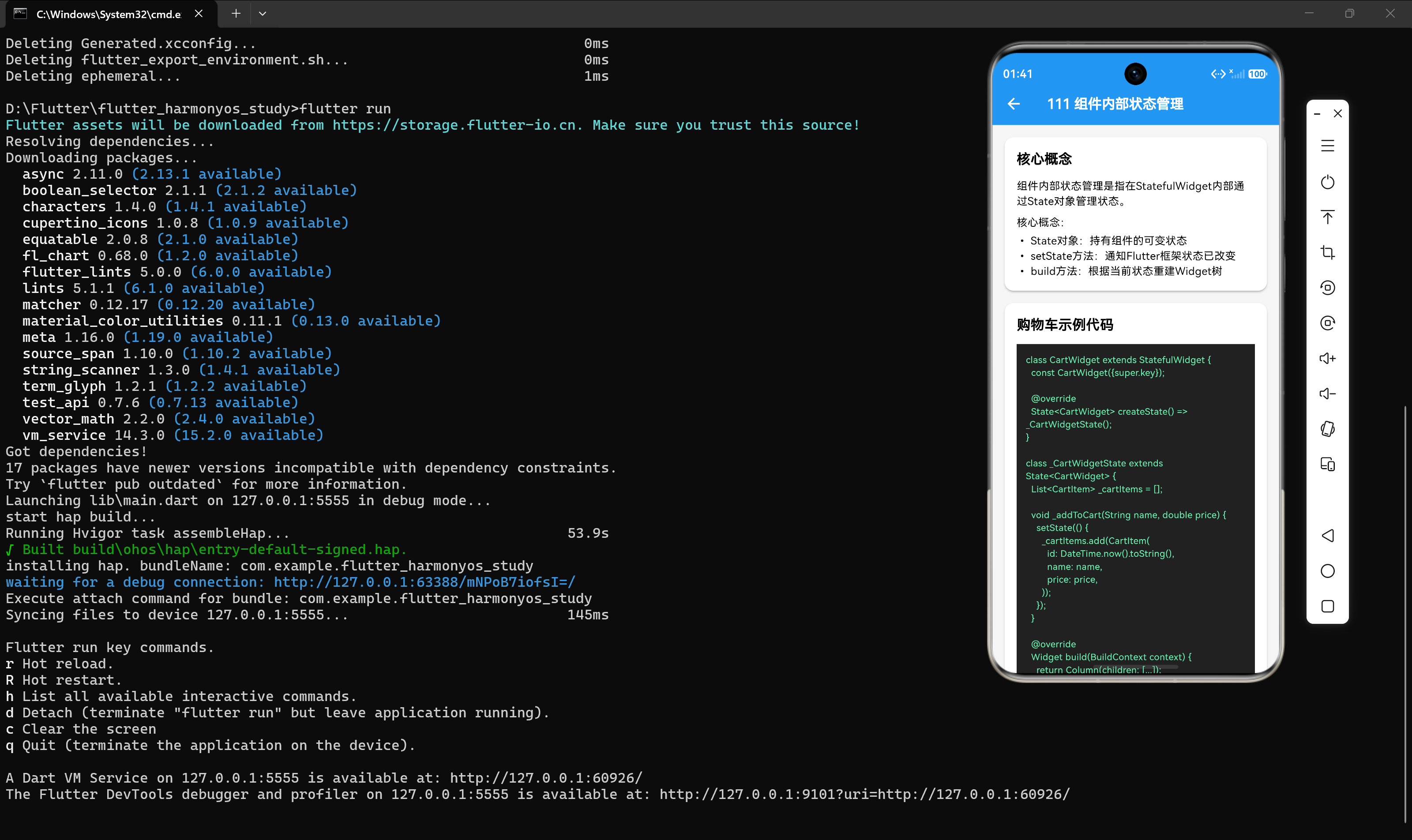
组件内部状态管理指的是在 StatefulWidget 内部通过 State 对象来管理状态。这种方式适用于状态只影响单个组件或少数紧密相关组件的场景。
核心概念
- State 对象:持有组件的可变状态,生命周期与组件绑定
- setState 方法:通知 Flutter 框架状态已改变,触发重建
- build 方法:根据当前状态重建 Widget 树
购物车示例
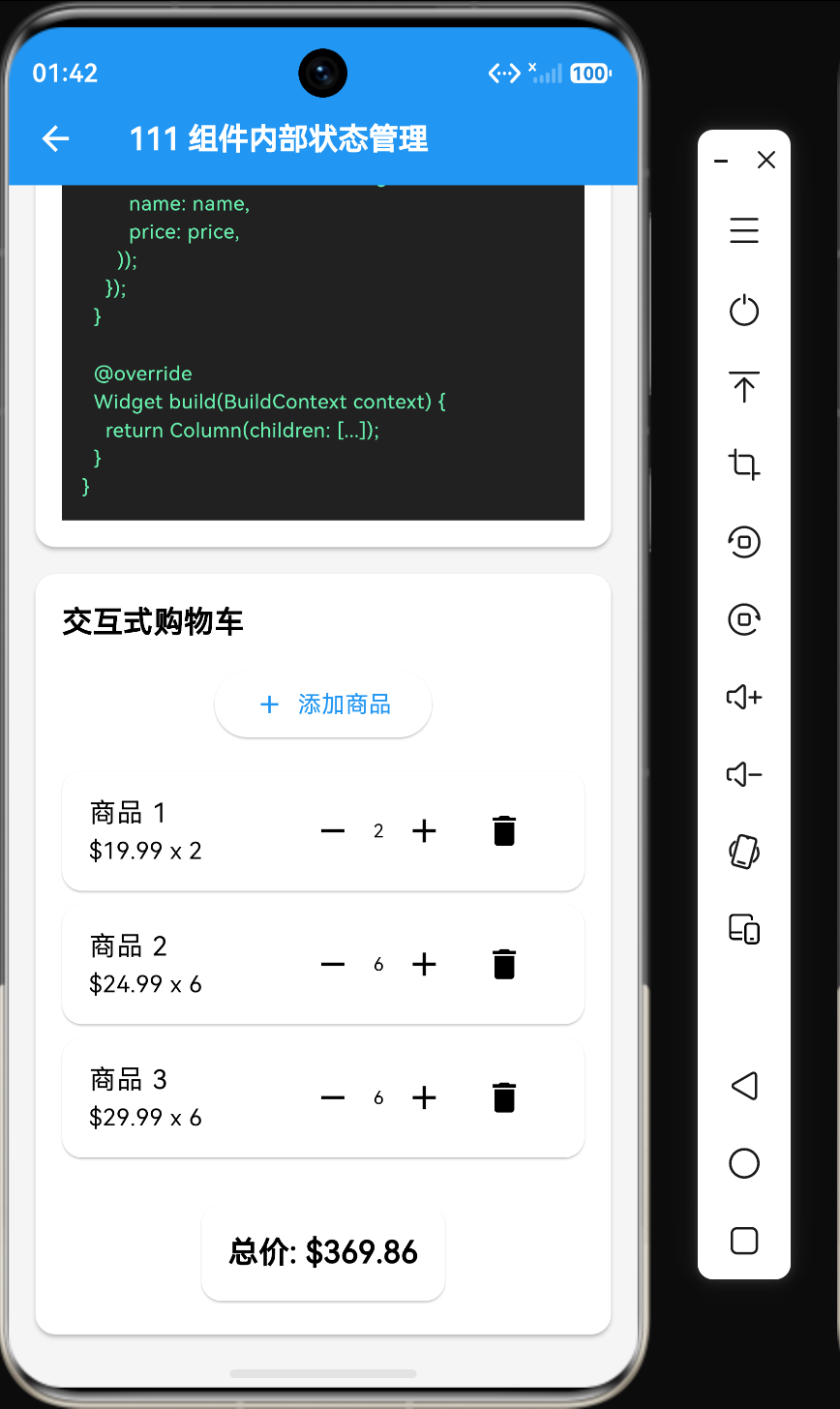
让我们通过一个购物车示例来理解组件内部状态管理:
第一步:定义数据模型
class CartItem {
  final String id;
  final String name;
  final double price;
  int quantity;

  CartItem({
    required this.id,
    required this.name,
    required this.price,
    this.quantity = 1,
  });
}
这个数据模型定义了购物车商品的基本属性:唯一标识、名称、价格和数量。注意 quantity 是可变的,因为用户可能会增加或减少商品数量。
第二步:创建 StatefulWidget
class CartWidget extends StatefulWidget {
const CartWidget({super.key});
State<CartWidget> createState() => _CartWidgetState();
}
StatefulWidget 本身是不可变的,它只是一个配置对象。真正的状态管理发生在 State 对象中。
第三步:实现 State 类
class _CartWidgetState extends State<CartWidget> {
List<CartItem> _cartItems = [];
void _addToCart(String name, double price) {
setState(() {
_cartItems.add(CartItem(
id: DateTime.now().toString(),
name: name,
price: price,
));
});
}
void _removeFromCart(String id) {
setState(() {
_cartItems.removeWhere((item) => item.id == id);
});
}
void _updateQuantity(String id, int quantity) {
setState(() {
final item = _cartItems.firstWhere((item) => item.id == id);
item.quantity = quantity;
});
}
double get _totalPrice {
  return _cartItems.fold(0, (sum, item) => sum + item.price * item.quantity);
}
Widget build(BuildContext context) {
return Column(
children: [
ElevatedButton(
onPressed: () => _addToCart('商品A', 19.99),
child: const Text('添加商品'),
),
if (_cartItems.isEmpty)
const Text('购物车为空')
else
Column(
children: _cartItems.map((item) => _buildCartItem(item)).toList(),
),
Text('总价: \$${_totalPrice.toStringAsFixed(2)}'),
],
);
}
Widget _buildCartItem(CartItem item) {
return ListTile(
title: Text(item.name),
subtitle: Text('\$${item.price} x ${item.quantity}'),
trailing: Row(
mainAxisSize: MainAxisSize.min,
children: [
IconButton(
icon: const Icon(Icons.remove),
onPressed: () => _updateQuantity(item.id, item.quantity - 1),
),
Text(item.quantity.toString()),
IconButton(
icon: const Icon(Icons.add),
onPressed: () => _updateQuantity(item.id, item.quantity + 1),
),
IconButton(
icon: const Icon(Icons.delete),
onPressed: () => _removeFromCart(item.id),
),
],
),
);
}
}
关键要点
setState 的工作机制
setState 方法是组件内部状态管理的核心,它的工作流程如下:
- 调用
setState(() {...}) - 将回调函数加入待处理队列
- 标记当前 State 为"脏"状态(dirty)
- 触发 Flutter 框架的重建流程
- 调用
build方法重建 Widget 树 - 对比新旧 Widget 树,更新差异部分
状态的可见性
组件内部状态是私有的,只能在 State 类内部访问和修改。这保证了状态的封装性,防止外部组件意外修改状态。
适用场景
组件内部状态管理适用于以下场景:
- 状态只影响单个组件
- 状态不需要跨组件传递
- 状态变化不频繁
- 简单的交互逻辑
优缺点分析
优点
- 简单直接:不需要引入额外的状态管理库
- 易于理解:状态管理逻辑集中在一个地方
- 性能良好:重建范围可控
- 代码量少:适合快速开发
缺点
- 状态共享困难:无法直接在多个组件间共享状态
- 逻辑耦合:状态管理和 UI 逻辑耦合在一起
- 测试困难:难以单独测试状态管理逻辑
- 扩展性差:随着应用复杂度增加,难以维护
最佳实践
1. 保持状态最小化
只在必要时使用状态,避免冗余状态。例如,总价可以通过计算得出,不需要单独存储。
double get _totalPrice {
return _cartItems.fold(0, (sum, item) => sum + item.price * item.quantity);
}
2. 使用私有变量
将状态变量声明为私有(以 _ 开头),防止外部访问。
List<CartItem> _cartItems = []; // 私有变量
3. 封装状态操作
将状态操作封装为方法,提高代码的可读性和可维护性。
void _addToCart(String name, double price) { ... }
void _removeFromCart(String id) { ... }
void _updateQuantity(String id, int quantity) { ... }
4. 避免在 build 方法中执行耗时操作
build 方法会被频繁调用,避免在其中执行耗时操作。
// 错误示例
Widget build(BuildContext context) {
final total = _calculateTotal(); // 每次build都会执行
return Text('总价: \$$total');
}
// 正确示例
Widget build(BuildContext context) {
return Text('总价: \$${_totalPrice}'); // 使用getter
}
总结
组件内部状态管理是 Flutter 状态管理的基础,适用于简单场景。理解它的工作原理对于掌握更复杂的状态管理方案至关重要。在下一节中,我们将深入探讨 setState 的机制。

讨论HarmonyOS开发技术,专注于API与组件、DevEco Studio、测试、元服务和应用上架分发等。
更多推荐
 5
5 0
0- 0


 已为社区贡献10条内容

所有评论(0)