HarmonyOS 6.0 拖拽排序与列表动画
列表排序看起来简单——不就是数组元素换个位置吗?但加上动画和交互就有很多细节:拖拽时视觉反馈、松手后的位置动画、排序过程中的状态同步。这篇从手动排序到拖拽排序,把动画细节全说清楚。
数组重排算法
最基础的操作——把数组元素从位置A移到位置B:
private moveItem(from: number, to: number): void {
  let item: DataItem = this.items[from];
  let newItems: DataItem[] = [];
  // 先移除from位置的元素
  for (let i: number = 0; i < this.items.length; i++) {
    if (i !== from) {
      newItems.push(this.items[i]);
    }
  }
  // 在to位置插入
  let result: DataItem[] = [];
  for (let i: number = 0; i < newItems.length; i++) {
    if (i === to) {
      result.push(item);
    }
    result.push(newItems[i]);
  }
  if (to >= newItems.length) {
    result.push(item);
  }
  this.items = result;
}
关键:必须给this.items赋值新数组,不能直接splice修改。@State数组的变更检测依赖引用变化,直接修改原数组不会触发UI刷新。
更简洁的方式(如果运行时支持):
let item: DataItem = this.items.splice(from, 1)[0];
this.items.splice(to, 0, item);
this.items = [...this.items]; // 触发刷新
但ArkTS不支持解构和展开运算符,所以用for循环构建新数组是最安全的做法。
上下移动按钮
最简单的排序UI——每个列表项旁边有↑↓按钮:
Row() {
  Text(item.title)
    .layoutWeight(1)

  Button('↑')
    .onClick(() => {
      if (index > 0) {
        this.moveItem(index, index - 1);
      }
    })

  Button('↓')
    .onClick(() => {
      if (index < this.items.length - 1) {
        this.moveItem(index, index + 2); // +2因为移除后索引偏移
      }
    })
}
moveItem的to参数要注意:移除from元素后,目标位置的含义会变。上移一位是index-1,下移一位是index+2(因为当前元素被移除后,后面的元素都前移了一位)。
位置动画
排序后列表项位置变化,加animation让变化有过渡:
ListItem() {
  Row() {
    // 内容
  }
  .width('100%')
  .padding(12)
  .borderRadius(10)
  .backgroundColor('#ffffff')
  .animation({ duration: 200, curve: Curve.EaseInOut })
}
animation修饰器加在ListItem的内容容器上。当items数组重排后,ForEach根据key重新分配数据,组件位置变化,animation让位移产生过渡动画。
ForEach的key必须稳定——用item.id不要用index。index在排序后会变,导致ForEach错误地复用组件,动画就会错乱。
拖拽项视觉反馈
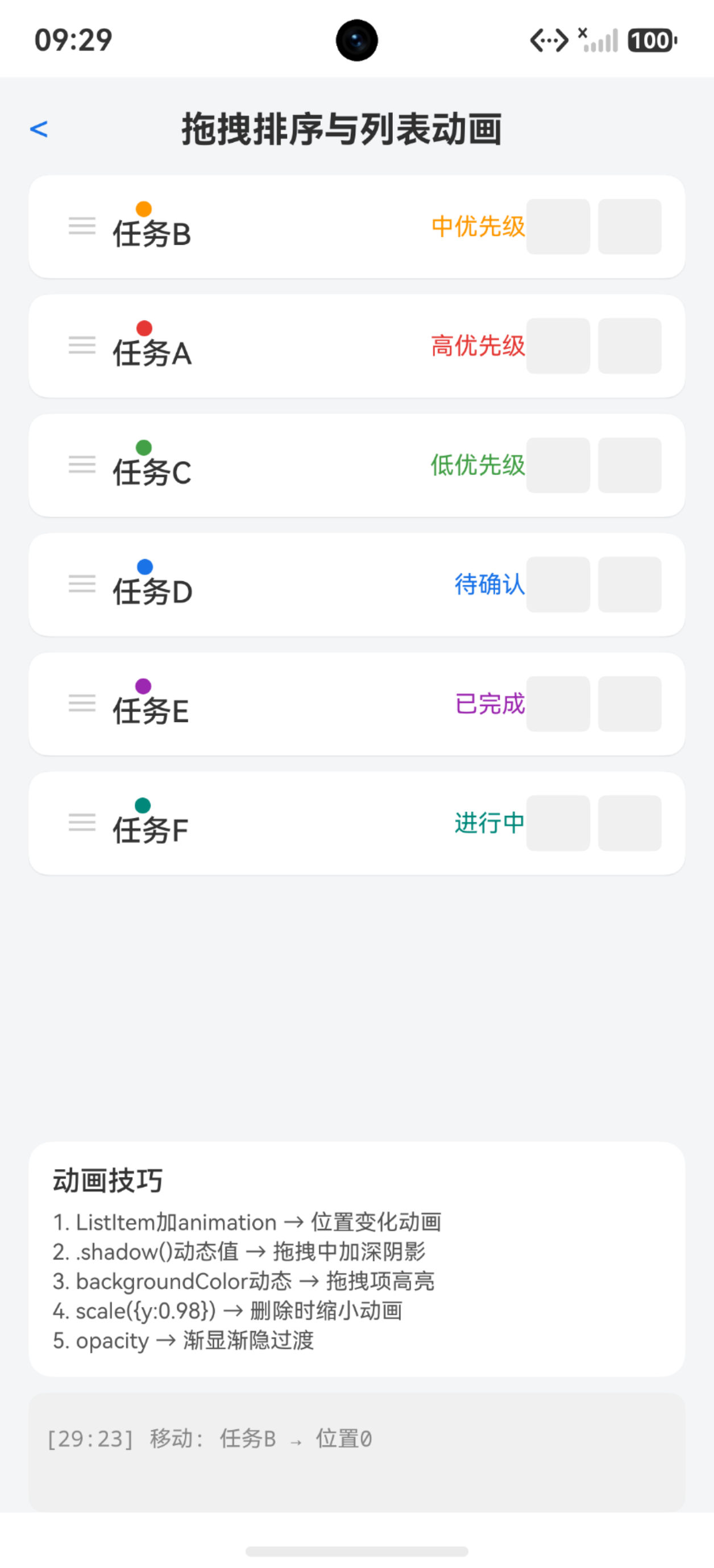
拖拽中的列表项需要视觉区分——背景色变化、阴影加深、轻微放大:
@State dragIndex: number = -1;

Row() {
  // 内容
}
.backgroundColor(this.dragIndex === index ? '#e3f2fd' : '#ffffff')
.shadow({
  radius: this.dragIndex === index ? 8 : 2,
  color: '#1a000000',
  offsetY: this.dragIndex === index ? 2 : 1
})
.scale({
  x: this.dragIndex === index ? 1.02 : 1,
  y: this.dragIndex === index ? 1.02 : 1
})
.animation({ duration: 150, curve: Curve.EaseOut })
三个视觉变化同时发生:背景变蓝、阴影加深、轻微放大1.02倍。animation让变化有过渡。
dragIndex在拖拽开始时设为当前index,拖拽结束时恢复-1。
PanGesture拖拽排序
用PanGesture实现跟手拖拽:
Row() {
  Text('≡')  // 拖拽手柄
  Text(item.title)
}
.gesture(
  PanGesture()
    .onActionStart(() => {
      this.dragIndex = index;
    })
    .onActionUpdate((event: GestureEvent) => {
      // 根据event.offsetY计算当前应该在的位置
      let currentY: number = this.itemPositions[index] + event.offsetY;
      let newIndex: number = this.calculateNewIndex(currentY);
      if (newIndex !== index && newIndex !== this.targetIndex) {
        this.targetIndex = newIndex;
      }
    })
    .onActionEnd(() => {
      if (this.targetIndex >= 0) {
        this.moveItem(this.dragIndex, this.targetIndex);
      }
      this.dragIndex = -1;
      this.targetIndex = -1;
    })
)
PanGesture的onActionUpdate提供offsetY——手指从起始位置的偏移。根据偏移计算当前应该在哪个位置,实时预览排序效果。
但PanGesture有个问题:ListItem的PanGesture会跟List的滚动冲突。需要用priorityGesture或者用专门的拖拽手柄区域。
List内置拖拽API
List组件有onDragStart/onDrop等拖拽回调:
List() {
  ForEach(this.items, (item: DataItem, index: number) => {
    ListItem() {
      Row() {
        Text(item.title)
      }
    }
    .onDragStart((event: DragEvent) => {
      this.dragIndex = index;
      return this.dragBuilder(item);
    })
    .onDrop((event: DragEvent) => {
      let targetIndex: number = this.calculateDropIndex(event.y);
      this.moveItem(this.dragIndex, targetIndex);
      this.dragIndex = -1;
    })
  }, (item: DataItem) => item.id)
}
onDragStart返回一个@Builder作为拖拽预览图。onDrop在松手时触发,event.y可以计算放置位置。
但onDragStart/onDrop在List中的行为不够稳定——长按触发拖拽的灵敏度、跨ListItem的拖拽位置计算都有坑。实际项目中更常用按钮排序+动画过渡,而不是真正拖拽。
删除动画
列表项删除时的动画效果:
@State removingIndex: number = -1;

Row() {
  Text(item.title)
}
.scale({
  x: this.removingIndex === index ? 0.8 : 1,
  y: this.removingIndex === index ? 0.8 : 1
})
.opacity(this.removingIndex === index ? 0 : 1)
.animation({ duration: 200, curve: Curve.EaseIn })

// 触发删除
removeItem(index: number): void {
  this.removingIndex = index;
  setTimeout(() => {
    let newItems: DataItem[] = [];
    for (let i: number = 0; i < this.items.length; i++) {
      if (i !== index) { newItems.push(this.items[i]); }
    }
    this.items = newItems;
    this.removingIndex = -1;
  }, 200);
}
删除分两步:先动画(缩小+渐隐),200ms后真正移除数据。setTimeout延迟匹配animation时长。
插入动画
新项目插入时渐显+放大:
@State newItemIndex: number = -1;

Row() {
  Text(item.title)
}
.scale({
  x: this.newItemIndex === index ? 1 : 0.5,
  y: this.newItemIndex === index ? 1 : 0.5
})
.opacity(this.newItemIndex === index ? 1 : 0)
.animation({ duration: 300, curve: Curve.EaseOut })

// 插入后
insertItem(item: DataItem, at: number): void {
  this.newItemIndex = at;
  let newItems: DataItem[] = [];
  for (let i: number = 0; i < this.items.length; i++) {
    if (i === at) { newItems.push(item); }
    newItems.push(this.items[i]);
  }
  if (at >= this.items.length) { newItems.push(item); }
  this.items = newItems;
  setTimeout(() => { this.newItemIndex = -1; }, 300);
}
初始scale 0.5和opacity 0,动画到1和1。300ms后清除标记。这样新插入的项有一个"出现"的动画。
列表动画的性能注意
动画越多性能开销越大。几个优化点:
- 只对可见项做动画:removingIndex/newItemIndex只影响一个项
- animation时长别太长:200ms够用,超过300ms用户会觉得卡
- 避免大范围重绘:排序时ForEach只更新变化项,key要稳定
- shadow开销大:大量列表项加shadow会掉帧,拖拽中临时加shadow,结束后去掉
- LazyForEach + cachedCount:大列表排序必须用LazyForEach,否则ForEach全量创建组件
交错动画
列表初始化时每项依次出现:
@State itemVisible: boolean[] = [];

aboutToAppear(): void {
  for (let i: number = 0; i < this.items.length; i++) {
    setTimeout(() => {
      this.itemVisible[i] = true;
    }, i * 50);
  }
}

Row() {
  Text(item.title)
}
.opacity(this.itemVisible[index] ? 1 : 0)
.translate({ y: this.itemVisible[index] ? 0 : 20 })
.animation({ duration: 300, curve: Curve.EaseOut })
每项延迟50ms出现,形成从上到下的波浪效果。50ms * N项 = 总延迟。10项500ms完成。
踩坑清单
| 问题 | 原因 | 解决 |
|---|---|---|
| 排序后UI没更新 | 直接修改数组没触发刷新 | 赋值新数组给this.items |
| 动画错乱 | ForEach用index作key | 改用item.id |
| PanGesture跟滚动冲突 | 两个手势互相消费 | 用priorityGesture或拖拽手柄 |
| 删除动画后列表跳 | 动画和数据移除不同步 | 动画完成后再移除数据 |
| 阴影导致掉帧 | 大量shadow组件 | 只在拖拽项加shadow |
| 移动位置计算错误 | 移除元素后索引偏移 | 先移除再计算目标位置 |
| 交错动画闪烁 | opacity初始值不对 | 初始化itemVisible为false |
| 按钮排序↑↓方向反 | moveItem的to参数理解错误 | 下移用index+2不是index+1 |
| 插入位置不准 | for循环的插入逻辑 | 在i===at时先push新项 |
| 动画中操作列表 | 动画未完成就改数据 | 加loading标记防重复操作 |
列表动画的原则是"少量项做动画,大量项保性能"。排序只影响两三个项的位置变化,用animation就够了。全列表出现动画只在初始化做一次,不要反复触发。

讨论HarmonyOS开发技术,专注于API与组件、DevEco Studio、测试、元服务和应用上架分发等。
更多推荐



 0
0 0
0- 0


 已为社区贡献127条内容

所有评论(0)