鸿蒙小案例-京东登录
·
效果
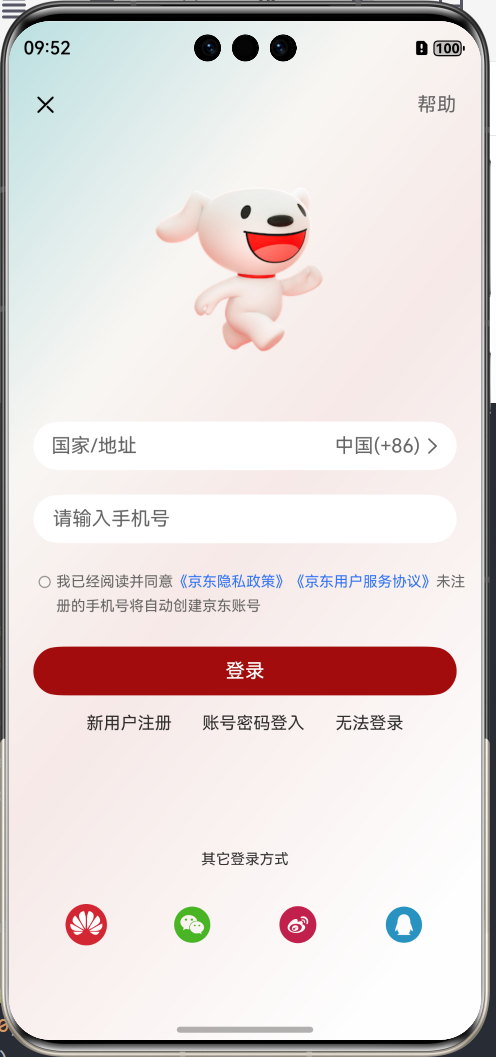
代码实现
@Entry
@Component
struct Index {
  build() {
    Column() {
      Row() {
        Image($r('app.media.jd_cancel'))
          .width(20)

        Text('帮助')
          .fontSize(16)
          .fontColor('#666')

      }
      .width('100%')
      .justifyContent(FlexAlign.SpaceBetween)

      Image($r('app.media.jd_logo'))
        .height(250)
        .width(250)
      // .backgroundColor(Color.Pink)

      // 国家/地址  -- 是点按区域,自己画出来
      /*
      TextInput({ placeholder: '国家/地址' })
        .height(40)
        .backgroundColor('#fff')
       */
      Row() {
        Text("国家/地址")
          .fontSize(16)
          .layoutWeight(1)
          .fontColor('#666')

        Text('中国(+86)')
          .fontSize(16)
          .fontColor('#666')

        Image($r('app.media.jd_right'))
          .width(20)
          .fillColor('#666')
      }
      .padding({ left: 15, right: 10 })
      .width('100%')
      .height(40)
      .backgroundColor('#fff')
      .borderRadius(20) // 胶囊按钮是高的一半

      TextInput({ placeholder: '请输入手机号' })
        .height(40)
        .backgroundColor('#fff')
        .margin({ top: 20, bottom: 20 })
        .placeholderColor('#666')

      Row(){
        Checkbox()
          .width(10)
          .margin({ top: 7})
        Text(){
          Span('我已经阅读并同意')
          Span('《京东隐私政策》')
            .fontColor('#3274f6')
          Span('《京东用户服务协议》')
            .fontColor('#3274f6')
          Span('未注册的手机号将自动创建京东账号')
        }
          .fontSize(12)
          .fontColor('#666')
        .lineHeight(20)
      }
      .width('100%')
      .alignItems(VerticalAlign.Top)

      Button('登录')
        .backgroundColor('#ffa20c0c')
        .width('100%')
        .height(40)
        .margin({ top: 25, bottom: 15 })

      Row() {
        Text('新用户注册')
          .fontSize(14)
        Text('账号密码登入')
          .fontSize(14)
          .margin({ left: 25, right: 25 })
        Text('无法登录')
          .fontSize(14)
      }

      Blank()

      Text('其它登录方式')
        .fontSize(12)
        .lineHeight(22)
        .margin({ bottom: 28 })

      Row() {
        Image($r('app.media.jd_huawei'))
          .width(34)
        Image($r('app.media.jd_wechat'))
          .width(34)
          .fillColor('#ff49b525')
        Image($r('app.media.jd_weibo'))
          .width(34)
          .fillColor('#ffc1204c')
        Image($r('app.media.jd_QQ'))
          .fillColor('#ff2892c0')
          .width(34)
      }
      .width('100%')
      .justifyContent(FlexAlign.SpaceAround)

    }
    .padding({
      top: 20,
      bottom: 50,
      left: 20,
      right: 20
    })
    .width('100%')
    .height('100%')
    // .backgroundColor('#ffe0cfcf')
    .backgroundImage($r('app.media.jd_login_bg'))
    .backgroundImageSize(ImageSize.Cover)
    .expandSafeArea([SafeAreaType.SYSTEM], [SafeAreaEdge.TOP, SafeAreaEdge.BOTTOM])
  }
}

讨论HarmonyOS开发技术,专注于API与组件、DevEco Studio、测试、元服务和应用上架分发等。
更多推荐


 4
4 0
0- 0


 已为社区贡献24条内容

所有评论(0)