鸿蒙应用开发
入门:
须有Ts的基础,才能开学习鸿蒙
应用开发导读-基础入门 - 华为HarmonyOS开发者 (huawei.com)
框架UI:
ArkUI简介-ArkUI(方舟UI框架)-应用框架 - 华为HarmonyOS开发者 (huawei.com)
第一步安装软件:
https://developer.huawei.com/consumer/cn/deveco-studio#download
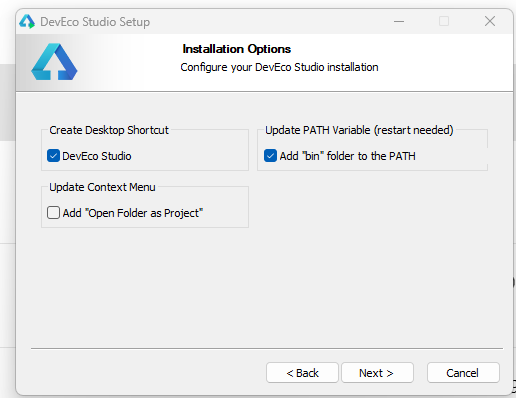
创建桌面文件和添加环境变量如下勾选:
打开软件:第一步是安装你的所有软件插件,比如nodejs等,如果不行
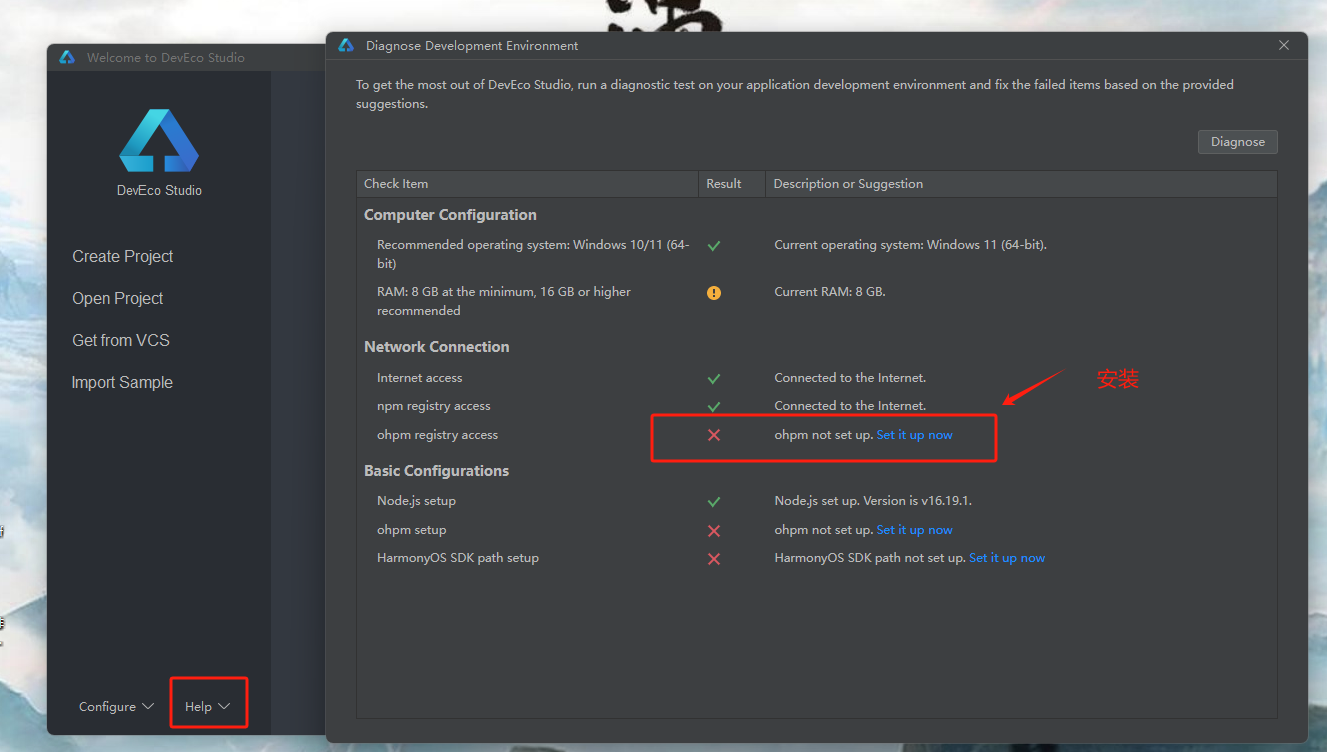
下面的sdk也都安装下(注意node版本要求,大于14,小于17才行)
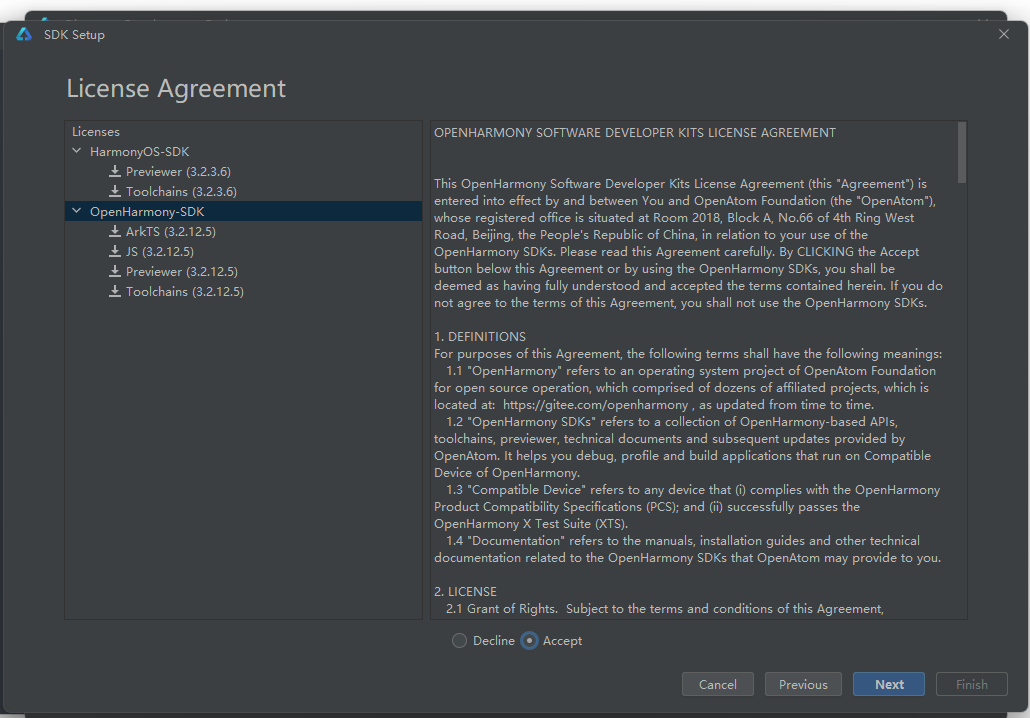
直到所有的图标都变成绿的为止!
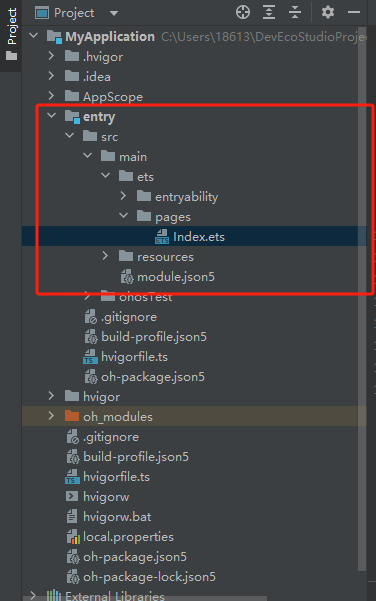
第二步:创建一个空的项目输出hello world
核心区域如下
第三步:代码语法糖
@Entry //->标记此组件是入口组件(即表示可以单独访问类似页面)
  @Component //->标记自定义组件
  struct Index {//-> 自定义组件,可以复印的UI单元
    @State message: string = 'Hello World' //@State表示值是状态变量,值发生变化,会更新ui就是我们说的domw

    build() {//->build 固定语法,表示声明UI类库
      Row() {//->ArkUi的内置组件了 分为容器组件,比如Row ,Column  和基础组件,比如Text,
        Column() {
          Text(this.message)
            .fontSize(50)   //->这里面的都是属性,比如字体,宽高,大小,都是属于方法类的属性
            .fontWeight(FontWeight.Bold)
        }
        .width('100%')
      }
      .height('100%')
    }
  }
预览设置:
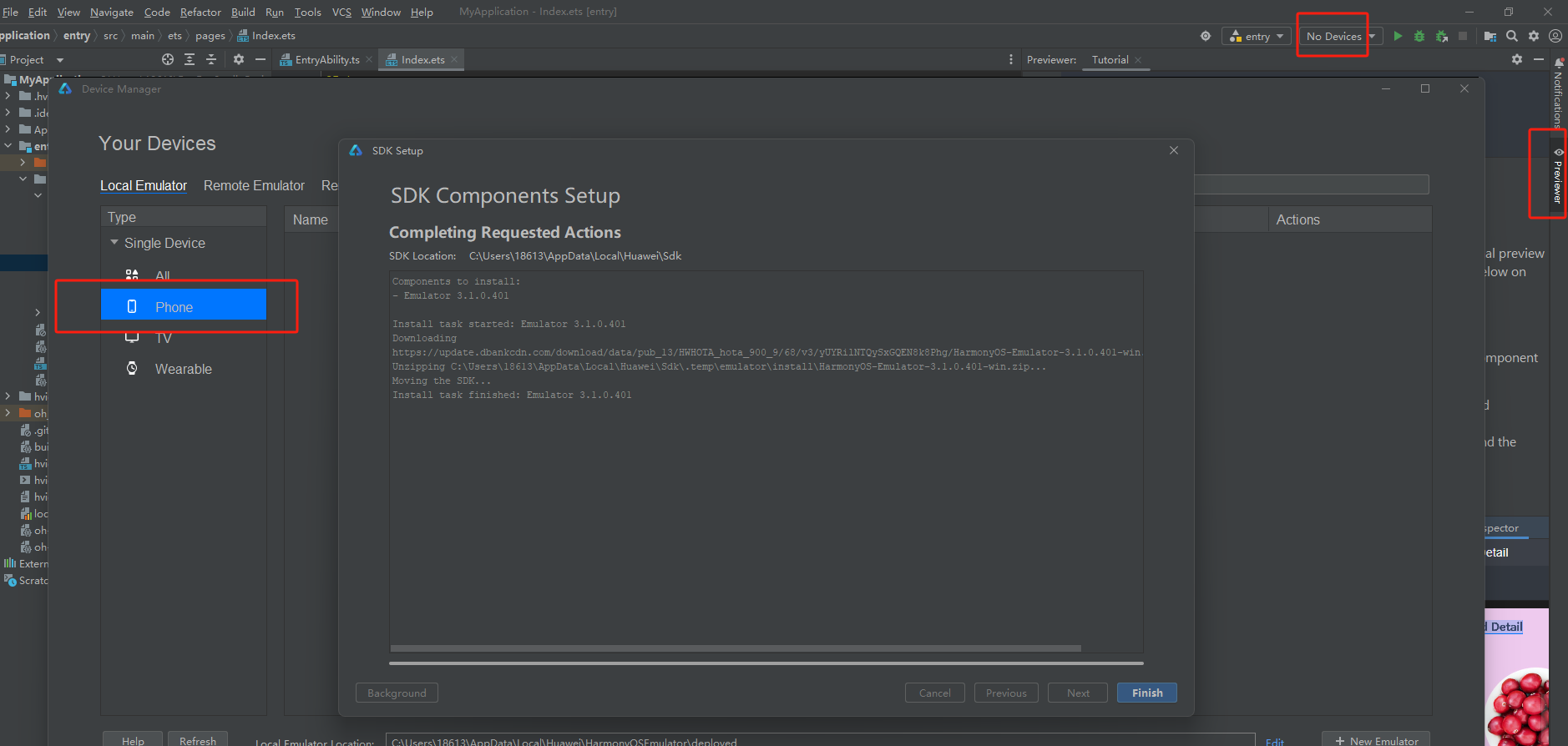
并且创建你的社保参数 安装
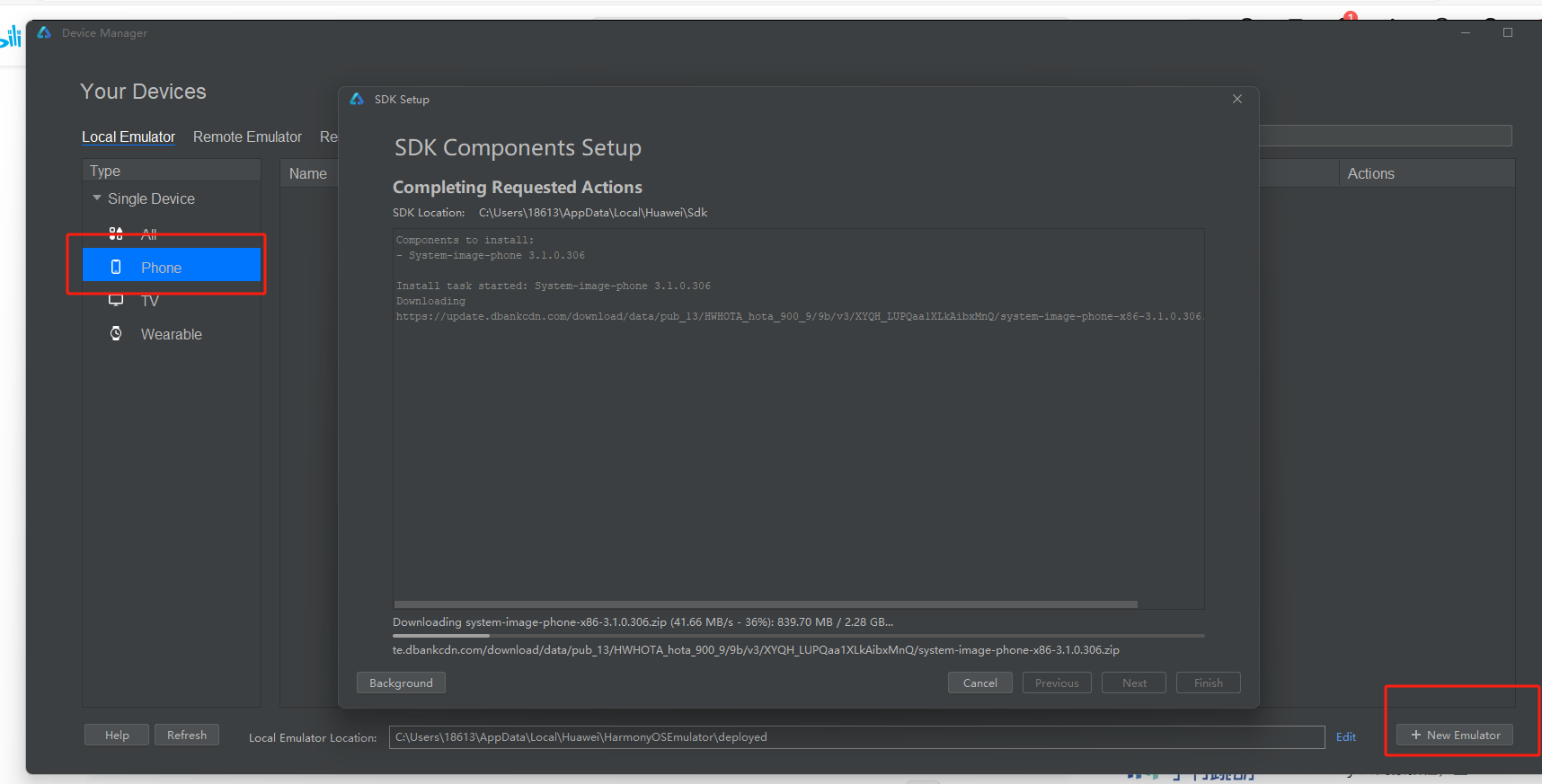
安装后,记得重启软件
右侧即可查看:
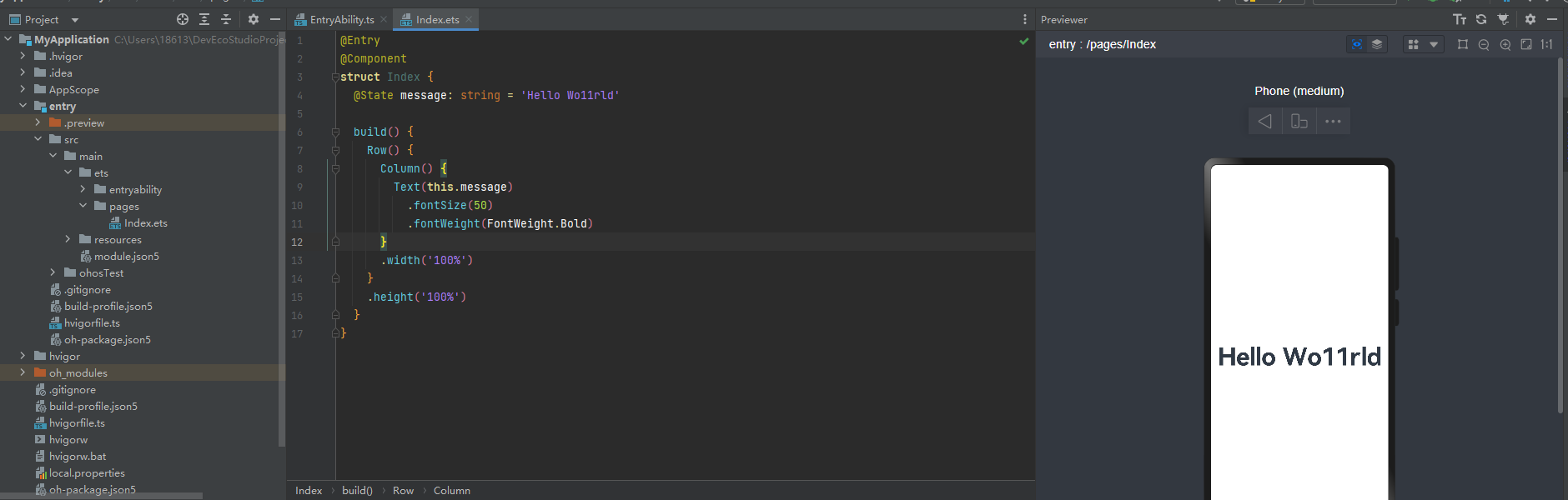
布局:
线性布局:
Column(){
      Row(){
        Text("1111")
      }
      Row(){
        Text("222")
      }
    }
Text组件使用
比如,可以加事件,可以加字体颜色等
比如宽高,可以是字符串的百分比,也可以是数值类型 30vp的分割,类似于 或者说vw vh
@Entry
@Component
struct Index {
  @State message: string = 'Hello Wo11rld'

  build() {
    Row() {
      Column() {
        Text(this.message)
          .fontSize(50)
          .fontWeight(FontWeight.Bold)
          .onClick(()=>{
            this.message = "生活就是这样"
          })
          .fontColor("red")
          .backgroundColor("#16D")
          .width('60%')
          .height(120)
      }
      .width('100%')
    }
    .height('100%')
  }
}
text的高级使用:
配置不同国家的显示情况
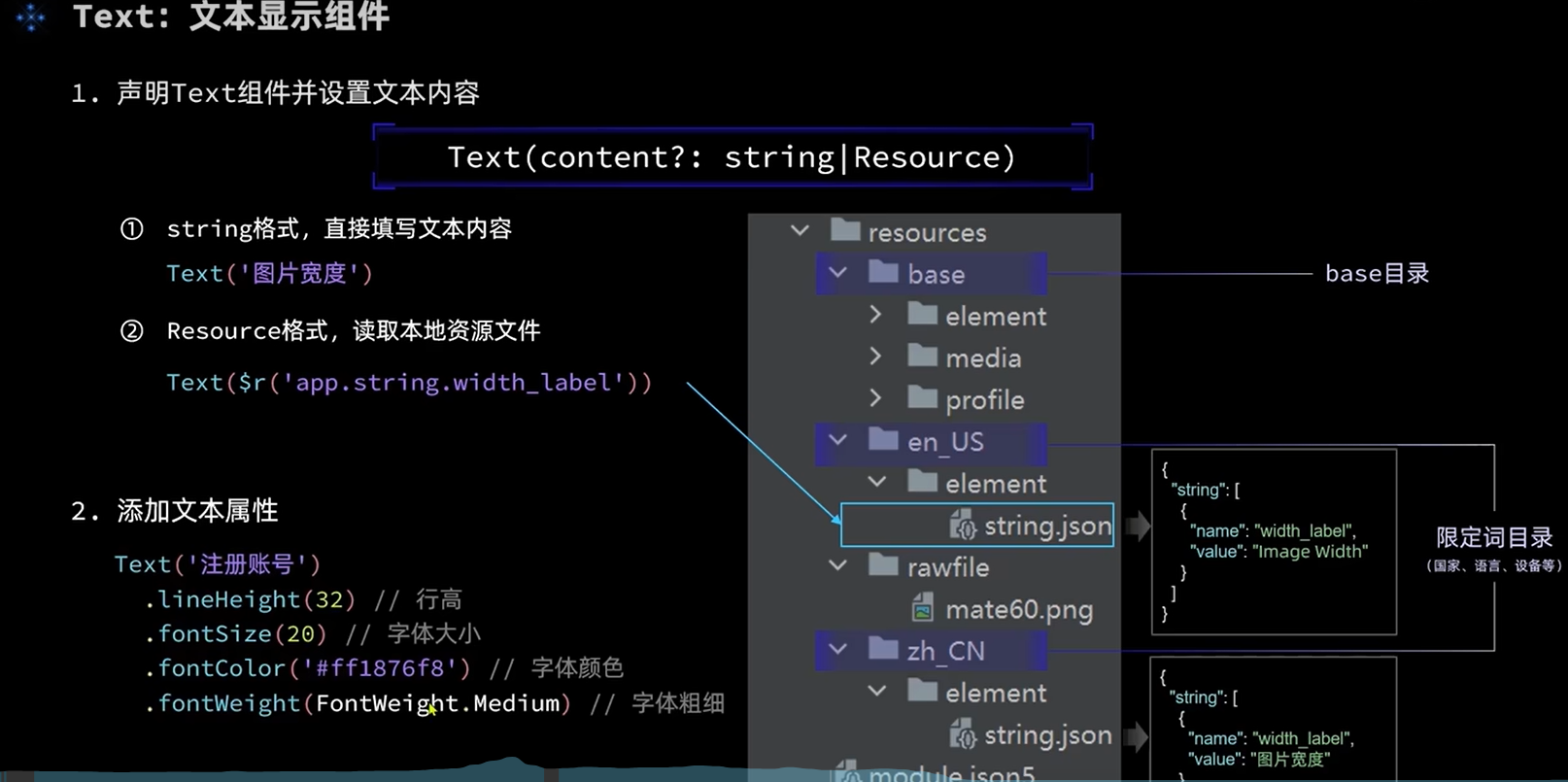
在使用的时候,就可以读取配置,而不是写死了
备注:配置这些的时候需要注意,base里面也要配置,否则会报错,而且需要你重启view界面
{
  "name": "show_label",
  "value": "文字显示"
}
代码读取:
Text($r("app.string.show_label"))image图片组件使用
注意:
1,使用网络图片,需要注意,申请网络权限,因为需在手机中使用,类似小程序的合法域名配置
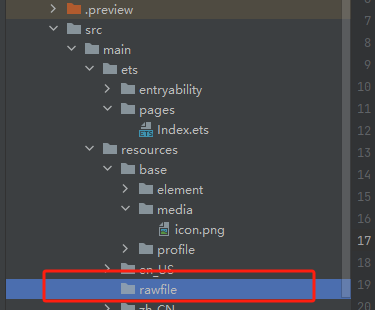
2,本地图片,注意需要放到指定位置
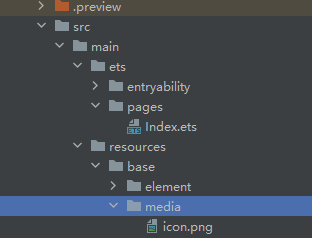
或者:
实际应用
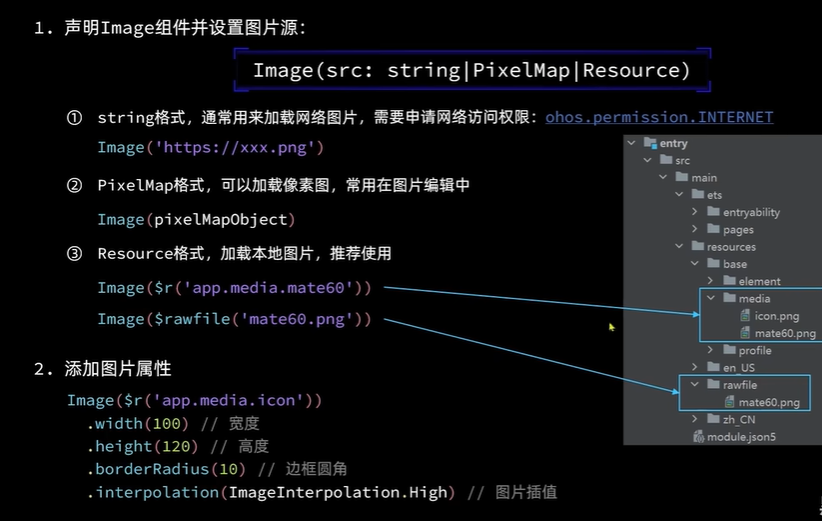
网络图片:
module.json5配置文件中配置:
      //网络图片的使用方式(但是需要配置合法域名)
        Image("https://www.zzgoodqc.cn/public/file/guomao.jpg")
          .width(300)//高度可以不写,会根据宽度自动缩放
"requestPermissions":[
{
"name": "ohos.permission.INTERNET"
}
],本地图片:
Image('images/view.jpg')
.width(200) 这样也可以
//本地图片的第一中方式 不用加后缀
Image($r('app.media.icon'))
.width(200)
.margin(10)
.interpolation(ImageInterpolation.High)//使图片更加清晰,
//方法2:在rawfile文件(新增了文件,记得重新打开浏览器链接)
Image($rawfile('timg.jpg'))
.width(100)
.backgroundColor("#39B")Textinput使用:
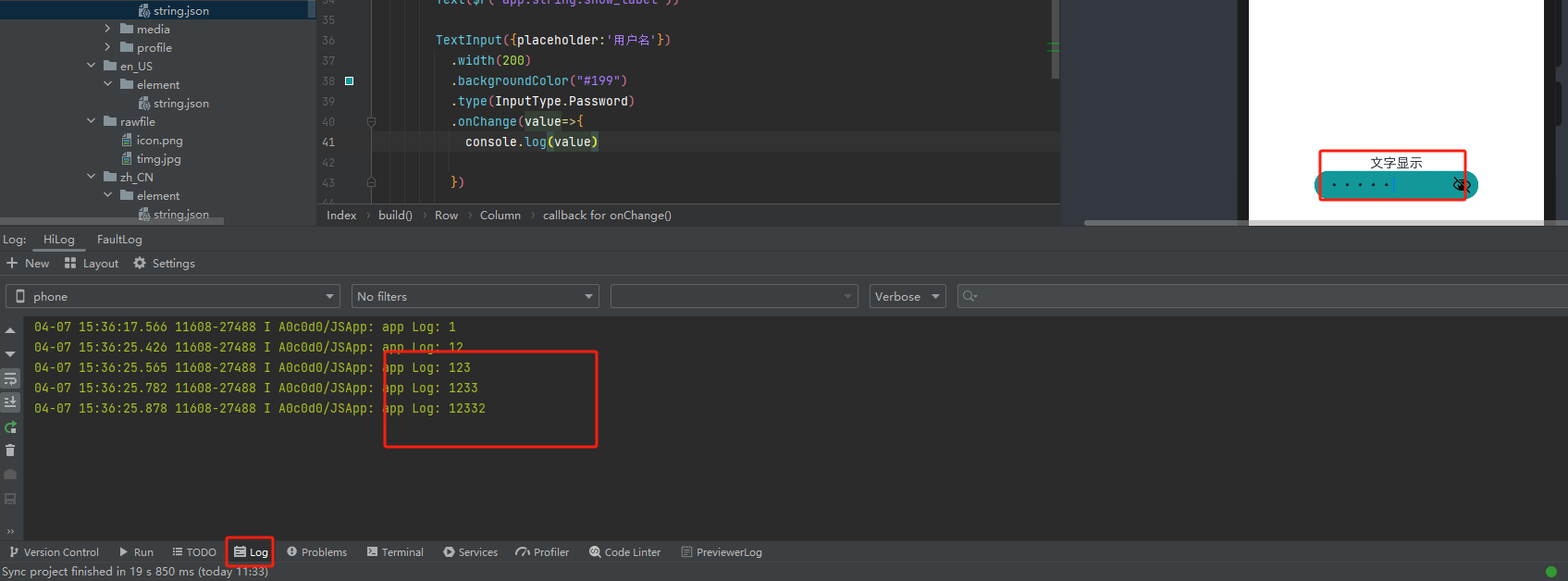
如何通过,修改输入框的的大小,改变图片的宽度
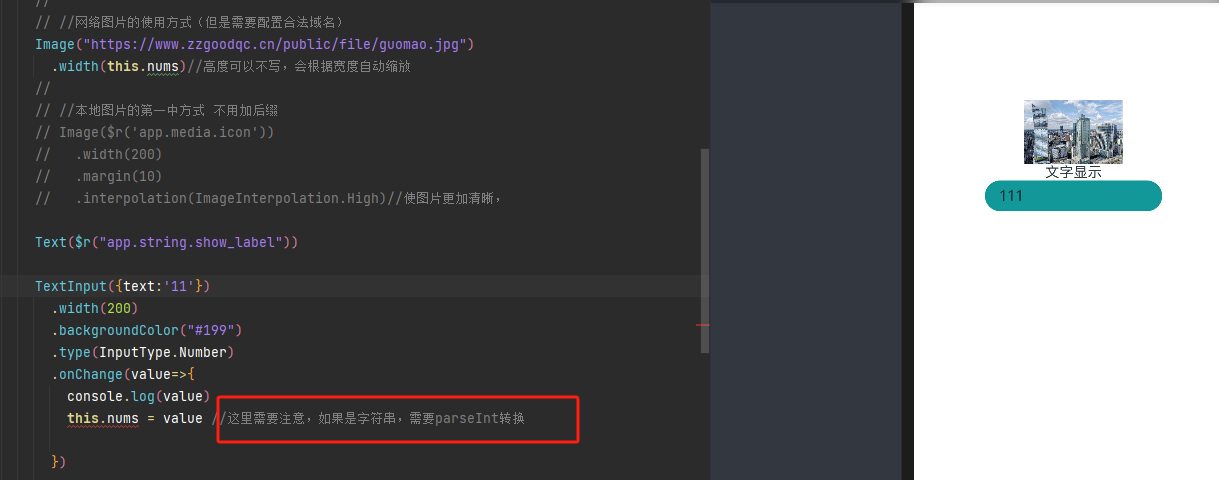
Button组件使用(请自行研究)
练习:要求使用一个粉红色的Button,和紫色的Button,实现图片的宽度的放大缩小。并且输入框也可以输入宽度,保障他们都是同步的
Slider 滑动条,就是滑动效果,比如百分比的进度条:
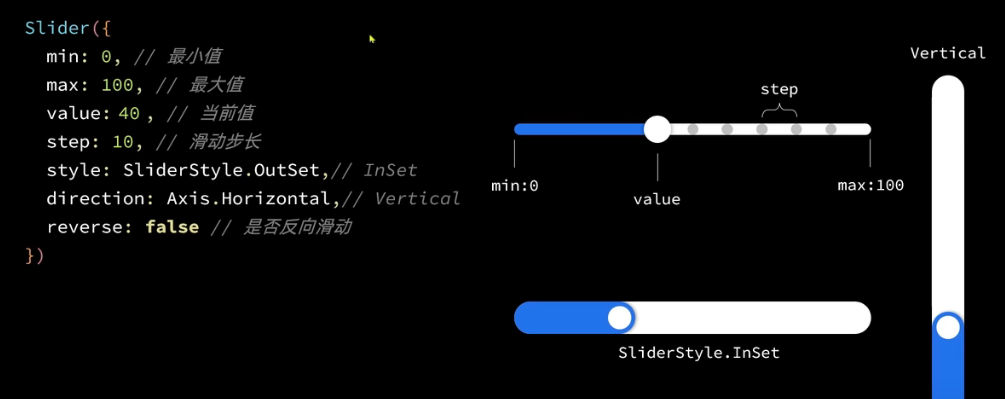
练习,滑块发生变化,请实现,一个正方形的图片,放大缩小
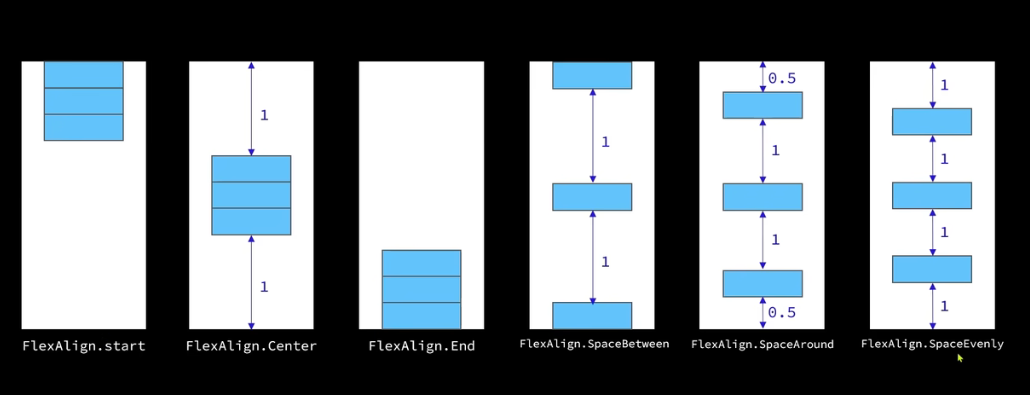
布局row和colum:
类似flex布局,有主轴,交叉轴的 对应方式
Column
row
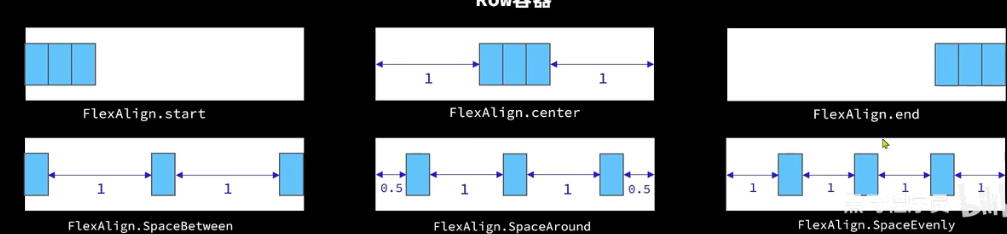
需要注意Row 和Column 在使用的的时候,alignItems的属性值不一样(VerticalAlign,和HorizontalAlign)
@Entry
@Component
struct Index {
  @State message: string = 'Hello Wo11rld'
  @State nums:number=100

  build() {

      Column(){
        Row(){
          Text("11111")
            .backgroundColor("#823")
            .width(112)
            .height(111)

          Text("22")
            .backgroundColor("#823")

        }
        .width('100%')
        .justifyContent(FlexAlign.Center)
        .alignItems(VerticalAlign.Bottom)

        Row(){
          Button('按钮1')
            .width(120)
            .backgroundColor('#666')

          Button('按钮2')
            .width(120)
            .backgroundColor('#666')
        }.width("100%")
        .justifyContent(FlexAlign.SpaceBetween)
        .padding({left:10,right:10})
        .margin({top:20,bottom:10})

        Divider()
          .color('#999')
          .width(200)

      }

      .justifyContent(FlexAlign.SpaceAround)
      .alignItems(HorizontalAlign.End)

  }
}
练习:
根据已学知识,实现一个简单的app页面出来
数组循环,if判断
  ForEach(
          this.arrs,
          (item,index) => {
            Row() {
              if (index % 2 == 0) {
                Text(""+item.name)
                  .width(112)
                  .height(111)
                  .fontColor("#88D")

              }else{
                Text(""+item.name)
                  .width(112)
                  .height(111)
                  .fontColor("#11A")
              }
            }
            .width('100%')
            .padding({left:100})

          }
List组件列表
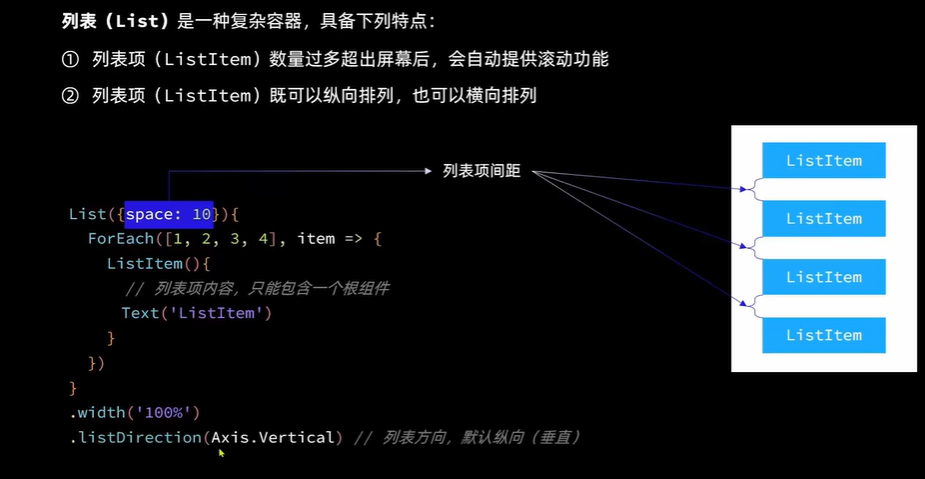
需要注意:(可以使foreach滚动)
1:listItem必须要有,而且里面只能有一个根目录(row或者Column)包裹
2:layoutWeight是权重(设置为1 ,表示其他的高度我都要)
3:list可以纵向也可以横向排列
        List({space:10}){
          ForEach(
            this.arrs,
            (item,index) => {
              ListItem(){
              Row() {
                if (index % 2 == 0) {
                  Text(""+item.name)
                    .width(112)
                    .height(111)
                    .fontColor("#88D")

                }else{
                  Text(""+item.name)
                    .width(112)
                    .height(111)
                    .fontColor("#11A")
                }
              }
              .width('100%')
              .padding({left:100})
              }

            }
          )


        }
        .width('100%')
        .layoutWeight(1)
自定义组件和构建函数
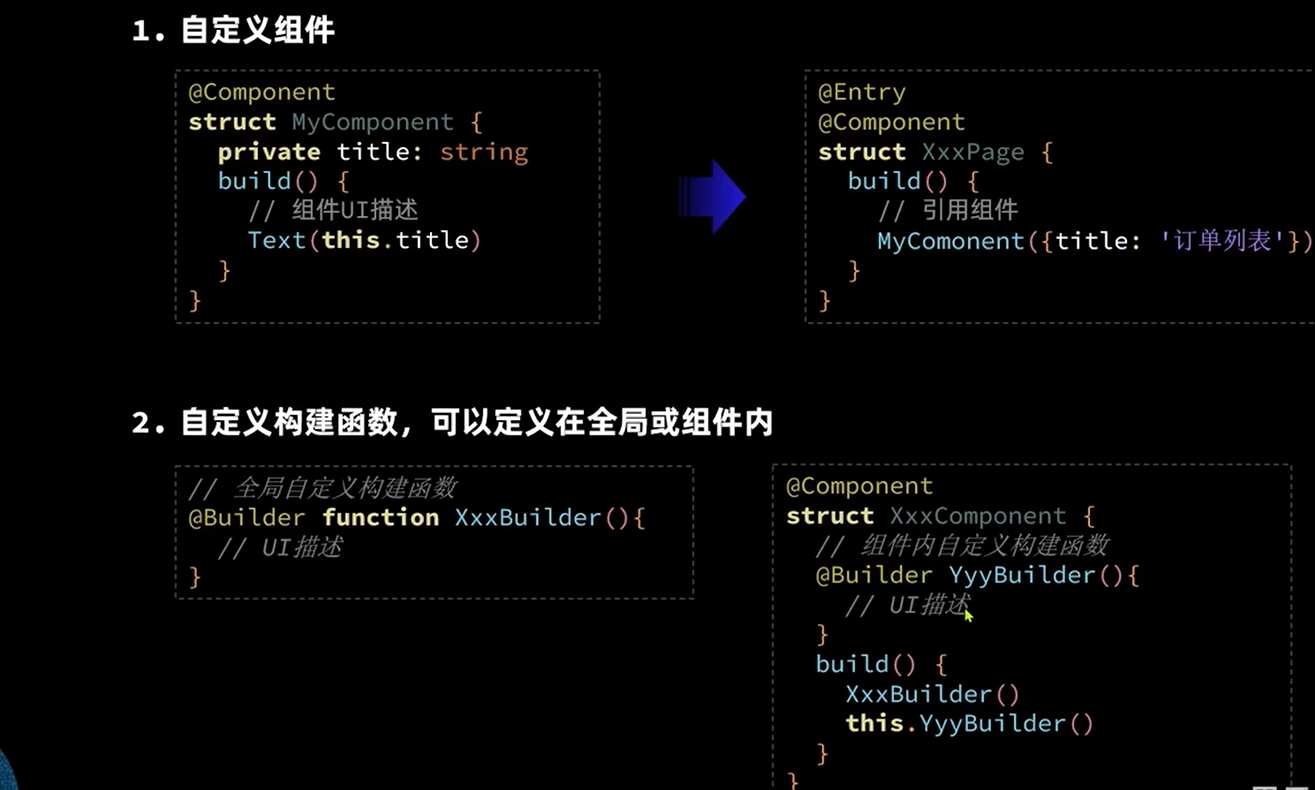
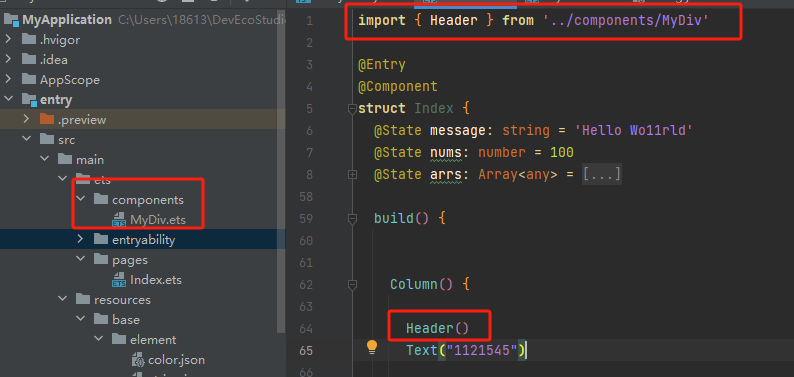
组件使用需要注意:
1,引入的时候需要再顶端
2,写组件的时候,需要注意格式问题(建议设置 -> 搜索 Actions on Save 勾上 Reformat code)
也可以传参的!如下,尽量使用resoureStr类型定义
@Component
export struct Header {
  private title: ResourceStr

  build() {
    Row() {
      Text(this.title)
    }
    .width("100%")
    .height('100')
    .backgroundColor("#888")
  }
}
公共样式,和局部样式,以及继承Text样式
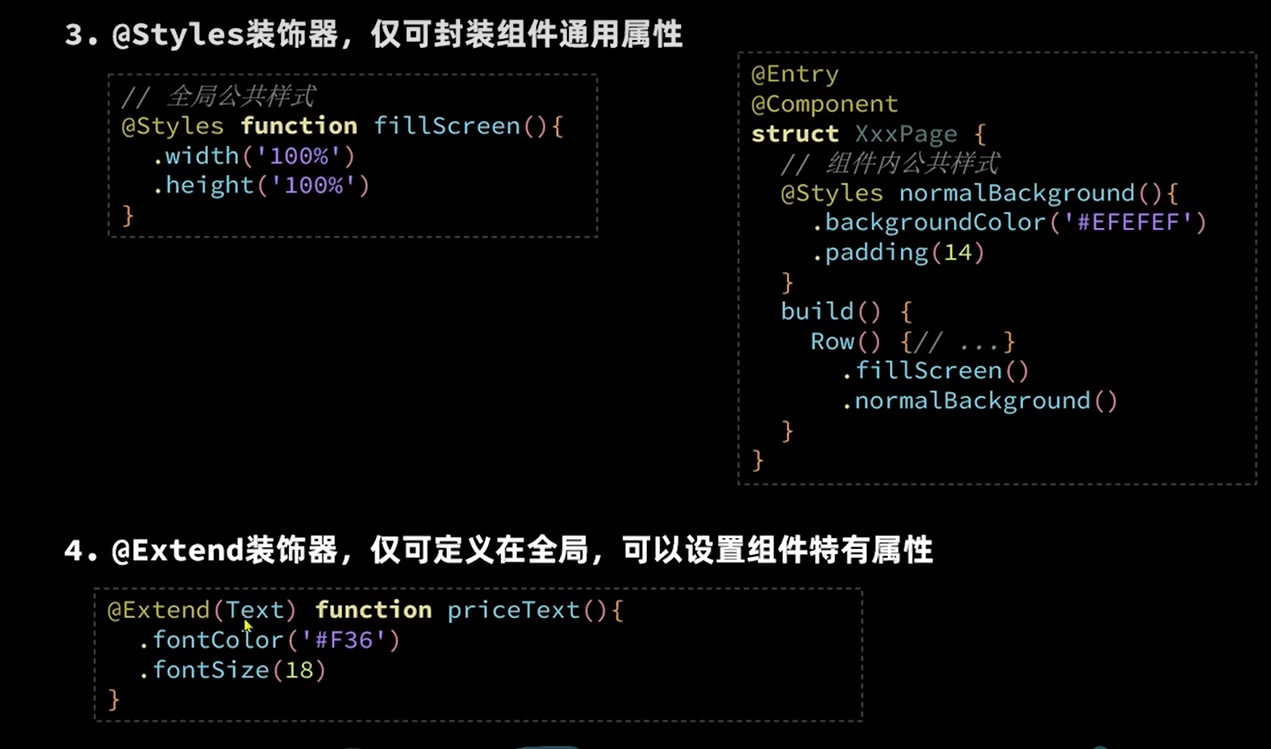
代码如下:
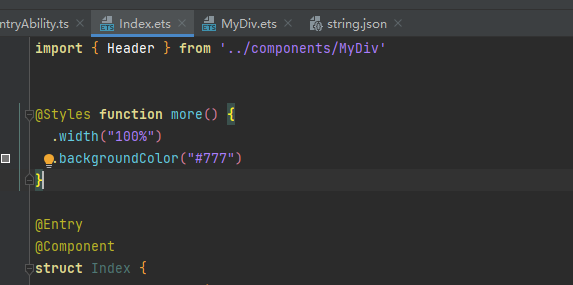
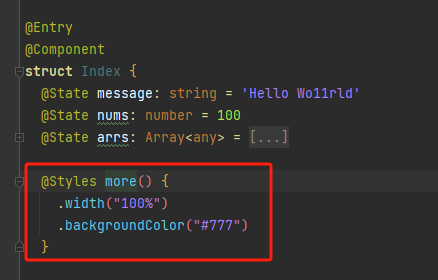
如果是局部呢?不要加function
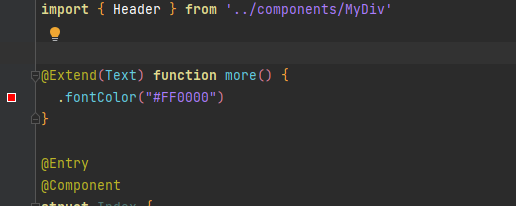
如果是给Text特有的样式呢?比如fontColor只能写在全局,而且需要用extend
状态数据:
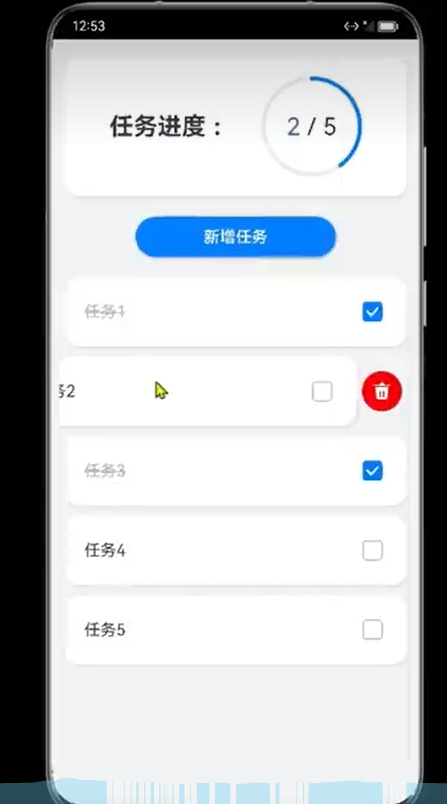
是否可以完成以下功能,使用的插件
static 定义id,让他保持变量活性
progress(进度条)type:ProgressType.Ring(圆圈)
stack 重叠容器(进度条和row可以放到堆叠容器里面,这样实现重叠)
list 多个数据,要下来,需要列表,并且需要右侧滑动产生删除按钮(属性.swipeAction({end:}))
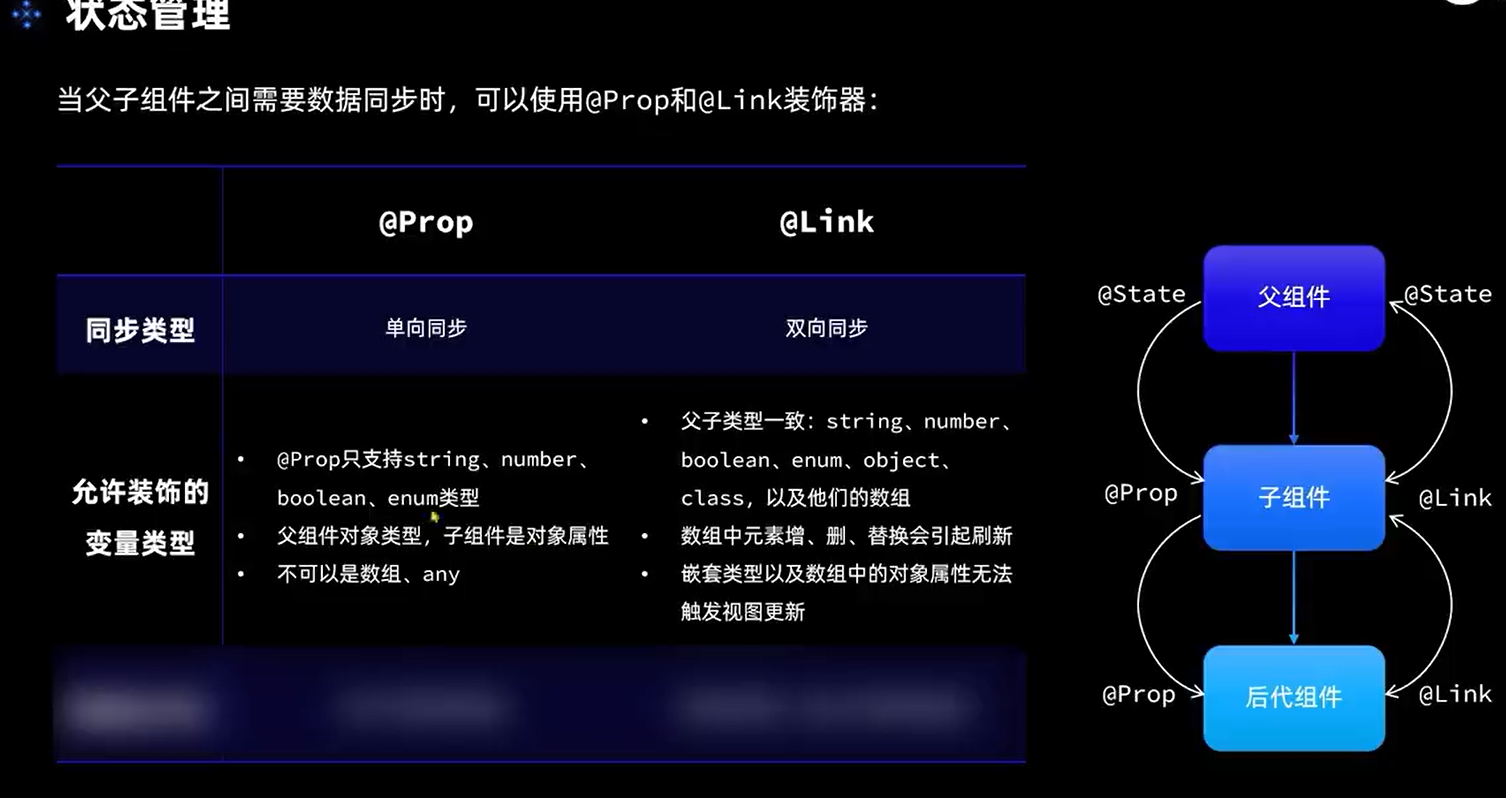
组件传值状态:
单向,双向(传的是引用)(props他们定义的变量,不能初始化因为接收值的)
如果是link,传值的时候不能用this,只能用$ 如下
.任务列表
TaskList({finishTask:$finishTask, totalTask: $totalTask})
provide 和consume也可实现,但是需要内部维护,所以性能不好
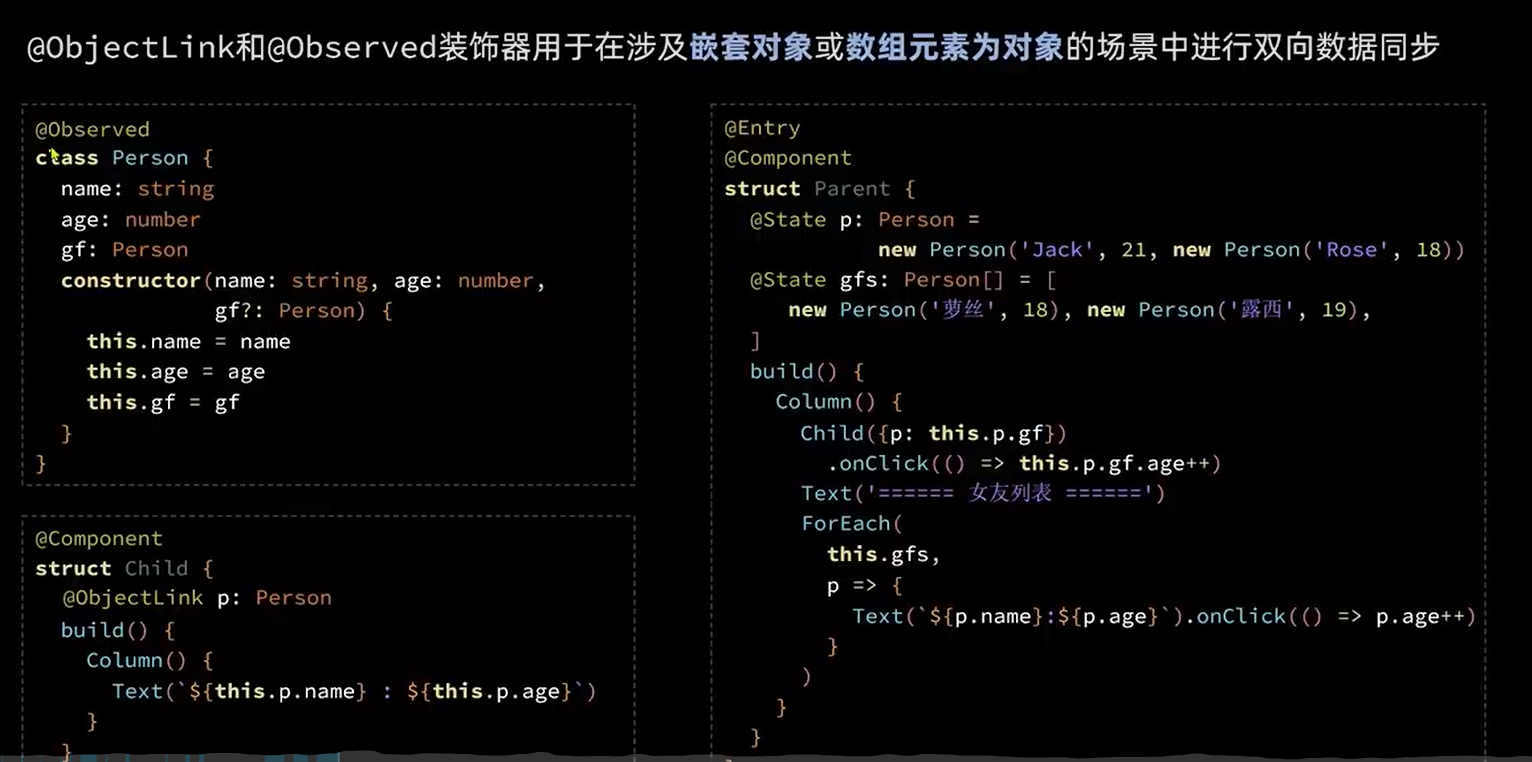
复杂嵌套类的对象数组:
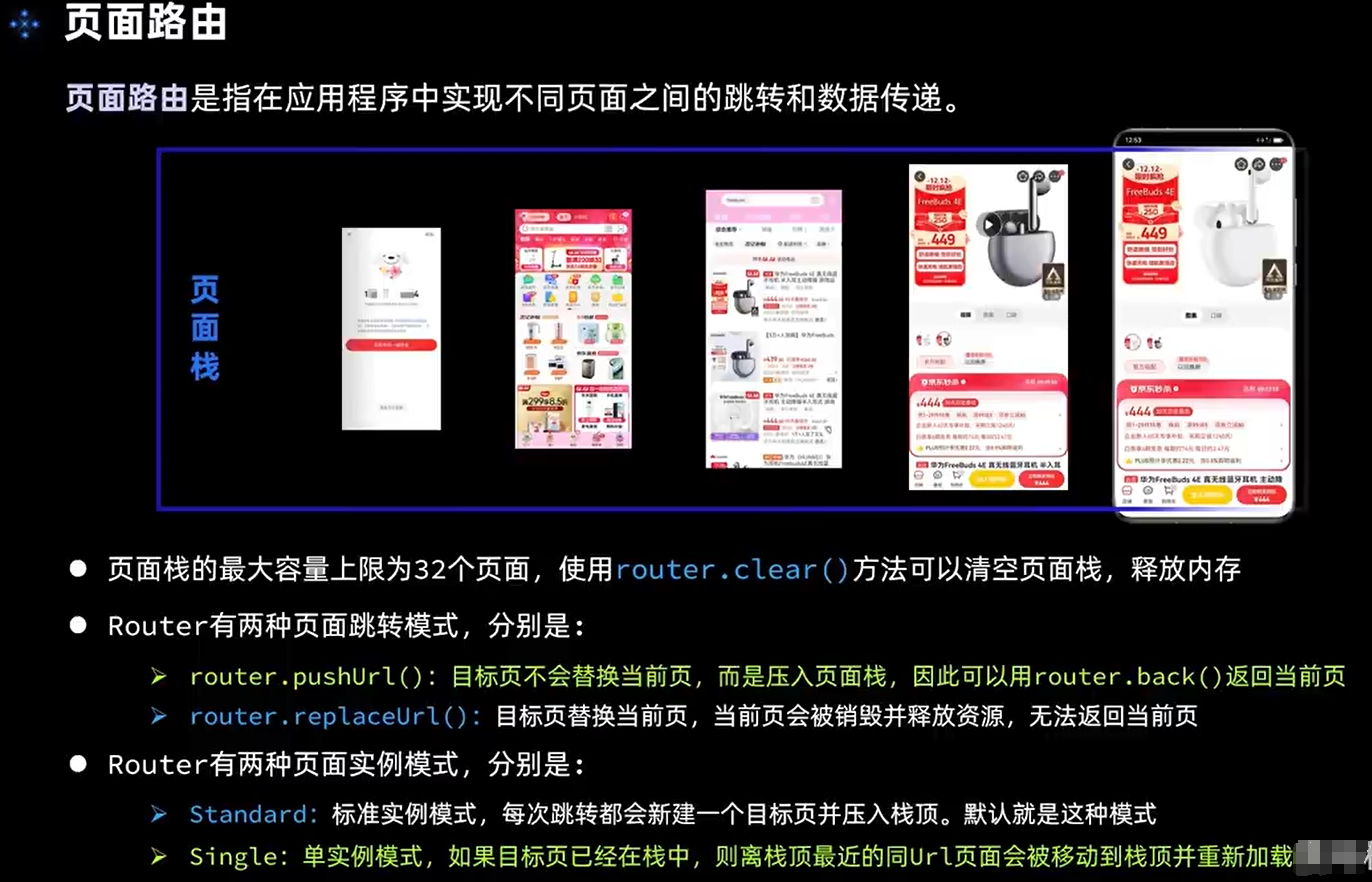
路由的跳转:
路由使用方式:
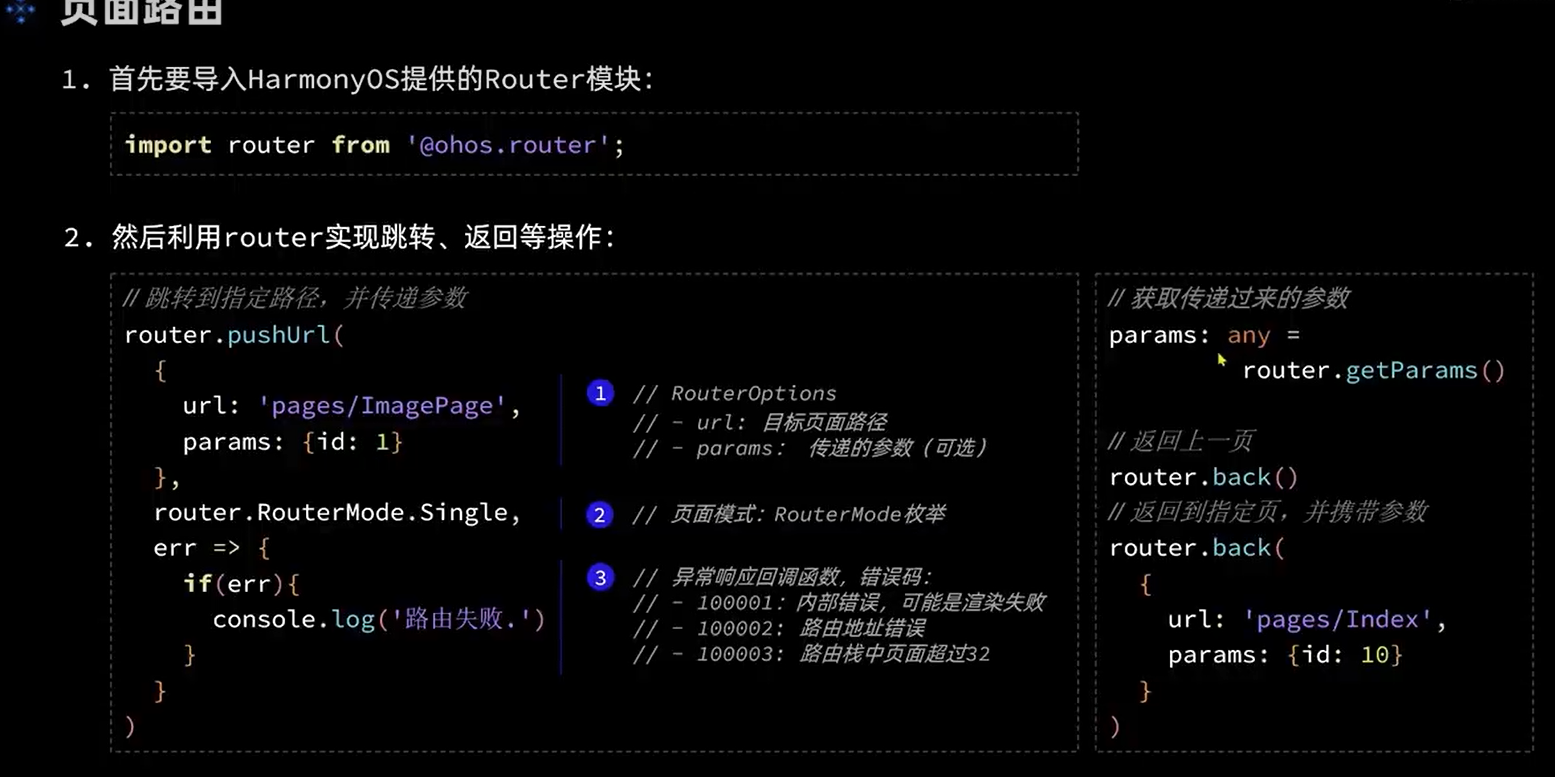
路由需要先配置好,resoureces/base/profile/main_pages.json
文件配置。如果起初新建页面的时候,不选ark文件,而是选的page,那就会自动填上
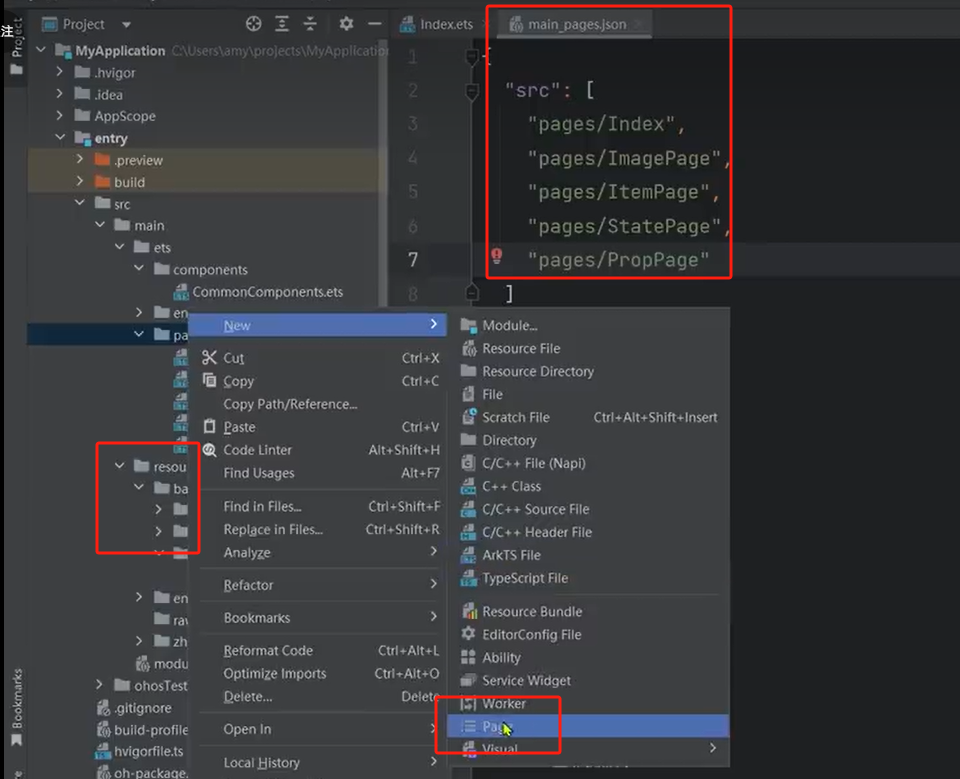
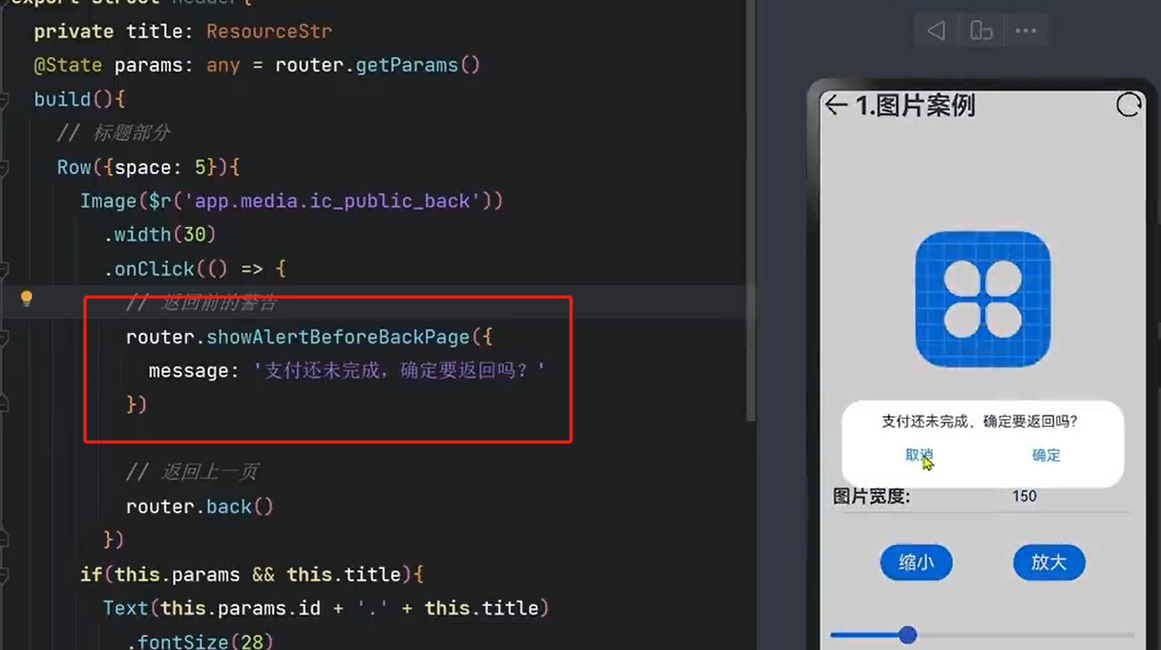
备注:路由获取参数:
@State params: RouTmp = router.getParams() as RouTmp; // 获取传递过来的参数对象
然后直接使用:Text(this.params.src)
            router.pushUrl({
              url:'pages/Demo',
              params: {
                src: "这是来自Second Page的数据"
              }
            })
注意:// @ts-ignore 要加上,不然报检查错误错
 // @ts-ignore
@State params: RouTmp = router.getParams() as RouTmp; // 获取传递过来的参数对象

Text(this.params.src)
动画效果:
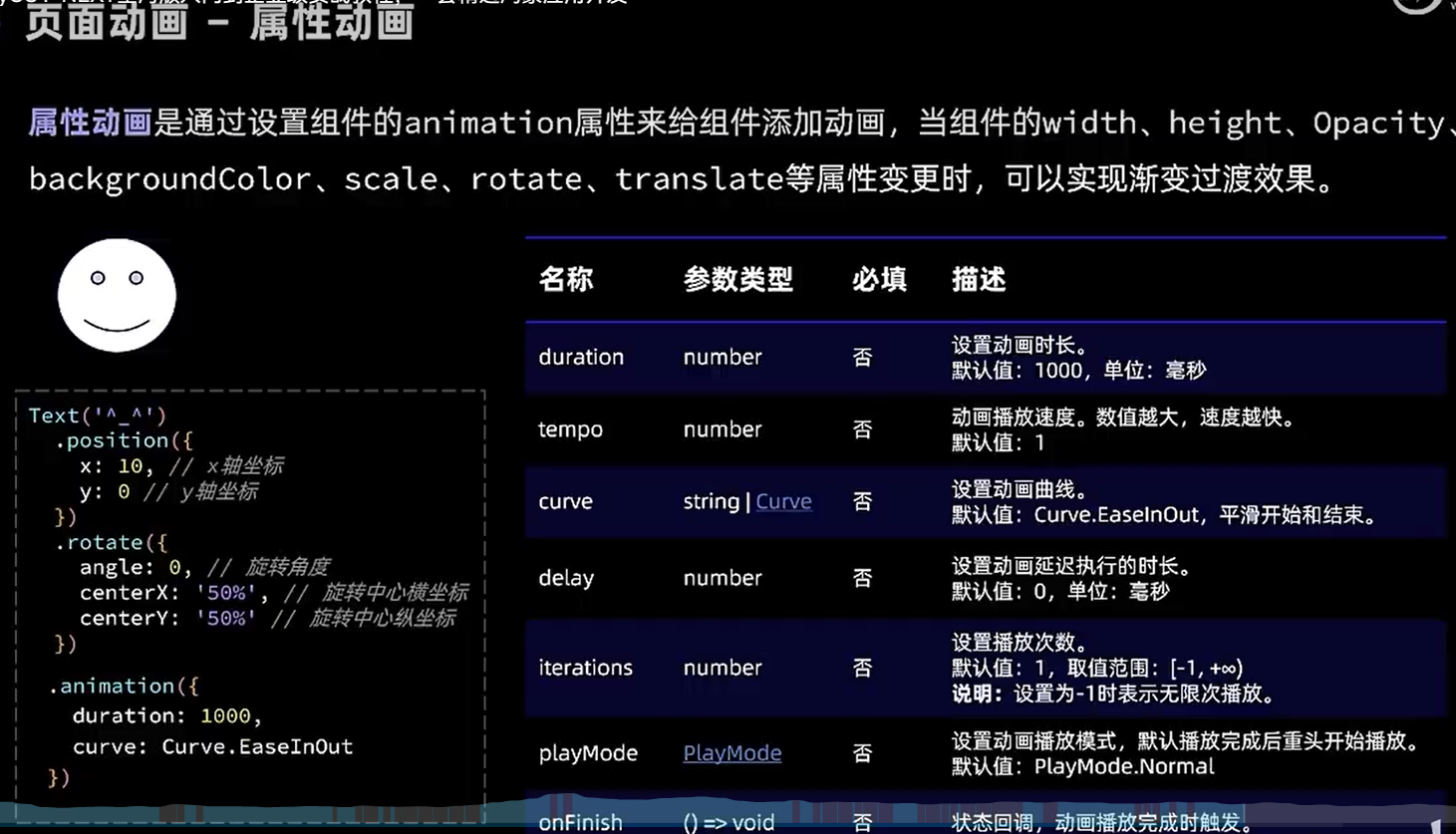
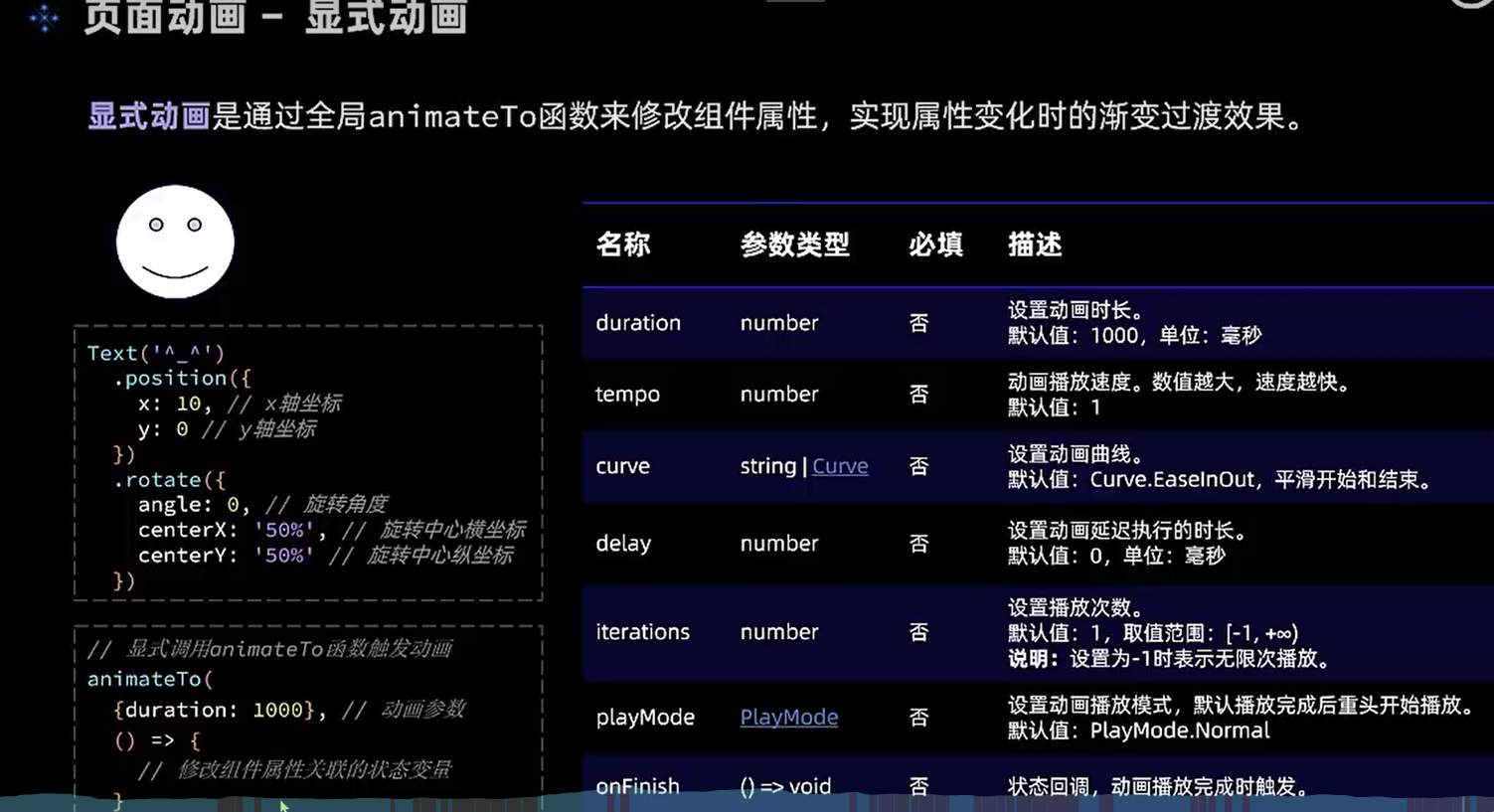
只有开始和结束,人家会帮我们实现效果中间的效果、他更像一个工具。设置好参数,我们去调节
两种方式:属性动画和显示动画
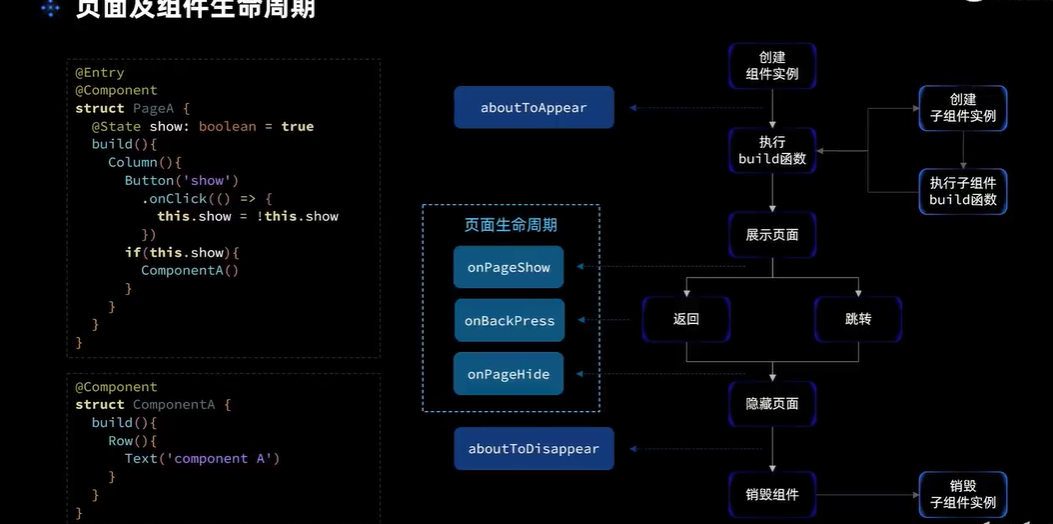
页面和组件的生命周期:
数据请求:(原生)
http协议
websoket 协议
socket 底层。tcl 等
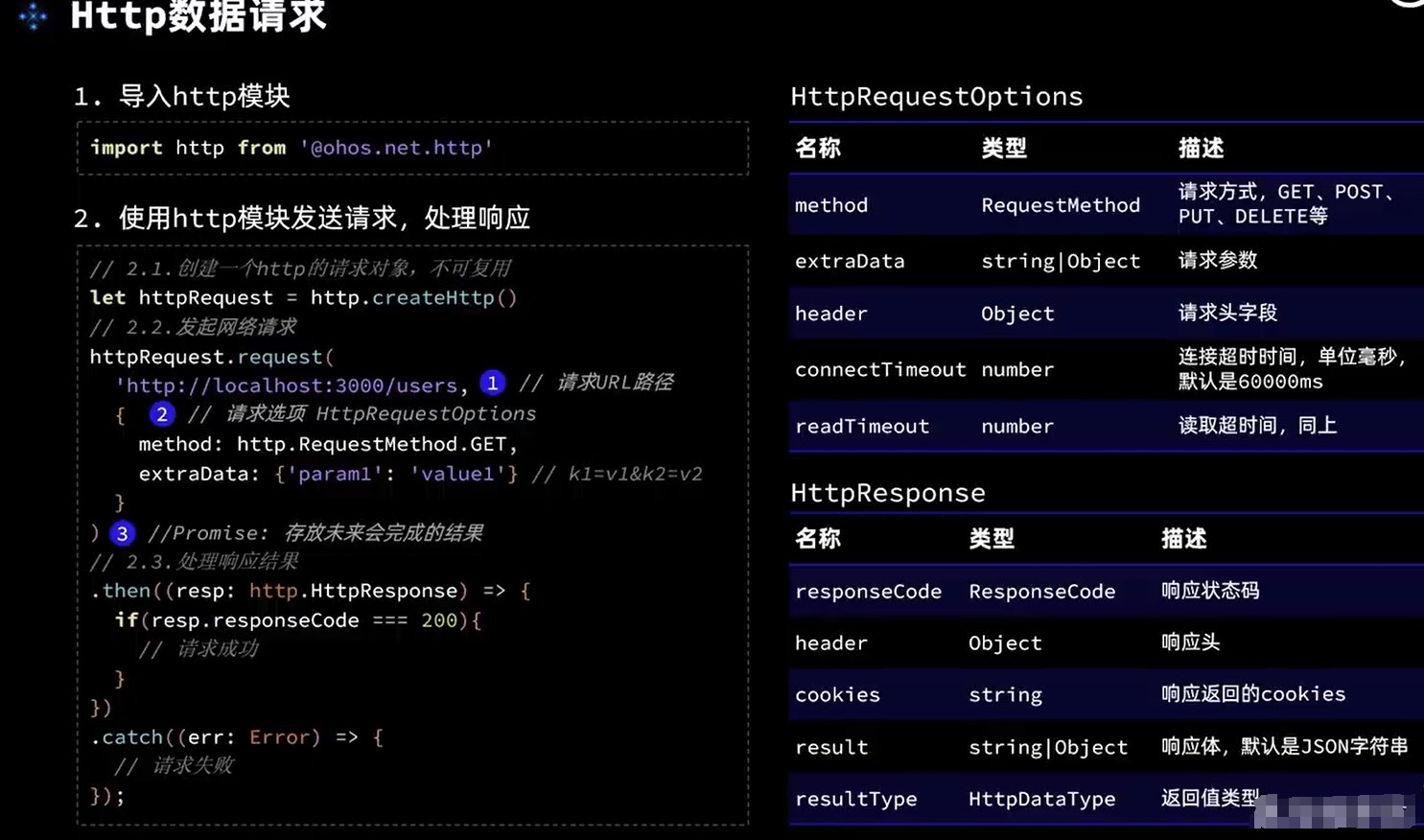
封装api
/*
 * Copyright (c) 2023 Huawei Device Co., Ltd.
 * Licensed under the Apache License, Version 2.0 (the "License");
 * you may not use this file except in compliance with the License.
 * You may obtain a copy of the License at
 *
 *     http://www.apache.org/licenses/LICENSE-2.0
 *
 * Unless required by applicable law or agreed to in writing, software
 * distributed under the License is distributed on an "AS IS" BASIS,
 * WITHOUT WARRANTIES OR CONDITIONS OF ANY KIND, either express or implied.
 * See the License for the specific language governing permissions and
 * limitations under the License.
 */

import http from '@ohos.net.http';


/**
 * Initiates an HTTP request to a given URL.
 *
 * @param url URL for initiating an HTTP request.
 * @returns the result of HTTPS.
 */
export default async function httpGet(url: string) {
  if (!url) {
    return undefined;
  }
  let request = http.createHttp();
  let options = {
    method: http.RequestMethod.GET,
    header: { 'Content-Type': 'application/json' },
    readTimeout: 2000,
    connectTimeout: 2000
  } as http.HttpRequestOptions;
  let result = await request.request(url, options);
  return result;
}
import router from '@ohos.router'

import  httpGet from '../common/utils/HttpUtil'


@Entry
@Component
struct Home {
  @State message: string = 'Hello 11'
  @State arr:Array<any> = ['1','2']
  // @ts-ignore

  build() {

    Row() {
      Column(){


        Text(this.message)
          .fontColor("blue")
          .width(100)
          .height(100)
          .fontSize(30)
          .onClick(()=>{
            this.onlist()
          })
      }


      Column(){
        Text("点击")
          .fontColor("blue")
          .width(100)
          .height(100)
          .fontSize(30)
          .onClick(()=>{
            router.pushUrl({
              url:'pages/Demo',
              params: {
                src: "这是来自Second Page的数据"
              }
            })

          })
      }


      Column(){
        ForEach(this.arr,(item,index)=>{
          Row(){
            Text(item).fontColor('yellow').fontSize('30')
          }

        })
      }

    }
    .height('100%')


  }

  async  onlist(){
    let result:ESObject = await httpGet('http://47.94.4.201/index.php/index/index/index');
    let obj = JSON.parse(result.result)
    // @ts-ignore
    console.log(obj)
    this.arr = obj.data
  }

}
或者在生命周期请求:
import router from '@ohos.router';
import  httpGet from '../common/api'
@Entry
@Component

struct Demo {

  @State message: string = 'Heasdfasdfa'
  @State arr:String[] = []
  onPageShow(){
    this.getList()

  }
  build() {


    Column(){
      List(){
        ForEach(this.arr,(item,index)=>{
          ListItem(){
            Row(){
              Text(""+item)
            }

          }.height(20)

        })
      }

      Row() {


        Text(this.message)
          .fontSize(100)
          .onClick(()=>{
            router.pushUrl({
              url:'pages/Index',
              params:{id:999}
            })
          })
      }
      }


  }

  async  getList(){
    // @ts-ignore
    let result:ESObject = await httpGet('http://47.94.4.201/index.php/index/index/index');
    let obj = JSON.parse(result.result)
    console.log(obj.data)
    this.arr = obj.data
  }
}
axios使用:
第三方的ajax请求
报错:ohpm : 无法将“ohpm”项识别为 cmdlet、函数、脚本文件或可运行程序的名称。请检查名称的拼写,如果包括路径,请确保路径正确,然后再试一次。——解决方法-CSDN博客
参考以上
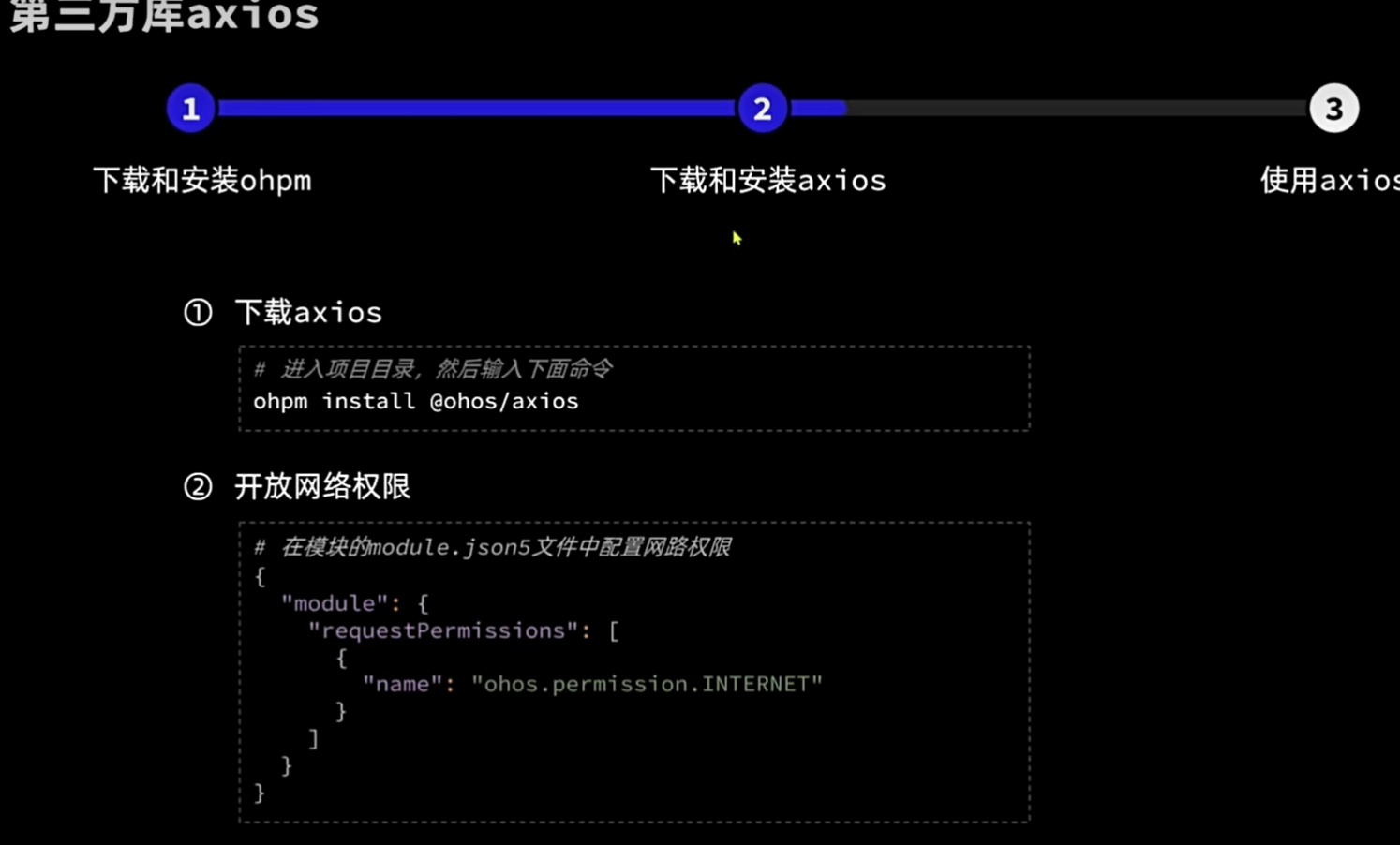
普通使用:
async  getList(){
  // @ts-ignore
  axios.get('http://47.94.4.201/index.php/index/index/index',{}).then(datas=>{
    // @ts-ignore
    console.log(datas.data.data)
  }).catch(err=>{
    console.log(err)
  })


  // let result:ESObject = await httpGet('http://47.94.4.201/index.php/index/index/index');
  // let obj = JSON.parse(result.result)
  // console.log(obj.data)
  // this.arr = obj.data
}
}
封装参考:
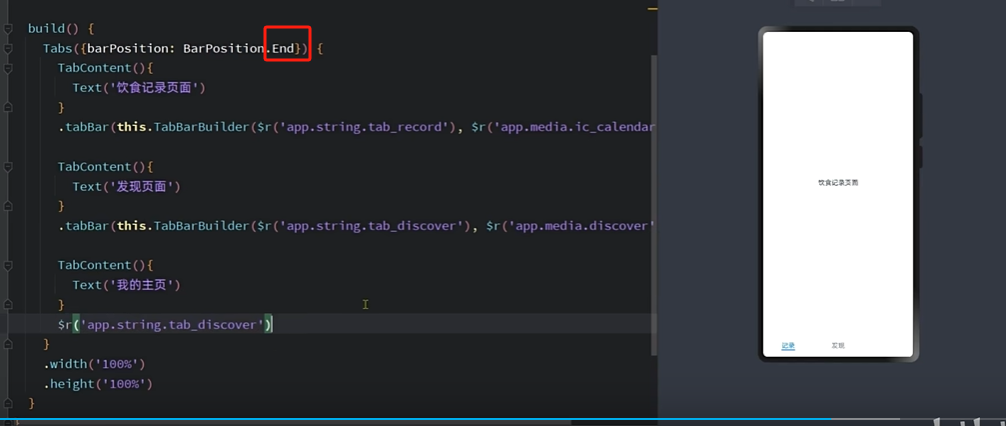
底部导航:
end显示底部,默认是显示上面的
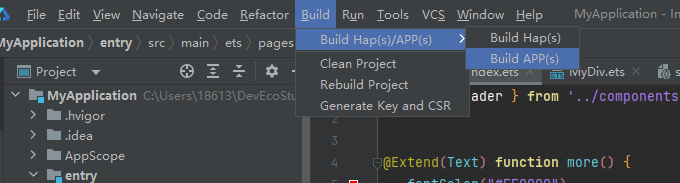
打包上线:
https://developer.huawei.com/consumer/cn/doc/harmonyos-guides-V2/build_overview-0000001055075201-V2

讨论HarmonyOS开发技术,专注于API与组件、DevEco Studio、测试、元服务和应用上架分发等。
更多推荐

 19
19 0
0- 0


 已为社区贡献4条内容

所有评论(0)