使用鸿蒙完成一个列表
·
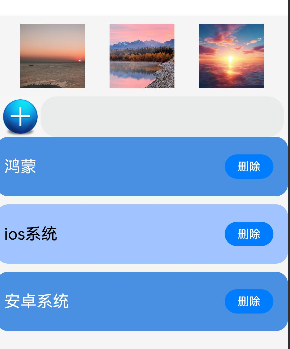
完成一个图片的布局,要求有三个图片,在页面的顶部,实现居中排列
列表要求:完成一个标准的Li列表,要求有圆角,好看,有隔行换色,实现展示
同步第二个作业,实现输入框,新增数据组合!
拓展。实现一个删除操作。
@Entry
@Component
struct Index {
  @State message: string = 'Hello World';
  @State arr: Array<string> = ['邓锐', '何帅志', '杨成龙']

  build() {
    Column() {
      // 第一题内容保持不变
      Flex({ justifyContent: FlexAlign.SpaceEvenly }) {
        Image('https://picx1.zhimg.com/v2-056e22d3f54164924938f963852d6657_r.jpg?source=1940ef5c').width(80).height(80)
        Image('https://i3.3conline.com/images/piclib/201110/17/batch/1/113319/1318814634712l2c0m21v0j.jpg').width(80).height(80)
        Image('https://tse1-mm.cn.bing.net/th/id/OIP-C.StrDRqennoZNbzSPZapKZwAAAA?rs=1&pid=ImgDetMain').width(80).height(80)
      }
      .width('100%')
      .padding({ top: 10, bottom: 10 })

      Row(){
        Image('https://pic.616pic.com/ys_b_img/00/46/57/lVaQ3yRrZY.jpg')
          .width(50)
          .height(50)
          .onClick(()=>{
            this.arr.push(this.message)
          })
        TextInput()
          .width(300)
          .height(50)
          .onChange((value)=>{
            this.message=value
          })
      }

      // 第二题 - 美观列表实现
      List({ space: 10 }) {
        ForEach(this.arr, (item: string, index: number) => {
          ListItem() {
            Row() {  // 改为Row布局
              Text(item)
                .fontSize(20)
                .fontColor(index % 2 === 0 ? Color.White : Color.Black)
                .width('80%')  // 调整宽度
                .margin({ top: 15, bottom: 15 })

              // 删除按钮现在放在右侧
              Button('删除')
                .width(60)
                .height(30)
                .fontSize(14)
                .margin({ right: 10 })  // 添加右边距
                .onClick(()=>{
                  this.arr.splice(index, 1);
                })
            }
            .width('100%')
            .justifyContent(FlexAlign.SpaceBetween)  // 两端对齐
          }
          .width('100%')
          .borderRadius(15)
          .backgroundColor(this.getBackgroundColor(index))
          .padding(10)
          .margin({ right: 15 })
        })
      }
      .width('100%')
      .layoutWeight(1)
    }
    .width('100%')
    .height('100%')
    .backgroundColor('#f5f5f5')
  }

  private getBackgroundColor(index: number): ResourceColor {
    return index % 2 === 0 ? '#4a90e2' : '#a0c4ff'
  }
}

讨论HarmonyOS开发技术,专注于API与组件、DevEco Studio、测试、元服务和应用上架分发等。
更多推荐


 17
17 0
0- 0


 已为社区贡献4条内容

所有评论(0)