鸿蒙单框架@Provide和@Consume的Demo
·
@ProvideAnd@ConsumeDemo.ets
@Component
struct Child1 {
  /**
   * '@Link', '@Consume', '@ObjectLink' 都不能初始化。
   * 使用@Provide和@Consume可以跨多个层级双向通信。
   * 使用@Provide和@Consume不用像@Prop和@Link一样给子组件传递。
   */
  @Consume data: number;

  build() {
    Column() {
      Text(`儿子 ${this.data}`)
        .fontSize(30)
      Button('儿子的按钮')
        .onClick(() => {
          this.data++;
        })
      Grandson1({});
    }
    .padding(15)
    .border({ width: 5, color: Color.Green })
  }
}

@Component
struct Grandson1 {
  @Consume data: number;

  build() {
    Column() {
      Text(`孙子: ${this.data}`)
        .fontSize(30)
      Button('孙子的按钮')
        .onClick(() => {
          this.data++;
        })
    }
    .padding(15)
    .border({ width: 5, color: Color.Orange })
  }
}

@Entry
@Component
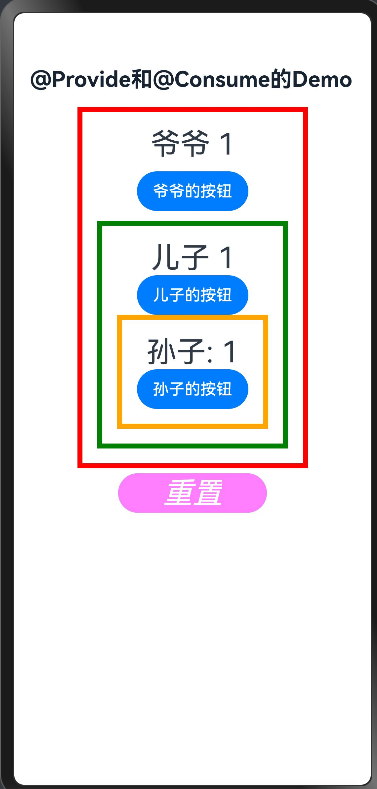
struct ProvideAndConsumeDemo {
  @Provide data: number = 1;

  build() {
    Navigation() {
      Scroll() {
        Column({ space: 10 }) {
          Text(`爷爷 ${this.data}`)
            .fontSize(30)
          Button('爷爷的按钮')
            .onClick(() => {
              this.data++;
            })
          Child1({
            // consume: this.provide
          });
          // Grandson1({})
        }
        .padding(15)
        .border({ width: 5, color: Color.Red })
      }

      Button('重置')
        .onClick(() => {
          this.data = 1;
        })
        .margin(5)
        .width(150)
        .fontSize(30)// .fontColor(Color.Red)// 不生效是因为什么?
        .fontStyle(FontStyle.Italic)
        .colorBlend(Color.Red)
        .type(ButtonType.ROUNDED_RECTANGLE)
        .backgroundColor(Color.Red)
        .buttonStyle(ButtonStyleMode.EMPHASIZED)
        .backgroundImage($r('app.media.tab_add'))
    }
    .title('@Provide和@Consume的Demo')
    .titleMode(NavigationTitleMode.Mini)
    .hideBackButton(true)
  }
}

讨论HarmonyOS开发技术,专注于API与组件、DevEco Studio、测试、元服务和应用上架分发等。
更多推荐



 7
7 0
0- 0


 已为社区贡献10条内容

所有评论(0)