鸿蒙应用开发中,如何使得Navigation的split模式右侧始终有个占位页面
·
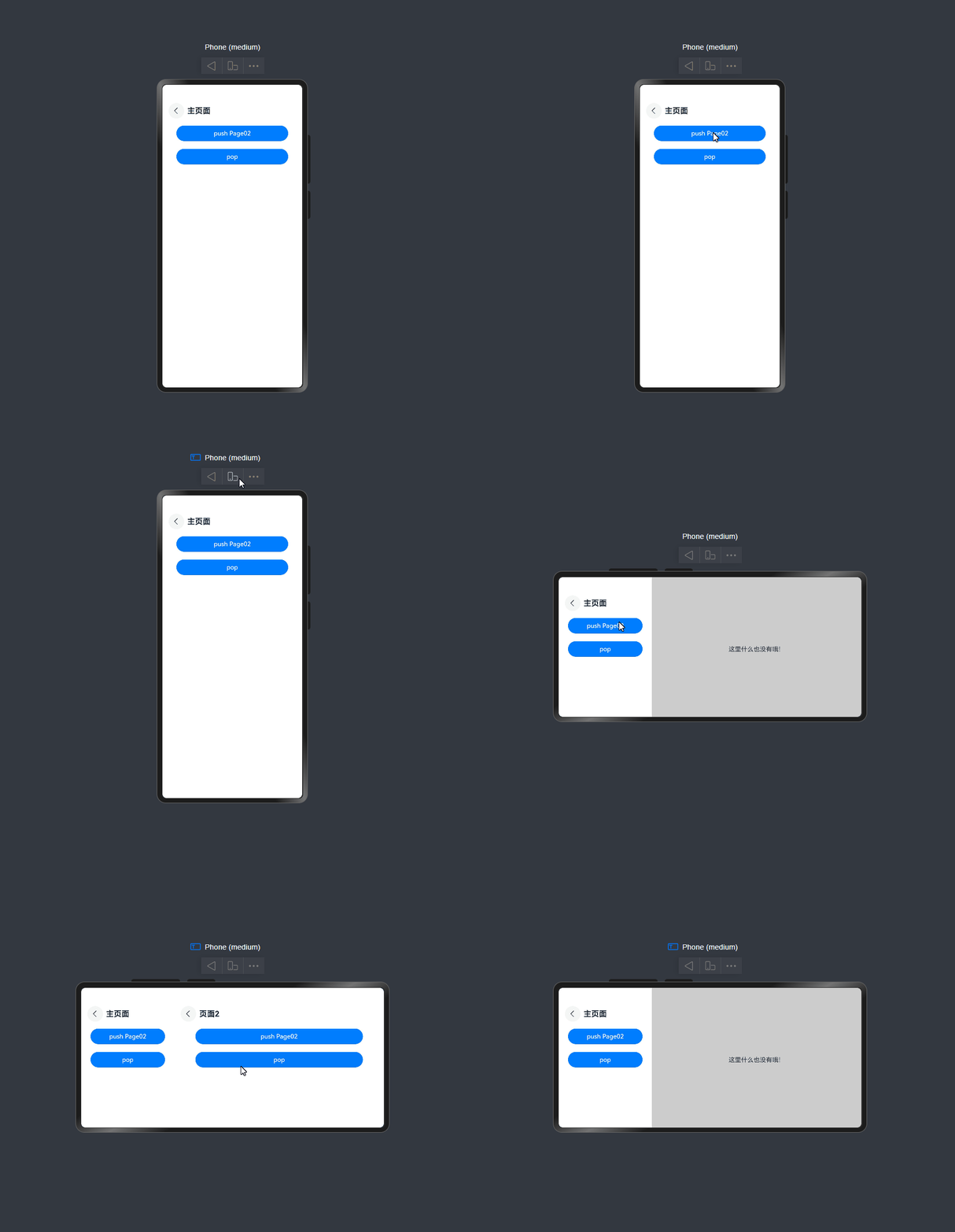
当设备较宽时,Navigation的mode会处于Split模式,即双栏模式。在双栏模式下,右侧如果没有页面,那么会处于空白状态。如果要给右边一个占位页面,那么可以用路由拦截来使得栈中始终有一个页面,并将这个页面添加自己想要的占位内容。
下面创建一个“Page01”页面,显示一行文字“这里什么也没有哦!”来提示用户当前没有内容,示例如下:
@Component
struct Page01 {
  pathStack: NavPathStack | undefined = undefined;

  build() {
    NavDestination() {
      Column() {
        Text(`这里什么也没有哦!`)
      }.width('100%').height('100%').justifyContent(FlexAlign.Center).alignItems(HorizontalAlign.Center)
    }.backgroundColor($r('sys.color.mask_fourth'))
    .hideTitleBar(true)
    // 把动画关闭,不然视觉效果差
    .systemTransition(NavigationSystemTransitionType.NONE)
    .onReady((context: NavDestinationContext) => {
      this.pathStack = context.pathStack;
    })
  }
}
进入页面时,通过setInterception设置路由拦截,如果是要跳转到navBar(主页面),并且处于Split模式,就向栈中push一个占位页面Page01。
// 设置路由拦截来保持栈中最底层是显示栈中为空的页面
this.pathStack.setInterception({
  willShow: (from: NavDestinationContext | NavBar, to: NavDestinationContext | NavBar, operation: NavigationOperation, isAnimated: boolean) => {
    console.log(`willShow: from ${JSON.stringify(from)}, to ${JSON.stringify(to)}, operation ${operation}, isAnimated ${isAnimated}.`);
    // 如果是要跳转到navBar,并且处于Split模式
    if (to == 'navBar' && this.navigationMode == NavigationMode.Split) {
      this.pathStack.pushPath({ name: 'Page01' }, (from as NavDestinationContext).pathInfo.name != 'Page01');
    }
  }
})
效果如下:
完整示例如下:
@Component
struct Page01 {
  pathStack: NavPathStack | undefined = undefined;

  build() {
    NavDestination() {
      Column() {
        Text(`这里什么也没有哦!`)
      }.width('100%').height('100%').justifyContent(FlexAlign.Center).alignItems(HorizontalAlign.Center)
    }.backgroundColor($r('sys.color.mask_fourth'))
    .hideTitleBar(true)
    // 把动画关闭,不然视觉效果差
    .systemTransition(NavigationSystemTransitionType.NONE)
    .onReady((context: NavDestinationContext) => {
      this.pathStack = context.pathStack;
    })
  }
}

@Component
struct Page02 {
  pathStack: NavPathStack | undefined = undefined;

  build() {
    NavDestination() {
      Column() {
        Button('push Page02').width('80%').margin({ top: 10, bottom: 10 })
          .onClick(() => {
            this.pathStack?.pushPath({ name: 'Page02' });
          })
        Button('pop').width('80%').margin({ top: 10, bottom: 10 })
          .onClick(() => {
            this.pathStack?.pop();
          })
      }.width('100%').height('100%')
    }.title('页面2')
    .onReady((context: NavDestinationContext) => {
      this.pathStack = context.pathStack;
    })
  }
}

@Entry
@Component
struct Index {
  pathStack: NavPathStack = new NavPathStack();
  navigationMode: NavigationMode = NavigationMode.Auto;

  @Builder
  pagesMap(name: string) {
    if (name == 'Page01') {
      Page01()
    } else if (name == 'Page02') {
      Page02()
    }
  }

  aboutToAppear(): void {
    // 设置路由拦截来保持栈中最底层是显示栈中为空的页面
    this.pathStack.setInterception({
      willShow: (from: NavDestinationContext | NavBar, to: NavDestinationContext | NavBar, operation: NavigationOperation, isAnimated: boolean) => {
        console.log(`willShow: from ${JSON.stringify(from)}, to ${JSON.stringify(to)}, operation ${operation}, isAnimated ${isAnimated}.`);
        // 如果是要跳转到navBar,并且处于Split模式
        if (to == 'navBar' && this.navigationMode == NavigationMode.Split) {
          this.pathStack.pushPath({ name: 'Page01' }, (from as NavDestinationContext).pathInfo.name != 'Page01');
        }
      }
    })
  }

  build() {
    Navigation(this.pathStack) {
      Column() {
        Button('push Page02').width('80%').margin({ top: 10, bottom: 10 })
          .onClick(() => {
            this.pathStack.pushPath({ name: 'Page02' });
          })
        Button('pop').width('80%').margin({ top: 10, bottom: 10 })
          .onClick(() => {
            this.pathStack.pop();
          })
      }.width('100%').height('100%')
    }.title('主页面')
    .titleMode(NavigationTitleMode.Mini)
    .navDestination(this.pagesMap)
    .onNavigationModeChange((mode: NavigationMode) => {
      console.log(`Navigation onNavigationModeChange mode: ${mode}.`);
      this.navigationMode = mode;

      if (this.navigationMode == NavigationMode.Split) {
        // mode切换到Split模式时,如果栈中为空,push一个占位页面
        if (this.pathStack.size() == 0) {
          this.pathStack.pushPath({ name: 'Page01' }, false);
        }
      } else {
        // mode切换到非Split模式时,如果栈中只有一个页面并且为占位页面
        if (this.pathStack.size() == 1 && this.pathStack.getAllPathName()[0] == 'Page01') {
          this.pathStack.pop(false);
        }
      }
    })
  }
}

讨论HarmonyOS开发技术,专注于API与组件、DevEco Studio、测试、元服务和应用上架分发等。
更多推荐

 10
10 0
0- 0


 已为社区贡献11条内容

所有评论(0)