鸿蒙学习-功能组件(Tabs)
Tabs(选项卡)
1.1概述
Tabs组件的页面组成包含两个部分,分别是TabContent和TabBar。TabContent是内容页,TabBar是导航页签栏。
TabBar是导航页签栏,页面结构如下图所示,根据不同的导航类型,布局会有区别,可以分为底部导航、顶部导航、侧边导航,其导航栏分别位于底部、顶部和侧边。
说明
●TabContent组件不支持设置通用宽度属性,其宽度默认撑满Tabs父组件。
●TabContent组件不支持设置通用高度属性,其高度由Tabs父组件高度与TabBar组件高度决定。
1.2基本使用
Tabs使用花括号包裹TabContent,每一个TabContent对应的内容需要有一个页签,可以通过TabContent的tabBar属性进行配置。
Tabs() {
  TabContent() {
    Text('首页的内容').fontSize(30)
  }
  .tabBar('首页')

  TabContent() {
    Text('推荐的内容').fontSize(30)
  }
  .tabBar('推荐')

  TabContent() {
    Text('发现的内容').fontSize(30)
  }
  .tabBar('发现')

  TabContent() {
    Text('我的内容').fontSize(30)
  }
  .tabBar("我的")
}
1.3导航位置
●vertical为false时,tabbar的宽度默认为撑满屏幕的宽度,需要设置barWidth为合适值。
●vertical为true时,tabbar的高度默认为实际内容的高度,需要设置barHeight为合适值。
1.4禁止滑动切换
控制滑动切换的属性为scrollable,默认值为true,表示可以滑动,若要限制滑动切换页签则需要设置为false。
Tabs({barPosition: BarPosition.Start}){

  ...
}.scrollable(false)
1.5滚动导航栏
当导航页签栏选项比较多时,可以让导航页签滚动
Tabs({ barPosition: BarPosition.Start }) {
  // TabContent的内容:关注、视频、游戏、数码、科技、体育、影视、人文、艺术、自然、军事
  ...
}
.barMode(BarMode.Scrollable)
1.6自定义导航栏
对于底部导航栏,一般作为应用主页面功能区分,为了更好的用户体验,会以“文字+图标”表示页签内容
1.6.1自定义导航页签
自定义导航每一个页签包含四部分内容
/*
title: 页签标题
targetIndex: 页签的索引
selectedImg: 选中时图标
normalImg: 未选中时
*/
//当前选中页签索引
@State currentIndex: number = 0
@Builder
tabBuilder(title: string, targetIndex: number, selectedImg: Resource, normalImg: Resource) {
  Column() {
    Image(this.currentIndex == targetIndex ? selectedImg : normalImg)
      .size({ width: 25, height: 25 })
    Text(title)
      .fontColor(this.currentIndex === targetIndex ? '#1698CE' : '#6B6B6B')
  }.width('100%').height(50).justifyContent(FlexAlign.Center)
  .onClick(() => {
    this.currentIndex = targetIndex
  })
}
但是此时还有一个问题,点击页签时并不能同步切换内容页。
1.6.2点击页签同步切换内容页
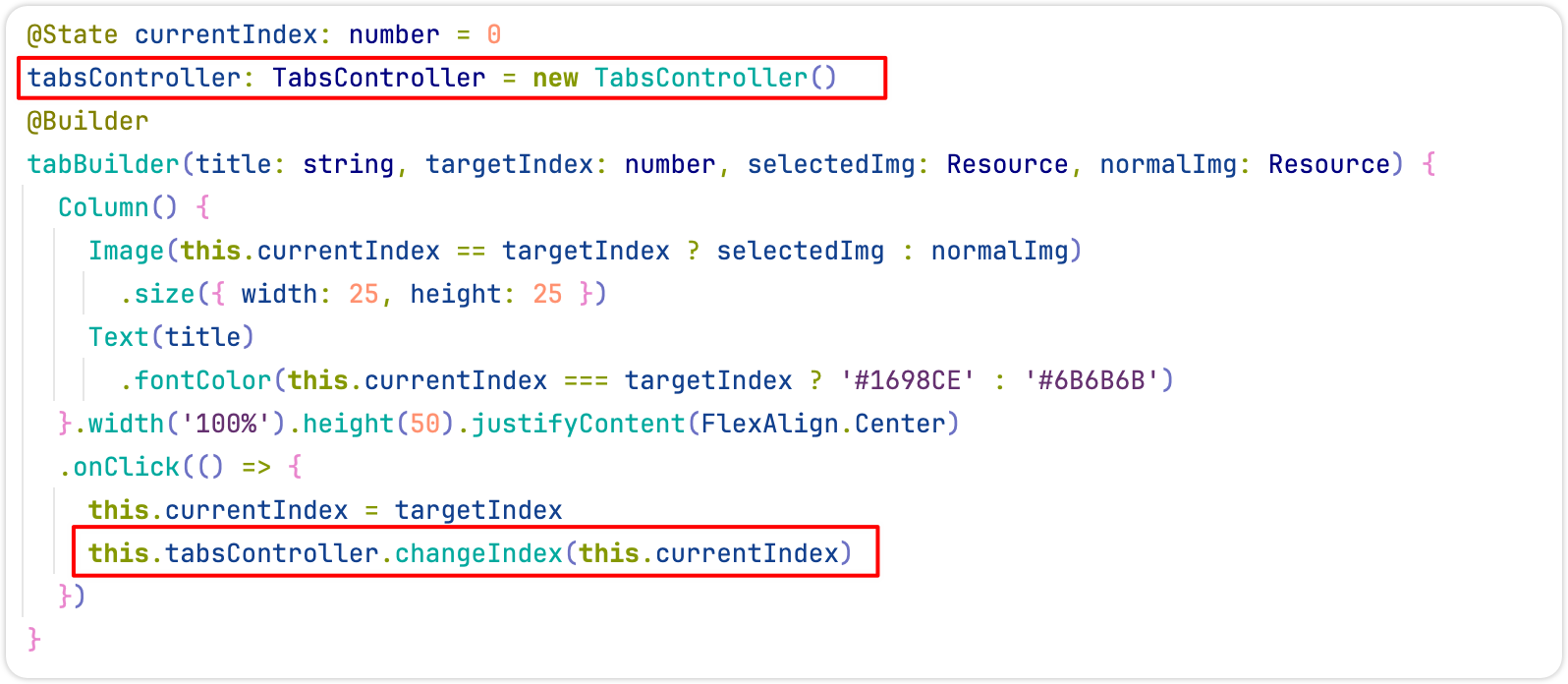
想要实现点击页签同步切换页面,需要让Tabs与TabsController相关联,TabsController是用来控制页面切换的控制器,并调用TabsController的changeIndex(索引)切换内容页。
1创建TabController与Tabs关联
tabsController: TabsController = new TabsController()

build() {
  Tabs({ barPosition: BarPosition.End, controller: this.tabsController }) {
    ...
  }
}
2给自定义页签设置点击事件,调用TabController的changeIndex(索引)切换页签。
1.6.3滑动内容页同步切换页签
在自定义导航栏的情况下,滑动内容页时,页签是不会同步切换的;此时需要监听内容页的改变,手动进行切换;
Tabs({ barPosition: BarPosition.End, controller: this.tabController }) {
  TabContent() {
    Text('首页内容')
  }.tabBar(this.tabBuilder('首页', 0, $r('app.media.home_selected'), $r('app.media.home_normal')))

  ...
}.onChange((index) => {
  this.currentIndex = index
})

讨论HarmonyOS开发技术,专注于API与组件、DevEco Studio、测试、元服务和应用上架分发等。
更多推荐
 3
3 0
0- 0


 已为社区贡献12条内容

所有评论(0)