鸿蒙学习-功能组件(Swiper轮播图)
·
1. 基本概念
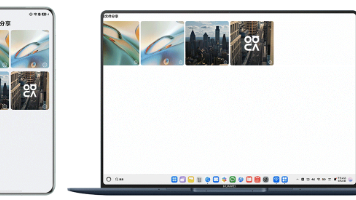
Swiper一般用来显示轮播图,在很多应用的首页都会有轮播图展示广告或者一些重要的信息。如下图所示,轮播展示几张图片
2. 基本使用
Swiper的基本使用也非常简单,只需要以下两个步骤即可
- 准备轮播数据
- 循环渲染轮播数据
@Entry
@Component
struct Index {
  //1. 准备轮播数据
  swiperImages: Resource[] = [
    $r('app.media.fig1'),
    $r('app.media.fig2'),
    $r('app.media.fig3'),
    $r('app.media.fig4'),
  ]

  build() {
    Column() {
      Swiper() {
        //2.循环轮播数据
        ForEach(this.swiperImages, (img: Resource) => {
          Image(img).borderRadius(16)
            .width('100%')
        })
      }
      .margin({ top: 12 })
      .autoPlay(true) //自动播放
    }.margin({
      left: 12, right: 12
    })
  }
}
3. 导航点指示器
-
Swiper(){
  ForEach(this.imageArray,(item:Resource)=>{
    Image(item).width('100%').height(200)
      .borderRadius(10)
  })
}
//.indicator(false)  true表示有导航点、false表示没有导航点
.indicator(
  //Indicator.digit() //数字导航指示效果
  Indicator.dot() //原点导航点
    .itemWidth(20)  //未选中的宽度
    .selectedItemWidth(20)  //选中的宽度
    .color(Color.Red) //未选中的颜色
    .selectedColor(Color.Yellow)  //选中的颜色
)

讨论HarmonyOS开发技术,专注于API与组件、DevEco Studio、测试、元服务和应用上架分发等。
更多推荐


 5
5 0
0- 0


 已为社区贡献12条内容

所有评论(0)