鸿蒙V1 & V2 状态管理第一弹:@State篇
·
@State装饰Map类型变量
1. Map 类型基础概念
定义:
Map是 TypeScript 中的内置集合类型,用于存储键值对(Key-Value Pairs)。特性:
键可以是任意类型(字符串、数字、对象等)
保持键的插入顺序
通过键快速查找值(高效检索)
let map = new Map<string, number>(); // 声明键为string, 值为number的Map
map.set("age", 25);        // 添加键值对
map.get("age");            // 获取值 → 25
map.has("name");           // 检查键是否存在 → false
map.delete("age");         // 删除键值对
map.size;                  // 获取元素数量
2. @State 装饰 Map 的核心规则
▶ 状态管理机制
当
@State装饰的Map被整体替换(赋值为新Map对象)时,触发UI更新。直接修改原Map不会触发更新(例如
map.set()后不会自动刷新UI)。// ❌ 错误:直接修改原Map,UI不会更新 this.myMap.set("newKey", "value"); // ✅ 正确:创建新Map对象替换旧引用 this.myMap = new Map([...this.myMap]); // 浅拷贝 this.myMap.set("newKey", "value"); // 操作新对象 this.myMap = new Map(this.myMap); // 重新赋值触发更新
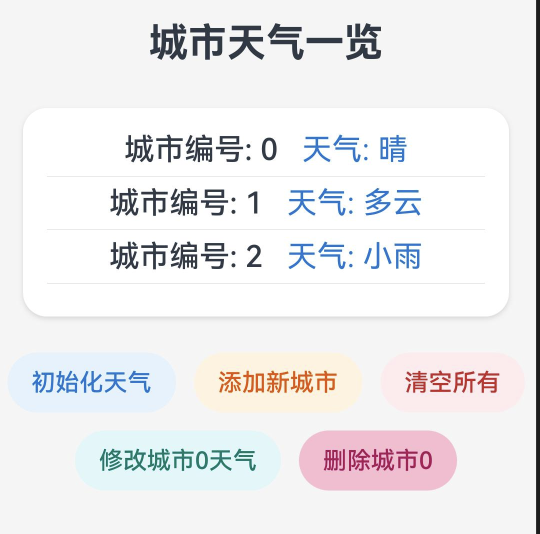
@Entry
@Component
struct MapCase {

// Step 1: 使用@State装饰Map类型变量

  @State weatherMap: Map<number, string> = new Map([
    [0, '晴'],
    [1, '多云'],
    [2, '小雨']
  ])

// Map<number, string>存储城市编号与天气的映射关系

  build() {
    Column() {
      Text('城市天气一览')
        .fontSize(26)
        .fontWeight(FontWeight.Bold)
        .margin({ top: 30, bottom: 20 })
      // 遍历Map,展示所有城市编号和天气
      this.Card()

      // 操作按钮区
      Row({ space: 12 }) {
        Button('初始化天气')
          .type(ButtonType.Capsule)
          .backgroundColor(0xE3F2FD)
          .fontColor(0x1976D2)
          .onClick(() => {
            // 重新赋值Map,触发UI刷新
            this.weatherMap = new Map([
              [0, '晴'],
              [1, '多云'],
              [2, '小雨']
            ])
          })
        Button('添加新城市')
          .type(ButtonType.Capsule)
          .backgroundColor(0xFFF3E0)
          .fontColor(0xE65100)
          .onClick(() => {
            // 复制原Map,添加新项,赋新引用
            let newMap = new Map(this.weatherMap)
            newMap.set(3, '雷阵雨')
            this.weatherMap = newMap
          })
        Button('清空所有')
          .type(ButtonType.Capsule)
          .backgroundColor(0xFFEBEE)
          .fontColor(0xC62828)
          .onClick(() => {
            // 赋空Map,触发UI刷新
            this.weatherMap = new Map()
          })
      }
      .margin({ bottom: 12 })

      Row({ space: 12 }) {
        Button('修改城市0天气')
          .type(ButtonType.Capsule)
          .backgroundColor(0xE0F7FA)
          .fontColor(0x00796B)
          .onClick(() => {
            // Step 3: 更新Map数据(需创建新对象!)
 // 正确做法:创建新Map并替换
            let newMap = new Map(this.weatherMap)
            newMap.set(0, '阴')
            this.weatherMap = newMap
          })
        Button('删除城市0')
          .type(ButtonType.Capsule)
          .backgroundColor(0xF8BBD0)
          .fontColor(0xAD1457)
          .onClick(() => {
            // 复制原Map,删除指定项
            let newMap = new Map(this.weatherMap)
            newMap.delete(0)
            this.weatherMap = newMap
          })
      }
      .margin({ bottom: 30 })
    }
    .width('100%')
    .height('100%')
    .backgroundColor(0xF5F5F5)
  }

  @Builder
  Card() {
    Column() {
      Column() {
      // Step 2: 渲染Map数据
        ForEach(Array.from(this.weatherMap.entries()), (item: [number, string]) => {
          Row() {
            Text(`城市编号: ${item[0]}`)
              .fontSize(20)
              .fontWeight(FontWeight.Medium)
              .margin({ right: 16 })
            Text(`天气: ${item[1]}`)
              .fontSize(20)
              .fontColor(0x1976D2)
          }

          Divider().margin({ top: 6, bottom: 6 })
        })
      }
      .padding(16)
    }
    .width('90%')
    .backgroundColor(0xFFFFFF)
    .borderRadius(16)
    .shadow({
      radius: 8,
      color: 0x22000000,
      offsetX: 0,
      offsetY: 4
    })
    .margin({ bottom: 24, top: 8 })
  }
}
@State装饰Set类型变量
Set是一种集合数据结构,存储唯一值(无重复元素)。Set类型核心概念
唯一性:Set中的每个值只出现一次(自动去重)
无序性:元素没有特定顺序(实际按插入顺序迭代)
高效性:快速检查元素是否存在
let set = new Set<number>();
set.add(1);         // 添加元素
set.add(2);
set.add(1);         // 重复添加无效
console.log(set.size); // 输出:2(自动去重)
set.has(1);         // true
set.delete(1);      // 删除元素
@State装饰Set的关键规则
状态管理机制
整体替换原则:必须创建新的Set对象赋值才能触发UI更新
禁止原地修改:
add(),delete()等方法不会触发更新// ❌ 错误 - 原地修改不会更新UI this.mySet.add(3); // ✅ 正确 - 创建新Set并替换 const newSet = new Set(this.mySet); newSet.add(3); this.mySet = newSet;
@Entry
@Component
struct SetCase {
  // 用Set<number>存储城市编号集合,代表有天气数据的城市
  @State citySet: Set<number> = new Set([0, 1, 2, 3, 4])
  // 城市编号与名称映射
  private cityNames: Map<number, string> = new Map([
    [0, '上海'],
    [1, '北京'],
    [2, '广州'],
    [3, '深圳'],
    [4, '成都'],
    [5, '杭州']
  ])

  build() {
    Column() {
      Text('有天气数据的城市')
        .fontSize(26)
        .fontWeight(FontWeight.Bold)
        .margin({ top: 30, bottom: 20 })
      // 展示Set中的所有城市编号和名称
      Column() {
        Column() {
          ForEach(Array.from(this.citySet.values()), (cityNo: number) => {
            Row() {
              Text(`城市编号: ${cityNo}`)
                .fontSize(20)
                .fontWeight(FontWeight.Medium)
                .margin({ right: 16 })
              Text(`城市: ${this.cityNames.get(cityNo) ?? '未知'}`)
                .fontSize(20)
                .fontColor(0x1976D2)
            }

            Divider().margin({ top: 6, bottom: 6 })
          })
        }
        .padding(16)
      }
      .width('90%')
      .backgroundColor(0xFFFFFF)
      .borderRadius(16)
      .shadow({
        radius: 8,
        color: 0x22000000,
        offsetX: 0,
        offsetY: 4
      })
      .margin({ bottom: 24, top: 8 })

      // 操作按钮区
      Row({ space: 12 }) {
        Button('初始化城市')
          .type(ButtonType.Capsule)
          .backgroundColor(0xE3F2FD)
          .fontColor(0x1976D2)
          .onClick(() => {
            // 重新赋值Set,触发UI刷新
            this.citySet = new Set([0, 1, 2, 3, 4])
          })
        Button('添加新城市')
          .type(ButtonType.Capsule)
          .backgroundColor(0xFFF3E0)
          .fontColor(0xE65100)
          .onClick(() => {
            // 复制原Set,添加新项,赋新引用
            let newSet = new Set(this.citySet)
            newSet.add(5)
            this.citySet = newSet
          })
        Button('清空所有')
          .type(ButtonType.Capsule)
          .backgroundColor(0xFFEBEE)
          .fontColor(0xC62828)
          .onClick(() => {
            // 赋空Set,触发UI刷新
            this.citySet = new Set()
          })
      }
      .margin({ bottom: 12 })

      Row({ space: 12 }) {
        Button('删除城市0')
          .type(ButtonType.Capsule)
          .backgroundColor(0xF8BBD0)
          .fontColor(0xAD1457)
          .onClick(() => {
            // 复制原Set,删除指定项
            let newSet = new Set(this.citySet)
            newSet.delete(0)
            this.citySet = newSet
          })
      }
      .margin({ bottom: 30 })
    }
    .width('100%')
    .height('100%')
    .backgroundColor(0xF5F5F5)
  }
}

讨论HarmonyOS开发技术,专注于API与组件、DevEco Studio、测试、元服务和应用上架分发等。
更多推荐
 5
5 0
0- 0


 已为社区贡献3条内容

所有评论(0)