鸿蒙APP开发——城市定位选择案例
·
往期推文全新看点(文中附带全新鸿蒙5.0全栈学习笔录)
✏️ 鸿蒙应用开发与鸿蒙系统开发哪个更有前景?
✏️ 嵌入式开发适不适合做鸿蒙南向开发?看完这篇你就了解了~
✏️ 对于大前端开发来说,转鸿蒙开发究竟是福还是祸?
✏️ 鸿蒙岗位需求突增!移动端、PC端、IoT到底该怎么选?
✏️ 市场巨变,移动开发行业即将迎来“第二春”?
✏️ 记录一场鸿蒙开发岗位面试经历~
✏️ 持续更新中……
介绍
本示例介绍城市选择场景的使用:通过 AlphabetIndexer 实现首字母快速定位城市的索引条导航。
效果图预览
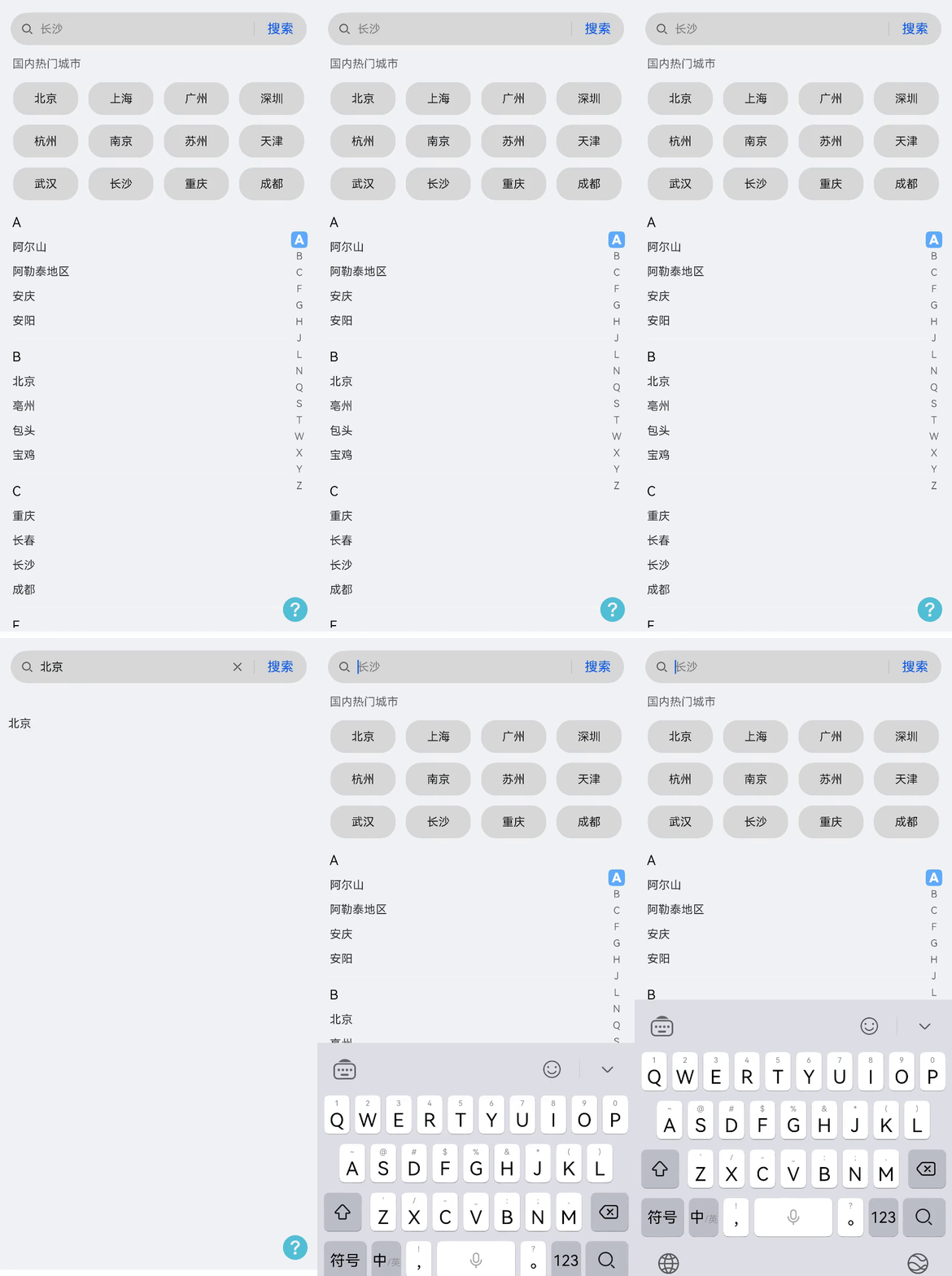
使用说明
分两个功能
- 在搜索框中可以根据城市拼音模糊搜索出相近的城市,例如输入"a",会出现"阿尔山"、“阿勒泰地区”、“安庆”、“安阳”。
- 下方城市列表通过AlphabetIndexer组件实现拼音索引条,通过滑动选择城市首拼,快速定位相关首拼城市。
实现思路
场景:通过AlphabetIndexer实现索引条导航
城市列表中的右侧首拼索引条,通过AlphabetIndexer组件实现首字母快速定位城市的索引条导航。
- 通过AlphabetIndexer的selected属性与城市列表中List组件onScrollIndex事件绑定,CityView.ets
AlphabetIndexer({ arrayValue: TAB_VALUE, selected: this.stabIndex })
  .height('100%')
  .selectedColor($r('app.color.citysearch_alphabet_select_color')) // 选中项文本颜色
  .popupColor($r('app.color.citysearch_alphabet_pop_color')) // 弹出框文本颜色
  .selectedBackgroundColor($r('app.color.citysearch_alphabet_selected_bgc')) // 选中项背景颜色
  .popupBackground($r('app.color.citysearch_alphabet_pop_bgc')) // 弹出框背景颜色
  .popupPosition({ x: $r('app.integer.citysearch_citysearch_pop_position_x'), y: $r('app.integer.citysearch_citysearch_pop_position_y') })
  .usingPopup(true) // 是否显示弹出框
  .selectedFont({ size: $r('app.integer.citysearch_select_font'), weight: FontWeight.Bolder }) // 选中项字体样式
  .popupFont({ size: $r('app.integer.citysearch_pop_font'), weight: FontWeight.Bolder }) // 弹出框内容的字体样式
  .alignStyle(IndexerAlign.Right) // 弹出框在索引条左侧弹出
  .onSelect((tabIndex: number) => {
    this.scroller.scrollToIndex(tabIndex);
  })
- 当用户滑动List组件,list组件onScrollIndex监听到firstIndex的改变,绑定赋值给AlphabetIndexer的selected属性,从而定位到字母索引。
- 当点击AlphabetIndexer的字母索引时,通过scrollToIndex触发list组件滑动并指定firstIndex,从而实现List列表与AlphabetIndexer组件首字母联动吸顶展示。
List({ space: 14, initialIndex: 0, scroller: this.scroller }) {
  .onScrollIndex((firstIndex: number, lastIndex: number) => {
     this.stabIndex = firstIndex;
  })
}
高性能知识点
由于需要通过搜索按钮频繁的控制自定义组件的显隐状态,CityView.ets,因此推荐使用显隐控制替代条件渲染。
工程结构&模块类型
citysearch                                      // har类型
|---src/main/ets/view
|   |---CitySearch.ets                          // 视图层-主页
|   |---CityView.ets                            // 视图层-城市列表组件
|   |---SearchView.ets                          // 视图层-搜索组件
|---src/main/ets/model
|   |---DetailData.ets                          // 模型层-数据模块


讨论HarmonyOS开发技术,专注于API与组件、DevEco Studio、测试、元服务和应用上架分发等。
更多推荐


 4
4 0
0- 0


 已为社区贡献264条内容

所有评论(0)