鸿蒙 HarmonyOS 5.0 Select的循环渲染
·
鸿蒙HarmonyOS 5.0
关于Select组件的循环渲染
官方代码是
 Select([{ value: 'aaa', icon: $r("app.media.selection") },
        { value: 'bbb', icon: $r("app.media.selection") },
        { value: 'ccc', icon: $r("app.media.selection") },
        { value: 'ddd', icon: $r("app.media.selection") }])
这里面如果需要循环渲染 是不能用Foreach的
只能添加一个属性
//外面添加一个data类,不添加就用基本类型,添加了得用V2的状态,不然监听不到,不监听就随便
class Data {
  value: string
  icon: Resource | undefined

  constructor(value: string, icon: Resource | undefined) {
    this.value = value;
    this.icon = icon;
  }
}

-----------
@Component
export struct MYSelect {
@State arr: Array<SelectOption> = [new Data('数据0',undedined)];
 @State strList: string[] = ['aaa', 'bbb'] //外面传这个数组或者其他进来就不用创建 arr的了,
   @State index: number = 0
  @State select: string = ''
 aboutToAppear(): void {
 	 this.strList.forEach((item:string)=>{
      this.arr.push(new Data(item,undefined))
    })
 }
build(){
 Row() {
  Select(this.arr)
        .selected(this.index)
        .value(this.select)
        .onSelect((index: number, text?: string) => {
          console.info('Select:' + index);
          this.index = index;
          if (text) {
            this.select = text;
          }
        })
	 }
	}
}

外面传值

  MYSelect ({
            strList: ['1', '2']
             })
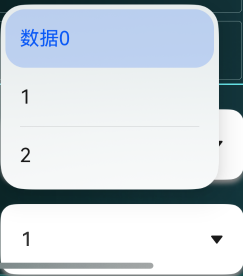
好了,结束,收工

讨论HarmonyOS开发技术,专注于API与组件、DevEco Studio、测试、元服务和应用上架分发等。
更多推荐



 3
3 0
0- 0


 已为社区贡献9条内容

所有评论(0)