鸿蒙5 影音娱乐类行业实践
📢 重磅福利!参与活动赢好礼,马克杯、鼠标垫、贴纸、8月1日-12月31日等你来!
点击链接: 华为开发者学堂
简介
本文档为影音娱乐类HarmonyOS应用的架构设计实践,提供影音娱乐类应用常见的音频播控、音频文件管理、播放记录、收藏等功能,帮助开发者快速构建一款影音娱乐类应用。
- Stage开发模型+声明式UI开发范式。
- 按照应用设备形态,规划一个手机设备Entry类型HAP包。
- 本实践性能优先,应用程序包大小可控,且无单独加载模块场景,业务模块包类型采用HAR包。
- 本实践侧重音频娱乐行业。
应用布局
说明
实践应用框架代码运行图,开发者可以基于框架代码替换相关资源文件,以保证应用良好的使用体验。
|
|
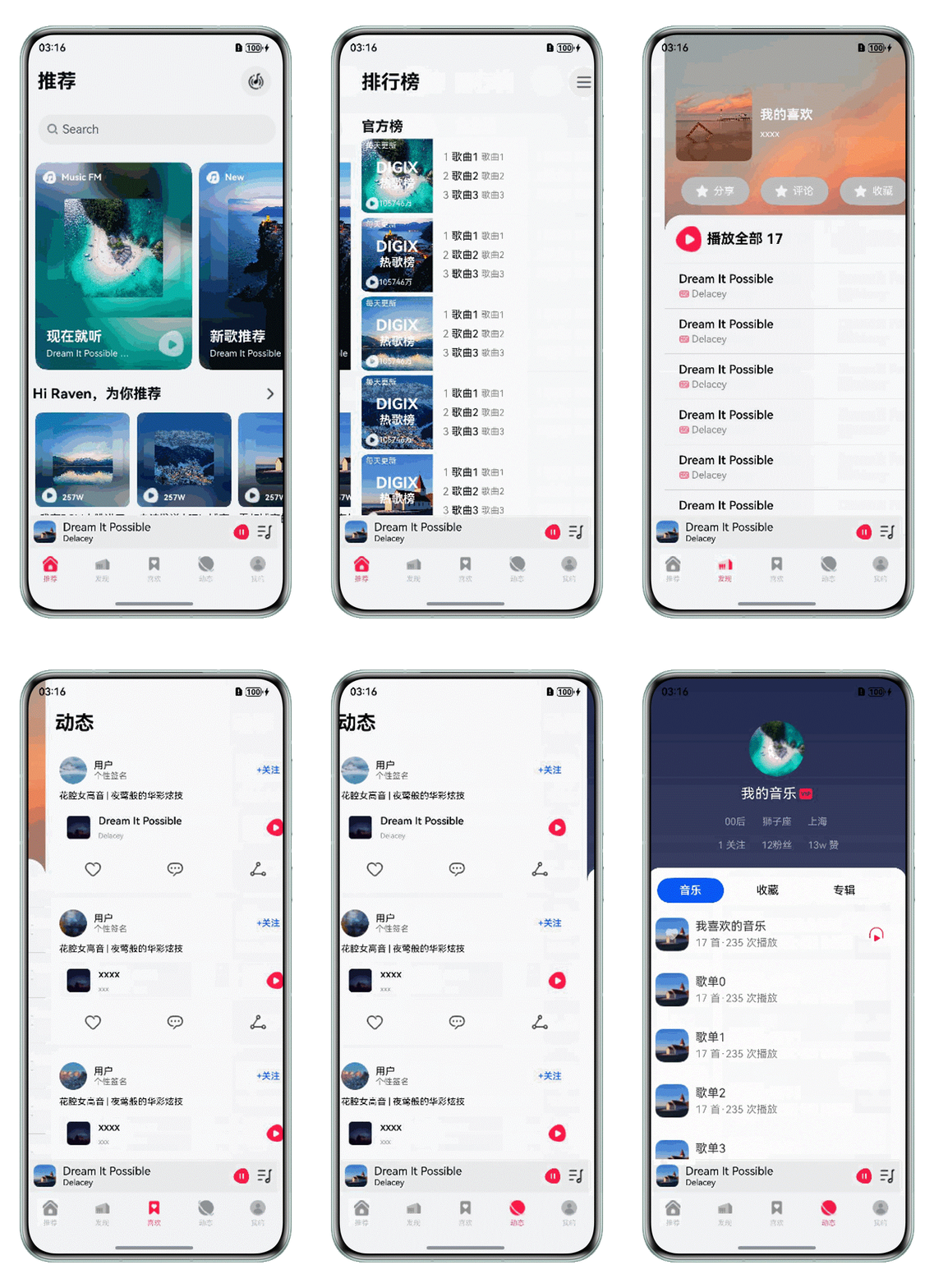
应用架构设计
模块划分
根据行业应用的功能,按照高内聚,低耦合的原则,常见影音娱乐类应用功能以及职责划分模块如下,开发者在实际设计过程中,可以根据模块的复杂程度实际情况再进一步细分:
| 模块名称 | 功能点 |
|---|---|
| 推荐 | 每日热门歌曲推荐 |
| 发现 | 应用官方排行榜 |
| 喜欢 | 收藏的喜欢歌曲列表 |
| 动态 | 音乐评论和分享 |
| 我的 | 个人信息 |
| 播放 | 音乐播放 |
软件视图设计
应用分层模块类型划分指导,参见分层模块化实践。
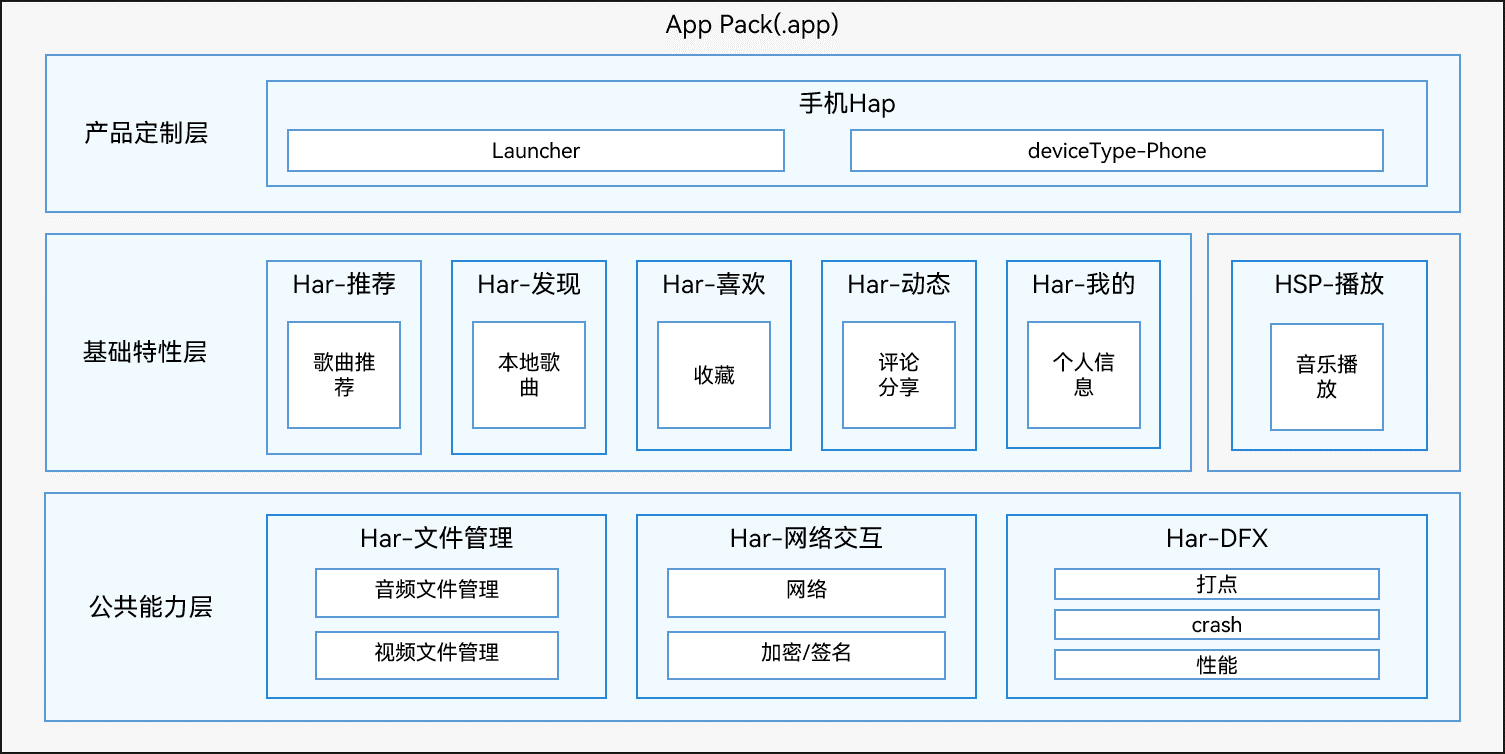
产品定制层:本应用只涉及手机端,设计为一个HAP,包含页面框架、导航、手机独有资源等。
基础特性层:将“推荐”、“音频文件管理”、“发现”、“喜欢”、“动态”、“我的”、“播放” 等功能模块打包为HAR包被上层产品组件引用。
公共能力层:将“文件管理”、“网络交互”、“DFX”等基础公共模块打包为HAR包被上层业务组件引用。
组件间依赖说明:上层组件可依赖下层,不建议跨层依赖、反向依赖、横向依赖。
图1 软件视图
逻辑视图设计
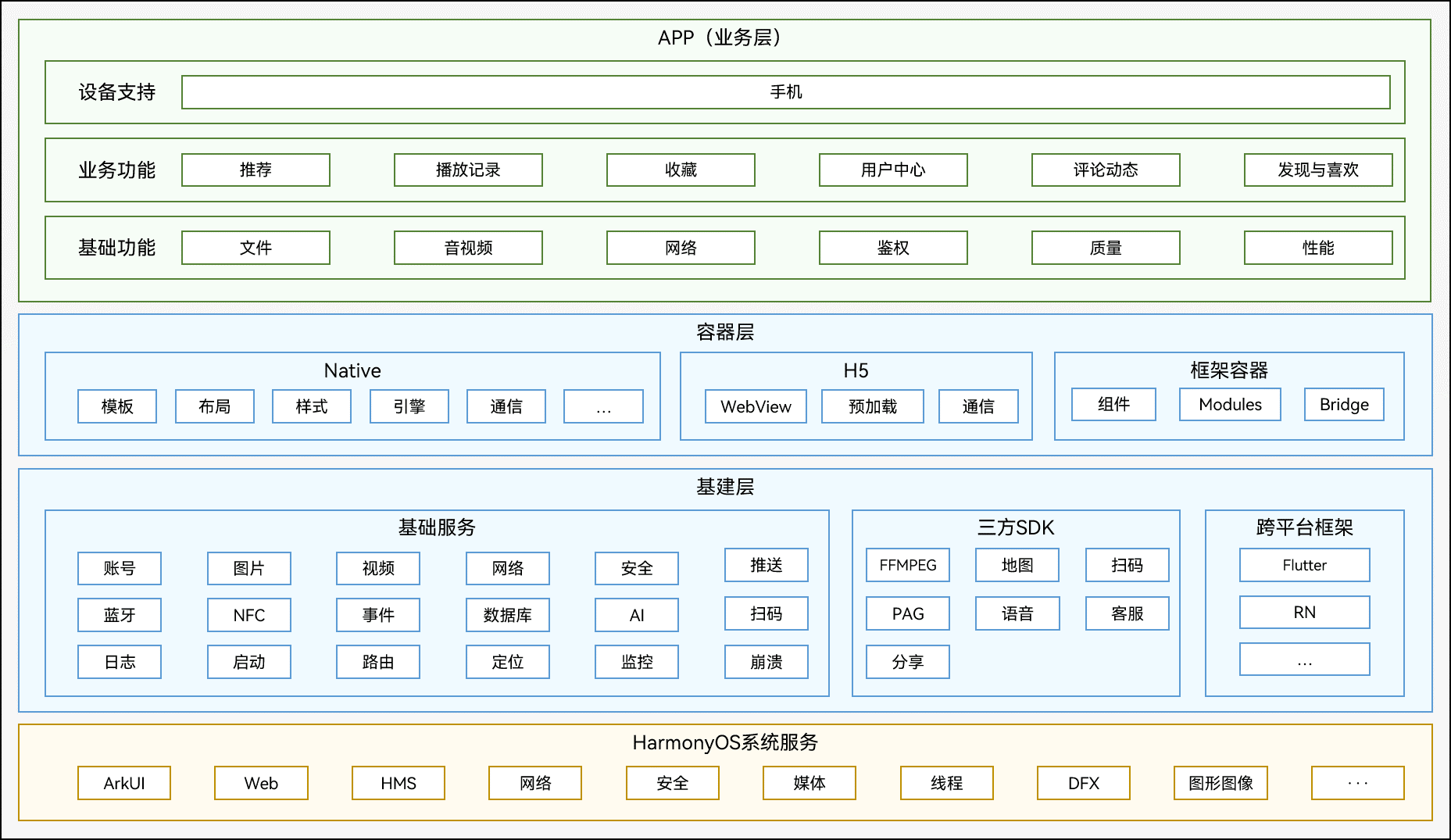
根据本应用功能的模块以及依赖,分解对基础服务以及三方的依赖,逻辑视图如下:
图2 逻辑视图
公共关键技术方案
介绍行业应用通用的公共关键技术,详见 公共关键技术方案。
行业关键技术方案
音频播控技术方案
功能设计
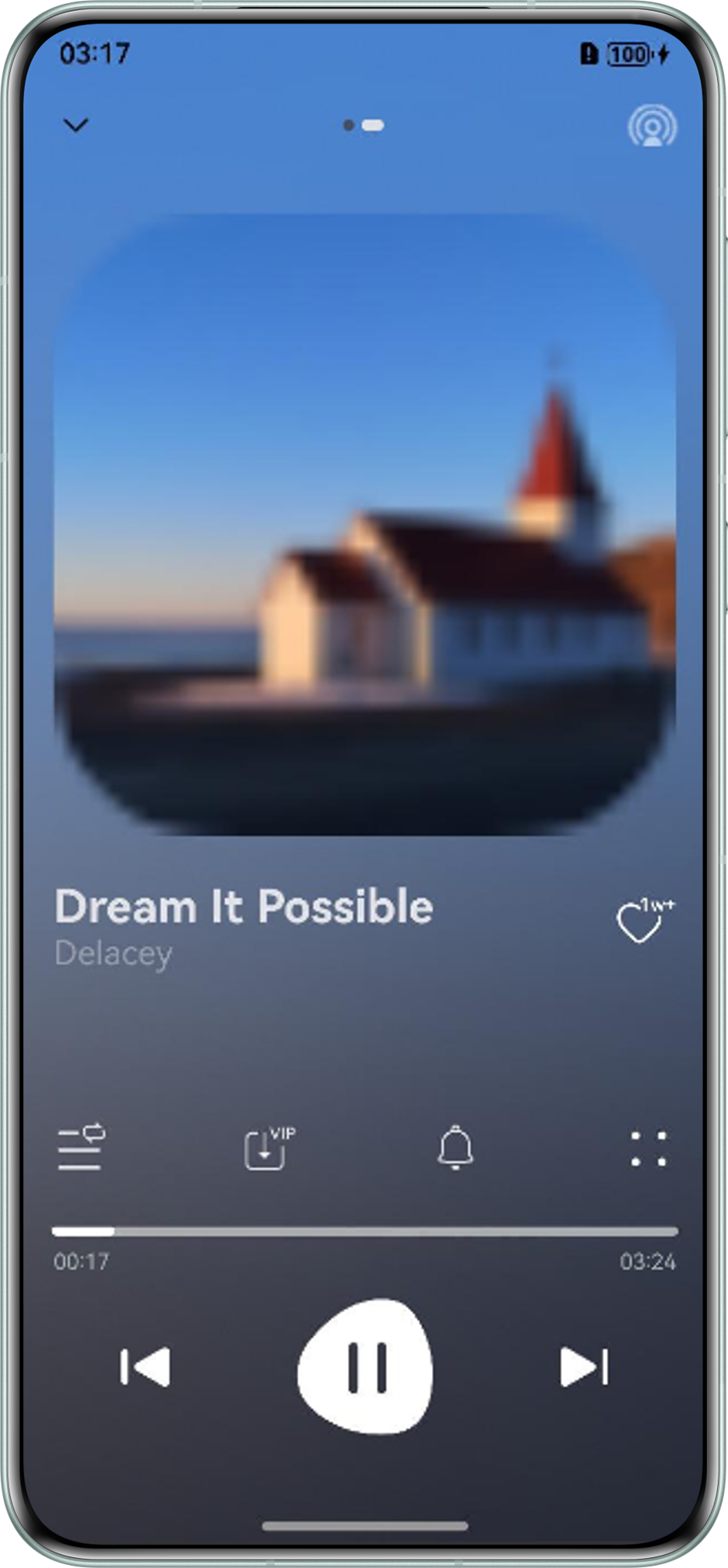
提供音频文件的播放、暂停、跳转、停止等能力,支持后台、锁屏播放。页面路径:首页->音频播放,如下图所示:
图3 音频播放功能
方案设计
- 使用Media Kit(媒体服务)实现音频播放功能,实现播放、暂停、跳转、停止能力。
- 使用AVSession Kit(音视频播控服务),实现后台播放或熄屏播放。
代码参考
代码参见音乐播放暂停实现。
播放历史、收藏技术方案
功能设计
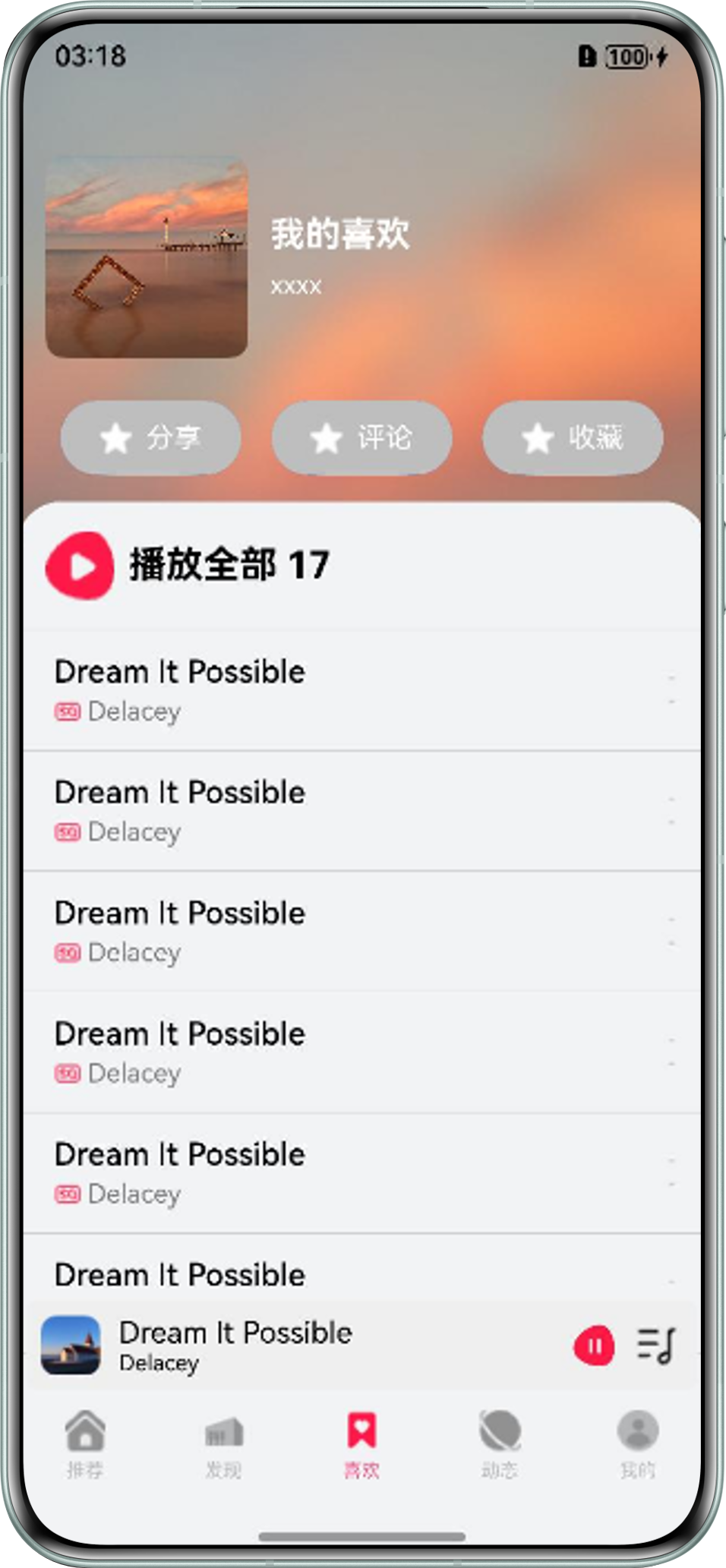
提供播放历史查看、清空,歌曲收藏、取消收藏能力;数据在端侧本地存储闭环。页面路径:首页->播放历史/收藏,如下图所示:
图4 音频播放功能
方案设计
- 使用ArkData(方舟数据管理)关系型数据库实现本地数据的存储管理。
- 用户行为数据属于个人敏感数据,数据库开启加密保护。
代码参考
代码参见播放历史和收藏。
应用框架代码
说明
本篇代码非应用的全量代码,只包括应用的部分框架代码。
框架代码中登录验证,只是UI演示。
代码运行环境
软件要求
- DevEco Studio版本:DevEco Studio 5.0.1 Release及以上。
- HarmonyOS SDK版本:HarmonyOS 5.0.1 Release SDK及以上。
硬件要求
- 设备类型:华为手机。
- HarmonyOS系统:HarmonyOS 5.0.1 Release及以上。
环境搭建
- 安装DevEco Studio,详情请参考使用指南。
历史工程迁移
开发者使用HarmonyOS 5.0.1 Release及以上版本导入代码,使用一体化的历史工程迁移能力,帮助开发者快速完成工程转换。
代码结构解读
本篇代码非应用的全量代码,只包括脱敏后的应用框架代码,开发者可以通过链接下载全量的框架代码。
- entry/src/main/ets/
- ├── components
- │ └── PlayerNav.ets // 播放栏样式
- ├── constants
- │ ├── EventConstants.ets // 自定义事件名称
- │ ├── Index.ets // SONG_KEY常量
- │ └── MusicConstants.ets // 歌单、评论等数据
- ├── entryability
- │ └── EntryAbility.ets
- ├── entryformability
- │ └── EntryFormAbility.ets
- ├── models
- │ ├── Index.ets // 导航栏结构
- │ ├── Music.ets // 音乐结构
- │ └── PlayState.ets // 传输数据的结构
- ├── pages
- │ ├── find
- │ │ └── Find.ets // “发现”页
- │ ├── mine
- │ │ └── Mine.ets // “我的”页
- │ ├── moment
- │ │ └── Moment.ets // “动态”页
- │ ├── play
- │ │ └── Play.ets // 音乐播放页
- │ ├── recommend
- │ │ └── Recommend.ets // "推荐"页
- │ ├── like
- │ │ └── Like.ets // 喜欢页
- │ └── Index.ets // 下导航栏、背景设置
- └── utils
- ├── AVPlayerManager.ets // 播放器创建
- ├── AVSessionManager.ets // 媒体会话
- ├── ImageSave.ets // 图片保存
- └── SongManager.ets // 歌曲管理
音乐播放暂停实现
- // entry/src/main/ets/utils/AVPlayerManager.ets
- // 单歌播放
- static async singlePlay(song: songItemType) {
- AVPlayerManager.startBackgroundTask()
- // 添加到播放列表中,再进行播放
- const isList = AVPlayerManager.currentSong.playList.some(
- (item: songItemType) => item.id === song.id
- )
- if (isList) {
- // 是不是正在播放的
- if (AVPlayerManager.player!.url === song.url) {
- // 重新播放(切换当前播放索引的歌曲)
- AVPlayerManager.player?.play()
- AVPlayerManager.currentSong.isPlay = true
- } else {
- // 切换歌曲(更新播放索引切换歌曲)
- AVPlayerManager.currentSong.playIndex =
- AVPlayerManager.currentSong.playList.findIndex(
- (item: songItemType) => item.id === song.id
- )
- AVPlayerManager.changePlay()
- }
- } else {
- AVPlayerManager.currentSong.playList.unshift(song)
- AVPlayerManager.currentSong.playIndex = 0
- AVPlayerManager.changePlay()
- }
- AppStorage.setOrCreate<PlayStateType>(SONG_KEY, AVPlayerManager.currentSong) // 更新全局状态
- AVSessionManager.setAVPlaybackState() // 更新状态
- }
- // 暂停播放
- static pause() {
- AVPlayerManager.player!.pause()
- // 更新播放器状态
- AVPlayerManager.currentSong.isPlay = false
- AVSessionManager.setAVPlaybackState() // 更新状态
- }
- // 上一首
- static prevPlay() {
- // 如果是随机播放
- if (AVPlayerManager.currentSong.playMode === "random" && AVPlayerManager.currentSong.playList.length > 1) {
- let index = -1
- do {
- index = Math.floor(Math.random() * AVPlayerManager.currentSong.playList.length)
- } while (index === AVPlayerManager.currentSong.playIndex)
- AVPlayerManager.currentSong.playIndex = index
- } else {
- AVPlayerManager.currentSong.playIndex--
- // 有可能减到负数
- AVPlayerManager.currentSong.playIndex =
- (AVPlayerManager.currentSong.playIndex + AVPlayerManager.currentSong.playList.length) %
- AVPlayerManager.currentSong.playList.length
- }
- AVPlayerManager.singlePlay(AVPlayerManager.currentSong.playList[AVPlayerManager.currentSong.playIndex])
- }
- // 下一首
- static nextPlay(repeat?: boolean) {
- if (!AVPlayerManager.currentSong.playList.length) {
- return
- }
- if (!repeat) {
- if (AVPlayerManager.currentSong.playMode === "random" && AVPlayerManager.currentSong.playList.length > 1) {
- let index = 0
- do {
- index = Math.floor(Math.random() * AVPlayerManager.currentSong.playList.length)
- } while (index === AVPlayerManager.currentSong.playIndex)
- AVPlayerManager.currentSong.playIndex = index
- } else {
- AVPlayerManager.currentSong.playIndex++
- // 有可能减到负数
- AVPlayerManager.currentSong.playIndex =
- (AVPlayerManager.currentSong.playIndex + AVPlayerManager.currentSong.playList.length) %
- AVPlayerManager.currentSong.playList.length
- }
- }
- AVPlayerManager.singlePlay(AVPlayerManager.currentSong.playList[AVPlayerManager.currentSong.playIndex])
- }
音乐后台播放实现
- // entry/src/main/ets/utils/AVPlayerManager.ets
- static async startBackgroundTask() {
- if (AVSessionManager.session.sessionId) {
- // 如果有会话,则不用开启后台任务
- return
- }
- try {
- let wantAgentInfo: wantAgent.WantAgentInfo = {
- wants: [
- {
- bundleName: "com.example.mymusic",
- abilityName: "com.example.mymusic.EntryAbility"
- }
- ],
- actionType: wantAgent.OperationType.START_ABILITY,
- requestCode: 0,
- wantAgentFlags: [wantAgent.WantAgentFlags.UPDATE_PRESENT_FLAG]
- };
- const want = await wantAgent.getWantAgent(wantAgentInfo)
- await backgroundTaskManager.startBackgroundRunning(
- getContext(),
- backgroundTaskManager.BackgroundMode.AUDIO_PLAYBACK,
- want
- )
- } catch (e) {
- AlertDialog.show({ message: e.message })
- }
- }
播放历史和收藏
- // entry/src/main/ets/pages/play/Play.ets
- build() {
- Stack({ alignContent: Alignment.Bottom }) {
- // 播放
- Stack() {
- // 变色背景
- Image(this.playState.img)
- .width('100%')
- .height('100%')
- .blur(1000)
- // 内容
- Column() {
- // 播放界面
- Column() {
- //头部控制
- Row(){
- Image($r('app.media.chevron_down'))
- .width(24)
- .height(24)
- Row(){
- Text()
- .backgroundColor('#465065')
- .height(6)
- .width(6)
- .borderRadius('50%')
- Text()
- .width(4)
- Text()
- .backgroundColor('#DFE0E4')
- .height(6)
- .width(12)
- .borderRadius('50%')
- }
- Image($r('app.media.people_wifi'))
- .width(26)
- .height(22)
- }
- .height(48)
- .margin({
- top: AppStorage.get<number>('topHeight'),
- })
- .width('1100px')
- .justifyContent(FlexAlign.SpaceBetween)
- // 图片
- Image(this.playState.img)
- .height('1100px')
- .width('1100px')
- .objectFit(ImageFit.Cover)
- .borderRadius(10)
- .margin({
- top:24,
- bottom:24
- })
- // 歌曲信息
- Row(){
- Column() {
- Text(this.playState.name)
- .fontSize(25)
- .fontWeight(FontWeight.Bold)
- .fontColor('#E1E2E7')
- Text(this.playState.author)
- .fontSize(18)
- .fontColor('#989EAD')
- }
- .alignItems(HorizontalAlign.Start)
- Stack(){
- Image($r('app.media.ic_like'))
- .width(24)
- Text('1w+')
- .fontColor(Color.White)
- .fontSize(10)
- .padding({
- bottom:20,
- left:20
- })
- .fontWeight(600)
- .width(40)
- .height(40)
- }
- .width(40)
- .height(40)
- }.justifyContent(FlexAlign.SpaceBetween)
- .width('1100px')
- .height(47)
- .margin({
- bottom:84
- })
- // 操作
- Row() {
- //歌单
- Image($r('app.media.ic_song_list'))
- .fillColor(Color.White)
- .width(28)
- .onClick(() => {
- this.panelHeight = '100%'
- })
- //下载
- Image($r('app.media.ic_download_o'))
- .fillColor(Color.White)
- .width(30)
- //铃声
- Image($r('app.media.ic_sing'))
- .fillColor(Color.White)
- .width(30)
- //其他
- Image($r('app.media.ic_other'))
- .fillColor(Color.White)
- .width(30)
- }
- .width('100%')
- .justifyContent(FlexAlign.SpaceBetween)
- .margin({
- bottom:10
- })
- // 播放
- Column() {
- // 进度条
- Slider({
- value: this.playState.time,
- min: 0,
- max: this.playState.duration,
- style:SliderStyle.InSet,
- })
- .blockBorderWidth(0)
- .blockSize({
- width:0.2,
- height:0.2
- })
- .trackThickness(5)
- .blockColor(Color.White)
- .blockBorderColor(Color.White)
- .selectedColor(Color.White)
- .trackColor('#ccc5c5c5')
- .onChange((val) => {
- AVPlayerManager.player!.seek(val)
- }).margin({
- bottom:-10,
- left:-7,
- right:-7
- })
- //时间
- Row() {
- Text(this.number2time(this.playState.time))
- .fontSize(12)
- .fontColor('#A5B4B1')
- Text(this.number2time(this.playState.duration))
- .fontSize(12)
- .fontColor('#A5B4B1')
- }
- .justifyContent(FlexAlign.SpaceBetween)
- .width('100%')
- .margin({
- bottom:10
- })
- // 切换
- Row() {
- Image($r('app.media.ic_prev'))
- .fillColor(Color.White)
- .width(40)
- .fillColor(Color.White)
- .onClick(() => {
- AVPlayerManager.prevPlay()
- })
- // 播放按钮
- Image(this.playState.isPlay ? $r('app.media.ic_paused') : $r('app.media.ic_play'))
- .fillColor(Color.White)
- .width(80)
- .objectFit(ImageFit.Contain)
- .onClick(() => {
- if (!this.playState.isPlay) {
- AVPlayerManager.singlePlay(this.playState.playList[this.playState.playIndex])
- this.animatorResult.play()
- } else {
- AVPlayerManager.pause()
- this.animatorResult.pause()
- }
- })
- // 下一首
- Image($r('app.media.ic_next'))
- .fillColor(Color.White)
- .width(40)
- .fillColor(Color.White)
- .onClick(() => {
- AVPlayerManager.nextPlay()
- })
- }
- .width('100%')
- .padding({
- bottom: 24
- })
- .justifyContent(FlexAlign.SpaceAround)
- }
- .width('100%')
- }
- .layoutWeight(1)
- .width('1100px')
- }
- }
- .backgroundColor(Color.Transparent)
- // 列表
- Column() {
- Column() {
- }
- .width('100%')
- .layoutWeight(1)
- .onClick(() => {
- this.panelHeight = '0%'
- })
- Column() {
- Row() {
- Row() {
- Image($r('app.media.ic_play'))
- .width(20)
- .fillColor('#ff5186')
- }
- .width(50)
- .aspectRatio(1)
- .justifyContent(FlexAlign.Center)
- Row({ space: 8 }) {
- Text(`播放列表 (${this.playState.playList?.length})`)
- .fontColor(Color.White)
- .fontSize(14)
- }
- .layoutWeight(1)
- Image($r('app.media.ic_close'))
- .fillColor('#ffa49a9a')
- .width(24)
- .height(24)
- .margin({ right: 16 })
- .onClick(() => {
- this.panelHeight = '0%'
- })
- }
- .width('100%')
- .backgroundColor('#ff353333')
- .padding(8)
- .border({
- width: { bottom: 1 },
- color: '#12ec5c87'
- })
- .borderRadius({
- topLeft: 4,
- topRight: 4
- })
- // 播放列表
- List() {
- ForEach(this.playState.playList, (item: songItemType, index: number) => {
- ListItem() {
- Row() {
- Row() {
- Text((index + 1).toString())
- .fontColor('#ffa49a9a')
- }
- .width(50)
- .aspectRatio(1)
- .justifyContent(FlexAlign.Center)
- // 列表
- Row({ space: 10 }) {
- Column() {
- Text(item.name)
- .fontSize(14)
- .fontColor(this.playState.playIndex === index ? $r('app.color.primary_light') : '#ffa49a9a')
- Text(item.author)
- .fontSize(12)
- .fontColor(this.playState.playIndex === index ? $r('app.color.primary_light') : Color.Gray)
- }
- .layoutWeight(1)
- .alignItems(HorizontalAlign.Start)
- .justifyContent(FlexAlign.Center)
- }
- .layoutWeight(1)
- Image($r('app.media.ic_more'))
- .width(24)
- .height(24)
- .margin({ right: 16 })
- .fillColor(Color.Gray)
- }
- .alignItems(VerticalAlign.Center)
- }
- .onClick(() => {
- AVPlayerManager.singlePlay(item)
- })
- .swipeAction({
- end: this.deleteButton(index)
- })
- .border({
- width: { bottom: 1 },
- color: '#12ec5c87'
- })
- })
- }
- .layoutWeight(1)
- .backgroundColor('#ff353333')
- }
- .height(400)
- }
- .height(this.panelHeight)
- .animation({
- duration: 300
- })
- }
- .width('100%')
- .height('100%')
- .backgroundColor(Color.Transparent)
- .opacity(this.opacityNum)
- }
代码下载链接

讨论HarmonyOS开发技术,专注于API与组件、DevEco Studio、测试、元服务和应用上架分发等。
更多推荐

 30
30 0
0- 0


 已为社区贡献20条内容

所有评论(0)