喵老师手把手带你做纯血鸿蒙应用的压测
参考资料:
官方文档:
一、压测方案
2种压测方案,一种是使用 DevEco Testing 自带的压测应用 ,一种是使用wukong进行压测
1.1 DevEco Testing
DevEco Testing是一款专项集成测试工具,提供了多项测试能力。DevEco Testing将测试能力以测试服务卡片的形式呈现给用户,无需复杂的配置,即可一键执行测试任务,同时提供了测试报告和分析,辅助开发者发现应用和产品问题,提升应用质量。
官方文档:
下载地址:
下载中心 | 华为开发者联盟-HarmonyOS开发者官网,共建鸿蒙生态
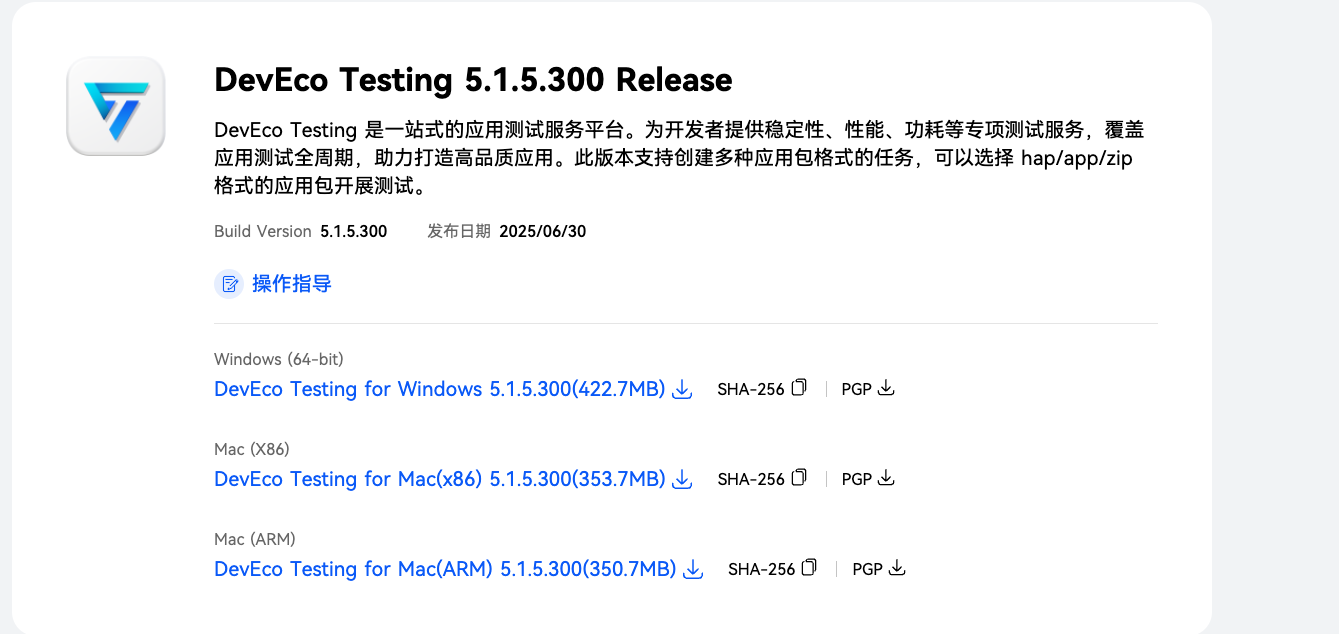
应用下载之后,无脑用就可以了,傻瓜似的。
1.2 wukong稳定性工具使用指导
wukong是系统自带的一种命令行工具,支持Ability的随机事件注入、控件注入、异常捕获、报告生成和对Ability数据遍历截图等特性。通过模拟用户行为,对系统或应用进行稳定性压力测试。wukong分为随机测试、专项测试和专注测试。
随机测试是指随机测试界面内容,支持的能力包括:shell启动、拉起整机应用、多种注入方式、设置随机种子、打印运行日志和生成报告。
专项测试主要提供对指定应用控件进行测试,支持的能力包括:shell启动、顺序遍历及截图、测试休眠睡醒、录制回放、打印运行日志和生成报告。
专注测试主要提供对指定控件的注入测试,支持的能力包括:shell启动、拉起整机应用、多种注入方式、设置随机种子、设置专注控件类型、设置注入控件次数、打印运行日志和生成报告。
1.3 工具对比
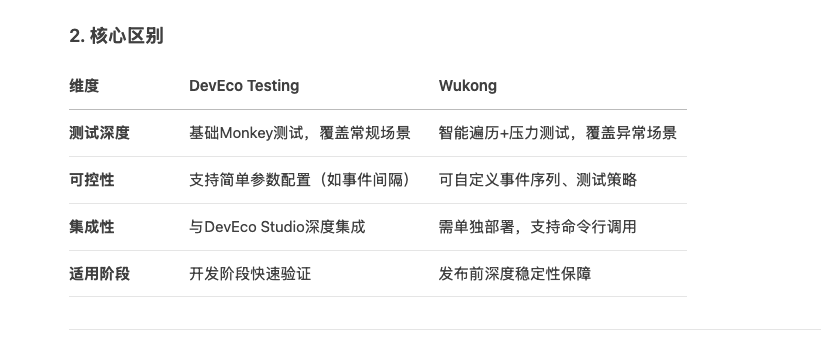
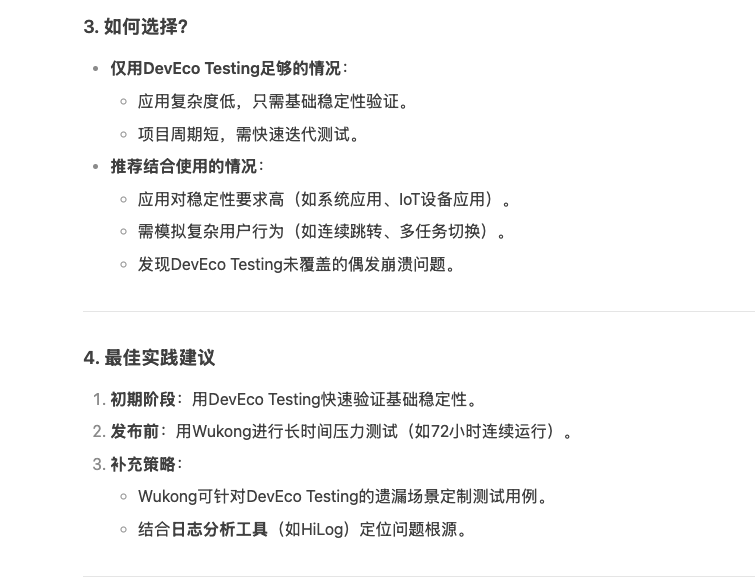
二、使用wukong 对纯血鸿蒙应用做压测
注意,这里是纯血鸿蒙
2.1 wukong安装 与 鸿蒙SDK 安装
安装方法:
单独安装wukong的方法,参考网上其他的博客。
因为wukong是系统自带的,所以我通过安装鸿蒙SDK来使用wukong。
2.1.1 鸿蒙SDK 安装方法
我通过安装DevEco Studio,来获取鸿蒙SDK
详细的安装步骤如下:
1、先安装DevEco Studio
下载地址
下载中心 | 华为开发者联盟-HarmonyOS开发者官网,共建鸿蒙生态
2、在DevEco Studio中安装鸿蒙SDK
-
打开 DevEco Studio。
-
进入配置界面:
-
Welcome 界面:点击右下角的 Configure -> SDK Manager。
-
项目打开状态:点击顶部菜单栏 File -> Settings -> Appearance & Behavior -> System Settings -> HarmonyOS SDK。
-
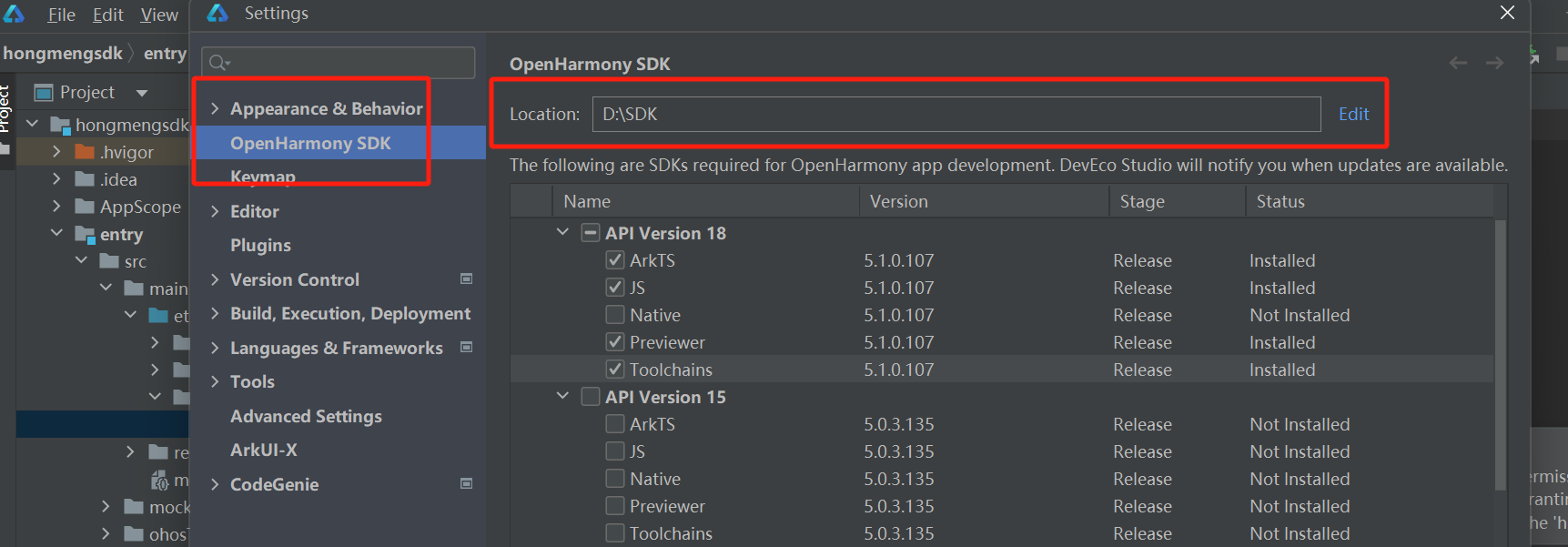
选择正确的 SDK 平台:
* 在 SDK Platforms 选项卡中,您应该能看到不同的 HarmonyOS API 版本(如 Ohos SDK API 9、API 10 等)。
我使用的是最新的API 18
3、点击进行安装,并且记住这个安装路径
4、配置环境变量
如上图,我的SDK安装目录为D:\SDK ,我们先找到hdc.exe 的路径。
-
hdc.exe通常位于:%SDK_Location%\toolchains\<版本号>\bin -
例如,一个常见的完整路径是:
C:\Users\YourUserName\AppData\Local\HarmonyOS\Sdk\toolchains\3.0.0.6\bin
我的hdc.exe 实际路径在 D:\SDK\18\toolchains
将路径添加到系统环境变量 PATH 中
在 Windows 搜索框输入 “编辑系统环境变量” 并打开。
点击下方的 “环境变量(N)...” 按钮。
在下面的 “系统变量” 列表中,找到并选中名为 Path 的变量,然后点击 “编辑”。
点击 “新建”,然后将您刚刚找到的完整 bin 目录路径(例如D:\SDK\18\toolchains 粘贴进去。
逐个点击 “确定” 关闭所有窗口。
5、在 CMD 或 PowerShell 窗口直接输入 hdc 并按回车
C:\Users\YourUserName> hdc
Usage: hdc [options] [command]
...
2.2 wukong压测
1、进入shell模式
#若为单设备,则直接输入如下命令进入shell模式
C:\Users>hdc shell
#

#若为多设备,则需先获取sn号,先输入hdc list targets获取sn号,然后进入shell模式
C:\Users>hdc list targets
15xxx424axxxx345209d94xxxx8fxx900
C:\Users>hdc -t 15xxx424axxxx345209d94xxxx8fxx900 shell
#
2、获取应用的bundle name和ability name
# wukong appinfo
BundleName:  com.ohos.adminprovisioning
AbilityName:  com.ohos.adminprovisioning.MainAbility
BundleName:  com.ohos.callui
AbilityName:  com.ohos.callui.MainAbility
3、执行查看帮助命令
C:\Users>hdc shell
# wukong --help        //wukong帮助菜单
wukong: '--help' is not a valid wukong command. See 'wukong help'.
usage: wukong <command> [<arguments>]
These are common wukong command list:
  help                       wukong help information
  -v/--version               wukong version
  exec                       run random test
  special                    run special test
  focus                      run focus test
  appinfo                    show all app information
# wukong exec -help   //wukong随机测试帮助菜单
usage: wukong exec [<arguments>]
These are wukong exec arguments list:
  -h, --help                 random test help
  -a, --appswitch            appswitch event percent
  -b, --bundle               the bundle name of allowlist
  -p, --prohibit             the bundle name of blocklist
  -d, --page                 block page list
  -t, --touch                touch event percent
  -c, --count                test count
  -i, --interval             interval
  -s, --seed                 random seed
  -m, --mouse                mouse event percent
  -k, --keyboard             keyboard event percent
  -H, --hardkey              hardkey event percent
  -S, --swap                 swap event percent
  -T, --time                 test time
  -C, --component            component event percent
  -r, --rotate               rotate event percent
  -e, --allow ability        the ability name of allowlist
  -E, --block ability        the ability name of blocklist
  -Y, --blockCompId          the id list of block component
  -y, --blockCompType        the type list of block component
  -I, --screenshot           get screenshot(only in random input)
  -B, --checkBWScreen        black and white screen detection
  -U, --Uri                  set Uri pages
  -x, --Uri-type             set Uri-type
# wukong special -help    //wukong专项测试帮助菜单
usage: wukong special [<arguments>]
These are wukong special arguments list:
  -h, --help                 special test help
  -t, --touch[x,y]           touch event
  -c, --count                total count of test
  -i, --interval             interval
  -S, --swap[option]         swap event
                              option is -s| -e| -b
                              -s, --start: the start point of swap
                              -e, --end: the end point of swap
                              -b, --bilateral: swap go and back
  -k, --spec_insomnia        power on/off event
  -T, --time                 total time of test
  -C, --component            component event
  -p, --screenshot           get screenshot(only in componment input)
  -r, --record               record user operation
  -R, --replay               replay user operation
  -u, --uitest               uitest dumpLayout
4、指定应用(指定页面压测)
> 显示启动
> hdc_std shell
# wukong exec -b bundlename -a abilityname -U uri

> 隐式启动
> hdc_std shell
# wukong exec -b bundlename -U uri -x uriType
5、测试报告
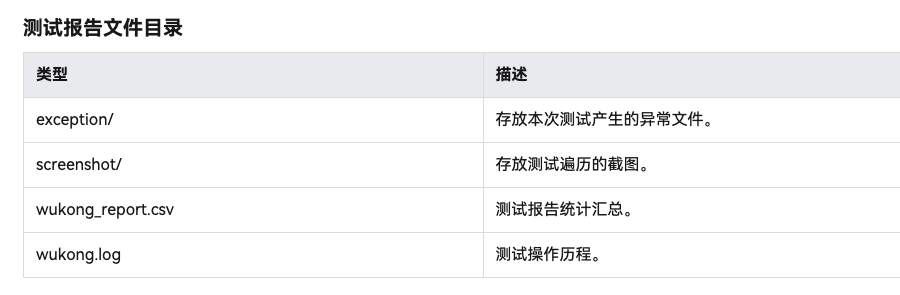
测试结果输出路径
执行完测试指令后,会自动生成测试结果,测试结果输出根路径如下:
- 2022/9/22之前的IDE版本,结果存放路径为:/data/local/wukong/report/xxxxxxxx_xxxxxx/。
- 2022/9/22之后的IDE版本,结果存放路径为:/data/local/tmp/wukong/report/xxxxxxxx_xxxxxx/。
6、查看操作日志
wukong支持通过hdc命令将日志获取到本地,查看操作历程。
// wukong.log文件对应路径如下
/data/local/tmp/wukong/report/xxxxxxxx_xxxxxx/wukong.log

// 查看wukong测试报告文件目录操作如下
# cd /data/local/tmp/wukong/report/20170805_170053
# ls
data.js  exception  wukong.log  wukong_report.csv

// 开启shell窗口,用hdc file recv获取wukong日志
C:\Users\xxx>hdc file recv /data/local/tmp/wukong/report/20170805_170053/wukong.log C:\Users\xxx\Desktop\log
[I][2024-01-03 20:08:02] HdcFile::TransferSummary success
FileTransfer finish, Size:76492, File count = 1, time:16ms rate:4780.75kB/s
7、其他具体细节命令,查看官方文档

讨论HarmonyOS开发技术,专注于API与组件、DevEco Studio、测试、元服务和应用上架分发等。
更多推荐



 26
26 0
0- 0


 已为社区贡献1条内容

所有评论(0)