鸿蒙6.0新特性,SymbolGlyph组件:图标渐变色与阴影特效
·
概述
SymbolGlyph是显示图标小符号的组件,不支持子组件。
属性
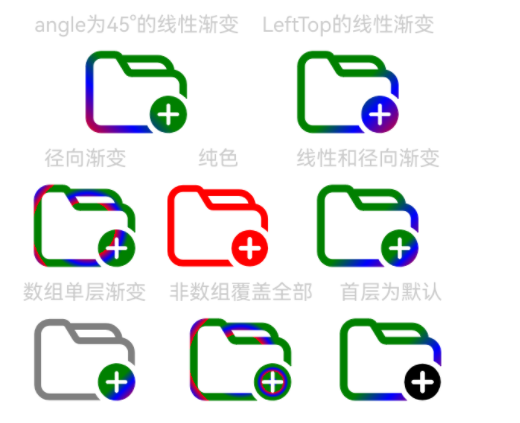
1.渐变色效果(shaderStyle)
通过shaderStyle设置SymbolGlyph组件的渐变色效果。
shaderStyle(shaders: Array<ShaderStyle | undefined> | ShaderStyle)
使用案例
@Entry
@Component
struct Index {
  @State message: string = 'Hello World';

  linearGradientOptions1: LinearGradientOptions = {
    angle: 45,
    colors: [[Color.Red, 0.0], [Color.Blue, 0.3], [Color.Green, 0.5]]
  };

  linearGradientOptions2: LinearGradientOptions = {
    direction: GradientDirection.LeftTop,
    colors: [[Color.Red, 0.0], [Color.Blue, 0.3], [Color.Green, 0.5]],
    repeating: true,
  };

  radialGradientOptions: RadialGradientOptions = {
    center: ["50%", "50%"],
    radius: "20%",
    colors: [[Color.Red, 0.0], [Color.Blue, 0.3], [Color.Green, 0.5]],
    repeating: true,
  };

  build() {
    Column() {
      Row() {
        Column() {
          Text('angle为45°的线性渐变')
            .fontSize(18)
            .fontColor(0xCCCCCC)
            .textAlign(TextAlign.Center)
          SymbolGlyph($r('sys.symbol.ohos_folder_badge_plus'))
            .fontSize(96)
            .shaderStyle([new LinearGradientStyle(this.linearGradientOptions1)])
        }
        .margin({ right: 20 })
        Column() {
          Text('LeftTop的线性渐变')
            .fontSize(18)
            .fontColor(0xCCCCCC)
            .textAlign(TextAlign.Center)
          SymbolGlyph($r('sys.symbol.ohos_folder_badge_plus'))
            .fontSize(96)
            .shaderStyle([new LinearGradientStyle(this.linearGradientOptions2)])
        }
        .margin({ right: 20 })
      }

      Row() {
        Column() {
          Text('径向渐变')
            .fontSize(18)
            .fontColor(0xCCCCCC)
            .textAlign(TextAlign.Center)
          SymbolGlyph($r('sys.symbol.ohos_folder_badge_plus'))
            .fontSize(96)
            .shaderStyle([new RadialGradientStyle(this.radialGradientOptions)])
        }
        .margin({ right: 20 })
        Column() {
          Text('纯色')
            .fontSize(18)
            .fontColor(0xCCCCCC)
            .textAlign(TextAlign.Center)
          SymbolGlyph($r('sys.symbol.ohos_folder_badge_plus'))
            .fontSize(96)
            .shaderStyle([new ColorShaderStyle(Color.Red)])
        }
        .margin({ right: 20 })
        Column() {
          Text('线性和径向渐变')
            .fontSize(18)
            .fontColor(0xCCCCCC)
            .textAlign(TextAlign.Center)
          SymbolGlyph($r('sys.symbol.ohos_folder_badge_plus'))
            .fontSize(96)
            .shaderStyle([
              new LinearGradientStyle(this.linearGradientOptions2),
              new LinearGradientStyle(this.linearGradientOptions2),
              new RadialGradientStyle(this.radialGradientOptions)
            ])
            .renderingStrategy(SymbolRenderingStrategy.MULTIPLE_OPACITY)
        }
        .margin({ right: 20 })
      }

      Row() {
        Column() {
          Text('数组单层渐变')
            .fontSize(18)
            .fontColor(0xCCCCCC)
            .textAlign(TextAlign.Center)
          SymbolGlyph($r('sys.symbol.ohos_folder_badge_plus'))
            .fontSize(96)
            .shaderStyle([
              new LinearGradientStyle(this.linearGradientOptions2),
            ])
            .renderingStrategy(SymbolRenderingStrategy.MULTIPLE_OPACITY)
        }.margin({ right: 20 })

        Column() {
          Text('非数组覆盖全部')
            .fontSize(18)
            .fontColor(0xCCCCCC)
            .textAlign(TextAlign.Center)
          SymbolGlyph($r('sys.symbol.ohos_folder_badge_plus'))
            .fontSize(96)
            .shaderStyle(new RadialGradientStyle(this.radialGradientOptions))
            .renderingStrategy(SymbolRenderingStrategy.MULTIPLE_OPACITY)
        }.margin({ right: 20 })

        Column() {
          Text('首层为默认')
            .fontSize(18)
            .fontColor(0xCCCCCC)
            .textAlign(TextAlign.Center)
          SymbolGlyph($r('sys.symbol.ohos_folder_badge_plus'))
            .fontSize(96)
            .shaderStyle([
              undefined,
              new LinearGradientStyle(this.linearGradientOptions2),
            ])
            .renderingStrategy(SymbolRenderingStrategy.MULTIPLE_OPACITY)
        }.margin({ right: 20 })
      }
    }
    .margin({
      left: 20,
      top: 50
    })
  }
}
2.阴影效果(symbolShadow)
通过symbolShadow设置SymbolGlyph组件的阴影效果。
symbolShadow(shadow: Optional<ShadowOptions>)
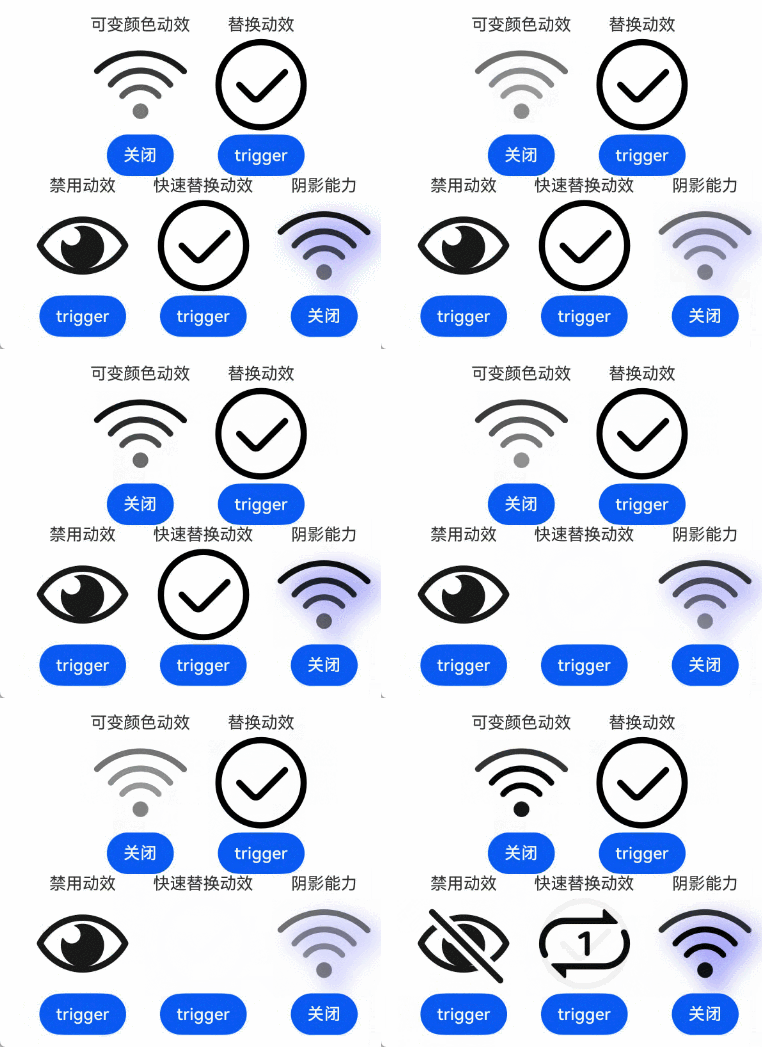
使用案例(通过设置动效和阴影)
// xxx.ets
@Entry
@Component
struct Index {
  @State isActive: boolean = true;
  @State triggerValueReplace: number = 0;
  @State triggerValueReplace1: number = 0;
  @State triggerValueReplace2: number = 0;
  @State renderMode: number = 1;

  replaceFlag: boolean = true;
  replaceFlag1: boolean = true;
  replaceFlag2: boolean = true;

  options: ShadowOptions = {
    radius: 10.0,
    color: Color.Blue,
    offsetX: 10,
    offsetY: 10,
  };

  build() {
    Column() {
      Row() {
        Column() {
          Text("可变颜色动效")
          SymbolGlyph($r('sys.symbol.ohos_wifi'))
            .fontSize(96)
            .symbolEffect(new HierarchicalSymbolEffect(EffectFillStyle.ITERATIVE), this.isActive)
          Button(this.isActive ? '关闭' : '播放')
            .onClick(() => {
              this.isActive = !this.isActive;
            })
        }
        .margin({ right: 20 })
        Column() {
          Text("替换动效")
          SymbolGlyph(this.replaceFlag ? $r('sys.symbol.checkmark_circle') : $r('sys.symbol.repeat_1'))
            .fontSize(96)
            .symbolEffect(new ReplaceSymbolEffect(EffectScope.WHOLE), this.triggerValueReplace)
          Button('trigger')
            .onClick(() => {
              this.replaceFlag = !this.replaceFlag;
              this.triggerValueReplace = this.triggerValueReplace + 1;
            })
        }
        .margin({ right: 20 })
      }

      Row() {
        Column() {
          Text("禁用动效")
          SymbolGlyph(this.replaceFlag1 ? $r('sys.symbol.eye_slash') : $r('sys.symbol.eye'))
            .fontSize(96)
            .renderingStrategy(this.renderMode)
            .symbolEffect(new DisableSymbolEffect(EffectScope.LAYER), this.triggerValueReplace1)
          Button('trigger')
            .onClick(() => {
              this.replaceFlag1 = !this.replaceFlag1;
              this.triggerValueReplace1 = this.triggerValueReplace1 + 1;
            })
        }
        .margin({ right: 20 })
        Column() {
          Text("快速替换动效")
          SymbolGlyph(this.replaceFlag2 ? $r('sys.symbol.checkmark_circle') : $r('sys.symbol.repeat_1'))
            .fontSize(96)
            .symbolEffect(new QuickReplaceSymbolEffect(EffectScope.WHOLE), this.triggerValueReplace2)
          Button('trigger')
            .onClick(() => {
              this.replaceFlag2 = !this.replaceFlag2;
              this.triggerValueReplace2 = this.triggerValueReplace2 + 1;
            })
        }
        .margin({ right: 20 })
        Column() {
          Text("阴影能力")
          SymbolGlyph($r('sys.symbol.ohos_wifi'))
            .fontSize(96)
            .symbolEffect(new HierarchicalSymbolEffect(EffectFillStyle.ITERATIVE), this.isActive)
            .symbolShadow(this.options)
          Button(this.isActive ? '关闭' : '播放')
            .onClick(() => {
              this.isActive = !this.isActive;
            })
        }
        .margin({ right: 20 })
      }
    }
    .margin({
      left: 45,
      top: 50
    })
  }
}
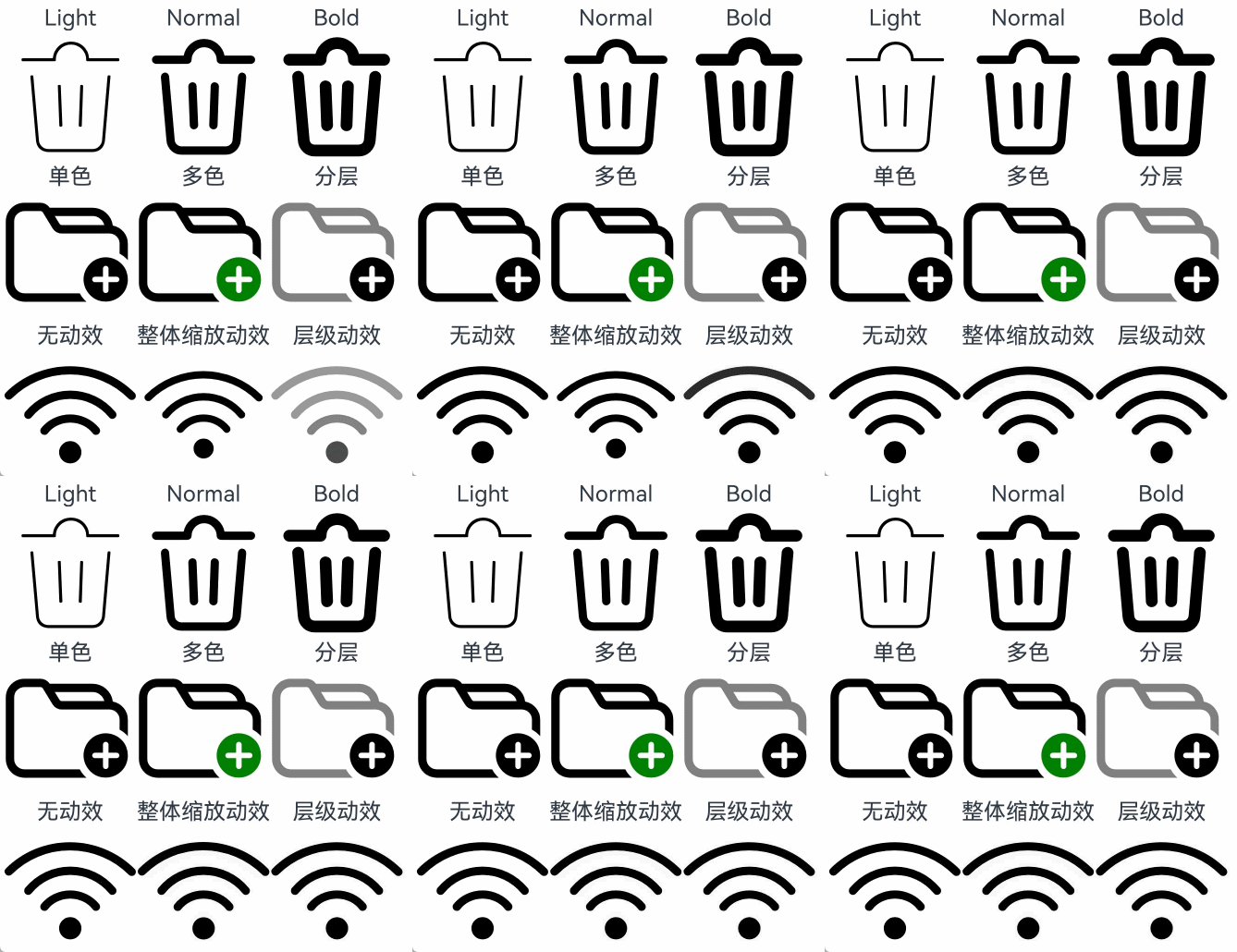
设置渲染和动效策略使用案例
// xxx.ets
@Entry
@Component
struct Index {
  build() {
    Column() {
      Row() {
        Column() {
          Text("Light")
          SymbolGlyph($r('sys.symbol.ohos_trash'))
            .fontWeight(FontWeight.Lighter)
            .fontSize(96)
        }

        Column() {
          Text("Normal")
          SymbolGlyph($r('sys.symbol.ohos_trash'))
            .fontWeight(FontWeight.Normal)
            .fontSize(96)
        }

        Column() {
          Text("Bold")
          SymbolGlyph($r('sys.symbol.ohos_trash'))
            .fontWeight(FontWeight.Bold)
            .fontSize(96)
        }
      }

      Row() {
        Column() {
          Text("单色")
          SymbolGlyph($r('sys.symbol.ohos_folder_badge_plus'))
            .fontSize(96)
            .renderingStrategy(SymbolRenderingStrategy.SINGLE)
            .fontColor([Color.Black, Color.Green, Color.White])
        }

        Column() {
          Text("多色")
          SymbolGlyph($r('sys.symbol.ohos_folder_badge_plus'))
            .fontSize(96)
            .renderingStrategy(SymbolRenderingStrategy.MULTIPLE_COLOR)
            .fontColor([Color.Black, Color.Green, Color.White])
        }

        Column() {
          Text("分层")
          SymbolGlyph($r('sys.symbol.ohos_folder_badge_plus'))
            .fontSize(96)
            .renderingStrategy(SymbolRenderingStrategy.MULTIPLE_OPACITY)
            .fontColor([Color.Black, Color.Green, Color.White])
        }
      }

      Row() {
        Column() {
          Text("无动效")
          SymbolGlyph($r('sys.symbol.ohos_wifi'))
            .fontSize(96)
            .effectStrategy(SymbolEffectStrategy.NONE)
        }

        Column() {
          Text("整体缩放动效")
          SymbolGlyph($r('sys.symbol.ohos_wifi'))
            .fontSize(96)
            .effectStrategy(SymbolEffectStrategy.SCALE)
        }

        Column() {
          Text("层级动效")
          SymbolGlyph($r('sys.symbol.ohos_wifi'))
            .fontSize(96)
            .effectStrategy(SymbolEffectStrategy.HIERARCHICAL)
        }
      }
    }
  }
}
使用案例预览图:
设置动效策略预览图 设置动效和阴影预览图 设置颜色渐变预览图

讨论HarmonyOS开发技术,专注于API与组件、DevEco Studio、测试、元服务和应用上架分发等。
更多推荐

 6
6 0
0- 0


 已为社区贡献12条内容

所有评论(0)