鸿蒙数据持久化-关系型数据库
·
1、封装DBUtils工具(DBUtils.ets)
import { Context } from '@ohos.abilityAccessCtrl';
import { relationalStore } from '@kit.ArkData';
import { BusinessError } from '@kit.BasicServicesKit';

export class EmpModel {
  id: number
  name: string
  age: number
  salary: number

  constructor(id: number, name: string, age: number, salary: number) {
    this.id = id;
    this.name = name;
    this.age = age;
    this.salary = salary;
  }
}

class DBUtils {
  /**
   * 初始化数据库
   */

  store: relationalStore.RdbStore | null = null

  initCreateDB(context: Context, tableName: string) {
    // (1) 初始化数据库配置
    const STORE_CONFIG: relationalStore.StoreConfig = {
      // 数据库文件名
      name: 'RdbTest.db',
      // 数据库安全级别
      securityLevel: relationalStore.SecurityLevel.S3,
      // 可选参数,指定数据库是否加密,默认不加密
      // encrypt: false,
      // 可选参数,数据库自定义路径。默认在本应用沙箱目录下创建RdbStore实例。
      // customDir: 'customDir/subCustomDir',
      // 可选参数,指定数据库是否以只读方式打开。默认为false,表示数据库可读可写。为true时,只允许从数据库读取数据,不允许对数据库进行写操作,否则会返回错误码801。
      // isReadOnly: false,
    };
    // (2)定义sql语句
    const SQL_CREATE_TABLE =
      `CREATE TABLE IF NOT EXISTS ${tableName} (
         ID INTEGER PRIMARY KEY AUTOINCREMENT,
         NAME TEXT NOT NULL,
         AGE INTEGER,
         SALARY REAL
      )`;
    //(3)初始化数据库(getRdbstore异步)
    relationalStore.getRdbStore(context, STORE_CONFIG, async (err, store) => {
      if (err) {
        console.error(`数据库创建失败. Code:${err.code}, message:${err.message}`);
        return;
      } else {
        console.log('数据库创建成功!!')
        this.store = store
        this.store.executeSql(SQL_CREATE_TABLE, (error) => {
          if (!error) {
            console.log('表格创建成功')
          } else {
            console.error('表格创建失败')
          }
        })
      }
    })
  }

  /**
   * 添加数据
   */
  async insterDataDB(tableName: string, valueBucket: relationalStore.ValuesBucket) {
    let rowId = -1
    if (this.store !== null) {
      try {
        rowId = await this.store.insert(tableName, valueBucket);
        console.info(`Succeeded in inserting data. rowId:${rowId}`);
        return rowId
      } catch (error) {
        const err = error as BusinessError;
        console.error(`Failed to insert data. Code:${err.code}, message:${err.message}`);
      }
    }
    return rowId
  }

  // 删除数据
  deleteDataDB(tableName: string, id: number) {

    const predicates = new relationalStore.RdbPredicates(tableName);
    predicates.equalTo('ID', id);
    if (this.store) {
      this.store.delete(predicates, (err: BusinessError, rows: number) => {
        if (err) {
          console.error(`删除失败. Code:${err.code}, message:${err.message}`);
          return;
        }
        console.info(`删除成功: rows=${rows}`);
      })
    }
  }

  // 修改数据
  updateDataDB(tableName: string, id: number, valueBucket: relationalStore.ValuesBucket) {
    let predicates = new relationalStore.RdbPredicates(tableName);
    predicates.equalTo('ID', id);
    if (this.store) {
      this.store.update(valueBucket, predicates, (err: BusinessError, rows: number) => {
        if (err) {
          console.error(`修改失败 Code:${err.code}, message:${err.message}`);
          return;
        }
        console.info(`修改成功 row count: ${rows}`);
      })
    }
  }

  /**
   * 查询
   * @param column
   * @param tableName
   */
  queryDataDB(column: Array<string>, tableName: string, pname: string) {


    return new Promise<EmpModel[]>((resolve) => {
      let predicates = new relationalStore.RdbPredicates(tableName);
      predicates.equalTo('NAME', pname);
      if (this.store) {
        this.store.query(predicates, column,
          (err: BusinessError, resultSet) => {
            if (err) {
              console.error(`查询失败. Code:${err.code}, message:${err.message}`);
              return;
            }
            console.info(`ResultSet column names: ${resultSet.columnNames}, column count: ${resultSet.columnCount}`);
            // const empList: Record<string, string | number>[] = []
            let empList: EmpModel[] = []
            // resultSet是一个数据集合的游标,默认指向第-1个记录,有效的数据
            // 从0开始。
            while (resultSet.goToNextRow()) {
              const id = resultSet.getLong(resultSet.getColumnIndex('ID'));
              const name = resultSet.getString(resultSet.getColumnIndex('NAME'));
              const age = resultSet.getLong(resultSet.getColumnIndex('AGE'));
              const salary = resultSet.getDouble(resultSet.getColumnIndex('SALARY'));
              console.info(`id=${id}, name=${name}, age=${age}, salary=${salary}`);
              console.log(id + '')
              let emp = new EmpModel(id, name, age, salary)
              empList.push(emp)
            }
            console.log(JSON.stringify(empList))
            resolve(empList)
            // 释放数据集的内存
            resultSet.close();


          })
      }
    })


  }
}

const empDBUtils = new DBUtils()

export { empDBUtils }
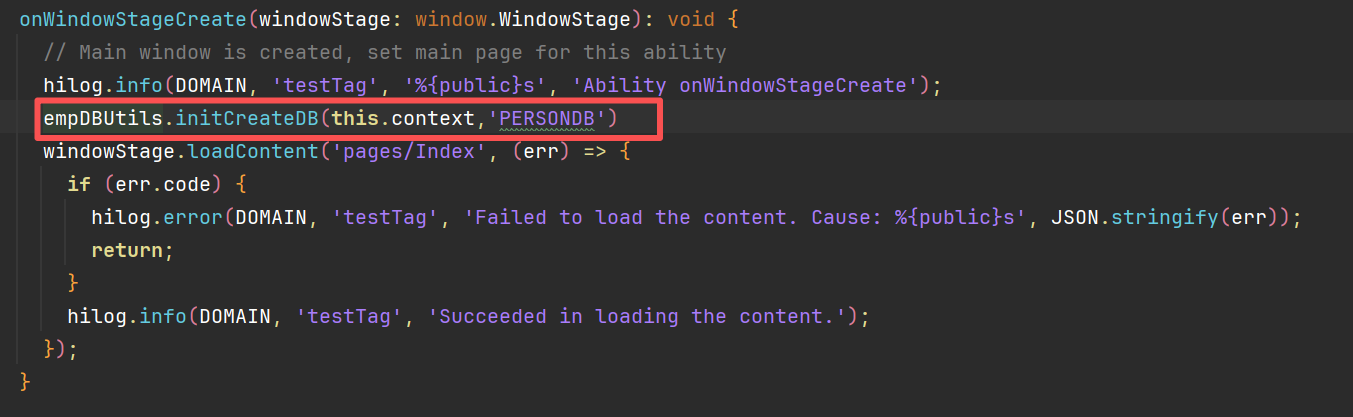
在EntryAbility中初始化数据配置
页面调用
import { empDBUtils, EmpModel } from '../util/DBUtils';
import { relationalStore } from '@kit.ArkData';


@Entry
@Component
struct Index {
  @State message: string = 'Hello World';
  @State name: string = ''
  @State ids: number = 0
  @State age: number = 0
  @State salary: number = 0
  @State empList: EmpModel[] = []
  private tableName: string = 'PERSONDB'

  build() {
    Column({ space: 10 }) {
      Row() {
        Text("员工编号:")
        TextInput({ text: $$this.ids })
          .width('50%')
        Button('删除').onClick(() => {
          empDBUtils.deleteDataDB(this.tableName, this.ids)
        })
        Button('修改').onClick(() => {
          const valueBucket: relationalStore.ValuesBucket = {
            NAME: this.name,
            AGE: this.age,
            SALARY: this.salary
          };
          empDBUtils.updateDataDB(this.tableName, this.ids, valueBucket)
        })
      }.width('100%').justifyContent(FlexAlign.Center)

      Row() {
        Text("员工姓名:")
        TextInput({ text: $$this.name })
          .width('50%')
      }.width('100%').justifyContent(FlexAlign.Center)

      Row() {
        Text("员工年龄:")
        TextInput({ text: $$this.age })
          .width('50%')
      }.width('100%').justifyContent(FlexAlign.Center)

      Row() {
        Text("员工工资:")
        TextInput({ text: $$this.salary })
          .width('50%')
      }.width('100%').justifyContent(FlexAlign.Center)

      Row() {
        Button('添加员工').onClick(async () => {
          const valueBucket: relationalStore.ValuesBucket = {
            NAME: this.name,
            AGE: this.age,
            SALARY: this.salary
          };
          empDBUtils.insterDataDB(this.tableName, valueBucket)
        })

        Button('查询员工').onClick(() => {
          this.empList = []
          empDBUtils.queryDataDB(['ID', 'NAME', 'AGE', 'SALARY'], this.tableName, this.name).then(empList => {
              this.empList = []
              this.empList = empList
          })
        })

      }


      List({ space: 10 }) {
        ForEach(this.empList, (emp: EmpModel) => {
          ListItem() {
            Flex({ wrap: FlexWrap.Wrap }) {
              Text(emp.name).width('50%')
              Text(`${emp.id}`).width('50%')
              Text(`年龄:${emp.age}`).width('50%')
              Text(`工资:${emp.salary}`).width('50%')
            }
          }.backgroundColor(Color.Yellow)
        }, (emp: EmpModel) => `${emp.id}`)
      }

    }
    .height('100%')
    .width('100%')
  }
}

讨论HarmonyOS开发技术,专注于API与组件、DevEco Studio、测试、元服务和应用上架分发等。
更多推荐
 2
2 0
0- 0


 已为社区贡献15条内容

所有评论(0)