鸿蒙开发-一个简易的网页嵌套模块
·
前言
通常软件会包含有隐私协议、用户协议等显示需求,并且一般来说,这样的界面都是网页资源。为了简便操作,我们需要封装一个网页嵌套组件以方便调用。
实现这个功能,我们需要思考这样一个模块需要什么。
首先是主体部分——实现网页渲染,这里我们将使用ArkUI提供的Web组件。
其次,为了完善实现效果,我们还需要对异常情况进行处理(网络错误、链接错误等,这里只展示网络错误和链接错误的情况)。
不仅如此,为了优化显示效果,我们还需要加上一点点动画,让它更好看,等等。。。。。。
废话不多说,以下即是具体实现。
实现
1. 配置网络权限(可选)
如果使用的网页资源是互联网资源,那么,就是需要配置这个的。通常来说都需要
    "requestPermissions": [
      {
        "name": "ohos.permission.INTERNET"
      },
    ],
2. 配置网页部分
该组件需要从外部传入的信息为webLink,也就是网页链接,可以是网址亦可以是本地html文件路径。
import { webview } from '@kit.ArkWeb';
import { curves } from '@kit.ArkUI';

@Component
  /**
   *  date:2025/9/5 17:09
   */

export struct WebPlugIn {
  controller: webview.WebviewController = new webview.WebviewController();
  @State errorStatus: number = 0; //0正常,1网络错误或资源加载错误,2HTTP错误,3是非网址或html文件
  @Prop webLink: ResourceStr = '';
  @State isLoading: boolean = true;
  @State animate: boolean = true;
  @State loadingScaleX: number = 0;
  @State loadingScaleY: number = 0;
  @State webOpacity: number = 0;

  async aboutToAppear() {
    this.loadingLoadingAnimation();
    await this.judgeUrlFormat();
  }

  loadingLoadingAnimation() {
    // 定义从小到大的缩放动画
    this.getUIContext()?.animateTo({ duration: 500, curve: curves.springMotion() }, () => {
      // console.log('加载动画',this.animate)
      this.loadingScaleX = this.animate ? 1 : 0;
      this.loadingScaleY = this.animate ? 1 : 0;
    })
  }

  loadingWebAnimation() {
    // 定义从小到大的缩放动画
    this.getUIContext()?.animateTo({ duration: 1500, curve: curves.springMotion() }, () => {
      // console.log('加载动画',this.animate)
      this.webOpacity = this.animate ? 0 : 1;
    })
  }

  isValidWebUrl(input: string): boolean {
    if (!input.trim()) return false;

    // 移除可能自动添加的协议
    let cleanInput = input.replace(/^https?:\/\//, '').trim();

    // IP地址格式 (包含端口)
    const ipRegex = /^(\d{1,3}\.){3}\d{1,3}(:\d+)?(\/.*)?$/;
    if (ipRegex.test(cleanInput)) {
      // 验证IP地址的有效性
      const ipParts = cleanInput.split(':')[0].split('/')[0].split('.');
      return ipParts.every(part => {
        const num = parseInt(part);
        return num >= 0 && num <= 255;
      });
    }

    // localhost格式
    const localhostRegex = /^localhost(:\d+)?(\/.*)?$/i;
    if (localhostRegex.test(cleanInput)) {
      return true;
    }

    // 域名格式
    const domainRegex = /^([a-zA-Z0-9]([a-zA-Z0-9\-]{0,61}[a-zA-Z0-9])?\.)+[a-zA-Z]{2,}(:\d+)?(\/.*)?$/;
    return domainRegex.test(cleanInput);
  }
  isHtmlFile(input: string): boolean {
    if (!input.trim()) return false;

    // 移除协议前缀
    const cleanInput = input.replace(/^https?:\/\//, '');
    const htmlFileRegex = /\.(html?|htm)(\?.*)?$/i;
    return htmlFileRegex.test(cleanInput);
  }
  async judgeUrlFormat() {
    try {
      let url: string = '';

      // 安全地将 ResourceStr 转换为 string
      if (typeof this.webLink === 'string') {
        url = this.webLink;
      } else {
        // 如果是资源引用,使用 getContext 获取实际字符串值
        const context = getContext(this);
        if (context && context.resourceManager) {
          url = await context.resourceManager.getStringValue(this.webLink);
        } else {
          // 降级处理:直接转换
          url = String(this.webLink);
        }
      }

      console.log('获取的url', url);

      if (!url || typeof url !== 'string') {
        console.log('URL转换失败');
        return;
      }

      // 确保 URL 是字符串后调用验证方法
      if (!(this.isValidWebUrl(url) || this.isHtmlFile(url))) {
        console.log('显示网址错误', url);
        this.animate = false;
        this.loadingLoadingAnimation();
        this.errorStatus = 3;
        setTimeout(() => {
          this.isLoading = false;
          this.loadingWebAnimation();
        }, 500);
      }
    } catch (error) {
      console.error('URL格式判断出错:', error);
    }
  }
  build() {
    Stack() {
      if (this.errorStatus == 0) {
        Web({ src: this.webLink, controller: this.controller ,renderMode:RenderMode.ASYNC_RENDER})
          // .backgroundColor(Color.Orange)
          .visibility(!this.isLoading ? Visibility.Visible : Visibility.Hidden)
          .opacity(this.webOpacity)
          .onPageBegin(() => {
            console.log('网页加载完成')
            this.animate = false;
            this.loadingLoadingAnimation();
            setTimeout(() => {
              this.isLoading = false;
              this.loadingWebAnimation();
            }, 500)
          })
          .onErrorReceive((event) => {
            if (event) {
/*              console.log('getErrorInfo:' + event.error.getErrorInfo());
              console.log('getErrorCode:' + event.error.getErrorCode());
              console.log('url:' + event.request.getRequestUrl());
              console.log('isMainFrame:' + event.request.isMainFrame());
              console.log('isRedirect:' + event.request.isRedirect());
              console.log('isRequestGesture:' + event.request.isRequestGesture());
              console.log('getRequestHeader_headerKey:' + event.request.getRequestHeader().toString());
              let result = event.request.getRequestHeader();
              console.log('The request header result size is ' + result.length);
              for (let i of result) {
                console.log('The request header key is : ' + i.headerKey + ', value is : ' + i.headerValue);
              }*/
              this.errorStatus = 1;
              console.log('网络错误或资源加载错误');
            }
          })
          .onHttpErrorReceive((event) => {
            if (event) {
/*              console.log('url:' + event.request.getRequestUrl());
              console.log('isMainFrame:' + event.request.isMainFrame());
              console.log('isRedirect:' + event.request.isRedirect());
              console.log('isRequestGesture:' + event.request.isRequestGesture());
              console.log('getResponseData:' + event.response.getResponseData());
              console.log('getResponseEncoding:' + event.response.getResponseEncoding());
              console.log('getResponseMimeType:' + event.response.getResponseMimeType());
              console.log('getResponseCode:' + event.response.getResponseCode());
              console.log('getReasonMessage:' + event.response.getReasonMessage());
              let result = event.request.getRequestHeader();
              console.log('The request header result size is ' + result.length);
              for (let i of result) {
                console.log('The request header key is : ' + i.headerKey + ' , value is : ' + i.headerValue);
              }
              let resph = event.response.getResponseHeader();
              console.log('The response header result size is ' + resph.length);
              for (let i of resph) {
                console.log('The response header key is : ' + i.headerKey + ' , value is : ' + i.headerValue);
              }*/
              this.errorStatus = 2;
              console.log('加载网络资源遇到HTTP错误(code>=400)');
            }
          })
/*
          .onInterceptRequest((event) => {
            const url = event.request.getRequestUrl()
            // 拦截图标.ico 请求
            if (url.includes('.ico')) {
              // 返回一个空的响应或默认图标
              return new WebResourceResponse();
            }
            return null; // 不拦截其他请求
          })
*/
      } else if (this.errorStatus == 1) {
        Web({ src: $rawfile('webpage/netError.html'), controller: this.controller })
          .visibility(!this.isLoading ? Visibility.Visible : Visibility.Hidden)
          .opacity(this.webOpacity)
        // .onPageBegin(() => {
        //   console.log('网页加载完成')
        //   this.animate = false;
        //   setTimeout(() => {
        //     this.isLoading = false;
        //   }, 1000)
        // })
      } else if(this.errorStatus==2){
        Web({ src: $rawfile('webpage/httpError.html'), controller: this.controller })
          .visibility(!this.isLoading ? Visibility.Visible : Visibility.Hidden)
          .opacity(this.webOpacity)
        // .onPageBegin(() => {
        //   console.log('网页加载完成')
        //   this.animate = false;
        //   setTimeout(() => {
        //     this.isLoading = false;
        //   }, 1000)
        // })
      }else{
        Web({ src: $rawfile('webpage/urlError.html'), controller: this.controller })
          .visibility(!this.isLoading ? Visibility.Visible : Visibility.Hidden)
          .opacity(this.webOpacity)
      }

      if (this.isLoading) {
        Column() {
          LoadingProgress().width(60).height(60)
            .margin({ top: 150 })
            .scale({ x: this.loadingScaleX, y: this.loadingScaleY })
        }
        .width('100%')
        .height('100%')
        .backgroundColor(Color.White)
        .justifyContent(FlexAlign.Start)
        .alignItems(HorizontalAlign.Center)
      }
    }
    .layoutWeight(1)
    // .padding({bottom:10})
  }
}
非常简单,到此我们就实现了一个简简单单的网页嵌套组件。并且,由于加载动画图标等等是系统提供的,所以可以直接使用。
3. 补充(错误提示网页内容)
netError.html
<!DOCTYPE html>
<html lang="zh-CN">
<head>
    <meta charset="UTF-8">
    <meta content="width=device-width, initial-scale=1.0" name="viewport">
    <title>错误!ERROR!</title>
    <link href="https://fonts.googleapis.com/css2?family=Roboto:wght@400;700&display=swap" rel="stylesheet">
    <style>
        body {
            margin: 0;
            padding: 0;
            font-family: 'Roboto', sans-serif;
            background: linear-gradient(to bottom right, #a1c4fd, #c2e9fb);
            display: flex;
            justify-content: center;
            align-items: flex-start;
            height: 100vh;
        }
        .container {
            margin-top: 50px;
            text-align: center;
            background-color: rgba(255, 255, 255, 0.9);
            padding: 30px;
            width: 80%;
            max-width: 400px;
            border-radius: 10px;
            box-shadow: 0 8px 16px rgba(0, 0, 0, 0.15);
            animation: float 3s ease-in-out infinite;
        }
        .content {
            color: #1e3a8a;
            font-size: 22px;
            margin-bottom: 20px;
            font-weight: 700;
        }
        .description {
            color: #333;
            margin-bottom: 10px;
        }
        .description .chinese {
            font-size: 18px;
            font-weight: 700;
        }
        .description .english {
            font-size: 14px;
            font-weight: 400;
        }
        .network-check {
            color: #333;
            line-height: 1.5;
        }
        .network-check .chinese {
            font-size: 18px;
            font-weight: 700;
        }
        .network-check .english {
            font-size: 14px;
            font-weight: 400;
        }
        @keyframes float {
            0%, 100% {
                transform: translateY(0);
            }
            50% {
                transform: translateY(-5px);
            }
        }
    </style>
</head>
<body>
<div class="container">
    <div class="content">错误!ERROR!</div>
    <div class="description">
        <span class="chinese">发生了一些问题。</span><br>
        <span class="english">Something went wrong.</span>
    </div>
    <div class="network-check">
        <span class="chinese">请检查您的网络连接或网址拼写,确保设备已联网并且网址拼写正确。</span><br>
        <span class="english">Please check your network connection or the spelling of the website address to ensure that your device is connected to the internet and the website address is spelled correctly.</span>
    </div>
</div>
</body>
</html>
httpError.html
<!DOCTYPE html>
<html lang="zh-CN">
<head>
    <meta charset="UTF-8">
    <meta content="width=device-width, initial-scale=1.0" name="viewport">
    <title>错误!ERROR!</title>
    <link href="https://fonts.googleapis.com/css2?family=Roboto:wght@400;700&display=swap" rel="stylesheet">
    <style>
        body {
            margin: 0;
            padding: 0;
            font-family: 'Roboto', sans-serif;
            background: linear-gradient(to bottom right, #a1c4fd, #c2e9fb);
            display: flex;
            justify-content: center;
            align-items: flex-start;
            height: 100vh;
        }
        .container {
            margin-top: 50px;
            text-align: center;
            background-color: rgba(255, 255, 255, 0.9);
            padding: 30px;
            width: 80%;
            max-width: 400px;
            border-radius: 10px;
            box-shadow: 0 8px 16px rgba(0, 0, 0, 0.15);
            animation: float 3s ease-in-out infinite;
        }
        .content {
            color: #1e3a8a;
            font-size: 22px;
            margin-bottom: 20px;
            font-weight: 700;
        }
        .description {
            color: #333;
            margin-bottom: 10px;
        }
        .description .chinese {
            font-size: 18px;
            font-weight: 700;
        }
        .description .english {
            font-size: 14px;
            font-weight: 400;
        }
        .network-check {
            color: #333;
            line-height: 1.5;
        }
        .network-check .chinese {
            font-size: 18px;
            font-weight: 700;
        }
        .network-check .english {
            font-size: 14px;
            font-weight: 400;
        }
        @keyframes float {
            0%, 100% {
                transform: translateY(0);
            }
            50% {
                transform: translateY(-5px);
            }
        }
    </style>
</head>
<body>
<div class="container">
    <div class="content">错误!ERROR!</div>
    <div class="description">
        <span class="chinese">发生了一些问题。</span><br>
        <span class="english">Something went wrong.</span>
    </div>
    <div class="network-check">
        <span class="chinese">请检查您的网络连接或网址拼写,确保设备已联网并且网址拼写正确。</span><br>
        <span class="english">Please check your network connection or the spelling of the website address to ensure that your device is connected to the internet and the website address is spelled correctly.</span>
    </div>
</div>
</body>
</html>
urlError.html
<!DOCTYPE html>
<html lang="zh-CN">
<head>
    <meta charset="UTF-8">
    <meta content="width=device-width, initial-scale=1.0" name="viewport">
    <title>资源错误 | Resource Error</title>
    <link href="https://fonts.googleapis.com/css2?family=Roboto:wght@400;700&display=swap" rel="stylesheet">
    <style>
        body {
            margin: 0;
            padding: 0;
            font-family: 'Roboto', sans-serif;
            background: linear-gradient(to bottom right, #89f7fe, #66a6ff);
            display: flex;
            justify-content: center;
            align-items: flex-start;
            height: 100vh;
        }
        .container {
            margin-top: 50px;
            text-align: center;
            background-color: rgba(255, 255, 255, 0.9);
            padding: 30px;
            width: 80%;
            max-width: 400px;
            border-radius: 10px;
            box-shadow: 0 8px 16px rgba(0, 0, 0, 0.15);
            animation: float 3s ease-in-out infinite;
        }
        .content {
            color: #d62828;
            font-size: 22px;
            margin-bottom: 20px;
            font-weight: 700;
        }
        .description {
            color: #333;
            margin-bottom: 10px;
        }
        .description .chinese {
            font-size: 18px;
            font-weight: 700;
        }
        .description .english {
            font-size: 14px;
            font-weight: 400;
        }
        .guidance {
            color: #333;
            line-height: 1.5;
        }
        .guidance .chinese {
            font-size: 18px;
            font-weight: 700;
        }
        .guidance .english {
            font-size: 14px;
            font-weight: 400;
        }
        @keyframes float {
            0%, 100% {
                transform: translateY(0);
            }
            50% {
                transform: translateY(-5px);
            }
        }
    </style>
</head>
<body>
<div class="container">
    <div class="content">错误!ERROR!</div>
    <div class="description">
        <span class="chinese">您所请求的资源格式错误。</span><br>
        <span class="english">The requested resource format is incorrect.</span>
    </div>
</div>
</body>
</html>
请将这三个文件放在如下目录中:
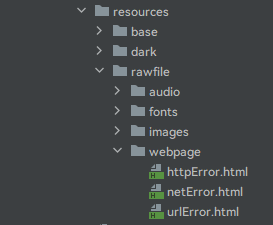 src/main/resources/rawfile/webpage
实际效果演示
网址错误或无网络连接情况:
SVID_20251010_145853_1
错误格式网址或html资源情况:
SVID_20251010_154613_1
网址或html资源正确情况:
SVID_20251010_154714_1

讨论HarmonyOS开发技术,专注于API与组件、DevEco Studio、测试、元服务和应用上架分发等。
更多推荐



 3
3 0
0- 0


 已为社区贡献10条内容

所有评论(0)