鸿蒙:使用媒体查询监听屏幕方向、切换横竖屏
·
1. 前言
媒体查询(@ohos.mediaquery)作为响应式设计的核心,在移动设备上应用十分广泛。媒体查询可根据不同设备类型或同设备不同状态修改应用的样式。媒体查询常用于下面两种场景:
- 针对设备和应用的属性信息(比如显示区域、深浅色、分辨率),设计出相匹配的布局。
- 当屏幕发生动态改变时(比如分屏、横竖屏切换),同步更新应用的页面布局。
2. 参考文档
https://developer.huawei.com/consumer/cn/doc/harmonyos-guides/arkts-layout-development-media-query
3. 核心思路
- 使用媒体查询api组件初始化前监听当前的屏幕方向状态
- 通过媒体查询api点击ui组件会触发切换当前的屏幕方向状态
4. 核心代码
/// 获取当前方向状态
getCurrentOrientation() {
  this.listener.on('change', (mediaQueryResult: mediaquery.MediaQueryResult) => {
    console.log("监听结果" + mediaQueryResult.media)
    if (mediaQueryResult.matches) {
      this.currentState = "横屏"
    } else {
      this.currentState = "竖屏"
    }
  });
}
/// 切换横屏
switchToLandscape() {
// 获取应用的最后一个窗口实例
window.getLastWindow(this.context).then((lastWindow) => {
// 根据参数设置窗口首选方向:横屏
lastWindow.setPreferredOrientation(window.Orientation.LANDSCAPE)
});
}
/// 切换竖屏
switchToPortrait() {
// 获取应用的最后一个窗口实例
window.getLastWindow(this.context).then((lastWindow) => {
// 根据参数设置窗口首选方向:竖屏
lastWindow.setPreferredOrientation(window.Orientation.PORTRAIT)
});
}5. 运行效果
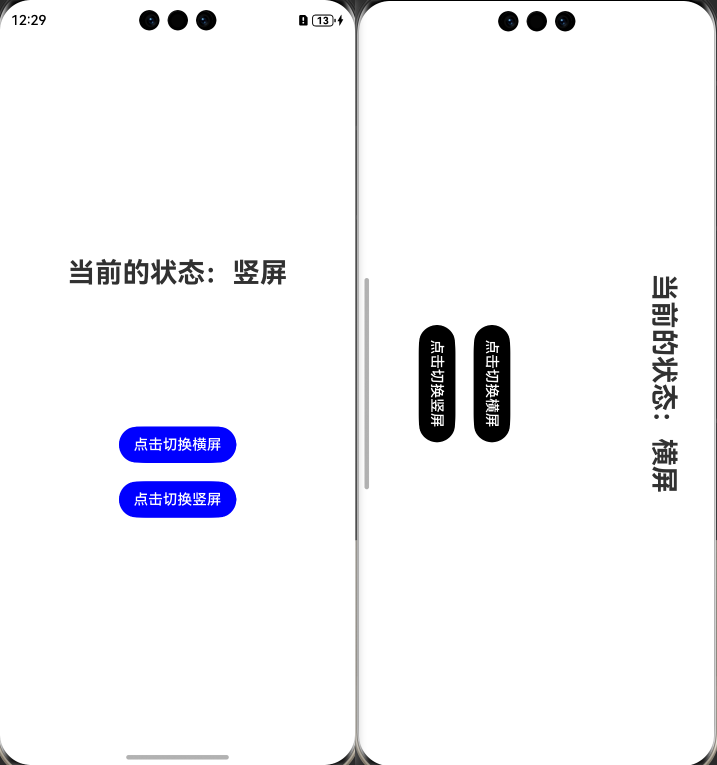
6. 完整代码
Index.ets
import { mediaquery, window } from '@kit.ArkUI';
@Entry
@ComponentV2
struct Index {
@Local currentState: string = ""
listener: mediaquery.MediaQueryListener =
this.getUIContext().getMediaQuery().matchMediaSync('(orientation: landscape)');
// 获取当前应用的UIAbility上下文
context = this.getUIContext().getHostContext()!;
aboutToAppear(): void {
// 监听屏幕方向改变
this.getCurrentOrientation()
}
/// 获取当前方向状态
getCurrentOrientation() {
this.listener.on('change', (mediaQueryResult: mediaquery.MediaQueryResult) => {
console.log("监听结果" + mediaQueryResult.media)
if (mediaQueryResult.matches) {
this.currentState = "横屏"
} else {
this.currentState = "竖屏"
}
});
}
/// 切换横屏
switchToLandscape() {

  // 获取应用的最后一个窗口实例
  window.getLastWindow(this.context).then((lastWindow) => {
    // 根据参数设置窗口首选方向:横屏
    lastWindow.setPreferredOrientation(window.Orientation.LANDSCAPE)
  });

}

/// 切换竖屏
switchToPortrait() {

  // 获取应用的最后一个窗口实例
  window.getLastWindow(this.context).then((lastWindow) => {
    // 根据参数设置窗口首选方向:竖屏
    lastWindow.setPreferredOrientation(window.Orientation.PORTRAIT)
  });

}
build() {
Column({ space: 150 }) {
Text("当前的状态:" + this.currentState)
.fontSize(30)
.fontWeight(FontWeight.Bold)
Column({ space: 20 }) {
Button("点击切换横屏")
.onClick(() => {
this.switchToLandscape()
})
.backgroundColor(this.currentState == "横屏" ? Color.Black : Color.Blue)
Button("点击切换竖屏")
.onClick(() => {
this.switchToPortrait()
})
.backgroundColor(this.currentState == "横屏" ? Color.Black : Color.Blue)
}
}
.justifyContent(FlexAlign.Center)
.width("100%")
.height("100%")
}
}觉得有帮助,可以点赞或收藏

讨论HarmonyOS开发技术,专注于API与组件、DevEco Studio、测试、元服务和应用上架分发等。
更多推荐
 1
1 0
0- 0


 已为社区贡献205条内容

所有评论(0)