HarmonyOS 智能工具箱(四):AI 图像处理工具
·
系列: HarmonyOS 智能工具箱 App 全栈开发 · 第 4 篇
上一篇: 语音交互工具
引言
图像处理是 AI 最具视觉冲击力的应用场景。本文将使用 HarmonyOS 的 Core Vision Kit 实现图像分割和超分辨率,使用 MindSpore Lite 实现端侧图像分类,构建一个功能完整的 AI 图像处理工具。
通过本文你将学到:
- 使用 Core Vision Kit 的
visionCore.segmentImage()进行前景/背景分割 - 使用
visionCore.superResolution()实现图像超分辨率(API 26) - 使用 MindSpore Lite 加载和运行图像分类模型
- 构建图片预处理流水线(resize、归一化、通道转换)
环境准备
| 项目 | 版本 |
|---|---|
| DevEco Studio | 6.1.1 Release (6.1.1.280) |
| API Level | API 24 (HarmonyOS 6.1.1 Release) |
| 设备 | 真机 |
依赖配置
// oh-package.json5
{
  "dependencies": {
    "@kit.CoreVisionKit": "^1.0.0",
    "@kit.MindSporeLiteKit": "^1.0.0",
    "@kit.ImageKit": "^1.0.0",
    "@kit.MediaLibraryKit": "^1.0.0",
    "@kit.PerformanceAnalysisKit": "^1.0.0"
  }
}
权限配置
// entry/src/main/module.json5
{
  "requestPermissions": [
    { "name": "ohos.permission.READ_IMAGEVIDEO", "reason": "从相册选择图片进行 AI 处理" },
    { "name": "ohos.permission.WRITE_IMAGEVIDEO", "reason": "保存处理后的图片到相册" }
  ]
}
核心实现
Step 1: 封装图像处理服务
目标: 将 Core Vision Kit 和 MindSpore Lite 的图像处理能力统一封装。
// service/ImageProcessService.ets
import { visionCore } from '@kit.CoreVisionKit';
import { mindsporeLite } from '@kit.MindSporeLiteKit';
import { image } from '@kit.ImageKit';
import { hilog } from '@kit.PerformanceAnalysisKit';

const TAG = 'ImageProcessService';
const DOMAIN = 0xFF00;

// 处理结果类型
export class ImageProcessResult {
  success: boolean = false;
  message: string = '';
  outputPixelMap: image.PixelMap | null = null;
  classifications: ClassificationResult[] = [];
  detections: DetectionResult[] = [];
  processingTime: number = 0;
}

// 分类结果
export class ClassificationResult {
  className: string = '';
  confidence: number = 0;
  classId: number = 0;
}

// 检测结果
export class DetectionResult {
  className: string = '';
  confidence: number = 0;
  boundingBox: Rect = { left: 0, top: 0, width: 0, height: 0 };
}

export class Rect {
  left: number = 0;
  top: number = 0;
  width: number = 0;
  height: number = 0;
}

export class ImageProcessService {
  private static model: mindsporeLite.Model | null = null;
  private static classNames: string[] = [
    '猫', '狗', '鸟', '鱼', '马',
    '汽车', '飞机', '自行车', '船', '火车',
    '花', '树', '山', '海', '天空',
    '食物', '建筑', '人物', '文字', '其他'
  ];

  /**
   * 初始化图像分类模型
   */
  static async initClassificationModel(context: Context): Promise<boolean> {
    try {
      if (this.model) return true;

      this.model = mindsporeLite.createModel();

      // 从 resources/rawfile 加载模型
      const modelPath = context.resourceDir + '/rawfile/image_classifier.mindir';
      await this.model.loadFromFile(modelPath);

      // 配置推理参数
      const config = mindsporeLite.createModelConfig();
      config.deviceType = mindsporeLite.DeviceType.DT_CPU;
      config.numThreads = 4;

      await this.model.build(config);

      hilog.info(DOMAIN, TAG, '图像分类模型加载成功');
      return true;
    } catch (err) {
      hilog.error(DOMAIN, TAG, `模型加载失败: ${JSON.stringify(err)}`);
      this.model = null;
      return false;
    }
  }

  /**
   * 图像分类
   * @param pixelMap 输入图片
   * @returns 分类结果
   */
  static async classifyImage(pixelMap: image.PixelMap): Promise<ImageProcessResult> {
    const result = new ImageProcessResult();
    const startTime = Date.now();

    try {
      if (!this.model) {
        result.message = '模型未加载,请先初始化';
        return result;
      }

      // 预处理:resize 到模型输入尺寸
      const inputWidth = 224;
      const inputHeight = 224;
      const resizedMap = await this.resizePixelMap(pixelMap, inputWidth, inputHeight);

      // 预处理:转为 Float32Array 并归一化
      const inputData = await this.pixelMapToFloat32Array(resizedMap);

      // 创建输入张量
      const inputs = this.model.createInputTensor();
      inputs[0].setData(inputData);

      // 创建输出张量
      const outputs = this.model.createOutputTensor();

      // 执行推理
      await this.model.predict(inputs, outputs);

      // 解析结果
      const outputData = new Float32Array(outputs[0].getData());
      const topK = this.getTopK(outputData, 3);

      result.classifications = topK.map((item: { index: number; value: number }) => ({
        className: this.classNames[item.index] ?? `类别${item.index}`,
        confidence: item.value,
        classId: item.index
      }));

      result.success = true;
      result.processingTime = Date.now() - startTime;

      hilog.info(DOMAIN, TAG, `分类完成: ${result.classifications[0]?.className}, 耗时 ${result.processingTime}ms`);
    } catch (err) {
      result.message = `分类失败: ${JSON.stringify(err)}`;
      hilog.error(DOMAIN, TAG, result.message);
    }

    return result;
  }

  /**
   * 图像分割(前景/背景)
   * @param pixelMap 输入图片
   * @returns 分割结果
   */
  static async segmentImage(pixelMap: image.PixelMap): Promise<ImageProcessResult> {
    const result = new ImageProcessResult();
    const startTime = Date.now();

    try {
      const imageSource = image.createImageSource(pixelMap);

      const segResult = await visionCore.segmentImage(imageSource, {
        segmentationType: visionCore.SegmentationType.FOREGROUND
      });

      result.outputPixelMap = segResult.foregroundMask;
      result.success = true;
      result.processingTime = Date.now() - startTime;
      result.message = `分割完成,耗时 ${result.processingTime}ms`;

      hilog.info(DOMAIN, TAG, result.message);
    } catch (err) {
      result.message = `图像分割失败: ${JSON.stringify(err)}`;
      hilog.error(DOMAIN, TAG, result.message);
    }

    return result;
  }

  /**
   * 图像超分辨率(API 26)
   * @param pixelMap 输入图片
   * @param scale 放大倍数
   * @returns 超分结果
   */
  static async superResolution(pixelMap: image.PixelMap, scale: number = 2): Promise<ImageProcessResult> {
    const result = new ImageProcessResult();
    const startTime = Date.now();

    try {
      const imageSource = image.createImageSource(pixelMap);

      const enhancedSource = await visionCore.superResolution(imageSource, {
        scale: scale
      });

      result.outputPixelMap = await enhancedSource.createPixelMap();
      result.success = true;
      result.processingTime = Date.now() - startTime;
      result.message = `超分辨率完成 (${scale}x),耗时 ${result.processingTime}ms`;

      hilog.info(DOMAIN, TAG, result.message);
    } catch (err) {
      result.message = `超分辨率失败: ${JSON.stringify(err)}`;
      hilog.error(DOMAIN, TAG, result.message);
    }

    return result;
  }

  /**
   * 释放资源
   */
  static release(): void {
    if (this.model) {
      this.model.release();
      this.model = null;
      hilog.info(DOMAIN, TAG, '模型资源已释放');
    }
  }

  // ========== 辅助方法 ==========

  /**
   * 缩放 PixelMap
   */
  private static async resizePixelMap(
    pixelMap: image.PixelMap,
    targetWidth: number,
    targetHeight: number
  ): Promise<image.PixelMap> {
    const scaleX = targetWidth / pixelMap.getWidth();
    const scaleY = targetHeight / pixelMap.getHeight();

    // 创建新的 PixelMap
    const opts: image.InitializationOptions = {
      size: { width: targetWidth, height: targetHeight }
    };
    const newPixelMap = await image.createPixelMap(opts);

    // 复制并缩放像素数据
    const srcBuffer = new ArrayBuffer(pixelMap.getByteCount());
    await pixelMap.readPixelsToBuffer(srcBuffer);

    // 简单的最近邻缩放(生产环境建议使用双线性插值)
    const srcData = new Uint8Array(srcBuffer);
    const dstBuffer = new ArrayBuffer(targetWidth * targetHeight * 4);
    const dstData = new Uint8Array(dstBuffer);

    for (let y = 0; y < targetHeight; y++) {
      for (let x = 0; x < targetWidth; x++) {
        const srcX = Math.min(Math.floor(x / scaleX), pixelMap.getWidth() - 1);
        const srcY = Math.min(Math.floor(y / scaleY), pixelMap.getHeight() - 1);
        const srcIdx = (srcY * pixelMap.getWidth() + srcX) * 4;
        const dstIdx = (y * targetWidth + x) * 4;
        dstData[dstIdx] = srcData[srcIdx];
        dstData[dstIdx + 1] = srcData[srcIdx + 1];
        dstData[dstIdx + 2] = srcData[srcIdx + 2];
        dstData[dstIdx + 3] = srcData[srcIdx + 3];
      }
    }

    await newPixelMap.writeBufferToPixels(dstBuffer);
    return newPixelMap;
  }

  /**
   * PixelMap 转 Float32Array(归一化)
   */
  private static async pixelMapToFloat32Array(pixelMap: image.PixelMap): Promise<Float32Array> {
    const width = pixelMap.getWidth();
    const height = pixelMap.getHeight();
    const buffer = new ArrayBuffer(width * height * 4);
    await pixelMap.readPixelsToBuffer(buffer);

    const pixels = new Uint8Array(buffer);
    const floatData = new Float32Array(width * height * 3);

    // RGBA -> RGB 归一化到 [0, 1]
    for (let i = 0; i < width * height; i++) {
      floatData[i * 3] = pixels[i * 4] / 255.0;
      floatData[i * 3 + 1] = pixels[i * 4 + 1] / 255.0;
      floatData[i * 3 + 2] = pixels[i * 4 + 2] / 255.0;
    }

    return floatData;
  }

  /**
   * 获取 Top-K 分类结果
   */
  private static getTopK(data: Float32Array, k: number): { index: number; value: number }[] {
    const indexed: { index: number; value: number }[] = [];
    for (let i = 0; i < data.length; i++) {
      indexed.push({ index: i, value: data[i] });
    }
    indexed.sort((a, b) => b.value - a.value);
    return indexed.slice(0, k);
  }
}
Step 2: 创建图像处理主页面
目标: 实现图像处理主界面,支持选图、分类、分割、超分。
// features/vision/VisionPage.ets
import { ImageProcessService, ImageProcessResult } from '../../service/ImageProcessService';
import { photoAccessHelper } from '@kit.MediaLibraryKit';
import { image } from '@kit.ImageKit';
import { hilog } from '@kit.PerformanceAnalysisKit';

const TAG = 'VisionPage';

@Entry
@Component
struct VisionPage {
  @Local selectedImageUri: string = '';
  @Local selectedPixelMap: image.PixelMap | undefined = undefined;
  @Local isProcessing: boolean = false;
  @Local processResult: string = '';
  @Local classifications: string[] = [];
  @Local processingMode: string = '';
  @Local progressText: string = '';

  async aboutToAppear(): Promise<void> {
    // 预加载分类模型
    const context = getContext(this);
    await ImageProcessService.initClassificationModel(context);
  }

  aboutToDisappear(): void {
    ImageProcessService.release();
  }

  build() {
    Column({ space: 12 }) {
      // 顶部标题
      Row() {
        Text('AI 图像处理')
          .fontSize(24)
          .fontWeight(FontWeight.Bold)
        Blank()
      }
      .width('100%')
      .padding({ left: 16, right: 16, top: 12 })

      // 图片预览区
      Stack({ alignContent: Alignment.Center }) {
        if (this.selectedPixelMap) {
          Image(this.selectedPixelMap)
            .width('100%')
            .height(280)
            .objectFit(ImageFit.Contain)
            .borderRadius(12)
        } else {
          Column({ space: 8 }) {
            SymbolGlyph($r('sys.symbol.photo'))
              .fontSize(48)
              .fontColor(['#CCC'])
            Text('选择图片开始处理')
              .fontSize(14)
              .fontColor('#999')
          }
          .width('100%')
          .height(280)
          .justifyContent(FlexAlign.Center)
          .backgroundColor('#F8F8F8')
          .borderRadius(12)
        }

        // 处理中遮罩
        if (this.isProcessing) {
          Column({ space: 8 }) {
            LoadingProgress().width(48).color('#007DFF')
            Text(this.progressText)
              .fontSize(13)
              .fontColor('#FFF')
          }
          .width('100%')
          .height(280)
          .justifyContent(FlexAlign.Center)
          .backgroundColor('#80000000')
          .borderRadius(12)
        }
      }
      .width('100%')
      .height(280)

      // 选图按钮
      Button('选择图片')
        .type(ButtonType.Capsule)
        .width('90%')
        .height(40)
        .onClick(() => this.pickImage())

      // 处理功能按钮
      Row({ space: 8 }) {
        Button('分类')
          .type(ButtonType.Normal)
          .layoutWeight(1)
          .height(40)
          .enabled(!!this.selectedPixelMap && !this.isProcessing)
          .onClick(() => this.classifyImage())

        Button('分割')
          .type(ButtonType.Normal)
          .layoutWeight(1)
          .height(40)
          .enabled(!!this.selectedPixelMap && !this.isProcessing)
          .onClick(() => this.segmentImage())

        Button('超分')
          .type(ButtonType.Normal)
          .layoutWeight(1)
          .height(40)
          .enabled(!!this.selectedPixelMap && !this.isProcessing)
          .onClick(() => this.enhanceImage())
      }
      .width('90%')

      // 处理结果
      if (this.classifications.length > 0) {
        Column({ space: 8 }) {
          Text('分类结果')
            .fontSize(16)
            .fontWeight(FontWeight.Medium)
            .width('100%')

          ForEach(this.classifications, (item: string) => {
            Row() {
              Text(item)
                .fontSize(14)
                .fontColor('#333')
            }
            .width('100%')
            .padding(8)
            .backgroundColor('#FFFFFF')
            .borderRadius(6)
          })
        }
        .padding(12)
        .backgroundColor('#F0F8FF')
        .borderRadius(8)
      }

      if (this.processResult) {
        Text(this.processResult)
          .fontSize(13)
          .fontColor('#666')
          .width('100%')
          .padding(12)
          .backgroundColor('#FFFFFF')
          .borderRadius(8)
      }
    }
    .width('100%')
    .height('100%')
    .backgroundColor('#F5F5F5')
    .padding({ left: 16, right: 16 })
  }

  // 选择图片
  async pickImage(): Promise<void> {
    try {
      const context = getContext(this);
      const phAccessHelper = photoAccessHelper.getPhotoAccessHelper(context);
      const picker = new photoAccessHelper.PhotoViewPicker();
      const result = await picker.select({
        MIMEType: photoAccessHelper.PhotoViewMIMETypes.IMAGE_TYPE,
        maxSelectNumber: 1
      });

      if (result.photoUris.length > 0) {
        this.selectedImageUri = result.photoUris[0];
        const imageSource = image.createImageSource(this.selectedImageUri);
        this.selectedPixelMap = await imageSource.createPixelMap();
        this.classifications = [];
        this.processResult = '';
      }
    } catch (err) {
      hilog.error(DOMAIN, TAG, `选图失败: ${JSON.stringify(err)}`);
    }
  }

  // 图像分类
  async classifyImage(): Promise<void> {
    if (!this.selectedPixelMap) return;

    this.isProcessing = true;
    this.processingMode = 'classify';
    this.progressText = '正在分类...';
    this.classifications = [];

    try {
      const result = await ImageProcessService.classifyImage(this.selectedPixelMap);

      if (result.success) {
        this.classifications = result.classifications.map(
          (c) => `${c.className} (${(c.confidence * 100).toFixed(1)}%)`
        );
        this.processResult = `分类完成,耗时 ${result.processingTime}ms`;
      } else {
        this.processResult = result.message;
      }
    } catch (err) {
      this.processResult = `分类失败: ${JSON.stringify(err)}`;
    } finally {
      this.isProcessing = false;
    }
  }

  // 图像分割
  async segmentImage(): Promise<void> {
    if (!this.selectedPixelMap) return;

    this.isProcessing = true;
    this.processingMode = 'segment';
    this.progressText = '正在分割...';

    try {
      const result = await ImageProcessService.segmentImage(this.selectedPixelMap);

      if (result.success && result.outputPixelMap) {
        this.selectedPixelMap = result.outputPixelMap;
        this.processResult = result.message;
      } else {
        this.processResult = result.message;
      }
    } catch (err) {
      this.processResult = `分割失败: ${JSON.stringify(err)}`;
    } finally {
      this.isProcessing = false;
    }
  }

  // 图像超分辨率
  async enhanceImage(): Promise<void> {
    if (!this.selectedPixelMap) return;

    this.isProcessing = true;
    this.processingMode = 'superres';
    this.progressText = '正在超分辨率处理...';

    try {
      const result = await ImageProcessService.superResolution(this.selectedPixelMap, 2);

      if (result.success && result.outputPixelMap) {
        this.selectedPixelMap = result.outputPixelMap;
        this.processResult = result.message;
      } else {
        this.processResult = result.message;
      }
    } catch (err) {
      this.processResult = `超分辨率失败: ${JSON.stringify(err)}`;
    } finally {
      this.isProcessing = false;
    }
  }
}
Step 3: 创建图像处理结果展示组件
目标: 可视化展示分类结果和处理效果对比。
// features/vision/ClassificationResultView.ets
import { ClassificationResult } from '../../service/ImageProcessService';

@ComponentV2
export struct ClassificationResultView {
  @Param @Once results: ClassificationResult[] = []

  build() {
    Column({ space: 8 }) {
      Text('识别结果')
        .fontSize(16)
        .fontWeight(FontWeight.Medium)
        .width('100%')

      ForEach(this.results, (item: ClassificationResult, index: number) => {
        Row({ space: 8 }) {
          // 排名
          Text(`${index + 1}`)
            .fontSize(14)
            .fontWeight(FontWeight.Bold)
            .fontColor(index === 0 ? '#007DFF' : '#999')
            .width(20)

          // 类别名
          Text(item.className)
            .fontSize(14)
            .fontColor('#333')
            .layoutWeight(1)

          // 置信度条
          Row() {
            Column()
              .width(`${item.confidence * 100}%`)
              .height(6)
              .backgroundColor(index === 0 ? '#007DFF' : '#E0E0E0')
              .borderRadius(3)
          }
          .width(80)
          .height(6)
          .backgroundColor('#F0F0F0')
          .borderRadius(3)

          // 置信度百分比
          Text(`${(item.confidence * 100).toFixed(1)}%`)
            .fontSize(12)
            .fontColor('#999')
            .width(50)
            .textAlign(TextAlign.End)
        }
        .width('100%')
        .padding(10)
        .backgroundColor('#FFFFFF')
        .borderRadius(8)
      })
    }
    .padding(12)
    .backgroundColor('#F0F8FF')
    .borderRadius(12)
  }
}
Step 4: 注册路由
// pages/Index.ets 中的 navDestination 部分
.navDestination((name: string, param: Object) => {
  if (name === 'VisionPage') {
    VisionPage()
  }
})
效果展示

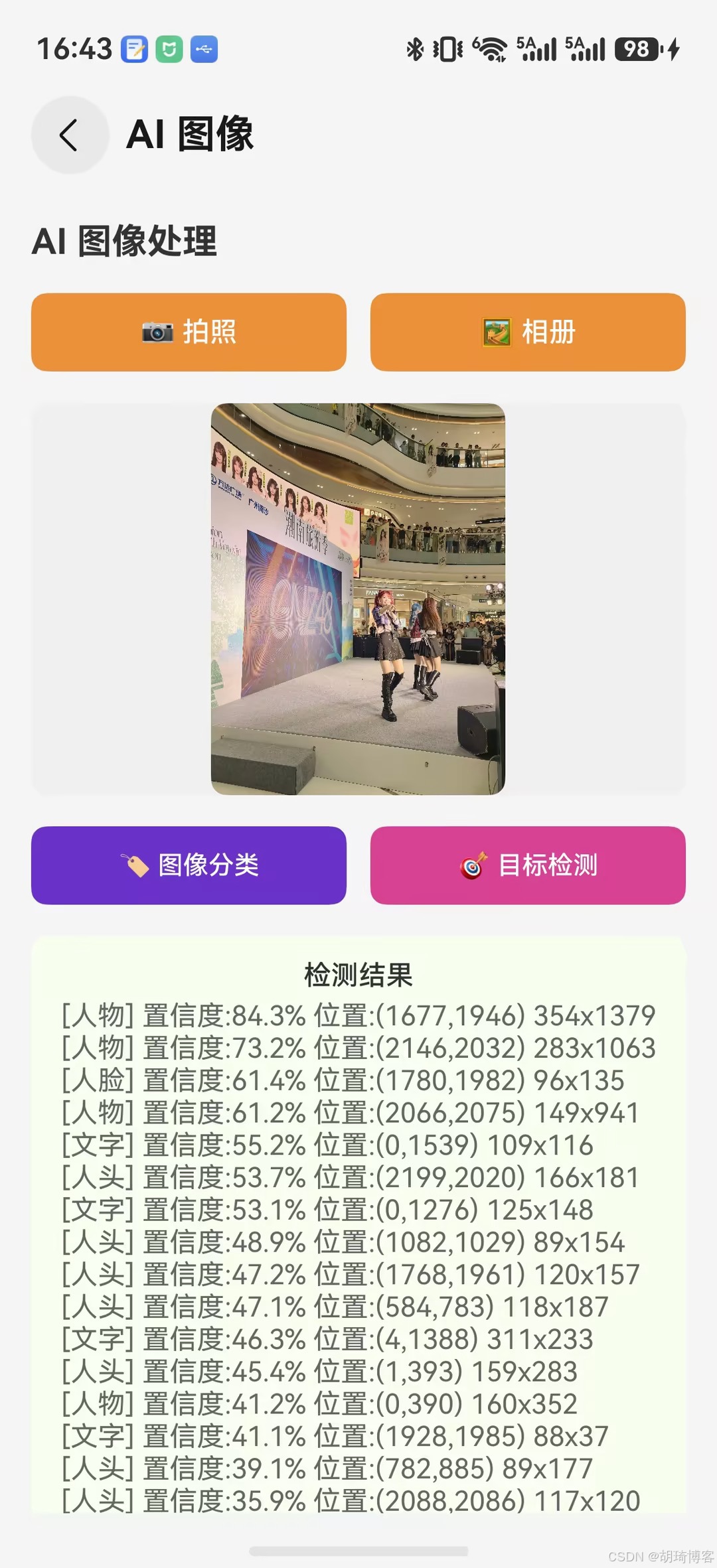
页面支持系统相机和 Photo Picker 两种输入。当前“图像分类”基于 Core Vision Kit 目标检测结果汇总标签,用于给出图片内容概览;真正的 MobileNetV2 分类放在第五篇的模型推理页面。
目标检测由 ObjectDetector.process() 完成,结果以类别、置信度和边界框坐标文本展示。当前示例没有 YOLO 自定义模型、检测框覆盖层、超分辨率处理或图像处理历史,因此删除对应的完成性描述。处理期间页面使用 LoadingProgress 显示加载状态。
关键代码解读
MindSpore Lite 推理流程
// 1. 加载模型
const model = mindsporeLite.createModel();
await model.loadFromFile(modelPath);

// 2. 配置
const config = mindsporeLite.createModelConfig();
config.deviceType = mindsporeLite.DeviceType.DT_CPU;  // CPU/GPU/NPU
config.numThreads = 4;

// 3. 构建计算图
await model.build(config);

// 4. 输入数据
const inputs = model.createInputTensor();
inputs[0].setData(float32Array);  // 必须是 Float32Array

// 5. 推理
const outputs = model.createOutputTensor();
await model.predict(inputs, outputs);

// 6. 解析结果
const result = new Float32Array(outputs[0].getData());

// 7. 释放
model.release();
关键点:
- 模型格式:推荐 MindIR(
.mindir),体积小加载快 - 输入形状:数据 shape 必须与模型定义一致
- 数据预处理:归一化到
[0, 1],通道顺序要匹配训练时 - 首次延迟:首次推理需编译计算图,建议预热
Core Vision Kit 超分辨率
const imageSource = image.createImageSource(pixelMap);
const enhanced = await visionCore.superResolution(imageSource, { scale: 2 });
const resultPixelMap = await enhanced.createPixelMap();
- 仅 API 26 可用,需做版本判断
scale支持 2x 和 4x- 处理耗时与图片尺寸成正比
总结
本文实现了智能工具箱的 AI 图像处理工具,主要完成了:
- ImageProcessService 服务层:封装图像分类、分割、超分辨率能力
- 图像处理主页面:选图、分类、分割、超分一站式操作
- 分类结果展示:Top-K 结果可视化,置信度条展示
- 图片预处理流水线:resize、归一化、通道转换
下篇预告
下一篇: HarmonyOS 智能工具箱(五):端侧模型推理实战
将深入 MindSpore Lite 的高级用法,包括自定义模型加载、GPU/NPU 加速、多模型串联推理。
参考资料

讨论HarmonyOS开发技术,专注于API与组件、DevEco Studio、测试、元服务和应用上架分发等。
更多推荐



 7
7 0
0- 0


 已为社区贡献39条内容

所有评论(0)